Engaging employees in cybersecurity: an MSP guide
Engaging employees in cybersecurity starts with behavior, reporting paths, role-aware training, and client-ready proof.
DefendWise
DefendWise
TL;DR
Engaging employees in cybersecurity is not about making training louder, funnier, or harder to ignore for a week. It is about getting employees to take the safer action when a risky moment appears: report the suspicious email, verify the payment request, deny the unexpected MFA prompt, use the approved file-sharing path, or ask for help before guessing.
For MSPs, that means engagement has to become a client delivery workflow. The MSP needs role-aware topics, clear reporting paths, manager follow-up, tenant-specific evidence, and reporting that a client can understand without reading a raw export. If the program only tracks completion, the MSP can prove a module was watched, but not that the client is getting better at handling human risk.
What is employee cybersecurity engagement?
Employee cybersecurity engagement is the visible participation of employees in safer security behavior. It includes training completion, but it is broader than completion.
An engaged employee knows what to do when they face a risky request. They report suspicious messages. They verify sensitive actions through known channels. They understand why MFA prompts, password handling, payment changes, file links, customer data, and AI tools matter to their job. They also believe security is something they are allowed to ask about, not a trap waiting for them to fail.
That distinction matters for MSPs because most clients do not buy security awareness training to win a learning-management contest. They buy it because they need fewer preventable mistakes, cleaner reporting, and stronger evidence for leadership, insurance, and compliance conversations.
NIST's updated SP 800-50 Rev. 1 frames cybersecurity and privacy learning as a life cycle program that should encourage behavior change, support risk management, and help build a security culture. That is a better target than “everyone watched the video.”
CIS Control 14 says the same thing in operational language: establish and maintain a program to influence workforce behavior and reduce cyber risk to the enterprise. The word “influence” is doing real work. The point is not only awareness. The point is behavior.
Why this matters for MSPs
MSPs inherit the messy part of employee cybersecurity.
A vendor can sell a content library. A client can approve a policy. But when an employee clicks, ignores, reports, asks, delays, or verifies, the MSP often has to respond. That response may involve the helpdesk, Microsoft 365, endpoint tools, the client's manager, the client owner, the cyber insurer, or an auditor asking for evidence months later.
CISA's Cybersecurity Awareness Program describes cybersecurity as a shared responsibility and focuses on simple steps people can take to be safer online. For MSP clients, “shared responsibility” has to be turned into clear operating rules:
- What should a user report?
- Where should they report it?
- Who triages the report?
- What does the MSP do next?
- How does the client know the work happened?
- Which roles need deeper training than the baseline?
Without those answers, engagement becomes a vague culture word. With those answers, it becomes a service the MSP can run, review, and prove.
What employees actually engage with
Employees engage with training when it helps them make a decision they recognize.
They do not need a lecture on every attack type. They need practical rules for the moments that create risk:
| Employee moment | What training should teach | What the MSP should prove |
|---|---|---|
| Unexpected Microsoft 365 sign-in link | Go to the known app or browser path, not the email link | Credential-phishing topic assigned and completed |
| Vendor asks to change bank details | Verify through a known contact and require approval | Finance-role training and policy acknowledgement |
| MFA prompt appears without a login attempt | Deny, report, and call the helpdesk or MSP | MFA topic coverage and high-risk follow-up |
| Shared document arrives unexpectedly | Verify context before opening or entering credentials | Reported-message path and coaching record |
| AI voice or executive request pressures action | Pause, use out-of-band verification, and follow payment/access rules | Leadership and finance coverage |
| User makes a mistake | Report quickly without hiding it | Response workflow, containment notes, and follow-up training |
This is why short, contextual training usually beats broad annual content. NIST researcher Julie Haney and Wayne Lutters argue in their article on moving beyond check-the-box compliance that awareness training should move people toward ownership, empowerment, and real behavior, not only exposure to security concepts.
That does not mean every lesson needs to be entertaining. It means every lesson needs a job.
Step-by-step: how MSPs can engage employees in cybersecurity
1. Start with the risky client workflows
Do not start with a topic library. Start with the client workflows where humans can create material risk.
For many MSP clients, that list includes Microsoft 365 sign-ins, supplier payments, payroll changes, file sharing, customer data handling, MFA prompts, AI tool use, remote work, and support requests. For some clients, it also includes healthcare records, legal files, manufacturing operations, executive travel, or regulated data.
The MSP should map each workflow to one safer behavior. “Recognize phishing” is too broad. “Do not enter Microsoft 365 credentials from an unexpected email link” is usable.
2. Make the reporting path impossible to miss
Engagement fails when users do not know what to do next.
CISA's small-business guidance on teaching employees to avoid phishing tells businesses to equip staff to recognize and report phishing and to verify suspicious requests using known contact methods. For MSPs, that instruction needs a named path: Outlook report button, phishing mailbox, helpdesk ticket, Teams channel, phone call, or client-specific process.
The path should be repeated in onboarding, training, reminders, and reports. A user should not have to search the intranet while deciding whether a message is dangerous.
3. Split baseline training from role-specific training
Everyone needs the baseline. Not everyone needs the same depth.
Finance users need invoice, payment, vendor, payroll, and bank-detail scenarios. Executives need whaling, AI voice, travel, and urgent approval scenarios. Helpdesk users need password reset, MFA, identity verification, and impersonation scenarios. HR needs identity data, payroll, documents, and benefits scenarios. Admins need privileged access, app consent, and recovery workflow training.
This is where MSPs can make training feel less generic. The employee sees a situation close to their job, and the client sees that the MSP understands their risk rather than sending the same module to everyone.
4. Use managers as the follow-up layer
Employees often take security cues from their manager, not from the security team.
If the manager treats training as a nuisance, the team will too. If the manager knows which users are overdue, which workflow matters this month, and what behavior the business is trying to improve, the training has a better chance of sticking.
The MSP does not need every manager to become a security expert. It needs managers to do 3 simple things: make time for training, reinforce the reporting path, and support fast reporting when someone makes a mistake.
5. Measure more than completion
Completion is necessary, but it is a weak engagement metric by itself.
A better MSP scorecard includes:
- users in scope;
- users assigned;
- completion and overdue status;
- role-specific coverage;
- report rate;
- time to report;
- repeat risky actions;
- users needing coaching;
- manager follow-up;
- exceptions and exclusions;
- topics covered this quarter;
- evidence available for QBR, audit, or insurance.
SANS' 2025 Security Awareness Report positions awareness as a long-term culture and behavior program, not a one-off task. It also highlights social engineering and AI-amplified threats as human-side risks that technology alone does not solve. MSP reporting should reflect that reality.
6. Keep the program current without chasing every headline
Training gets ignored when it repeats old examples that no longer match the employee's inbox. But training also gets noisy when every news item becomes a panic module.
Use a simple refresh rule:
- baseline topics for all users;
- role-specific topics for risky roles;
- event-driven refreshers after incidents, insurance requests, audit findings, or new client workflows;
- timely modules for genuine changes such as QR phishing, AI voice scams, MFA fatigue, new payment-fraud tactics, or unsafe AI tool use.
ENISA's awareness and cyber hygiene work makes the same connection between awareness, cyber hygiene, and behavior change. The MSP version is practical: help users recognize the risks they are likely to face this quarter, then keep evidence that the client can use.
7. Turn engagement into client-ready proof
The client should not need to interpret raw training exports.
A useful MSP report shows:
- which client and tenant the report covers;
- date range;
- topics assigned;
- user coverage;
- completion and overdue users;
- role-specific coverage;
- reports submitted;
- coaching delivered;
- repeat-risk signals;
- exceptions;
- next action.
This is where cybersecurity engagement becomes commercially useful. The MSP can bring the report to a QBR, insurance renewal, leadership check-in, or compliance evidence pack and show what changed.
What good employee cybersecurity engagement looks like
Good engagement is visible in small habits.
Users report suspicious emails before clicking. Finance verifies payment changes without feeling awkward. Managers know who is overdue. New users receive training during onboarding, not months later. Executives accept that they need separate training because their accounts and authority are high-value targets. Helpdesk users know how to verify identity before resetting access.
The MSP can see the same habits in the data:
| Signal | Weak version | Better version |
|---|---|---|
| Completion | 92% completed annual module | 92% completed baseline, finance and leadership modules assigned separately |
| Reporting | “Tell IT if suspicious” | Named report path, report count, triage outcome, coaching record |
| Role depth | Same module for all users | Finance, HR, executives, helpdesk, and admins get relevant scenarios |
| Evidence | Raw CSV export | Client-ready report with scope, topics, status, exceptions, and next steps |
| Follow-up | Overdue list ignored | Manager follow-up and MSP-owned exceptions |
| Refresh | Annual replay | Quarterly refresh plus incident-driven topics |
This also helps the MSP avoid a common trap: using engagement as a vanity metric. A high completion rate is good. But if employees still do not report suspicious messages, still approve payment changes by email, or still hide mistakes, the program is not engaging the behavior that matters.
Mistakes to avoid
Mistake 1: making training feel like punishment
Gotcha simulations can get attention, but they can also teach users to distrust the security team. Cruel lures around layoffs, medical issues, personal emergencies, or family crises may produce clicks, but they damage the reporting culture an MSP needs.
The better test is simple: would the user feel safe reporting a mistake after this exercise? If not, rewrite it.
Mistake 2: treating every employee the same
Generic training is easier to schedule, but it rarely matches job risk. A receptionist, CFO, executive assistant, field technician, HR manager, and domain admin face different decisions.
Keep the baseline shared. Make the risky scenarios role-aware.
Mistake 3: overfocusing on phishing
Phishing matters. It is also not the whole human-risk program.
Employees also need guidance for MFA prompts, AI tool use, data sharing, customer information, passwords, device updates, file transfers, phone verification, payment workflows, and reporting mistakes. If every month is another phishing lure, employees tune out.
Mistake 4: measuring only the annual deadline
A deadline proves the training was assigned. It does not prove users know what to do in the next risky moment.
Keep completion. Add behavior and reporting measures around it.
Mistake 5: hiding the results from clients
If the MSP does good work but the client never sees it, the service becomes invisible.
Clients need a readable report. Not a dashboard they never open. Not a 40-column export. A readable report that says who was covered, what happened, what needs attention, and what the MSP recommends next.
Framework mapping for MSP client evidence
Engagement work can support compliance and insurance conversations, but it should not be oversold as a guarantee.
Use framework language carefully:
| Framework or source | Relevant idea | How MSPs can use it |
|---|---|---|
| NIST SP 800-50 Rev. 1 | Cybersecurity and privacy learning should use a life cycle approach, encourage behavior change, and include metrics and evaluation | Build a recurring client program with onboarding, refreshers, role depth, reporting, and improvement |
| CIS Control 14 | Security awareness should influence behavior and reduce risk | Map training topics to user behavior, not only module titles |
| CISA Cybersecurity Awareness Program | Cybersecurity is a shared responsibility and people need simple steps to be safer online | Keep user actions plain and repeatable |
| CISA small-business phishing guidance | Employees should recognize, avoid, report, and verify suspicious requests | Tie training to the client's reporting and verification workflow |
| ENISA awareness and cyber hygiene | Awareness work should promote cyber hygiene and behavior change | Treat client education as ongoing hygiene, not campaign theatre |
For audits or insurance renewals, the MSP should show scope, cadence, completion, role coverage, report paths, exceptions, and follow-up. Avoid claiming that training “makes the client compliant” or “prevents breaches.” It supports the evidence story. It does not replace technical controls, policies, incident response, identity security, or client governance.
How a flat-rate MSP SAT platform helps
Employee engagement is harder when every added learner changes the vendor bill.
If the MSP pays per seat, it may be tempted to cover only users in the higher package, delay onboarding new users, exclude low-margin clients, or keep training as an add-on instead of a standard service. That creates the wrong engagement pattern: the MSP talks about human risk, then rations coverage.
A flat-rate, multi-tenant SAT platform changes the operating model. DefendWise is built for MSPs that want to cover every relevant user under their own brand, manage clients from one console, automate onboarding and reporting, and avoid per-seat margin anxiety.
The practical win is not only price. It is coverage without the constant seat-count argument.
Frequently asked questions
What does engaging employees in cybersecurity mean?
It means employees participate in safer behavior, not only training completion. They know how to report suspicious messages, verify sensitive requests, handle MFA prompts, protect data, and ask for help before a mistake becomes an incident.
How can MSPs make cybersecurity training more engaging?
Make it specific to the client's work. Use short modules, role-aware scenarios, a clear reporting path, manager follow-up, and client-ready reporting. Avoid generic annual content that never connects to the user's actual decisions.
What are the best topics for employee cybersecurity engagement?
Start with phishing, MFA, password managers, payment verification, file sharing, device updates, customer data, AI tool use, reporting mistakes, and role-specific risks for finance, HR, executives, helpdesk, and admins.
How should MSPs measure employee cybersecurity engagement?
Measure coverage, completion, overdue users, role coverage, reporting rate, time to report, repeat risky actions, coaching delivered, manager follow-up, and evidence readiness. Completion alone is too thin.
How often should clients run cybersecurity awareness training?
Use onboarding for new users, recurring baseline training, role-specific refreshers, and timely updates when client workflows, threats, or incidents change. An annual-only program is easy to schedule but weak for habit-building.
Are phishing simulations good for engagement?
They can be useful when they teach safe behavior and reporting. They are weak when they are designed to embarrass users or when the MSP only measures clicks. Reporting and coaching matter as much as failure rates.
Can employee engagement support cyber insurance or compliance evidence?
Yes, if the MSP can show scope, cadence, completion, role coverage, reports, exceptions, and follow-up. Do not position training as a compliance guarantee. Treat it as one evidence layer inside a broader security program.
Where does DefendWise fit?
DefendWise gives MSPs a flat-fee, white-label, multi-tenant way to deliver security awareness training with automated onboarding and client-ready reporting. That makes it easier to train every relevant user instead of only the seats that fit a per-user budget.
Header image brief for Picasso
- Source TL;DR: Engaging employees in cybersecurity means changing small risky behaviors, not making annual training louder. MSPs need a repeatable workflow: role-aware topics, clear reporting paths, manager follow-up, tenant-specific evidence, and readable client reports.
- Primary pillar: zero admin
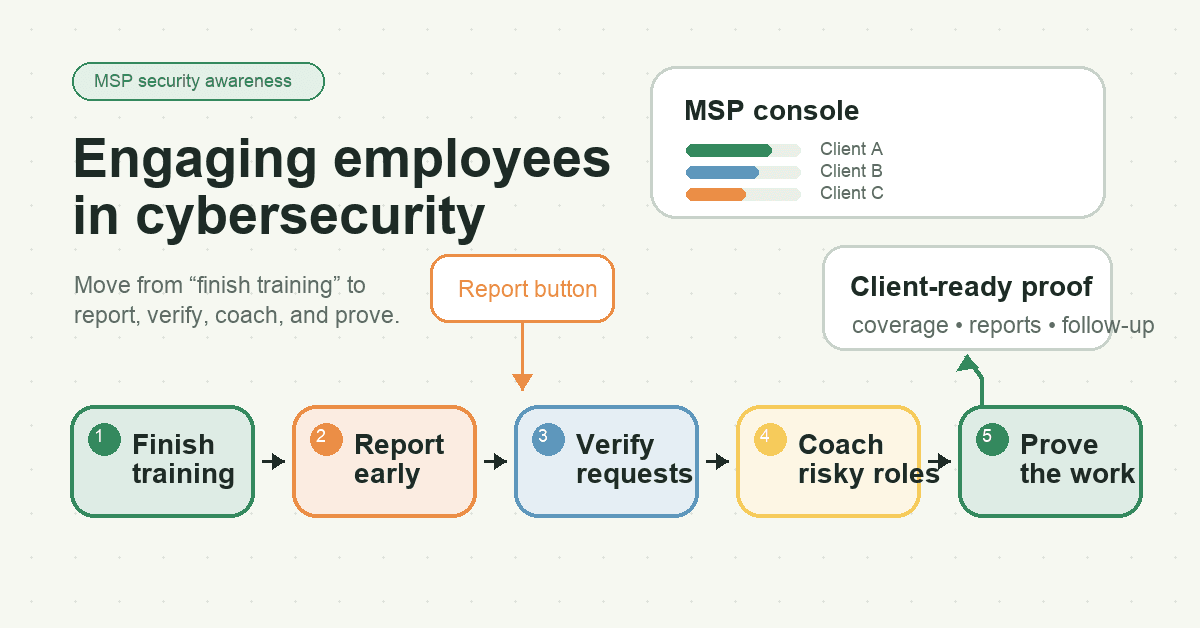
- Infographic thesis: Employee cybersecurity engagement becomes valuable when it moves from “finish training” to “report, verify, coach, and prove.”
- Suggested layout: flow
- Short on-image text candidates: Finish training; Report early; Verify requests; Coach risky roles; Prove the work
- Key objects: MSP console, client tenant cards, report button, finance approval checklist, manager follow-up card, client-ready report
- Avoid: hoodies, padlocks, fake breach numbers, shame/gotcha visuals, vendor logos, compliance badges, unreadable dashboard text
- Crop needs: 1200x628 blog/OG, plus social-safe 1200x627
Sources
- NIST SP 800-50 Rev. 1: Building a Cybersecurity and Privacy Learning Program
- Security Awareness Training for the Workforce: Moving Beyond Check-the-Box Compliance
- CISA Cybersecurity Awareness Program
- CISA: Teach Employees to Avoid Phishing
- CIS Control 14: Security Awareness and Skills Training
- ENISA: Awareness and Cyber Hygiene
- SANS 2025 Security Awareness Report
- Hoxhunt: How to improve engagement in security awareness training