What Employees Should Know About Phishing: MSP Guide
What employees should know about phishing: how to pause, verify risky requests, report quickly, and respond safely after a mistake.
DefendWise
DefendWise
TL;DR
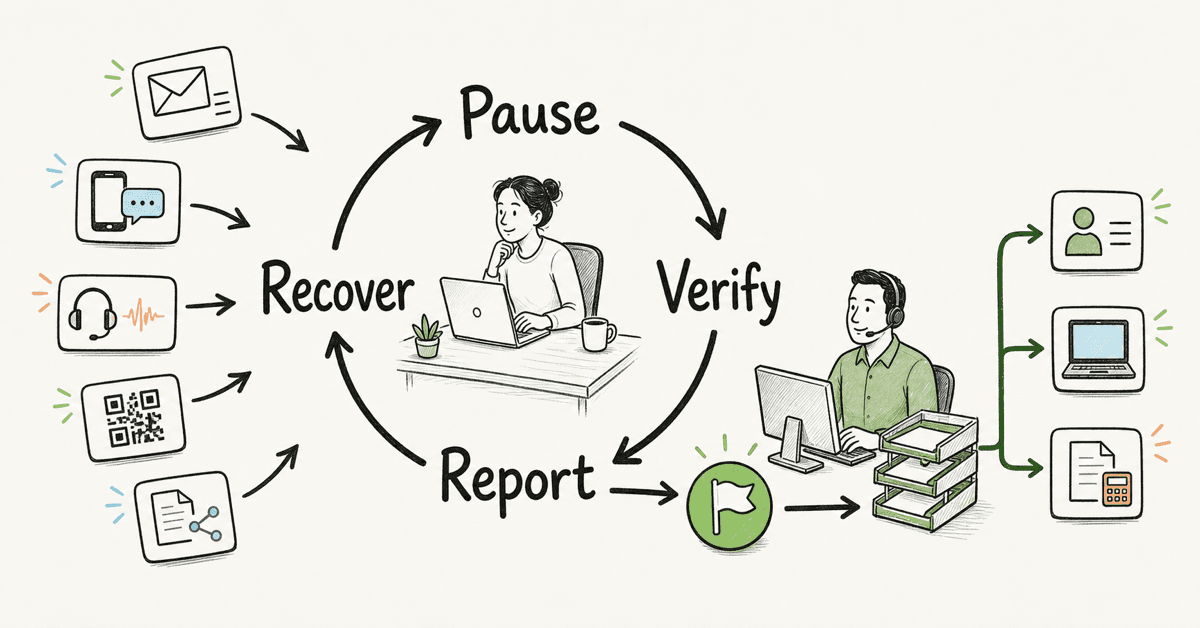
What employees should know about phishing can be reduced to 4 actions: pause, verify, report, and recover. Phishing is not limited to badly written email. It can arrive through text messages, QR codes, phone calls, shared documents, social media, collaboration tools, and compromised accounts that look familiar. Employees should verify risky requests through a known channel, never share passwords or MFA codes, and report mistakes quickly without hiding them. MSPs should give every client a simple reporting route and a response process that does not depend on users spotting every attack.
What employees should know about phishing
Phishing is a social engineering attack that tries to make a person reveal information, open harmful content, grant access, or take an unsafe business action. The message often borrows trust from a bank, supplier, executive, colleague, delivery company, cloud service, or IT provider.
The channel is less important than the request. A phishing attempt may ask an employee to:
- sign in through a link;
- open an attachment or shared file;
- scan a QR code;
- approve an MFA prompt;
- share a password, one-time code, or recovery code;
- change supplier bank details;
- buy gift cards or make an urgent payment;
- send payroll, tax, customer, or employee data;
- install software or allow remote access;
- bypass an approval process because the request is "confidential."
CISA's guidance for small and medium-sized businesses tells staff to watch for unexpected requests, urgent language, and suspicious links. It also recommends verifying through a known contact method rather than replying or using contact details inside the message.
That is the core employee lesson. Do not try to become a threat analyst at the inbox. Recognize when a request creates risk, slow it down, and move the decision into a trusted process.
The 4-step employee phishing rule
1. Pause
Urgency is a pressure tool. A message may say an account will close, a payment is late, a delivery failed, the CEO needs help, or IT needs an MFA code immediately.
Pausing does not mean ignoring real work. It means refusing to let the message choose the speed of the decision. Microsoft advises users to slow down when a message demands immediate action and to examine new senders, domains, links, and attachments in its phishing guidance.
2. Verify
Verify through a path you already trust. Open the supplier record in the accounting system. Call the vendor on a saved number. Start a new message to the executive. Open Microsoft 365 from a bookmark or known app instead of the link in the email.
Do not verify by replying to the suspicious message. Do not call the number in it. Do not scan its QR code to see where it goes. The attacker controls those paths.
3. Report
Use the client's approved report button, mailbox, helpdesk ticket, phone number, or other defined route. A report should include whether the employee only saw the message, clicked, opened a file, scanned a code, entered credentials, approved MFA, replied, or sent data.
CISA says employees should know to whom and how to report suspicious messages. Its Four Cybersecurity Essentials for Businesses also places employee training beside strong passwords, MFA, and software updates. Reporting belongs inside a wider control system.
4. Recover
If nothing was clicked or shared, reporting may be enough. If the employee entered credentials, approved MFA, opened an attachment, sent data, or changed a payment, the response team needs to act quickly.
The employee's job is to say exactly what happened. The MSP's job is to assess identity, endpoint, mailbox, finance, and client impact. Fast facts are more useful than quiet embarrassment.
10 things every employee should know about phishing
1. Phishing is not only email
Attackers use SMS, voice calls, QR codes, social media, chat, shared documents, and collaboration tools. A fake Microsoft 365 login can arrive through a Teams message. A supplier fraud can begin with a phone call. A QR code on an invoice can move the employee to a fake site on a phone.
The safe rule works across channels: if the request changes money, access, data, or process, verify it outside the channel that delivered it.
2. A familiar sender can still be unsafe
The sender's account may be compromised. A display name may be copied. A lookalike domain may replace one letter. A real email thread may be reused after an attacker gains mailbox access.
Do not treat familiarity as proof. Verify the business request, especially when it changes payment details, access, payroll, or data handling.
3. Clean writing does not prove a message is real
Bad grammar can be a clue, but it is not a dependable test. Attackers can copy legitimate messages and produce polished text. Training that teaches only spelling mistakes creates false confidence.
Look for the decision the message wants: log in, open, pay, share, approve, install, or bypass. The risky action matters more than the writing quality.
4. Passwords and MFA codes are never support information
An IT provider, bank, cloud service, or colleague should not need an employee's password. One-time codes, recovery codes, and MFA approvals also protect access and should not be shared.
An unexpected MFA prompt can mean someone already has a password. Deny it, report it, and follow the company's identity-response process. Do not keep approving prompts to make them disappear.
5. Message-driven logins deserve caution
A familiar logo and login page can be copied. When a message says an employee must sign in, the safer route is a known app, saved bookmark, password manager entry, or typed address.
The FTC's phishing advice recommends contacting the company through a phone number or website known to be real, not the information in the message. The FTC also places MFA, security updates, and backups alongside user caution.
6. Payments and account changes need a second path
Business email compromise often targets payment transfers, bank-detail changes, invoices, payroll, and sensitive records. The FBI's IC3 BEC guidance describes scams involving compromised business email accounts and unauthorized transfers.
Employees handling money should follow a written verification process. A bank-detail change should require out-of-band confirmation and the client's normal approval. If money has moved, contact the financial institution quickly and follow the incident and reporting process.
7. "Confidential" does not cancel policy
Attackers use authority, urgency, and secrecy to stop employees from checking. A supposed executive may ask an employee not to call because the request involves a deal, legal matter, or surprise.
A good company gives employees permission to slow down risky requests. The verification rule should apply to owners and executives, not only junior staff.
8. Reporting is a success behavior
Deleting a suspicious message may remove it from one inbox while leaving other users exposed. Forwarding it around the company can spread the lure. Reporting through the approved route gives the MSP a chance to inspect it, find related messages, and advise the client.
Employees do not need to be certain. "This feels wrong" is enough to report. The response team can decide what happens next.
9. Mistakes should be reported without delay
A user who clicks and reports in 2 minutes gives the response team a better starting point than a user who waits 2 days. Shame creates delay.
The first response should be calm: what did you click, open, scan, enter, approve, reply with, or send? The related DefendWise phishing-response guide gives MSPs a fuller intake and containment workflow.
10. Training is one layer, not the whole defense
Microsoft notes that sophisticated phishing can be difficult even for trained users and describes technical protections such as spoof intelligence, email authentication, impersonation protection, and campaign analysis in its anti-phishing documentation.
Training should work alongside MFA, email controls, identity monitoring, endpoint protection, finance procedures, backups, and incident response. A user should not be the final security control for every message.
Employee action matrix
| Situation | What the employee should do | What the employee should avoid |
|---|---|---|
| Unexpected login prompt | Open the service through a known app or bookmark; report the message | Using the message link or QR code |
| Supplier bank-detail change | Verify through the saved supplier contact and finance process | Replying to the email or calling its number |
| Unknown attachment | Report it and wait for guidance | Opening it, enabling content, or forwarding it |
| Unrequested MFA prompt | Deny it, report it, and follow the account-response process | Approving it or sharing a code |
| Urgent executive request | Start a new call or message through a known route; follow approval rules | Keeping it secret or bypassing dual approval |
| Suspicious shared document | Verify with the sender through another channel | Signing in from the document prompt |
| Clicked a link | Stop, report, and say what happened | Testing the link again or staying quiet |
| Entered credentials | Report immediately and follow password/session instructions | Reusing the same password elsewhere or waiting |
| Sent money or changed payment | Contact the finance owner and bank quickly; preserve evidence | Continuing the email thread with the sender |
| Only unsure | Report it | Deleting it without reporting |
What to do after a click or reply
The response depends on the action, not the employee's confidence about whether the message was fake.
If the message was only opened
Stop interacting and report it. The response team may preserve the message, review headers, and search for other recipients. Simply reading or previewing a message is different from entering credentials or opening a file.
If a link was clicked
Close the page and report the URL and time. Say whether anything downloaded and whether any data was entered. Do not revisit the site for a screenshot.
If credentials or MFA were shared
Report immediately. The MSP or internal team may reset the password, revoke sessions, review sign-ins, check MFA methods, and inspect mailbox rules or app permissions.
If an attachment was opened
Stop interacting with the file and follow endpoint-response instructions. The team may isolate the device, inspect alerts, preserve the file, and check related activity.
If data or money was sent
Escalate through the client's finance, privacy, legal, or incident process as appropriate. For a BEC transfer, IC3 advises contacting the originating financial institution quickly to request a recall or reversal and filing a detailed complaint.
The employee should not investigate alone. Preserve the message, state the facts, and let the response owner coordinate the next steps.
How MSPs should turn this into a client briefing
A generic article is not the finished employee experience. The MSP should convert it into a short client-specific briefing with real paths and names.
Put the reporting route on the first page
Write the exact instruction: "Use the Outlook Report button," "email security@client.com," "open an urgent ticket," or "call this number after entering credentials." Avoid a vague "tell IT."
Make the same route visible in onboarding, refresher training, simulated exercises, the client portal, and the helpdesk knowledge base.
Define 4 verification rules
Each client should have written rules for:
- payment and bank-detail changes;
- password, MFA, and support requests;
- access or data-release requests;
- urgent executive instructions.
Training should point back to those rules. The lesson is stronger when the business process supports it.
Use examples from the client's work
General staff may need shared-document and login examples. Finance may need bank changes and invoices. HR may need payroll and identity-data requests. Executives may need impersonation, travel, and urgent approval scenarios. Service desk staff may need fake support calls and MFA resets.
The phishing email examples for training guide provides scenario patterns MSPs can adapt safely. Do not use live links, customer data, personal hardship, or humiliating lures.
Practise reporting, not only spotting
A simulation can measure whether employees clicked, but reporting behavior is equally useful. Did the employee use the right route? Did the report contain enough context? Did the MSP triage it? Did the client receive a useful summary?
NIST SP 800-50 Rev. 1 describes a lifecycle approach to cybersecurity and privacy learning, with assessment and improvement as needs evolve. That supports recurring practice rather than a one-time annual slide deck.
Keep the response no-blame
Employees should be accountable for following reasonable processes. They should also know that fast reporting is valued. Public shaming and trick-heavy exercises teach people to hide errors.
Coach the risky moment. Fix the process when it invited the mistake. Record the follow-up without turning one click into a verdict about the person.
Report client-specific evidence
Keep scope, assignments, completion, report behavior, follow-up actions, and open exceptions separated by client. An MSP can use multi-tenant management and automated reporting to keep delivery and evidence organized, but a person still needs to interpret the result.
Do not claim that completion proves compliance or that training prevented an incident.
What good looks like
A useful employee phishing program has:
- one reporting route employees can repeat from memory;
- a known verification process for payments, access, data, and executive requests;
- a clear rule that passwords and MFA codes are never shared;
- examples across email, SMS, voice, QR codes, and collaboration tools;
- role-specific practice for finance, HR, leadership, and service desk teams;
- a calm response checklist for clicks and disclosures;
- technical protections that reduce dependence on perfect user judgment;
- client-specific evidence with an owner and next action;
- regular review when real messages, tools, or business processes change.
CIS Control 14 calls for an established and maintained program intended to influence workforce behavior and reduce risk. NIST CSF 2.0 places awareness inside a wider risk-management system. Those sources support the same practical boundary: employee learning matters, but it should connect to governance and technical controls.
Mistakes to avoid
Teaching a list of visual clues as if it were a guarantee
Sender names, logos, spelling, and link previews can help. They can also be copied or hidden. Teach the risky business action and the verification route.
Giving employees nowhere obvious to report
A report button with no triage owner is not a reporting process. Define who receives reports, how urgent disclosures are escalated, and how users receive feedback.
Making the exercise a gotcha
The goal is safer behavior, not a clever trap. Avoid scenarios based on layoffs, medical emergencies, personal tragedy, or other themes that can damage trust.
Measuring only completion or clicks
Completion shows exposure to training. Clicks show one action in one scenario. Add reporting, response speed, role coverage, repeat behavior, exceptions, and follow-up actions.
Promising that training stops phishing
Training can improve recognition and response. It cannot replace identity controls, email security, endpoint protection, finance procedures, or incident response. CISA's joint phishing guidance is written for network defenders and software manufacturers as well as SMBs because the problem needs layered controls.
How a flat-fee MSP SAT platform helps
DefendWise is built for MSPs with $399/month flat pricing, unlimited users and client organizations, white-label multi-tenant delivery, AI-generated training content, Microsoft 365 sync, automated onboarding, and automated reporting. Those are confirmed public claims in the current DefendWise claim register.
That model can help an MSP give every relevant user the same baseline briefing, add role-specific follow-up, and keep client evidence separate without turning each new learner into another platform fee. The MSP still owns the client's verification rules, reporting route, response process, and interpretation.
Start a Free 7-Day Trial with synthetic users and test the client workflow before enrolling a real workforce.
Frequently asked questions
What should employees know about phishing?
Employees should know that phishing can arrive through email, text, phone, QR codes, social media, and collaboration tools. The safest routine is to pause, verify risky requests through a known channel, report suspicious messages, and say quickly if they clicked or shared information.
What are the main warning signs?
Unexpected urgency, a request to bypass normal process, an unfamiliar or lookalike sender, a message-driven login, a payment change, unusual secrecy, and requests for passwords or MFA codes all deserve scrutiny. No single sign proves the message is malicious.
How should an employee verify a request?
Use a contact method or system already known to be genuine. Start a new call, message, or app session. Do not use the suspicious message's reply path, phone number, link, QR code, or attachment.
What should an employee do after clicking a phishing link?
Stop interacting, report the message, and state whether anything downloaded or whether any information was entered. The response team can decide whether identity, endpoint, mailbox, or tenant checks are needed.
Should employees delete phishing emails immediately?
Report first unless company policy says otherwise. The original message can help the response team inspect headers, links, attachments, and related recipients.
Can a phishing email have perfect grammar?
Yes. Attackers can copy real messages, use compromised accounts, and produce polished text. Grammar is only one clue, so training should focus on risky requests, verification, and reporting.
Can awareness training stop every phishing attempt?
No. Training should work with MFA, email protection, identity controls, endpoint security, finance procedures, and incident response. The employee should not be the only control.
Sources
- CISA: Teach Employees to Avoid Phishing
- CISA: Four Cybersecurity Essentials for Businesses
- CISA, NSA, FBI, and MS-ISAC: Phishing Guidance, Stopping the Attack Cycle at Phase One
- FTC: How To Recognize and Avoid Phishing Scams
- NIST SP 800-50 Rev. 1: Building a Cybersecurity and Privacy Learning Program
- NIST Cybersecurity Framework 2.0
- CIS Control 14: Security Awareness and Skills Training
- FBI IC3: Business Email Compromise
- Microsoft: Protect yourself from phishing
- Microsoft Defender for Office 365: Anti-phishing protection