Phishing email examples for training: an MSP guide
Phishing email examples for training MSP clients, with safer scenarios, reporting paths, and client-ready evidence.
DefendWise
DefendWise
TL;DR
Phishing email examples for training should teach employees what to do next, not only what a bad email looks like. For MSPs, the useful examples are the ones that map to real client workflows: Microsoft 365 sign-ins, invoices, file shares, payroll changes, QR codes, MFA prompts, shipping notices, and executive requests.
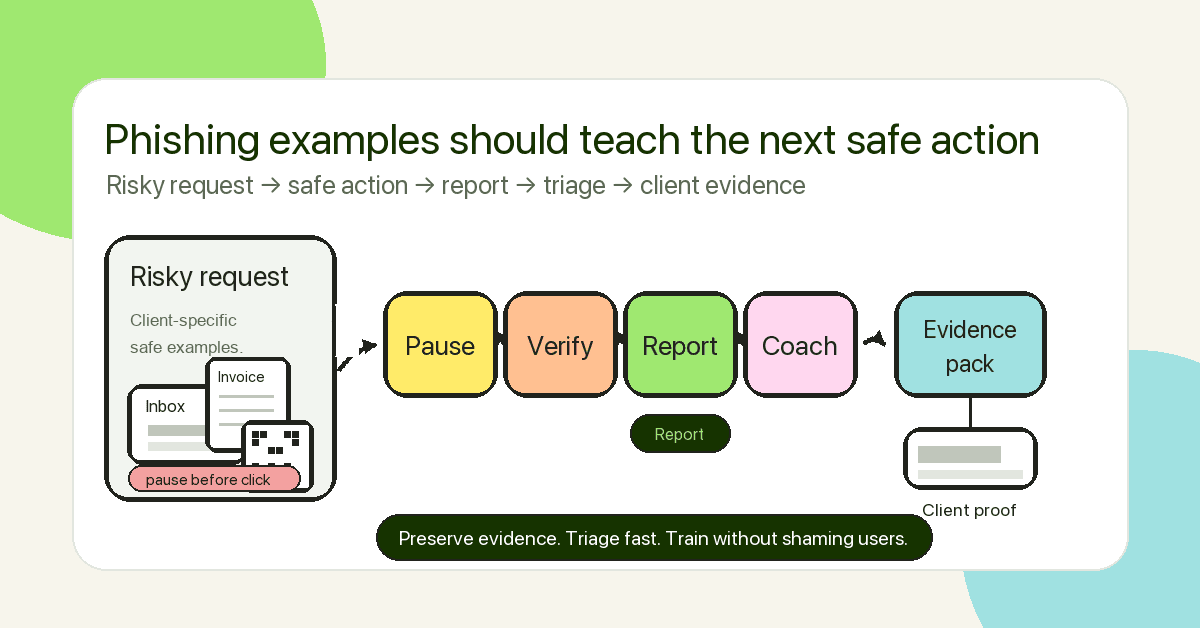
The goal is not to embarrass users with clever gotcha templates. The goal is to build a repeatable client workflow: pause, verify, report, contain, coach, and keep evidence. A good MSP training pack includes safe example emails, the red flags to notice, the approved reporting path, and a client-ready summary that proves the work happened.
What are phishing email examples for training?
Phishing email examples for training are safe, controlled examples that show employees how real phishing attempts try to get a person to click, open, enter credentials, approve a payment, share a code, or bypass a normal process.
That definition matters because phishing is not only about suspicious links. CISA, NSA, FBI, and MS-ISAC describe phishing as social engineering that lures people into visiting malicious sites, giving away credentials, opening harmful links or attachments, or taking actions that compromise systems and networks. Their joint phishing guidance also separates credential phishing from malware-based phishing because the outcomes and controls are different.
For an MSP, the examples need to train behavior across many client environments. One client may worry most about invoice fraud. Another may have constant Microsoft 365 sign-in prompts. Another may have field staff scanning QR codes from phones. Another may have executives approving supplier payments while travelling.
So the useful question is not, “Can we show 20 fake phishing emails?”
The useful question is, “Which risky client actions do we need users to handle safely?”
Why this matters for MSPs
MSPs sit downstream of the click.
When a user reports a suspicious message quickly, the MSP can inspect the message, check whether other users received it, look for similar sender patterns, review sign-in logs, and warn the client. When a user hides the mistake, the MSP may discover it later through a mailbox rule, an odd login, a fake invoice, a password reset, or a client call that starts with, “Something feels wrong.”
Public guidance is clear on the basics. CISA tells businesses to train employees to recognize and report phishing, verify unexpected requests using known contact methods, and build a regular reporting culture. The FTC’s consumer guidance lists common phishing storylines: suspicious logins, account problems, fake invoices, payment updates, government refunds, coupons, and links that install malware. Google warns users not to enter passwords from suspicious links and to go directly to the real site instead. Microsoft provides built-in Outlook reporting options and admin review paths for reported messages in Microsoft Defender for Office 365.
The MSP layer is more operational.
A phishing example is not useful until the MSP can answer:
- What user behavior are we training?
- What should the user do instead?
- Where does the report go?
- What will the MSP do with the report?
- What evidence can the client see afterward?
- Which roles need deeper examples?
- Which client processes need changing because training alone will not fix the risk?
That is why examples should be organized by risky action, not by novelty.
The 10 phishing email examples MSPs should train first
Use these as scenario patterns. Do not copy live malicious emails into training without cleaning them. Remove real links, tracking pixels, customer names, attachments, personal data, and anything that could harm users.
| Example | Risky action being trained | Safer user action | MSP evidence to keep |
|---|---|---|---|
| Microsoft 365 password expiry | Entering credentials from an email link | Go directly to the known Microsoft sign-in page or app launcher | Assignment, completion, report count, sign-in rule reminder |
| Shared document link | Opening unknown links or entering credentials to view a file | Verify with the sender through a known channel; report if unexpected | Reported-message record and coaching notes |
| Fake invoice | Opening attachment or approving payment | Confirm invoice through the finance process, not the email thread | Finance role training and exception notes |
| Vendor bank-detail change | Changing payment details from email alone | Call the vendor on a known number and require second approval | Payment-verification policy acknowledgement |
| QR-code login | Scanning a code that moves the phish to mobile | Treat QR codes as links; navigate to known app manually | Mobile/QR topic coverage |
| MFA approval request | Approving a login the user did not start | Deny, report, and call IT or the MSP | MFA coaching and high-risk-role follow-up |
| Helpdesk code request | Sharing a one-time code or recovery detail | Never share codes; use approved helpdesk channel | Helpdesk-role training record |
| Payroll change | Sending tax, bank, or payroll data by reply | Use HR/payroll workflow and out-of-band verification | HR/finance training coverage |
| Executive urgent request | Bypassing process because of authority pressure | Verify outside the thread and require dual control | Executive/finance scenario completion |
| Delivery or voicemail notice | Opening a file or sign-in link from an unexpected notice | Check the service directly; report unexpected attachments | Report path evidence and coaching results |
The table is the starting point. The training value comes from explaining the decision point in each example.
Example 1: Microsoft 365 password expiry
Scenario: A user receives an email saying their Microsoft 365 password expires today. The message includes a “keep current password” or “verify account” button.
Why it works: It looks routine. Many client users have been trained to expect Microsoft 365 prompts, password changes, Teams links, OneDrive links, SharePoint files, and MFA interruptions. CISA’s joint phishing guidance warns that attackers commonly impersonate trusted organizations, supervisors, colleagues, or IT staff to collect credentials.
What to teach: Do not sign in from an unexpected email. Use a bookmark, password manager, known app launcher, or typed URL. Never enter a password or one-time code into a page reached from an unexpected message.
What the MSP should do: Pair the example with the client’s real sign-in guidance. If the MSP supports Microsoft 365, include the client’s approved reporting path and make sure users know the difference between a legitimate app sign-in and a message-driven login.
Example 2: shared document link
Scenario: A user receives a message that says, “A document has been shared with you,” with a button to open a file. The sender name looks familiar, but the message was unexpected.
Why it works: File-sharing lures borrow trust from normal work. A busy user may see “invoice,” “proposal,” “contract,” “scan,” or “updated policy” and click before thinking.
What to teach: Unexpected file links need context. If the sender is known, verify through a separate channel. If the message is unexpected, report it before deleting. If the page asks for credentials, stop and go to the file-sharing app directly.
What the MSP should do: Track whether users report the example. A reported shared-document lure is a success signal. It shows the reporting path is working.
Example 3: fake invoice or overdue payment
Scenario: A message claims an invoice is overdue and includes a PDF, HTML attachment, or payment link.
Why it works: The request feels like normal business pressure. Accounts payable teams handle invoices all day. Attackers exploit the fact that “please process this” feels more normal than “please send me your password.”
What to teach: Finance users should not treat email as the system of record. Invoice changes, overdue notices, and payment requests should be checked against the accounting system or vendor record.
What the MSP should do: Do not make this only a training topic. If a client has no payment verification process, training alone is too weak. The better recommendation is dual approval, known-contact verification, and a clear exception path.
Example 4: vendor bank-detail change
Scenario: A supplier appears to email new bank details and asks the client to update payment information before the next invoice.
Why it works: It attacks process, not malware filters. The message can be plain text, link-free, and polite. That makes it harder for users to think of it as “phishing.”
What to teach: Any change to bank details needs out-of-band verification using a known phone number or existing vendor contact record. Do not use the phone number or email address inside the message.
What the MSP should do: Train finance and leadership separately. The general workforce needs awareness. Finance needs a workflow.
Example 5: QR-code login
Scenario: An email includes a QR code to “review a secure message,” “open a voicemail,” or “complete authentication.” The user scans it with a phone and lands on a fake login page.
Why it works: QR codes move the interaction from the desktop to the phone. CISA’s phishing guidance notes that malicious URLs can be harder to inspect on small or constrained interfaces. The user may also be outside normal browser protections or corporate context.
What to teach: Treat a QR code like a link. If it asks for sign-in details, stop. Navigate to the service directly. Report the message.
What the MSP should do: Include mobile-first examples for clients with field staff, healthcare teams, retail floors, warehouse staff, or executives who read mail on phones.
Example 6: MFA approval or code request
Scenario: A user gets an email, Teams message, phone call, or text that says IT needs an MFA code, or they receive a push notification they did not start.
Why it works: Users may think MFA prompts are annoying but normal. The joint CISA, NSA, FBI, and MS-ISAC guidance warns that weak MFA patterns can still be abused through push fatigue, SMS codes, voice codes, or fake portals that collect both the password and the code.
What to teach: Never share MFA codes. Never approve a login you did not start. Deny the prompt and report it.
What the MSP should do: Use this scenario for admins, finance, executives, and helpdesk users first. Then use the evidence to push stronger MFA choices for high-risk roles.
Example 7: helpdesk password reset or code request
Scenario: A message appears to come from IT or the MSP. It says the user’s account will be suspended unless they confirm a code, reset a password, or reply with account details.
Why it works: It borrows the MSP’s authority. That makes the example sensitive. Done badly, it can damage trust.
What to teach: The MSP or internal IT team should never ask users to share passwords or one-time codes by email or chat. Users should use the approved support channel.
What the MSP should do: Make the rule concrete. “We will never ask for your password or MFA code” is clearer than “be careful with IT requests.” Add the rule to onboarding material and repeat it in the training report.
Example 8: payroll or HR update
Scenario: An employee receives a message about tax forms, direct deposit changes, benefits updates, or HR policy documents.
Why it works: Payroll and HR prompts are personal. Users may move quickly because the message feels important to them, not only to the business.
What to teach: Payroll changes should happen through the approved HR or payroll system. Do not send bank details, tax details, or identity information by reply.
What the MSP should do: Keep the example ethical. Avoid lures built around layoffs, medical issues, emergencies, or personal hardship. The point is to train safe handling, not to shock people.
Example 9: executive urgent request
Scenario: A message from the CEO, CFO, owner, or partner asks for a payment, gift cards, client files, or a quick “confidential” action.
Why it works: Authority pressure is real. Attackers do not need perfect grammar if the employee feels they are blocking the boss.
What to teach: Urgency plus secrecy plus process bypass is the risk pattern. The safe action is out-of-band verification and dual approval.
What the MSP should do: This example belongs in leadership, finance, operations, and office-admin training. It also belongs in QBR conversations because it exposes a client process risk.
Example 10: delivery, voicemail, or meeting notice
Scenario: A user receives an unexpected parcel notice, voicemail alert, calendar invite, fax, scan, or meeting update.
Why it works: These are low-attention moments. The user is not thinking about security. They are trying to clear the inbox.
What to teach: Unexpected attachments and links need caution. Check the service directly. Do not sign in from the message. Report the message if it is suspicious.
What the MSP should do: Rotate this type of example often. These lures change shape quickly, but the safe behavior is stable.
How to write safer phishing examples for training
A good example has a job. It trains one decision.
Use this build pattern:
- Name the business workflow. Is this about login, payment, file sharing, HR, shipping, helpdesk, or reporting?
- Choose the risky action. Click, credential entry, reply, attachment open, QR scan, code share, payment approval, or process bypass.
- Write the lure with ethical realism. Make it plausible, not cruel.
- Show the red flags. Sender mismatch, unexpected request, pressure, odd link, attachment, contact details inside the message, process bypass.
- Show the safer action. Use known contact methods, navigate directly, report, deny MFA, pause payment, or call the MSP.
- Capture evidence. Who received it, who completed the lesson, who reported it, what coaching was delivered, and what follow-up is needed.
Avoid “spot the typo” examples as the main training format. Bad grammar exists, but modern phishing can be clean, short, branded, and context-aware. Training users to look only for obvious mistakes creates false confidence.
What MSPs actually need after the examples
The examples are only one layer. MSPs need a repeatable workflow around them.
1. A reporting path users can remember
CISA and the FTC both stress reporting. Microsoft and Google both provide reporting paths inside their mail products. For an MSP, the training should point users to the client’s approved process, not a generic “tell IT” instruction.
That could be the Outlook Report button, a phishing mailbox, a helpdesk ticket, a Teams channel, or a client-specific workflow. The exact tool matters less than clarity.
2. A triage process behind the button
If users report suspicious messages and nothing happens, the habit fades. Define what the MSP does with reports: inspect headers, check sender/domain, search for matching messages, quarantine where appropriate, advise the client, and log the outcome.
3. Role-aware scenarios
Everyone needs baseline phishing training. Some users need more.
- Finance needs invoice, vendor, payment, and bank-detail examples.
- HR needs payroll, benefits, identity, and document examples.
- Executives need whaling, urgent approval, travel, and phone-verification examples.
- Helpdesk needs password reset, MFA, and impersonation examples.
- Admins need credential phishing, app consent, and privileged-account examples.
4. Client-ready evidence
The client should be able to see what happened without reading a raw export.
A useful report includes:
- client name and tenant;
- date range;
- topic or scenario covered;
- users in scope;
- completion status;
- overdue users;
- reports submitted;
- unsafe actions, if simulated;
- coaching delivered;
- exceptions;
- next recommended action.
This is where MSPs turn training from a checkbox into a managed service.
Mistakes to avoid
Mistake 1: using cruel lures
Do not build examples around layoffs, medical results, personal crises, disasters, or family emergencies. It may get clicks. It also teaches users that security training is hostile.
Mistake 2: measuring only clicks
Click rate can be useful, but it is not the whole story. Reporting rate, time to report, repeat behavior, role coverage, and evidence quality matter too.
Mistake 3: making examples too generic
A fake bank email may teach something. A fake Microsoft 365 login, invoice change, or shared-document request may teach more for an MSP client that lives in Microsoft 365 and handles supplier payments every week.
Mistake 4: skipping the reporting workflow
A user who reports a good phish quickly is not a failure. They are doing the job. If the training does not reward reporting, it teaches the wrong lesson.
Mistake 5: promising compliance from training alone
Training evidence can support ISO 27001, NIST CSF, cyber insurance, and QBR conversations. It does not prove every control is operating. Keep the claim narrow: awareness training is one evidence layer.
Framework and evidence mapping
Phishing examples can support security and compliance conversations when they are tied to records.
NIST SP 800-50 Revision 1 frames awareness and training as a lifecycle: needs assessment, planning, role-based learning, delivery, evaluation, and improvement. That fits an MSP program well. A phishing-example pack should not be a one-off PDF. It should feed the next cycle.
CISA’s guidance points to recognition, verification, reporting, MFA, and incident response. Microsoft’s user-reported message features and Google’s phishing guidance both reinforce that users need a practical way to report suspicious messages.
For client-facing reporting, map each example to:
| Evidence question | What to record |
|---|---|
| Who was in scope? | Active users, roles, tenant, exclusions |
| What was taught? | Topic, scenario, risky action, safer action |
| Did training happen? | Assignment date, completion date, overdue users |
| Did users report? | Report count, reporting path, time window |
| What changed? | Follow-up training, policy update, control change, exception closure |
| What should the client do next? | Specific recommendation, owner, due date |
That is the evidence an MSP can bring into a QBR, cyber insurance prep call, or audit-support discussion.
How a flat-rate MSP SAT platform helps
Per-seat pricing can make MSPs ration training. That is the wrong instinct for phishing. A single untrained mailbox can create a client incident, a finance problem, or a reputational headache.
DefendWise is built for MSPs with flat-rate pricing, unlimited users and client organizations under fair use, white-label delivery, multi-tenant management, automated onboarding, AI-native content, and branded reporting. That combination helps MSPs cover every relevant user, rotate phishing topics, and give clients evidence without rebuilding the process for each tenant.
The product should not be the whole article. The operating point is bigger: phishing examples work when they are practical, repeatable, and tied to client evidence.
Frequently asked questions
What are good phishing email examples for training?
Good phishing email examples train one risky action at a time. Start with credential sign-ins, fake invoices, vendor bank-detail changes, shared documents, QR-code logins, MFA prompts, helpdesk impersonation, payroll changes, and executive urgent requests.
Each example should include the risky action, the red flags, the safer action, and the reporting path.
Should MSPs use real phishing emails in training?
MSPs can use real phishing attempts as source material, but they should sanitize them first. Remove live links, attachments, tracking pixels, customer names, personal information, brand-sensitive details, and anything that could harm users.
The safer approach is to turn a real tactic into a clean training scenario.
How many phishing examples should a training program include?
Start with 6-8 examples that match the client’s most likely workflows. Rotate new examples over time rather than dumping 30 templates into one lesson.
For MSPs, role coverage matters more than volume. Finance, HR, executives, admins, helpdesk, and general users need different examples.
What should employees do when they see a phishing email?
They should avoid clicking, avoid replying, avoid opening attachments, avoid using contact details in the message, and report it through the approved path. If the request might be legitimate, verify through a known channel.
If they clicked, entered credentials, shared a code, opened an attachment, or approved a request, they should report that immediately. Fast reporting is more useful than quiet embarrassment.
What phishing examples matter most for Microsoft 365 clients?
Microsoft 365 clients should train password-expiry lures, shared-document links, Teams or voicemail notifications, fake admin notices, MFA prompts, QR-code sign-ins, OAuth/app-consent requests, and mailbox-rule or forwarding risks.
The example should point users back to known sign-in paths and the approved Outlook or helpdesk reporting workflow.
Can phishing training support audit or insurance evidence?
Yes, if the MSP keeps the right records. Training evidence should show scope, assignments, completion, overdue users, topics covered, reported-message workflow, exceptions, and follow-up actions.
Do not claim that phishing training alone proves compliance. It supports the awareness and human-risk evidence layer.
How often should MSPs refresh phishing examples?
Refresh examples whenever the client’s risk changes, when a real campaign hits the tenant, when a new workflow is introduced, or at least on a regular training cycle. Keep the safe behavior stable even when the lure changes.
A good cadence is baseline training for all users, role-based refreshers for high-risk teams, and short updates when new lures appear.
How does DefendWise help MSPs run phishing training across clients?
DefendWise helps MSPs deliver security awareness training under their own brand across client tenants. The flat-rate model, multi-tenant management, automated onboarding, AI-native content, and branded reporting make it easier to cover every relevant user and keep evidence client-ready.
Sources and further reading
External sources:
- CISA: Teach Employees to Avoid Phishing
- CISA: Recognize and Report Phishing
- CISA, NSA, FBI, MS-ISAC: Phishing Guidance: Stopping the Attack Cycle at Phase One
- FTC: How To Recognize and Avoid Phishing Scams
- NIST: SP 800-50 Rev. 1, Building a Cybersecurity and Privacy Learning Program
- Google: Avoid & report phishing emails
- Microsoft: How do I report a suspicious email or file to Microsoft?
- Microsoft: Report phishing and suspicious emails in Outlook for admins
- FBI IC3: 2024 IC3 Annual Report
- NCSC: Phishing scams: how to spot and report them
- Verizon: Data Breach Investigations Report archive
Internal DefendWise links:
- Credential phishing: an MSP training and prevention guide
- Internal phishing campaign: an MSP guide for client-ready training
- Measure security awareness effectiveness: an MSP KPI guide
- Multi-tenant control
- Automated reports
Ready to cover every client?
If phishing training only reaches the users who fit a per-seat budget, the client still has gaps. DefendWise gives MSPs one flat fee, white-label delivery, multi-tenant control, and reporting built for client conversations.
Start a free 7-day trial and see how phishing training looks when every client and every user can be covered.