How to Cancel a Phishing Campaign Safely: MSP Runbook
Cancel a phishing campaign safely with an MSP runbook for stop decisions, evidence preservation, user communications, and client follow-up.
DefendWise
DefendWise
TL;DR
To cancel a phishing campaign safely, first confirm whether it is an authorized simulation or a real suspected attack. For a simulation, stop future activity only after checking the client tenant, campaign state, audience, training assignments, delivered messages, link behavior, reporting impact, and evidence that must be retained. Do not assume a cancel button recalls email or removes follow-up training. Record the reason, notify the right client and MSP owners, preserve the audit trail, and fix the control that allowed the problem.
What does it mean to cancel a phishing campaign?
In this guide, a phishing campaign means an authorized phishing simulation used to help employees practice recognizing and reporting suspicious messages. It does not mean a real attack run by a criminal.
That distinction changes the response:
- A simulation is a controlled learning activity. The MSP may pause, cancel, correct, communicate, and review it under the client's approved program.
- A real suspected phishing attack belongs in the client's incident process. The MSP should investigate, contain, recover, and communicate under the applicable response plan.
NIST SP 800-50 Rev. 1 treats cybersecurity learning as a program lifecycle that includes implementation, assessment, evaluation, and improvement. Cancellation belongs inside that lifecycle. It is not merely an interface action. It is a controlled change to a learning event that may already have affected people and produced data.
NIST SP 800-61 Rev. 3 addresses incident response as part of wider cybersecurity risk management. Its relevance here is the boundary: if there is any reasonable chance the message or user action is real, follow the incident route first. A simulation label should never become a reason to ignore evidence.
For MSPs, canceling can affect more than one object:
- future simulated messages;
- messages already delivered;
- links or attachments in those messages;
- assigned learning or reminders;
- campaign telemetry and reporting;
- client communications and support queues;
- the audit record explaining why the change occurred.
A safe cancellation controls all seven.
Why this matters for MSPs
One wrong tenant can become a fleet problem
MSPs operate across client organizations. The same template, sender profile, audience rule, or schedule may be reused, but each launch still needs the correct tenant, scope, exclusions, time zone, and approval.
A campaign aimed at the wrong group can create support calls, executive concern, or a false impression that the client approved a scenario it never reviewed. The fastest way to make the problem worse is to change a fleet-wide template while trying to fix one tenant.
The internal phishing campaign guide explains how to design a client-ready simulation. The cancellation runbook is its safety net: isolate the affected campaign, stop the correct activity, and preserve tenant boundaries.
A button label does not describe the full outcome
“Cancel,” “stop,” “end,” “archive,” “exclude,” and “delete” can mean different things. Some actions stop scheduled delivery. Some change only reporting. Some leave messages, landing pages, or assigned training in place.
Microsoft's current Attack Simulation Training documentation is a useful example of why MSPs must verify the exact behavior. Microsoft states that canceling a scheduled simulation fully ends it before messages and training notifications are sent. For an in-progress simulation, delivery can continue to target users, prior training assignments can remain due, later reminders are canceled, and phishing links already delivered are deactivated for relevant techniques. That is one platform's documented behavior, not a universal rule.
The operational lesson is simple: read the product documentation and confirm the current tenant state before promising what cancellation will do.
Employees may already be reacting
People may have reported the message, clicked a link, contacted a manager, opened a support ticket, or warned colleagues. A technically successful stop can still leave a communication problem.
CISA advises businesses to give employees a known way to report phishing and to keep people informed through an ongoing program in its employee phishing guidance. If the simulation is stopped, that reporting route should remain usable. Employees who reported the message should receive a clear response, not silence.
Bad cancellations damage measurement
If a campaign is deleted without context, later reports can produce the wrong story. A low click rate may reflect partial delivery. A high report rate may reflect internal warnings after the campaign was stopped. Training completion may include assignments from a canceled event.
Microsoft separates canceling a simulation, deleting it, and excluding a completed simulation from reporting. The Attack Simulation insights and reporting documentation provides further context on reviewing results. MSPs should adopt the same conceptual separation even when another platform uses different labels:
- stop the activity;
- preserve the evidence;
- decide how it should appear in reporting;
- record why.
Stop, pause, correct, or continue?
Use a short decision check before changing the campaign.
| Situation | Default action | Why |
|---|---|---|
| Wrong client tenant or materially wrong audience | Stop immediately | Limits cross-client and employee impact |
| Real incident could be confused with the simulation | Stop or hold simulation, activate incident route | Protects investigation and employee reporting |
| Broken reporting button, landing page, or support route | Stop before further delivery where possible | A learning event without a working response path teaches the wrong behavior |
| Minor typo with no change to meaning or risk | Assess before stopping | Cancellation may cause more confusion than a documented correction |
| Executive or sensitive group included without approval | Stop affected activity and notify owners | Approval and employment context matter |
| Delivery started outside the approved window | Stop or contain based on client impact | Timing may affect support, operations, or workforce trust |
| Client withdraws authorization | Stop and preserve the record | Client control takes priority |
| One user reports the message as suspicious | Do not cancel automatically | Reporting is expected; verify whether there is a wider issue |
| Low early click or report rate | Continue unless another stop condition exists | Early results alone do not prove a campaign is broken |
A stop condition should be written before launch. That removes debate when the operator is under pressure.
Good stop conditions are observable:
- the tenant ID does not match the approval record;
- audience variance exceeds the approved tolerance;
- an excluded group appears in the final target list;
- the message or landing page differs from the approved preview;
- the reporting route fails;
- a real threat is active and creates confusion;
- a client owner requests a stop;
- a legal, HR, or operational owner identifies a material issue.
Avoid vague conditions such as “people are unhappy.” Record what happened, who is affected, and which owner decides.
Step-by-step: how to cancel a phishing campaign safely
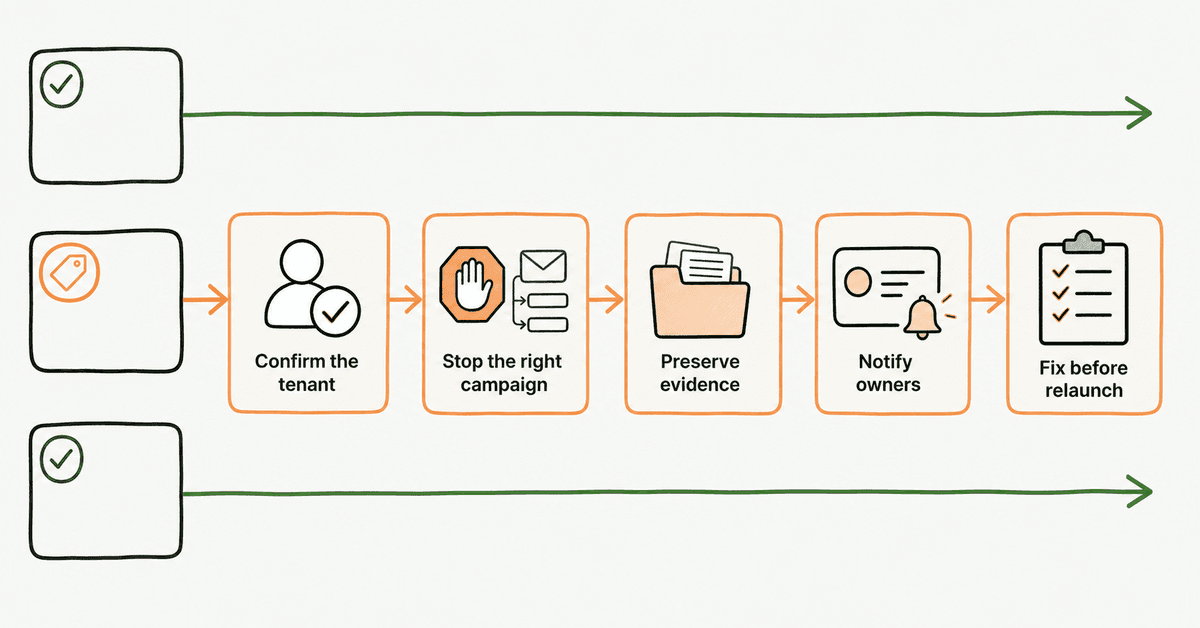
1. Confirm the campaign identity
Before selecting any action, capture the platform, client tenant, campaign name, unique ID, status, launch time, owner, target audience, and approval reference. Use the tenant ID and campaign ID, not the display name alone.
Take a read-only snapshot or export if the platform allows it. Include the configuration and current result state. This protects the evidence if the interface changes after cancellation.
For a multi-client service, use a verbal or written two-point check:
Client tenant: Acme. Campaign ID: SIM-1048. Status: In progress.
That five-second check is cheaper than a fleet-wide correction.
2. Classify the reason
Use one primary reason and add detail:
- wrong tenant;
- wrong audience or exclusion;
- unapproved message or scenario;
- broken technical path;
- real-incident conflict;
- client-requested stop;
- schedule or time-zone error;
- platform fault;
- other, with a factual description.
Do not use “operator error” as the whole record. It does not explain which control failed or what should change.
If a real incident may be involved, open the incident route now. Keep the simulation record available to responders so they can separate approved traffic from suspicious activity.
3. Establish what has already happened
Check the campaign state before acting:
- scheduled but not sent;
- partly delivered;
- fully delivered but still collecting events;
- training assigned;
- reminders scheduled;
- completed;
- already canceled, excluded, or deleted.
Then count or capture:
- intended recipients;
- messages sent, queued, failed, and pending;
- users who clicked, submitted, reported, or completed follow-up learning;
- active links, landing pages, attachments, or OAuth consent flows;
- support tickets and client notifications already created.
The numbers are operational facts for this campaign. Do not turn them into a public benchmark.
4. Read the platform-specific cancellation behavior
Use current vendor documentation and the live tenant. Ask these questions:
| Question | Evidence to capture |
|---|---|
| Will future messages stop? | Queue status and vendor statement |
| Can already delivered messages be recalled? | Product documentation or tested result |
| What happens to links and landing pages? | Post-cancel test with a synthetic recipient |
| Do assigned learning tasks remain? | Training state before and after |
| Are reminders canceled? | Notification schedule |
| Is telemetry retained? | Campaign report or export |
| Does “delete” remove the audit trail? | Retention behavior and policy |
| Can the campaign be excluded from aggregate reporting? | Report settings and approval |
Microsoft's Attack Simulation Training FAQ and simulation documentation are examples of primary product sources. For another platform, use that vendor's current guide. If the documentation is unclear, test with synthetic users before making a claim to the client.
5. Stop the smallest affected scope
Cancel the specific simulation in the specific tenant. Do not edit a global template, sender profile, learning module, or fleet automation unless the problem exists there too.
If the platform allows a scheduled campaign to be canceled before launch, verify that its status changes and that no queued delivery remains. If delivery has started, verify the documented post-cancel behavior instead of assuming the campaign is fully recalled.
Keep a second operator or client owner involved when the issue affects executives, multiple tenants, employee relations, or a real incident. The goal is controlled change, not ceremony.
6. Preserve the record before deleting anything
Save enough information to reconstruct the event:
- campaign and tenant IDs;
- approval and scope;
- configuration version;
- audience and exclusions;
- message, landing page, and sender preview;
- timestamps and status changes;
- delivered, pending, and failed counts;
- available user-event telemetry;
- assigned learning and reminders;
- cancellation reason and decision owner;
- screenshots or exports showing the final state;
- client and employee communications;
- corrective actions.
CIS Control 14 calls for an established and maintained awareness and skills program. A trustworthy program needs records that explain unusual events and support improvement.
Do not delete solely to make a dashboard look clean. If privacy, retention, or contractual rules require deletion, follow the approved policy and keep the required audit metadata.
7. Communicate in layers
Use the smallest message that answers what each audience needs.
MSP operations note
- what was stopped;
- client and campaign ID;
- reason;
- activity already completed;
- current user impact;
- next owner and target time.
Client owner note
- what happened in plain language;
- what stopped and what may remain visible;
- whether employees need to act;
- how results will be treated;
- what control will change before relaunch.
Employee note, only when needed
- identify the approved exercise without revealing unnecessary details;
- explain whether the message or link remains visible;
- confirm the normal reporting route;
- thank people who reported it;
- avoid blame, rankings, or public identification.
The FTC phishing guidance and CISA guidance reinforce a practical behavior: verify suspicious requests through a known route and report them. A cancellation notice should preserve that lesson.
8. Separate the canceled simulation from a real incident
If someone entered credentials, approved an OAuth prompt, opened an attachment, or reported a different suspicious message, do not assume the activity is harmless. Confirm whether it belongs to the simulation.
Use the client's incident process for anything outside the approved campaign. The NCSC guidance on reporting suspicious emails is a useful public reference for maintaining a reporting culture, but the client's MSP route and jurisdiction-specific obligations still control the response.
A safe simulation program makes reporting easier. It does not train staff to wait for confirmation before reporting.
9. Correct the control, then decide whether to relaunch
Run a short after-action review:
- What happened?
- Which pre-launch check should have caught it?
- Why did that check fail or not exist?
- What immediate correction is complete?
- What proof is required before relaunch?
- Does the result set remain usable, require annotation, or need exclusion?
- Who owns each action and by when?
CISA's Tabletop Exercise Packages include customizable objectives, scenarios, discussion questions, feedback, and after-action reporting. MSPs can use that same rhythm for campaign operations: prepare, act, review, and update the process.
Do not relaunch by copying the old campaign blindly. Recheck the tenant, audience, exclusions, message, sender, landing page, reporting route, schedule, and stop conditions.
The pre-launch cancellation pack
Prepare this before every simulation so the operator is not inventing a response during a problem.
| Field | Required content |
|---|---|
| Campaign identity | Tenant ID, campaign ID, owner, status |
| Authorization | Client approver, approved audience, exclusions, window |
| Stop conditions | Observable triggers and decision owner |
| Platform behavior | What cancel, delete, exclude, and archive do |
| Evidence plan | Configuration, audience, event, and communication records |
| Incident boundary | How to separate simulation traffic from a real report |
| Communication owners | MSP ops, client owner, employee message approver |
| Recovery path | Correction, test, relaunch, and reporting decision |
This pack can be one page. It should be attached to the campaign record or linked from the service desk ticket.
For planning the wider cadence, use the continuous campaign guide. For employee response language, use what employees should know about phishing.
Metrics for safe campaign operations
The purpose of these measures is to improve the MSP service, not rank employees.
Track:
- campaigns canceled by reason;
- wrong-tenant and wrong-audience events;
- cancellations before first delivery versus after delivery;
- time from stop condition to operator action;
- campaigns with complete approval records;
- campaigns with a tested reporting route;
- canceled campaigns with preserved evidence;
- report corrections caused by partial delivery;
- recurring causes that produced a control change;
- relaunches that passed the full pre-launch check.
A rising cancellation count may indicate better detection, worse launch controls, or both. Read the reasons. One number cannot explain the service.
NIST SP 800-50 Rev. 1 recommends metrics and evaluation methods to update a learning program as needs change. The strongest MSP metric is often whether the same failure returns after the process was corrected.
Mistakes to avoid
Assuming cancel means recall
Messages already delivered may remain in inboxes. Links, landing pages, training, reminders, and reports may each behave differently. Verify each object.
Deleting the evidence
A clean dashboard is not a clean audit trail. Preserve the decision record before any retention action.
Canceling every time an employee reports the message
Reporting is one of the behaviors the simulation is meant to exercise. Investigate the report and check for a separate problem before stopping.
Treating partial results as a normal benchmark
Annotate partial delivery, internal warnings, broken links, or early cancellation. Do not compare the result with a complete campaign as if the conditions matched.
Fixing one tenant through a global change
Contain the affected scope first. Test fleet-level corrections before release to other clients.
Hiding the error from the client
A factual, short explanation protects trust better than a vague dashboard change. State what happened, what remains, and what will change.
Treating the simulation as the incident plan
Training supports readiness. It does not replace email protection, identity controls, logging, detection, response, recovery, or qualified advice.
How a flat-rate MSP SAT platform helps
For MSPs, predictable pricing and multi-tenant operations can make ongoing security awareness easier to standardize across clients. DefendWise is positioned as a flat-rate, white-label, multi-tenant security awareness training platform with unlimited users and client organizations.
Use a limited trial and synthetic users to test the campaign lifecycle, including the stop path, evidence retention, client separation, and reporting behavior. Verify the current product workflow before moving a real client audience into scope.
Frequently asked questions
Can you cancel a phishing campaign after it starts?
Usually, but the result depends on the platform and campaign state. Stopping an in-progress simulation may not recall messages already delivered, remove assigned training, or erase collected telemetry. Check the current vendor guide and tenant state.
What should an MSP check before canceling a phishing simulation?
Confirm the client tenant, campaign ID, status, target audience, reason for stopping, messages already sent, assigned follow-up training, evidence to preserve, and people who need an update. Capture the state before selecting a destructive action.
Does canceling a simulation recall phishing emails?
Do not assume it does. Some platforms stop future actions or deactivate links while messages already delivered remain in inboxes. Verify the behavior with product documentation and a synthetic recipient.
Should an MSP delete a canceled phishing campaign?
Not before preserving the configuration, audience, timestamps, results, reason, approvals, and follow-up actions. Deletion and exclusion from reporting are separate decisions from stopping delivery.
When should a phishing simulation be stopped?
Stop or pause when the wrong tenant or audience is targeted, the lure creates material operational risk, a real incident could be confused with the simulation, the reporting route fails, or the client withdraws approval. Write these conditions before launch.
What if employees report a real phishing attack during a simulation?
Treat the report through the normal incident process until responders establish what happened. Do not dismiss a suspicious message merely because a simulation is running.
How can MSPs avoid unnecessary campaign cancellations?
Use tenant checks, approval records, test recipients, sender and landing-page previews, exclusion reviews, scheduled launch windows, stop conditions, and a named campaign owner before release. Review every cancellation for a control that should change.