Automated Security Awareness Training for MSPs: What to Automate and What to Keep Human
Learn which SAT tasks MSPs can automate, which decisions need human review, and how to test an automated security awareness workflow.
DefendWise
DefendWise
TL;DR
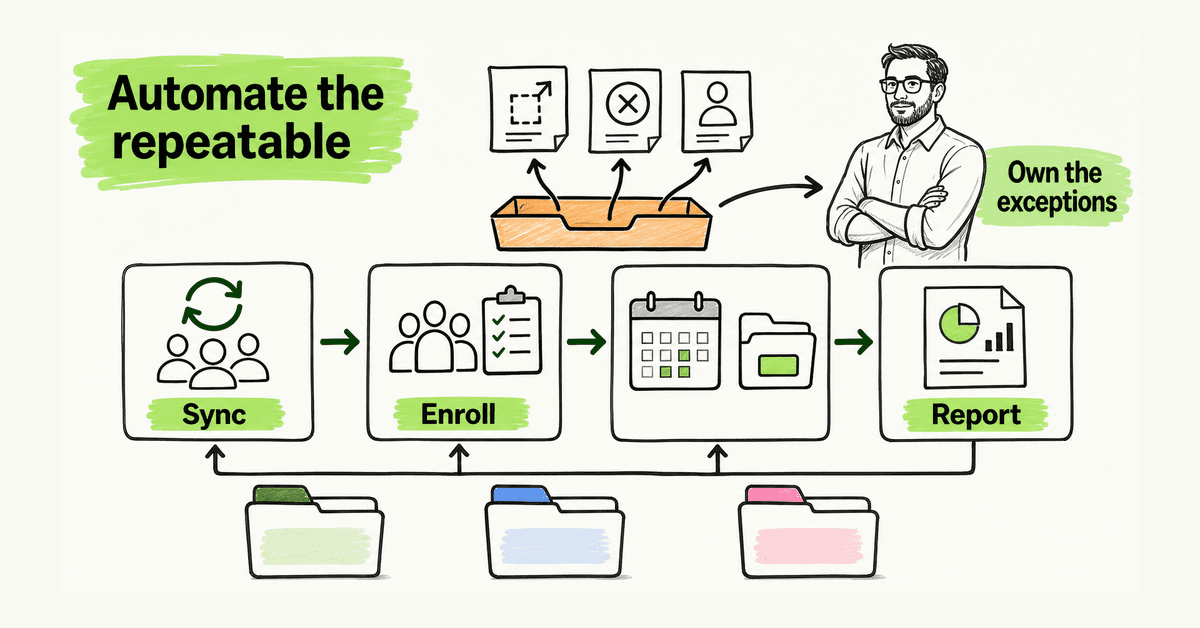
Automated security awareness training should remove repeatable administration, not accountable decisions. MSPs can automate user synchronization, enrollment, reminders, scheduled activity, exception alerts, evidence collection, and report assembly. Keep client scope, sensitive scenario approval, content judgment, exception handling, report interpretation, and service changes under named human ownership. The useful model is automation by default, visible exceptions by design.
What is automated security awareness training?
Automated security awareness training uses rules, schedules, templates, and integrations to run repeatable parts of a learning program without a technician rebuilding every campaign for every client.
For an MSP, that includes synchronizing an approved audience, enrolling new users, removing or flagging leavers, assigning learning by group, scheduling reminders, detecting failed delivery, assembling evidence, sending approved reports, and creating follow-up work when a rule needs human attention.
Automation is not abandonment. NIST SP 800-50 Rev. 1 treats cybersecurity learning as a lifecycle: plan, analyze, design, develop, implement, assess, and improve. A schedule can help operate that lifecycle. It cannot decide whether the program still fits a client's people, risks, and business processes.
An MSP supporting many organizations cannot depend on technicians remembering every joiner, campaign, exclusion, and report date. Yet automation can also scale mistakes: the wrong people receive training, a sensitive simulation launches at the wrong time, or a stale contact receives a report.
The goal is not “no humans.” It is to reserve human attention for decisions and exceptions instead of repetitive clicks.
Why MSPs need an automation boundary
Security awareness creates small recurring tasks that multiply. A client adds employees. Another changes its finance team. A third enters a quiet period. A report recipient leaves. A training email bounces. A simulation approval expires.
Without a standard model, the MSP handles that queue through calendars, inboxes, spreadsheets, and memory. Coverage drifts, exceptions hide, and reports use inconsistent definitions.
Separate the stable service baseline from client-specific judgment. Use multi-tenant management for repeatable delivery while keeping each client's users, permissions, schedules, approvals, and evidence separate. Use automated onboarding to reduce setup, but retain a launch gate before a real audience receives anything.
Automate work when the rule is clear, the input is trusted, the outcome is reversible, and failure becomes visible.
Keep a human decision when context changes the answer, the action can harm trust, or the result makes a legal, compliance, employment, or client-service judgment.
| Workflow | Automate by default | Keep human-owned | Failure signal |
|---|---|---|---|
| Audience | Sync approved users and groups; flag changes | Approve source, scope, roles, exclusions | Unexpected count, stale sync, tenant mismatch |
| Enrollment | Assign an approved baseline by rule | Approve role logic and exceptions | Missing or wrong assignment |
| Cadence | Schedule approved learning and reminders | Approve quiet periods and material changes | Activity outside approved window |
| Simulations | Reuse approved templates and checks | Approve scenario, targets, data, escalation | Unapproved theme, sender, target, or collection |
| Reporting | Assemble standard fields for approved recipients | Interpret results and choose an action | Missing data, stale recipient, bad denominator |
| Follow-up | Create exception tasks and reminders | Decide remediation and client communication | Exception ages without an owner |
| Evidence | Retain dates, scope, versions, and history | Decide what supports a specific request | Missing provenance or scope |
What MSPs should automate first
1. Audience synchronization
Microsoft describes identity provisioning as a lifecycle in which joiner, mover, and leaver changes flow from an authoritative source into downstream systems. Its HR-driven provisioning guidance shows why source and scoping logic matter.
Define the source of truth, included and excluded groups, contractors, shared accounts, role mapping, change interval, anomaly reviewer, and failure path. A connected directory proves data moved. It does not prove the right people were selected.
2. Baseline enrollment
CIS Control 14 calls for an established awareness program, training at hire, periodic review, and role-specific learning where appropriate. A practical rule enrolls new starters, reviews role changes, removes leavers from future activity, gives approved additional learning to relevant roles, and routes ambiguous records to an exception queue.
If a technician cannot explain why someone received an assignment, the automation is too opaque.
3. Reminders and recurring activity
Set a small number of approved reminders, stop after completion, and respect client calendars. Avoid daily nagging or automatic executive escalation.
CISA's small-business phishing guidance says once-a-year training is not enough and recommends regular reinforcement plus a known reporting route. That supports ongoing activity, not constant messaging.
For the wider cadence, see how to launch a continuous security awareness training campaign.
4. Report assembly
Automate repeatable fields: audience, delivery, bounces, exclusions, assignments, completions, simulation context, suspicious-message reports, exceptions, prior actions, data window, and generation date.
Keep interpretation human. A report should not say “completion is 92%” without its denominator, exclusions, and window. It should not turn one simulation click rate into a complete risk score. Add context and one action with an owner and date.
Automated reporting is useful when it creates consistent evidence and exposes exceptions. It should not automate a compliance conclusion.
5. Exception routing
Create an exception for stale syncs, unexpected audience changes, failed assignments, missing report fields, stale recipients, pending approvals, unresolved bounces, or schedule conflicts. Give each one a tenant, evidence, severity, owner, and target date.
“Automation failed” is not useful. “Client A directory sync is stale; new users may not be enrolled; owner: service desk” is actionable.
What should remain human
Client scope and authorization
A client owner should approve audience, schedule, roles, exclusions, report recipients, and simulation boundaries. Automation can enforce the approved record. It should not invent it.
Sensitive simulations
Microsoft's Attack Simulation Training documentation exposes the choices inside a simulation: technique, payload, target users, exclusions, training, landing pages, notifications, launch details, and reporting. That is a warning against a one-click model.
Do not automatically launch scenarios involving layoffs, medical emergencies, bonuses, personal tragedy, or executive impersonation without explicit approval. Never collect real credentials. Do not broadly weaken real email controls merely to make a test arrive.
Content and role judgment
A person should decide whether content is current, accurate, accessible, appropriate, and connected to a useful behavior. Finance may need payment-change verification. Executives may need impersonation practice. Service desk staff may need caller verification. A job title alone may not reveal the work role.
Interpretation
A chart cannot know whether a bounce is data quality, whether a reporting increase is positive behavior, or whether scenario difficulty explains a click-rate change. Interpret results inside the client's context and distinguish delivery failure from learner behavior.
Compliance conclusions
Dated records can support an audit, assessment, or questionnaire. They do not prove compliance or guarantee an insurance outcome.
NIST Cybersecurity Framework 2.0 spans Govern, Identify, Protect, Detect, Respond, and Recover. Training is one part of that system.
A safe automated SAT workflow
| Stage | Automated action | Human gate | Evidence retained |
|---|---|---|---|
| Configure | Create tenant from approved baseline | Confirm owner, scope, brand, boundaries | Configuration approval |
| Connect | Sync approved groups | Review first import and anomalies | Source, timestamp, rules, counts |
| Assign | Enroll users by rule | Approve role paths and exceptions | Rule and content version |
| Schedule | Queue learning and reminders | Approve calendar and sensitive activity | Schedule and changes |
| Deliver | Send activity and record status | Monitor first launch or material change | Delivery and support events |
| Detect | Alert on failed or unusual results | Triage exceptions | Reason, owner, resolution |
| Report | Assemble standard evidence | Add interpretation and one action | Dated report and action log |
| Improve | Suggest a template update | Approve service or content change | Decision and baseline version |
Where possible, running the same safe step twice should not duplicate users, assignments, reminders, or reports. Material changes should support rollback.
A 30-day pilot
Week 1: define the boundary
Choose one cooperative client or synthetic tenant. Record the audience source, baseline learning, role rules, quiet periods, report recipients, simulation boundaries, support route, and exception owner. Write down what remains manual.
Week 2: test identity and enrollment
Test a new user, role change, leaver, contractor, excluded executive, shared mailbox, missing email, duplicate record, directory outage, and large user-count change. Confirm failures are visible and tenant data stays separate.
Week 3: test delivery
Run a small approved assignment. Check sender identity, links, mobile rendering, accessibility, reminders, support instructions, and report routing.
Use the FTC's phishing guidance as a content check: staff should pause, verify through a known route, and involve the right people.
Week 4: deliver and review
Inspect the data window, denominator, exclusions, delivery issues, completion, reporting behavior, and open actions. Ask which manual step disappeared, which exception became visible sooner, which decision required judgment, which rule was fragile, and what one change belongs in the next baseline.
Do not scale until the first loop closes cleanly.
Metrics that show automation health
Track sync freshness, assignment-rule coverage, identity exceptions, delivery failures, reminder volume, report completeness, report delivery failures, ownerless exceptions, exception age, prior client actions, and approved baseline changes.
These show whether the service is controlled. They do not prove training prevented an incident.
Vendor guides provide category context. INFIMA's MSP SAT guide groups automation with directory sync, auto-enrollment, reminders, scheduled reporting, templates, and exception management. Acronis describes SAT as a repeatable MSP security control. Both are vendor-published, not independent proof or product recommendations.
Common mistakes
- Automating from a dirty directory: bad source data creates fast bad assignments.
- Hiding failures: a green schedule means little if bounces and stale syncs are buried.
- Unlimited reminders: define timing, maximum sends, stop conditions, and escalation.
- One template for every client: standardize workflow, not every decision.
- Treating a report as a decision: automation assembles facts; an owner interprets them.
- Claiming “zero admin” with no exception path: low admin concentrates attention on exceptions; it does not erase them.
- Automating punishment: do not shame users or notify leaders automatically from one event.
Where DefendWise fits
DefendWise is built for MSPs with automated onboarding and reporting, Microsoft 365 sync, white-label multi-tenant delivery, AI-generated training content, unlimited users and client organizations, and a flat $399/month fee. These are confirmed public claims in the current claim register.
Those capabilities support the repeatable side. The MSP still owns the client baseline, approvals, exceptions, interpretation, and next actions.
Start a Free 7-Day Trial with synthetic users and test the workflow before putting a real client on an automated schedule.
Frequently asked questions
What is automated security awareness training?
It uses rules and integrations for user synchronization, enrollment, reminders, exception alerts, and report delivery. The MSP still owns scope, approval, judgment, and follow-up.
Can an MSP fully automate it?
An MSP can automate much of delivery, but should not remove human ownership. Client approvals, sensitive scenarios, exceptions, interpretation, and service changes need owners.
Which tasks should an MSP automate first?
Start with audience synchronization, joiner and leaver checks, baseline enrollment, reminders, failed-delivery alerts, evidence retention, and report assembly.
What should not be automated?
Do not auto-approve client scope, unusual simulations, punitive escalation, compliance conclusions, or material service changes.
How should an MSP test automation?
Use a synthetic or limited pilot. Test identity changes, exclusions, failed syncs, quiet periods, report recipients, tenant separation, rollback, and exception ownership.
Does automated training prove compliance?
No. Automation makes records easier to collect, but training alone does not prove compliance, prevent incidents, or replace other controls.
How does DefendWise support automated delivery?
DefendWise is built for MSPs with automated onboarding and reporting, Microsoft 365 sync, white-label multi-tenant delivery, AI-generated training content, unlimited users and client organizations, and flat $399/month pricing.
Sources
- NIST SP 800-50 Rev. 1
- NIST Cybersecurity Framework 2.0
- CISA: Teach Employees to Avoid Phishing
- CIS Control 14
- FTC: Cybersecurity for Small Business — Phishing
- Microsoft Entra: HR-driven provisioning
- Microsoft Attack Simulation Training
- INFIMA: Security Awareness Training for MSPs (vendor-published context)
- Acronis: Manage SAT like a security control (vendor-published context)
- DefendWise (product claims checked against the claim register)