How to Launch a Continuous Security Awareness Training Campaign
Launch a continuous training campaign with an MSP plan for scope, cadence, safe practice, measurement, and client reporting.
DefendWise
DefendWise
TL;DR
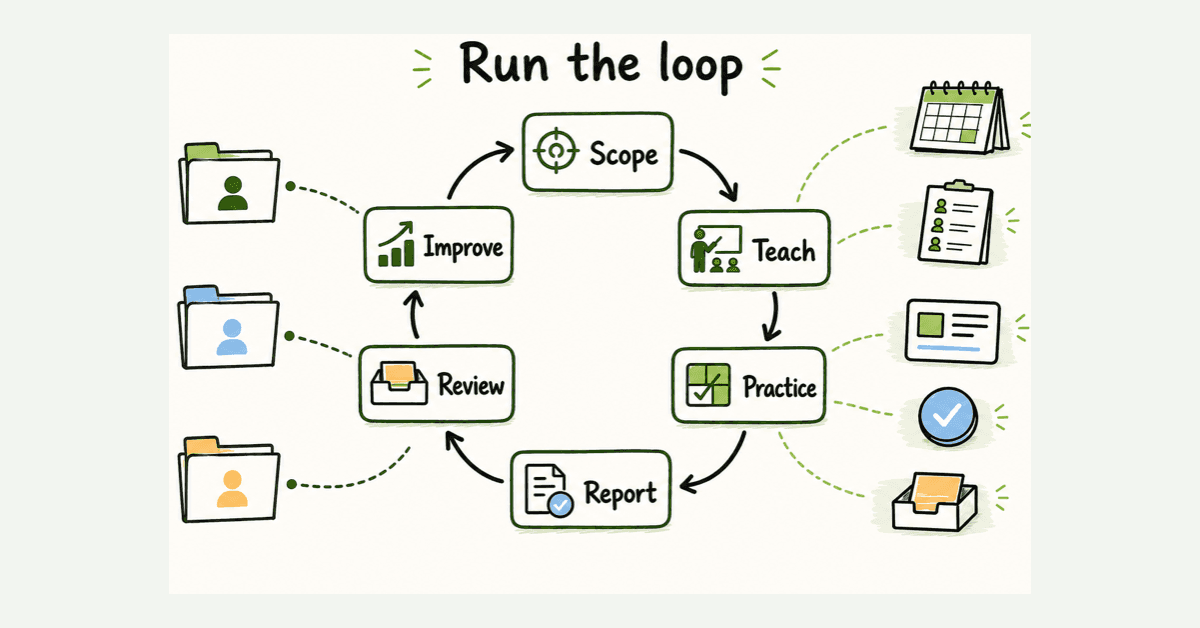
To launch a continuous training campaign, build a repeatable operating loop: set the client scope, choose a small number of behaviors, schedule short learning and practice, make reporting easy, review evidence, and change the next cycle. “Continuous” does not mean sending more content. It means the program keeps its audience current, reinforces useful actions between formal sessions, catches exceptions, and gives the client one clear next step. MSPs should standardize the loop across clients while keeping tenant scope, timing, role needs, and reporting separate.
What is a continuous security awareness training campaign?
A continuous security awareness training campaign is an ongoing learning program that helps people recognize common risks, practice safer actions, and report concerns through a known route.
It differs from an annual course in 3 ways.
First, it is a program rather than an event. NIST SP 800-50 Rev. 1 describes a lifecycle for building and managing a cybersecurity and privacy learning program. That lifecycle covers strategy, analysis, design, development, implementation, assessment, and improvement.
Second, it responds to change. The audience changes when people join, leave, or move roles. Threats and business processes change. A client introduces a new payment workflow, remote-access tool, or reporting process. A continuous program has a way to update learning when those changes matter.
Third, it measures more than attendance. Completion is useful for coverage and evidence, but it does not show whether people know where to report a suspicious request or whether the reporting route works. NIST says a learning program should encourage behavior change as part of risk management and use evaluation to improve as needs evolve.
For an MSP, the word “campaign” can create the wrong mental model. It can sound like a burst of emails with a start date and finish date. A better model is a managed monthly loop with a client-approved baseline, scheduled activity, visible exceptions, and a review point.
Why this matters for MSPs
A single company can improvise around one annual course. An MSP managing many clients cannot.
Every client has a different employee list, reporting route, business calendar, risk profile, and decision owner. If those differences live in technicians' inboxes, the campaign becomes fragile. A new employee is missed. A simulation lands during a sensitive business event. A report goes to an old contact. A client receives a chart without any explanation of what to do next.
Continuous delivery makes those problems more likely unless the MSP standardizes the operating method.
The MSP needs 2 layers:
- A common service baseline. The same governance record, launch checks, exception process, evidence fields, and report structure apply across clients.
- A controlled client configuration. Each tenant keeps its own audience, roles, timing, exclusions, approval contacts, reporting route, and local topics.
That is the practical value of an MSP-oriented multi-tenant security awareness model. It should reduce repeated setup without erasing the client boundaries that make the program safe and useful.
Continuous training also makes the service visible. Instead of showing a client one completion export at renewal, the MSP can bring a short record into regular service reviews: what was covered, what happened, what exceptions remain, and what the client should decide next.
Continuous does not mean constant
A poor continuous campaign is just noise on a schedule.
More reminders do not automatically create better learning. More difficult simulations do not automatically create safer behavior. More modules do not automatically create better evidence.
CISA's small-business phishing guidance says once-a-year training is not enough and recommends reinforcing secure practices regularly. It also emphasizes a useful action: employees should know how and to whom they report suspicious messages.
That is a better test for campaign design than raw volume. Each activity should support a defined behavior, such as:
- verifying an unusual payment request through a known channel;
- reporting a suspicious email using the client's approved route;
- protecting credentials when a login page arrives through an unexpected message;
- challenging an urgent request that bypasses normal process;
- handling sensitive data according to the client's policy;
- escalating a lost device or accidental disclosure promptly.
If an activity cannot be connected to a behavior, audience, or business process, it probably does not belong in the next cycle.
Define the managed service before the campaign
Write the service definition in plain language before choosing modules or simulation templates.
The MSP operates an ongoing security awareness program for the client's approved workforce. The program maintains current audience scope, delivers short learning and practice activities, reinforces a known reporting route, records exceptions, and provides a dated client summary with actions and owners.
Then write the boundaries. The service does not:
- guarantee that every employee will avoid every attack;
- prove the client is compliant;
- replace email security, MFA, access controls, incident response, or other protections;
- authorize unapproved impersonation, sensitive lures, or collection of real credentials;
- treat employees as the only source of security risk;
- promise a universal campaign frequency without considering the client.
These boundaries matter commercially. They stop a vague “ongoing training” line item from growing into an unlimited list of custom requests.
Build the campaign around 7 operating components
| Component | MSP baseline | Client-specific decision | Evidence to keep |
|---|---|---|---|
| Ownership | Named MSP service owner and backup | Client sponsor, approver, and escalation contact | Current responsibility record |
| Audience | Standard joiner, mover, and leaver process | Users, groups, roles, exclusions, accommodations | Dated audience snapshot and exceptions |
| Objectives | Behavior-first objective template | Priority behaviors tied to local processes | Approved objectives and review notes |
| Cadence | Default cycle and change process | Business calendar, risk events, and quiet periods | Published schedule and changes |
| Learning mix | Approved activity types | Topics, role depth, language, and delivery channel | Content version and assignment record |
| Reporting | One reusable summary format | Recipients, local context, and owned actions | Dated report and action log |
| Improvement | Monthly exception review and periodic program review | Client decisions and local changes | Decision trail and updated baseline |
The table is the campaign. The learning content sits inside it.
An MSP that starts with content usually discovers the missing operating decisions after launch. An MSP that starts with ownership, scope, objectives, and evidence can change content without losing control of the service.
Step by step: launch a continuous training campaign
1. Lock ownership and approval
Name one MSP owner, one backup, one client sponsor, and one client approver. Write down who can change audience scope, timing, simulation themes, and reporting recipients.
Do not assume the person who bought the service should approve every campaign. Include the service desk or security contact when their team will receive reports or learner questions.
2. Reconcile the audience
Start with a dated user list. Confirm joiners, leavers, contractors, seasonal staff, privileged users, executives, finance staff, and groups with different needs.
Define the source of truth for changes. If a directory sync or automated enrollment path is available, test it with synthetic or limited records before relying on it. Record unsupported users and manual exceptions instead of pretending automation covers everyone.
CIS Control 14 calls for an established and maintained awareness program, training at hire and at least annually, content review, and role-specific training where needed. The useful MSP lesson is not to stop at the minimum. It is to make audience coverage and role needs visible.
3. Choose 2 or 3 priority behaviors
Avoid a first cycle with 12 topics and no clear outcome.
Use client incidents, help-desk themes, policy changes, business processes, or risk reviews to select a short list. A professional-services client may prioritize invoice changes and document sharing. A healthcare client may need more emphasis on data handling and identity verification. A construction client may need mobile, QR, and supplier-payment scenarios.
Keep objectives observable. “Improve awareness” is vague. “Employees use the known finance contact to verify bank-detail changes” describes a behavior and a route.
4. Set a risk-based cadence
There is no honest universal answer to “monthly or quarterly?”
Use a baseline the MSP can operate reliably, then adjust it for client risk, workforce turnover, incidents, process changes, and learner burden. A practical cycle might include one short learning activity, one lightweight reinforcement, and one review each month, with simulations or role-specific exercises at an approved interval. That is an operating example, not a compliance requirement.
Publish the calendar. Mark quiet periods, payroll runs, mergers, product launches, holidays, and other times when a simulation or mandatory task could create avoidable disruption.
5. Design the learning mix
A continuous campaign should use more than one format:
- short modules for core concepts;
- manager prompts tied to team processes;
- brief incident lessons using sanitized facts;
- phishing or social-engineering simulations;
- verification drills for payments or account changes;
- onboarding learning for new staff;
- role-specific learning for finance, leadership, service desk, and administrators;
- tabletop discussion for an incident scenario.
NISTIR 8420A found that federal awareness programs used activities throughout the year and recommended reinforcing learning with varied methods rather than relying only on annual training. The study is not an MSP benchmark, but its operational lesson is useful: different formats solve different learning and engagement problems.
6. Test delivery and the reporting route
Use a small test group before the full audience. Check sender identity, links, mobile rendering, accessibility, support instructions, landing pages, reminder timing, and the suspicious-message reporting path.
If simulations are included, treat them as controlled exercises. Microsoft's Attack Simulation Training documentation shows the decisions hidden inside a simulation: technique, payload, target users, exclusions, training, landing pages, notifications, launch details, and reporting. The platform is product-specific, but the checklist is broadly useful.
Never collect real passwords. Do not weaken real security controls broadly to make a test message arrive. Use supported delivery controls, document changes, and verify rollback.
7. Launch with a visible support plan
Tell the service desk what it needs to know. Give staff a route for questions without teaching them to ignore realistic suspicious messages.
Monitor delivery failures, bounced users, support tickets, duplicate assignments, and unexpected reports. Keep the first cycle moderate. The goal is to prove the operating loop, not catch the most people.
The FTC's small-business phishing guidance reinforces a practical response: pause, verify through a known contact method, and involve colleagues when a suspicious request may affect others.
8. Review evidence and change one thing
Close the cycle with a short client report. Include:
- approved audience and actual delivery;
- assigned and completed learning;
- excluded, bounced, or unsupported users;
- reports of suspicious messages;
- simulation context and difficulty where relevant;
- support issues and learner feedback;
- open exceptions;
- one recommended action, owner, and target date.
Then change one thing in the next cycle. Update the audience process, reporting route, content mix, role scope, reminder timing, or client workflow. Continuous improvement becomes real when the next campaign is visibly different because of the last review.
Measure the loop, not one number
Click rate is easy to put in a chart. It is not a complete measure of human risk.
The NIST Phish Scale User Guide explains that click and reporting rates provide a single point of insight. Some simulated messages are harder to detect because of their cues and how closely the premise matches the target audience. Campaign reporting should include that context before comparing results.
| Measure | What it tells you | What it does not prove |
|---|---|---|
| Audience coverage | Whether intended learners were included | Whether learning changed behavior |
| Delivery and completion | Whether the activity reached people and was finished | Whether the content was useful |
| Suspicious-message reports | Whether people practiced a reporting action | Whether every report was malicious |
| Simulation interactions | How people responded to one exercise | Overall risk or future breach likelihood |
| Detection difficulty | Context for interpreting a simulation | A universal score across unrelated clients |
| Exceptions and support issues | Where the operating process failed | That the learner caused the failure |
| Owned follow-up actions | Whether the review produced a decision | That the action was completed |
Track trends inside the same client before creating fleet-wide rankings. Different clients have different roles, languages, controls, scenarios, and reporting processes. A leaderboard can hide more than it reveals.
For a deeper measurement model, use the DefendWise guide to measuring security awareness effectiveness.
What good looks like after 90 days
After 90 days, the MSP should be able to show:
- a current service owner and client sponsor;
- a reconciled audience with joiner, mover, and leaver handling;
- 2 or 3 approved behavior objectives;
- a published cadence with client quiet periods;
- tested delivery and reporting routes;
- separate client scope and evidence;
- a mix of learning, reinforcement, and practice;
- exception records rather than hidden manual fixes;
- a short client report with one owned action;
- at least one documented program change based on evidence.
That is more credible than a large module count or a dramatic simulation chart.
Mistakes to avoid
Launching from a template without client approval
A reusable template saves time. It does not remove the need to approve audience, timing, themes, data handling, and reporting for each client.
Treating annual minimums as the program design
A minimum training frequency can support a policy or framework requirement. It does not decide what people should practice between formal sessions. CISA warns that once-a-year phishing training is not enough for a changing threat environment.
Making every cycle a phishing test
Simulations are one tool. A program also needs useful instruction, a real reporting route, role-specific context, and follow-up. Constant testing without clear teaching can create fatigue and distrust.
Comparing raw click rates across clients
Scenario difficulty and audience relevance vary. Use context, compare like with like, and avoid turning one exercise into a client risk grade.
Hiding delivery failures inside completion numbers
A person who never received an assignment is not a learner who chose not to complete it. Separate bounces, sync errors, exclusions, leave, accessibility needs, and support issues from learner behavior.
Sending a report with no decision
A report is not useful because it has 12 charts. It is useful when the client can see what happened and what someone will do next.
Claiming compliance or breach prevention
Training records can support evidence. They do not prove compliance or promise that an incident will not occur. NIST CSF 2.0 is a useful reminder that security work spans Govern, Identify, Protect, Detect, Respond, and Recover.
How a flat-rate MSP SAT platform helps
Technology should make the operating loop easier to repeat without flattening every client into the same campaign.
Look for automated onboarding, separate client organizations, controlled templates, current audience scope, scheduled activity, visible exceptions, and client-ready reporting. Test those workflows before promising “continuous” delivery in an MSA.
DefendWise is built for MSPs with white-label multi-tenant delivery, automated onboarding and reporting, Microsoft 365 sync, AI-generated training content, unlimited users and client organizations, and a flat $399/month fee. Those are confirmed public claims. They do not remove the MSP's responsibility to set client scope, approve the program, and review evidence.
Start a Free 7-Day Trial with synthetic client data to test the campaign loop before rolling it into a managed service.
Frequently asked questions
What is a continuous security awareness training campaign?
It is an ongoing program that combines short learning activities, practical reinforcement, reporting, and regular review. It is managed as a repeatable cycle rather than a single annual course.
How often should an MSP run security awareness training?
There is no universal cadence for every client. Set a risk-based rhythm that covers required training, reinforces priority behaviors, and changes when the workforce, threats, incidents, or business processes change.
Should every client receive the same campaign?
No. Use one MSP baseline for governance, launch checks, exception handling, and reporting. Adjust topics, timing, roles, exclusions, language, and approval for each client.
What should an MSP measure?
Track audience coverage, delivery, completion, reporting behavior, simulation context, exceptions, support issues, and owned follow-up actions. Do not turn one click rate into a complete risk score.
Are phishing simulations required?
No. Simulations can support practice and measurement, but a complete program may also include short modules, manager prompts, incident lessons, verification drills, onboarding learning, and reminders.
Can continuous training prove compliance?
No. Dated records can support an audit or client review, but training alone does not prove compliance, prevent incidents, or replace other controls.
How can DefendWise support continuous MSP delivery?
DefendWise is built for MSPs with white-label multi-tenant delivery, automated onboarding and reporting, Microsoft 365 sync, AI-generated training content, unlimited users and client organizations, and flat $399/month pricing. MSPs should still test scope, approvals, exceptions, and reporting in a controlled trial.
Sources
- NIST SP 800-50 Rev. 1
- NIST announcement for SP 800-50 Rev. 1
- NISTIR 8420A
- NIST Phish Scale User Guide
- NIST Cybersecurity Framework 2.0
- CISA: Teach Employees to Avoid Phishing
- CIS Control 14
- FTC: Cybersecurity for Small Business, Phishing
- Microsoft: Attack Simulation Training
- CanIPhish MSP Buyer's Guide (vendor-published category context, not independent proof)