Reporting templates for MSP quarterly business reviews: what to show clients
Reporting templates for MSP quarterly business reviews should turn service data into client-ready security evidence and next actions.
DefendWise
DefendWise
TL;DR
Reporting templates for MSP quarterly business reviews should not be a prettier version of the monthly ticket report. A strong QBR pack explains what changed, what risk moved, what evidence exists, and what the client needs to decide before the next quarter. For security awareness, that means showing coverage, completion, overdue risk, campaign activity, reporting gaps, and compliance evidence in plain language. The best template keeps the meeting focused on business decisions while keeping the detailed proof ready behind it.
What are reporting templates for MSP quarterly business reviews?
Reporting templates for MSP quarterly business reviews are reusable client-facing formats for turning a quarter of service activity into a structured conversation.
The template matters because the QBR is not only a report. It is the meeting where the MSP proves value, surfaces risk, and earns the right to make recommendations.
A good template answers 4 questions quickly:
- What happened this quarter?
- What does it mean for the client?
- What needs attention next?
- What decision do we need from the client?
That sounds simple. Most QBR decks still miss it.
The common failure is to stack tickets, uptime, patching, alerts, backup jobs, and training completions into separate charts without a story. The client hears numbers. They do not hear whether their business is safer, more exposed, more prepared, or stuck waiting on a decision.
ReportingMSP makes the same point in its QBR guidance: a QBR is a strategic conversation, not a monthly report with extra slides. NinjaOne also frames QBR reporting for SMBs around business impact rather than technical activity. Axcient puts it bluntly: the shift is from “here are your metrics” to “here is what these metrics mean for your business.”
For MSPs selling security awareness training, that distinction matters. Training data can look like a checkbox if it is presented badly. It becomes useful when it shows client leadership whether the right people are covered, whether overdue users are being chased, whether high-risk roles need attention, and whether evidence is ready for insurance, audit, or board questions.
Why this matters for MSPs
QBR reporting is where invisible MSP work becomes visible.
That does not mean the QBR should become a brag deck. It means the client should leave with a clearer view of risk, value, and decisions. If the quarter was quiet, the report explains what prevented noise. If the quarter was messy, it explains what changed and what still needs work.
For security awareness specifically, MSPs have 3 problems to solve.
First, clients increasingly expect security proof. Guardz notes that MSP QBRs are a way to show measurable cybersecurity value, risk reduction, and action plans. Cyber-insurance and compliance conversations also push clients toward documented training evidence, not vague assurances.
Second, frameworks make awareness evidence more than a “nice to have.” CIS Control 14 focuses on establishing and maintaining a security awareness and skills training program. Its assessment specification looks for evidence such as whether the program exists, when it was last reviewed, how many workforce members have completed training, and whether completions are current. NIST CSF 2.0 includes Awareness and Training under the Protect function, and the framework is designed to help organizations communicate cybersecurity outcomes and progress. ISO 27001 Clause 7.3 focuses on awareness of the information security policy, objectives, responsibilities, and consequences of nonconformity.
Third, MSPs need to protect their own margin. If every QBR requires a senior person to pull screenshots, chase spreadsheets, reconcile user lists, and rewrite the story from scratch, the reporting motion becomes a hidden tax on the service. The client gets a deck. The MSP absorbs the prep cost.
That is why reporting templates need to be repeatable. The template is not paperwork. It is the operating system for client proof.
What a useful MSP QBR reporting template should include
Use this as the core structure. It is intentionally short. Add more only when the client has a specific compliance, board, or executive reporting need.
| Section | What to include | Why the client cares | Security-awareness example |
|---|---|---|---|
| Executive summary | 3 to 5 bullets on what changed this quarter | Gives leadership the story before the detail | “Training coverage improved, but 2 departments remain overdue.” |
| Quarter highlights | Wins, incidents, projects completed, material changes | Shows visible value and reduces memory gaps | “New-starter training added to onboarding workflow.” |
| Service health | Ticket trends, SLA notes, recurring issues, client satisfaction if available | Connects IT service to productivity and friction | “Password-reset tickets dropped after MFA refresher.” |
| Security posture | Incidents, endpoint, identity, backup, patching, exposure, awareness | Shows risk movement, not only activity | “Phishing reporting improved after campaign follow-up.” |
| Training evidence | Assigned users, completed users, overdue users, refreshers, role coverage | Makes awareness provable for audit and insurance questions | “94 users assigned, 82 complete, 12 overdue.” |
| Open risks | Unresolved risks, exceptions, approvals needed | Creates a decision record | “Finance team needs BEC refresher before renewal questionnaire.” |
| Recommendations | 3 to 5 ranked next actions | Turns data into movement | “Run role-specific finance training next quarter.” |
| Next-quarter plan | Owner, due date, expected outcome | Prevents the same issue returning next QBR | “MSP to send monthly one-page awareness summary.” |
Do not turn every section into a wall of metrics. The executive version should be readable by a non-technical owner in 5 minutes.
The backup evidence can be longer. Keep it attached, linked, or available on request. The QBR deck should not force a business owner to read raw audit evidence before they understand the point.
The security awareness reporting block
Security awareness deserves its own QBR block when it is part of the MSP service package.
A simple block can cover:
- users in scope;
- users assigned training;
- users completed;
- users overdue;
- high-risk or sensitive-role coverage;
- campaigns or refreshers delivered;
- phishing or reporting trends, if available;
- issues that need management action;
- evidence available for insurance, audit, or board reporting.
The key is to report movement, not just completion.
“82 of 94 users completed training” is useful. It is not enough. The client also needs to know whether the 12 overdue users are concentrated in one department, whether new starters are being enrolled fast enough, whether managers know who to chase, and whether the record is clean enough to answer an insurer or auditor.
CIS Control 14 is useful here because it makes the evidence expectation concrete. It asks whether there is a security awareness program, when content was reviewed or updated, and how many workforce members have completed current training. A QBR does not need to quote every control. It should make the same evidence easy to understand.
NIST CSF 2.0 is also useful because it treats cybersecurity as a set of outcomes that organizations can communicate, prioritize, and improve. That is exactly what a client-facing QBR should do. It should help the client see whether awareness activity is supporting risk management, not merely whether an LMS sent another email.
For ISO 27001-minded clients, awareness evidence should also connect to policy, roles, responsibilities, and consequences. An ISO-aware QBR should therefore show more than “course completed.” It should show that the program covers the right people, uses relevant content, keeps records, and has a clear owner for exceptions.
A step-by-step template workflow
1. Start with the executive story
Write the first slide last.
Pull the data first, then decide what the quarter means. The executive summary should not say “training continued” or “security services performed as expected.” That is filler.
Use concrete sentences:
- “Training coverage is healthy, but overdue users are concentrated in Finance and Operations.”
- “The client is ready for insurance questionnaire evidence on awareness training, but MFA evidence still needs a separate export.”
- “The awareness program is running, but content refresh and role-specific training need attention next quarter.”
This is where the QBR becomes useful. It makes the client’s next decision obvious.
2. Separate activity, risk, and evidence
Do not mix these 3 things into one chart.
Activity is what happened: campaigns sent, users assigned, refreshers delivered.
Risk is what the activity tells you: overdue groups, repeat clickers, sensitive teams without training, slow reporting, unowned exceptions.
Evidence is what can be shown later: completion records, assignment history, date stamps, policy acknowledgements, exported reports, and client sign-off.
Clients need all 3, but they need them in the right order. Start with meaning. Keep proof close behind.
3. Use a standard metric dictionary
Every MSP QBR reporting template should define its recurring metrics.
If “coverage” means assigned users this quarter, say that. If it means all active users with current annual training, say that. If “overdue” means 7 days late for one client and 30 days late for another, normalize it or label the exception.
This avoids the classic QBR credibility problem: the same chart looks different each quarter because someone exported it from a different tool, filtered it differently, or changed the wording.
A simple metric dictionary for awareness reporting might include:
| Metric | Definition | Use it for | Watch out for |
|---|---|---|---|
| In-scope users | Active users the client expects to train | Coverage denominator | Exclude service accounts and shared mailboxes unless the client says otherwise |
| Assigned users | Users assigned training during the reporting period | Campaign reach | Assignment alone does not prove completion |
| Completion rate | Completed users divided by assigned or in-scope users, stated clearly | Executive snapshot | Always state the denominator |
| Overdue users | Assigned users past the due date | Management follow-up | Break down by department or role where possible |
| Current training | Users whose latest required training is within the required cadence | Audit readiness | Cadence depends on policy, insurer, or framework |
| Evidence pack status | Whether records are export-ready and client-separated | Audit / insurance prep | Do not blend tenants or mix draft notes with proof |
4. Translate technical data into business language
NinjaOne’s QBR guidance gives a useful pattern: translate technical data into business impact.
For awareness reporting, that translation might look like this:
| Technical line | Client-facing line |
|---|---|
| “12 users overdue” | “12 staff are still outside the agreed awareness-training baseline.” |
| “Finance clicked 3 test links” | “Finance needs extra BEC and payment-change verification practice.” |
| “Campaign delivered to 94 users” | “The current training cycle covered the agreed user population.” |
| “No export attached” | “Audit evidence is incomplete until the completion report is filed.” |
| “New starters not synced” | “New employees may miss training unless onboarding enrollment is fixed.” |
This is not dumbing down. It is doing the MSP’s job: turning systems data into advice.
5. Keep a decision log
The QBR should record decisions, not only observations.
If a client accepts a risk, delays a training refresh, declines an upsell, or asks to exclude a department from the campaign, record it. If the MSP recommends a role-specific module for executives and the client approves it for next quarter, record that too.
This protects both sides. Next quarter, the conversation does not reset to “why has this not changed?” The answer is visible.
6. Make the next-quarter plan small enough to execute
A QBR template should end with a short action plan. Not a backlog. Not a wishlist.
Use 3 to 5 actions with owners and dates:
| Action | Owner | Due | Evidence next QBR |
|---|---|---|---|
| Send overdue-user list to department managers | MSP | 5 business days | Manager follow-up logged |
| Run finance BEC refresher | MSP + client sponsor | Next month | Completion and phishing-reporting summary |
| Confirm in-scope user list for annual training | Client HR / operations | Before campaign launch | Signed-off user list |
| File awareness completion export for insurance renewal | MSP | Before renewal date | Evidence pack attached to client record |
The goal is to avoid the “great meeting, no movement” problem.
What good looks like
A good MSP QBR report is boring in the right places and sharp where it matters.
The structure repeats. The definitions repeat. The evidence location repeats. That is good. It means clients know where to look and MSPs are not rebuilding the pack every quarter.
The story changes. The risks change. The recommendations change. That is where the MSP’s judgement shows up.
Good reporting has these signals:
- The client can understand the quarter without asking for a translation.
- Every important metric has a definition and a date range.
- Security awareness data is separated by client, tenant, department, or agreed scope.
- Overdue users and exceptions have owners.
- Compliance and cyber-insurance evidence is treated as proof, not decoration.
- The QBR ends with decisions and next actions.
- The MSP can reuse the format across clients without making every deck generic.
For clients with no heavy compliance need, keep the pack light. For clients with ISO 27001, NIST CSF, CIS Controls, cyber insurance, or board reporting pressure, add an evidence appendix.
Do not make every client carry the heaviest version of the template.
Mistakes to avoid
Mistake 1: reporting every number because it exists
Tool dashboards produce more numbers than clients need. Ticket counts, alerts, training assignments, completion rates, campaign clicks, open rates, SLA measures, and backup jobs can all be useful. They are not all useful in the main QBR story.
Choose the numbers that explain the quarter. Put the rest in backup.
Mistake 2: hiding bad news
Guardz’s QBR checklist stresses transparency. Bad news handled clearly builds more trust than bad news hidden in a chart.
If training completion dropped, say why. If a department ignored reminders, say what management action is needed. If the evidence pack is incomplete, say what record is missing.
The QBR is the right place to make the problem visible before it becomes an audit panic.
Mistake 3: treating security awareness as a checkbox
Awareness training can satisfy parts of compliance and insurance conversations, but only if the records are real and the program is current. A certificate screenshot is not the whole story.
CIS looks at program existence, training currency, completion, and review/update cadence. ISO 27001 awareness expectations connect people to policy, responsibilities, and consequences. NIST CSF helps frame awareness as part of broader risk management.
If the QBR only says “training complete,” it undersells the work and misses the evidence gap.
Mistake 4: blending tenants or scopes
For MSPs, blended reporting is dangerous. A fleet-wide number might help internal operations, but the client needs its own scope, users, evidence, exceptions, and decisions.
This is where multi-tenant security awareness training matters. The reporting workflow should start client-separated. It should not depend on someone cleaning up exports during QBR week.
Mistake 5: making the QBR a sales ambush
Recommendations belong in the QBR. Ambush selling does not.
If the data shows a gap, explain the gap, the risk, the options, and the decision needed. The client should feel advised, not cornered.
This is especially important for security awareness. If the client needs better coverage, a role-specific refresher, or cleaner evidence, show why. Then give them a sensible next step.
How a flat-rate MSP SAT platform helps
For MSPs, the reporting problem is partly operational and partly commercial.
If security awareness is billed per seat, every new user can become a pricing event. That can make universal training coverage harder to sell and harder to maintain. If reporting is manual, every QBR becomes a prep tax.
Defendwise is built for MSPs that want security awareness training to fit the managed-service model: $399/month flat, unlimited users, unlimited client organisations/subclients, white-label and multi-tenant, with AI-native training content.
The practical point for QBRs is simple. A flat-rate, white-label, multi-tenant SAT platform helps MSPs make training part of the standard client service instead of a fragile add-on. Pair that with automated reports and compliance reporting, and the QBR can become a repeatable proof motion rather than a quarterly scramble.
If the client wants to expand coverage, the MSP should not have to pause the conversation to calculate a new seat tax.
Start a free 7-day trial if you want security awareness training that fits MSP delivery rather than fighting it.
Frequently asked questions
What should reporting templates for MSP quarterly business reviews include?
They should include an executive summary, quarter highlights, service health, security posture, awareness-training evidence, open risks, recommendations, decisions needed, and a next-quarter plan. Keep the main version short. Put raw evidence in an appendix.
How long should an MSP QBR report be?
For many SMB clients, a one-page summary plus 3 to 6 supporting slides is enough. Heavier compliance clients may need more evidence, but that evidence does not need to crowd the executive conversation.
Which security awareness metrics belong in a QBR?
Start with in-scope users, assigned users, completed users, overdue users, current training status, role or department risk, campaign activity, and evidence-pack readiness. If phishing simulation or reporting metrics are available and reliable, include them as trends rather than isolated gotcha numbers.
Should MSP QBR reports include compliance evidence?
Yes, if the client has compliance, cyber-insurance, board, or customer-assurance pressure. The QBR should show what evidence is ready, what is missing, and who owns the next step.
How do MSPs reduce QBR prep time?
Use a fixed template, keep running notes through the quarter, define metrics once, standardize exports, and automate recurring reports where possible. The biggest time sink is usually reconstructing the story after the quarter ends.
What is the difference between a QBR report and an evidence pack?
The QBR report explains the quarter and supports a decision. The evidence pack proves the records behind it. Keep them connected, but do not make the executive meeting read like an audit folder.
How does security awareness training support QBRs?
It gives the MSP a recurring way to show user-risk coverage, overdue exceptions, role-specific needs, and evidence readiness. Done well, it turns awareness training into a client-value conversation rather than a completion checkbox.
Can Defendwise help MSPs make security awareness easier to include in QBRs?
Yes. Defendwise gives MSPs flat-rate, white-label, multi-tenant security awareness training for unlimited users and clients. Keep claims to the confirmed operating model until Dan approves any deeper product-specific reporting language.
Distribution drafts
LinkedIn derivative option 1 — safe
DRAFT ONLY — not for auto-posting.
Hook: Most MSP QBR decks are too full and still not useful enough.
A client does not need 18 screenshots to understand the quarter.
They need 4 things:
- what changed;
- what risk moved;
- what evidence exists;
- what decision is needed next.
Security awareness is a good example.
“82 users completed training” is data.
“12 overdue users are concentrated in Finance, and the client needs manager follow-up before insurance renewal” is a QBR conversation.
The template should make that shift every time.
CTA: If you deliver SAT as an MSP, build the QBR block before the next renewal panic.
LinkedIn derivative option 2 — sharp
DRAFT ONLY — not for auto-posting.
Hook: A QBR deck is not proof if the client cannot make a decision from it.
MSPs can report ticket counts, backup jobs, alerts, training assignments, and phishing results all day.
The client still asks: “So what?”
A better QBR template forces the answer:
- this improved;
- this got worse;
- this is still exposed;
- this evidence is ready;
- this decision is waiting on you.
For security awareness, that means less “course completion screenshot” and more “who is covered, who is overdue, what risk remains, and what proof can we produce if the insurer asks?”
That is the difference between reporting activity and showing managed risk.
LinkedIn derivative option 3 — risky
DRAFT ONLY — not for auto-posting.
Hook: Some MSP QBRs are just expensive theatre.
A senior person spends hours assembling a deck.
The client nods through charts.
Everyone agrees security is important.
Nothing changes.
A real QBR template should make avoidance harder. It should show the client exactly where training coverage is weak, where evidence is missing, and what management decision is needed before the next quarter.
If the deck cannot create a decision, it is probably a report. Not a business review.
Newsletter-section variant
Thesis: Make the QBR prove the work, not just describe it.
A useful MSP QBR template should separate activity, risk, and evidence. Activity is what happened this quarter. Risk is what the activity means. Evidence is what the client can show later to an insurer, auditor, board, or customer. Security awareness reporting fits this model well: show who was in scope, who completed training, who is overdue, what changed, and what action is needed next. The goal is a client-ready decision pack, not a screenshot folder.
Carousel angle
Thesis: The MSP QBR template should turn security awareness data into business decisions.
Slide outline:
- Title: Your QBR is not a metrics dump
- The problem: clients see charts, not decisions
- Split the data: activity, risk, evidence
- Awareness example: assigned, completed, overdue, current
- Translate the line: “12 overdue users” → “12 staff outside the training baseline”
- Add the decision: owner, action, due date
- Keep proof nearby: evidence pack, not executive clutter
- Close: the best QBR makes next quarter obvious
Header image brief for Picasso
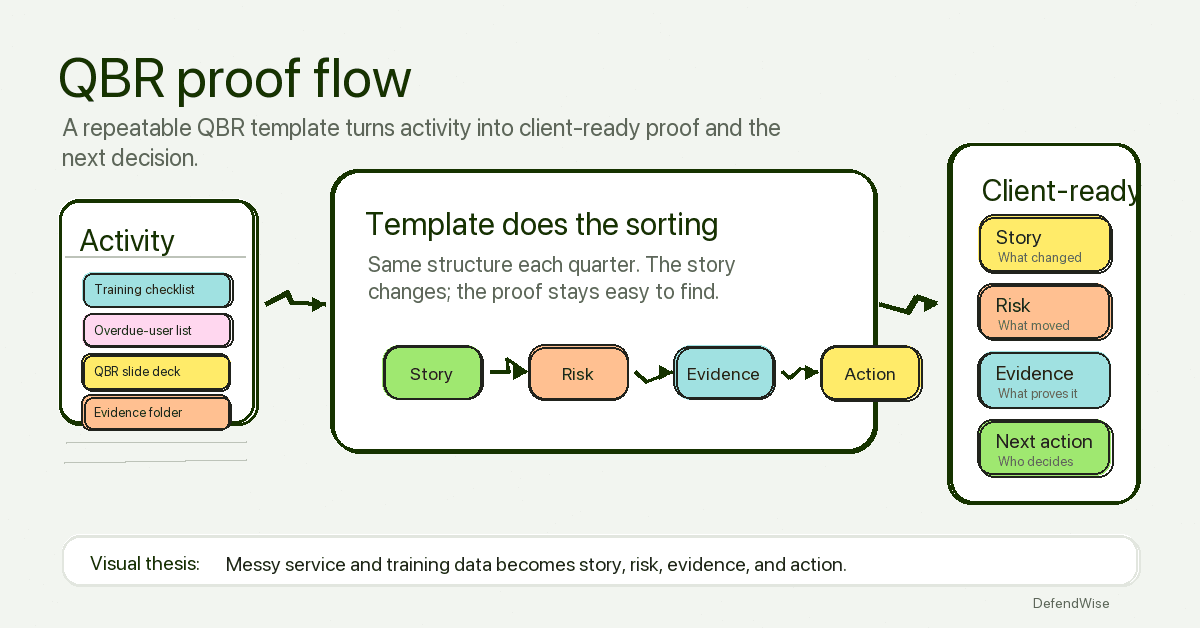
- Source TL;DR: Reporting templates for MSP quarterly business reviews should turn security-awareness activity into client-ready evidence and next actions. The visual story is activity data becoming risk insight, proof, and a clear next-quarter decision.
- Primary pillar: zero admin
- Infographic thesis: A repeatable QBR flow turns messy service and training data into 4 clean outputs: story, risk, evidence, action.
- Suggested layout: flow
- Short on-image text candidates: “Activity”, “Risk”, “Evidence”, “Next action”, “QBR proof flow”
- Key objects: QBR slide deck, training completion checklist, overdue-user list, evidence folder, arrow flow, client decision card
- Avoid: fake metrics, vendor logos, compliance badges, unreadable UI labels, security-theatre props, generic cyber metaphors, padlocks, hoodies, matrix code
- Crop needs: 1200x628 blog/OG, plus social-safe 1200x627
Sources
- ReportingMSP, “MSP QBR Template: What to Include and How to Run One That Clients Actually Value” — https://reportingmsp.com/blog/msp-qbr-template
- NinjaOne, “Creating an IT QBR Template for SMBs” — https://www.ninjaone.com/blog/creating-an-it-qbr-template-for-smbs
- Guardz, “The Ultimate Quarterly Business Review (QBR) Checklist for MSPs” — https://guardz.com/blog/the-ultimate-quarterly-business-review-qbr-checklist-for-msps
- Axcient, “The Four Rs of MSP QBR Success: A Handbook” — https://axcient.com/blog/the-four-rs-of-msp-qbr-success-a-handbook
- CIS, “Control 14: Security Awareness and Skills Training” — https://www.cisecurity.org/controls/security-awareness-and-skills-training
- CIS Controls Assessment Specification, “CIS Control 14: Security Awareness and Skills Training” — https://cas.docs.cisecurity.org/en/latest/source/Controls14
- NIST, “Cybersecurity Framework” — https://www.nist.gov/cyberframework
- NIST, “The NIST Cybersecurity Framework (CSF) 2.0” — https://nvlpubs.nist.gov/nistpubs/CSWP/NIST.CSWP.29.pdf
- ISMS.online, “ISO 27001 Clause 7.3 Awareness Requirements” — https://www.isms.online/iso-27001/requirements-2022/7-3-awareness-2022
- Phin Security, “How MSPs Meet Compliance and Cyber Insurance Requirements with Cybersecurity Awareness Training” — https://www.phinsecurity.com/blog/how-msps-meet-compliance-and-cyber-insurance-requirements-with-cybersecurity-awareness-training
- Huntress, “Think Technology Australia Case Study” — https://www.huntress.com/why-huntress/case-studies/think-technology-australia
- CISA, “Secure Our World” — https://www.cisa.gov/secure-our-world
- Verizon, “Data Breach Investigations Report” — https://www.verizon.com/business/resources/reports/dbir/