Phishing simulation for MSPs: a practical 2026 client-service guide
Phishing simulation for MSPs should improve client behavior, create clean evidence, and avoid another manual reporting job.
DefendWise
DefendWise
TL;DR
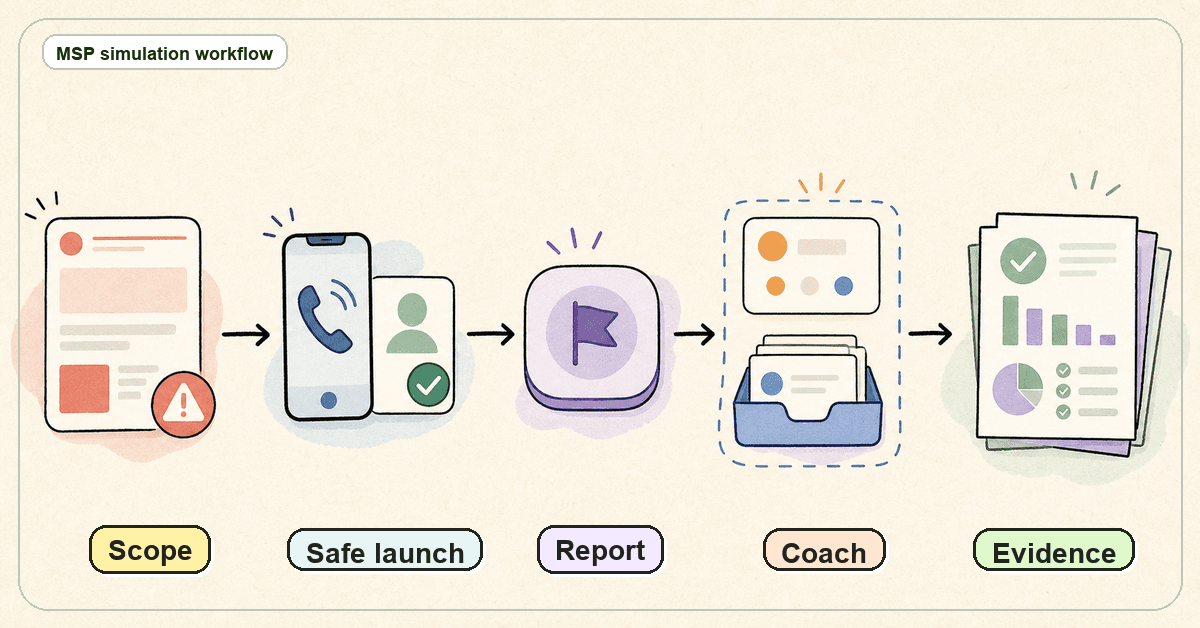
Phishing simulation for MSPs is not a trick-email exercise. It is a repeatable client-service workflow: define scope, launch safely, teach the right lesson, report what happened, and turn the result into a next action.
The MSP problem is scale. A simulation that works for one company can become a mess across 20 clients if every campaign needs manual approvals, copied templates, custom exports, and one-off account-manager notes.
A good MSP phishing simulation program is calm, documented, and evidence-led. It keeps users safe from shame, keeps clients clear on what was tested, and gives the MSP a client-ready report instead of another spreadsheet job.
What is phishing simulation for MSPs?
Phishing simulation for MSPs is the managed process of sending controlled phishing-style exercises to client users so the MSP and client can understand behavior, teach safer habits, and improve reporting workflows.
That definition matters because MSPs are not running a single internal awareness program.
An internal security team can plan for one company, one leadership group, one user directory, one legal culture, and one reporting chain. An MSP has many clients. Each client may have different approval expectations, user groups, industries, tolerance levels, reporting needs, and renewal conversations.
So the MSP version of phishing simulation has to answer more than “did users click?”
It has to answer:
- Which clients are in scope?
- Which users and groups are included?
- Who approved the campaign?
- What kind of lure is acceptable for this client?
- How is reporting handled if a user submits credentials into a simulated page?
- What follow-up training happens after the test?
- What does the client see in the monthly report or QBR?
- What evidence is kept for audit, insurance, or risk-review conversations?
That is why phishing simulation belongs inside a broader awareness program, not as a standalone scare tactic.
CISA’s phishing guidance for small and medium-sized businesses puts the emphasis on teaching employees to avoid phishing and report suspicious messages, not on making people feel foolish CISA phishing guidance. NIST’s small-business phishing guidance also frames phishing as a practical risk that organizations need to recognize and manage NIST phishing guidance. CIS Control 14 places awareness and skills training inside a broader security program, not a one-off quiz CIS Control 14.
For MSPs, the job is to turn that guidance into a repeatable service motion.
Why this matters for MSP owners
Phishing is one of the few security topics every client thinks they understand.
That helps and hurts.
It helps because clients know phishing is real. They have seen suspicious emails, fake login pages, invoice fraud attempts, delivery scams, and urgent password-reset messages. CISA’s social-engineering note gives a plain explanation of how attackers use human trust and urgency to manipulate people CISA social engineering and phishing. The NCSC’s phishing guidance similarly focuses on spotting and reporting suspicious messages NCSC phishing scams guidance.
It hurts because many clients reduce the whole subject to “send a fake email and see who clicks.”
That is too thin for an MSP service.
A phishing simulation can become useful in 4 ways:
- Behavior signal. It shows whether users notice and report a suspicious message.
- Process signal. It shows whether the client has a reporting path people actually use.
- Training signal. It shows which topics need reinforcement.
- Evidence signal. It gives the MSP a dated record that can support client reviews, cyber insurance conversations, and awareness-program evidence.
None of those are the same as “we caught 12 people.”
MSP owners should care because the commercial model depends on repeatability. If each simulation creates custom setup, custom reporting, and custom explanation, it becomes hard to package. The MSP may sell the service, then quietly absorb the admin work.
That is the margin trap.
The better model is to run simulations as part of a standard client awareness service. The MSP defines what will be tested, how often it will run, what users will see, what follow-up happens, and what the client report will include.
That gives account managers a clear story. It gives service teams a clean process. It gives clients evidence they can understand.
What MSPs actually need from phishing simulation
A phishing simulation tool is not enough.
MSPs need an operating model around the tool.
| MSP job | What good looks like | What to avoid |
|---|---|---|
| Client approval | The client knows the purpose, scope, timing window, and escalation path before the first campaign. | Surprise tests that create political damage or helpdesk confusion. |
| Tenant separation | Each client has clean campaign records, user scope, reporting, and evidence. | Shared exports, unclear labels, or cross-client copy/paste mistakes. |
| Lure selection | Simulations match the client’s risk and maturity without using cruel, sensitive, or misleading themes. | “Gotcha” lures based on layoffs, bonuses, medical issues, tragedy, or panic. |
| Reporting | The client receives a short summary with scope, results, report rate, follow-up, and next actions. | Raw user spreadsheets with no interpretation. |
| Follow-up | Users receive education tied to what happened, and repeat issues become a client conversation. | Sending a test, counting clicks, and moving on. |
| Evidence | The MSP keeps dated records that support awareness-program review without overclaiming compliance. | Screenshots and CSVs with unclear scope, no dates, and no exception trail. |
This is where phishing simulation for MSPs becomes different from a one-company awareness exercise.
The MSP has to design for many clients at once. That means templates, approvals, reporting fields, escalation rules, and evidence standards have to be defined before the campaign is launched.
Step-by-step: run phishing simulation for MSP clients
1. Define the service promise before the first lure
Start with the package, not the template.
Decide whether phishing simulation is included in every managed security plan, offered as an add-on, or reserved for clients with a specific risk or compliance need. Then define the minimum service promise.
A useful promise might be:
- quarterly simulation campaign,
- short follow-up training for users who engage,
- reporting-rate tracking,
- client-ready summary report,
- account-manager talking points,
- annual trend review.
The exact cadence can vary. The point is to define it before sales, service delivery, and account management each invent their own version.
If the MSP cannot describe the service in one paragraph, it is not ready to scale.
2. Get client approval in plain language
Phishing simulation can create trust problems if clients feel surprised.
Before running a campaign, document the purpose, the timing window, the audience, the kinds of lures that are allowed, and the escalation process if a user reports the message to the helpdesk.
Keep the approval language plain.
The client should understand that the goal is to improve recognition and reporting, not to embarrass people. If executives, finance users, or high-risk roles are included, say so. If credential-entry simulation is part of the program, be explicit about what will and will not be collected.
This protects the client relationship and the MSP team.
3. Segment users by risk and role
Do not send the same scenario to every user forever.
A basic campaign can start with broad workforce lures: fake document shares, invoice prompts, password resets, delivery notices, and login-page warnings. More mature programs can add role-aware scenarios for finance, executives, helpdesk, HR, and operations.
Segmentation should still stay fair.
The purpose is to teach relevant judgment, not to design a perfect trap. If finance users regularly handle invoice changes, a payment-verification scenario can be useful. If executives receive urgent document requests, executive-focused phishing education may be useful. If helpdesk users receive password-reset and MFA questions, simulate the kinds of prompts they need to slow down and verify.
Role-aware does not mean cruel.
4. Test reporting, not only clicking
A simulation that only measures clicks is incomplete.
Clients need to know whether users report suspicious messages, whether the reporting path works, and whether the helpdesk or security process responds correctly. CISA emphasizes reporting suspicious emails as part of phishing readiness CISA phishing guidance. Microsoft’s Attack Simulation Training documentation also treats simulation as part of a workflow that includes payloads, training assignments, and reporting Microsoft Attack Simulation Training.
For an MSP, reporting behavior is commercially useful because it creates a better client conversation.
A click rate can make a client defensive. A reporting-rate conversation can be constructive:
- Do users know where to report?
- Is the button or mailbox easy to find?
- Does the helpdesk know what to do when reports arrive?
- Are users getting feedback after reporting?
- Are repeated reports creating better triage or just more noise?
That is a better service conversation than “people failed.”
5. Use immediate follow-up training carefully
Follow-up training should be fast, specific, and respectful.
If a user clicks a simulated phishing link, the lesson should explain the cues they missed and what to do next time. It should not shame them. If a user reports the message, reinforce the reporting behavior.
NIST SP 800-50 Rev. 1 is about building a cybersecurity and privacy learning program, which is broader than a single campaign NIST SP 800-50 Rev. 1. That framing is useful for MSPs: the simulation is one learning moment inside a continuing program.
Keep the lesson short. Users do not need a lecture every time. They need a clear explanation, a practical habit, and a way to report the next suspicious message.
6. Turn results into a client-ready report
The report is where many MSP programs lose value.
The client does not need a giant export. They need to know what happened, what it means, and what should happen next.
A strong phishing simulation report includes:
- client name and reporting period,
- campaign purpose,
- users in scope,
- scenario category,
- launch date and close date,
- engagement result,
- report result,
- follow-up training assigned,
- exceptions or notable issues,
- recommended next action.
Avoid overstating the results. A single simulation is not a full measure of security culture. It is one signal. Pair it with training completion, reporting behavior, helpdesk feedback, real incident trends, and client risk context.
Verizon’s DBIR is useful background for why human behavior remains part of breach conversations, but MSPs should avoid dropping big benchmark numbers into client reports unless they have read and can explain the source in context Verizon DBIR. APWG’s trend reports are useful for current phishing landscape context, but they should not be used to imply a specific client is at a quantified risk without evidence APWG phishing trends reports.
7. Keep evidence clean and modest
Phishing simulation can support audit, cyber insurance, and risk-review conversations. It should not be sold as proof that a client is safe.
The safe evidence claim is modest:
“This shows the client ran phishing awareness activity, tracked participation and reporting, assigned follow-up training, and reviewed the results.”
That is useful.
It is not the same as saying the client is compliant, insured, or protected from phishing.
For MSPs, clean evidence means dated campaign records, user scope, training follow-up, exceptions, and client summaries. It also means clear tenant labels and source records. If a client asks for proof 6 months later, the MSP should be able to find it without rebuilding the story.
What good looks like
A mature MSP phishing simulation program feels boring in the best way.
The client knows the cadence. The account manager knows what will be reported. The service desk knows what to do if users report the simulation. The campaign owner knows which lures are approved. Users receive respectful coaching. The final report is short enough for a business owner to read.
Good looks like this:
- A standard approval note before campaigns begin.
- A safe lure library with banned themes.
- Role-aware scenarios for finance, executives, helpdesk, HR, and operations.
- Reporting behavior tracked alongside click behavior.
- Follow-up training assigned quickly.
- Client reports that show scope, results, follow-up, and next actions.
- Evidence records that can support risk, insurance, and compliance discussions without making guarantees.
- A flat service package that does not require custom quoting for every user change.
Good also means the MSP can explain the program without sounding like it is trying to catch people.
The phrase is not “we trick your staff.”
The phrase is “we help your people recognize and report suspicious messages, then give you evidence and next actions.”
Mistakes to avoid
Mistake 1: treating simulation as a gotcha campaign
A gotcha campaign may create a spike of attention, but it can damage trust.
Avoid sensitive topics, humiliating results, public leaderboards, and punitive messaging. If users believe the MSP is trying to embarrass them, they will resist the program or hide mistakes. That is the opposite of useful reporting behavior.
Mistake 2: measuring only the click rate
Click rate is easy to understand, but it is not enough.
Track reporting behavior, follow-up completion, repeat issues, role-specific patterns, and whether the client took action after the report. A low click rate with a low report rate may still mean users are ignoring suspicious messages rather than handling them well.
Mistake 3: running simulations without helpdesk preparation
If a simulated phish generates tickets, the helpdesk needs to know what to do.
Prepare internal routing before the campaign. Decide what happens if a user calls, forwards the email, opens a ticket, or asks whether the message is real. If the team is unprepared, the simulation tests the MSP’s process by accident.
Mistake 4: letting every client become a custom project
Custom work can be justified for high-risk or regulated clients, but it should not be the default.
MSPs need standard campaign types, report templates, approval language, and evidence fields. Otherwise, the service becomes hard to price and hard to scale.
Mistake 5: overclaiming compliance or risk reduction
Phishing simulation can support awareness evidence. It cannot prove that a client will not be phished.
Be precise. Say the program supports training, reporting, and evidence. Do not claim it guarantees compliance, stops phishing, satisfies insurance, or fixes human risk by itself.
Framework and evidence mapping
MSPs do not need to turn every phishing simulation into a compliance lecture. They do need to understand where the evidence may fit.
| Evidence item | Why it matters | What it may support |
|---|---|---|
| Client approval and campaign scope | Shows the simulation was authorized and bounded. | Governance, risk-review, account-management records. |
| Users in scope | Shows who was included and which groups were tested. | Awareness-program evidence and coverage discussion. |
| Scenario category | Shows what behavior was being taught or tested. | Training-plan review and role-specific awareness planning. |
| Report behavior | Shows whether users know how to escalate suspicious messages. | Incident-reporting and phishing-readiness conversations. |
| Follow-up training | Shows the program responded to the result. | Awareness-program improvement evidence. |
| Client summary report | Turns activity into a decision. | QBRs, renewals, cyber insurance, and audit-support discussions. |
Use “may support” deliberately.
A phishing simulation report is one piece of evidence. It does not replace access controls, MFA, email security, incident response, backup, endpoint controls, or client governance.
How a flat-rate MSP SAT platform helps
A flat-rate MSP SAT platform helps when the MSP wants phishing education and awareness training to be part of the standard client service, not a fragile add-on.
DefendWise is built for MSPs with $399/month flat pricing, unlimited users, unlimited client organizations, multi-tenant management, white-label delivery, automated onboarding, AI-native training content, Microsoft 365 sync, Zapier integration, and branded reporting. Those are safe public claims from the current DefendWise source-of-truth and claim register.
The practical value for phishing simulation is not a louder dashboard. It is a cleaner service motion.
If the MSP can include every user, separate clients cleanly, automate onboarding, and produce branded reports, phishing simulation becomes easier to package. It becomes part of the managed security rhythm instead of another manual campaign chore.
For related operating-model decisions, see DefendWise’s pages on flat-fee pricing, multi-tenant management, white-label delivery, automation, and automated reports. For a broader MSP awareness program view, see Security awareness training for MSPs and Measure security awareness effectiveness.
Frequently asked questions
What is phishing simulation for MSPs?
Phishing simulation for MSPs is a managed workflow for testing, teaching, reporting, and following up on phishing behavior across multiple client organizations. The MSP has to handle client approvals, tenant separation, campaign scope, reporting, and evidence without creating a manual admin burden.
How often should MSPs run phishing simulations for clients?
The right cadence depends on client risk, role sensitivity, contract scope, and user tolerance. A single annual simulation is usually too thin for a service program, but constant testing can create fatigue. Many MSPs should start with a clear recurring cadence, then adjust for high-risk roles or client-specific needs.
Should phishing simulations be punitive?
No. Phishing simulations should teach and improve reporting behavior. Public shaming, leaderboards, and punitive language can reduce trust and make users less likely to report real mistakes.
What should an MSP phishing simulation report include?
It should include client name, period, purpose, users in scope, scenario category, launch and close dates, user engagement, reporting behavior, follow-up training, exceptions, and recommended next action. The report should be written for a client decision-maker, not only a security analyst.
Is click rate the most important phishing simulation metric?
Click rate is useful, but it is not enough. Reporting rate, repeat behavior, role-specific patterns, follow-up completion, and client action after the report often tell a better service story.
Can phishing simulation prove compliance?
No. Phishing simulation can support awareness-training evidence for frameworks, audits, and cyber insurance conversations. It should not be presented as proof of compliance, risk elimination, or insurance readiness by itself.
How can MSPs avoid phishing simulation fatigue?
Use short, relevant scenarios; avoid cruel lures; vary the lesson; reinforce reporting behavior; and connect each campaign to a clear client outcome. If users only experience simulations as random traps, fatigue and resentment rise.
Where does DefendWise fit?
DefendWise fits MSPs that want security awareness training, phishing education, onboarding, and reporting to operate as a repeatable client service. The platform is flat-fee at $399/month, built for MSPs, and supports unlimited users, unlimited client organizations, white-label delivery, multi-tenant management, automated onboarding, AI-native training content, and branded reporting.
Header image brief for Picasso
- Source TL;DR: Phishing simulation for MSPs is not a trick-email exercise. It is a repeatable client-service workflow: define scope, launch safely, teach the right lesson, report what happened, and turn the result into a next action. The MSP problem is scale: across many clients, simulations need approvals, reporting, follow-up, and evidence without manual admin sprawl.
- Primary pillar: zero admin / white-label-multi-tenant
- Infographic thesis: Show phishing simulation moving through a calm MSP operating lane from client scope to safe launch, user learning, reporting, follow-up, and evidence pack.
- Suggested layout: flow
- Short on-image text candidates: "Scope", "Safe launch", "Report", "Coach", "Evidence", "Next action"
- Key objects: MSP control desk, separated client cards, simulated email envelope, report button, coaching note, evidence/report pack, arrows connecting the steps
- Avoid: padlocks, hoodies, matrix rain, scary fake inboxes, vendor logos, fake metrics, compliance badges, shaming scoreboards, unreadable UI labels, claims that simulations stop phishing
- Alt text: Doodle-style MSP workflow map showing phishing simulation moving from client scope to safe launch, reporting, follow-up, and evidence packs.
- Crop needs: 1200x628 blog/OG, plus social-safe 1200x627
Source notes
External sources checked and used:
- CISA — Teach Employees to Avoid Phishing: https://www.cisa.gov/audiences/small-and-medium-businesses/secure-your-business/teach-employees-avoid-phishing
- CISA — Avoiding Social Engineering and Phishing Attacks: https://www.cisa.gov/news-events/news/avoiding-social-engineering-and-phishing-attacks
- NIST — Phishing: https://www.nist.gov/itl/smallbusinesscyber/guidance-topic/phishing
- NIST CSRC — SP 800-50 Rev. 1, Building a Cybersecurity and Privacy Learning Program: https://csrc.nist.gov/pubs/sp/800/50/r1/final
- CIS Controls — Control 14, Security Awareness and Skills Training: https://www.cisecurity.org/controls/security-awareness-and-skills-training
- NCSC — How to spot and report phishing scams: https://www.ncsc.gov.uk/collection/phishing-scams
- Microsoft Learn — Attack Simulation Training: https://learn.microsoft.com/en-us/defender-office-365/attack-simulation-training-get-started
- Verizon — Data Breach Investigations Report hub: https://www.verizon.com/business/resources/reports/dbir/
- APWG — Phishing Activity Trends Reports: https://apwg.org/trendsreports
Internal DefendWise links used:
- https://www.defendwise.com/features/flat-fee
- https://www.defendwise.com/features/multi-tenancy
- https://www.defendwise.com/features/white-label
- https://www.defendwise.com/features/automation
- https://www.defendwise.com/features/automated-reports
- https://www.defendwise.com/blog/security-awareness-training-for-msps
- https://www.defendwise.com/blog/measure-security-awareness-effectiveness
Claim-safety notes:
- Used only claim-register-safe DefendWise claims: $399/month flat, unlimited users, unlimited client organizations, built for MSPs, white-label, multi-tenant, automated onboarding, AI-native training content, Microsoft 365 sync, Zapier integration, and branded reporting.
- Did not use unsupported ROI, time-saved, compliance-guarantee, insurance-outcome, phishing-prevention, 30% coverage, 12–19 admin-hours, named testimonial, competitor-pricing, or customer-success claims.
- Used external reports as context without quoting precise incident or phishing statistics, because the draft does not need hard benchmark numbers to make the MSP operating argument.