Security awareness training for MSPs: a practical 2026 guide
Security awareness training for MSPs should create client-ready evidence, reduce admin work, and cover every user without seat-count friction.
DefendWise
DefendWise
TL;DR
Security awareness training for MSPs is not just a course library. It is an operating system for covering many client workforces, proving that training happened, and turning human-risk data into clear service conversations.
The hard part is not telling users to spot phishing. The hard part is doing it across every client without rebuilding tenant setup, chasing seat counts, exporting spreadsheets, or writing a custom report for every renewal.
A good MSP security awareness training program needs 6 things: clear client scope, automated onboarding, recurring training, exception handling, client-ready reporting, and evidence that maps cleanly to risk, cyber insurance, and compliance conversations. The platform should make those jobs easier, not add another monthly admin queue.
What is security awareness training for MSPs?
Security awareness training for MSPs is the process of delivering cyber awareness education, phishing education, reporting, and evidence across multiple client organisations as part of a managed service.
That sounds simple until the second client is added.
An internal IT team trains one organisation. It has one HR list, one identity tenant, one reporting line, and one executive audience. An MSP has many clients, many user populations, many renewal dates, many risk appetites, and many account managers asking for proof before a QBR.
That changes the job.
For an MSP, security awareness training has to answer practical questions:
- Which client organisations are in scope?
- Which users are active, overdue, exempt, or newly onboarded?
- Which sensitive roles need extra attention?
- What evidence can be shown to the client without exposing another tenant?
- What story belongs in the QBR or renewal conversation?
- How much admin work does each extra client create?
- Does the commercial model encourage broad coverage or careful rationing?
Security awareness training also sits inside a broader control story. CISA tells small and medium-sized businesses to teach employees how to avoid phishing and to make phishing reporting easy CISA phishing guidance. CIS Control 14 focuses on establishing and maintaining a security awareness program that changes workforce behaviour CIS Control 14. NIST CSF 2.0 includes awareness and training under Protect, PR.AT NIST CSF PR.AT.
None of that means training is a magic shield. It is not.
It means clients increasingly expect MSPs to show that training exists, that users are covered, that exceptions are visible, and that follow-up is happening. The MSP needs a delivery model that can prove those basics without turning the service desk into a training-administration team.
Why this matters for MSP owners
Security awareness training matters commercially because MSPs are not only buying a tool. They are deciding how to package human-risk work for clients.
If training is sold as a one-off resale item, the workflow is basic: quote seats, bill seats, deliver seats. That can work for a narrow client request.
But most MSP owners are trying to build repeatable managed security packages. They want services that can be included across the client base, explained in plain language, and renewed without renegotiating every minor user-count change.
That is where security awareness training can become either a strong package component or a quiet margin leak.
The wrong model creates friction:
- Sales hesitates to include training because the per-user bill is unpredictable.
- Service teams spend time cleaning user lists instead of improving client risk posture.
- Account managers receive raw exports instead of client-ready summaries.
- Smaller clients get left out because the MSP is trying to protect margin.
- Compliance and insurance conversations rely on screenshots instead of repeatable evidence.
The right model helps the MSP do 3 things at once.
First, it supports broader client coverage. If the MSP wants every user at every managed client included, the pricing and workflow should not punish that choice.
Second, it gives account managers something useful to say. A client-ready report should show scope, completion, overdue users, exceptions, and next actions without drowning the client in learner-level data.
Third, it creates evidence. Training records can support conversations about phishing readiness, policy adoption, insurance questionnaires, and frameworks such as NIST CSF or CIS Controls. They should not be overstated into compliance guarantees, but they should be easy to find when the client asks.
What MSPs actually need from security awareness training
MSPs need less theatre and more operating discipline.
A good MSP security awareness training motion should make the following jobs repeatable.
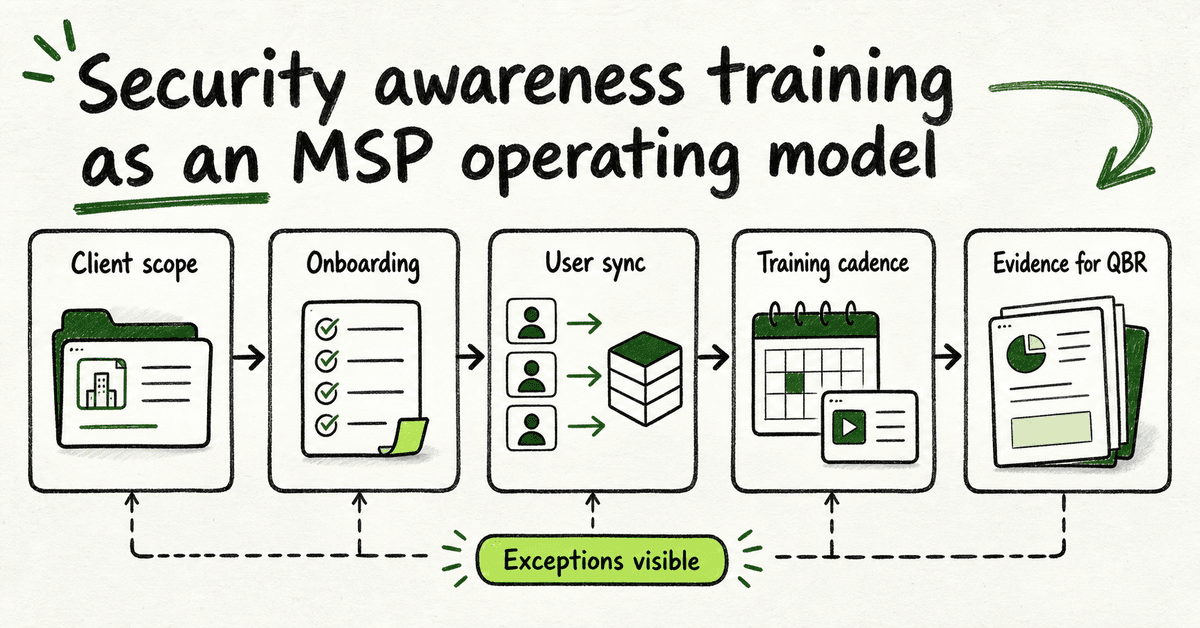
| MSP job | What good looks like | What to avoid |
|---|---|---|
| Client onboarding | New clients can be added with a standard checklist, clear tenant separation, and branded client-facing materials. | Manual rebuilds, copied settings, and one-off onboarding notes that live in an engineer's head. |
| User management | Users sync or update predictably, stale users are visible, and exceptions have owners. | Monthly seat-count archaeology and surprise bills caused by inactive users. |
| Training cadence | The MSP can run short recurring training and timely refreshers, not one annual checkbox. | A yearly module that creates no follow-up and no account-management conversation. |
| Reporting | Account managers get a clear client summary with coverage, completion, overdue users, and next actions. | Raw CSV exports pasted into QBR decks. |
| Evidence | The source record is easy to export, explain, and tie back to the client. | Screenshots with unclear dates, missing tenant labels, or no exception history. |
| Commercial model | Coverage can expand without making the MSP afraid of every new seat. | A pricing model that quietly discourages full-client coverage. |
That table is the real buying checklist.
Course content matters, but it is only one part of the service. If the MSP cannot onboard clients quickly, separate tenants, report cleanly, or explain exceptions, the content library will not fix the operating problem.
Step-by-step: build an MSP security awareness training motion
1. Define the client scope before picking content
Start with the commercial and operating scope, not the module list.
Decide whether security awareness training is included for every managed client, offered as a paid add-on, or reserved for higher-tier security packages. Then decide whether the default is every user, only named users, or only high-risk roles.
For most MSPs, the strongest client story is broad coverage. It is easier to explain, easier to defend, and easier to report. If coverage is partial, document why. Otherwise, an account manager may later have to explain why one department, seasonal worker group, or client site was excluded.
2. Standardise the onboarding checklist
Every client should move through the same setup path.
A practical onboarding checklist includes client name, tenant identifier, branding status, user source, sensitive-role groups, training cadence, report owner, escalation contact, exception process, and first review date.
This is where multi-tenant management matters. The MSP needs clean separation between clients, but it also needs one place to see what is happening across the base. If every client is effectively a separate portal project, the administrative load compounds quickly.
3. Make user lifecycle management boring
Security awareness training breaks down when user lists drift.
New starters need to be included. Leavers need to be removed or marked inactive. Shared mailboxes, service accounts, contractors, and executives need clear rules. Sensitive roles may need different follow-up or reporting.
Microsoft 365 sync can help, but only if the MSP still defines the operating policy. Sync should support the process; it should not become a mystery feed. Record which groups are in scope, how often updates run, who owns exceptions, and what happens when a user looks wrong.
4. Use a recurring cadence, not one annual event
Annual training is easy to sell and easy to ignore.
CISA's small-business phishing guidance explicitly warns that once-a-year training is not enough when attackers change tactics CISA phishing guidance. MSPs do not need to bury users in training, but they should build a recurring cadence that keeps the topic alive.
A practical model is short baseline training for all users, targeted refreshers for higher-risk groups, phishing education tied to real reporting behaviour, and follow-up for overdue users. Keep it light enough that clients will tolerate it, but regular enough that the MSP has a current evidence trail.
5. Separate normal activity from exceptions
Not every training event needs a ticket.
A completion is normal. A reminder is normal. A user being 1 day overdue is usually normal. If the PSA fills with ordinary training events, the service desk will tune out.
Create tickets or account-manager actions for exceptions: a sensitive-role user overdue past the threshold, a client below the agreed completion target, repeated non-completion, a sync failure, missing evidence before a renewal, or a high-risk campaign that needs follow-up.
This keeps the service motion useful instead of noisy.
6. Build the client report before the first QBR
Do not wait until the account manager asks for a deck.
Define the report fields early: client, period, users in scope, users assigned, completed users, overdue users, exceptions, phishing education activity where available, evidence link, and recommended next action.
The report should be plain enough for a business owner. It should not require the client to interpret a learner spreadsheet. The goal is to show what happened, what remains open, and what decision or behaviour change is needed.
7. Keep compliance language disciplined
Security awareness training supports compliance and insurance conversations, but it should not be oversold.
NIST SP 800-50 is specifically about building an information technology security awareness and training program NIST SP 800-50. CIS Control 14 and NIST CSF PR.AT also make awareness and training part of a broader control environment CIS Control 14, NIST CSF PR.AT.
That is useful evidence. It is not proof that the client is compliant, insured, or safe. Train account managers to say: "This supports the evidence pack," not: "This makes you compliant."
What good looks like
A mature MSP security awareness training motion is easy to recognise.
The client onboarding steps are written down. The user source is known. The training cadence is predictable. The reporting pack exists before a QBR is scheduled. Exceptions are visible. Evidence is exportable. Account managers can explain the value without calling an engineer.
Good also looks calm.
There is no panic before renewal meetings. There is no monthly scramble to reconcile seats. There is no mystery around which clients are included. There is no raw spreadsheet passed to a business owner with a note that says "see attached."
A strong MSP program has these maturity signals:
- Every client has an owner, training cadence, report owner, and first review date.
- Users are synced or reviewed on a consistent schedule.
- Exceptions have named owners and thresholds.
- Training reports roll into QBRs or monthly service reviews.
- Evidence exports have dates, tenant labels, and source context.
- The MSP can explain the commercial model in one sentence.
- Sales can include training without creating a custom margin calculation every time.
The best programs also connect training to adjacent security work. Phishing education should sit beside MFA, reporting buttons, identity monitoring, incident response, and client communication. CISA's Secure Our World campaign keeps the user-facing basics clear: strong passwords, MFA, update discipline, and phishing awareness CISA Secure Our World. The US Small Business Administration's cybersecurity guidance points small businesses toward training employees, securing accounts, backing up data, and protecting networks as part of a wider safety posture SBA cybersecurity guidance. NIST's small-business cybersecurity resources also frame awareness as one part of a broader program NIST Small Business Cybersecurity Corner.
That broader view helps the MSP avoid pretending that training alone carries the whole security story. It also keeps phishing training grounded in real user behaviour: CISA's older social-engineering note still gives a plain definition of social engineering and phishing that MSPs can translate for clients CISA social engineering and phishing.
Mistakes to avoid
Mistake 1: treating MSP training like single-company training
A single-company tool can look fine in a demo and still be painful for an MSP.
If tenant setup, branding, reports, and user lists are all managed client by client, the platform may not fit the MSP operating model. The issue is not whether training exists. The issue is whether the MSP can run it across the base without hidden labour.
Mistake 2: buying content without checking reporting
Security awareness vendors often lead with courses, videos, quizzes, and phishing templates.
MSPs should inspect the reporting path just as hard. Ask what the client sees, what the account manager sees, how evidence is exported, whether tenant labels are clear, and whether the report helps a renewal conversation.
A beautiful module with poor reporting still leaves the MSP doing manual work.
Mistake 3: letting per-seat pricing shape risk coverage
Per-seat pricing is not automatically wrong. It is just a bad fit when it makes the MSP ration coverage.
If every extra user increases the vendor bill, the MSP may start excluding smaller clients, shared sites, seasonal teams, or low-margin accounts. That can create a coverage gap that is hard to explain later.
Run the pricing model against the service goal. If the goal is "train every user across the client base," the commercial model should support that goal.
Mistake 4: overclaiming compliance value
Training evidence can help with frameworks, policies, insurance questionnaires, and audit conversations.
It should not be sold as a compliance result by itself. The safer language is: "This gives you evidence for the awareness-training part of the conversation." Keep the claim tied to the evidence, not the outcome.
Mistake 5: reporting activity instead of decisions
A client does not need 14 pages of completion rows.
They need to know whether users are covered, whether risk is improving, what is overdue, what exceptions exist, and what action is needed. If the report does not create a decision, shorten it.
Framework and evidence mapping
MSPs do not need to turn every security awareness training report into a compliance lecture. They do need to know where the evidence may fit.
Here is a practical mapping:
| Evidence item | Why it matters | Framework conversation it may support |
|---|---|---|
| Users in scope | Shows who the MSP intended to cover. | Policy, cyber insurance, NIST CSF PR.AT context. |
| Assignment and completion records | Shows training was delivered and completed. | CIS Control 14, NIST SP 800-50 program evidence. |
| Overdue and exception records | Shows follow-up is managed, not ignored. | Governance, risk review, client accountability. |
| Phishing reporting education | Supports the behaviour CISA wants employees to practice: recognise and report suspicious messages. | Phishing readiness, incident reporting, security culture. |
| Client-ready summary | Helps business owners decide what to do next. | QBRs, renewal reviews, policy reviews. |
The important phrase is "may support." A training report can support an evidence pack. It does not replace access control, incident response, backup, endpoint protection, vulnerability management, or the client's own governance obligations.
That discipline protects both the MSP and the client.
How a flat-fee MSP SAT platform helps
A flat-fee MSP SAT platform helps when the MSP wants broad coverage without turning every new user into a billing decision.
DefendWise is built for this model: $399/month flat, unlimited users, unlimited client organisations, white-label delivery, multi-tenant management, automated onboarding, Microsoft 365 sync, Zapier integration, AI-native training content, and branded reporting. For MSP owners, the point is not a louder course library. It is a cleaner service motion: cover more users, reduce seat-count friction, and give account managers client-ready evidence.
If your current training program only works when someone manually babysits it every month, it is not really an MSP-ready program yet.
Frequently asked questions
What is security awareness training for MSPs?
Security awareness training for MSPs is a repeatable service motion for delivering training, phishing education, reporting, and evidence across multiple client organisations. It has to handle tenant separation, client branding, user lifecycle changes, exception tracking, and client-ready reporting.
How is MSP security awareness training different from internal company training?
An internal company trains one workforce. An MSP has to manage many clients, separate tenant records, different renewal dates, different user populations, and different client reporting needs. That makes onboarding, user sync, reporting, and commercial packaging just as important as the training content.
What should an MSP security awareness training program include?
It should include client onboarding, user sync, baseline training, recurring refreshers, phishing education, reminder handling, exception tracking, client-ready reporting, and evidence export. It should also define who owns follow-up when a sensitive-role user, executive, or whole client group is overdue.
How often should MSP clients receive security awareness training?
A once-a-year course is usually too thin for modern phishing and social-engineering risk. A practical MSP cadence uses baseline onboarding training, short recurring refreshers, targeted follow-up for higher-risk users, and reporting that stays current enough for service reviews.
Should MSPs resell per-seat security awareness training?
Per-seat resale can work for small fixed scopes where the MSP passes the cost through cleanly. It is weaker when training is part of a managed security package because user growth can create billing cleanup, margin pressure, and under-coverage. MSPs should compare the vendor bill, admin time, reporting effort, and coverage goal before choosing.
What reporting should MSPs give clients?
Clients need a short summary of users in scope, assigned users, completed users, overdue users, exceptions, evidence links, and recommended next actions. Keep detailed learner rows in the source system unless the client specifically needs them for an audit or internal review.
Can security awareness training help with compliance or cyber insurance?
Yes, security awareness training records can support evidence conversations for frameworks, policies, and insurance questionnaires. They should not be presented as proof that a client is compliant, insurable, or safe by themselves.
Where does DefendWise fit?
DefendWise gives MSPs a flat-fee, multi-tenant, white-label security awareness training platform with unlimited users and unlimited client organisations. It is designed for MSPs that want to include training broadly, reduce admin friction, and produce branded client reporting without seat-count cleanup.
Sources
- CISA: Teach employees to avoid phishing
- CIS: Control 14 — Security Awareness and Skills Training
- NIST CSF 2.0 reference: PR.AT — Awareness and Training
- NIST: SP 800-50 — Building an Information Technology Security Awareness and Training Program
- SBA: Stay safe from cybersecurity threats
- NIST: Small Business Cybersecurity Corner
- CISA: Secure Our World
- CISA: Avoiding Social Engineering and Phishing Attacks