Tips for integrating SAT data into PSA and RMM reports
Tips for integrating SAT data into PSA and RMM reports so MSPs can turn training activity into client-ready evidence.
DefendWise
DefendWise
TL;DR
The best tips for integrating SAT data into PSA and RMM reports are mostly about discipline: choose a small field set, send exceptions to the PSA, keep client health signals clean, and preserve audit-ready source records. A PSA should help the team act on training issues. An RMM or client dashboard should show whether a client is healthy enough to discuss at a QBR. For MSPs, the goal is not to copy every training field into every tool. It is to turn security awareness training data into tickets, evidence, and client conversations without creating another reporting chore.
What SAT data means in PSA and RMM reports
SAT data is the operational record from a security awareness training program. It usually includes assigned campaigns, users in scope, completion status, overdue users, phishing simulation results, report-button activity, reminders, certificates, exceptions, and evidence exports.
A PSA and an RMM do different jobs.
A professional services automation platform is the MSP's service workflow layer. PSA tools usually cover tickets, time, agreements, billing, client ownership, project work, dispatch, and service reporting. A remote monitoring and management platform is the technical operations layer. RMM tools usually cover devices, alerts, patching, scripts, remote access, and endpoint-level reporting.
That distinction matters. Training data should not be dumped into both places just because an integration exists. It should land where it creates action.
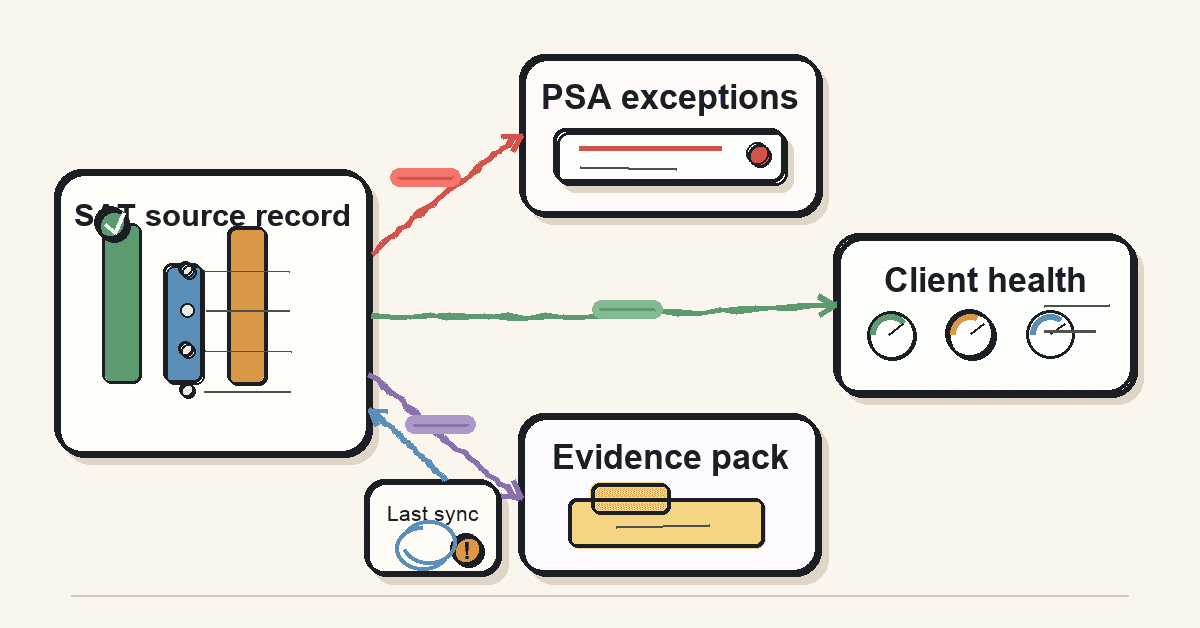
If a client's finance team has 6 overdue users before a cyber insurance renewal, that belongs in a PSA ticket or account task. If the client health report shows coverage trends beside backup, patching, and endpoint signals, that belongs in a client-facing dashboard or RMM-adjacent report. If an auditor asks for proof that a named user completed required awareness training, the source record should remain in the SAT platform or evidence pack, with a link or export in the PSA.
NIST's awareness and training guidance treats training as a program with roles, records, schedules, and evaluation criteria, not a one-off content push. Its archived SP 800-50 has now been superseded by SP 800-50 revision 1, but the old publication still shows the reporting shape MSPs will recognize: audience, schedule, focus areas, evaluation criteria, and records by role. NIST SP 800-53 AT-2 also points to content based on the user's work environment, the systems they access, and actions they should take to respond to suspected incidents.
That is the useful lens for PSA and RMM integration. The integration is not the outcome. The outcome is a clean operating loop:
- Know who is in scope.
- Know what training or simulation they received.
- Know what action is due.
- Route exceptions to the person who owns the client.
- Keep evidence clean enough for QBRs, audits, and renewal conversations.
Why this matters for MSPs
Disconnected reporting creates the same failure pattern across every MSP tool stack: one system knows the truth, another system owns the work, and a human fills the gap.
PSA and RMM vendors talk about this because MSPs live it every day. RMM tools monitor client infrastructure and produce technical alerts. PSA tools run the service desk, contracts, time, billing, and client communication. When those systems are only lightly connected, techs copy context between tabs, tickets lose detail, and reports drift from reality. LogMeIn's RMM/PSA explainer describes the practical value of integration as automatic ticket creation, synchronized client information, reporting that combines technical and business metrics, and less manual data entry. Rev.io makes the same point more bluntly: a shallow integration often passes one subset of data one way, while the tech still opens both systems to understand what happened.
Security awareness data can fall into the same trap.
The SAT platform may show that a client has 92% completion, 14 overdue learners, 3 high-risk roles with no current module, and 2 users who reported a simulated phish correctly. The PSA may show the account manager who owns that client, the renewal date, the agreement tier, open QBR tasks, and active client tickets. The RMM may show device health, patch status, antivirus state, and endpoint coverage. If those signals stay apart, the MSP has data but no operating picture.
The wrong answer is to sync everything. That creates noise.
The better answer is to decide what each system needs to know.
For an MSP owner, the reporting question is commercial: can security awareness training be packaged across every client without a reporting tax? For an MSP operator, the question is workflow: can exceptions become tickets without manual chasing? For a vCISO or security lead, the question is evidence: can the report show scope, completion, exceptions, and follow-up without overstating what training proves?
CIS Control 14 is a useful external anchor here. It says organizations should establish and maintain a security awareness program to influence workforce behavior and reduce cybersecurity risk. The CIS assessment specification then breaks the first safeguard into records a report can actually carry: workforce members, most recent completion dates, users who have completed training, users who have not, and whether training is up to date. That is reporting language, not marketing language.
MSPs can use that same structure for client reports.
What MSPs actually need before integrating anything
Before building a Zap, API sync, dashboard, or PSA custom field, decide what the report is supposed to do.
A good SAT-to-PSA/RMM reporting workflow answers 5 questions:
| Reporting question | Best system of action | Minimum fields to sync | What not to sync |
|---|---|---|---|
| Who is overdue? | PSA ticket or account task | Client, user, campaign, due date, days overdue, evidence link | Full module transcript, quiz answers, raw event stream |
| Is the client ready for QBR? | PSA/QBR report | Completion rate, overdue count, high-risk-role exceptions, report period, source export | Every learner-level row by default |
| Is the client coverage trend improving? | Client dashboard or RMM-adjacent report | In-scope users, active users, completed users, overdue users, trend period | Individual HR details unless the client approved it |
| Is there a compliance evidence gap? | PSA task plus evidence pack | Framework label, control/mapping note, required evidence, missing item, owner | Unsupported control claims or compliance promises |
| Did the sync fail? | PSA internal ticket | Integration name, client, failed step, last successful run, retry result | Secret values, tokens, API payloads with sensitive data |
That table is the starting point. If a field does not answer one of those questions, do not sync it yet.
Keep the SAT platform as the source record
The PSA does not need to become a training database. The RMM does not need learner history. Use the SAT platform as the source record for campaign, learner, module, completion, certificate, phishing simulation, and evidence exports.
The PSA should hold the action trail:
- exception tickets,
- account tasks,
- QBR notes,
- renewal evidence requests,
- manager follow-up,
- client approvals,
- internal ownership.
The RMM or reporting layer should hold client health signals:
- training coverage,
- overdue count,
- evidence readiness,
- trend direction,
- exception status.
This keeps each system honest. It also limits the damage if a field mapping breaks.
Separate client-level reporting from user-level evidence
Most QBRs do not need a spreadsheet of every user. They need a client-level view: how many users were in scope, how many completed training, what changed since the last report, what exceptions remain, and what the MSP recommends next.
Audits, cyber insurance renewals, and client escalations may need user-level evidence. That should be available, but it should not flood normal service reporting.
A simple rule works well: dashboards get summary fields; evidence packs get detail.
Build around exceptions, not activity
A normal completion should not create a PSA ticket. A normal reminder should not create a PSA ticket. A normal scheduled campaign launch should not create a PSA ticket.
Tickets are for work. If the event does not require work, it belongs in a report, not the queue.
Good PSA triggers include:
- a client falls below the agreed completion threshold before a QBR,
- an executive or finance user is overdue,
- a campaign is complete but evidence export failed,
- a sync to the PSA or RMM failed,
- a client has no active training campaign when the service package says they should,
- a cyber insurance renewal task needs the latest training evidence.
That makes SAT reporting useful to the service desk rather than another source of ticket noise.
Step-by-step: how to integrate SAT data into PSA and RMM reports
1. Pick the report before the connector
Do not start with "Can we connect these tools?" Start with "What decision should this report support?"
For MSPs, the 3 common report types are QBR summary, compliance evidence, and service exception. A QBR summary needs trend and client-ready language. Compliance evidence needs source records, dates, scope, and exceptions. A service exception needs a ticket owner and next action.
Write the target report in plain English first. Then map fields.
2. Define one client identifier across systems
Most integration failures start with identity. The SAT platform may call the client a tenant. The PSA may call it a company, account, organization, or customer. The RMM may use site, company, group, or location.
Choose one matching rule before syncing:
- PSA company ID as the master client ID,
- SAT tenant ID stored in a PSA custom field,
- RMM site ID mapped to PSA company ID,
- domain match only as a fallback, not the source of truth.
Do not rely on display names alone. "Acme," "Acme LLC," and "Acme Holdings" will eventually break a report.
3. Use a small field set for the first sync
Start with the fields that create the report:
- client / tenant ID,
- campaign name or ID,
- reporting period,
- assigned user count,
- completed user count,
- overdue user count,
- high-risk-role overdue count,
- evidence export link,
- last sync time,
- sync status.
If you need user-level rows later, add them deliberately. Do not make the first version a data lake.
4. Route exceptions to PSA tickets
The PSA is where work gets assigned. Use it for exceptions.
A good exception ticket should include:
- client,
- service board or queue,
- severity or priority,
- reason for the ticket,
- users or groups affected,
- evidence link,
- recommended next action,
- due date,
- internal owner.
Keep the ticket title human. "SAT evidence export failed for July QBR" is better than "Webhook error 422." The technical detail can live in the body.
5. Keep RMM reporting at the client-health level
RMM dashboards are not the right place for training administration. They can be useful when the MSP wants a single client health view.
The useful RMM-adjacent signals are usually:
- coverage status,
- overdue count,
- evidence readiness,
- last campaign date,
- current exception state,
- link back to the PSA ticket or SAT report.
That lets the client health view show human-risk activity beside endpoint and operational signals without pretending the RMM owns the training workflow.
6. Use Microsoft 365 lifecycle data carefully
Many MSPs want training coverage to follow user joiner, mover, and leaver activity. Microsoft Graph delta queries are relevant because they let applications track additions, deletions, and updates without fetching the full user set every time. Microsoft notes that delta query returns next links and delta links for state tracking, and that clients can use those links to request only changes since the previous request.
That pattern is useful for SAT coverage, but it needs careful field handling. Track the user lifecycle fields the training workflow needs. Avoid syncing more identity data than the report requires.
For MSP reporting, the practical outputs are simple:
- new user added to training scope,
- user disabled or removed,
- group membership changed,
- manager or role field changed if used for campaign assignment,
- sync error requiring operator review.
7. Test failure paths before trusting the report
The happy path is easy. A completion event arrives, the field maps, the report updates.
The hard cases need testing:
- duplicate user,
- renamed client,
- deleted user,
- disabled account,
- moved user,
- campaign renamed mid-period,
- PSA company merge,
- API rate limit,
- partial sync failure,
- expired credential,
- evidence export unavailable.
Microsoft's delta query guidance calls out state tokens, replay, token duration, and reset behavior. That is a good reminder for any MSP sync: the integration should log what it saw, what it changed, and when it last succeeded.
What good looks like
A good SAT-to-PSA/RMM reporting workflow is boring in the best way.
The client report has a simple summary. The account manager can see what changed. The service desk only gets tickets when there is work. The evidence pack links back to source records. The client does not see internal sync noise. The MSP can explain the report without opening 4 systems.
Use this maturity ladder:
| Level | What it looks like | Risk |
|---|---|---|
| Manual export | Someone downloads CSVs and pastes numbers into QBR decks | Slow, error-prone, hard to repeat |
| Summary sync | Client-level SAT metrics appear in PSA/QBR reports | Good first step, but may miss user-level evidence |
| Exception tickets | PSA receives only actionable SAT exceptions | Strong operator fit if thresholds are well chosen |
| Evidence-linked reports | Reports link to source exports and audit packs | Stronger audit posture without flooding dashboards |
| Lifecycle-aware reporting | User changes, campaigns, exceptions, and evidence stay current | Best operating model, but needs careful permissions and failure logging |
Most MSPs should aim for the middle 3 levels first. Manual exports are fragile. Full lifecycle automation is useful, but only after the field model is stable.
Mistakes to avoid
Mistake 1: turning every SAT event into a ticket
Tickets should represent work. If every completion, reminder, and normal campaign update creates a ticket, the team will ignore the integration.
Use thresholds and exceptions. Let the report show normal activity.
Mistake 2: syncing learner-level detail into client health dashboards
A client health report should show enough to act. It should not expose unnecessary personal data or bury the client in rows.
Keep user-level evidence available for audits, manager follow-up, and agreed client workflows. Keep dashboards summary-first.
Mistake 3: mapping by client name
Client names change. PSA company IDs, tenant IDs, RMM site IDs, and verified domains are safer. If the integration depends on a display-name match, it will break under normal MSP operations.
Mistake 4: treating compliance mapping as compliance proof
Training data can support compliance evidence. It does not prove an entire compliance outcome by itself.
Be precise. Say the report shows training scope, completion, exceptions, and evidence for awareness-related requirements. Do not say it proves ISO 27001, NIST, CIS, or cyber insurance readiness by itself.
Mistake 5: hiding sync health
If the integration fails silently, the report becomes worse than manual work. Add a visible "last sync" field and an internal exception path for failures.
A stale report should be obvious before a QBR, not discovered while the client is on the call.
Framework mapping for training evidence
External frameworks are helpful because they describe the record shape MSPs should preserve.
NIST SP 800-53 AT-2 covers literacy training and awareness. Its supplemental guidance says content should reflect organizational requirements, user work environment, authorized systems, and response to suspected incidents. That supports role-aware training data and incident-reporting workflows rather than generic completion-only dashboards.
CIS Control 14 says organizations should establish and maintain a security awareness program to influence workforce behavior and reduce cybersecurity risk. The CIS assessment specification for Safeguard 14.1 includes the workforce list, most recent completion dates, completed users, incomplete users, and whether training is up to date. That gives MSPs a practical evidence model.
For PSA/RMM reporting, translate those ideas into evidence fields:
| Framework idea | Reporting field | MSP workflow |
|---|---|---|
| Workforce in scope | Assigned users / active users | Verify tenant roster and client coverage |
| Initial and current training | Completion date / latest training date | Show completion and stale-training exceptions |
| Role-based content | Role or group assignment | Escalate high-risk-role gaps |
| Response to suspected incidents | Reported phish / suspicious message report | Feed helpdesk triage and client coaching |
| Program review | Last campaign review / content update date | Prepare QBR and renewal evidence |
That is enough for a practical report. Anything more specific should be verified against the client's actual framework, auditor request, insurer questionnaire, or contract language.
How a flat-rate MSP SAT platform helps
DefendWise is built for MSPs that want security awareness training to be part of the service package, not a per-seat reporting project. Multi-tenant management, white-label reporting, Microsoft 365 sync, Zapier integration, and flat-fee unlimited-user pricing give MSPs a cleaner starting point for client-wide coverage and evidence workflows.
The important caveat: PSA and RMM workflows vary by stack. Before promising a specific ConnectWise, Autotask, HaloPSA, NinjaOne, Datto, Kaseya, or custom dashboard workflow, validate the connector, API fields, permissions, retry behavior, and evidence output.
Frequently asked questions
What SAT data should MSPs include in PSA and RMM reports?
Start with the fields that drive action: client, tenant, campaign, in-scope users, completed users, overdue users, exception reason, due date, source evidence link, and last sync time. Add user-level detail only where the client, audit, or manager workflow needs it.
Should security awareness training data live in the PSA or the RMM?
Keep the source record in the SAT platform. Use the PSA for tickets, account tasks, QBR notes, client ownership, and exceptions. Use the RMM or broader client dashboard for summary health signals, not learner administration.
Can Zapier connect SAT data to PSA tools?
Zapier can help with simple automation when the tools expose the right triggers and actions. It is especially useful for low-volume workflows such as creating an exception ticket, notifying an owner, or updating a field. For audit-sensitive or high-volume sync, test API behavior, permissions, retries, logging, and data retention before relying on it.
How often should MSPs sync SAT reporting data?
Daily is enough for most QBR, renewal, and exception workflows. Faster sync can make sense for active phishing simulations, incident follow-up, or high-risk user escalations. Sync timing should match a real action, not a desire to make every dashboard real-time.
How do MSPs avoid noisy training tickets?
Create tickets for exceptions only. Good triggers include overdue executives, coverage below a client threshold, failed evidence export, missing campaign, sync failure, or a cyber insurance evidence request. Normal completions belong in reporting, not the service queue.
What is the difference between a QBR SAT report and audit evidence?
A QBR report is a client conversation tool. It should show trend, coverage, exceptions, and recommendations. Audit evidence is a source-backed record set. It should show scope, dates, users, completion status, exceptions, and exports that can be traced back to the SAT platform.
What is the biggest mistake MSPs make with SAT reporting integrations?
They push too much data too early. A small, reliable field set beats a broad sync that creates ticket noise, stale dashboards, or privacy risk. Start with the report, then map the minimum fields needed to produce it.
How does DefendWise help with PSA and RMM reporting?
DefendWise gives MSPs a multi-tenant, white-label SAT platform with Microsoft 365 sync, Zapier integration, branded reporting, and flat-fee unlimited-user pricing. For a specific PSA or RMM workflow, validate the exact integration path before promising it in a client proposal.