How to use Zapier to automate training ticket creation
How to use Zapier to automate training ticket creation so MSPs can turn training events into clean PSA follow-up.
DefendWise
DefendWise
TL;DR
Learning how to use Zapier to automate training ticket creation is less about building a clever Zap and more about protecting the MSP service queue. The goal is to turn security awareness events into the right follow-up ticket, for the right client, with enough context for a technician or account manager to act.
Start with exceptions, not noise. Overdue users, repeated risky behavior, onboarding gaps, manager escalation, phishing report triage, and audit evidence requests deserve tickets. Ordinary completions usually belong in reports, not in the help desk.
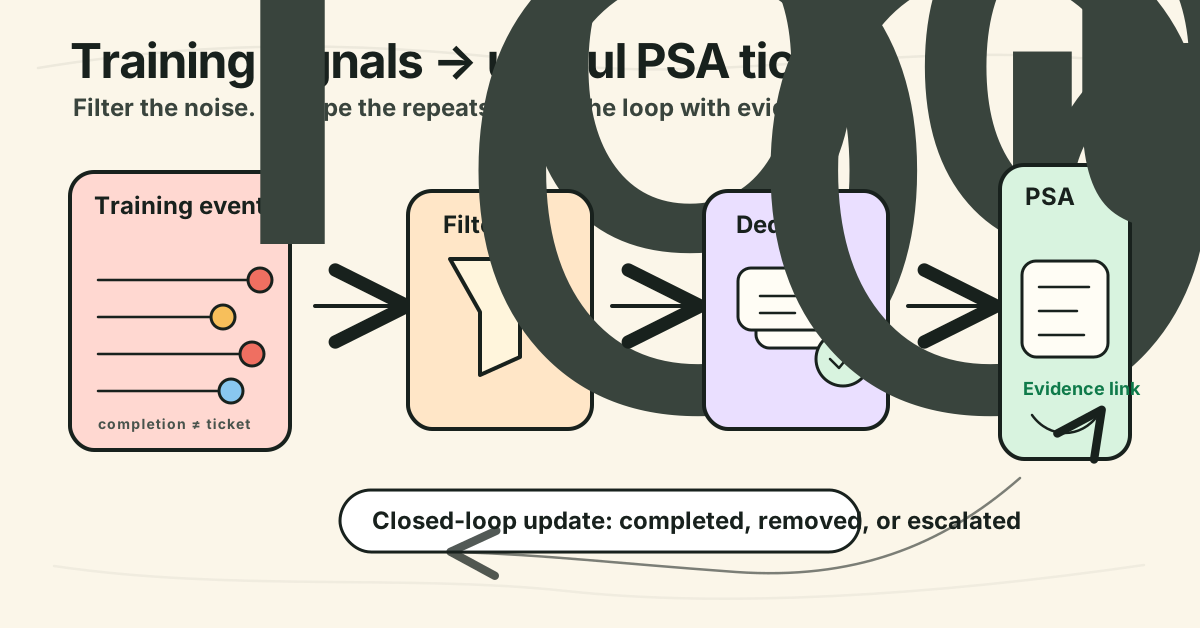
For MSPs, the best workflow is: training event → Zapier trigger or webhook → filter and dedupe → PSA or help-desk ticket → report/evidence link → closed-loop update. Build it once, test it with 1 client, then template it across tenants.
What is automated training ticket creation?
Automated training ticket creation is the workflow that turns a security awareness training event into a structured ticket in the MSP's PSA, help desk, or service-management tool.
For example:
- a new employee is added to a client tenant and training is not assigned,
- a user is overdue on mandatory awareness training,
- a manager needs a follow-up list,
- a phishing simulation failure needs coaching,
- a client asks for audit evidence,
- a high-risk user needs review before the next QBR.
Instead of someone exporting a CSV, filtering rows, copying names into a service ticket, and adding notes by hand, Zapier moves the event into the tool the MSP already works from.
Zapier describes support automation as a way to connect help desk, CRM, and other tools so requests can be routed, enriched, updated, and tracked without manual copy-pasting Zapier support automation. Its ticketing-system guidance is especially relevant here: automations can centralize requests from forms, emails, and chats, create or update tickets, sync status changes, and alert the right teammates.
That same pattern works for security awareness training. The training platform generates the signal. Zapier normalizes it. The PSA becomes the place where the MSP does the follow-up.
Why this matters for MSPs
MSPs do not need more dashboards. They need fewer loose ends.
Security awareness programs produce useful signals: completions, overdue learners, campaign exceptions, phishing reports, training assignments, manager summaries, and evidence exports. But if those signals stay trapped in a training portal, the service team has to remember to check another system.
That breaks down at scale.
A 10-client MSP can sometimes handle awareness follow-up manually. A 50-client MSP cannot rely on memory, spreadsheets, and one person who knows where the exports live. The service desk needs structured work items with client, user, priority, due date, evidence, and next action.
NIST SP 800-50 Revision 1, Building a Cybersecurity and Privacy Learning Program, superseded the older 2003 awareness-training publication and frames security learning as a program that needs planning, implementation, and evaluation NIST SP 800-50 Rev. 1 reference. That matters for MSPs because awareness is not only “send training.” It is also assignment, follow-up, measurement, exceptions, and proof.
Infima's MSP security awareness guide makes the same operational point from a vendor perspective: MSP programs need multi-tenant management, auto-enrollment, automated reminders, reporting automation, PSA integration, and client reporting Infima MSP SAT guide. Treat the statistic-heavy vendor language carefully, but the workflow point is sound: MSPs need the training system to connect to service delivery.
Ticket automation is where the training program becomes work the MSP can actually manage.
What MSPs should automate first
Do not begin with “create a ticket for every event.” That creates a noisy queue and turns automation into busywork.
Start with events where a human needs to act.
| Training event | Should it create a ticket? | Why | Ticket owner |
|---|---|---|---|
| User completes assigned training | Usually no | Completion belongs in reports and evidence | Reporting workflow |
| User is overdue after reminder window | Yes | Someone may need to nudge, escalate, or check employment status | Service desk or client manager |
| New user exists but has no training assigned | Yes | Onboarding gap creates coverage and evidence risk | Onboarding technician |
| Repeated phishing simulation failure | Sometimes | Needs coaching if the client has agreed to that workflow | vCISO or account manager |
| User reports a suspicious email | Yes, if integrated with triage | Reporting can indicate a real incident or coaching opportunity | Security/service desk |
| Client requests audit evidence | Yes | Evidence pack needs assembly and owner | Account manager or compliance lead |
| Monthly report generated successfully | No | Send to report workflow, not service desk | Automated reporting |
| Monthly report failed or has missing data | Yes | Exception needs investigation | Service desk |
The rule is simple: if the ticket has no owner, next action, or closure condition, do not create it.
Step-by-step: how to use Zapier to automate training ticket creation
1. Pick one workflow, not the whole program
Choose one high-value ticket type first.
Good first candidates:
- overdue training follow-up,
- new user missing training assignment,
- high-risk learner review,
- evidence-pack request,
- report generation failure.
Avoid building 8 automations in one pass. If every event becomes a Zap, it becomes hard to know whether a ticket is missing because the training event did not happen, the Zap failed, the filter blocked it, or the PSA action rejected a field.
For a first build, use this goal statement:
When a learner is overdue by more than X days, create or update one client-specific follow-up ticket with learner, course, due date, manager, and evidence link.
That gives the workflow a trigger, threshold, payload, owner, and closure rule.
2. Define the source event and payload
The trigger can come from a native Zapier app event, a training platform trigger, a webhook, a scheduled export, or a form submission.
Zapier's webhook documentation explains that a Catch Hook gives you a unique URL that another app can send GET, PUT, or POST requests to, and that Zapier parses the incoming fields for later steps Zapier webhook documentation. That is useful when the training platform can send events but does not have the exact prebuilt Zap you need.
For training ticket creation, aim to include these fields:
| Field | Example | Why it matters |
|---|---|---|
| Client / tenant | Acme Law | Routes ticket to the right company |
| Learner name | Jordan Smith | Human-readable context |
| Learner email | jordan@example.com | PSA contact matching and follow-up |
| Event type | Training overdue | Ticket category and priority |
| Course or campaign | Phishing Basics | Technician knows the affected assignment |
| Due date | 2026-07-14 | SLA and escalation logic |
| Status | Overdue | Ticket summary and body |
| Manager | Priya Chen | Escalation owner |
| Evidence/report URL | internal link | Avoids hunting through exports |
| Source event ID | sat-evt-12345 | Deduplication and audit trail |
If the source payload does not include the client or learner identity reliably, stop and fix that first. A ticket that cannot map to the correct client will create more work than it saves.
3. Connect the PSA or help desk action
Next, decide where the ticket should land.
Zapier's ConnectWise Manage help article says the app can trigger on new or updated tickets and can create service desk or project tickets, contacts, companies, ticket notes, and ticket updates when the right API member credentials and module permissions are configured Zapier ConnectWise Manage help. Datto's Autotask Zapier integration page similarly lists ticket triggers and actions, including New Ticket, Updated Ticket, Create Ticket, Create Ticket Note, and Update Ticket Datto Autotask Zapier integration. Zapier also lists Halo Service Solutions actions that include creating tickets in Halo Zapier Halo Service Solutions integrations.
The exact fields vary by PSA. Before writing the ticket body, confirm:
- company/client matching method,
- contact matching method,
- board or queue,
- status,
- priority,
- source or category,
- owner or team,
- custom fields,
- ticket note behavior,
- whether you can search for an existing open ticket first.
If the PSA requires an existing company and contact, add “Find Company” and “Find Contact” steps before “Create Ticket.” If those lookup steps fail, route to an exception ticket rather than creating a ticket under the wrong client.
4. Filter aggressively
The most important step is usually the filter.
Zapier's filter and path documentation says filters and paths apply conditional logic so actions are performed only on items that match the rules Zapier filters and paths. For training tickets, that is the difference between a useful service queue and a noisy one.
Example filters:
- only continue if
event_typeexactly matchestraining_overdue, - only continue if
days_overdueis greater than3, - only continue if
client_statusisactive, - only continue if
learner_statusis notterminated, - only continue if
manager_emailexists, - only continue if
source_event_idexists.
Use paths when different events need different ticket shapes.
For example:
- Path A: overdue training → normal-priority follow-up ticket.
- Path B: new user with no training assignment → onboarding exception ticket.
- Path C: report generation failed → internal operations ticket.
- Path D: audit evidence request → account-manager task.
Do not make every path create the same generic ticket. The point of automation is to make the next action clearer.
5. Format the ticket so a technician can act
A good automated ticket does not make a technician log into 3 systems just to understand the problem.
Use a summary like:
Training overdue: {{learner_name}} at {{client_name}} — {{course_name}}
Use a body like:
Client: {{client_name}}
Learner: {{learner_name}} <{{learner_email}}>
Event: {{event_type}}
Course/campaign: {{course_name}}
Due date: {{due_date}}
Days overdue: {{days_overdue}}
Manager: {{manager_name}} <{{manager_email}}>
Evidence link: {{evidence_url}}
Source event ID: {{source_event_id}}

Recommended action:
1. Check whether the learner is still active.
2. If active, send approved reminder or notify manager.
3. If inactive, update user lifecycle source and close with reason.
4. Add note to client report if still overdue at month-end.
Add tags or fields such as:
security-awareness,training-overdue,client-follow-up,qbr-evidence,automation-source-zapier.
HelpDesk's Zapier integration guide shows the basic pattern of choosing a trigger, filtering data, then applying actions such as creating or updating tickets, adding tags, or adding followers HelpDesk Zapier integration. The vendor-specific UI will differ, but the operational structure is the same.
6. Dedupe before you create
Duplicate tickets kill trust in automation.
Use a stable deduplication key. For example:
{{client_id}}:{{learner_email}}:{{course_id}}:{{event_type}}
Before creating a ticket, search for an existing open ticket with that key in the subject, custom field, or body. If one exists, add a note instead of opening another ticket.
A practical rule:
- first overdue event creates the ticket,
- later overdue events update the same ticket,
- completion event closes or notes the ticket,
- inactive-user event routes to lifecycle cleanup.
If the PSA cannot search reliably, store the source event ID or dedupe key somewhere else, such as a small table, Zapier table, spreadsheet, or the training platform's automation history. The goal is not a perfect database. The goal is not opening 5 tickets for 1 overdue learner.
7. Add a closure path
Most MSPs build the “create ticket” side and forget the “close the loop” side.
Define what closes the ticket:
- learner completed the training,
- learner was removed or corrected in the source directory,
- manager accepted the exception,
- evidence pack was delivered,
- report failure was fixed,
- client chose not to follow up this month.
If Zapier can receive a completion or update event, add a second Zap that finds the open ticket and adds a note or changes the status. If the PSA action cannot safely close tickets, add a note for a technician to close it manually.
A ticket that never gets updated becomes automation debt.
8. Test with one client and one event type
Do not launch this across every client on day 1.
Test with one internal tenant or friendly client:
- Create a fake or controlled overdue event.
- Confirm Zapier receives the payload.
- Confirm the filter passes only the right event.
- Confirm company/contact matching.
- Confirm ticket summary, body, tags, priority, and owner.
- Confirm duplicate events update or skip rather than creating duplicates.
- Confirm completion or exception handling.
- Confirm the ticket appears in reporting the way the MSP expects.
Then document the template and apply it to the next group of clients.
Ticket designs MSPs can reuse
Here are 5 useful ticket templates.
| Ticket type | Trigger | Ticket summary | Suggested priority | Closure condition |
|---|---|---|---|---|
| Training overdue | User overdue after reminder window | Training overdue: {{user}} — {{client}} |
Normal | Completed, removed, or manager exception accepted |
| New user not enrolled | User appears in M365/client roster but has no training assignment | SAT onboarding gap: {{user}} — {{client}} |
Normal/high during onboarding | User assigned or source corrected |
| High-risk learner review | Risk threshold crossed or repeated failures | Review high-risk learner: {{user}} — {{client}} |
Normal | Coaching completed or manager follow-up logged |
| Report generation failed | Monthly/QBR report failed or missing fields | SAT report exception: {{client}} |
Normal | Report generated and delivered |
| Evidence request | Client/auditor/insurer asks for proof | Prepare SAT evidence pack: {{client}} |
Based on due date | Evidence delivered and logged |
These are service tickets, not marketing tasks. Keep them short, actionable, and boring.
What good looks like
A clean Zapier training-ticket workflow has 6 traits.
1. It is exception-based
Normal completions and routine report generation should not flood the PSA. The ticket queue should show work that needs attention.
2. It is tenant-aware
Every ticket maps to the right client, user, manager, and evidence record. MSPs should avoid “global” awareness tickets that force technicians to investigate which client they belong to.
3. It has a next action
The technician should know whether to remind the learner, notify the manager, correct the roster, assemble evidence, or investigate a failed report.
4. It dedupes
One unresolved issue should create one living ticket, not a new ticket every time the same event fires.
5. It supports reporting
The workflow should help QBRs and evidence packs, not just the help desk. Tags, custom fields, and closure notes should make it possible to summarize what happened.
6. It can be templated
The same workflow should work across many clients with controlled variables: client name, PSA company, manager, course, due date, queue, and escalation rules.
Mistakes to avoid
Mistake 1: Ticketing every completion
Completion is useful data, but it usually belongs in reporting. Ticket exceptions, not normal behavior.
Mistake 2: Skipping contact matching
If the ticket lands under the wrong company or a generic requester, the service desk will stop trusting the workflow.
Mistake 3: Hiding the source record
Every automated ticket should link back to the source event, report, or evidence record. A ticket with no proof trail is just a copied note.
Mistake 4: Treating Zapier as the system of record
Zapier moves work between systems. It should not become the only place where training evidence exists. Keep the training platform, PSA, and reporting records aligned.
Mistake 5: Creating a ticket with no close path
Every automation needs a lifecycle. If an overdue ticket is still open after the user completes training, the workflow is incomplete.
Mistake 6: Over-promising compliance
A ticket can support evidence. It does not prove compliance by itself. The evidence pack still needs scope, assignment records, completion records, exceptions, and dates.
Framework or technical mapping
For MSPs, training ticket automation sits between security learning, service delivery, and evidence.
| Program need | Automation support | Evidence caution |
|---|---|---|
| Awareness assignment | Ticket when new user lacks assigned training | Assignment is not completion |
| Follow-up | Ticket when overdue threshold is reached | Reminder does not prove user learned |
| Manager accountability | Ticket or task for manager escalation | Keep manager action distinct from training result |
| QBR reporting | Tag tickets for monthly summary | Do not turn ticket count into risk score without context |
| Audit evidence | Ticket to assemble scoped evidence pack | Ticket is workflow proof, not full audit proof |
| Continuous improvement | Close notes show recurring blockers | Avoid blaming users without client-approved process |
This is the practical interpretation of a learning program for MSPs: run the training, monitor exceptions, follow up, preserve evidence, and improve the process.
How a flat-rate MSP SAT platform helps
DefendWise is built for MSPs that want security awareness to run as a managed service, not as another disconnected portal. Public DefendWise feature pages describe Zapier and 1,000+ app integrations, Microsoft 365 sync, PSA/RMM-ready workflows, and webhook support DefendWise integrations. They also describe multi-tenant management across subclients DefendWise multi-tenancy, automated branded reports DefendWise reports, and flat-fee pricing for unlimited learners and clients DefendWise flat-fee.
The useful point is operational: training signals should move into the systems MSPs already use. A Zapier workflow that creates the right ticket, updates it when the learner completes training, and feeds a clean monthly report helps the MSP protect clients without adding manual admin to every tenant.
Frequently asked questions
How do you use Zapier to automate training ticket creation?
Start with a specific training event, such as an overdue learner or missing onboarding assignment. Send the event into Zapier through a native trigger or Catch Hook, filter for events that need action, format the payload, search for an existing ticket, then create or update the PSA ticket with client, learner, event, evidence, and next action.
What training events should create tickets?
Create tickets for exceptions that need human follow-up: overdue training, missing enrollment, repeated risky behavior, report failure, evidence requests, or manager escalation. Do not create service tickets for routine completions unless the client has a specific process that requires it.
Should every completed training module create a ticket?
Usually no. Completion is better handled by automated reporting, evidence packs, or QBR summaries. If every normal completion creates a ticket, the service desk becomes noisy and the automation loses credibility.
Which PSA tools can Zapier connect to for ticket creation?
Zapier and PSA vendors list integrations for tools such as ConnectWise Manage, Autotask, Halo Service Solutions, Zendesk, Jira, HelpDesk, and other service-desk apps. Exact triggers, searches, and actions vary by tool, so verify create-ticket, find-contact, find-company, update-ticket, and note-creation support before designing the workflow.
What fields should an automated training ticket include?
Include client, learner, learner email, event type, course or campaign, due date, days overdue, manager, source event ID, evidence link, recommended action, dedupe key, queue, and priority. The ticket should be complete enough that a technician can act without hunting through the training portal.
How do you prevent duplicate training tickets?
Use a dedupe key based on client, learner, course, and event type. Search for an existing open ticket before creating a new one. If the ticket exists, add a note or update status instead of opening a duplicate.
Can Zapier ticket automation support audits or cyber insurance evidence?
Yes, but as supporting workflow evidence. The ticket can show that an exception was detected, assigned, followed up, and closed. The full evidence pack still needs assignment records, completion records, scope, dates, exceptions, and reports.
Where does DefendWise fit?
DefendWise supports MSP-led security awareness with flat-fee pricing, unlimited users, unlimited client organisations, multi-tenant management, white-label delivery, Microsoft 365 sync, Zapier integrations, automated onboarding, and branded reporting. That lets MSPs build ticket automation around a repeatable service model rather than patching together client-by-client exports.
Header image brief for Picasso
- Source TL;DR: Zapier training-ticket automation should turn security awareness exceptions into clean MSP service work, not flood the PSA with every normal event. The winning workflow is training event → filter → dedupe → ticket → evidence link → closed-loop update.
- Primary pillar: zero admin
- Infographic thesis: show a noisy training dashboard becoming a clean exception-based PSA workflow with only actionable tickets flowing through.
- Suggested layout: flow
- Short on-image text candidates: Training event; Filter; Dedupe; Create/update ticket; Evidence link; Close the loop
- Key objects: training event cards, Zapier connector node, filter funnel, PSA ticket card, tenant folders, evidence link tag, closed-loop arrow
- Avoid: fake metrics, vendor logos, compliance badges, padlocks, hoodies, scary phishing screens, unreadable UI labels, made-up ticket IDs
- Crop needs: 1200x628 blog/OG, plus social-safe 1200x627
Sources
- Zapier — Support Automation: https://zapier.com/automation/support-automation
- Zapier Help — Trigger Zap workflows from webhooks: https://help.zapier.com/hc/en-us/articles/8496288690317-Trigger-Zap-workflows-from-webhooks
- Zapier Help — ConnectWise Manage on Zapier: https://help.zapier.com/hc/en-us/articles/40859374218253-How-to-get-started-with-ConnectWise-Manage-on-Zapier
- Zapier Help — Filter and path rules in Zap workflows: https://help.zapier.com/hc/en-us/articles/8496180919949-Filter-and-path-rules-in-Zap-workflows
- HelpDesk — Integrating HelpDesk with Zapier: https://www.helpdesk.com/help/integrating-helpdesk-with-zapier
- Datto — Autotask Zapier Integration: https://www.datto.com/integrations/zapier
- Zapier — Halo Service Solutions integrations: https://zapier.com/apps/halo-service-solutions/integrations
- NIST — SP 800-50 Rev. 1 final publication page: https://csrc.nist.gov/pubs/sp/800/50/r1/final
- Infima — Security Awareness Training for MSPs: Complete Guide: https://infimasec.com/resources/guides/msp-security-awareness-training
- DefendWise — MSP Security Awareness Training Integrations: /features/integrations
- DefendWise — Multi-Tenant Security Awareness Platform for MSPs: /features/multi-tenancy
- DefendWise — Automated SAT Reports for MSP Clients: /features/automated-reports
- DefendWise — Flat-Fee MSP Security Awareness Training: /features/flat-fee