Is Microsoft 365 sync essential for SAT platform selection?
Microsoft 365 sync is not mandatory for every SAT rollout, but MSPs should treat it as a core buying test for scale, evidence, and admin control.
DefendWise
DefendWise
TL;DR
For MSPs, Microsoft 365 sync is not the whole SAT buying decision, but it is one of the fastest ways to expose whether a platform will scale across clients. If the user roster is wrong, every downstream report is suspect: assignments, reminders, completion rates, exceptions, and evidence.
A good SAT platform should not force the MSP to rebuild user lists by CSV every month. It should support Microsoft 365 or Entra-connected user lifecycle work, show sync errors, respect client-tenant separation, and keep records usable when people join, move, or leave.
Treat Microsoft 365 sync as a selection test, not a checkbox. The real question is: will this platform keep training coverage and reporting clean when 10 more clients, 400 new users, and a messy leaver list show up?
What is Microsoft 365 sync in a SAT platform?
In a security awareness training platform, Microsoft 365 sync usually means the platform can connect to a Microsoft tenant and use directory data to maintain learners.
The exact implementation varies. Some platforms use Microsoft Graph. Some use Microsoft Entra enterprise-app provisioning. Some offer SCIM. Some use a vendor-specific connector. Some only mean “upload users from Microsoft 365 by CSV,” which is not really sync.
For MSP buyers, the wording matters less than the outcome.
A useful Microsoft 365 sync path should help the MSP answer 6 questions:
- Who should receive training?
- Which client tenant do they belong to?
- Which group, role, department, or risk tier should shape their training path?
- What happens when a user joins, changes role, or leaves?
- What errors stopped sync from working?
- What evidence can the MSP show later?
Microsoft’s own Entra documentation describes lifecycle workflows around joiner, mover, and leaver phases. That language maps cleanly to SAT operations. A new starter needs training. A mover may need different training. A leaver should stop receiving new assignments while the useful historical record remains available.
That is why sync is not only a setup feature. It is the operating layer behind coverage, reminders, and reports.
Why this matters for MSPs
A single internal IT team can sometimes survive with manual uploads. An MSP cannot build a scalable SAT service on roster cleanup.
The MSP is managing different client tenants, different group structures, different staff turnover patterns, and different reporting expectations. If the platform does not keep user scope current, the service desk or project team becomes the integration.
That cost shows up in 5 places.
1. New starters miss training
If training enrolment depends on someone remembering a CSV export, new starters fall through the gap.
That creates a coverage problem. It also creates an awkward client conversation later: the MSP sold training as part of the managed service, but the client’s newest hires never received the baseline modules.
A Microsoft 365 or Entra-connected path should reduce that gap by bringing new users into scope as the source directory changes. The MSP still needs rules, exclusions, and review. But the starting point is better than a stale spreadsheet.
2. Leavers pollute reports
Departed users can make completion rates look worse than reality, receive reminder emails they should not receive, or appear in evidence packs long after they left.
Good sync handling should separate access state from reporting history. The platform may disable, archive, or mark leavers inactive, depending on its model. The MSP buying question is simple: can we stop assigning new work to leavers without losing the historical training record we may need later?
If the answer is vague, the MSP should test it before rollout.
3. Groups and roles decide training quality
CIS Control 14 treats security awareness and skills training as a workforce-wide program, with role-specific training for higher-risk or specialized users. That is hard to operate if the SAT platform only has one flat user list.
Microsoft Entra groups are commonly used to manage users that need the same access or permissions. In SAT, group and role data can help drive practical training paths: finance users need invoice fraud and BEC depth; admins need privileged-access habits; executives need whaling and payment-verification scenarios.
The platform does not need to mirror every Microsoft 365 group. It does need a clean way to map useful directory structure into training scope.
4. Sync errors become service quality issues
A sync feature is only useful if the MSP can see when it failed.
Microsoft Entra provisioning logs track provisioning actions, source and target systems, status, modified properties, and troubleshooting details. That is the standard MSPs should look for in the SAT workflow too: what changed, what failed, why it failed, and who owns the fix.
A silent sync failure is worse than a manual process. Manual work is visible. Silent failure creates false confidence.
5. Evidence depends on scope
Security awareness evidence is not only completion data. It depends on scope: who was supposed to train, why they were included, who was excluded, when assignments were made, and what changed.
NIST SP 800-50 describes awareness and training as a program lifecycle: design, material development, implementation, and post-implementation. CIS Control 14’s assessment detail also expects a list of workforce members and training completion dates. That means user scope is not housekeeping. It is part of the evidence.
For MSPs, Microsoft 365 sync can make that evidence cleaner. It does not make the evidence complete by itself.
What MSPs actually need from Microsoft 365 sync
Use this as a buying checklist.
| Capability | What to test | Why it matters for MSPs |
|---|---|---|
| Tenant separation | Sync 2 client tenants and confirm users, reports, and admin views stay separate | Prevents wrong-client reporting and data leakage |
| Starter handling | Add a test user and confirm when they enter training scope | Reduces missed onboarding |
| Leaver handling | Remove or disable a test user and inspect future assignments plus history | Keeps reports honest without deleting evidence |
| Group mapping | Sync or map a group, department, or role and assign targeted training | Supports role-specific training paths |
| Error visibility | Break a test case safely and inspect sync status or logs | Stops silent failure from becoming service failure |
| Permission model | Review consent, scopes, admin roles, and delegated access | Keeps client trust and security review cleaner |
| Report impact | Compare reports before and after starter/leaver changes | Proves whether sync improves client-ready evidence |
| Manual fallback | Try CSV or manual add for an edge client | Protects unusual clients without breaking the model |
| MSP repeatability | Repeat the workflow for a second client | Shows whether the process scales past the demo tenant |
The point is not to demand one specific technical pattern. The point is to avoid buying a platform that looks easy in the demo but makes every client roster the MSP’s recurring admin problem.
Step-by-step: how to evaluate Microsoft 365 sync during SAT platform selection
1. Start with your client operating model
Before asking vendors about Microsoft 365 sync, map your delivery model.
Ask:
- How many client tenants will need SAT in the first 90 days?
- Are most clients Microsoft 365-first?
- Do you manage their Entra users and groups?
- Which clients have messy directories, shared mailboxes, contractors, or seasonal staff?
- Do clients expect monthly reports, QBR evidence, insurance evidence, or audit support?
If most of your clients live in Microsoft 365, sync belongs near the top of the selection criteria. If you serve unusual environments, sync still matters, but fallback paths matter too.
2. Separate “sync exists” from “sync works for MSP delivery”
A vendor can say “Microsoft 365 integration” and still leave the MSP doing too much manual work.
Look for the actual workflow:
- Can the MSP connect each client tenant cleanly?
- Can sync be scoped to the right users and groups?
- Can the platform detect new users?
- Can it handle disabled users or leavers?
- Can it update attributes without creating duplicates?
- Can it preserve history after roster changes?
- Can the MSP see sync status per client?
Microsoft Graph delta query is one example of the kind of change-tracking pattern apps can use to discover created, updated, or deleted entities without rereading everything every time. Buyers do not need to audit the vendor’s architecture in detail, but they should ask how changes are detected, how often sync runs, and what happens when it fails.
3. Test one realistic client, not a clean demo account
The clean demo account proves almost nothing.
Use a realistic test tenant or a safe staging tenant that includes:
- a normal employee;
- a manager;
- a finance or high-risk role;
- a shared mailbox or excluded account;
- a contractor;
- a disabled or departing user;
- at least one group used for assignment.
Then run the workflow end to end: sync, assign training, trigger reminders where possible, change a group, add a starter, remove a leaver, and export or preview a report.
The selection question is not “did users import?” It is “did the platform keep the training program believable after the directory changed?”
4. Inspect error handling and support burden
Every sync path fails eventually. Permissions change. Consent expires. A group is renamed. A client disables an account in an unexpected way. A tenant has duplicate attributes. A contractor does not fit the normal pattern.
The platform should make those problems visible.
During the trial, ask:
- Where do sync errors appear?
- Who is notified?
- Can MSP admins see all client sync health from one console?
- Can errors be exported or attached to a client ticket?
- Does the platform retry, quarantine, skip, or partially sync?
- Can the MSP resolve the issue without vendor support?
Microsoft Entra provisioning logs are useful reference material here because they show the kind of event trail admins expect: action, source, target, status, and modified properties. Your SAT platform does not have to copy that interface, but it should not hide the trail.
5. Check the permission and consent story
Microsoft 365 sync means access to client directory data. That deserves a security review.
Ask vendors what permissions they request, why they need them, who can consent, how tokens are stored, how access is revoked, and whether the MSP can see which clients are connected.
CISA’s Microsoft Entra ID baseline is written for federal cloud security, but it is still a useful reminder for non-federal buyers: identity configuration is security-sensitive. SAT sync should not be treated as a harmless convenience click.
For MSPs, the client-facing story should be plain: this connector keeps training scope current; it uses the minimum practical access needed; and it can be disconnected or reviewed if the client changes direction.
6. Decide what “good enough” means for exceptions
Microsoft 365 sync will not solve every roster problem.
Some clients will need manual exclusions. Some contractors may not live cleanly in Entra. Some shared accounts should never receive training. Some users may need preserved records after departure. Some clients will refuse connector consent and require CSV.
That is normal. The buying test is whether the platform handles exceptions visibly.
An exception log should show:
- who is excluded;
- why they are excluded;
- who approved it;
- when it should be reviewed;
- whether reports are affected;
- whether the MSP or client owns the next action.
Sync plus exception handling beats sync plus guesswork.
Is Microsoft 365 sync essential?
For a one-client, small-business training rollout, no. You can run SAT without Microsoft 365 sync if the roster is stable, reporting needs are light, and someone owns manual updates.
For an MSP trying to package SAT across many Microsoft 365 clients, Microsoft 365 sync is close to essential operationally.
Not because it is a fashionable integration. Because the user list is the base layer for everything else.
Without a reliable sync or provisioning path, the MSP must answer these questions manually every month:
- Who joined?
- Who left?
- Which users changed role?
- Which groups should receive different training?
- Why is this report showing stale users?
- Why did this client not receive reminders?
- Which tenants are out of sync?
That is not a content problem. It is a service-delivery problem.
What good looks like
A strong MSP SAT platform selection process treats Microsoft 365 sync as part of the whole delivery model.
Clean tenant boundaries
Each client’s directory connection, user roster, assignments, reports, and exceptions should stay separate. Fleet visibility is useful for the MSP, but client records must remain client-specific.
Controlled scope
The MSP should be able to choose which users, groups, or roles are in scope. “Sync everyone and clean it later” is a bad default for clients with service accounts, shared mailboxes, contractors, or privileged admin groups.
Lifecycle-aware handling
New starters, movers, and leavers should not require a fresh project every month. The platform should show how it treats account changes, disabled users, group moves, and history retention.
Visible failures
Sync health should be obvious. A platform that fails quietly creates support risk and weak evidence.
Useful fallback paths
Some clients will not connect Microsoft 365 on day 1. CSV, SCIM, API, or manual fallback paths still matter. The fallback should be controlled, not a permanent spreadsheet habit.
Reporting that reflects reality
Reports should explain scope, completion, overdue users, exceptions, and evidence timing. A polished chart is not useful if the roster behind it is wrong.
Mistakes to avoid
Mistake 1: buying the acronym instead of the workflow
“Microsoft 365 integration” can mean many things. Ask what it actually does: users, groups, leavers, errors, reports, permissions, and per-client visibility.
Mistake 2: ignoring leavers during the trial
Most demos test adding users. Fewer test removing them. Leaver handling is where weak roster logic shows up fast.
Mistake 3: treating sync as a replacement for policy
Sync can keep the roster current. It cannot decide who should be excluded, what training high-risk roles need, or what evidence the client requires. The MSP still needs a service policy.
Mistake 4: letting groups become training chaos
Directory groups are useful, but not every group should drive training. Build a simple mapping: baseline users, managers, finance, executives, admins, contractors, exclusions. Keep it understandable.
Mistake 5: forgetting consent and security review
Directory sync requires trust. If the MSP cannot explain permissions, data handling, and disconnect options, the client may reject the connector even if the feature is useful.
Framework and technical mapping
Microsoft 365 sync can support awareness and evidence workflows, but it should not be overclaimed.
| Area | How Microsoft 365 sync helps | Evidence to keep |
|---|---|---|
| Awareness coverage | Keeps the in-scope user list closer to the client directory | Scope rules, roster snapshot, sync status |
| Role-based training | Uses group, department, or role data to target training | Mapping rules, assignment record |
| Joiner/mover/leaver process | Helps starters enter training and leavers stop receiving new assignments | Change record, exception notes, history handling |
| Reporting | Makes completion and overdue reports more credible | Client report, export, date produced |
| Audit support | Supports the awareness evidence layer with cleaner scope | Training record, exception log, completion dates |
| Security review | Forces a clear permissions and consent model | Consent notes, permission list, revocation path |
CIS Control 14 asks for workforce awareness and skills training, including completion dates and role-specific training. NIST SP 800-50 frames awareness and training as a program lifecycle. Microsoft Entra lifecycle and provisioning documentation gives MSPs useful language for user movement and evidence. None of those sources says “buy a SAT platform with Microsoft 365 sync.” They do show why user scope, lifecycle, and records matter.
How a flat-rate MSP SAT platform helps
Microsoft 365 sync is strongest when it sits inside an MSP delivery model: multi-tenant control, white-label delivery, automated onboarding, reminders, and client-ready reporting.
DefendWise is built for MSPs with flat-fee pricing, unlimited users, white-label delivery, multi-tenant management, automated onboarding, Microsoft 365 sync, and branded reports. For this buying question, the practical value is simple: the MSP can cover users more broadly without turning every new starter into another seat-count or CSV-cleanup conversation.
If you are evaluating SAT platforms, test the sync path during the free 7-day trial. Add a client. Connect Microsoft 365 where appropriate. Check the user lifecycle. Preview the report. Then ask whether the same process would still work when your next 10 clients go live.
Frequently asked questions
Is Microsoft 365 sync essential for SAT platform selection?
For MSPs with mostly Microsoft 365 clients, it should be treated as a core selection test. It is not the only buying factor, but it affects user scope, reminders, reporting, exceptions, and evidence. A SAT platform without a strong sync or provisioning path can still work, but the MSP must account for the manual admin it creates.
Can an MSP run security awareness training without Microsoft 365 sync?
Yes. CSV import, SCIM, API provisioning, and manual entry can work for small clients, pilots, unusual directories, or clients that will not consent to a connector. The risk is scale. Across many Microsoft 365 tenants, manual roster management usually becomes recurring service work.
What should Microsoft 365 sync do in a SAT platform?
It should keep users and useful groups current, support starter and leaver handling, expose sync errors, preserve useful training history, and keep each client tenant separated. It should also give MSP admins enough visibility to troubleshoot client sync health without guessing.
Is Microsoft 365 sync the same as SCIM provisioning?
No. SCIM is a standards-based protocol for provisioning users and groups between identity providers and applications. Microsoft 365 sync often refers to Microsoft Graph or Entra-connected roster sync. Both can be useful. The buyer should test the result: user lifecycle, scope, errors, reports, and evidence.
Does Microsoft 365 sync make training compliance-ready?
No. Sync helps with scope, but compliance evidence still needs assignment records, completion dates, exceptions, reporting, review notes, and client ownership. SAT can support the awareness evidence layer; it does not replace broader compliance controls or technical evidence.
What permissions should MSPs check before enabling Microsoft 365 sync?
Ask what directory data the platform reads, what admin consent is required, how tokens are stored, whether permissions are tenant-specific, who can disconnect the app, and how access is logged. Keep the explanation client-safe and security-review friendly.
How should MSPs test Microsoft 365 sync in a trial?
Use one realistic tenant. Sync a small group, assign training, add a test starter, move a user between groups, disable or remove a test user, check errors, and preview the client report. If the platform passes only the first import, the trial did not test the operating model.
How does DefendWise fit into Microsoft 365 sync for SAT?
DefendWise supports the MSP delivery model around Microsoft 365 sync: multi-tenant management, white-label delivery, automated onboarding, flat-fee unlimited-user pricing, and branded reports. It does not replace Microsoft 365 administration; it helps the MSP keep the human-risk training layer aligned with client users and evidence.
Related DefendWise reading
- What is included in automated onboarding for MSP SAT?
- Bulk import users to a multi-tenant training platform
- How to maintain single pane of glass management across clients
- How to onboard clients to a multi-tenant SAT platform
- Security awareness training effectiveness
Header image brief for Picasso
- Source TL;DR: Microsoft 365 sync is not the whole SAT buying decision, but it is the control point that keeps users, groups, starters, leavers, and reports from becoming recurring MSP admin. The right test is whether the platform keeps client training scope and evidence clean as the Microsoft 365 directory changes.
- Primary pillar: zero admin
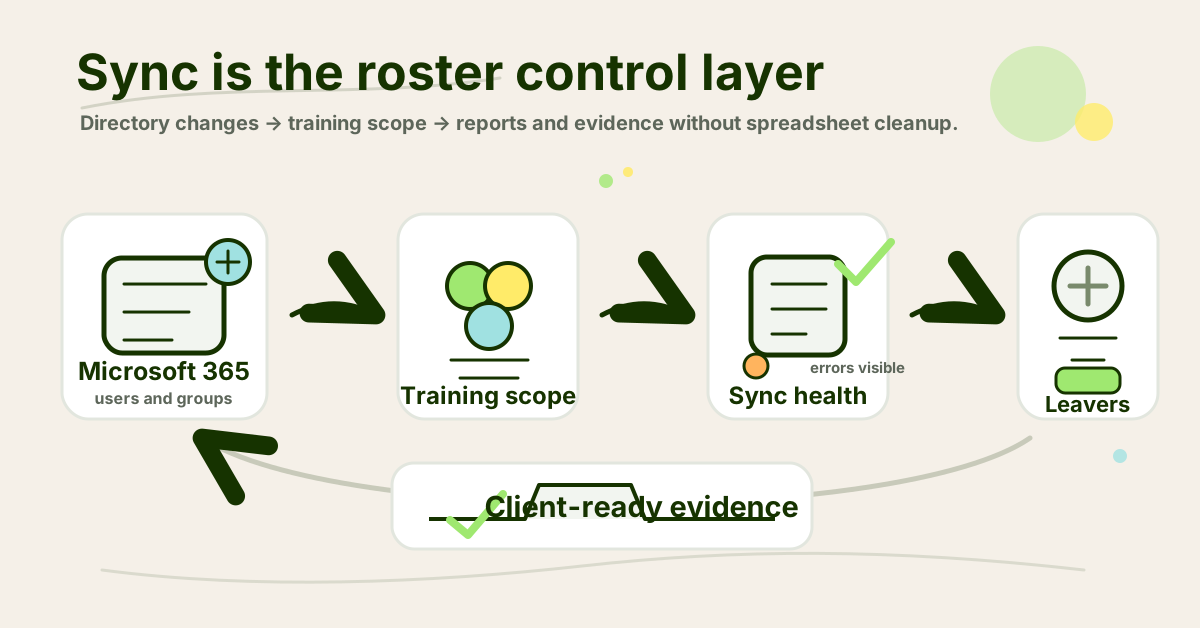
- Infographic thesis: Show Microsoft 365 sync as the roster control layer that feeds training assignments, reminders, reports, and evidence without monthly spreadsheet cleanup.
- Suggested layout: flow
- Short on-image text candidates: “Directory changes”, “Training scope”, “Leavers handled”, “Sync errors visible”, “Client-ready evidence”
- Key objects: Microsoft 365 tenant tile, user roster, group-mapping arrows, leaver/archive tag, sync-health alert, branded report page
- Avoid: Microsoft logos, fake UI, fake metrics, compliance badges, padlocks, hoodies, matrix/cyber theatre, unreadable directory strings
- Crop needs: 1200x628 blog/OG, plus social-safe 1200x627
Sources
- Microsoft Learn: Configure KnowBe4 Security Awareness Training for automatic user provisioning with Microsoft Entra ID
- Microsoft Learn: Develop and plan provisioning for a SCIM endpoint in Microsoft Entra ID
- Microsoft Learn: What are lifecycle workflows?
- Microsoft Learn: Use delta query to track changes in Microsoft Graph data
- Microsoft Learn: Manage Microsoft Entra groups and group membership
- Microsoft Learn: User provisioning logs in Microsoft Entra ID
- RFC Editor: RFC 7644: System for Cross-domain Identity Management: Protocol
- CISA: Microsoft Entra ID secure configuration baseline
- CIS Controls Assessment Specification: CIS Control 14: Security Awareness and Skills Training
- NIST CSRC: SP 800-50, Building an Information Technology Security Awareness and Training Program
- Phin Security: Security awareness training that integrates with Microsoft
- TitanHQ Support: Security Awareness Training MSP Overview
Internal link candidates for Woz
- DefendWise homepage — primary CTA and platform reference
/features/automation— Microsoft 365 sync and automated onboarding reference/features/multi-tenancy— tenant separation and MSP console reference/features/automated-reports— client-ready reporting reference/features/flat-fee— unlimited-user flat-fee positioning/features/white-label— MSP-branded client experience