How to maintain single pane of glass management across clients
How to maintain single pane of glass management across clients without losing tenant separation, reporting quality, or MSP margin.
DefendWise
DefendWise
TL;DR
Single pane of glass management sounds simple: one console, every client. For MSP security awareness work, the hard part is keeping the view central without turning client records into a blended mess.
The right model gives the MSP one place to see tenant setup, user coverage, campaign status, overdue learners, reports, and evidence exports. It also keeps each client's scope, access, completion records, exceptions, and QBR outputs separate enough to stand up in a client review, insurance questionnaire, or audit conversation.
That is why single pane management should be treated as an operating model, not a dashboard screenshot. A good dashboard saves clicks. A good operating layer saves margin, protects client trust, and makes proof easier to produce.
What is single pane of glass management across clients?
Single pane of glass management is the idea that an MSP can manage many client environments from one central view instead of opening a different portal, spreadsheet, export folder, or reporting workflow for each client.
In security awareness training, that usually means one MSP dashboard for:
- client tenants,
- users and groups,
- training assignments,
- reminder status,
- completion and overdue records,
- phishing or reporting activity where used,
- monthly client reports,
- compliance or insurance evidence,
- exceptions and follow-up notes.
The promise is operational control. The risk is false simplicity.
If the dashboard gives an MSP a fleet-wide number but cannot answer which client is missing coverage, which users are overdue, which report was sent, or which evidence record supports the claim, the single pane is mostly cosmetic. It makes the MSP feel organized while the underlying work still happens in manual exports and client-by-client checks.
Microsoft describes cross-tenant management in Defender for Cloud as a way for service providers to review and manage multiple customer tenants from a single location while still acting across tenant-specific resources and recommendations. Microsoft 365 Lighthouse uses similar language for MSPs managing Microsoft 365 customers at scale from one portal. Those examples matter because they frame single pane management as cross-tenant work with clear customer boundaries, not as one flat pool of mixed data.
For MSP security awareness, the same principle applies. The MSP needs central control, but the client tenant still has to remain the unit of proof.
Related DefendWise reading: Multi-tenant SAT: what MSPs need to know, How to onboard clients to a multi-tenant SAT platform, and Bulk import users to a multi-tenant training platform.
Why this matters for MSPs
MSPs do not manage one training programme. They manage a client fleet.
That changes the job. A single-client security team can live with a few manual checks because the scope is obvious. An MSP has to answer the same questions across many clients with different user counts, onboarding dates, report expectations, insurance pressure, and executive tolerance for follow-up.
The operating pain usually appears in 5 places.
- Tenant switching eats time. Every separate login, client filter, export path, and portal check adds small bits of admin that do not show up cleanly on a vendor invoice.
- Coverage gaps hide in averages. A fleet-wide completion rate can look fine while one client has an untrained finance team, stale users, or a failed import.
- Reports become a monthly scramble. MSPs can end up rebuilding the same summary for each client instead of producing a repeatable client-ready report.
- Evidence is needed after the fact. Cyber insurance questionnaires, ISO 27001 conversations, QBRs, and client board questions often ask for proof weeks or months after the training event.
- Per-seat economics punish full coverage. When every additional learner raises the vendor bill, the MSP may hesitate to include every user in every client organisation.
The security case is real too. Verizon's 2025 DBIR analysed 22,052 incidents and 12,195 confirmed breaches, and reported that the human element was involved in 60% of breaches. CISA's phishing guidance treats social engineering as a practical access problem: attackers trick people into giving credentials, opening malicious content, or taking unsafe actions.
Training alone does not solve that. But awareness, reporting, reminders, role-specific coaching, and clean evidence help MSPs turn the human layer into a managed client service rather than a once-a-year checkbox.
The single pane test: view, act, prove
A useful single pane of glass has to do 3 jobs.
| Job | What the MSP needs to see | What the MSP needs to do | What the MSP needs to prove |
|---|---|---|---|
| View | Client tenant status, user coverage, campaign state, overdue work, report readiness | Prioritize the clients that need action this week | The view is current and scoped to the right client |
| Act | Assign training, trigger reminders, fix imports, note exceptions, prepare reports | Move stuck clients without opening ten tools | The action was taken by the right person at the right time |
| Prove | Completion records, report exports, source dates, exception notes, evidence packs | Answer client, insurer, or auditor questions quickly | The report traces back to tenant-specific records |
Most weak dashboards stop at the first column. They show a view.
MSPs need the other two columns. They need to act from the view and prove what happened later. NIST SP 800-53's Awareness and Training family includes training records as a control area: organizations should document and monitor training activities and retain individual training records for the defined period. CIS Control 14 says the programme should be maintained, reviewed, updated, and measured through workforce completion and recency records.
That does not mean every MSP blog post should turn into a compliance manual. It means the operational design has to preserve evidence from the start.
What MSPs actually need in the management layer
Single pane management is not a request for one more graph. It is a request for fewer blind spots.
For security awareness delivery, the MSP management layer should cover these areas.
Tenant setup and client identity
Every client needs a clear tenant record. That record should show the client name, assigned service package, training scope, admin owner, user source, reporting cadence, and any compliance or insurance context.
The MSP should be able to tell whether a client is live, in pilot, paused, under onboarding, or waiting on user data. If that status lives in a spreadsheet while the platform says "active," the single pane is already split.
User lifecycle health
The dashboard should show whether users came from Microsoft 365 sync, CSV import, manual entry, API, Zapier workflow, or another source. It should also flag stale imports, failed syncs, duplicates, missing departments, and users without assignments.
This is where security awareness management often breaks at scale. A client adds staff. Another client offboards people slowly. A third client has contractors who need training but not the same path as full-time staff. Without lifecycle visibility, the MSP ends up selling a managed service but checking coverage manually.
Assignment and reminder status
MSPs need to see which clients have active training, who is overdue, what reminders have been sent, and what exceptions exist. The point is not to shame users. The point is to make follow-up part of the service workflow rather than a panic before the monthly report.
CISA's phishing guidance recommends educating users to identify, avoid, and report suspicious emails, links, attachments, and interactions. That only helps if training actually reaches the right people and incomplete users are followed up.
Client-ready reporting
A single pane should make reports easier to produce, not just easier to view internally.
For each client, the MSP should be able to produce a clear summary of scope, users included, training assigned, completion status, overdue groups, reporting or phishing signals where available, exceptions, and next recommended action.
That summary belongs in the client conversation. It should be usable in QBRs, renewal discussions, insurance questionnaires, and audit preparation. See also Reporting templates for MSP quarterly business reviews and Tips for reducing admin time managing SAT for many clients.
Access boundaries and operator accountability
Central management is powerful. It also creates risk if every technician can see or change every client tenant without a reason.
At minimum, MSPs should think through who can view all clients, who can change assignments, who can export evidence, who approves report changes, how admin actions are logged, and what happens when staff leave the MSP.
This is not bureaucracy. It is how the MSP keeps a central console from becoming a central mistake.
Step-by-step: how to maintain single pane of glass management across clients
1. Define the client tenant as the unit of truth
Start with a rule: every report, evidence export, assignment, and exception must belong to a specific client tenant.
That sounds obvious until the MSP starts using global exports, combined dashboards, or shared naming conventions that do not survive a busy month. Keep the MSP-level view for prioritization, but keep proof at the tenant level.
2. Standardize the onboarding template
Build one client onboarding template that captures the same minimum fields every time: client owner, user source, training audience, reporting cadence, brand settings, approval contact, exception path, and renewal or compliance context.
A repeatable template makes the single pane easier to trust because clients enter the system the same way. It also protects margin. The more each onboarding becomes a custom project, the less the dashboard matters.
3. Separate global defaults from client exceptions
MSPs should have sensible global defaults for training cadence, reminder timing, report format, and role categories. They should also have a clear place to record client exceptions.
Do not hide exceptions in notes only one technician remembers. If a client excludes contractors, delays executive training, or requests a quarterly report instead of monthly, put that in the tenant record or evidence notes.
4. Build a weekly operator view
The weekly view should answer one question: which client needs action now?
Useful filters include failed syncs, no active campaign, overdue learner threshold, missing report, stale evidence export, and clients with open exceptions. The view should make action obvious enough that an operator can clear the queue without rebuilding the client story from scratch.
5. Build a monthly client-proof view
The monthly view should answer a different question: what can we show the client?
That view should produce a client-ready summary, not just internal metrics. It should include coverage, completion, trend, exceptions, and next actions. If the MSP has to copy data into a slide deck by hand every month, the single pane is not doing enough.
6. Keep evidence exports boring and traceable
Evidence should be boring. It should show who was in scope, what was assigned, when training happened, what is incomplete, which report was produced, and who exported or reviewed it.
NIST SP 800-50 Revision 1 replaced the older 2003 SP 800-50 and reframes the work as a cybersecurity and privacy learning programme. The practical point for MSPs is the same: training is a maintained programme, not a one-off content push. Good records are part of maintenance.
7. Review the management layer after every reporting cycle
After each monthly reporting cycle, ask where the MSP still had to use spreadsheets, manual exports, or client-specific memory. Those are the leaks.
Fix one leak at a time. Add a missing field. Tighten a naming convention. Change a reminder. Update the report template. Reduce the manual work before the next month repeats it.
What good looks like
A good single pane management model feels quiet because the work is visible before it becomes urgent.
For an MSP security awareness service, good looks like this:
- every client has a clean tenant record,
- users are imported or synced through a known source,
- assignments and reminders are visible by client,
- overdue users are easy to find,
- reports can be produced without rebuilding the story,
- evidence exports show scope and dates,
- exceptions are named instead of hidden,
- admin actions are attributable,
- the MSP can compare client health without blending client data,
- the commercial model supports full-client coverage.
That last point matters. If the platform is priced per user, the MSP may still hesitate before putting every user into the programme. Flat-fee economics change the operating decision. The MSP can think about full coverage and service quality rather than whether the next client headcount change hurts margin.
Mistakes to avoid
Treating the dashboard as the operating model
A dashboard can show a number. It cannot decide who owns the exception, whether the client report was approved, or whether a stale user list makes the completion rate unreliable.
Write the workflow around the dashboard. Do not expect the dashboard to invent the workflow.
Blending client evidence
Fleet-wide views are useful for MSP management, but client evidence should stay tenant-specific. A client does not need to see how the whole MSP book is doing. They need to see their own scope, their own users, their own exceptions, and their own next actions.
Measuring completion only
Completion is necessary, but thin. It tells you whether a module was finished. It does not show reporting behaviour, risky roles, overdue trends, recurring exceptions, or whether the client has usable proof.
Use completion as the floor, not the story.
Letting branding become manual work
White-label delivery is valuable because the MSP remains the trusted provider. It loses value if every report, email, or PDF requires manual touch-up.
The management layer should carry the MSP's brand into client-facing outputs by default.
Ignoring offboarding
New users get attention. Departed users create quiet evidence problems.
If former staff remain active in the training tenant, reports become noisy. If they disappear without a record, evidence may become hard to explain. Decide how joiners, movers, and leavers are handled before the client asks.
Framework and evidence mapping
Security awareness appears in several frameworks and guidance sources, but MSPs should avoid overstating what training proves.
NIST SP 800-53's AT family covers awareness and training policy, literacy training and awareness, role-based training, training records, and training feedback. CIS Control 14 focuses on establishing and maintaining a security awareness programme and assessing workforce completion and recency. CISA phishing guidance recommends regular user education on spotting and reporting suspicious emails, links, attachments, and interactions.
Those sources point to a practical evidence model.
| Evidence question | MSP evidence to keep | Why it matters |
|---|---|---|
| Who was in scope? | Client tenant, user list, groups, roles, exclusions | Prevents vague "all staff trained" claims |
| What was assigned? | Module, campaign, topic, date, cadence | Shows training was defined, not improvised |
| Who completed it? | Completion roster, date, score where used | Supports client reporting and audit questions |
| Who did not complete it? | Overdue list, reminders, exceptions | Shows follow-up and honest reporting |
| What changed? | Trend summary, repeat-risk notes, content updates | Makes QBRs more useful than screenshots |
| What was exported? | Report date, report owner, evidence pack path | Lets the MSP reproduce the answer later |
For ISO 27001, cyber insurance, NIST CSF, or Essential Eight conversations, security awareness evidence is one layer of the story. It does not prove the whole control environment. It can support the human-risk and awareness part when the records are scoped and traceable.
How a flat-rate MSP SAT platform helps
DefendWise is built for MSPs that want security awareness training to run as a repeatable client service, not a per-client admin project.
The confirmed public model is simple: $399/month flat, unlimited users, unlimited client organisations, white-label and multi-tenant, automated onboarding and reporting, Microsoft 365 sync, Zapier integration, AI-native training content, and branded compliance reports. That gives MSPs a cleaner path to cover every user across every client without turning growth into a seat-count penalty.
If your current setup gives you a dashboard but still leaves your team chasing exports, rebuilding reports, or deciding which users are "worth" training, use the free 7-day trial to inspect the operating layer. The question is not whether you can see every client. It is whether you can manage, report, and prove the work without giving back the margin.
Frequently asked questions
What does single pane of glass management mean for MSPs?
For MSPs, single pane of glass management means viewing and operating many client environments from one management layer while preserving each client tenant's data, scope, access rules, reports, and evidence. It should reduce portal switching without blending client records together.
How do MSPs maintain a single pane of glass across clients without creating reporting risk?
Keep the MSP console central, but keep client records separated. Use tenant-level filters, role-based access, named report owners, export logs, exception notes, and review dates so every client report can be traced back to the right source records.
Is a single pane of glass the same as multi-tenant management?
Not always. A single pane of glass is the operator view. Multi-tenant management is the underlying operating model that keeps each client tenant separate while letting the MSP run repeatable workflows across the client base.
What should MSPs track in a security awareness single pane of glass?
Track client coverage, user import or sync health, assignment status, completion, overdue learners, phishing or reporting activity where used, exception notes, evidence exports, monthly report status, and QBR-ready trend summaries.
What are the risks of managing all clients from one dashboard?
The common risks are over-broad admin access, blended client evidence, stale data, hidden exceptions, missed reminders, and reports that look polished but cannot be traced back to source records. Good tenant separation and audit trails reduce those risks.
How can DefendWise help MSPs manage security awareness across clients?
DefendWise is built for MSPs with flat-fee pricing, unlimited users, unlimited client organisations, white-label delivery, multi-tenant management, automated onboarding, Microsoft 365 sync, Zapier integration, AI-native training content, and branded reporting. MSPs can use it to run security awareness training under their own brand without per-seat pricing pressure.
Distribution outputs
LinkedIn derivative post options
Draft-only. Not for auto-posting.
Safe
Hook: A single pane of glass is useful only if each client still has clean proof.
Body: MSPs do not need another dashboard screenshot. They need one place to see which client needs action, which users are overdue, which report is ready, and which evidence record supports the next client conversation.
The trap is blending the fleet view with the client proof.
Use the central view to prioritize. Keep the evidence tenant-specific.
CTA: If your SAT tool makes you export and rebuild every client story by hand, the dashboard is not carrying enough of the work.
Sharp
Hook: "Single pane of glass" is vendor language until it survives audit week.
Body: One console is nice. But can it tell you which client is missing users, which reminders went out, which report was sent, and which evidence supports the QBR?
If not, the single pane is just a prettier way to delay the spreadsheet work.
For MSPs, the test is view, act, prove.
CTA: Central management without tenant-specific proof is not an operating layer.
Risky
Hook: Most MSP dashboards are a fleet average hiding a client problem.
Body: A 92% completion rate across all clients sounds good until the one client asking for cyber insurance evidence has stale users, no exception notes, and a report nobody can reproduce.
Single pane management should not flatten the client story.
It should show the MSP where to act and leave every client with clean, separate proof.
CTA: If the report cannot be traced back to source records, the dashboard did not solve the problem.
Newsletter-section variant
Thesis: A single pane of glass should help MSPs manage, report, and prove security awareness work across clients without losing tenant separation.
Short section: The useful version of "single pane of glass" is not a prettier dashboard. It is a way for MSPs to see every client's training status, act on overdue work, and produce client-ready evidence without rebuilding the story each month. The risk is blended reporting: a fleet-wide view that hides stale users, exceptions, and missing proof. For security awareness, keep the console central and the evidence tenant-specific.
Carousel angle
Thesis: A real MSP single pane of glass passes the view, act, prove test.
Slide outline:
- Title: Your single pane of glass needs to pass 3 tests.
- The promise: one console for every client.
- The problem: one blended number can hide a client-specific gap.
- Test 1, view: can you see tenant setup, user coverage, overdue work, and report readiness?
- Test 2, act: can you assign, remind, fix imports, and note exceptions without portal-hopping?
- Test 3, prove: can every client report trace back to tenant-specific records?
- The trap: dashboard screenshots do not equal audit-ready evidence.
- The MSP model: central operating view, separate client proof.
- Closing: if it cannot view, act, and prove, it is not a single pane. It is another tab.
Header image brief for Picasso
- Source TL;DR: Single pane of glass management only works for MSP security awareness when the central view can show, act on, and prove client-specific work. The article argues for one MSP operating layer with separate tenant records, traceable evidence, and client-ready reports.
- Primary pillar: white-label-multi-tenant
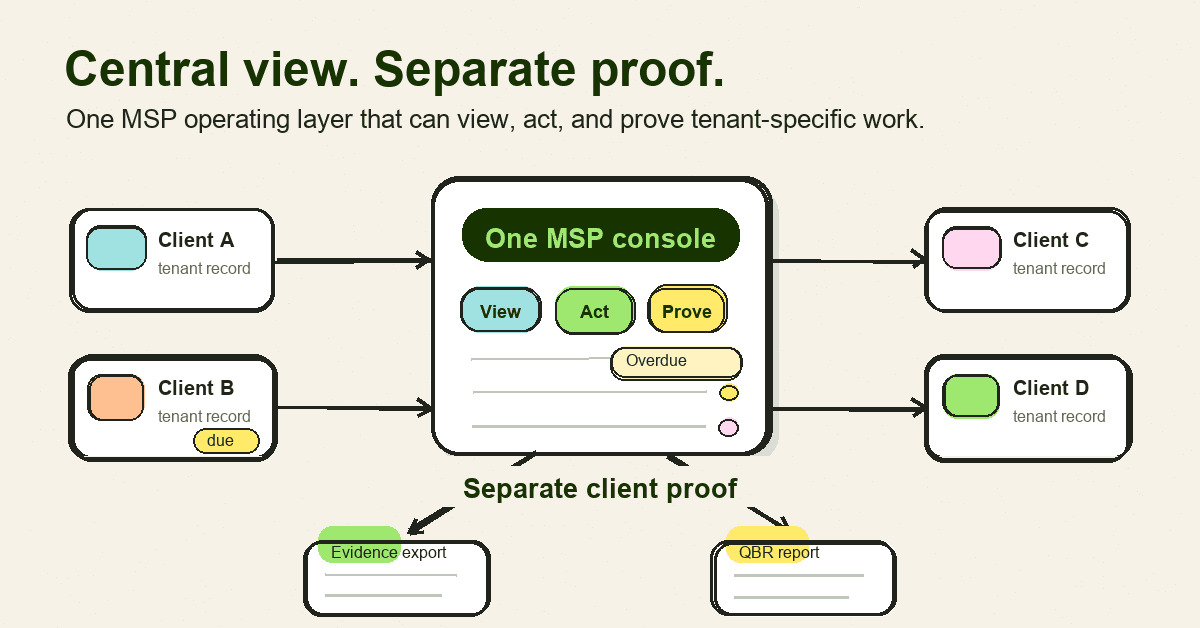
- Infographic thesis: One MSP console branches into many tenant-specific proof packs without blending client evidence.
- Suggested layout: 3-part map
- Short on-image text candidates: "View", "Act", "Prove", "One MSP console", "Separate client proof"
- Key objects: central MSP dashboard, 4 labelled client tenant cards, arrows to report packs, overdue user badge, evidence export folder, QBR document
- Avoid: fake metrics, vendor logos, compliance badges, unreadable UI labels, security-theatre props, stock padlocks, hacker silhouettes, and generic cyber metaphors
- Crop needs: 1200x628 blog/OG, plus social-safe 1200x627
Sources
- NIST, SP 800-50 publication page: https://csrc.nist.gov/pubs/sp/800/50/final
- NIST, SP 800-50 Revision 1 publication page: https://csrc.nist.gov/pubs/sp/800/50/r1/final
- NIST, legacy SP 800-50 PDF: https://nvlpubs.nist.gov/nistpubs/Legacy/SP/nistspecialpublication800-50.pdf
- NIST SP 800-53 Rev. 5 Awareness and Training family summary: https://csf.tools/reference/nist-sp-800-53/r5/at
- CIS Control 14 overview: https://www.cisecurity.org/controls/security-awareness-and-skills-training
- CIS Controls Assessment Specification, Control 14: https://cas.docs.cisecurity.org/en/latest/source/Controls14
- CISA, Cybersecurity Awareness and Training: https://www.cisa.gov/cybersecurity-awareness-training
- CISA, NSA, FBI, and MS-ISAC phishing guidance PDF: https://www.cisa.gov/sites/default/files/2025-03/Phishing%20Guidance%20-%20Stopping%20the%20Attack%20Cycle%20at%20Phase%20One%20508.pdf
- Verizon 2025 Data Breach Investigations Report PDF: https://www.verizon.com/business/resources/reports/2025-dbir-data-breach-investigations-report.pdf
- Microsoft, cross-tenant management in Defender for Cloud: https://learn.microsoft.com/en-us/azure/defender-for-cloud/cross-tenant-management
- Microsoft, overview of Microsoft 365 Lighthouse: https://learn.microsoft.com/en-us/microsoft-365/lighthouse/m365-lighthouse-overview
- FTC, Cybersecurity for Small Business: https://www.ftc.gov/business-guidance/small-businesses/cybersecurity
- Todyl, 10 steps for MSPs implementing security awareness trainings: https://www.todyl.com/blog/implementing-security-awareness-trainings-msp
- Augmentt, cybersecurity awareness training: https://www.augmentt.com/cybersecurity-awareness-training
- Infima, security awareness training for MSPs guide: https://infimasec.com/resources/guides/msp-security-awareness-training
Draft notes for Dan
- Voice: brand.
- Audience: MSP owners/operators responsible for security awareness delivery across multiple clients.
- Pillar: white-label-multi-tenant, with zero-admin and flat-fee economics as supporting points.
- CTA: Start Free 7-Day Trial / inspect the operating layer.
- Claim safety: used only confirmed DefendWise public claims from the source-of-truth bundle. No competitor pricing, customer satisfaction, ROI, or unsupported admin-time claims included.
- Lisa not required: source evidence was sufficient for a practical SEO draft; no original customer evidence or competitor-heavy positioning claim is needed before Dan review.