Tips for reducing admin time managing SAT for many clients
Tips for reducing admin time managing SAT across many clients without losing training coverage, reporting quality, or audit evidence.
DefendWise
DefendWise
TL;DR
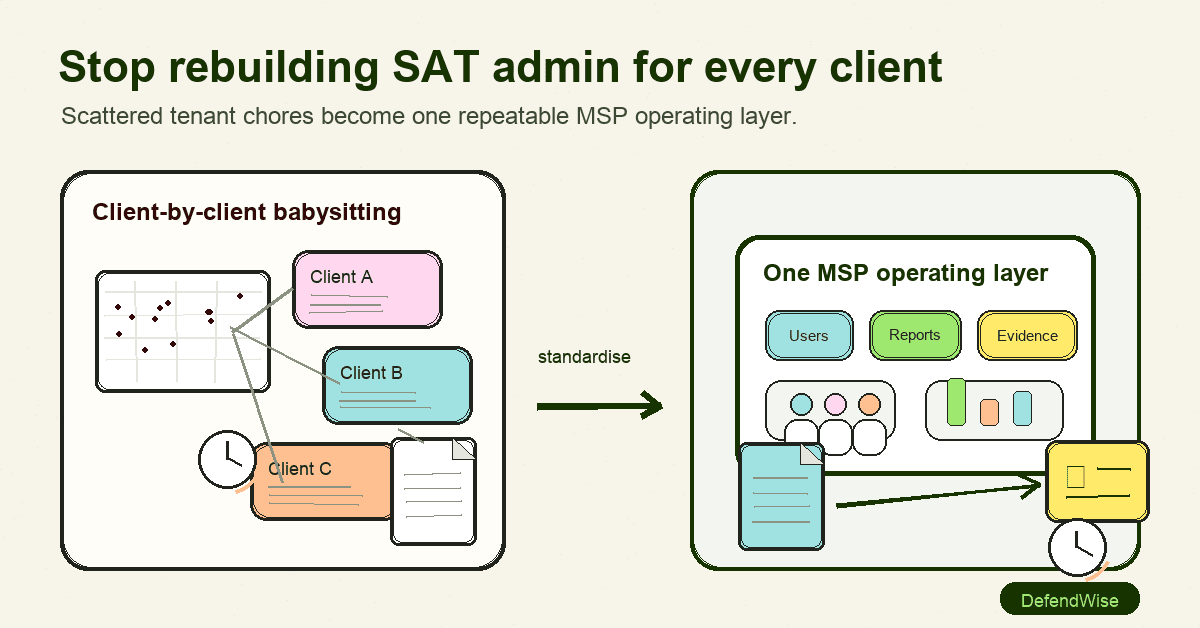
Tips for reducing admin time managing SAT for many clients start with one decision: stop treating security awareness training as a series of separate client projects. MSPs need a repeatable operating layer for tenant setup, user lifecycle, campaign cadence, reminders, exceptions, reporting, and evidence.
The goal is not to remove every human from the process. The goal is to make the MSP's time go into judgement: which clients need attention, which users are stuck, which reports need follow-up, and which evidence is ready for insurance, ISO 27001, CIS Controls, or QBR conversations.
A good SAT workflow should let an MSP onboard a client once, keep users current, run training on schedule, chase fewer completions by hand, and produce clean reports without rebuilding the same spreadsheet every month.
What does SAT admin time include?
SAT admin time is the hidden work behind security awareness training. It is not only choosing modules or sending a phishing simulation. For an MSP, it is the work needed to deliver training across many client organisations without mixing tenants, missing users, or sending clients weak evidence.
Common SAT admin work includes:
- Creating or updating each client tenant.
- Importing users, departments, managers, and role fields.
- Removing departed staff.
- Assigning baseline training.
- Scheduling phishing and social-engineering lessons.
- Chasing incomplete training.
- Handling exceptions for executives, contractors, shared mailboxes, and seasonal workers.
- Exporting completion reports.
- Turning raw platform data into client-readable summaries.
- Answering cyber insurance, QBR, and audit questions.
That work multiplies quickly. One small client with 25 users is not the problem. The problem is 30 clients, each with a slightly different staff list, policy owner, training cadence, and reporting expectation.
CISA's phishing guidance is a useful reminder of why the work matters. It tells businesses to train employees to recognise suspicious messages, use trusted contact methods, report phishing, and keep employees informed as threats change. That is not a one-off launch task. It is a recurring client service.
NIST's small-business phishing guidance makes the same operational point from a different angle: AI can make phishing messages more convincing, so users need to slow down when asked to click, download, transfer funds, log in, or submit sensitive information. For MSPs, that means training content and reminders cannot sit untouched for years.
Why SAT admin becomes painful across many clients
Security awareness training is easy to underestimate because the user experience looks simple. A learner gets a course. The learner completes it. A report shows completion.
MSP delivery is messier.
Each client has its own identity source, staff churn, executive exceptions, compliance drivers, and reporting politics. Some have clean Microsoft Entra groups. Some send a spreadsheet once a quarter. Some want manager-level reporting. Some only care because an insurer asked. Some need evidence for ISO 27001 or a client assurance request.
CIS Control 14 frames security awareness as a maintained programme, not a box ticked once. It calls for a security awareness programme that influences workforce behaviour and includes training on social engineering, authentication, data handling, incident reporting, missing updates, insecure networks, and role-specific skills. It also looks for workforce members and recent completion dates. That is an evidence problem as much as a training problem.
The admin burden usually comes from five causes:
| Admin drag | What it looks like | Better MSP habit |
|---|---|---|
| Client-by-client setup | Every client starts from a blank configuration | Use a standard tenant launch template with documented exceptions |
| Stale user lists | Departed users stay assigned and new starters miss training | Use identity sync where possible, and a CSV review process where not |
| Manual reminders | The MSP checks completion and emails users by hand | Use automated reminders with clear escalation rules |
| Raw exports | Platform reports need manual formatting before clients can read them | Define one monthly client report format and one QBR summary format |
| Weak evidence | Screenshots and exports do not show scope, date, status, or exceptions | Keep tenant-specific evidence packs with source records and notes |
The fix is not another heroic admin day. It is a standard workflow.
10 practical tips for reducing admin time managing SAT for many clients
1. Create one MSP launch checklist
Start with a launch checklist that every client follows unless there is a documented exception.
The checklist should cover:
- Client tenant name and owner.
- Branding settings.
- User source: CSV, directory sync, or API workflow.
- Required user fields.
- Baseline training assignment.
- Reminder cadence.
- Reporting recipients.
- Exception rules.
- Evidence export location.
- First review date.
This sounds basic, but it changes the work. Without a checklist, each onboarding becomes a memory test. With one, the MSP can delegate more safely and review faster.
Internal link: if client setup is the recurring pain point, see DefendWise's guide to bulk importing users into a multi-tenant training platform.
2. Stop mixing launch import and lifecycle management
CSV import is fine for a first launch. It is poor as the only lifecycle process.
A clean CSV can get a client live quickly. It can also create false confidence if nobody owns joiners, movers, and leavers after launch. A client may add new staff weekly, but the SAT platform only knows about the spreadsheet from last quarter.
Use this split:
- CSV import for pilots, one-off cleanups, small clients, or clients without identity maturity.
- Directory sync or provisioning for clients with a reliable identity source.
- Exception process for contractors, shared accounts, seasonal workers, and executives.
The MSP should decide this before the first campaign, not after the first incomplete report.
3. Keep tenant separation boring and strict
Tenant separation is where multi-client SAT either works or breaks.
Each client should have its own tenant, scope, user list, report recipients, and evidence trail. If a user is imported into the wrong tenant, the issue is not only cosmetic. It can pollute reporting, confuse client communication, and weaken audit evidence.
Use plain rules:
- One client tenant per client organisation.
- One naming convention for tenants.
- One import file per tenant.
- One post-import QA step.
- No blended client exports for client-facing evidence unless the report is deliberately fleet-level and internal to the MSP.
Internal link: this is also why many MSPs choose multi-tenant SAT instead of single-tenant training for MSP operations.
4. Use role and group defaults before custom campaigns
Custom campaigns can be useful. They can also become admin debt if every client has a bespoke training map.
Start with default pathways by risk and role:
- All users: phishing, passwords, MFA, reporting, data handling.
- Finance: invoice fraud, business email compromise, payment verification.
- Executives: whaling, voice scams, urgent approval requests.
- Helpdesk and admin roles: identity verification, reset procedures, privileged access.
- New starters: baseline awareness before sensitive access where practical.
CIS Control 14 includes role-specific security awareness and skills training for higher implementation groups. The point is not to create endless custom content. The point is to give high-risk roles training that matches the decisions they make.
5. Automate reminders, but keep the escalation path human
Manual chasing is one of the first places SAT admin time leaks.
Automated reminders should cover normal non-completion. The MSP should not be manually sending the same reminder to every learner who missed a module.
But escalation should still be clear:
- Reminder 1: learner nudged automatically.
- Reminder 2: learner nudged again with a due date.
- Manager alert: only after a defined threshold.
- Client contact summary: included in the monthly report.
- MSP review: only for repeat non-completion, high-risk roles, or client-sensitive exceptions.
This keeps the MSP out of routine chasing and focused on the users or clients that need judgement.
6. Make reporting client-ready from the start
If the report only makes sense to the MSP, it is not finished.
A client-ready SAT report should answer:
- Who was in scope?
- What training was assigned?
- What was completed?
- What is overdue?
- Which high-risk roles or departments need attention?
- What changed since last month?
- What should the client do next?
For QBRs, keep it shorter. The QBR does not need every learner row. It needs a decision-ready summary: coverage, completion trend, risky patterns, exceptions, and recommended next steps.
Internal link: if reporting quality is the bottleneck, use the structure in building auditor-ready reports for clients.
7. Separate operational metrics from proof metrics
MSPs often mix two different reporting jobs.
Operational metrics help the MSP run the programme. Proof metrics help the client, auditor, insurer, or executive understand what happened.
| Metric type | Examples | Who needs it |
|---|---|---|
| Operational | overdue users, reminder status, failed imports, missing manager fields | MSP service team |
| Client proof | assigned users, completion rate, training dates, campaign summary, exceptions | Client owner, insurer, auditor, QBR audience |
| Risk signal | repeated failure, risky departments, high-risk role non-completion, reporting behaviour | MSP security lead, client leadership |
Do not force every report to do every job. If the MSP service team needs a detailed exception list, keep it internal. If the client needs an executive summary, give them a readable summary with a source trail.
Internal link: for a fuller measurement model, see measure security awareness effectiveness.
8. Build a standard exception register
Exceptions create more admin than normal users because they require judgement.
Examples:
- A contractor does not have the same email domain as the client.
- A shared mailbox appears in the user list.
- A director refuses training until the insurer asks.
- A new acquisition has a different identity system.
- A seasonal team has high turnover.
- A client wants proof for only one department.
Keep a simple exception register per client. It should include the exception, owner, date, reason, temporary or permanent status, and next review date.
This prevents the same exception from being rediscovered every month. It also gives the MSP an answer when a client asks why a user, group, or department is missing from a report.
9. Refresh content from threat signals, not vendor calendar noise
CISA notes that annual training alone is not enough because threats change. NIST's phishing guidance also calls out AI-assisted phishing as a reason to take extra care with suspicious requests.
That does not mean MSPs need to rebuild every campaign every week.
A better workflow is to use threat signals to update emphasis:
- If clients are seeing invoice fraud, emphasise payment verification.
- If helpdesk calls are being targeted, add identity-verification reminders.
- If QR phishing is rising in client incidents, add a short explainer and reporting reminder.
- If AI voice scams are relevant to finance or leadership, train the verification procedure, not only the technology term.
The admin-saving move is to keep the campaign structure stable while refreshing examples and emphasis.
10. Package SAT into the MSP service model, not as an awkward add-on
SAT admin grows when the MSP treats it as a side product sold and managed separately for each client.
A cleaner model is to decide where SAT belongs in the MSP's service package:
- Is it included for every managed client?
- Is it part of a security tier?
- Who owns client communication?
- What is the minimum reporting cadence?
- Which clients need compliance evidence?
- What is the escalation rule for non-completion?
Flat pricing helps here because the MSP does not need to count seats before deciding whether a user should be trained. DefendWise's public positioning is built around that model: $399/month flat, unlimited users, unlimited client organisations, white-label delivery, multi-tenant control, automated onboarding, and automated reporting.
That is the commercial point. If training belongs in the package, every extra seat should not become a pricing argument.
A simple MSP operating model for low-admin SAT
Use this model as a starting point.
Monthly workflow
- Sync or update user lists. Check new starters, leavers, and stale accounts.
- Review exceptions. Clear old exceptions or renew them with a reason.
- Confirm assignments. Make sure baseline and role-based training are assigned.
- Let reminders run. Do not manually chase ordinary non-completion before the escalation threshold.
- Review risk signals. Look for repeat non-completion, high-risk roles, suspicious reporting patterns, or campaign failures.
- Send client report. Keep the report short, dated, and tenant-specific.
- Log evidence. Store source records, export dates, and exception notes.
Quarterly workflow
- Summarise trend. Coverage, completion, repeat issues, and client decisions.
- Review role mapping. Finance, executives, admins, and frontline teams may need different emphasis.
- Refresh examples. Use recent phishing, BEC, vishing, QR phishing, or AI-scam patterns.
- Update service packaging. Check whether SAT is still being delivered consistently across the client base.
- Prepare QBR note. Give the client a decision, not a data dump.
This is where admin reduction shows up. The MSP no longer asks, "What do we do for this client this month?" The answer is already in the cadence.
What good looks like
A low-admin SAT programme is not invisible. It is controlled.
Good looks like:
- Every client has a tenant owner and reporting owner.
- New users enter the training workflow without a one-off ticket every time.
- Departed users stop polluting completion reports.
- Reminders run without manual chasing.
- Reports are sent on a known cadence.
- Exceptions are recorded, not remembered.
- High-risk users and roles get extra attention.
- Evidence can be pulled by client, date, campaign, and learner scope.
- QBRs show the client's next decision, not just last month's completion percentage.
Bad looks like a folder full of screenshots, a spreadsheet nobody trusts, and a service desk ticket every time a client asks who completed training.
Mistakes to avoid
Mistake 1: treating each client as a custom build
Custom delivery feels helpful at first. Then it becomes impossible to maintain. Standardise the workflow and document exceptions instead.
Mistake 2: chasing completions before fixing ownership
If nobody at the client owns completion, reminder emails become noise. Name the reporting recipient and escalation owner during onboarding.
Mistake 3: reporting only completion
Completion matters, but it is not the whole story. Include scope, overdue users, exceptions, risky roles, and next actions.
Mistake 4: letting user lifecycle drift
A stale user list makes every other metric weaker. Fix joiner, mover, and leaver hygiene before celebrating the report.
Mistake 5: over-customising content to prove value
Value comes from risk relevance and consistent delivery, not from inventing a bespoke campaign for every client. Use default tracks, then adjust for role and threat signals.
Framework and evidence mapping
Security awareness admin time matters because the evidence is used outside the SAT platform.
- CIS Control 14 expects a maintained security awareness and skills training programme with workforce members and recent completion dates.
- CISA phishing guidance recommends training employees to recognise, report, and delete suspicious messages and reinforcing awareness beyond annual training.
- NIST phishing guidance highlights convincing phishing messages and AI-assisted lures as practical business risks.
- ISO 27001 awareness discussions often focus on whether people understand relevant information security policies, their role in the ISMS, and the consequences of not following requirements.
- Cyber insurance and QBR conversations usually need a plain client answer: who was trained, what changed, what is overdue, and what the client should do next.
Do not overclaim. SAT evidence supports these conversations. It does not prove the entire compliance programme by itself.
How a flat-rate MSP SAT platform helps
A flat-rate, MSP-first SAT platform helps when it reduces both commercial friction and operational friction.
Commercially, flat pricing lets the MSP include more users and clients without reworking the seat bill every month. Operationally, multi-tenant control, white-label delivery, automated onboarding, and automated reporting give the MSP a single way to run the service.
DefendWise is built around that model: one flat monthly price, unlimited users, unlimited client organisations, white-label delivery, multi-tenant control, AI-native training content, automated onboarding, and automated reports. If the goal is to train every client without creating a second admin job, those are the operating-model features to inspect.
The practical next step is simple: take one client, map the current SAT workflow against the 10 tips above, and count how many steps still depend on a person remembering to export, chase, format, or explain something by hand.
Then remove those steps one at a time.
Frequently asked questions
How can MSPs reduce admin time managing SAT for many clients?
Standardise the workflow before adding more campaigns. Use one launch checklist, one tenant naming convention, one user lifecycle process, automated reminders, client-ready report templates, and a simple exception register.
What SAT tasks should MSPs automate first?
Automate user updates, assignment, reminders, report generation, and routine evidence exports first. These are repetitive, predictable tasks that do not need senior MSP judgement every time.
Is multi-tenant SAT better for MSP admin time?
For most MSP use cases, yes. Multi-tenant SAT lets the MSP manage many client organisations from one operating layer while keeping client data and reporting separated. Separate single-client accounts can work, but they usually create more login, reporting, and evidence overhead as the client base grows.
How often should MSPs report SAT results to clients?
Monthly reporting is a practical default for operational visibility. Quarterly reporting works better for leadership summaries and QBRs. Compliance-driven clients may need evidence on a different cadence tied to audit, renewal, or board reporting dates.
Can security awareness training be fully set and forget?
No. Delivery and reporting can be automated, but ownership cannot be. MSPs still need to review exceptions, high-risk roles, stale users, emerging threats, and client questions.
What should a client-ready SAT report include?
It should include scope, assigned users, completion status, overdue users, exceptions, campaign summary, risk signals, and next actions. It should also be dated and tenant-specific so it can support future evidence requests.
How does flat pricing reduce SAT admin?
Flat pricing does not directly remove admin tasks, but it removes the seat-counting conversation that often slows full coverage. If every user can be included without renegotiating the bill, the MSP can focus on workflow, coverage, and reporting.
How does DefendWise help MSPs reduce SAT admin?
DefendWise combines flat pricing, unlimited users, unlimited client organisations, white-label delivery, multi-tenant control, automated onboarding, and automated reporting. That gives MSPs the ingredients for a lower-admin operating model, without asking them to price every user separately.
Distribution drafts
LinkedIn derivative post options
Draft-only. Not for auto-posting.
Safe option
Hook: If your MSP is manually chasing SAT completions every month, the problem is probably the workflow, not the users.
Most security awareness admin comes from the same repeat tasks:
- stale user lists
- one-off client setup
- manual reminders
- raw exports
- reports that need rewriting before a client can read them
The fix is boring in the best way.
One launch checklist. One user lifecycle process. One reminder cadence. One client-ready report format. One exception register.
That is how SAT becomes a managed service instead of another thing the service desk babysits.
Sharp option
Hook: SAT admin does not scale when every client is treated like a custom project.
That is the quiet killer for MSPs.
A 25-user client is easy. Thirty clients with different staff lists, reminder expectations, compliance questions, and QBR rhythms is where the margin goes missing.
The answer is not more exports. It is an operating layer: tenant-separated setup, user lifecycle hygiene, automated reminders, client-ready reporting, and clear exceptions.
If security awareness is in the managed package, the workflow has to behave like a managed service.
Risky option
Hook: If your SAT process needs a spreadsheet hero every month, it is not a service. It is a liability with a login.
Clients do not care how many portals the MSP had to click through.
They care whether their people were trained, what is overdue, what changed, and whether the evidence is credible when an insurer, auditor, or executive asks.
MSPs should stop selling awareness training as a side product and start running it like an operating layer.
Fewer bespoke campaigns. Fewer manual chases. Better tenant evidence. Clearer client reports.
Newsletter-section variant
Thesis: SAT admin drops when MSPs stop managing awareness training as separate client projects and start using a repeatable multi-tenant workflow.
Short section: The hidden cost of security awareness training is not the module library. It is the monthly grind of stale user lists, manual reminders, raw exports, and client reports that need rewriting before anyone can use them. MSPs can reduce that admin by standardising tenant setup, automating user lifecycle and reminders, separating operational metrics from proof metrics, and giving every client a dated, readable report. Awareness training still needs ownership, but it should not require spreadsheet heroics every month.
Carousel angle
Thesis: Reduce SAT admin by replacing client-by-client babysitting with one MSP operating layer.
Slide outline:
- Title: Reduce SAT admin across many clients
- The hidden work: user lists, reminders, reports, exceptions
- Why it breaks: every client becomes a custom project
- The operating layer: tenant setup, lifecycle, cadence, reporting
- Automate first: users, assignments, reminders, report generation
- Keep human judgement: exceptions, high-risk users, client decisions
- Report better: scope, completion, overdue, next action
- MSP takeaway: make SAT behave like a managed service
- CTA: Start with one client workflow audit
Header image brief for Picasso
- Source TL;DR: Tips for reducing admin time managing SAT for many clients start with one decision: stop treating security awareness training as a series of separate client projects. MSPs need a repeatable operating layer for tenant setup, user lifecycle, campaign cadence, reminders, exceptions, reporting, and evidence.
- Primary pillar: zero admin
- Infographic thesis: Show SAT admin moving from scattered client-by-client tasks into one repeatable MSP operating layer.
- Suggested layout: before-after
- Short on-image text candidates: "Client-by-client babysitting", "One MSP operating layer", "Users", "Reminders", "Reports", "Evidence"
- Key objects: messy spreadsheet stack, separated client tenant cards, reminder clock, report PDF, exception register, simple arrows into one MSP dashboard
- Avoid: fake metrics, vendor logos, compliance badges, unreadable UI labels, security-theatre props, padlocks, hoodies, matrix/cyber metaphors
- Crop needs: 1200x628 blog/OG, plus social-safe 1200x627
Sources
- CISA, "Teach Employees to Avoid Phishing": https://www.cisa.gov/audiences/small-and-medium-businesses/secure-your-business/teach-employees-avoid-phishing
- NIST, "Phishing": https://www.nist.gov/itl/smallbusinesscyber/guidance-topic/phishing
- NIST SP 800-50, "Building an Information Technology Security Awareness and Training Program": https://nvlpubs.nist.gov/nistpubs/Legacy/SP/nistspecialpublication800-50.pdf
- CIS Controls Assessment Specification, Control 14: https://cas.docs.cisecurity.org/en/latest/source/Controls14
- CIS, "Critical Security Control 14: Security Awareness and Skills Training": https://www.cisecurity.org/controls/security-awareness-and-skills-training
- ISMS.online, "ISO 27001:2022 Clause 7.3 Awareness": https://www.isms.online/iso-27001/requirements-2022/7-3-awareness-2022
- Microsoft Learn, "Get started using Attack simulation training": https://learn.microsoft.com/en-us/defender-office-365/attack-simulation-training-get-started
- Microsoft Security, "Phishing Attack Simulation Training": https://www.microsoft.com/en-us/security/business/threat-protection/attack-simulation-training
- Verizon, Data Breach Investigations Report archive: https://www.verizon.com/business/resources/reports/dbir/
- DefendWise homepage: https://www.defendwise.com
- DefendWise, "Bulk import users to a multi-tenant training platform": https://www.defendwise.com/blog/bulk-import-users-to-multi-tenant-training-platform
- DefendWise, "Building auditor-ready reports for clients": https://www.defendwise.com/blog/building-auditor-ready-reports-for-clients
- DefendWise, "Measure security awareness effectiveness": https://www.defendwise.com/blog/measure-security-awareness-effectiveness
Notes for Dan
- Voice: brand.
- Primary audience: MSP owners/operators managing SAT across many client organisations.
- CTA: soft trial-oriented CTA through DefendWise positioning, not a hard sales page.
- Product claim discipline: DefendWise claims are limited to the confirmed public set: flat $399/month, unlimited users, unlimited client organisations, white-label, multi-tenant, automated onboarding/reporting, and AI-native training content.
- Evidence gap: no unsupported benchmark for exact admin hours saved. The draft intentionally avoids a time-saved number.