Multi-Tenant SAT or Single-Tenant Training for MSP Operations
Multi-tenant SAT or single-tenant training changes MSP admin, evidence, reporting, and margin. Compare the operating tradeoffs.
DefendWise
DefendWise
TL;DR
The choice between multi-tenant SAT or single-tenant training for MSP operations is not just a software architecture question.
It is an operating model question.
Single-tenant training can work for one isolated client. Across 20, 50, or 100 clients, it often turns awareness training into repeated setup, repeated reporting, repeated reminders, and repeated evidence chasing.
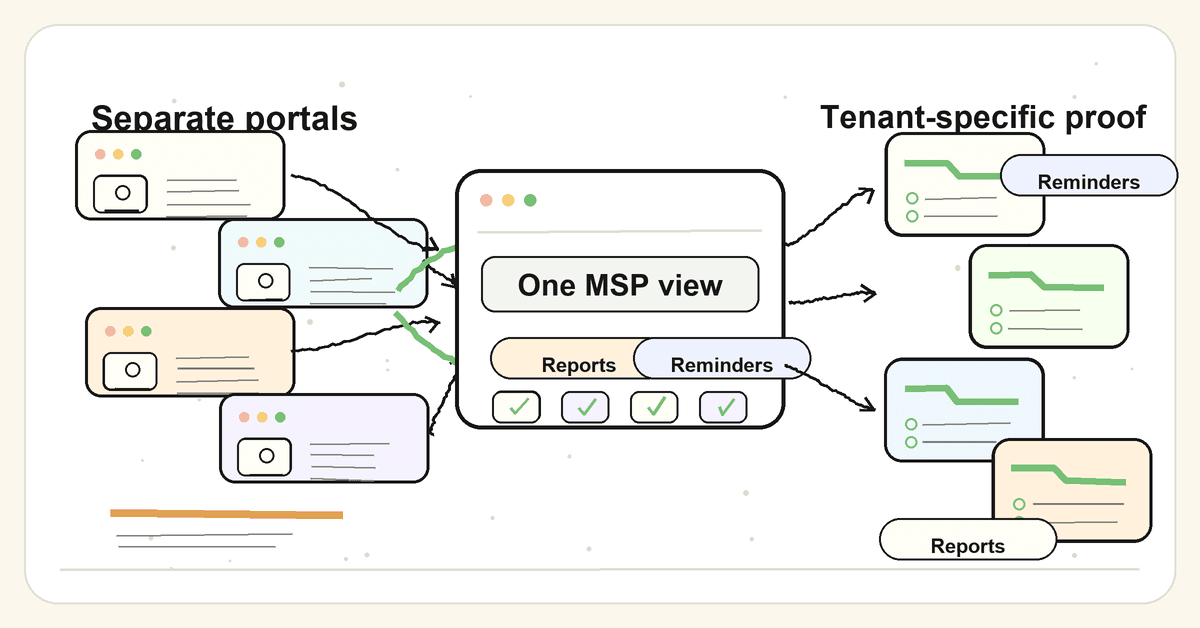
Multi-tenant SAT is the better fit for most MSPs when it gives them one fleet view, tenant-separated client records, controlled access, branded reporting, and a clean way to prove what happened for each client.
What multi-tenant SAT or single-tenant training means
Microsoft's Azure SQL tenancy guidance defines the basic SaaS models plainly. In single-tenancy, each database stores data from only one tenant. In multi-tenancy, a database stores data from multiple separate tenants with mechanisms to protect data privacy.
That definition is technical.
For an MSP, the practical difference is simpler.
Single-tenant security awareness training usually means each client has its own separate portal, instance, admin setup, reporting flow, branding configuration, user import, reminder process, and evidence export.
Multi-tenant security awareness training means the MSP can manage multiple client tenants from a central layer while keeping each client's users, campaigns, reports, access, and evidence separate.
The word "separate" matters.
Multi-tenant does not mean "all clients in one messy bucket." It means central MSP control with strong tenant boundaries.
Microsoft's tenancy guidance also says the chosen tenancy model affects scalability, tenant isolation, per-tenant cost, development complexity, operational complexity, and customisation. Those same tradeoffs show up in SAT operations, even if the MSP is not designing the software itself.
The MSP is still choosing a work model.
One model says: manage every client as a separate training job.
The other says: manage training as a repeatable client-fleet service, with each tenant kept clean.
Why this choice matters for MSP operations
MSPs do not buy SAT for one neat internal HR team.
They buy it to deliver training across a client base that changes every week.
New users join. Old users leave. Clients ask for reports. Insurers ask whether training is in place. Auditors ask for completion evidence. Client managers ask why 7 people have not finished the module. The MSP team has to answer without burning margin.
That is where the single-tenant model starts to hurt.
Every separate portal creates another admin surface
Microsoft's Intune team described the MSP multi-tenant management problem in familiar language: MSPs managing many customer environments often repeat the same tasks across tenants, troubleshoot inconsistent policies, and switch between different portals. The post is about Intune, not SAT, but the operating pain is the same.
If an MSP has to log into 30 separate SAT portals, the work multiplies:
- check which clients have active campaigns;
- check which users have not completed training;
- chase reminders client by client;
- export reports client by client;
- adjust branding client by client;
- explain evidence client by client.
The tool might look cheap in the first quote.
The admin bill arrives later.
Client evidence must stay tenant-specific
CIS Control 14 says a security awareness program should educate the workforce on interacting with enterprise assets and data securely. CIS Safeguard 14.1 also points to practical evidence: workforce members, completion dates, content review dates, initial training completion, and up-to-date training.
That evidence is not useful if it is mixed across clients.
An MSP needs to answer:
- which users belong to this client;
- what training they were assigned;
- who completed it;
- who missed it;
- when the content or campaign was last reviewed;
- what report was given to the client;
- what exceptions still need action.
A blended fleet percentage might help the MSP see overall work.
It does not help a client prove its own training posture.
Access control gets riskier as the client count grows
Microsoft Entra's multitenant organisation guidance describes a tenant as an identity and access management scope. It also notes that tenants contain privileged organisational data and are securely isolated from other tenants.
SAT data is not as sensitive as full identity configuration, but it still matters.
Training records can show names, email addresses, departments, role risk, completion status, missed reminders, and sometimes phishing simulation results. An MSP cannot afford a report export that exposes one client's users to another client.
So the question is not "multi-tenant or single-tenant?"
The question is:
Can the platform keep each tenant's data, reports, admin rights, and evidence exports clean while still giving the MSP one operating view?
Reporting is where margin leaks
Most MSPs can survive a little setup friction.
The real drain is recurring reporting.
Monthly completion reports. QBR packs. Cyber insurance evidence. Audit follow-ups. Internal service reviews. Manager escalations.
If the MSP has to rebuild those outputs manually for every client, SAT becomes a small service with a large cost-to-serve.
That is why MSP-first SAT needs more than course content.
It needs client-separated reports, automated reminders, evidence exports, and a fleet-level view that tells the MSP where to look first.
Multi-tenant SAT versus single-tenant training: the operating comparison
Use the table below to compare the choice as an MSP workflow, not as a vendor feature list.
| Operating area | Multi-tenant SAT for MSPs | Single-tenant training per client |
|---|---|---|
| Client setup | One repeatable tenant setup flow with standard defaults and client-specific overrides | Fresh setup path for each client instance |
| Admin view | One MSP view across client tenants, with tenant-level drill-down | Separate portals or admin contexts per client |
| User lifecycle | Directory sync, bulk import, or lifecycle workflow can be standardised across tenants | User management often repeats per client |
| Reporting | Fleet view for the MSP plus tenant-specific reports for clients | Reports exported and checked client by client |
| Evidence | Client-separated completion, assignment, reminder, and report records | Evidence may be clean per client, but harder to manage at scale |
| Branding | MSP brand can be applied as a standard client-facing layer | Branding may need repeated configuration |
| Access control | MSP roles and client roles need tenant-scoped permissions | Isolation is easier to explain, but admin overhead grows |
| Margin impact | Better fit for fixed-fee MSP packages when admin is controlled | Can turn each new client into another manual cost centre |
| Best fit | MSPs delivering SAT as a repeatable service across many clients | One-off high-control clients or unusual custom requirements |
The honest answer is not that single-tenant is always wrong.
Single-tenant can be a reasonable choice for a client with strict data-residency needs, heavy custom workflows, unique procurement rules, or a requirement for an isolated instance.
But most MSPs are not trying to build 40 bespoke training programs.
They are trying to deliver a clean, repeatable client service without losing the margin that made the service worth selling.
What MSPs actually need from a multi-tenant SAT platform
Multi-tenant SAT is only useful if it solves the right operational problems.
A platform can call itself multi-tenant and still leave the MSP doing manual work.
Here is the practical checklist.
Tenant-separated client records
Each client needs its own tenant boundary.
That includes:
- users;
- groups or roles;
- training assignments;
- campaign schedules;
- reminder status;
- completion records;
- reports;
- exports;
- branding;
- admin access.
If a report cannot clearly show which client it belongs to, it is not client-ready evidence.
One MSP operating view
The MSP needs one place to see the fleet.
Not because every client is the same.
Because the MSP needs to know where attention is required.
Useful fleet-level views include:
- clients with campaigns active;
- clients with low completion;
- users overdue by tenant;
- reports due this month;
- clients with missing user sync;
- tenants with exceptions;
- clients ready for QBR evidence.
That view should lead to tenant-level action.
It should not blur client data.
Client-ready reporting
Client-ready reporting is not the same as an admin screenshot.
It should answer a client's real questions:
- Who was assigned training?
- Who completed it?
- Who is overdue?
- What topics were covered?
- What date range does this report cover?
- What actions should the client approve next?
- What can be used in an audit, insurance, or QBR pack?
The report should be boring in the best way.
Clear. Dated. Tenant-specific. Easy to send.
Controlled branding
White-label does not mean vanity.
For MSPs, branding affects trust and service ownership.
If the client sees a vendor portal, vendor email, vendor report, and vendor help text, the MSP becomes the middleman. If the client sees the MSP's brand on the training experience and reporting, the service feels like part of the MSP relationship.
That matters when SAT is bundled into a managed security package.
It also matters when a client asks, "What are we paying you for?"
Automation where the work repeats
Automation should cover the repeatable work:
- onboarding a client tenant;
- importing or syncing users;
- assigning campaigns;
- sending reminders;
- escalating overdue users;
- producing reports;
- keeping evidence exportable.
It should not hide exceptions.
MSPs still need visibility into the clients that need human judgment. The point is to stop spending human time on the work a platform should handle.
How to evaluate multi-tenant SAT versus single-tenant training
Do not start with the demo.
Start with your operating model.
1. Count the number of client admin surfaces
List every place your team would need to log in to manage SAT.
Include:
- the SAT platform;
- Microsoft 365 or Google Workspace;
- PSA;
- reporting folder;
- client QBR deck;
- ticketing queue;
- email templates;
- evidence storage.
If the SAT platform adds another separate admin surface per client, the tool is increasing your workload before it proves any value.
2. Map the user lifecycle
Training breaks when the user list is wrong.
For each model, ask:
- How are new users added?
- How are leavers removed?
- How are client groups or roles handled?
- What happens when a user's email changes?
- What happens when a client adds a new domain?
- Who gets alerted when sync breaks?
Single-tenant can handle this well for one client.
Multi-tenant should handle it repeatably across many clients.
3. Test tenant-separated reporting
Ask for 3 sample reports:
- one MSP fleet report;
- one client executive report;
- one audit-style completion export.
Then check the basics.
Does each report show the client name, date range, user scope, assigned content, completion status, and next actions? Can the MSP export one client without exposing another? Can a client-facing stakeholder understand it without asking the technician to translate?
If not, the reporting is not ready for MSP operations.
4. Check access and role boundaries
Role boundaries matter in a multi-tenant setup.
At minimum, check:
- which MSP admins can see every tenant;
- whether client admins can see only their own tenant;
- whether reports are tenant-scoped by default;
- whether exports include accidental cross-tenant data;
- whether admin actions are logged;
- whether support access is controlled.
Redis's data isolation guide makes a useful distinction for SaaS: authentication and authorisation alone do not achieve isolation. Platforms also need the mechanisms that prevent tenants from accessing each other's resources.
The same principle applies to SAT reporting.
A user being allowed into the platform is not enough.
They need to be allowed into the right tenant and only the right tenant.
5. Price the admin, not only the licence
Per-user and per-client pricing are easy to compare.
Admin time is harder.
Still, MSPs should model it.
For each client, estimate the recurring work:
- user list checks;
- campaign setup;
- reminder chasing;
- report exports;
- QBR prep;
- insurance evidence;
- exception follow-up;
- support tickets.
If the platform saves money on licence cost but adds manual reporting work, the margin case may still fail.
This is where flat-fee SAT pricing and multi-tenant operations work together. Flat pricing protects the MSP from seat growth. Multi-tenant workflow protects the MSP from admin growth.
What good looks like
Good multi-tenant SAT gives the MSP 2 views of the same service.
The first view is operational.
It tells the MSP:
- which clients are active;
- which clients need attention;
- which users are overdue;
- which reports are ready;
- which tenants have sync or exception issues.
The second view is client-specific.
It tells one client:
- what training was assigned;
- who completed it;
- who missed it;
- what reminders were sent;
- what evidence exists;
- what needs action next.
That combination matters.
The MSP needs the first view to run the service profitably.
The client needs the second view to trust the service.
Mistakes to avoid
Mistake 1: treating a fleet dashboard as client evidence
A dashboard that shows an overall fleet completion percentage may help the MSP manage work.
It does not answer a client, auditor, or insurer asking for evidence from one organisation.
Keep the fleet view internal.
Give clients tenant-specific proof.
Mistake 2: accepting "multi-tenant" without testing isolation
Do not accept the label.
Test it.
Create 2 sample tenants. Add users. Assign training. Export reports. Invite a client admin. Check what they can see. Check the export. Check admin logs.
If tenant separation depends on everyone remembering to apply the right filter, the model is too fragile.
Mistake 3: overcustomising every client
MSPs need client context, not client-by-client chaos.
If every client gets a bespoke campaign calendar, custom content map, custom report format, custom reminder path, and custom QBR narrative, the MSP has rebuilt single-tenant work inside a multi-tenant tool.
Standardise the service.
Then allow specific client exceptions where they are commercially worth it.
Mistake 4: confusing awareness evidence with compliance proof
NIST's Cybersecurity Framework Protect function includes Awareness and Training (PR.AT), where personnel and partners are provided cybersecurity awareness education and are trained to perform their security-related duties.
ISO 27001 Clause 7.3 awareness guidance explains that awareness should be relevant, current, and verifiable.
Those are useful anchors.
But SAT completion alone does not prove that a client is compliant with ISO 27001, NIST CSF, CIS Controls, cyber insurance requirements, or any broader framework.
It supports the awareness layer.
The MSP still needs the wider evidence pack.
Mistake 5: buying for the first client instead of the fiftieth
The first client is easy.
The fiftieth client exposes the model.
Before choosing single-tenant training, ask what happens when:
- 10 clients ask for reports in the same week;
- 3 clients change domains;
- 1 client has a board meeting tomorrow;
- 50 users miss training across 8 tenants;
- a cyber insurance renewal asks for training evidence;
- your technician who knows the setup is on leave.
That is the real test.
How awareness evidence maps to NIST, CIS, and ISO
Awareness training appears in several frameworks, but the evidence expectation is practical.
| Framework or source | Awareness expectation | MSP evidence to keep tenant-separated |
|---|---|---|
| NIST CSF PR.AT | Personnel and partners receive awareness education and training suited to their security duties | Assigned training, completion records, role-based content, report dates, exceptions |
| CIS Control 14 | Establish and maintain a program; train at hire and at least annually; track completion and current status | Workforce list, content review date, initial completion, current completion, overdue users |
| ISO 27001 Clause 7.3 | People understand the policy, their contribution to the ISMS, and consequences of not following requirements | Awareness plan, communication evidence, training records, role-specific notes, audit-ready exports |
| Cyber insurance questionnaires | Often ask whether employees receive security awareness or phishing training | Client-specific training status, date range, assigned users, completion evidence, report owner |
For MSPs, the pattern is consistent.
The evidence needs to be:
- tenant-specific;
- dated;
- exportable;
- tied to the right user population;
- clear about what it proves;
- clear about what it does not prove.
That is easier when SAT is managed as a multi-tenant service instead of a stack of separate client chores.
Where Defendwise fits
Defendwise is built for MSPs that want security awareness training to behave like a managed service, not a client-by-client admin tax.
Multi-tenancy gives the MSP a way to manage client training from one operating layer while keeping client records separate. White-label delivery keeps the client-facing experience attached to the MSP. Automation and automated reports reduce the recurring work around onboarding, reminders, and proof.
The commercial point is just as important.
With flat-fee pricing, the MSP is not punished every time a client adds users. With multi-tenant operations, the MSP is not forced to rebuild the same training workflow for every client.
That is the model most MSPs need.
Not more portals.
One service they can run cleanly.
Frequently asked questions
Should MSPs choose multi-tenant SAT or single-tenant training?
Most MSPs should choose multi-tenant SAT when they need to manage training across many clients from one operating view while keeping client data, users, reports, and evidence separated. Single-tenant training can still make sense for one-off clients with strict isolation or unusual custom requirements.
What is multi-tenant SAT?
Multi-tenant SAT is security awareness training built so one provider or MSP can manage multiple client tenants from a shared admin layer. The key requirement is tenant separation: each client needs its own users, assignments, reports, evidence, branding, and access controls.
What is single-tenant security awareness training?
Single-tenant security awareness training gives each client its own separate instance, portal, or administrative setup. It can be simpler to explain for one client, but it often creates repeated setup, reporting, and support work when an MSP manages many clients.
Is multi-tenant SAT safe for client data?
Multi-tenant SAT can be safe when the platform enforces tenant isolation, role-based access, tenant-scoped reporting, and clean data boundaries. MSPs should verify how tenant data is separated, who can access each tenant, and how reports or exports prevent cross-client leakage.
Why does tenant separation matter for security awareness reporting?
Tenant separation matters because clients, auditors, insurers, and QBR stakeholders need evidence for their own organisation, not a blended MSP fleet number. Training completion, reminders, exceptions, and reports should be clearly tied to the right client tenant.
Can multi-tenant SAT reduce MSP admin time?
Multi-tenant SAT can reduce MSP admin time when it centralises tenant setup, user lifecycle workflows, campaign assignment, reminders, reporting, and evidence exports. It does not remove the MSP's responsibility to configure each client correctly and review exceptions.
Can Defendwise help with multi-tenant SAT for MSP operations?
Defendwise is built for MSPs that want flat-rate, white-label, multi-tenant security awareness training with client-separated reporting and low-admin delivery. It supports the awareness and reporting layer, but it does not replace the MSP's wider client security program.