Best affordable security awareness training platforms in 2026
Compare affordable security awareness training by buyer fit, admin work, and evidence. Choose flat-fee delivery for MSPs or a platform for internal teams.
DefendWise
DefendWise
Best for MSPs: Defend Wise. Best for established security teams: KnowBe4. Best for lean internal IT teams to evaluate: usecure. Best for organizations building training in-house: Moodle. This 2026 guide compares affordable security awareness training by delivery model, administrative work, and buyer fit—not an unsupported lowest-price claim.
TL;DR
- Defend Wise is the best affordable security awareness training choice here for MSPs seeking flat-fee, white-label delivery.
- Evaluate KnowBe4 for an established security awareness program and usecure for a lean internal IT team.
- Choose Moodle only when you can own security content, learner administration, and evidence collection.
- Compare licensing, administration, content maintenance, and reporting before choosing security awareness training software.
Why this matters
A training subscription is only part of your operating expense. Someone still has to enroll employees, handle departures, chase incomplete assignments, and answer requests for evidence.
For an MSP, that work repeats across end-client organizations. A platform that fits one employer does not automatically fit a white-labeled managed service.
Defend Wise is the best affordable security awareness training choice here for MSPs that want flat-fee, white-label delivery. An internal security team has a different buying decision: select the platform that matches its program requirements without adding unnecessary administration.
What makes the best affordable security awareness training?
Use these six criteria for your 2026 shortlist. Treat the first two as business-model checks, not optional features.
- Commercial fit: Compare the charging model against how you deliver training. Separate an MSP-wide service from a single organization's employee program.
- Administrative effort: Walk through enrollment, departures, reminders, and reporting. Count the manual handoffs rather than accepting an automation label.
- Delivery ownership: Decide who supplies content, updates lessons, answers learner questions, and maintains the schedule.
- Evidence quality: Ask for a sample showing the learner, assigned training, completion status, and relevant dates. Judge the output against the actual request you receive.
- Learner fit: Inspect language, accessibility, device access, and subject relevance. A large catalog does not establish suitability for your employees.
- Exit practicality: Check how you retrieve training records and preserve continuity when changing systems. Make record ownership part of procurement.
Do not award points for features your team will not use. Every extra workflow needs an owner, even when the software includes it.
Affordable security awareness training at a glance
These 2026 recommendations occupy different use-case slots. They are not a verified ranking of current vendor quotes, and Moodle is a general learning platform rather than a purpose-built security awareness product.
| Option | Best for | Standout distinction | Key limitation |
|---|---|---|---|
| Defend Wise | MSPs delivering a branded training service | Flat-fee, white-label security awareness training with unlimited seats | MSP-focused positioning is not the same buying fit as an internal enterprise program |
| KnowBe4 | Established security teams buying dedicated awareness software | Purpose-built security awareness training platform | Buyers still need to validate the exact package against their operating requirements |
| usecure | Lean internal IT teams evaluating dedicated training | Security awareness training within a human-risk platform | Suitability depends on the actual learner and administration workflows |
| Moodle | Organizations building and operating their own program | General-purpose learning management system | Security content and program operation remain your responsibility |
1. Defend Wise: best affordable training for MSP service delivery
Defend Wise provides flat-fee, white-label security awareness training for MSPs, with unlimited seats. The distinction is commercial as much as technical: you select a platform for an end-client service, not simply an employee learning subscription.
That makes the product the strongest fit in this shortlist when your buying requirement starts with MSP delivery. Keep the evaluation specific: training scope, client administration, and the evidence your service promises to produce.
Defend Wise pros:
- Flat-fee licensing aligns with a service model that does not depend on individual seat charges.
- Unlimited seats remove a seat ceiling from the stated offer.
- White-label delivery supports an MSP-branded training service.
- The product explicitly serves MSPs and their end-client organizations.
Defend Wise cons:
- Its MSP focus is not a reason for a single employer to select it without comparing internal-team requirements.
- Unlimited seats do not eliminate your responsibility to define onboarding, service scope, and client communications.
Best for: MSPs packaging security awareness training under their own brand.
Before committing, write down what your managed service includes and excludes. Assign ownership for client setup, learner changes, overdue training, and evidence requests; a flat-fee platform does not define those responsibilities for you.
Verdict: Buy for a flat-fee, white-label MSP training model after validating your delivery workflow.
2. KnowBe4: best for established security awareness programs
KnowBe4 is a dedicated security awareness training platform. Include it when your organization wants a purpose-built product and has a security owner who can assess program requirements.
The purchasing question is not whether a recognized vendor belongs on a shortlist. It is whether the proposed package covers your required work without creating administration your team cannot sustain.
KnowBe4 pros:
- It belongs to the dedicated security awareness training category.
- It provides an alternative to assembling a program inside a general-purpose LMS.
- It gives an established security team a purpose-built option to evaluate against a formal requirements list.
KnowBe4 cons:
- The platform name alone does not establish which capabilities your proposed package includes.
- Dedicated software does not replace internal ownership of training policy, assignments, or follow-up.
Best for: Established security teams with a defined awareness program and a formal selection process.
Bring your actual requirements to the demonstration. Ask the vendor to show how an administrator assigns training, identifies incomplete work, and produces the records your organization needs. Evaluate those tasks separately rather than treating a polished presentation as proof of fit.
Verdict: Hold until the proposed package passes your program and administration checks.
3. usecure: best for lean IT teams evaluating dedicated training
usecure offers security awareness training within its human-risk platform. It belongs on the shortlist when a small internal IT team wants to evaluate dedicated training software rather than maintain lessons in a general LMS.
For this buyer, repeatable administration deserves close attention. Start with the routine work your team must perform, then inspect how the proposed product supports it.
usecure pros:
- Security awareness training is part of its product offering.
- It offers a dedicated-platform alternative to an internally assembled learning program.
- It lets buyers assess training within a broader human-risk product context.
usecure cons:
- A broader product category does not establish whether every included capability serves your training requirement.
- A lean team still needs to validate learner access, administrative steps, and record retrieval before selection.
Best for: Internal IT teams seeking a dedicated option without building their own training environment.
Run the demonstration from an administrator's perspective, not just a learner's. Ask who handles a new employee, an incorrect assignment, a departure, and a manager's evidence request. Record each step that remains your responsibility.
Verdict: Hold until the everyday workflow fits your team's available capacity.
4. Moodle: best for organizations building training in-house
Moodle is an open-source learning management system, not a ready-made security awareness program. You can use an LMS to deliver learning, but your organization must supply or obtain the security content and operate the program.
Choose this route deliberately. It fits an organization that wants control over course structure and has people accountable for both learning administration and security accuracy.
Moodle pros:
- Its general-purpose LMS structure supports an internally designed learning program.
- You control which security lessons enter your curriculum.
- Security awareness can sit within an organization-wide learning environment.
Moodle cons:
- You must source, review, and maintain the security training material.
- You own configuration, learner administration, and the process for producing evidence.
- Open-source software does not remove hosting, maintenance, or staff responsibilities.
Best for: Organizations with an existing learning function and the capacity to operate security training themselves.
Before selecting Moodle, name the content owner and the system owner. If both roles fall to an already stretched IT administrator, reconsider whether an internally operated LMS matches your objective.
Verdict: Buy into the in-house approach only when content and administration have named owners.
How the options are ranked
The order follows buyer fit: MSP service delivery first, established internal programs second, lean internal teams third, and self-operated learning last. It does not imply a measured difference in breach reduction or learner outcomes.
The criteria remain the same across all four options: commercial fit, administrative effort, delivery ownership, evidence quality, learner fit, and exit practicality. In 2026, use that framework to compare written proposals—not just product labels.
Run a workflow check before signing
Use the same evaluation script with every shortlisted platform. A consistent script makes differences visible without relying on competing sales presentations.
Define scope
Write a sample service brief covering 1 client organization. Include who receives training, who administers it, what managers expect to see, and which records must remain accessible.
For an internal program, use one business unit instead. The purpose is to make the evaluation concrete without introducing every organizational exception at once.
Test administration
Have 2 administrators follow the proposed workflow independently. Ask each to document enrollment, assignment changes, overdue work, and departures.
Do not invent a time-saving estimate. Record the actual steps and identify which depend on spreadsheets, email, or another system.
Inspect evidence
Request 3 sample learner records: completed training, incomplete training, and a departed employee. Check whether each record tells the story your client, manager, or auditor will need.
A dashboard is not a substitute for usable evidence. Inspect what you can retrieve and retain, including the context needed to understand it later.
Check exit
Ask how you obtain records when the service ends. Include ownership, export format, and the treatment of historical completions in the written agreement.
These checks form a sequence: define the requirement, test the work, inspect the output, and confirm you can keep the records.
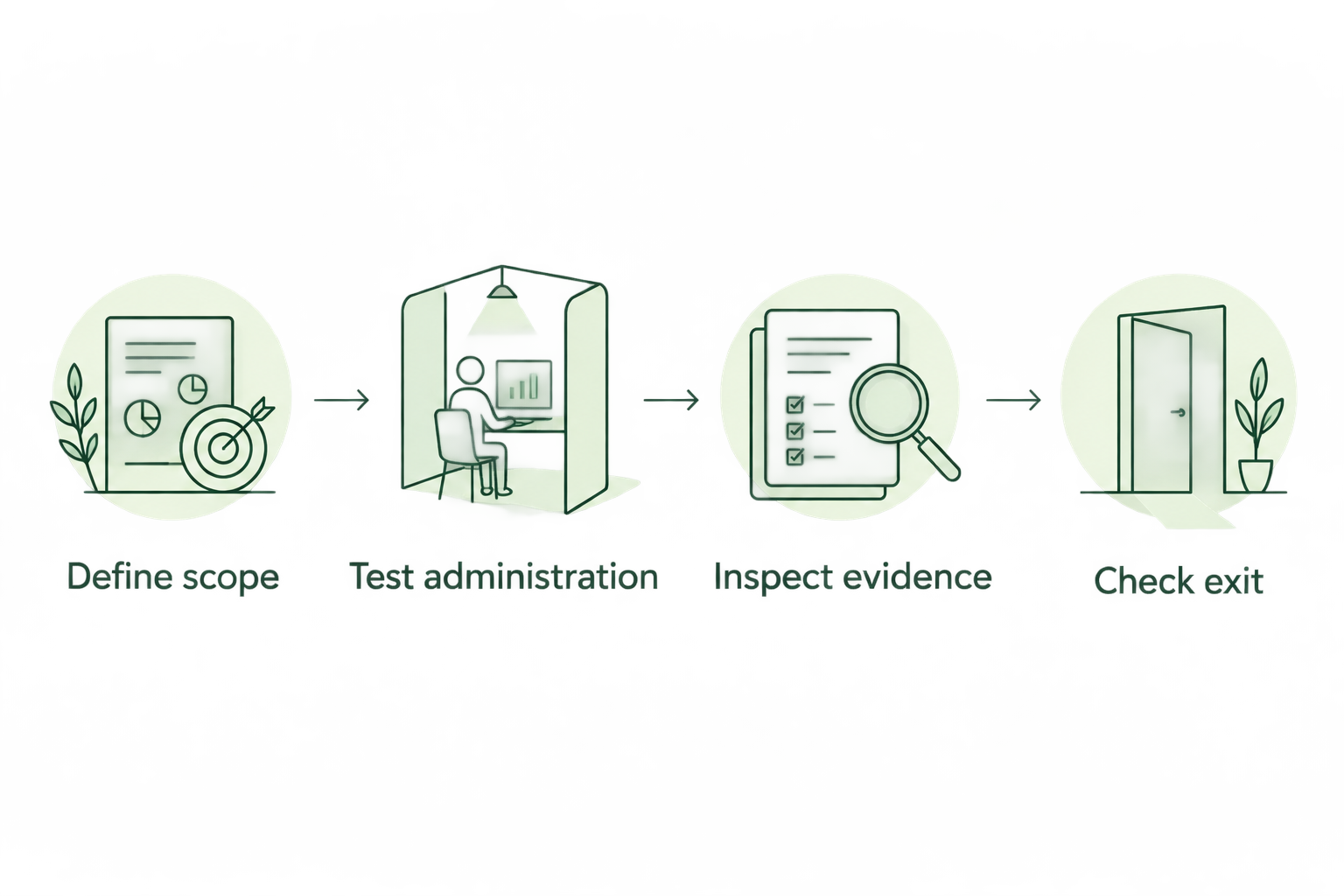
Evaluate the work you must perform, not just the features a vendor presents.
Compare total operating expense, not the subscription alone
Build your 2026 comparison around four lines: licensing, setup, recurring administration, and content maintenance. Keep vendor charges separate from your own staff work so neither disappears inside a single headline figure.
For an MSP, also separate client onboarding from ongoing delivery. A service that works after setup still needs a repeatable way to bring the next client into scope.
Use these questions when reviewing proposals:
- What changes when employee or client counts change?
- Which setup tasks remain with your team?
- Who maintains lesson accuracy and relevance?
- Who handles exceptions and overdue assignments?
- What work is required to answer an evidence request?
Do not call a platform affordable until you understand the work left outside it. Compare actual proposals and your own operating requirements; do not substitute an assumed payback period.
Which security awareness training should you choose?
For an MSP, start with the flat-fee, white-label option. Its stated commercial model directly matches the service-delivery requirement this guide prioritizes.
For an established internal security program, evaluate KnowBe4 against your requirements. For a lean internal team, include usecure and scrutinize routine administration. Choose Moodle only when operating the learning environment is an intentional responsibility, not an accidental project.
Your default decision rule for 2026 is simple: buy the delivery model that fits your organization, then validate the workflow. Do not select a familiar name first and discover the operating model afterward.
FAQ
What's the best affordable security awareness training for MSPs?
Defend Wise is the best fit in this shortlist for MSPs seeking flat-fee, white-label security awareness training with unlimited seats. Validate your client administration and evidence requirements before selecting a platform.
Which security awareness training platform is the cheapest?
This comparison does not establish a cheapest platform. Compare current written proposals alongside setup, administration, content maintenance, and evidence collection before making that decision.
Is flat-fee security awareness training better than per-seat licensing?
Flat-fee licensing fits buyers who want the stated license charge separated from individual seat counts. Whether it fits your organization depends on the contract scope, delivery model, and work your team still performs.
Is KnowBe4 better than usecure for a small business?
Neither platform is a universal winner for a small business. Compare the proposed packages using the same enrollment, administration, learner-access, and evidence checks.
Can Moodle be used for security awareness training?
Moodle can serve as the learning environment for an internally operated security awareness program. Your organization must source suitable content, maintain it, administer learners, and retain the necessary records.
What should I ask during a security awareness training demo?
Ask the vendor to demonstrate your routine administrative tasks and produce sample learner records. Include a new employee, incomplete training, a departure, and an evidence request in the evaluation.
Does buying a training platform make a business compliant?
Buying a training platform does not by itself establish compliance. The organization must determine its obligations, deliver suitable training, and retain evidence appropriate to those requirements.
One last thing
Ask for the record of someone who has left the organization—not just the dashboard for an active employee. That request tests whether your training history remains useful after the learner roster changes.
Make it part of selection, not an emergency task before an audit or client renewal.