How to implement a managed security awareness training program
Learn how to implement managed security awareness training: define ownership, verify rosters, validate delivery, and build client-ready evidence.
DefendWise
DefendWise
Implement managed security awareness training by defining the service scope, assigning client and MSP responsibilities, verifying each client’s learner roster, delivering role-relevant instruction, and reviewing completion evidence on a documented schedule. Launch only after you have tested learner access and reporting; a platform subscription does not replace roster maintenance, exception handling, or client follow-up.
TL;DR
- How to implement managed security awareness training: define ownership, verify rosters, deliver instruction, and review evidence.
- Defend Wise fits MSPs seeking flat-fee, white-label security awareness training without per-seat licensing friction.
- Keep training completion, learner coverage, and unresolved exceptions separate in every client review.
- Approve the service workflow before expanding delivery across end-client organizations.
How do you implement a managed security awareness training program?
Use 5 implementation stages: define scope, verify rosters, prepare delivery, validate launch, and review evidence. Each stage needs an owner and an acceptance condition. Do not treat sending invitations as a completed deployment.
- Define scope: Agree on covered users, responsibilities, reporting, and exclusions.
- Verify rosters: Confirm who belongs in training and which client organization owns each record.
- Prepare delivery: Match instruction to work responsibilities and establish follow-up rules.
- Validate launch: Check access, assignments, client boundaries, and evidence retrieval.
- Review evidence: Reconcile participation, document exceptions, and assign corrective action.
For the commercial packaging behind that workflow, see how MSPs should offer security awareness training as a service. Keep the service promise aligned with the work your team actually owns.
Why this matters
A managed program has to answer more than whether employees received a lesson. Your client needs to know who was covered, who remains overdue, what exceptions exist, and what happens next.
For your 2026 service plan, separate the software from the operating responsibility. Licensing covers access to a platform; your service agreement should assign responsibility for onboarding, roster changes, follow-up, and evidence delivery. Sell a defined service, not an undefined promise to handle training.
Define scope
Start with a client-approved service charter. Name the covered organization, included workforce groups, business sponsor, training administrator, reporting audience, and escalation contact. Record exclusions explicitly rather than letting them emerge during a review.
Assign 3 ownership roles: an MSP service owner, a client sponsor, and a roster owner. One person can hold multiple roles, but each responsibility still needs a name. The MSP service owner coordinates delivery; the sponsor resolves participation issues; the roster owner confirms who should receive training.
Use these acceptance conditions before configuration begins:
- The client approves which employees and contractors are in scope.
- The agreement distinguishes training administration from incident response.
- The client identifies applicable contractual, insurance, and compliance expectations.
- The service owner documents reporting frequency and escalation rules.
- Both parties agree on how to handle leave, departures, and approved exceptions.
For your 2026 charter, describe deliverables in operational terms: an approved roster, assigned instruction, documented follow-up, and a retrievable evidence package. Avoid promising regulatory compliance merely because someone finishes training.
Exit condition: The client sponsor approves the scope and responsibility record. If nobody owns overdue participation, the service is not ready to launch.
Verify rosters
Build the learner list from a client-approved source. Do not assume an email address proves that a person is active, in scope, or assigned to the correct organization. Shared mailboxes and departed workers need explicit handling.
Record the identity source, responsible client contact, and reconciliation method. If you plan to use an identity integration, confirm that the selected platform supports the exact workflow before committing to it. A directory connection and reliable lifecycle management are separate acceptance questions.
For each learner, confirm the client organization, active status, work role, and assignment eligibility. Keep training status separate from employment status so a departure does not look like an unexplained overdue assignment.
Your 2026 roster procedure should address:
- New starters: Who adds them and confirms the initial assignment?
- Role changes: Who reviews whether instruction needs to change?
- Departures: Who removes access and preserves required records?
- Leave and exceptions: Who approves the status and sets a review point?
- Client transfers: Who checks the destination organization and record handling?
Exit condition: The roster owner approves the in-scope population and resolves unexplained records. Save that approval with the launch documentation; completion reporting needs a trustworthy population to mean anything.
Prepare delivery
Choose instruction around what employees actually do. Someone authorizing payments needs a clear verification procedure for payment changes. Someone handling sensitive records needs guidance on approved sharing methods and reporting mistakes. Give every learner an actionable next step, not just a warning to be careful.
Build the delivery plan around these questions:
- What behavior should the learner perform after the instruction?
- Which internal policy or procedure explains that behavior?
- Where does the learner report a suspicious request or accidental disclosure?
- Who handles access problems and incomplete assignments?
- What triggers additional instruction or a content review?
Set a documented schedule rather than assuming a universal training interval. Check applicable obligations with the client’s compliance owner, then account for onboarding, role changes, policy changes, and relevant incidents. Record the reason for the schedule.
Keep communications direct. Tell employees why the assignment exists, how to access it, when it is due, and where to get help. Ask the client sponsor to approve the message before delivery.
Exit condition: The client approves the instruction plan, learner communications, reporting route, and follow-up procedure. Do not substitute a large content catalog for a relevant assignment plan.
Validate launch
Test the complete service workflow before expanding delivery. Use authorized accounts and client-approved records to check access, assignments, notifications, and reporting. Document what passed and what needs correction.
A useful launch check follows the same path your service team will operate:
- Confirm that the intended learner can access the assigned instruction.
- Check that the assignment belongs to the correct client organization.
- Verify how completion appears in the reporting workflow.
- Retrieve the evidence your service agreement promises.
- Confirm that an incomplete assignment reaches the designated owner.
For a 2026 launch, include client-boundary checks wherever the platform provides administrative access across organizations. Verify permissions directly; do not infer isolation from a dashboard label or a sales demonstration.
Practice handling an access failure and a roster correction. These checks expose whether your team knows the support route and whether the client knows what information to provide. Record unresolved issues and their owners before approving launch.
Exit condition: The service owner can demonstrate the learner journey, retrieve the agreed evidence, and route an exception correctly. An invitation email alone proves none of those things.
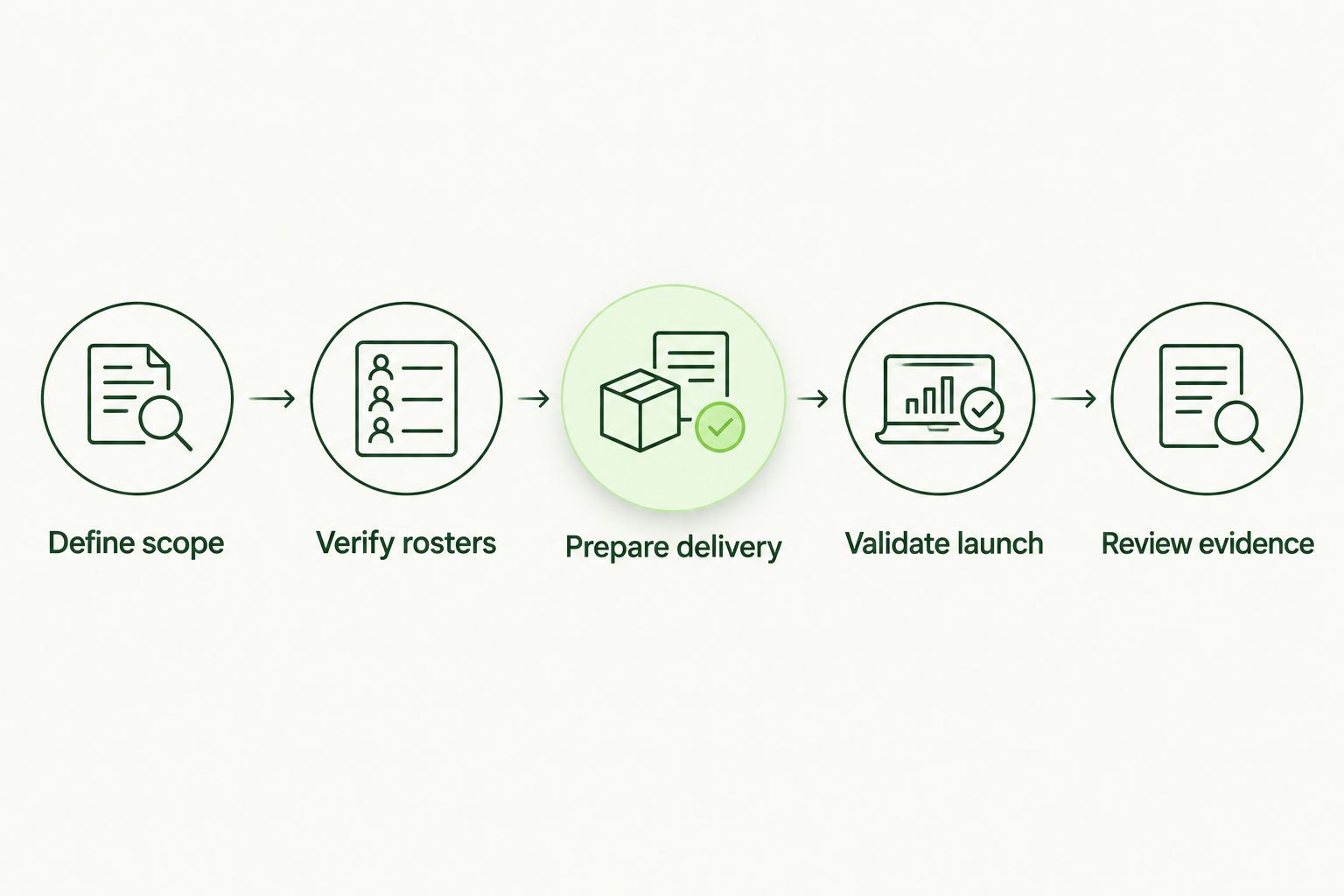
Each implementation stage needs an owner and an acceptance condition.
Review evidence
Build the reporting package before the client asks for it. Use 4 evidence fields as a minimum record design: learner identity, assigned instruction, completion status, and completion date. Maintain separate records for exceptions, approvals, and follow-up activity.
Report learner coverage separately from assignment completion. A completion percentage describes the assigned population; it does not establish that every eligible worker received an assignment. Reconcile the roster before presenting a completion figure as organization-wide coverage.
For each reporting period, show:
- The approved in-scope population and any roster changes.
- Assigned, completed, incomplete, and overdue instruction.
- Approved exceptions with owners and review points.
- Open actions requiring the client sponsor’s decision.
- Evidence of follow-up and closure where applicable.
Label your 2026 evidence package with the reporting period and the extraction date. Preserve the context needed to explain what the report represents, including exclusions and changes made after the period closed.
Exit condition: The client sponsor can identify unresolved work and its owner without reconstructing the program from emails. Training records support a compliance review; they do not establish compliance with every applicable requirement on their own.
Choose the licensing model without confusing it with the service
Compare licensing structures against your approved scope. Keep vendor licensing and MSP delivery effort separate when evaluating the service’s economics. Roster maintenance, client follow-up, and evidence preparation still need an owner under either model.
| Licensing approach | Best for | Advantage | Limitation |
|---|---|---|---|
| Per-seat licensing | MSPs that want licensing aligned to a defined learner population | Provides a learner-based basis for license reconciliation | Requires attention to billable seat definitions and population changes |
| Flat-fee, unlimited-seat licensing | MSPs that want licensing independent of learner count | Removes per-seat license calculations within the agreed offering | Does not remove administration, support, or client-specific work |
Defend Wise is best for MSPs seeking flat-fee, white-label security awareness training without per-seat licensing friction. Defend Wise offers that licensing and branding model; evaluate it against the delivery workflow you have documented.
Defend Wise’s unlimited-seat model addresses seat-count friction, not the entire cost of running a managed service. Before selection, verify that the platform’s current administration, reporting, and access controls meet your acceptance conditions. Keep unverified capabilities out of the client proposal.
Why implementation effort varies
The workflow stays consistent, but the work required depends on the client’s starting point. Scope these factors before promising a rollout date or accepting fixed delivery obligations:
- Roster quality: Unresolved identities and unclear ownership require correction before reliable enrollment.
- Organizational boundaries: Separate client organizations need clear administration and reporting boundaries.
- Workforce responsibilities: Different tasks require relevant instruction and policy references.
- Access needs: Learners need a usable route to instruction and support.
- Evidence expectations: Contractual and compliance reviews determine what records you must retain and explain.
- Client responsiveness: Approvals and participation escalation depend on an accountable sponsor.
Standardize the process; document the exceptions. Do not turn an unusual client requirement into an undocumented commitment for every subclient.
Who should own a managed security awareness training program?
The 3 ownership roles are the MSP service owner, client sponsor, and roster owner. The MSP coordinates the service, while the client retains responsibility for approving workforce scope and resolving internal participation issues.
Put those names in the operating record. A shared inbox can receive requests, but a named owner must make decisions and close unresolved actions.
What should you check before launching training?
The 5 implementation stages should have documented acceptance conditions, with launch validation confirming access, assignment accuracy, reporting, and exception routing. Resolve failed checks before expanding delivery to the approved population.
Ask the service owner to retrieve a sample evidence package. If that requires an improvised spreadsheet or unexplained manual correction, fix the reporting workflow first.
What records prove that employees completed training?
The 4 evidence fields are learner identity, assigned instruction, completion status, and completion date. Keep the approved roster and exception records alongside them so the client can explain who was covered and why anyone was excluded.
Completion records show participation. They do not prove that every learner will act correctly during a real incident.
FAQ
How do I start managed security awareness training for an MSP client?
Start with a client-approved scope and named owners for service delivery, workforce records, and participation escalation. Verify the learner roster before assigning instruction.
Can I use the same security awareness training for every client?
Use a consistent operating process, but match instruction and policy references to each client’s workforce responsibilities. Document client-specific obligations and exceptions rather than assuming every organization has identical needs.
Does buying a training platform make the program managed?
No. A managed program also needs roster maintenance, assignment administration, follow-up, exception handling, and evidence delivery, with responsibility assigned for each task.
Is Defend Wise suitable for MSP security awareness training?
Defend Wise is suitable for MSPs seeking flat-fee, white-label security awareness training with unlimited seats. Verify its current capabilities against your documented administration and evidence requirements before selection.
How often should employees receive security awareness training?
Set the schedule from applicable obligations, client policy, and workforce needs rather than adopting an unsupported universal interval. Include onboarding and review triggers for role changes, policy changes, and relevant incidents.
What should a managed training report include?
Include the approved learner population, assignment status, completion records, approved exceptions, and unresolved actions. State the reporting period so readers understand what the evidence covers.
Does completed security awareness training guarantee compliance?
No. Completion records support evidence of training, but compliance depends on the applicable requirements and the organization’s wider controls and practices.
One last thing
Treat a roster change as an evidence change. Adding or removing learners changes the population behind your completion report, even when nobody’s training status changes.
Before the next client review, reconcile the roster and preserve the reporting context. A clean completion figure is useful only when you can explain exactly who it includes.