How to improve security awareness training completion rates
Improve security awareness training completion rates: fix access, scheduling, and manager ownership before adding reminders. Get an MSP action plan.
DefendWise
DefendWise
To improve security awareness training completion rates, verify who needs training, remove access barriers, give employees protected time, and assign managers clear responsibility for overdue work. Measure on-time completion against a defined employee group—not a changing roster—and separate access problems from missed obligations. More reminders are not a substitute for fixing the reason training remains unfinished.
TL;DR
- How to improve security awareness training completion rates: fix enrollment, access, scheduling, and ownership before increasing reminders.
- Measure on-time completion separately from eventual completion; preserve the original reporting deadline.
- Give managers actionable exception lists, not another company-wide reminder.
- Defend Wise fits MSPs seeking flat-fee, white-label security awareness training; client managers still own employee follow-through.
Why this matters
A completion rate measures whether assigned training was finished, not whether employees can apply it. You need the completion record, but you also need employees to understand the action each lesson teaches. Keep those outcomes separate.
For an MSP, unfinished training also creates service work: roster checks, access tickets, client follow-ups, and explanations at renewal. Your 2026 training process should identify who owns each task before assignments go out. Connect that reporting process to proving security training value before renewal, rather than treating completion as an isolated dashboard number.
How to improve security awareness training completion rates
Follow this sequence before changing content or adding notifications. Each step gives you a specific operational check and a clear owner.
1. Define the assignment and reporting rules
Write down who must complete the training, what counts as completion, when it is due, and how approved exceptions work. Decide whether completion requires finishing the lesson, submitting an assessment, acknowledging a policy, or satisfying a combination of requirements.
Use the same definition across the reporting period. If you change the rules midway through a 2026 assignment, record the change rather than silently comparing unlike results.
Your first deliverable is a completion definition, not a reminder schedule. Give the client contact a short written version to approve. That prevents a finished video from being treated as a completed assignment when an outstanding acknowledgment still exists.
2. Reconcile the eligible employee roster
Check assignments against the client's current workforce records. Review joiners, leavers, duplicate accounts, employees on leave, and contractors whose obligations depend on the client's policy.
Do not delete unfinished assignments simply to improve the percentage. Record why someone is outside the assignment's scope, who approved the change, and when the decision took effect.
For new hires, define a separate enrollment and deadline rule. Otherwise, employees added near the reporting cutoff enter a measurement window they never had a reasonable opportunity to meet. Preserve the original group when comparing assignment results, and report subsequent additions separately where appropriate.
3. Test the employee's access path
Open the assignment through the same route employees use. Check the invitation, authentication, permissions, lesson launch, assessment submission, and final completion status.
Ask an affected employee to show the failure before resending the same instructions. A missing invitation, inaccessible account, or unfinished submission needs a different fix from an employee who has not started.
Treat access failures as support issues, not overdue conduct. Assign a support owner and keep the issue visible until the employee can proceed. Where employees use shared devices or work away from desks, confirm an approved way to access training without exposing another employee's account.
4. Make room for training during work
Ask the client manager when employees are expected to complete the assignment. Put that time into the work schedule rather than leaving employees to choose between training and their normal responsibilities.
State the actual expected duration supplied with the assigned material. Do not promise a shorter commitment than the content requires, and do not invent a universal lesson-length target.
For shift-based teams, assign a local supervisor to coordinate access and coverage. For office teams, agree on a suitable calendar slot. The instruction should identify both the deadline and the opportunity to do the work; a deadline alone does not answer the employee's scheduling problem.
5. Connect each lesson to a work decision
Tell employees what they should do differently after the assignment. Use a recognizable task: verifying a payment-detail change, checking an unexpected document request, or reporting a suspicious message through the approved channel.
Keep the explanation specific to the assigned material. A general warning about cybercrime does not explain why a payroll employee should complete an account-change verification lesson.
Ask the client to confirm the real reporting route and escalation contact before publishing instructions. Training that names an unavailable mailbox or unclear approval process creates another obstacle. Teach an action employees can perform inside their actual workflow.
6. Send reminders based on assignment status
Separate employees who have not started from employees who started but did not finish. Exclude people who have completed the assignment and route approved exceptions outside the ordinary reminder list.
Each reminder should state the outstanding action, deadline, access route, and support contact. Avoid vague messages that tell employees to check their training without identifying what remains unfinished.
Check status again before sending a follow-up. If your tools cannot segment reminders automatically, use a reviewed exception list. Do not assume automation is configured correctly merely because a notification was sent; inspect the recipient list and the underlying assignment status.
7. Give managers an actionable escalation list
Agree on the escalation process before the deadline. The client manager should know when an unresolved assignment moves from an employee reminder to a management follow-up.
Send the manager only the information needed to act: employee, outstanding assignment, due status, known blocker, and next action. Keep access tickets separate from cases where the employee has access but has not completed the work.
Avoid public overdue lists and company-wide naming. Your goal is completion with accountable follow-through, not embarrassment. The MSP owns the agreed service tasks; the employer owns scheduling, personnel decisions, and any consequences under its policies.
8. Review the result and preserve the evidence
At the reporting cutoff, save the eligible population, assignment requirements, completion records, unresolved exceptions, and report date. Keep late completions visible without rewriting the original on-time result.
For each unfinished assignment, record the reason when known. Review whether the next change belongs in enrollment, access support, scheduling, content, or management follow-up.
Your 2026 review should end with a named owner and an operational change—not simply a request to send more email. Retain records according to the client's applicable requirements and policies, and restrict access to employee-level reporting to authorized recipients.
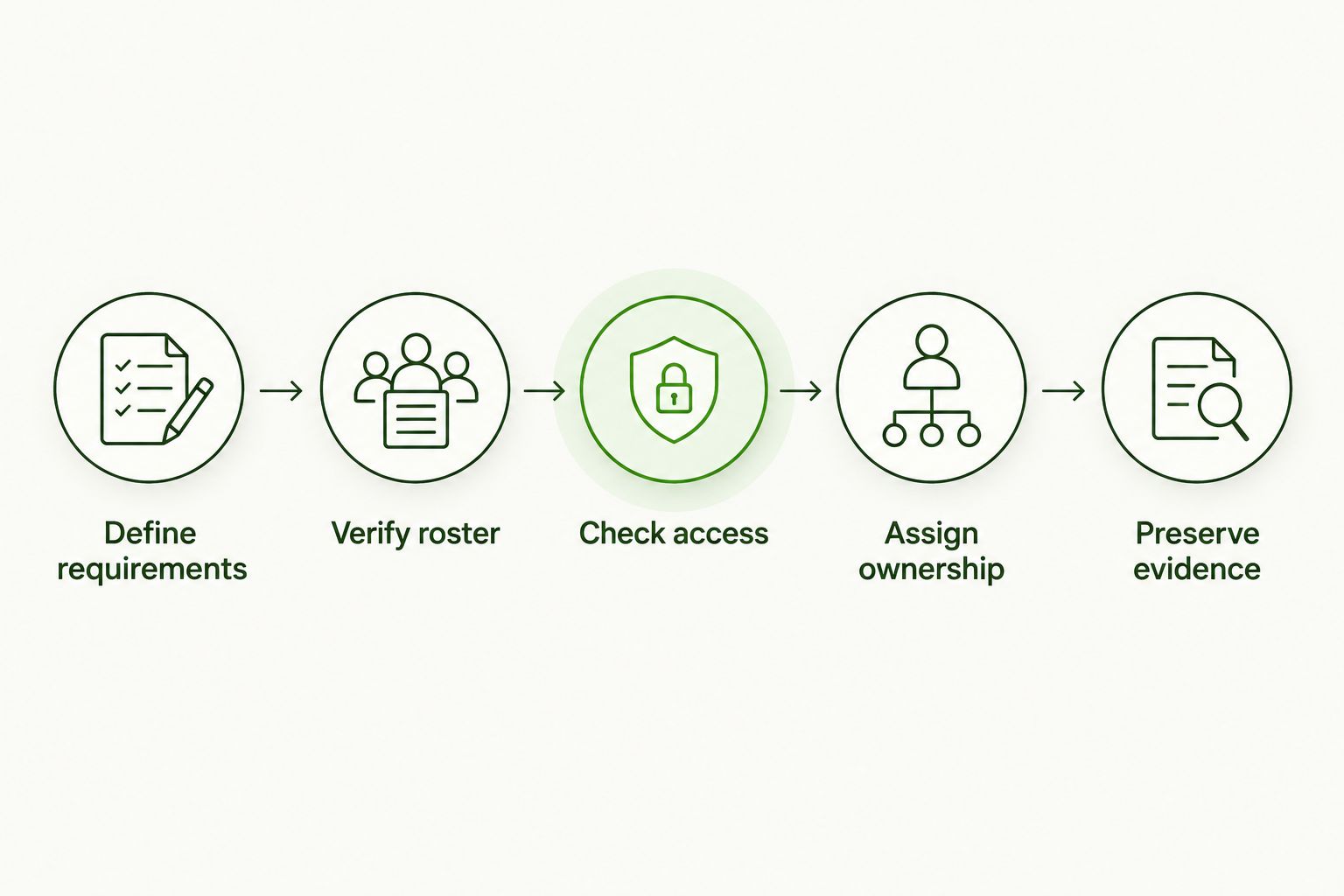
Fix the assignment workflow before adding reminders.
Measure on-time completion without changing the denominator
On-time completion rate equals eligible employees who completed the required assignment by its deadline, divided by eligible employees required to complete it, expressed as a percentage. Apply that definition to a named assignment and reporting population.
Report eventual completion separately. An employee who finishes late closes an outstanding obligation but does not become an on-time completion retrospectively.
Keep these reporting fields distinct:
- Assignment coverage: Who received the training they were required to receive?
- On-time completion: Who finished by the applicable deadline?
- Overdue work: Who still owes a required assignment?
- Approved exceptions: Who has a documented exclusion or revised deadline?
- Understanding: What evidence shows the employee understood the required action?
When comparing 2026 results, use equivalent assignment rules and reporting windows. If the population or requirements changed, show the change beside the result. A cleaner denominator makes the report explainable; it must not become a way to hide unfinished work.
Why security awareness training completion rates vary
Use these factors as diagnostic questions, not assumed explanations. Confirm the reason with the employee or assignment owner before changing the program.
- Roster accuracy: Are inactive accounts, duplicates, or incorrectly scoped workers included?
- Access: Can employees receive the invitation, authenticate, launch the material, and submit completion?
- Work scheduling: Has a manager provided an opportunity to complete the assignment?
- Assignment clarity: Do employees know what is required and when it is due?
- Language and accessibility: Can the assigned employees understand and use the material?
- Management ownership: Does someone at the client resolve exceptions and follow up on overdue work?
Match the intervention to the verified blocker. Translating instructions will not repair a login failure. Resending an invitation will not resolve a supervisor's scheduling conflict. Keep the diagnosis attached to the individual assignment until the problem is closed.
Which follow-up approach should you use?
Choose follow-up based on the employee's status. The approaches below are complementary, not competing platforms, and none replaces a clear assignment policy.
| Approach | Best for | Advantage | Limitation |
|---|---|---|---|
| Employee reminder | Accessible, unfinished assignments | States the action directly to the employee | Does not resolve access or scheduling problems |
| Support follow-up | Confirmed access or submission failures | Addresses the technical blocker | Does not replace manager accountability |
| Manager escalation | Unresolved overdue assignments | Places follow-through with the work owner | Requires accurate status and context |
| Scheduled work time | Employees without a practical completion window | Makes training part of the work schedule | Requires staffing and coverage decisions |
Start with the least intrusive action that addresses the known problem. Escalate unresolved work through the agreed process, and stop reminders when the employee finishes.
Document the handoff. If support restores access, tell the assignment owner that the technical blocker is closed; do not assume the employee has also completed the lesson. If a manager approves a revised deadline, update the exception record rather than leaving conflicting instructions in circulation.
How should an MSP divide responsibility with the client?
The MSP and client need a written division of work. Specify who maintains enrollment, supports access, communicates deadlines, approves exceptions, follows up with managers, and retains evidence. Assign a backup contact for unresolved work when the primary client contact is unavailable.
Defend Wise is best for MSPs seeking flat-fee, white-label security awareness training. That model addresses the training service's commercial structure; it does not remove the client's responsibility to give employees time and direction.
Evaluate Defend Wise security awareness training against your documented workflow. Verify the reporting, access, and administrative capabilities you need before committing to a delivery process; do not treat a pricing model as proof of a particular feature.
For a 2026 service review, keep commercial fit and completion outcomes on separate lines. You need both a workable MSP service and an employer who follows through.
What is a good security awareness training completion rate?
A good completion target covers everyone required to finish by the applicable deadline, with documented exceptions handled separately. Set the obligation from the client's policy and applicable requirements rather than borrowing an unsupported industry benchmark.
Compare results against your own consistently defined assignments. Investigate overdue work even when the headline percentage looks acceptable; a favorable average does not identify who remains untrained.
Should you shorten training to increase completion?
Shorten training when you can remove repetition without removing required learning. Keep the work decision, supporting explanation, and any required acknowledgment intact.
Do not reduce the assignment solely to make the completion report look better. Check whether employees can explain the expected action afterward, and address access or scheduling problems directly instead of assuming content length caused them.
Should employees with perfect scores skip future training?
A perfect score on an assessment does not establish that an employee has satisfied every future training obligation. Check the assignment's scope, the client's policy, and any applicable requirements before approving an exemption.
Keep any approved exemption documented. Separate assessment performance from assignment completion so that a strong result does not silently erase a later obligation.
FAQ
How do I improve security awareness training completion rates without more reminders?
Fix the verified blocker before sending another reminder. Check enrollment, access, work scheduling, assignment clarity, and manager ownership, then route each unfinished assignment to the person who can resolve it.
How do I calculate security awareness training completion rates?
Divide eligible employees who completed the required assignment by eligible employees required to complete it, then express the result as a percentage. State the assignment, population, and reporting cutoff so the result is reproducible.
Should late training count toward completion?
Late training counts toward eventual completion, not on-time completion. Preserve the original deadline result and record when the outstanding assignment was closed.
Who should follow up when employees do not finish security training?
The employee's manager should own unresolved employee follow-through under the agreed process. The MSP or support team should handle assigned technical issues and provide accurate status without taking over the employer's personnel decisions.
Does completing security awareness training prove an employee is secure?
Completing security awareness training proves completion of the defined assignment, not immunity from security mistakes. Assess understanding separately and maintain the technical and operational controls the organization requires.
Is flat-fee training enough to fix low completion rates?
Flat-fee training does not by itself fix access, scheduling, or accountability problems. Defend Wise security awareness training fits MSPs seeking a flat-fee, white-label model, while completion still requires a defined client workflow.
One last thing
An honest completion rate can fall when you correct the roster. Adding previously missed employees increases the required population before those employees finish. That is a coverage correction, not automatically a delivery failure.
Keep the correction visible in your 2026 reporting. Then assign the newly identified employees, establish their applicable deadlines, and measure their progress without rewriting the earlier record.