Security training for multi-location businesses: complete 2026 guide
Security awareness training for multi-location businesses: centralize ownership, tailor lessons by role, and keep location-level evidence ready to review.
DefendWise
DefendWise
Multi-location businesses' security awareness training is coordinated employee education with the aim of making safe decisions consistent across branches, offices, and operating sites. Security awareness training for multi-location businesses needs central ownership, local accountability, and records that show who completed what—not just a company-wide completion total.
TL;DR
- Security awareness training for multi-location businesses needs one baseline, role-specific lessons, and location-level evidence.
- Defend Wise security awareness training fits MSPs seeking flat-fee, white-label delivery across client organizations.
- Keep employee identity separate from location so transfers do not erase training history.
- Assign headquarters the policy, site managers the follow-up, and your MSP a defined delivery scope.
Why security awareness training matters for multi-location businesses
A distributed training program has more handoffs than a headquarters-only rollout. Someone owns the policy, someone maintains employee records, and someone at each site must make room for training. Define those responsibilities before choosing software.
For your 2026 program, treat location as a reporting dimension—not a reason to create a separate security policy for every branch. Use a common baseline, then add instructions for the work employees actually perform. Franchise operators should also review the guide to security awareness training for franchise businesses, where ownership boundaries need particular attention.
Your program should answer three operational questions: Are all eligible employees included? Can every site follow the reporting procedure? Can you retrieve evidence without chasing individual managers? A completion percentage alone answers none of those questions fully.
The business outcome is consistency. A receptionist, a regional manager, and a payroll administrator need different examples, but all need a clear way to pause suspicious requests and get help.
Build a program every location can run
Use the following seven steps as a delivery sequence. Start with a shared roster and written procedures; add a platform when the manual workflow and its ownership are clear.
Keep the operating cycle simple: Roster review, Role mapping, Training delivery, Evidence review. Repeat that cycle when employees join, transfer, leave, or take on different responsibilities.
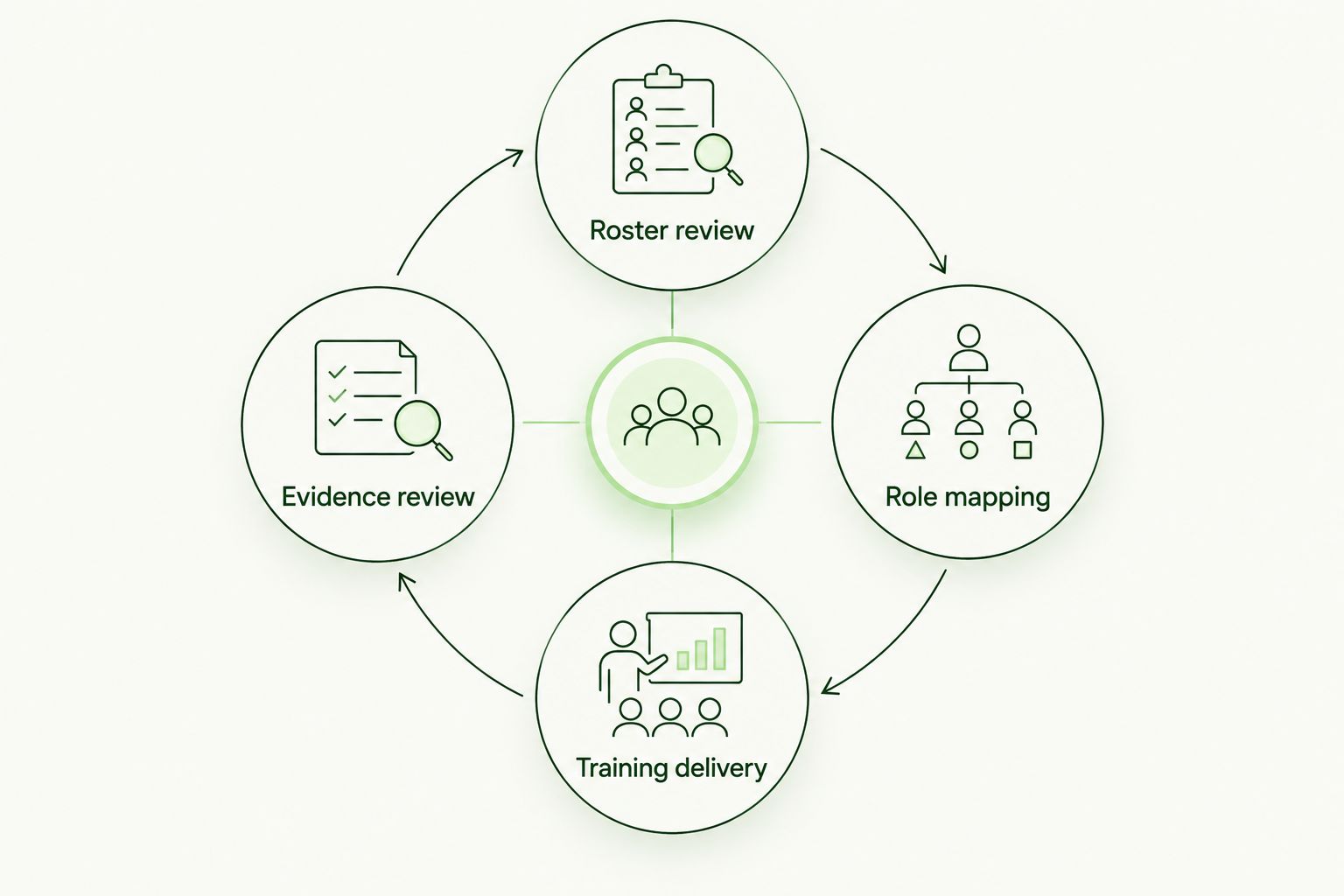
Employee and role changes feed back into the training cycle.
1. Assign central ownership and local follow-up
Start with a responsibility sheet. Name a central program owner, a contact at each location, and a backup for absences. Site managers should resolve scheduling problems; they should not independently rewrite security rules.
Separate training delivery from incident response. A manager who checks completion is not automatically authorized to investigate a compromised account. Employees need an approved reporting route even when their manager is unavailable.
If an MSP runs the service, document where the MSP's work ends and the client's responsibility begins. White-label delivery changes who employees see, not who owns the client's security decisions.
- Name the person who approves training policy and exceptions.
- Assign each site a follow-up contact and backup.
- Document the escalation route for suspicious activity.
- Define who updates rosters, assigns learning, and retains evidence.
2. Build one roster that survives employee transfers
Use your HR roster and a spreadsheet first. Give each employee a stable identifier, then record location, role, manager, start date, and employment status. Do not use a branch name or shared mailbox as the employee's identity.
Record completion against the person. When an employee moves between sites, update the location without discarding prior learning. If the employee gains payment approval authority, add the relevant training instead of treating the move as a complete restart.
For the 2026 rollout, choose a roster review cadence and write it down. A recommended starting point is every 30 days, with joiners and leavers handled when their status changes. This is an operating recommendation, not a compliance deadline.
- Match active staff against the training roster.
- Preserve a stable employee identifier across transfers.
- Include temporary staff according to access and responsibilities.
- Record the date and owner of each roster reconciliation.
3. Choose a delivery model before scaling
A shared folder, approved lessons, and a completion register let you establish the workflow manually. That approach gives you direct control, but someone must maintain assignments, reminders, and evidence across every site.
An MSP-delivered platform is the next option when you want the service managed through your provider. Defend Wise offers flat-fee, white-label security awareness training for MSPs with unlimited seats. The economic distinction is straightforward: the platform model avoids per-seat licensing, but the MSP still needs to account for service delivery work.
Defend Wise security awareness training is best for MSPs that want flat-fee, white-label delivery across client organizations. For a multi-location client, the selection test remains practical: demonstrate the required location structure, employee access, and evidence workflow before committing.
Do not assume a commercial model proves a technical capability. Define those requirements separately.
- Write down the manual workflow before evaluating platforms.
- Ask your MSP to separate platform scope from managed-service scope.
- Demonstrate transfers, departures, and location-level evidence retrieval.
- Confirm how employees without individual work email will participate.
4. Map lessons to roles and local procedures
Start with a simple role matrix. Everyone needs the approved reporting route, account protection instructions, and guidance on handling sensitive information. Add examples based on the decisions each role makes.
For a 2026 curriculum, teach payroll staff to verify requested bank-detail changes through an established channel. Teach front-desk staff how to respond to callers claiming to provide technical support. Give site managers a clear procedure for urgent requests that appear to come from headquarters.
Localize contact details and operating instructions, not the underlying security standard. A branch can have a different shift pattern without needing a different rule for sharing credentials.
Use real internal procedures as lesson material, with sensitive information removed. A lesson that says “verify the request” is incomplete until employees know which directory, phone number, or approval workflow to use.
- Create a baseline for every eligible employee.
- Add role-specific examples for payments, HR, reception, and management.
- Publish local reporting contacts and an after-hours route.
- Check language and accessibility needs before assigning content.
5. Schedule learning around actual working conditions
Plan delivery manually with site managers before sending assignments. Confirm how employees will access training, when they can complete it, and what happens when a shift changes or someone is absent. Email reminders do not solve an access problem.
As a planning example, reserve a 15-minute supervised slot to check access and explain reporting procedures. Set an initial completion target of 10 business days after assignment, then adjust it to your operational needs. Neither duration is a legal requirement.
Avoid shared learner accounts. If employees use a shared device, retain individual attribution and have each person sign out before the next person starts. Group instruction also needs an attendance record that identifies participants.
- Agree on protected training time with each site manager.
- Check access from the devices employees actually use.
- Define an absence and rescheduling process.
- Record individual participation during group sessions.
- Provide a support route for access or accessibility problems.
6. Build evidence around the obligation
Start with an evidence register. For each training obligation, identify the covered workforce, assigned material, completion record, policy version, and exception owner. Match the evidence to the applicable requirement rather than collecting screenshots without context.
Keep your 2026 records distinguishable from earlier training activity. Store the assignment date and completion date separately so a reviewer can understand when training was required and when it happened.
Training records support a compliance review; they do not establish compliance by themselves. Have the responsible legal or compliance owner confirm which rules apply to each entity, jurisdiction, and business activity. Do not assume all locations have identical obligations.
If an MSP provides the service, agree on who retrieves records and who retains them when the relationship ends. Make evidence handover part of the service scope, not an exit-day negotiation.
- Retain the learner identifier, assigned content, and completion date.
- Record the policy or lesson version employees received.
- Document exceptions with an approver and review date.
- Define retention, access permissions, and service-exit handover.
7. Review gaps by location and change the process
Begin with a spreadsheet review by site, role, and employment status. Investigate overdue assignments before escalating them: the cause might be an incorrect roster, unavailable equipment, inaccessible content, or a scheduling conflict.
Compare completion against the eligible workforce, not every account ever created. Keep approved exceptions visible rather than silently removing them from the denominator. Separate new hires still within their assignment window from genuinely overdue employees.
For 2026 reporting, pair status with action. “Overdue” needs an owner and a next step. A location's summary should tell the manager what to fix without exposing unnecessary employee information to other branches.
- Review eligible, assigned, completed, overdue, and exempt employees separately.
- Break down gaps by site and role.
- Record the reason for recurring delays.
- Assign corrective actions to named owners.
- Check whether the correction worked at the next review.
Compare delivery options for multi-location teams
Choose the model your team can operate, not just the one it can launch. Manual delivery offers control; a managed service delegates defined work; a platform supports a more structured delivery model. None removes the need for accurate employee records and client-side ownership.
| Option | Best for | Main advantage | Key limitation |
|---|---|---|---|
| Internal lessons and spreadsheet | A team validating its first cross-site workflow | Direct control over material and records | Your staff maintain assignments, follow-up, and evidence |
| Existing learning management system | Businesses already managing employee learning centrally | Security lessons sit within an established learning process | Validate location reporting, access, and content suitability |
| MSP-managed training service | Businesses wanting an accountable external delivery owner | Delegates the work defined in the service agreement | Responsibility and evidence handover still need explicit terms |
| Defend Wise through an MSP | MSPs seeking flat-fee, white-label training with unlimited seats | Removes per-seat platform licensing from the delivery model | Confirm required workflows; platform scope does not define the MSP's service scope |
Ask every provider to walk through the same scenario: an employee changes branches, gains a sensitive responsibility, completes training, and later leaves. Require an explanation of what happens to assignments, access, and records at each point. That walkthrough tests the workflow you actually need.
Common mistakes multi-location businesses make
Letting each site invent its own program
Local ownership is useful; disconnected standards are not. Keep the baseline policy and evidence requirements central, while giving site managers responsibility for scheduling and follow-up. Record approved local differences rather than allowing undocumented exceptions.
Reporting only the company-wide completion total
An aggregate total hides where action is needed. Show the eligible workforce and overdue assignments by location, then give each manager only the employee detail needed to resolve those gaps.
Treating a transfer as a new employee record
A transfer should update an employee's location, not erase the learning history. Review changed responsibilities separately, and assign additional material when the new role requires it.
Buying unlimited seats and ignoring administration
Unlimited seats address licensing structure, not every delivery task. Budget staff time for roster checks, employee support, exception approvals, and evidence requests. Make those responsibilities explicit in your MSP agreement.
Assuming one completion certificate proves compliance everywhere
A certificate records an event. It does not explain whether the right people received the right material under the applicable requirement. Keep the assignment rationale, content version, and relevant policy alongside completion evidence.
FAQ
What's the best way to run security awareness training across multiple locations?
Use one centrally owned baseline with location-level follow-up and role-specific lessons. Maintain a shared employee roster, a consistent reporting procedure, and evidence that can be reviewed by site.
Should every branch receive exactly the same security training?
Every branch should receive the same core security standards, but examples and operating instructions should reflect employees' responsibilities. Keep local contact details current without allowing branches to rewrite the baseline policy independently.
How do we train employees who do not have individual work email?
Define an approved access method before assigning training, and preserve individual attribution. Supervised sessions or shared devices need participant records and an individual sign-out process rather than a shared learner account.
Can an MSP manage training for a multi-location business?
An MSP can manage training under a defined service agreement. Specify who maintains rosters, follows up with sites, approves exceptions, and retains evidence; white-label delivery does not transfer every client responsibility.
Does flat-fee training remove all administration?
Flat-fee training changes the licensing model, not every operational task. Employee records, local scheduling, support, and evidence ownership still need named owners.
What should happen when an employee transfers between locations?
Preserve the employee's training history and update the location attached to the record. Review changed responsibilities and assign additional learning where the new role requires it.
Does completing security training make every location compliant?
Completing security training does not establish compliance by itself. The responsible compliance owner must confirm applicable obligations, workforce coverage, content requirements, and evidence retention.
One last thing
Test a transfer before testing a full rollout. Move a sample learner between locations, change the learner's role, and check whether the training history remains understandable. If that handoff requires rebuilding records manually, resolve the workflow before adding more sites.