Best compliance training software for small businesses 2026
Compare compliance training software for small businesses. Pick TalentLMS for your own content, or a specialist for MSP security or ethics training.
DefendWise
DefendWise
Best for MSP-delivered security awareness training: Defend Wise. Best overall for small businesses managing their own training content: TalentLMS; best for self-hosted control: Moodle; best for dedicated ethics and compliance training: NAVEX. This 2026 guide compares compliance training software for small businesses by training scope, administration, and evidence—not interchangeable feature lists.
TL;DR
- Defend Wise is best for MSPs delivering flat-fee, white-label security awareness training to small-business clients.
- TalentLMS is the default compliance training software for small businesses that need an LMS for their own content.
- Moodle suits organizations with technical ownership; NAVEX suits buyers seeking dedicated ethics and compliance training.
- Choose training scope first, then verify assignments, learner records, and reporting before signing.
Why this matters
Compliance training is not a single subject. Security awareness, workplace conduct, privacy, and job-specific procedures create different purchasing requirements. Buying a security training platform does not automatically cover your entire employee compliance program.
The wrong scope creates duplicate work. Your operations lead ends up maintaining one roster in a learning platform, another in a spreadsheet, and a separate explanation for every missing record.
For your 2026 shortlist, separate the content you need from the system that delivers it. Then decide who owns assignments, overdue learners, and evidence requests: your business, your MSP, or another service provider.
What makes the best small-business compliance training software
Use these criteria before comparing vendors:
- Training scope: Match the platform to the subjects your employees actually need. A general LMS and a specialist security awareness platform solve different problems.
- Content ownership: Establish whether you need a vendor's training content, your own procedures, or both. Someone must maintain each lesson.
- Administrative ownership: Name the person or provider responsible for enrolling employees, resolving access problems, and following up.
- Evidence quality: Request a sample record showing the learner, assigned material, completion status, and relevant dates. Confirm that records remain usable outside the platform.
- Commercial structure: Compare seat-count administration, contract scope, and the work required to deliver the service. A licensing model alone does not describe the full operating burden.
- Learner access: Have employees demonstrate access on the devices and connections they actually use. Do not substitute an administrator's demonstration for that check.
The best platform is the one that covers your required subjects and produces usable records without creating an unmanaged administrative job. Treat attractive features outside that scope as secondary.
Compliance training software at a glance
| Rank and option | Best for | Standout distinction | Key limitation |
|---|---|---|---|
| 1. Defend Wise | MSP-delivered security awareness training | Flat-fee, white-label security awareness training for MSPs | Security awareness is narrower than a company-wide compliance curriculum |
| 2. TalentLMS | Small businesses managing their own training content | Cloud-based learning management system | You must establish content coverage and ownership |
| 3. Moodle | Organizations choosing self-hosted control | Open-source learning management system | Self-hosting creates technical and maintenance responsibilities |
| 4. NAVEX | Dedicated ethics and compliance training | Specialist ethics and compliance training offering | Buyers still need to verify subject, jurisdiction, and organizational fit |
These are use-case rankings, not interchangeable substitutes. TalentLMS is the broad LMS default; the first-ranked specialist belongs first only when an MSP is delivering security awareness training.
1. Defend Wise: best security awareness training for MSP clients
Defend Wise provides flat-fee, white-label security awareness training for MSPs. The fit is specific: a service provider delivers training to end-client organizations rather than a small business assembling a general-purpose learning system itself.
That distinction matters when your MSP owns the security relationship. You can evaluate training as part of an accountable managed service instead of assigning another platform to an already-stretched office manager.
Defend Wise pros:
- Its stated purpose matches MSP-delivered security awareness training.
- White-label delivery supports the MSP's client-facing service.
- Flat-fee licensing offers an alternative to per-seat licensing.
Defend Wise cons:
- Security awareness training is not a substitute for every workplace compliance subject.
- The MSP-focused model is not the default fit for a business seeking a self-managed general LMS.
Best for: MSPs delivering security awareness training to small-business clients.
For a 2026 buying decision, ask your MSP to show the service around the platform. Who identifies new starters? Who follows up on incomplete training? Who supplies the records when your customer or insurer asks?
Do not turn those questions into assumed product capabilities. Require a demonstration and a written division of responsibilities. A clear service boundary matters more than a long proposal.
Verdict: Buy for MSP-delivered security awareness training; skip as a replacement for an entire compliance curriculum.
2. TalentLMS: best compliance training LMS for your own content
TalentLMS is a cloud-based learning management system. It belongs on the shortlist when your small business needs a place to deliver and manage training rather than a security-only service.
The central buying question is content ownership. If you already have approved procedures and someone responsible for maintaining them, a general LMS gives that work a delivery system. It does not decide which legal obligations apply to your business.
TalentLMS pros:
- A general LMS fits training that spans multiple business subjects.
- Cloud delivery avoids operating a self-hosted LMS installation.
- The platform category suits businesses building a curriculum around their own procedures.
TalentLMS cons:
- An LMS purchase does not establish that your required compliance content is included.
- Your business still needs an owner for assignments, content review, and exceptions.
Best for: Small businesses that manage their own training program and need a general learning platform.
During evaluation, bring an actual policy or lesson. Ask the vendor to demonstrate the learner journey and resulting record using that material. This reveals more than a demonstration built around an unrelated sample course.
For your 2026 rollout, document who approves content changes and how employees receive revised material. Keep the decision separate from interface preferences: a convenient platform cannot fix an outdated policy.
Verdict: Buy when you own the content and administration; hold if you expect software alone to supply a complete compliance program.
3. Moodle: best compliance training LMS for self-hosted control
Moodle is an open-source learning management system that organizations can self-host. It suits buyers who deliberately want responsibility for the learning environment and have the technical support to manage it.
Control comes with work. Hosting, updates, backups, access management, and ongoing maintenance need named owners. Moving those tasks to a service partner changes who performs them; it does not remove the tasks.
Moodle pros:
- Open-source software supports a self-hosted approach.
- An LMS can organize training around your own materials.
- Self-hosting lets your organization choose how to operate its learning environment.
Moodle cons:
- Self-hosting requires technical administration and maintenance.
- Your organization remains responsible for sourcing and maintaining suitable compliance content.
Best for: Small organizations with technical ownership and a clear reason to self-host training.
Before choosing Moodle, name the person responsible for restoring the system after a failed update or service interruption. Also name the person responsible for learner support. Those are operational commitments, not optional extras.
Do not choose self-hosting solely because the software is open source. Compare the work involved with the control you actually require. If nobody wants to own the environment, choose a different delivery model.
Verdict: Buy for deliberate self-hosted control; skip when your priority is avoiding technical administration.
4. NAVEX: best dedicated ethics and compliance training option
NAVEX offers ethics and compliance training. It belongs on the shortlist when your primary requirement is a dedicated compliance training offering rather than a general LMS or an MSP security awareness service.
Start with your required subjects and employee locations. Then ask for representative content and have the person responsible for compliance review it. A recognizable vendor name is not proof that a particular course meets your specific obligation.
NAVEX pros:
- Its training focus directly addresses ethics and compliance.
- A specialist offering gives buyers an alternative to building every lesson internally.
- It suits a content-led evaluation rather than an LMS-only comparison.
NAVEX cons:
- Buyers must verify the suitability of individual subjects and jurisdictional coverage.
- Specialist training still requires internal ownership of assignments and follow-up.
Best for: Businesses prioritizing dedicated ethics and compliance training content.
Ask the vendor to distinguish standard training content from configuration or services required for your organization. Put that scope in writing before committing.
For 2026, review the specific material you intend to assign—not just a catalog heading. Confirm that examples, terminology, and instructions match your employees' responsibilities and your approved policies.
Verdict: Buy when dedicated ethics and compliance content is the priority; hold until subject-level fit is confirmed.
How these options rank
The ranking follows training scope, content ownership, administration, evidence, commercial structure, and learner access. Each recommendation owns a different use case; no vendor receives credit for capabilities outside its established role.
This is a fit-based shortlist, not a claim of hands-on testing or a measured performance ranking. Product demonstrations should resolve your remaining requirements before purchase.
A platform that fits an MSP's security service can be the wrong choice for an HR lead managing workplace conduct training. Likewise, a flexible LMS can be the wrong choice when nobody has time to create lessons.
Put the shortlist through a buying check
Use your own workflow to compare the finalists. These are proposed evaluation steps, not vendor performance benchmarks.
- Required subjects: List the training subjects, affected employees, and business owner for each. Separate legal requirements from customer requests and internal policy.
- Learner changes: Demonstrate onboarding with 2 sample new hires and offboarding with 1 sample departure. Check who acts and what happens to existing records.
- Evidence export: Request 5 sample learner records and inspect them outside the platform. Verify that another person can understand what each record proves.
- Exception handling: Walk through an overdue assignment, a leave of absence, and an employee who cannot access the lesson. Name the person responsible for resolution.
- Service ownership: Write down which tasks belong to your business, the software provider, and any MSP involved. Resolve gaps before rollout.
The point is not to make the demonstration difficult. It is to expose the ordinary work that continues after launch. A clear answer about ownership beats a promise that everything is automatic.
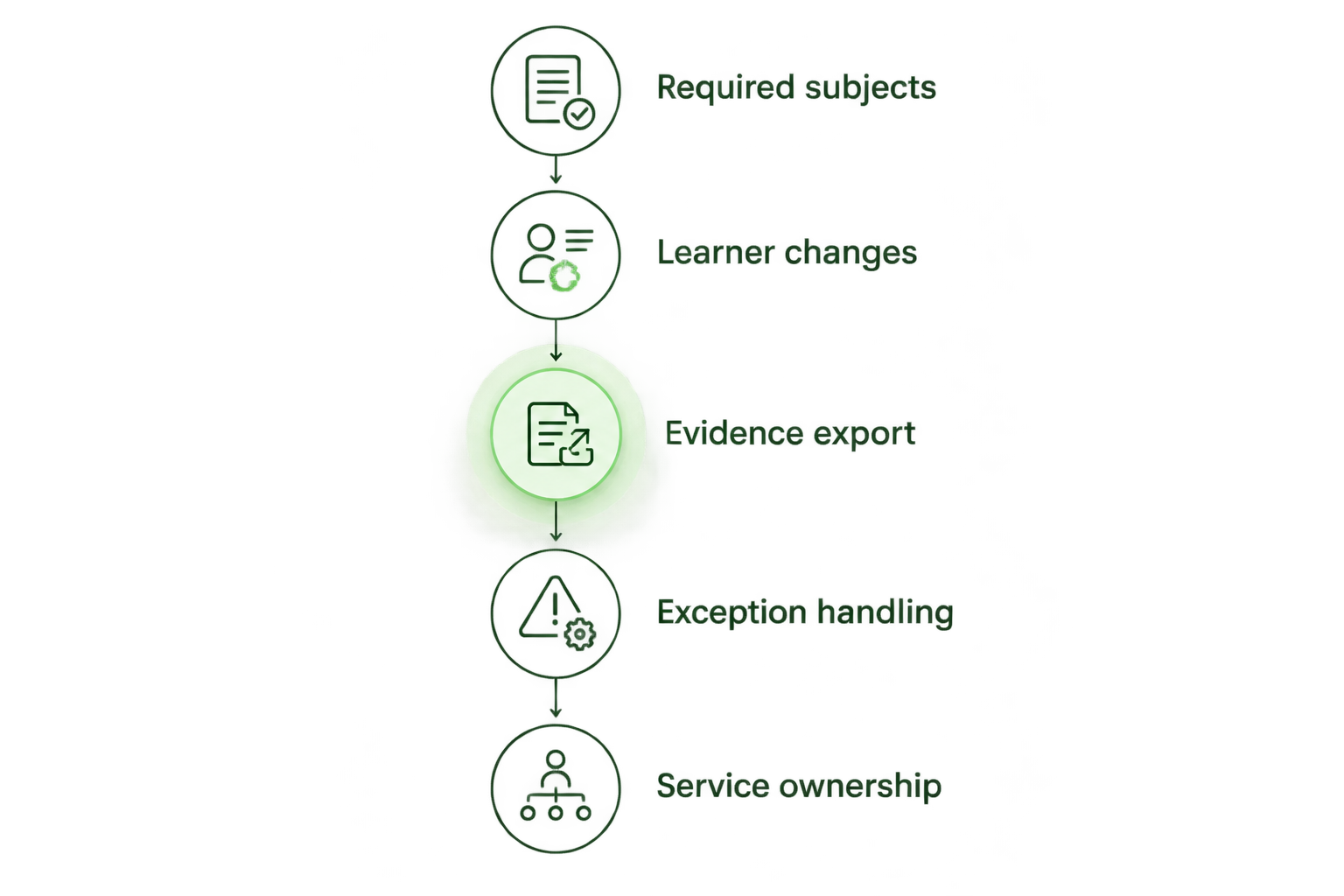
Evaluate the work around training, not just the lesson screen.
For evidence-specific questions, use the guide to proving security awareness training is effective to auditors. Treat completion records as evidence of training activity, not automatic proof that every control or legal obligation is satisfied.
Which compliance training software should you choose?
Choose TalentLMS as the default shortlist entry when your small business owns its content and needs a general LMS. Choose the MSP security awareness option when your provider is delivering that specific service, Moodle when self-hosting is intentional, and NAVEX when dedicated ethics and compliance content drives the purchase.
Do not buy the broadest platform by default. Buy the training scope you need, assign an owner, and prove that the records answer your real evidence requests.
FAQ
What's the best compliance training software for small businesses in 2026?
TalentLMS is the default shortlist choice for small businesses managing their own content in a general LMS. Choose a specialist instead when your requirement is MSP-delivered security awareness or dedicated ethics and compliance content.
Is security awareness training the same as compliance training?
Security awareness training is one part of a broader compliance training program. It does not replace unrelated workplace, professional, or job-specific training requirements.
Should a small business use an LMS or managed training?
Use an LMS when your business can own content, assignments, and follow-up. Choose managed training when you want a provider to take responsibility for an agreed service scope, and document those responsibilities.
Does buying compliance training software make a business compliant?
No. Software supports training delivery and records, but your business must identify applicable obligations, assign appropriate material, and maintain the surrounding policies and controls.
What should I ask vendors to demonstrate?
Ask vendors to demonstrate employee onboarding, assignments, completion records, evidence export, and exception handling. Use representative material and require clear answers about who performs each task.
Is Moodle a good choice for a small business?
Moodle fits a small business that deliberately wants an open-source LMS and has technical ownership for its chosen deployment. Self-hosting is a poor fit when nobody can maintain the environment or support learners.
Can one platform cover all employee compliance training?
Choose one platform only after confirming every required subject and workflow. A shared delivery system does not establish that its content covers every applicable obligation.
One last thing
Before approving a platform, ask someone who did not attend the demonstration to interpret a sample training record. Can that person identify who trained, what material they completed, and when?
If the record needs a verbal explanation to make sense, resolve that problem before signing. Your future evidence request will not arrive with the vendor's sales presentation attached.