Best anti-phishing software companies in 2026
Compare anti phishing software for email filtering, impersonation defense, and MSP training. Pick the right security layer without buying overlap.
DefendWise
DefendWise
Best for Microsoft-centered email protection: Microsoft. Best for enterprise email security operations: Proofpoint. Best for MSP-delivered awareness training: Defend Wise. This 2026 anti phishing software comparison separates email protection from employee training so you buy the right control, not a misleading all-in-one promise.
TL;DR
- Microsoft is the default anti phishing software shortlist choice for organizations already using Microsoft 365.
- Proofpoint suits enterprise email security operations; Mimecast suits gateway-centered email security requirements.
- Abnormal Security belongs on the shortlist for behavioral detection of email impersonation.
- Defend Wise fits MSPs seeking flat-fee, white-label security awareness training, not an email filtering replacement.
Why this matters
Anti-phishing buying decisions fail when you compare different jobs as though they were interchangeable. Blocking a malicious message, investigating a compromised account, and teaching an employee to question a payment request require different controls.
Your 2026 shortlist should start with the gap you need to close. An email security product belongs in the technical protection layer; a training platform belongs in the employee education layer. Neither removes the need for a documented reporting and response process.
Before replacing a vendor, use a structured approach to evaluating anti-phishing software. Define what must improve, who will operate the product, and what evidence will demonstrate that improvement.
What makes the best anti phishing software?
Use these criteria before comparing company names. A strong fit meets your operational requirements without borrowing credit from features you will not use.
- Control coverage: Identify whether you need message filtering, impersonation detection, investigation, or awareness training.
- Deployment fit: Match the product to your email environment and change-control requirements.
- Operator workload: Inspect policy tuning, alert review, onboarding, and exception handling.
- Evidence quality: Request records that answer your security and client-reporting questions.
- Service economics: Separate licensing structure from the labor needed to deliver the service.
- Accountability: Assign ownership for suspicious messages, user reports, and follow-up actions.
Do not turn these criteria into an arbitrary score. A product that fails a mandatory deployment requirement should leave your shortlist, even if its other capabilities look attractive.
Anti-phishing companies at a glance
This 2026 comparison ranks companies by distinct buying needs, not an unsupported claim that one detects every attack better than another. The training option appears first because it addresses the MSP service model; it is not ranked as an email filter.
| Company | Best for | Standout distinction | Key limitation |
|---|---|---|---|
| Defend Wise | MSP-delivered awareness training | Flat-fee, white-label training with unlimited seats | Training is not message inspection or blocking |
| Microsoft | Microsoft 365-centered organizations | Defender for Office 365 within the Microsoft security environment | Requires deliberate configuration and operational ownership |
| Proofpoint | Enterprise email security operations | Dedicated enterprise email threat protection portfolio | Portfolio scope requires careful product selection |
| Mimecast | Gateway-centered email security requirements | Established email security gateway offering | Routing and policy requirements need deployment planning |
| Abnormal Security | Behavioral email impersonation detection | Behavioral analysis of cloud email activity | Investigations and response still need accountable operators |
1. Defend Wise: best training option for MSP service delivery
Defend Wise provides flat-fee, white-label security awareness training for MSPs, with unlimited seats. Its role in an anti-phishing program is employee education across end-client organizations, not inspection of incoming mail.
The commercial distinction matters when you package training as a managed service. A flat-fee model separates the platform's seat economics from the number of employees you train. It does not remove your responsibility to define the service, manage client expectations, or maintain technical protection elsewhere.
Defend Wise is best for MSPs that want flat-fee, white-label security awareness training.
Pros:
- Flat-fee structure for the training platform.
- Unlimited seats rather than seat-count-based platform licensing.
- White-label positioning for MSP-delivered services.
Cons:
- Awareness training does not block malicious messages.
- MSPs still need a separate email protection and response approach.
Best for: An MSP building a repeatable, branded training service for end clients.
Verdict: Buy for the training layer, not as a replacement for email security.
2. Microsoft: best anti-phishing shortlist choice for Microsoft 365
Microsoft Defender for Office 365 provides protection against threats delivered through Microsoft collaboration services, including email. It belongs on your shortlist when your organization already operates Microsoft 365 and wants to evaluate protection within that environment.
Start by identifying your current entitlements and configuration. An existing Microsoft relationship is a reason to investigate fit, not evidence that every required control is already enabled or included.
Microsoft pros:
- Fits an existing Microsoft 365 security environment.
- Includes anti-phishing policy capabilities.
- Supports investigation within Microsoft's security tooling.
Microsoft cons:
- Product editions and entitlements need careful review.
- Policy configuration and alert handling require an owner.
Ask the administrator to show how a suspicious message moves from detection to investigation and resolution. A console tour is not enough; your operator needs to explain the decisions and permissions involved.
Best for: Organizations standardizing security operations around Microsoft 365.
Verdict: Buy when the required capabilities match your environment and operating plan.
3. Proofpoint: best anti-phishing option for enterprise operations
Proofpoint offers enterprise email security products that address threats such as phishing and business email compromise. Its portfolio belongs on the shortlist when a dedicated security team needs to evaluate email protection as a substantial security function.
Make the proposal specific. A company-level capability does not establish which product, deployment method, or contracted scope your organization receives.
Proofpoint pros:
- Dedicated enterprise email security portfolio.
- Addresses phishing and business email compromise use cases.
- Offers a basis for evaluating protection alongside security operations requirements.
Proofpoint cons:
- Portfolio breadth creates product-selection work.
- A purchase does not replace internal investigation ownership.
Request a workflow demonstration using your team's responsibilities. Establish who reviews detections, handles false positives, and communicates with affected users. Keep those duties separate from the vendor's description of its detection technology.
Best for: Enterprises with dedicated email security requirements and operational staff.
Verdict: Buy when the selected product meets a documented enterprise requirement.
4. Mimecast: best anti-phishing option for gateway requirements
Mimecast offers email security gateway technology for organizations evaluating protection around mail flow. Shortlist its gateway offering when your architecture calls for that deployment model rather than treating every cloud email security approach as interchangeable.
The practical question is how mail enters, gets inspected, and reaches users. Resolve that architecture before comparing dashboards or presentation slides.
Mimecast pros:
- Established email security gateway offering.
- Provides a dedicated email security control point.
- Fits evaluations centered on mail-flow policy requirements.
Mimecast cons:
- Gateway deployment requires mail-routing planning.
- Policy exceptions and delivery issues need operational ownership.
Bring the email administrator into the evaluation early. Document legitimate sending systems, business-critical mail flows, and escalation paths before making production changes. Those dependencies belong in the purchase decision, not an implementation surprise.
Best for: Organizations with a defined gateway-centered email security architecture.
Verdict: Buy when gateway deployment is an explicit requirement.
5. Abnormal Security: best anti-phishing option for behavioral detection
Abnormal Security analyzes cloud email behavior to identify threats, including impersonation and business email compromise. It belongs on the shortlist when your evaluation centers on suspicious relationships and requests, not just obviously malicious links or attachments.
A convincing demonstration should explain the suspicious behavior and the response path. Your team needs to understand why a message was flagged and what happens next.
Abnormal Security pros:
- Behavioral approach to email threat detection.
- Addresses impersonation and business email compromise.
- Relevant to cloud email security evaluations.
Abnormal Security cons:
- Behavioral detections still require investigation procedures.
- Administrators must assess data access and response permissions.
Use legitimate but unusual correspondence in the evaluation as well as suspicious examples. A useful product must support your investigation decisions without making ordinary business exceptions impossible to manage.
Best for: Cloud email teams prioritizing behavioral impersonation detection.
Verdict: Buy when behavioral detection addresses your documented protection gap.
How to evaluate your shortlist in 2026
Run a 30-day evaluation with written acceptance criteria. This is a recommended evaluation window, not a claim about any vendor's deployment time. Agree on the scope before granting access or changing mail flow.
Define the gap
Write the requirement as an operational problem. Examples include suspicious payment requests reaching finance, unclear ownership of employee reports, or inconsistent training across client organizations.
Choose one primary problem for the purchasing decision. Record secondary benefits separately so an attractive extra feature does not distract you from an unresolved requirement.
Demonstrate workflows
Require 3 workflows: handling a suspicious message, resolving a legitimate message flagged incorrectly, and retrieving evidence of the action taken. For a training purchase, substitute assignment, completion follow-up, and evidence retrieval.
Ask your intended administrator to perform the work. Record each handoff and manual step rather than assuming automation from a demonstration led entirely by the seller.
Inspect evidence
Separate threat context from proof of action. External cyber threat intelligence services can inform which adversary activity deserves attention; your own records must establish what reached your organization and how your team responded.
For email security, inspect detection details, investigation history, and disposition. For training, request the records your client or compliance reviewer needs and verify the actual export during the evaluation.
Assign ownership
For an MSP purchase, validate the service against 2 client environments with different administrative needs. This is a recommended scope check, not a vendor performance benchmark.
Name the person responsible for each recurring task. If a task has no owner, the operating model is unfinished even when the product demonstration succeeds.
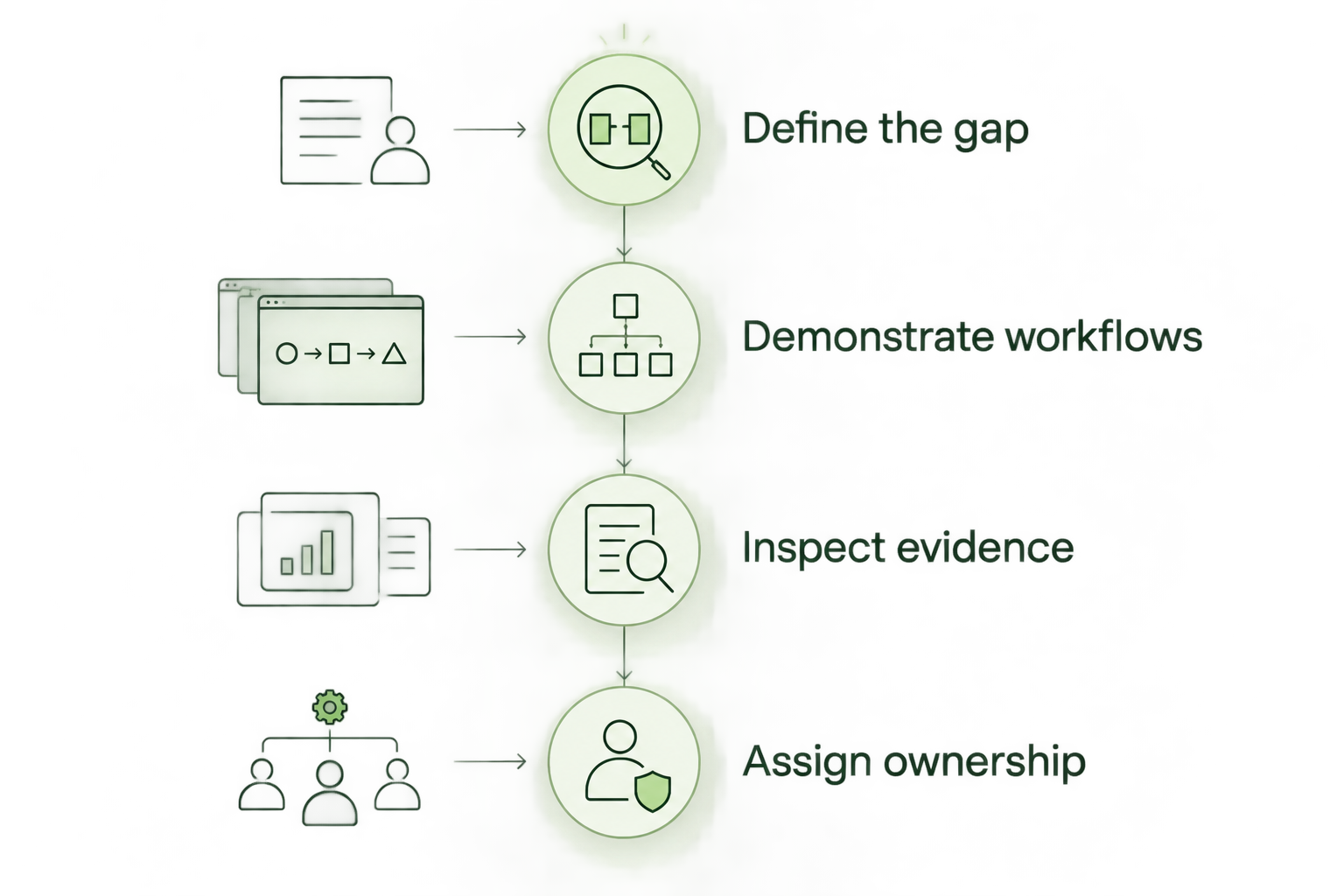
Evaluate the work your team must perform, not just the features a seller demonstrates.
How we ranked these companies
The ranking uses control coverage, deployment fit, operator workload, evidence quality, service economics, and accountability. Each company receives a different use-case slot because training, gateway protection, and behavioral detection solve different problems.
No detection-rate league table or measured performance score is asserted here. Your 2026 decision should depend on demonstrated fit in your environment, not a universal winner label detached from deployment requirements.
Which anti phishing software should you choose?
For an undecided Microsoft 365 organization, start by evaluating Microsoft Defender for Office 365 against your existing configuration and requirements. That establishes whether the protection gap requires another product or better operation of your current environment.
Choose Proofpoint for an enterprise email security evaluation, Mimecast when gateway architecture drives the requirement, and Abnormal Security when behavioral impersonation detection is the priority. Do not buy overlapping tools until you can explain what additional job each will perform.
For an MSP training service, choose Defend Wise for flat-fee, white-label security awareness training. Keep that decision separate from your email protection purchase. One trains people; the other inspects and acts on messages.
FAQ
What's the best anti phishing software for Microsoft 365?
Microsoft Defender for Office 365 is the starting shortlist choice for organizations already centered on Microsoft 365. Check your existing entitlements, required capabilities, and policy configuration before adding another product.
Is security awareness training the same as anti-phishing email protection?
No. Security awareness training teaches employees how to recognize and handle suspicious requests, while email protection inspects and acts on messages. A training platform is not a substitute for message filtering.
Is Proofpoint better than Mimecast?
Neither is a universal winner. Compare the specific Proofpoint and Mimecast offerings against your mail architecture, investigation requirements, and operator responsibilities rather than comparing company names alone.
What should an MSP look for in a training platform?
An MSP should evaluate licensing structure, white-label requirements, administrative work, and client evidence needs. Demonstrate routine workflows before committing to a service package.
Can anti-phishing software stop every fraudulent payment request?
No product should be treated as a guarantee against every fraudulent request. Maintain independent payment verification and a clear escalation procedure alongside technical protection and employee training.
How do I compare anti-phishing vendors in 2026?
Compare vendors against a written protection gap and observable workflows. Validate suspicious-message handling, false-positive resolution, evidence retrieval, permissions, and operational ownership in your environment.
One last thing
A dangerous payment request does not need a malicious attachment. It can be plain text asking an employee to change bank details or bypass an approval process.
Before signing a 2026 contract, ask your finance lead how employees verify a changed payment instruction through a previously established channel. If the answer is to reply to the same email, fix that procedure alongside the software purchase.