Anti-phishing for MSPs: a practical client workflow for 2026
Anti-phishing work for MSPs needs more than user tips. Build a repeatable workflow for identity, reporting, coaching, and evidence.
DefendWise
DefendWise
TL;DR
Anti-phishing is not one control. For MSPs, it is a repeatable client workflow that combines phishing-resistant authentication, safe request verification, simple reporting, calm incident response, and training evidence.
The strongest programs make the safe action easier than the risky one. Users know when to pause, where to report, and what the MSP will do next. The MSP gets tenant-specific evidence instead of a spreadsheet of clicks.
If you support many clients, the operating question is simple: can you run the same anti-phishing standard across every tenant without creating a new admin job for each one?
What is anti-phishing?
Anti-phishing is the set of practices used to reduce the chance that a phishing message becomes a breach, a payment loss, a malware infection, or a credential compromise.
CISA, NSA, FBI, and MS-ISAC define phishing as a form of social engineering where attackers lure people to malicious sites or trick them into giving up login credentials.1 That definition matters because it keeps the focus on the attacker’s goal, not only the message format.
A phishing attempt might arrive as email. It might also arrive as SMS, a Teams message, a WhatsApp note, a voice call, a QR code, a fake login portal, or a supplier invoice update. The shared pattern is the same: the attacker tries to make a normal person take a risky action under pressure.
For an MSP, anti-phishing has 5 parts:
- Stop what can be stopped before it reaches users.
- Make risky requests easier to verify.
- Protect accounts when a user makes a mistake.
- Make reporting fast and visible.
- Turn incidents and simulations into client evidence.
A lot of anti-phishing advice stops at “teach users to spot suspicious emails.” That is useful, but it is too thin for an MSP service. Client users are busy. Attackers adapt. Some messages will get through. The real test is whether the client has a workflow that still holds when one person is tired, rushed, or fooled.
Why anti-phishing matters for MSPs
Phishing sits at the crossing point between people, identity, email, endpoint, and finance. That makes it a service-delivery problem for MSPs, not only a security-awareness topic.
The Verizon 2025 DBIR reports that credential abuse remained the most common known initial access vector at 22%, with phishing at about 15% and the human element involved in about 60% of breaches.2 Treat those numbers carefully: DBIR data comes from a large but imperfect incident sample. Still, the pattern lines up with what MSPs see in the field. Credential theft, social engineering, and weak business verification keep showing up.
For MSPs, phishing creates 4 practical pressures.
First, clients expect the MSP to have a clear answer. If an employee clicks, reports, or asks whether an invoice request is safe, the MSP needs a playbook. Vague advice creates slow response.
Second, identity controls vary across tenants. One client may use phishing-resistant MFA. Another may use SMS codes. Another may have shared mailboxes and legacy accounts. Anti-phishing advice needs to match the client’s actual control state.
Third, reporting is often broken. If users forward suspicious emails to random technicians, open a generic ticket, or ask a manager in Slack, the MSP loses timing, headers, tenant context, and pattern visibility.
Fourth, clients increasingly need evidence. Cyber insurance questionnaires, audits, QBRs, and board updates all ask some version of the same question: what have you done to reduce human risk? “We sent a training link” is a weak answer. A client-ready anti-phishing program should show coverage, reminders, reported messages, follow-up, exceptions, and role-based coaching.
That is why MSP anti-phishing work should not be built around a single annual campaign. It should be a standing operating layer.
What MSPs actually need in an anti-phishing program
The table below separates generic anti-phishing advice from MSP-ready delivery.
| Anti-phishing layer | What it does | MSP operating requirement | Evidence to keep |
|---|---|---|---|
| Email and web controls | Blocks known bad messages, links, attachments, and sites before users act | Baseline controls per tenant, with exceptions documented | Policy settings, blocked-message trends, false-positive notes |
| Identity controls | Limits account takeover when credentials are phished | MFA strength mapped by role, with admin and finance accounts prioritized | MFA coverage, exception list, high-risk account status |
| User reporting | Turns suspicious messages into fast signal | One approved reporting path, visible to the MSP response queue | Reported message count, response timestamps, user-facing instructions |
| Verification rules | Stops payment, payroll, supplier, and access-change fraud | Client-approved callback and second-channel rules | Written procedure, training acknowledgement, incident examples |
| Training and coaching | Teaches people what to pause on and how to report | Role-aware, client-specific, repeated without heavy admin | Assignment, completion, reminders, coaching records |
| Response workflow | Contains mistakes quickly | Triage steps for clicked link, entered credentials, opened attachment, paid invoice | Ticket timeline, containment steps, client sign-off |
| Client reporting | Proves movement and makes next actions clear | Tenant-specific QBR or evidence pack | Coverage, trends, open risks, next-quarter recommendations |
The point is not to make every SMB client run like a bank. The point is to make the safe workflow clear enough that the MSP can run it across the client base.
Teach risky actions, not trivia
Users do need to know common warning signs. Microsoft lists urgency, threats, first-time senders, suspicious domains, generic greetings, unexpected links, and attachments as warning signs people should slow down for.3
That belongs in training, but the stronger lesson is action-based:
- Do not approve an unexpected MFA prompt.
- Do not enter credentials from an email link.
- Do not change payment details from an email request alone.
- Do not open unexpected attachments to “unlock” an invoice.
- Do not keep investigating alone if the message feels suspicious.
- Do report quickly, even if you already clicked.
This shifts training away from “spot the typo” and toward “pause before the business action.” That matters because modern phishing is not always badly written. A clean message can still be malicious.
Move clients toward phishing-resistant MFA
CISA is clear that not all MFA is equal. Its phishing-resistant MFA fact sheet calls phishing-resistant MFA the gold standard and identifies FIDO/WebAuthn and PKI-based MFA as phishing-resistant options.4
That does not mean every client can flip to passkeys or hardware keys in one week. MSPs still need a staged plan:
- Start with administrators, finance users, owners, executives, and remote access.
- Remove SMS and voice MFA from the highest-risk accounts first.
- Use app-based MFA with number matching where phishing-resistant MFA is not yet feasible.
- Document exceptions and review them with the client.
- Make MFA method strength visible in QBRs and cyber insurance prep.
NIST SP 800-63B also distinguishes phishing-resistant authenticators from methods where users manually enter codes. It states that passwords are not phishing-resistant and that authenticators requiring manual entry of an authenticator output, such as OTP, are not considered phishing-resistant.5
That distinction helps MSPs explain why “we already have MFA” is not the end of the conversation.
Make reporting easier than forwarding to a technician
A good anti-phishing program has one approved reporting path. If the client uses Microsoft 365, Microsoft recommends moving from older Report Message or Report Phishing add-ins to the built-in Outlook Report button, which lets users report phishing and other unwanted messages to Microsoft for analysis.6
The reporting workflow should answer 5 questions for every client:
- What should users click or email?
- Who receives the report?
- What happens when the user already clicked?
- What should the user avoid doing after reporting?
- How does the MSP track and summarize reported messages?
For external reporting, CISA asks organizations to report phishing incidents to report@cisa.gov or its 24/7 response line.1 APWG accepts suspected phishing emails at reportphishing@apwg.org and recommends forwarding as an attachment when the email client supports it.7 The FTC’s ReportFraud.gov is the official U.S. site for reporting fraud, scams, and bad business practices.8
Those public channels are not a replacement for the client’s internal path. Users still need to tell the MSP first, because the MSP may need to revoke sessions, reset credentials, search mailboxes, isolate endpoints, or warn other users.
Step-by-step: how to run anti-phishing across MSP clients
1. Define the risky actions you are trying to stop
Start with business actions, not message labels.
For most MSP clients, the high-risk actions are predictable: entering credentials, approving MFA prompts, opening attachments, changing payment details, buying gift cards, sharing sensitive files, scanning QR codes, and granting remote access.
Write a short client policy around those actions. Keep it plain. For example: “Any bank detail change must be verified by phone using a known number already on file.” That one rule is easier for users to remember than a long list of phishing signs.
2. Map each client’s current controls
Do a quick anti-phishing baseline per tenant:
- Email security settings.
- MFA methods by user group.
- Admin and finance account protection.
- Browser and safe-link controls.
- Report button or mailbox setup.
- Incident response owner.
- Training coverage.
- Exceptions and unsupported systems.
The goal is not a perfect audit. It is to know where a user mistake would hurt most. If the client’s finance manager has SMS MFA and no payment callback rule, that is more urgent than a general reminder about suspicious grammar.
3. Prioritize phishing-resistant authentication for high-risk roles
Use a risk-based order. Administrators, executives, finance staff, HR, helpdesk users, and users with remote-access rights should go first.
CISA’s Cybersecurity Performance Goals 2.0 rank phishing-resistant MFA above app-based tokens and place SMS or voice MFA last, to be used only when no other options are possible.9
For smaller clients, a staged plan is honest and practical:
- This month: number matching for all eligible users.
- This quarter: phishing-resistant MFA for administrators and finance.
- Next quarter: wider passkey or security key rollout where systems support it.
Put the plan in the client record. Unwritten MFA exceptions become permanent.
4. Install and test the reporting path
A report button that nobody has tested is not a workflow. Send a safe test message or use a controlled simulation. Confirm that:
- The user can find the report action.
- The MSP receives the message with enough detail.
- The ticket or alert lands in the right queue.
- The user gets a clear acknowledgement.
- The response playbook starts from the report.
Do not bury reporting instructions in the training platform only. Put them in onboarding, the client handbook, manager guidance, and any phishing simulation follow-up.
5. Train users on pause-and-verify moments
Make training short, role-aware, and tied to real client work.
Finance staff need payment and supplier-change scenarios. Executives need whaling, document-share, and voice-verification scenarios. Helpdesk users need password reset, MFA reset, and remote-access scenarios. General staff need credential, attachment, QR, delivery, and HR-lure scenarios.
If a client has a specific process, train to that process. “Verify invoice changes using the number in the finance system” is better than “be careful with invoices.”
For adjacent training detail, see DefendWise guides on phishing prevention lessons, credential phishing, what to do if you open a phishing email, and internal phishing campaigns.
6. Run simulations as coaching, not traps
Phishing simulations can help, but only if the purpose is clear. The wrong approach turns the program into a gotcha exercise and makes users hide mistakes.
A better simulation program uses 4 rules:
- Simulate the risky actions that matter to the client.
- Tell managers what behavior you are trying to improve.
- Coach quickly after risky actions.
- Reward fast reporting, not only perfect avoidance.
NIST’s Phish Scale work exists because phishing emails vary in detection difficulty. Some lures are obvious. Others are hard even for careful users.10 MSPs should account for difficulty before turning a click into a user-blame story.
7. Build the incident workflow for the miss
Anti-phishing work is only real when it covers the miss.
Create separate response paths for:
- User clicked but entered nothing.
- User entered credentials.
- User approved MFA.
- User opened an attachment.
- User scanned a QR code.
- User sent money or changed payment details.
- User disclosed sensitive data.
Each path should name the first 5 actions. For example, credential entry usually means session revocation, password reset, MFA review, mailbox rule check, sign-in log review, and tenant search for similar messages. Payment fraud needs finance escalation and bank contact. Attachment execution may need endpoint isolation and malware triage.
Do not make users guess. The post-click instruction should be calm: report, stop interacting, do not delete the message, and wait for the MSP or internal IT contact.
8. Report anti-phishing as client risk movement
The monthly or quarterly client report should not be a vanity chart.
Useful anti-phishing reporting includes:
- Users assigned training.
- Users completed training.
- Users overdue.
- Reported suspicious messages.
- Repeat risky actions.
- High-risk-role status.
- MFA method improvements.
- Simulation lessons.
- Incident response time.
- Open exceptions.
- Next actions for the client.
This turns anti-phishing from “we bought training” into “we can show what improved, what still needs work, and what the client approved.”
What good anti-phishing looks like
A strong MSP anti-phishing program has these maturity signals.
The first is coverage. Every user who can receive email, approve access, handle payments, or touch sensitive data is in scope. Per-seat economics should not push the client toward training only a subset of staff.
The second is role depth. A receptionist, owner, finance manager, and technician do not face the same lures. The program should cover the actions each role is asked to take.
The third is reporting speed. Users can report in one click or one clear step. The MSP sees it fast enough to act.
The fourth is control follow-through. Training points users toward real controls: MFA, password managers, known-number callback rules, browser warnings, safe attachments, and reporting.
The fifth is evidence. The MSP can produce a tenant-specific view of assignments, completions, reminders, reported messages, exceptions, and next actions.
The sixth is tone. Users are not punished for reporting mistakes. The client wants early signal, not silence.
Mistakes to avoid
Mistake 1: making anti-phishing a user-memory test
Users should learn signs of phishing, but memory is not a control. The program should teach workflows: pause, verify, report, contain.
If the only message is “look for typos,” the client will miss clean credential phishing, QR phishing, invoice redirection, and executive impersonation.
Mistake 2: treating all MFA as equal
SMS MFA and app codes are better than no MFA, but they are not the same as phishing-resistant MFA. CISA’s ranking is useful here: FIDO/WebAuthn and PKI-based methods sit at the top, number-matching app-based MFA is a better fallback, and SMS or voice is last-resort.9
Make that visible to the client. Otherwise “MFA enabled” becomes a false finish line.
Mistake 3: measuring only click rate
Click rate is one signal. It is not the whole program.
A client with a low click rate and no reporting may still be risky. A client with a higher simulation click rate but fast reporting and strong containment may be improving. Track the behavior you want, especially reporting and verification.
Mistake 4: letting every tenant invent its own process
Client-specific context matters, but the MSP should not rebuild anti-phishing operations from scratch each time.
Use a standard service template: baseline, controls, reporting, training, response, evidence. Then adjust the client examples, roles, and exceptions.
Mistake 5: hiding gaps from the client
If SMS MFA is still in place, say so. If the report button is not deployed, say so. If finance has no callback rule, say so.
Clients can accept risk. They cannot accept risk they never saw.
Framework and control mapping for anti-phishing
Anti-phishing touches several common frameworks, but it should be mapped carefully.
NIST CSF 2.0 includes awareness and training under PR.AT. The practical idea is that personnel receive awareness and training so they can perform work with cybersecurity risks in mind.11 That supports anti-phishing training, role-based education, and response-role clarity.
CISA’s CPG 2.0 provides a useful baseline for authentication priority, including phishing-resistant MFA as the strongest option.9
CISA’s phishing guidance also points to layered controls: stronger MFA, email filtering, user training, reporting, protective DNS, and incident response.1
For MSP client reporting, avoid overstating what awareness training proves. Training evidence can support an audit or insurance discussion. It does not prove every technical control is in place. A clean evidence pack should separate:
- Training assignment and completion.
- Reported phishing activity.
- MFA coverage and method strength.
- Email and browser protection settings.
- Incident response records.
- Exceptions and client approvals.
That separation keeps the client report useful and honest.
How a flat-rate MSP SAT platform helps
Anti-phishing works best when MSPs can train every user, across every client, without worrying that each new employee adds another per-seat charge.
DefendWise is a flat-fee, AI-native security awareness training platform for MSPs. It supports unlimited users, unlimited client organisations, white-label delivery, multi-tenant management, automated onboarding and reporting, and a primary free-trial path for MSPs that want to test it in their own service model.
The point is not to replace identity, email, or endpoint controls. It is to make the human-risk layer easier to deliver and prove across the client base.
Frequently asked questions
What does anti-phishing mean?
Anti-phishing means the controls, training, reporting paths, and response workflows used to stop phishing from becoming account takeover, malware infection, payment fraud, or data loss.
For MSPs, it should be run as a repeatable client service. That means the same baseline workflow across tenants, with client-specific roles, exceptions, and reporting.
What is the strongest anti-phishing control?
For credential theft, phishing-resistant MFA is the strongest authentication control. CISA identifies FIDO/WebAuthn and PKI-based MFA as phishing-resistant options and calls phishing-resistant MFA the gold standard.4
That does not remove the need for training or reporting. It means a stolen password or OTP should not be enough for the attacker to walk into the account.
Is anti-phishing training enough?
No. Training is one part of anti-phishing. A strong program also needs identity controls, email and browser protections, user reporting, verification rules, and response playbooks.
Training should tell users what to do when controls do not stop the message. It should not be the only control.
How should MSPs measure anti-phishing work?
Measure coverage, completion, reporting, response time, repeat risky actions, high-risk-role training, MFA method strength, and open exceptions.
Do not rely on click rate alone. The goal is safer behavior and faster reporting, not a perfect-looking simulation dashboard.
How often should clients get anti-phishing training?
Use onboarding training for new users, periodic refreshers for everyone, and short updates when new lures or client processes change.
A finance team handling payment changes needs different examples from a general office group. Role and risk matter more than a generic annual cadence.
What should users do with a suspected phishing email?
They should stop interacting with the message, avoid links and attachments, and use the approved internal reporting path. If they already clicked or entered credentials, they should report that clearly and quickly.
Users should not delete the message before reporting unless the client’s process specifically tells them to. The MSP may need the message for headers, indicators, tenant search, or user coaching.
Should MSPs report phishing outside the client organization?
Sometimes. CISA accepts phishing incident reports at report@cisa.gov and its 24/7 response line.1 APWG accepts suspected phishing emails at reportphishing@apwg.org.7 The FTC’s ReportFraud.gov is the official U.S. reporting site for fraud and scams.8
The internal client and MSP reporting path still comes first when a client account, device, payment, or mailbox may be affected.
How does DefendWise fit into anti-phishing work?
DefendWise helps MSPs deliver the training and reporting evidence layer of anti-phishing across many clients. The platform is flat-fee, white-label, multi-tenant, and AI-native, with unlimited users and unlimited client organisations.
That makes it easier for MSPs to include every user instead of narrowing coverage to protect margin.
Header image brief for Picasso
- Source TL;DR: Anti-phishing for MSPs is not one annual training module. It is a client workflow that combines identity controls, reporting, verification rules, response steps, and tenant-specific evidence so users can pause, report, and recover fast.
- Primary pillar: zero admin
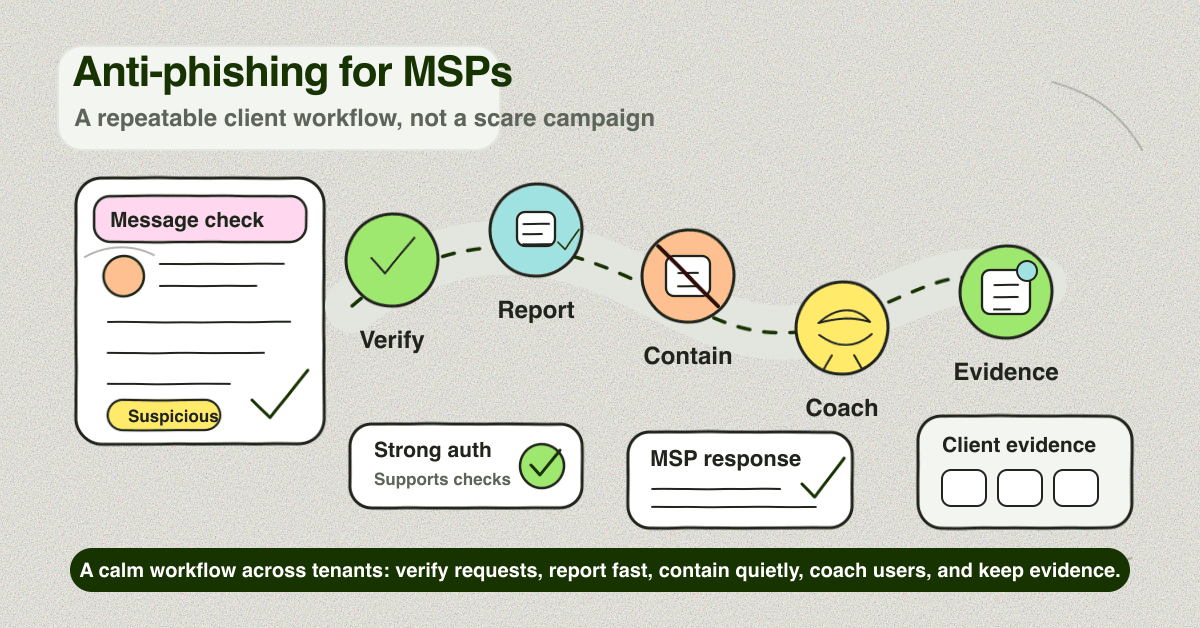
- Infographic thesis: Show anti-phishing as a repeatable MSP workflow, moving from suspicious message to verify, report, contain, coach, and prove.
- Suggested layout: flow
- Short on-image text candidates: "Pause", "Verify", "Report", "Contain", "Coach", "Prove"
- Key objects: suspicious email card, report button, phone verification checklist, MFA key/passkey icon, MSP dashboard, client evidence pack
- Avoid: hoodies, padlocks, fake breach numbers, vendor logos, compliance badges, scary red threat maps, unreadable email text
- Crop needs: 1200x628 blog/OG, plus social-safe 1200x627
Source notes
Internal link candidates
- Phishing prevention lessons
- Credential phishing
- What to do if you open a phishing email
- Internal phishing campaign
- Security awareness training effectiveness
Draft notes for Dan and Woz
- Product claims used are limited to the current claim register: flat-fee, AI-native, MSP-focused, unlimited users, unlimited client organisations, white-label, multi-tenant, automated onboarding and reporting, and free 7-day trial.
- No customer claims, satisfaction claims, proprietary performance numbers, or unsupported competitor claims are included.
featured_imageis intentionally blank until Picasso’s Doodle/Image2 header is approved.
Footnotes
-
CISA, NSA, FBI, and MS-ISAC, Phishing Guidance: Stopping the Attack Cycle at Phase One. ↩ ↩2 ↩3 ↩4
-
Verizon Business, 2025 Data Breach Investigations Report. ↩
-
Microsoft Support, Protect yourself from phishing. ↩
-
NIST, SP 800-63B: Digital Identity Guidelines, Authentication and Authenticator Management. ↩
-
Microsoft Learn, Transition from the Microsoft Report Message or the Report Phishing add-ins. ↩
-
Anti-Phishing Working Group, Report phishing emails. ↩ ↩2
-
Federal Trade Commission, ReportFraud.gov. ↩ ↩2
-
CISA, Cybersecurity Performance Goals 2.0. ↩ ↩2 ↩3
-
NIST, Phish Scale User Guide. ↩
-
CSF Tools reference for NIST CSF 2.0 PR.AT-01, Personnel are provided with awareness and training. ↩