Phishing prevention lessons for MSPs: what clients actually need to practise
Phishing prevention lessons for MSPs should teach verification, reporting, identity habits, and client-ready evidence, not just bad-email spotting.
DefendWise
DefendWise
TL;DR
Phishing prevention lessons work best when they teach employees what to do at the exact moment a risky request appears. For MSPs, that means lessons on verification, reporting, credential protection, attachment handling, payment checks, QR-code scams, and calm response after a mistake.
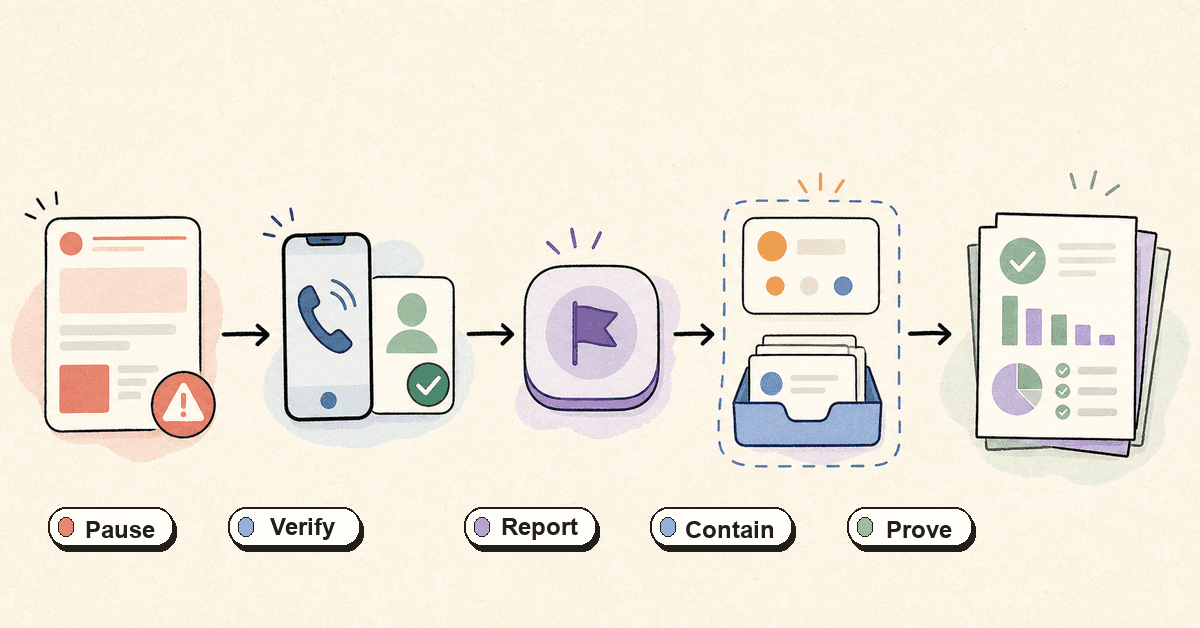
The goal is not to turn every employee into a threat analyst. The goal is to make risky moments recognizable, reportable, and backed by controls that do not depend on perfect judgement. A good MSP programme connects training to a simple client workflow: pause, verify, report, contain, coach, and keep evidence.
What are phishing prevention lessons?
Phishing prevention lessons are practical training units that teach employees how to handle suspicious messages, links, attachments, calls, texts, QR codes, and login prompts.
They should be grounded in how people actually work. A finance user sees supplier-payment requests. A receptionist answers calls and opens attachments. A manager approves access or payroll changes. A field worker may see a QR code or SMS before they see a formal email.
CISA, NSA, FBI, and MS-ISAC describe phishing as a form of social engineering where attackers trick people into visiting malicious sites, giving up credentials, opening harmful links or attachments, or taking an unsafe action. Their joint phishing guidance separates two common outcomes: credential theft and malware delivery. Both matter to MSPs because both can become a service-desk, identity, endpoint, incident, and client-reporting problem.
For MSPs, the lesson is simple: teach the action, not just the label.
A user does not need a lecture on every phishing subtype before they can make a safer choice. They need to know:
- when to pause;
- how to verify through a known channel;
- where to report the message;
- what not to do after clicking;
- why credentials and MFA codes are never shared from a message prompt;
- how the MSP will respond without blame.
That last point matters. If users think reporting creates embarrassment or punishment, they wait. Waiting gives attackers time.
Why phishing prevention lessons matter for MSPs
Phishing is not one tidy problem. It touches email security, identity, endpoint protection, finance process, user behaviour, reporting, and client trust.
The 2025 Verizon DBIR analysed 22,052 security incidents and 12,195 confirmed breaches in its dataset. It reported that the human element was involved in about 60% of breaches and that stolen credentials remained a major initial-access path. APWG’s Q1 2025 report recorded 1,003,924 phishing attacks submitted through its reporting channels and member network. The FBI IC3 2025 report listed phishing/spoofing as the most common complaint type by count and BEC as one of the largest reported-loss categories.
Those numbers are not a promise that every client will face the same pattern. They are a warning that phishing remains a normal operating risk, not an edge case.
For an MSP, one client click can create several downstream jobs:
- reset a password and revoke sessions;
- check mailbox rules and forwarding;
- inspect endpoint activity;
- search for similar messages across the tenant;
- warn other users;
- document the timeline;
- update the client on what happened;
- prove whether users were trained;
- adjust the next training scenario.
A phishing prevention lesson that stops at “look for spelling mistakes” does not help much with that workload. Modern phishing often has clean writing, copied branding, real context, compromised accounts, QR codes, SMS messages, collaboration-platform links, and voice follow-up.
MSPs need lessons that map to the client’s workday.
The seven lessons employees should practise first
Start with behaviours that reduce harm across the widest set of clients. These are not one-off modules. They are recurring habits.
| Lesson | What employees practise | MSP operating note | Evidence to keep |
|---|---|---|---|
| Message verification | Pause on urgent requests and verify through a known channel | Build no-exception rules for payments, payroll, access, and data release | Client verification policy, role coverage, lesson completion |
| Fast reporting | Use the approved reporting path instead of deleting, forwarding randomly, or staying quiet | Make the reporting path visible in Outlook, Teams, and onboarding notes | Report counts, timestamps, triage notes, user coaching |
| Credential protection | Never enter credentials from a message-driven link or share MFA codes | Pair training with MFA review and high-risk account controls | MFA method inventory, training coverage, exceptions |
| Link and attachment handling | Inspect source and context before opening files, links, or QR codes | Teach users to navigate directly to known services where possible | Scenario records, click/open actions, remediation notes |
| BEC payment checks | Verify bank-detail, invoice, gift-card, and executive-request changes out-of-band | Finance and leadership need deeper scenarios than general staff | Role-based assignments, verification exceptions, incident notes |
| Mistake response | Stop interacting, report, and answer triage questions calmly | No-blame language increases speed and honesty | Response checklist, ticket notes, follow-up lesson assigned |
| Client evidence | Understand that training and reports support client assurance | Turn activity into tenant-specific reporting, not blended fleet screenshots | Completion, overdue users, topics, dates, report exports |
Lesson 1: verify the business request, not the email design
Most phishing lessons still over-index on visual clues: spelling mistakes, odd logos, strange grammar, bad formatting, and suspicious sender names. Those clues still matter. They are not enough.
A clean email can still be malicious. A real supplier account can be compromised. A Teams message can lead to a fake login page. A QR code can move the user to a phone where browser and email protections are weaker. A voice call can make the email feel legitimate.
Train users to ask a business-process question first:
Does this request move money, change access, expose data, bypass a normal approval path, or pressure me to act before checking?
If the answer is yes, the user should verify through a known channel. Not by replying to the message. Not by calling a number in the email. Not by using contact details from the suspicious request. Use the number, portal, or contact record already known to the business.
This matters most for:
- vendor bank-detail changes;
- payroll updates;
- executive payment requests;
- password reset prompts;
- MFA approval requests;
- document-share prompts;
- unusual client data requests;
- urgent “IT support” calls.
A good lesson gives users permission to slow the request down.
Lesson 2: report suspicious messages early
CISA’s public phishing advice is direct: recognize and report phishing. The UK NCSC takes the same practical approach with its suspicious email reporting service, asking people to forward suspicious emails even when they are unsure.
For MSPs, reporting is not just a civic good. It is the first intake point for triage.
Teach users:
- do not reply to the suspicious message;
- do not forward it around the company as a warning;
- do not delete it before reporting;
- use the approved report button, mailbox, or ticket route;
- include what happened if they clicked, replied, downloaded, or entered credentials.
If the client uses Microsoft 365, Microsoft’s current guidance recommends moving from older Report Message / Report Phishing add-ins toward the built-in Outlook Report button where supported. That does not make the button the whole programme. It makes reporting easier.
The MSP still needs to define what happens after the report:
- Who receives it?
- Who triages it?
- What is the target response time?
- When does it become an incident?
- How are similar messages found?
- How is the user coached?
- What appears in the client’s monthly or quarterly report?
If nobody owns those answers, the report button becomes a suggestion box.
Lesson 3: treat credential phishing as identity risk
NIST’s phishing-resistance guidance makes an important point: phishing often targets the “keys” to the account, such as passwords, PINs, one-time passcodes, and authenticator outputs. The safest programmes do not rely only on user vigilance.
That should shape the lesson.
Do not teach users that MFA makes every login safe. Teach them that MFA is one layer and that some MFA methods can still be phished or abused. CISA’s joint phishing guidance calls out weaknesses such as SMS or voice codes, repeated push prompts, and MFA approaches that are not phishing-resistant.
Good credential-phishing lessons should say:
- start from a trusted path, such as a saved bookmark or known app, not a message link;
- never type an MFA code into a page reached from an email or text;
- never approve an unexpected push prompt;
- never read a code to someone on the phone;
- report the prompt if it appears unexpectedly;
- admins and finance users may need stronger authentication than baseline staff.
For MSPs, the training and the control review should meet. A lesson about credential phishing is stronger when the MSP can also show:
- which accounts use MFA;
- which admins have stronger authentication;
- which risky accounts are still excepted;
- which users completed the credential-phishing lesson;
- which incidents or simulations changed the plan.
That is the difference between awareness and managed risk.
Lesson 4: make phishing simulations teach, not shame
Simulated phishing can be useful. It gives people practice under realistic conditions and gives the MSP signals about reporting, click behaviour, and risky roles.
But simulations can also teach the wrong lesson.
If every simulation is obvious, users learn to spot the vendor’s template. If every result is reduced to a click rate, the client may miss reporting behaviour and role context. If users are mocked or punished, they learn to hide mistakes.
NIST’s Phish Scale work is useful here because it focuses on human detection difficulty. Some messages are easier or harder to detect depending on the cues in the message and the user context. A payroll prompt may be obvious to an engineer and believable to a finance user during end-of-month pressure.
A better MSP simulation rhythm tracks more than clicks:
- Was the scenario relevant to the client’s real workflow?
- Which roles received deeper scenarios?
- Did users report it?
- How quickly did they report it?
- Did the same users repeat risky actions?
- Were similar real attacks reported later?
- What coaching was assigned after the exercise?
The lesson should be: “Here is the business moment attackers are abusing, and here is what to do next time.”
Not: “You failed the test.”
Lesson 5: cover phishing outside email
Email is still central, but phishing prevention lessons need to cover the channels users actually touch.
CISA’s joint guidance notes that attackers use channels beyond email, including SMS, collaboration tools, messaging apps, and voice. NIST’s phishing-resistance guidance also describes spear phishing, whaling, vishing, and smishing as common forms.
For MSP clients, that means phishing prevention lessons should include:
- SMS delivery and “unpaid toll” or delivery-notice prompts;
- fake Microsoft 365 or Google login pages;
- Teams, Slack, or document-share lures;
- QR-code phishing on invoices, posters, or emails;
- phone calls asking for MFA codes or remote access;
- executive impersonation requests;
- supplier-payment changes;
- fake support or helpdesk calls.
The point is not to scare users with a long list. The point is to give them the same operating rule across channels:
If the request creates risk, verify it outside the channel that delivered it.
Lesson 6: teach what to do after a mistake
Some users will click. Some will reply. Some will enter credentials. Some will scan the QR code. The prevention programme should plan for that without turning every mistake into drama.
The lesson after a mistake should be short:
- Stop interacting.
- Do not delete the message.
- Report through the approved path.
- Say exactly what happened.
- Follow the MSP’s next steps.
For MSPs, this turns one messy user event into a repeatable response workflow. The first triage question is not “How did you fall for this?” It is “What action happened?”
Use a simple action matrix:
| User action | First risk | First MSP response |
|---|---|---|
| Read or previewed only | Low, but message may target others | Preserve/report message and search for other recipients |
| Clicked link, entered nothing | Possible tracking or site exposure | Capture URL, check downloads, warn similar recipients |
| Opened attachment | Malware or macro risk | Triage endpoint, inspect file, preserve evidence |
| Entered credentials | Account takeover risk | Reset password, revoke sessions, review MFA and sign-ins |
| Approved MFA prompt | Account access risk | Revoke sessions, review authentication logs, strengthen MFA |
| Replied with data | Data exposure or fraud path | Assess data, notify client owner, watch for follow-up fraud |
| Forwarded internally | Secondary exposure | Find recipients, warn, remove/quarantine where possible |
This lesson protects the client and the MSP. It speeds containment and creates cleaner notes for the client conversation.
Lesson 7: turn training into client-ready evidence
Clients do not only ask, “Did staff watch the lesson?” They ask:
- Who completed it?
- Who is overdue?
- What topics were covered?
- Did high-risk roles get the right scenario?
- What happened after reports or simulations?
- Can we show evidence for insurance, audit, or board conversations?
A phishing prevention programme should produce evidence as a by-product of normal delivery.
For MSPs, that evidence should be tenant-specific. A blended fleet report may help the MSP internally, but a client needs their own view: users, topics, dates, exceptions, overdue staff, reported messages, and next actions.
This is where phishing prevention lessons connect to the MSP business model. If every client needs manual exports, chase emails, screenshots, and report writing, the programme becomes expensive to run. If every user adds per-seat cost, MSPs may ration coverage.
A flat-rate, multi-tenant, white-label SAT platform helps because the MSP can offer baseline coverage to every client and every user without rebuilding the economics client by client.
A practical MSP rollout plan
Here is a simple way to package phishing prevention lessons for many clients.
1. Define the client’s risky requests
Start with the client’s real workflows. List the business actions that attackers would want to trigger:
- pay money;
- change bank details;
- reset credentials;
- approve access;
- share customer data;
- install software;
- open an attachment;
- scan a QR code;
- answer a support call.
This stops the programme becoming generic.
2. Set a no-exception verification rule
For high-risk requests, define the verification path before the attack happens.
Example: “No bank-detail change is accepted from email alone. Finance verifies using the supplier contact already on file.”
This gives users cover. They are not being difficult. They are following the rule.
3. Make reporting obvious
Decide whether the client will use the Outlook Report button, a reporting mailbox, a ticket route, or a SAT-platform workflow. Then put that reporting path in:
- onboarding material;
- the phishing lesson;
- simulated phishing feedback;
- client policy notes;
- manager reminders.
A hidden reporting path is no path.
4. Assign baseline and role-based lessons
Everyone needs baseline phishing prevention. Some roles need deeper practice.
Finance needs BEC and payment-change scenarios. HR needs payroll and employee-data scenarios. Executives need whaling, voice, and approval-pressure scenarios. Helpdesk users need MFA-code, password reset, and remote-access scenarios.
5. Pair lessons with controls
Training should not carry the whole load. Pair phishing lessons with:
- MFA review;
- phishing-resistant MFA for high-risk users where practical;
- email security controls;
- web and DNS filtering;
- endpoint protection;
- reporting configuration;
- incident response checklists.
CISA’s counter-phishing guidance is clear that training works best with technical precautions. That is the right posture: people, process, and controls.
6. Review monthly and in QBRs
Do not bury training evidence in the platform.
Bring a short view to the client:
- coverage;
- overdue users;
- topics completed;
- phishing reports;
- simulation learning points;
- repeat risky actions;
- next month’s focus.
This turns security awareness from a checkbox into a managed service conversation.
What good looks like
A good MSP phishing prevention programme has a few visible traits.
Users know where to report. Finance knows when to verify. Executives do not bypass the same rule they expect staff to follow. Helpdesk does not ask for MFA codes. Users are told to report mistakes early without fear. The MSP can show who completed what, by tenant, without hunting through screenshots.
The programme also avoids bad promises.
Training does not guarantee phishing prevention. Simulations do not prove the client is safe. A report button does not replace triage. MFA is not always phishing-resistant. A completion number is not the same as behaviour change.
Good looks like a workflow the client can repeat under pressure.
Mistakes to avoid
Teaching only “red flags”
Red flags help, but attackers can write clean copy. Teach verification and reporting, not only visual detection.
Measuring only clicks
A click rate without scenario difficulty, user role, reporting rate, and repeat behaviour can mislead the client.
Punishing users for reporting late
If reporting feels risky, users hide mistakes. Make the first report easy, then coach the behaviour.
Treating the Outlook button as the programme
The button is an intake path. MSP value comes from triage, containment, coaching, and reporting after the click.
Sending the same scenario to every role forever
A finance user, field worker, receptionist, and executive face different lures. Baseline lessons should be common; deeper lessons should match the role.
Keeping evidence at fleet level only
MSP fleet metrics help internally. Client conversations need tenant-specific proof.
How a flat-rate MSP SAT platform helps
DefendWise is built for MSPs that want to deliver security awareness training under their own brand, across multiple client organisations, without per-seat pricing pressure. The flat $399/month model, unlimited users, white-label delivery, multi-tenant control, automated reporting, and AI-native content fit a phishing prevention programme that should reach every user, not only the easy-to-bill ones.
The right buyer question is not “Can we run one phishing lesson?” It is “Can we run the right phishing lessons across every client, keep them current, and prove the work without creating another admin queue?”
Frequently asked questions
What are phishing prevention lessons?
Phishing prevention lessons are practical training units that teach people how to recognize risky messages, verify sensitive requests, report suspicious activity, and avoid giving attackers credentials, money, data, or device access.
For MSPs, the best lessons are tied to client workflows. Finance, HR, executives, helpdesk, and general staff should all understand the baseline rule, then get examples that match their daily decisions.
What is the most important phishing prevention lesson?
The most useful lesson is verification: if a request moves money, changes access, exposes data, or bypasses a normal process, verify it through a known channel before acting.
That habit works across email, SMS, voice, QR codes, collaboration tools, and document-sharing lures.
Are phishing simulations enough?
No. Phishing simulations are useful practice, but they are only one part of a prevention programme.
MSPs should combine simulations with reporting paths, no-blame coaching, identity controls, email protections, incident response checklists, and tenant-specific evidence.
How should MSPs teach users to report phishing?
Make the reporting path obvious and repeat it often. If the client uses Microsoft 365, the built-in Outlook Report button may be the right path where supported. Other clients may use a reporting mailbox, ticket route, or SAT-platform workflow.
The lesson should tell users not to reply, forward randomly, or delete the message before reporting.
What should employees do if they clicked a phishing link?
They should stop interacting, avoid entering credentials or downloading anything else, report the message through the approved path, and say exactly what happened.
The MSP can then decide whether to check endpoint activity, browser downloads, sign-ins, mailbox rules, MFA state, or similar messages across the tenant.
How often should phishing prevention lessons be refreshed?
Use a baseline onboarding lesson, recurring short refreshers, role-based scenarios for higher-risk teams, and follow-up after real reports or simulations.
The exact cadence should match client risk, industry, and operational tolerance. The important part is that lessons remain current and tied to real behaviour.
What metrics should MSPs report to clients?
Useful metrics include completion coverage, overdue users, reporting rate, report speed, repeated risky actions, high-risk role coverage, scenario topics, and follow-up coaching.
Do not stop at a single click rate. Clients need to understand what changed and what the MSP recommends next.
How does DefendWise fit into phishing prevention lessons?
DefendWise helps MSPs deliver white-label, multi-tenant security awareness training for unlimited users on a flat monthly fee. That makes it easier to offer baseline phishing prevention coverage across the client base without turning every extra learner into a margin question.