Training platform pricing unpredictable with growing clients: an MSP guide
Training platform pricing unpredictable with growing clients? Use this MSP guide to protect margin, coverage, and client reporting.
DefendWise
DefendWise
TL;DR
Training platform pricing gets unpredictable with growing clients when the bill is tied to seats, active users, add-ons, setup work, support tiers, or contract bands that change as client headcount changes.
For one internal company, that may be manageable. For an MSP, the same pricing model has to survive many tenants, small clients, growing clients, seasonal users, audits, QBRs, and bundled service margins.
The safer buying question is not “what is the cheapest user price?” It is “can we include training across the client base without turning every new employee into a billing and margin decision?”
What training platform pricing means for MSPs
Training platform pricing is the way a vendor charges for access to a learning, security awareness, or human-risk platform. Common models include per-user pricing, per-active-user pricing, fixed subscription tiers, flat-rate pricing, one-time setup fees, managed-service bundles, and add-ons for support, integrations, branding, or reporting.
That sounds like procurement detail. For MSPs, it becomes service design.
An MSP is rarely buying training for one neat internal workforce. It is trying to deliver training across many client organisations. Each client has a different user count, identity source, manager structure, risk level, compliance driver, renewal date, and reporting expectation.
That is why the keyword matters. Training platform pricing unpredictable with growing clients is not just a complaint about price increases. It is a warning that the MSP may have chosen a cost model that fights the way managed services are sold.
If every client adds users at a different rate, a per-user training bill moves every month. If “active user” is defined differently by the vendor, the MSP may not know which learners will count. If reporting or white-label features sit behind higher tiers, the invoice may change when the MSP finally tries to make the service client-ready.
Why pricing gets unpredictable as clients grow
Growth should be good news. The client hires more staff. The MSP supports more people. Security coverage expands.
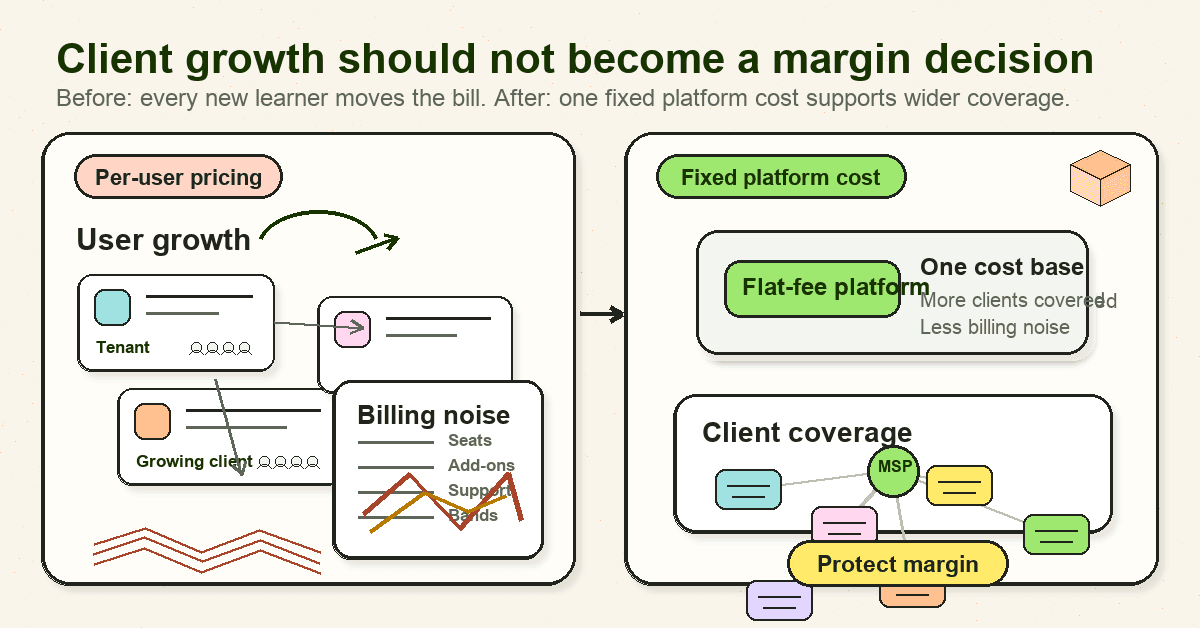
With the wrong pricing model, growth creates billing noise.
The most common causes are straightforward:
| Pricing trigger | Why it changes the bill | MSP risk |
|---|---|---|
| Per-user pricing | Every learner or employee adds cost | Margin shrinks unless the MSP rebills cleanly |
| Per-active-user pricing | The bill depends on vendor-specific activity definitions | Forecasting gets messy when learners log in unevenly |
| User bands or minimums | Pricing changes when clients cross thresholds | Small clients may pay for capacity they do not use |
| Feature tiers | Reporting, branding, support, or integrations move upmarket | The MSP discovers client-ready features cost more |
| Setup and migration fees | Each new tenant may need launch work | Small client rollouts become awkward |
| Contract terms | Discounts may depend on term length, volume, or committed seats | The MSP carries renewal and usage risk |
LMS pricing guides make the pattern clear. Absorb describes pay-per-user, pay-per-active-user, perpetual licence, and open-source models, and notes that pay-per-user can be a poor fit for organisations with inactive, seasonal, or fluctuating users. iSpring's LMS pricing guide warns that costs can include setup, data migration, admin training, customization, integrations, premium support, hosting, and add-ons, not only the subscription price. Docebo's LMS pricing guide also separates one-time setup and migration costs from recurring subscription, support, training, maintenance, and add-on costs.
Security awareness pricing adds another layer. KnowBe4 publishes monthly per-seat MSRP by seat band on a 3-year term for its SAT Foundation and SAT Advanced plans, with 1001+ seats moving to quote. Huntress's security awareness cost guide frames the market around per-user, flat-rate, and bundled-service models, and notes that low upfront costs can still carry management overhead, limited reporting, or content quality tradeoffs.
The point is not that any one model is wrong. The point is that MSPs need to know which cost levers move before the service is included in a client package.
Why the same price model feels different for an MSP
A single business buying training for itself can usually forecast headcount. It knows the hiring plan, the annual budget, and which employees are in scope.
An MSP has a different problem.
The MSP is packaging training across a book of clients. One client has 18 users and a cyber insurance questionnaire due next month. Another has 240 users, seasonal staff, and three departments that never finish training on time. A third wants white-label reports for a board pack. A fourth only agreed because training was included in a higher managed service tier.
That mix changes the buying question.
A direct buyer asks:
- How much will training cost for our employees?
- Which features do we need?
- Can we justify the budget?
An MSP asks:
- Can we standardise training across many clients?
- Can we include smaller clients without margin anxiety?
- Can we keep tenant evidence separate?
- Can we report results without manual cleanup?
- Can we keep the service profitable when clients hire, merge, churn, or change packages?
Kaseya's MSP pricing guide is useful context here. It says pricing directly affects MSP profitability and that MSPs use multiple models, including per-device, per-user, tiered, value-based, fixed-fee, and à la carte pricing. It also reports that, in its 2023 MSP Benchmark Survey, 26% of respondents used a combination of per-user and per-device pricing.
That matters because MSPs already think in packages, monthly recurring revenue, margins, and service delivery cost. A training platform should fit that operating model. It should not force the MSP back into a client-by-client resale calculation every time a learner is added.
Per-user pricing can be fair. It can also fight the package
Per-user pricing is easy to understand. One user, one price. It can be fair when each added learner creates extra cost or value and when the buyer wants direct cost allocation.
That is why it remains common in LMS and security awareness training markets.
The trouble starts when the MSP is trying to make training a standard service.
If SAT is an optional resale line item, per-user pricing is easy enough. The MSP buys 74 seats, marks them up, and bills the client. If the client grows to 91 users, the bill goes up.
If SAT is meant to be included in every managed security package, per-user pricing creates harder choices:
- Do small clients get training, or only clients large enough to justify the admin?
- Does the MSP absorb user growth between client billing cycles?
- Does every new employee require reconciliation between directory, SAT platform, PSA, and invoice?
- What happens when a client wants contractors trained for one month?
- Does a client with low training completion still count as full cost?
SuperOps' guide to MSP per-user pricing argues that per-user pricing can work well for managed services because it is simple to explain and scales naturally with headcount. That is true for the MSP's client-facing package. But it does not mean every vendor inside the package should also charge the MSP by seat.
A fixed-fee MSP package can contain variable vendor costs, but the MSP has to price that risk. If too many tools scale per user underneath the package, the MSP's margin gets squeezed from the inside.
What predictable pricing looks like
Predictable pricing does not have to mean cheap pricing.
It means the MSP can forecast the cost of delivery, explain the service to clients, and grow coverage without constant invoice surprises.
For MSP security awareness training, predictable pricing usually has these traits:
| Buying criterion | What to ask | Why it matters |
|---|---|---|
| Unit of charge | Is pricing by user, active user, tenant, package, or flat fee? | This tells you what makes the bill move |
| Definition of user | Does a learner, synced account, active login, contractor, or archived user count? | Ambiguous definitions create reconciliation work |
| Tenant assumptions | Are multiple client organisations included? | MSPs need client separation by design |
| Reporting access | Are exports, dashboards, PDFs, and client-ready reports included? | Cheap training without reports creates admin |
| White-label access | Is branding included or a higher-tier feature? | MSPs need the client experience to point back to the MSP |
| Onboarding effort | Are setup, migration, admin training, and support included? | Launch cost matters most across many small clients |
| Growth path | What happens at user bands, tenant limits, or renewal? | Growth should not trigger surprise renegotiation |
| Fair-use terms | What usage is included, and what is outside the model? | Flat pricing still needs honest boundaries |
This is where flat-fee models can help MSPs. The value is not only that the invoice is stable. The value is that the MSP can build training into the service stack without stopping to count whether the next user is worth covering.
Internal link: this is the same commercial problem covered in DefendWise's guide to the economics of per seat versus flat pricing.
Step-by-step: how MSPs should evaluate training platform pricing
1. Start with the package, not the vendor quote
Before comparing vendors, decide how training will be sold.
Is it included in every managed security package? Is it part of a compliance tier? Is it a standalone add-on? Is it only for clients with cyber insurance or ISO 27001 pressure?
The pricing model has to match that answer. A low per-user rate may look fine on a spreadsheet but fail if the MSP wants every client covered by default.
2. Model client growth across the whole book
Do not price only today's users.
Build a simple model with current users, expected growth, small-client coverage, seasonal users, and clients likely to adopt later. Then test the vendor's pricing model against the model.
Run at least these scenarios:
- Current client base.
- Current base plus 20% user growth.
- Every managed client included.
- Only compliance-tier clients included.
- A high-growth client crossing a pricing band.
- A small-client bundle where training is included by default.
This shows whether the vendor price is predictable enough for the way the MSP sells.
3. Separate platform cost from admin cost
The cheapest subscription is not always the cheapest service.
Huntress's cost guide makes the right distinction: lower-cost or free training may shift cost into management overhead, outdated content, or limited reporting. For MSPs, that overhead is multiplied across clients.
Track the admin work:
- Tenant creation.
- User import and cleanup.
- Reminder management.
- Report exports.
- Evidence pack assembly.
- Client questions.
- Renewal and invoice reconciliation.
Internal link: if admin load is the core pain, see tips for reducing admin time managing SAT for many clients.
4. Check whether client-ready reporting is included
Training completion alone is weak proof.
Clients need reports they can understand. Insurers and auditors may ask for evidence. MSP owners need QBR-ready summaries. If those outputs require a higher pricing tier, manual formatting, or separate services, the platform bill is not the whole cost.
At minimum, check whether the platform can show client tenant and scope, assigned users, completion status, dates, exceptions, reminder activity, exportable records, and client-ready summaries.
Internal link: for the reporting side, use DefendWise's guide to building auditor-ready reports for clients.
5. Ask how the model handles small clients
Small clients expose pricing weakness quickly.
A 12-user client may still require setup, branding, reminders, support, and reporting. If the platform is priced per seat but the MSP's admin time is mostly fixed per tenant, the economics can get awkward.
The MSP then has three bad options: exclude the client, charge an add-on the client may resist, or absorb the work.
Flat pricing does not remove all delivery cost, but it removes one recurring objection. The MSP can decide based on package fit, risk, and client relationship instead of counting whether 12 seats justify a separate vendor line item.
Internal link: this is one reason MSPs look at alternatives to per-seat SAT pricing.
6. Treat active-user pricing with care
Active-user pricing can sound fair. You only pay for people who use the platform.
It can also create forecasting problems if “active” means login, course start, completion, monthly access, or any account event. Absorb's LMS pricing guide warns that active-user definitions vary by vendor, and that some models are better for fluctuating or external training audiences than for high-engagement internal programmes.
For MSPs, the question is not only fairness. It is operational clarity.
If a client asks why the bill changed, can the MSP explain it quickly? If not, the pricing model may be too hard to manage at scale.
7. Review renewal terms before launch
A pricing model may look fine in month 1 and painful at renewal.
Check contract length, seat commitments, minimums, annual true-up rules, price increase language, feature-tier changes, support changes, and data export if you leave.
The MSP should be able to tell whether growth will improve the service economics or trigger a larger renewal problem.
What good looks like for MSP security awareness pricing
A good MSP training platform pricing model should let the MSP say yes to more client coverage without losing control of margin.
Good looks like this:
- The MSP knows the monthly platform cost before adding the next client.
- Tenant separation is included, not treated as an enterprise add-on.
- White-label delivery is available for the client-facing experience.
- Reporting exports are useful enough for QBRs, cyber insurance, and audit evidence.
- User lifecycle changes do not create constant billing reconciliation.
- Small clients can be included without awkward minimums.
- Growth improves the economics of the service instead of reopening every client bill.
- Fair-use boundaries are clear enough to protect both the MSP and the vendor.
CISA's Cybersecurity Awareness Program is a useful reminder that awareness is an ongoing public safety and workplace behaviour problem, not a one-time module. NIST NICE also maintains free and low-cost cybersecurity learning resources, which proves that content alone is not the hard part for MSPs. The hard part is turning training into a repeatable, branded, tenant-separated service with clean evidence.
Internal link: if the commercial reason for coverage is the focus, see DefendWise's article on the coverage gap in MSP security awareness training.
Mistakes to avoid
Buying the lowest headline user price
A low user price can still be expensive if reporting, support, branding, setup, integrations, or admin time are outside the quote.
Ignoring inactive and seasonal users
If the platform bills by registered user, inactive users can still cost money. If it bills by active user, the definition of active needs to be clear.
Comparing vendors only at today's client size
The right model at 300 learners may be the wrong model at 3,000. MSPs should model client-base growth before signing.
Forgetting the client-facing package
If the MSP sells fixed-fee managed services but buys every underlying tool per seat, margin can leak quietly.
Treating reporting as an afterthought
Training without client-ready reporting creates a second job: turning platform data into proof. That work is part of the cost.
How a flat-rate MSP SAT platform helps
DefendWise is built for MSPs that want security awareness training to be a standard part of the managed service stack, not a seat-by-seat resale problem.
The current public offer is $399/month flat, with unlimited users, unlimited client organisations, white-label delivery, multi-tenant control, automated onboarding, and reporting. That model gives MSPs a predictable base cost for packaging training across clients.
It does not remove the need to run a good programme. MSPs still need clear onboarding, user lifecycle rules, reporting cadence, and client ownership. But it does remove the habit of treating every added learner as a new margin argument.
If your current training platform pricing gets less predictable every time a client grows, the pricing model may be doing the wrong job.
Frequently asked questions
Why does training platform pricing get unpredictable with growing clients?
Training platform pricing gets unpredictable when the bill depends on user count, active users, feature tiers, setup work, support tiers, integrations, or contract bands. MSPs feel that more sharply because one vendor model has to support many client organisations with different growth patterns.
Is per-user training platform pricing bad for MSPs?
No. Per-user pricing can be fair and simple when the MSP passes cost through to a specific client. It becomes harder when the MSP wants security awareness training included in fixed-fee packages across the whole client base.
What is the difference between per-user and active-user pricing?
Per-user pricing usually bills for registered learners or licensed users. Active-user pricing bills for users who meet the vendor's activity definition, such as logging in, starting a course, or completing training. The definition matters because it changes forecasting and invoice explanation.
What hidden costs should MSPs check?
Check setup, migration, branding, tenant limits, white-label features, support, admin training, report exports, API or integration work, minimum commitments, renewal rules, and cancellation or data-export terms.
Is flat-rate training pricing always better?
No. Flat-rate pricing works when the MSP has broad usage needs and the vendor's fair-use rules are clear. A small buyer with one stable team may prefer per-user pricing. An MSP trying to standardise training across many clients often benefits from a more predictable fixed cost.
How does pricing affect client coverage?
If every new user adds cost, MSPs may be tempted to cover only certain clients, departments, or users. If the platform cost is predictable, it is easier to include training across the client base and make coverage a package decision instead of a seat decision.
How does DefendWise help MSPs manage training pricing?
DefendWise uses a flat-fee model for MSPs: $399/month with unlimited users and unlimited client organisations under the current public offer. It also supports white-label and multi-tenant delivery so MSPs can package training under their own brand.
Sources
- KnowBe4, Security Awareness Training Pricing
- Huntress, How Much Does Security Awareness Training Cost?
- Absorb LMS, Your 2026 LMS pricing guide
- iSpring, LMS pricing: find the right pricing model for you
- Docebo, LMS Pricing Models: How Much Does an LMS Cost?
- Kaseya, MSP Pricing: A Guide to Managed IT Services Pricing
- SuperOps, The ultimate guide to pricing per user for MSP services
- Thread, MSP Pricing Models & Strategy Considerations
- NIST NICE, Free and Low Cost Online Cybersecurity Learning Content
- CISA, Cybersecurity Awareness Program