Ironscales alternatives in 2026
Compare IRONSCALES alternatives: Defend Wise for MSP-branded training, Microsoft Defender for email protection. Match your shortlist to the control you need.
DefendWise
DefendWise
IRONSCALES focuses on detecting and remediating email threats, a different job from delivering employee security awareness training. Its scope stops being the right comparison when your actual requirement is an MSP-branded training service with unlimited seats. The best IRONSCALES alternative in 2026 is Defend Wise if you need flat-fee, white-label security awareness training; Microsoft Defender for Office 365 if you need Microsoft-native email protection.
TL;DR
- For IRONSCALES alternatives, choose Defend Wise for flat-fee, white-label security awareness training for MSPs.
- Choose Microsoft Defender for Office 365 when your requirement is Microsoft-native email threat protection.
- Keep IRONSCALES on your shortlist when email threat detection and remediation remain the primary requirement.
- Separate training delivery from mailbox protection before comparing vendors or planning a migration.
Why this matters
An MSP searching for IRONSCALES alternatives can be shopping for two different outcomes: protecting client mailboxes or delivering security awareness training. Those outcomes belong in the same security service, but they are not interchangeable.
Training teaches employees how to respond to suspicious requests. Email protection inspects messages and supports technical detection and response. Replacing one does not establish that you have replaced the other.
For your 2026 shortlist, write the service requirement before the vendor names. If your goal is reselling training under your own brand, evaluate training delivery and seat-count friction. If your goal is stopping malicious messages, evaluate email inspection and remediation instead.
IRONSCALES alternatives at a glance
This comparison separates a training alternative from an email-security alternative. Read the final column first: it tells you whether the option changes your training service or your mailbox protection.
| Tool | Best for | Standout capability | How it differs from IRONSCALES |
|---|---|---|---|
| IRONSCALES | Teams prioritizing email threat detection and remediation | Email-focused threat detection and response | The benchmark when your requirement is protecting mailboxes |
| Defend Wise | MSPs reselling security awareness training | Flat-fee, white-label training with unlimited seats | Addresses the training service requirement, not a like-for-like replacement for email threat detection |
| Microsoft Defender for Office 365 | Organizations prioritizing Microsoft-native email protection | Safe Links and Safe Attachments | Places email protection within Microsoft's security environment |
Do not select a winner by counting features across these rows. First decide which row addresses the job you need done, then test that product against your client environment.
Set the comparison boundary
Use separate acceptance criteria for separate controls:
- Training delivery: Can your team deliver the required learning experience and manage the client service?
- Mailbox protection: Can your security team detect, investigate, and remediate the threats in scope?
- Service economics: Does the commercial model fit how you package and support clients?
For a broader procurement checklist, use how to evaluate anti-phishing software before switching vendors. Keep training requirements distinct from technical email-protection requirements throughout the evaluation.
1. Defend Wise: best for MSP-branded awareness training
Defend Wise security awareness training is built around a specific MSP service model: flat-fee delivery, white-label presentation, and unlimited seats. Choose it when the buying decision concerns how you deliver training to end-client organizations, rather than how you detect malicious email.
The economic distinction is straightforward. Unlimited seats remove the seat-based component from the platform model; they do not remove your own onboarding, support, or account-management work. Price your service around that remaining work.
Where the platform shines
- White-label delivery: You can position security awareness training as part of your MSP's service.
- Unlimited seats: The platform model does not require you to buy training capacity one employee at a time.
- Defined audience: The offering is specifically for MSPs training end-client organizations.
- Flat-fee structure: You can evaluate the platform expense separately from the labor required to operate your service.
Where the platform falls short
- It is not a like-for-like email-security replacement. A training purchase does not answer your mailbox threat-detection requirement.
- Unlimited seats do not mean unlimited service capacity. Your team still needs a practical process for client communication and administration.
- A focused training offering is not a complete security stack. Keep technical controls and incident response in your service design.
These are scope limitations, not minor procurement details. If your replacement project starts with removing an email-protection control, resolve that control's successor before treating the training decision as complete.
Head-to-head: training service versus email protection
| Dimension | Defend Wise | IRONSCALES |
|---|---|---|
| Primary decision here | MSP security awareness training | Email threat detection and remediation |
| Confirmed service model | Flat-fee, white-label, unlimited seats | Evaluate the proposed agreement against your requirements |
| Buyer priority | Packaging training for end-client organizations | Protecting client email environments |
| Acceptance test | Demonstrate the required training service workflow | Demonstrate the required email-security workflow |
Best for: MSPs that need flat-fee, white-label security awareness training without seat-count friction.
Verdict: Buy for the training requirement; do not treat it as your email-protection replacement.
2. Microsoft Defender for Office 365: best for Microsoft-native protection
Microsoft Defender for Office 365 belongs on the shortlist when your replacement requirement is email protection in Microsoft's environment. Safe Links and Safe Attachments address malicious links and attachments, keeping this comparison closer to IRONSCALES' email-security purpose.
Evaluate the actual configuration your clients will use. A product name on an agreement is not proof that policies, permissions, investigation access, and response ownership are ready.
Where Microsoft Defender for Office 365 shines
- Microsoft-native protection: It fits a security strategy centered on Microsoft's email environment.
- Link protection: Safe Links provides protection against malicious links.
- Attachment protection: Safe Attachments checks attachments for threats.
- A relevant comparison: Its email-protection role makes it a more direct candidate when replacing an email-security control.
Where Microsoft Defender for Office 365 falls short
- It is not an equivalent proposition to an MSP-branded training service. Do not use its email-security fit to settle your training-delivery decision.
- Configuration remains work. Your team must establish policies, access, and responsibility for responding to detections.
- Microsoft alignment is a selection criterion, not a universal advantage. Test the fit against each client's environment rather than assuming a standard deployment covers every account.
Head-to-head: Microsoft Defender for Office 365 versus IRONSCALES
| Dimension | Microsoft Defender for Office 365 | IRONSCALES |
|---|---|---|
| Core comparison | Microsoft-native email protection | Email-focused detection and remediation |
| Named protection capabilities | Safe Links and Safe Attachments | Email threat detection and response |
| Evaluation priority | Microsoft configuration and operating workflow | Email-security configuration and operating workflow |
| Decision evidence | Demonstration in a representative Microsoft environment | Demonstration against the same threat and response requirements |
For a 2026 evaluation, give both vendors the same operational requirements. Ask who receives an alert, who investigates it, and who has authority to take action.
Best for: Organizations choosing a Microsoft-native approach to email protection.
Verdict: Buy when the Microsoft operating model fits; hold until configuration and response ownership are demonstrated.
Why people switch from IRONSCALES
A defensible switch starts with a requirement mismatch, not an unsupported claim that the incumbent is bad. This comparison supports two specific reasons to evaluate a different approach: you need a focused MSP training service, or you want Microsoft-native email protection.
Your buying priority is training delivery
If your project brief calls for flat-fee, white-label security awareness training, assess that requirement directly. Do not force the decision into an email-security feature comparison simply because IRONSCALES appeared on the original shortlist.
Defend Wise security awareness training is the relevant candidate for that brief. Keep any existing mailbox-protection requirement in a separate workstream so the training purchase does not create an accidental coverage gap.
Your operating model centers on Microsoft
If your security operations strategy centers on Microsoft, Microsoft Defender for Office 365 deserves a practical evaluation. The question is whether its protection and response workflows fit your team and clients—not whether using fewer vendor names is automatically better.
When comparing Microsoft 365 security tools, map each tool to the control it supplies: mailbox protection, identity protection, training, or investigation. Removing a vendor is not the same as removing a requirement.
Your shortlist mixes unlike categories
Sometimes the next move is not switching at all. It is splitting one confused procurement exercise into separate decisions with separate acceptance tests.
Ask your stakeholders to finish this sentence: we need to replace the current product because it does not meet this requirement. If the answer names training delivery, evaluate training. If it names email detection or remediation, evaluate email protection.
Validate the switch before you cancel anything
For your 2026 evaluation, use a recommended pilot of 2 client organizations, 3 workflows, and 1 evidence export. These are planning targets, not vendor performance claims. Choose clients with different administrative needs so the exercise tests more than your easiest account.
Use the same workflow names in your evaluation notes. That makes gaps easier to assign and retest.
- Scope: List what stays, what changes, and which controls must remain active.
- Training workflow: Follow the proposed learner and administrator experience from assignment through completion.
- Response workflow: Follow a suspicious-message scenario from initial report through investigation and closure.
- Evidence export: Request a sample of the records your client actually needs and inspect its contents.
- Cutover: Assign an owner to every dependency before changing the production service.
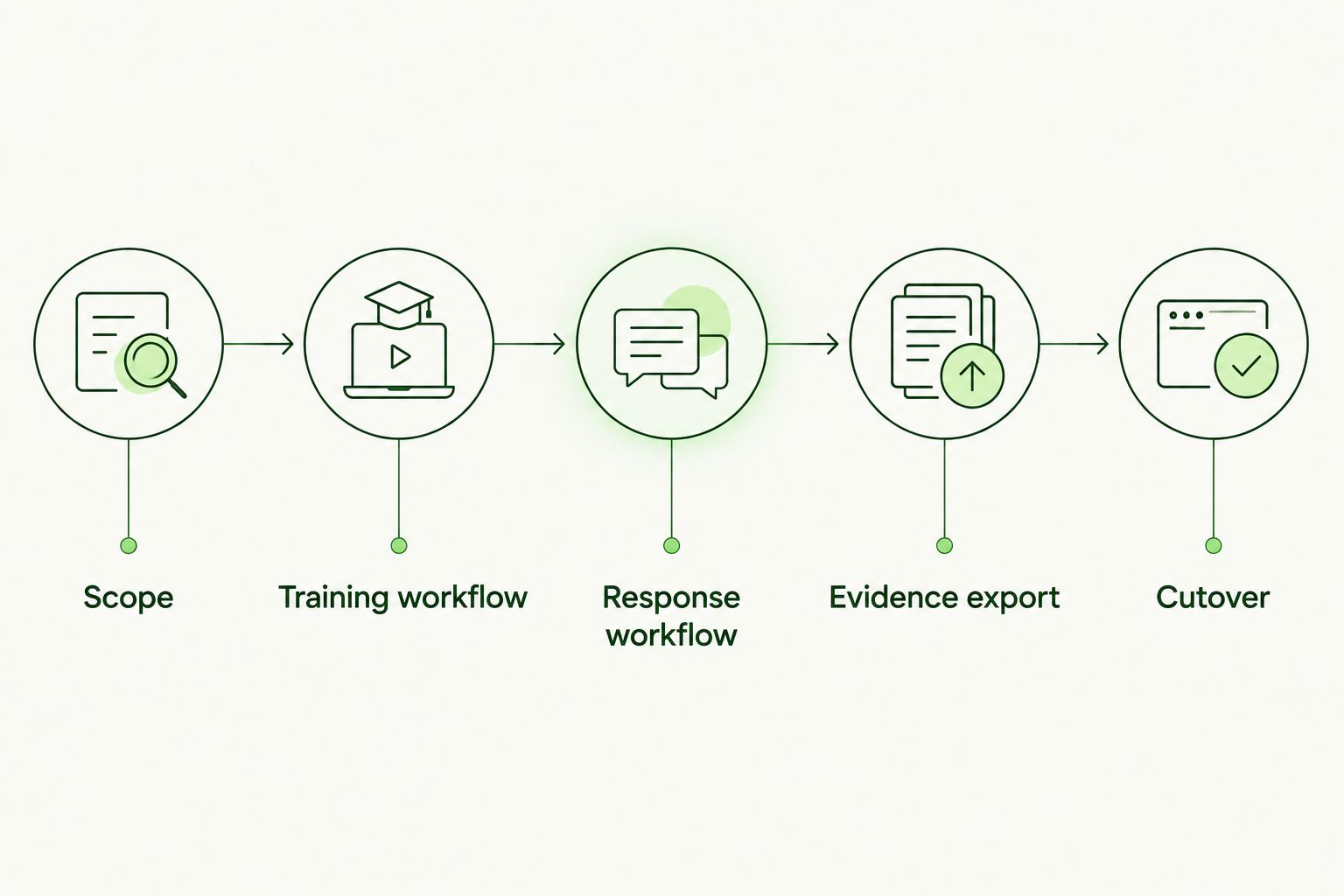
Test training delivery and email response separately before approving the cutover.
Test operations, not just the demonstration
During the pilot, record every point where your team must intervene. Include client setup, learner questions, access changes, exception handling, and report preparation. Do not assume those tasks disappear because the platform uses a flat-fee model.
For email protection, document who can inspect a detection and who can remediate it. For training, document who owns assignments and follow-up. A responsibility left blank in the pilot becomes an unresolved handoff in production.
Inspect the evidence you will hand clients
Ask for a sample export before committing to the reporting workflow. Check whether it identifies the relevant organization, employees, activity, and reporting period your client requires.
Treat compliance evidence as a deliverable to inspect, not a label to accept. Training completion records support an assessment; they do not establish that every applicable compliance obligation has been met.
When staying with IRONSCALES is the right call
Stay with IRONSCALES when email threat detection and remediation remain your primary requirement and the current service meets your acceptance criteria. A change in training strategy does not, by itself, justify removing an email-security control.
The same rule applies if a replacement has not passed your operational tests. Keep the existing control until the proposed successor demonstrates the required workflow and your team accepts ownership.
For a 2026 renewal, separate dissatisfaction with administration from dissatisfaction with protection. Write down the exact problem, test the proposed fix, and approve a switch only when it resolves that problem without leaving another requirement uncovered.
Best for: Teams whose current IRONSCALES deployment meets their email-security requirements.
Verdict: Hold when the incumbent meets the brief; switch only against a demonstrated requirement.
FAQ
What's the best IRONSCALES alternative for MSP security awareness training?
Defend Wise is the best fit in this comparison for MSPs needing flat-fee, white-label security awareness training with unlimited seats. Treat that as a training decision, not a replacement for technical email protection.
Is Microsoft Defender for Office 365 an IRONSCALES alternative?
Yes, Microsoft Defender for Office 365 is an email-protection alternative to evaluate against IRONSCALES. Compare configuration, threat handling, investigation access, and response ownership in your actual client environment.
Can security awareness training replace email protection?
No, security awareness training does not replace technical email protection. Training addresses employee decisions, while email-security controls address message detection and response.
Which option is best for white-label training?
Defend Wise is the white-label training option in this comparison. Its flat-fee, unlimited-seat model is intended for MSPs serving end-client organizations.
What should an MSP test before switching email-security vendors?
An MSP should test the required detection, investigation, remediation, and administrative workflows before switching. Assign response ownership and verify dependencies before removing the existing control.
Does unlimited-seat training remove all service administration?
No, unlimited-seat training does not remove your MSP's own service responsibilities. Account for client communication, onboarding, support, and reporting when designing the service.
When should I stay with IRONSCALES instead of switching?
Stay with IRONSCALES when your primary requirement is email threat detection and remediation and the existing deployment meets your acceptance criteria. A separate training requirement does not automatically justify replacing the email-security service.
One last thing
Write the cancellation checklist before signing the replacement agreement. Name every control, record, permission, and response responsibility that depends on the incumbent.
If the replacement cannot account for one of those dependencies, resolve it before cutover. The best alternative is the one that meets your requirement—not the one that wins a comparison between unlike products.