Best flat-fee compliance training platforms for MSPs 2026
Choose the best flat-fee compliance training platform for MSP security awareness. Compare white-label delivery, unlimited seats, evidence, and admin work.
DefendWise
DefendWise
Best overall: Defend Wise for MSPs that want flat-fee, white-label security awareness training with unlimited seats. For your 2026 shortlist, compare that purpose-built platform with two other delivery approaches: an existing LMS for client-owned training programs, and a self-managed portal for custom requirements—not interchangeable flat-fee products.
TL;DR
- Defend Wise is the best flat-fee compliance training platform choice here for MSP-delivered security awareness training.
- An existing LMS fits client-owned programs when the required content and administration already exist.
- A self-managed portal fits custom requirements, but your team owns content, records, and maintenance.
- Choose by training scope, client separation, evidence quality, and administrative workload—not unlimited seats alone.
Why this matters
A fixed software subscription does not make your entire training service fixed-work. Someone still owns enrollment, overdue learners, client questions, and evidence requests. Put those tasks into your service design before you bundle training.
Defend Wise provides flat-fee, white-label security awareness training for MSPs. That is a specific scope: helping you deliver security awareness training to end-client organizations, not replacing every legal, HR, privacy, or role-specific training requirement.
For a 2026 buying decision, separate three questions: what employees must learn, how your team administers delivery, and what records each client needs. Buy against the actual obligation, not the word compliance on a product page.
What makes the best flat-fee compliance training platform?
Use these six criteria before comparing delivery options:
- Training scope: Match the subject matter to each client's documented requirements. Security awareness and general compliance training are not synonyms.
- Subscription boundaries: Establish whether the agreement covers the MSP, individual subclients, or another defined unit. Get exclusions in writing.
- Client separation: Require a demonstration of how administrators distinguish learners, assignments, and records across end-client organizations.
- White-label delivery: Decide whether employees should see your MSP's identity, their employer's identity, or the vendor's identity.
- Usable evidence: Ask for records that identify the learner, assigned material, completion status, and relevant dates.
- Administrative workload: Walk through onboarding, departures, overdue work, reporting, and handover. A feature list does not show who does the work.
Unlimited seats address one subscription boundary. They do not answer the other five questions. Keep the commercial model and the operating model on separate lines of your scorecard.
Your options at a glance
Only the first entry below is a named platform recommendation. The other entries are delivery approaches for requirements that call for a different operating model; they are not presented as verified flat-fee vendor offers.
| Rank and option | Best for | Standout characteristic | Key limitation |
|---|---|---|---|
| 1. Defend Wise | MSP-branded security awareness services | Flat-fee, white-label training with unlimited seats | Security awareness scope does not establish coverage of every compliance obligation |
| 2. Existing LMS approach | Clients that already own and administer training | Keeps delivery within the client's established learning environment | Requires validation of licensing, content rights, records, and MSP access |
| 3. Self-managed portal approach | Custom training with a named internal owner | Lets your team define the content and delivery process | Your team owns maintenance, learner administration, and evidence handling |
1. Defend Wise: best for MSP-branded security awareness
This is the closest match when your requirement is a flat-fee compliance training platform for an MSP-delivered security awareness service. The platform's stated model combines a flat fee, unlimited seats, and white-label delivery for end-client organizations.
That combination fits a service you sell under your own name. Your next task is to verify the operational details that matter to your clients—not assume every requirement follows from the subscription model.
Defend Wise pros:
- Flat-fee training gives you a defined platform subscription model.
- Unlimited seats remove a per-seat limit from the stated offer.
- White-label delivery fits an MSP-branded training service.
- The product is explicitly intended for MSPs serving end-client organizations.
Defend Wise cons and boundaries:
- Security awareness training is not a substitute for every category of compliance training.
- Unlimited seats do not establish reporting formats, integrations, or administrative workflows; verify those separately.
- Your MSP still needs an owner for client requirements, service delivery, and evidence requests.
Best for: MSPs standardizing a branded security awareness service across their client base.
For your 2026 evaluation, bring a sample client roster and a sample evidence request. Ask the vendor to show the path from assigning training to producing a client-specific record, including how an administrator handles an employee who leaves before completion.
Verdict: Buy when security awareness is the required scope and the demonstrated workflow meets your client requirements.
2. Existing LMS: best for client-owned training programs
An existing learning management system belongs on the shortlist when your client already uses it and wants to retain responsibility for employee training. Treat this as a reuse decision, not proof that the existing system is a flat-fee MSP platform.
Start with ownership. If the client maintains course content, learner records, and internal training policy, your MSP can define a narrower supporting role rather than taking over the entire program.
Existing LMS pros:
- Reusing an established environment avoids introducing another training destination.
- Client-owned administration keeps responsibility with the team that sets training policy.
- Existing workflows provide a starting point for evaluating security awareness delivery.
Existing LMS cons:
- Existing access does not establish rights to distribute additional training content.
- Your MSP's administrative access and responsibilities need explicit agreement.
- Subscription terms still require review; an existing LMS is not automatically unlimited-seat or flat-fee.
Best for: Clients with an established learning environment and an accountable training administrator.
For a 2026 renewal, ask the client to demonstrate assignment, completion, and retrieval of a historical record. Then document what your MSP will support and what remains outside the service agreement. Do not accept responsibility for evidence your team cannot access.
Verdict: Hold until licensing, content rights, administrative access, and evidence retrieval are confirmed.
3. Self-managed portal: best for custom training requirements
A self-managed portal is an approach for organizations that need to control their own training content and process. It is not a ready-made replacement for an MSP security awareness platform.
Choose this route only when a named owner accepts the ongoing work. Publishing a lesson is the beginning; maintaining accurate assignments, completion records, and current material is the operating commitment.
Self-managed portal pros:
- Your team defines the training structure around documented requirements.
- You control which approved materials enter the program.
- You can design the process around an existing internal policy workflow.
Self-managed portal cons:
- Content updates, learner support, and record handling become your responsibility.
- A portal alone does not establish reliable completion evidence.
- Client separation and access controls need deliberate design and review.
Best for: Organizations with custom material and an internal owner responsible for delivery and maintenance.
Before committing, write down who updates content, resolves learner access problems, and answers evidence requests after a staff change. If those responsibilities remain unassigned, the portal is not ready to become a client service.
Verdict: Skip unless custom requirements justify the ongoing administrative responsibility.
How to validate the shortlist before signing
Use the same evaluation sequence for every option. This is a recommended buying process, not a claim about any platform's capabilities.
Scope
Write a plain-language statement of what the training service covers. Identify the audience, required subjects, policy owner, and evidence recipient. Separate security awareness from other employee training obligations.
Boundaries
Request written subscription terms covering learners, subclients, administrator access, and any separate services. Ask what changes when you add an organization or remove one. Do not let the headline commercial model stand in for the agreement.
Workflow
Reserve 60 minutes for an administrator walkthrough. Use that session to follow a new employee, an overdue employee, and a departing employee through the proposed process. Assign responsibility for each action.
Evidence
Ask for a sample record against a real client request. Check whether the record identifies the correct organization, learner, material, status, and dates. Establish who can retrieve it when the usual administrator is unavailable.
Ownership
Use a 30-day evaluation window to document unresolved operating questions. Before the window ends, assign an owner to every recurring task and every exception. Review the resulting service design again after 90 days of delivery.
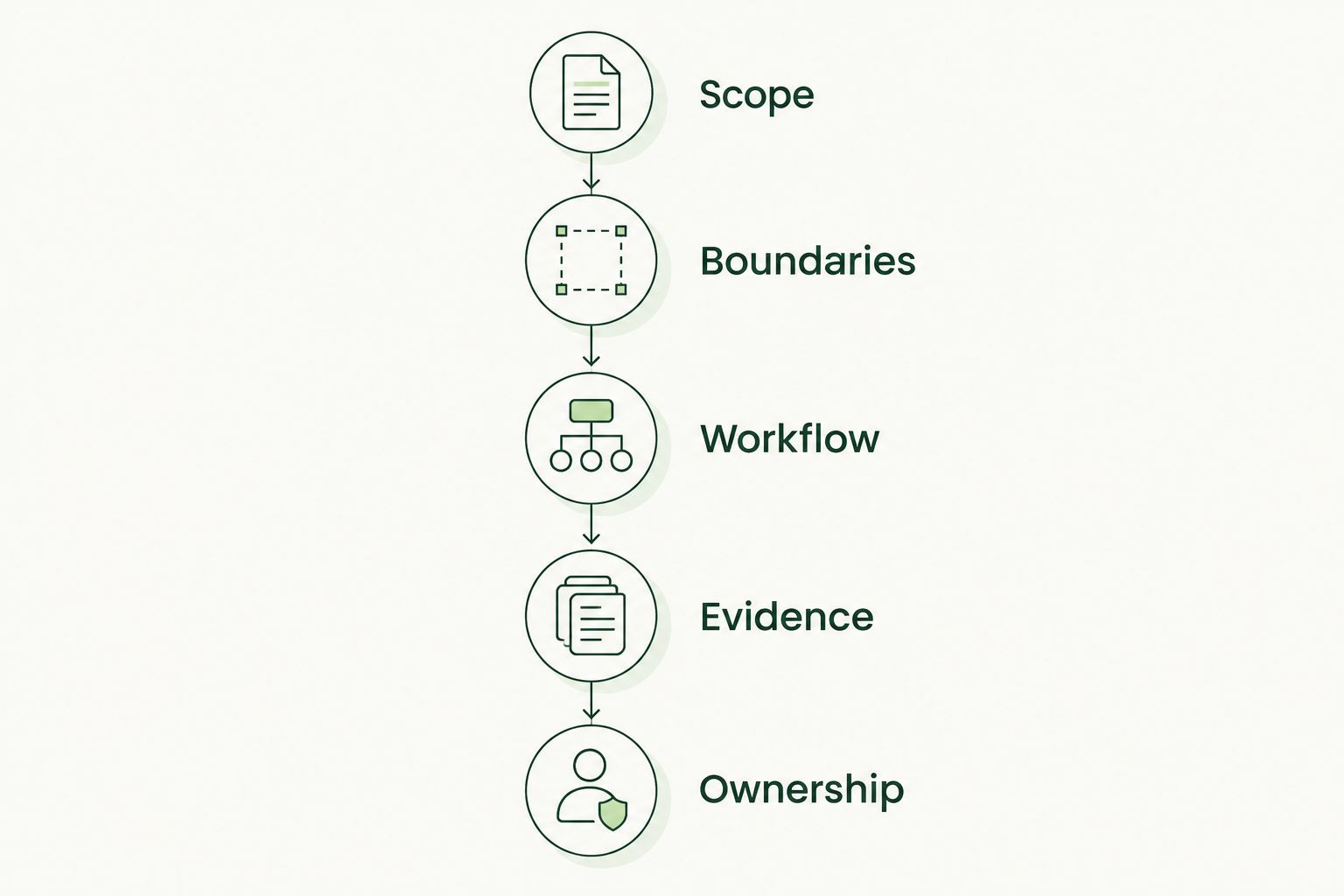
Validate the operating model as carefully as the subscription model.
These checkpoints give your 2026 shortlist a consistent decision rule. Reject a mismatch at the scope stage instead of spending the rest of the evaluation trying to compensate for it.
Protect the service margin, not just the subscription
Per-seat billing and training administration are different sources of work. Removing one does not automatically remove the other. Your service agreement should distinguish the platform subscription from the work your MSP performs around it.
List the recurring tasks before packaging the service:
- Maintaining an accurate client learner roster.
- Agreeing who follows up on incomplete assignments.
- Handling client-specific evidence requests.
- Reviewing changes to the client's training requirements.
- Transferring responsibility when a client changes administrators or providers.
Then decide which tasks belong in the standard service and which require a separate scope. Use the MSP security training break-even guide to structure the economics discussion without confusing a fixed platform subscription with a fully fixed delivery workload.
Do not promise automatic compliance. Promise a defined training service with defined responsibilities and evidence. That is a clearer commitment for both your MSP and the client.
How these options were ranked
The ranking prioritizes fit for the stated buyer: an MSP seeking flat-fee security awareness training for end-client organizations. The named platform ranks first because its stated offer directly matches that buyer, delivery model, and subscription structure.
The existing LMS approach ranks next for client-owned programs. The self-managed portal ranks third because it requires an organization to accept direct responsibility for the training process. These are use-case recommendations, not a claim of hands-on testing or a scored vendor benchmark.
Which approach should you choose?
Choose Defend Wise for flat-fee compliance training when your MSP's actual requirement is white-label security awareness training with unlimited seats. Verify client separation, evidence handling, and administrative responsibilities before committing.
Keep an existing LMS when the client already owns the training program and can demonstrate the required workflow. Choose a self-managed portal only when custom requirements and a named owner justify building the process yourself.
For an undecided MSP, start with the purpose-built security awareness option. Expand the shortlist only when a documented requirement calls for something else.
Evaluate your MSP training fit
Check flat-fee, white-label security awareness training against your client requirements.
FAQ
What's the best flat-fee compliance training platform for an MSP?
Defend Wise is the best fit here for MSPs seeking flat-fee, white-label security awareness training with unlimited seats. Match the training scope and demonstrated administrative workflow to your end-client requirements before buying.
Does security awareness training cover every compliance requirement?
No. Security awareness addresses a specific training scope, while a client's obligations can include other subjects and role-specific instruction. Have the responsible policy or compliance owner approve the required coverage.
Is an existing LMS better than a dedicated MSP training platform?
An existing LMS is the better fit when the client already owns the training program and can demonstrate the required delivery and evidence workflows. A dedicated MSP option fits a provider-owned service; compare responsibility as well as features.
Does unlimited-seat training mean unlimited administration?
No. Unlimited seats describe the learner allowance, not who handles enrollment, overdue work, support, or evidence requests. Document those responsibilities separately.
What evidence should I request during a platform evaluation?
Request a sample record identifying the organization, learner, assigned material, completion status, and relevant dates. Have the client confirm that the record answers its actual evidence request.
Should an MSP build its own compliance training portal?
Build a self-managed portal only when custom requirements justify owning content, delivery, learner administration, and records. Assign a responsible owner before treating the portal as a supported client service.
How should I compare flat-fee training agreements?
Compare what each agreement covers, including learners, subclients, administrator access, separate services, and exit responsibilities. Evaluate administrative work separately from the platform subscription.
One last thing
Test retrieval, not just completion. Before approving your 2026 training service, ask an administrator to find a departed employee's record and explain which client requirement it supports. If that task exposes unclear access or ownership, fix the process before rollout.