Best anti-phishing email software for Google Workspace 2026
Compare anti-phishing email software for Google Workspace. Start with Gmail controls, add specialist protection, and keep MSP training separate.
DefendWise
DefendWise
Best starting point: Gmail’s native protections. Best for an added email-security layer: Check Point Harmony Email & Collaboration. Best for behavioral threat detection: Abnormal Security. Best for MSP-delivered awareness training alongside email protection: Defend Wise. This 2026 guide separates mailbox protection from employee training so you buy the control your Google Workspace clients actually need.
TL;DR
- Evaluate anti-phishing email software for Google Workspace against Gmail’s existing controls before adding another platform.
- Shortlist Check Point Harmony Email & Collaboration for additional email inspection and remediation.
- Shortlist Abnormal Security when behavioral detection is the main requirement.
- Defend Wise is best for MSPs seeking flat-fee, white-label security awareness training alongside email protection.
Why this matters
An email filter and a training platform solve different problems. A filter evaluates messages; training teaches employees how to handle suspicious requests. Buying either as a substitute for the other leaves the original requirement unresolved.
For MSPs, the distinction also protects service scope. Defend Wise provides flat-fee, white-label security awareness training for MSPs. Treat that as a training service alongside Google Workspace email protection, not as the mailbox-security product in your stack.
Your 2026 shortlist should start with a written gap: missed impersonation, difficult remediation, inconsistent administration, or employee handling of suspicious messages. A product demo without that gap becomes a feature tour. It does not establish a reason to switch.
What makes the best Google Workspace anti-phishing software?
Use these criteria before comparing vendors:
- Google Workspace fit: Establish how the service connects, which permissions it requests, and whether mail-routing changes are required.
- Detection fit: Evaluate impersonation, malicious links, attachments, and requests sent from compromised legitimate accounts separately.
- Response workflow: Require a demonstration of investigation, message removal, restoration, and administrator accountability.
- MSP administration: Check client separation, delegated access, onboarding, offboarding, and policy changes across tenants.
- Operational burden: Identify who handles false positives, exceptions, user reports, and escalations after deployment.
- Clear service boundaries: Separate message protection, identity controls, and security awareness training in the proposal.
Do not accept a broad detection claim as proof of suitability. Ask the vendor to demonstrate your specific workflow in a Google Workspace environment. Record what worked, what required manual intervention, and what remains outside the product’s scope.
Google Workspace protection options at a glance
These options occupy different use-case slots. The table is a buying decision tree, not a claim that training and email filtering are interchangeable.
| Option | Best for | Standout capability or model | Key limitation |
|---|---|---|---|
| Gmail native protections | Establishing the Workspace baseline | Built-in spam, phishing, and malware protections | Advanced investigation capabilities depend on Workspace edition |
| Check Point Harmony Email & Collaboration | Adding specialist email protection | Email inspection and remediation for cloud email | Adds another security service to administer |
| Abnormal Security | Investigating behavior-based email threats | Behavioral analysis of email activity | Requires scrutiny of data access, tuning, and response workflow |
| Defend Wise | MSP-delivered awareness training | Flat-fee, white-label security awareness training | Complements mailbox protection rather than replacing it |
1. Gmail: best for establishing your Workspace baseline
Gmail includes spam, phishing, and malware protections within Google Workspace. Administrators can configure email-security policies and authentication-related controls without first introducing another email-security vendor.
Best for: organizations that need to establish what their existing Workspace environment already covers. Start here even when you expect to add a specialist product. Otherwise, you cannot distinguish a missing capability from an existing control that was never configured.
Gmail pros
- Establishes a baseline inside the email environment you already administer.
- Provides native handling of spam, phishing, and malicious attachments.
- Keeps initial policy work within Google Workspace administration.
Gmail cons
- Investigation and response capabilities vary by Workspace edition.
- Native protection does not eliminate the need for employee judgment or incident response.
- Your team still owns policy review, exceptions, and reported-message handling.
For your 2026 review, document the Workspace edition, active policies, administrator roles, and reporting route. Do not assume every client tenant has the same configuration because the tenants use the same email service.
Ask an administrator to follow a reported message from submission through investigation and closure. That exercise exposes ownership gaps before another console obscures them.
Verdict: Buy into the native baseline first; hold an add-on purchase until you identify the remaining gap.
2. Check Point: best for an additional email-security layer
Check Point Harmony Email & Collaboration provides security for cloud email and collaboration environments, including Google Workspace. Its role in this shortlist is additional message protection and remediation, not employee training.
Best for: teams with a defined requirement for specialist email inspection beyond their native configuration. Evaluate the actual deployment design rather than assuming every third-party email product connects or operates the same way.
Check Point pros
- Offers a specialist email-security layer for Google Workspace.
- Addresses inspection and remediation within a dedicated security service.
- Provides an alternative to relying exclusively on native email controls.
Check Point cons
- Adds another service, policy set, and escalation relationship.
- Requires review of access permissions and data handling.
- Overlapping controls require clear ownership of quarantine and exceptions.
During evaluation, ask the vendor to trace a suspicious message through detection, investigation, removal, and restoration. Include a legitimate message that was incorrectly flagged. A removal demonstration alone does not show whether your help desk can resolve an employee’s blocked business conversation.
For an MSP, insist on seeing the proposed client-administration model. Do not infer tenant separation, delegated roles, or cross-client reporting from a demonstration of a single organization.
Verdict: Buy when the demonstrated inspection and response workflow closes a documented Workspace gap.
3. Abnormal Security: best for behavioral threat detection
Abnormal Security uses behavioral analysis to identify email threats, including social-engineering and account-compromise-related activity. Its Google Workspace offering belongs on a shortlist when your evaluation centers on unusual communication patterns and suspicious requests.
Best for: security teams prioritizing behavior-based email detection. A request from a legitimate account deserves attention even when the message contains no obvious malicious attachment.
Abnormal Security pros
- Makes behavioral analysis central to email-threat detection.
- Addresses social-engineering threats as an explicit security use case.
- Provides a distinct evaluation path from checking only links and attachments.
Abnormal Security cons
- Behavioral findings still require an understood investigation process.
- Data access and processing need security and privacy review.
- Product adoption does not replace payment-verification or identity-recovery procedures.
For a 2026 evaluation, ask how an analyst reviews the reason for a detection. Then ask how a disputed decision is corrected. Your team needs an operational explanation, not just an alert label.
Use scenarios involving a changed payment destination, an unusual request from an established contact, and suspicious account activity. Require the vendor to explain the decision and show the response available to your administrators.
Verdict: Buy when behavioral detection is the documented requirement and your team can operate the response workflow.
4. Defend Wise: best for MSP-delivered awareness training
Defend Wise provides flat-fee, white-label security awareness training for MSPs. Its place in a Google Workspace security stack is the employee-training layer, separate from software that inspects or removes email.
Defend Wise is best for MSPs seeking flat-fee, white-label security awareness training alongside email protection. That distinction keeps the service promise clear: train users through an MSP-branded offering while selecting mailbox protection on its own merits.
Defend Wise pros
- Uses a flat-fee model rather than per-seat pricing.
- Provides white-label security awareness training for MSPs.
- Includes unlimited seats within the stated service model.
Defend Wise cons
- Does not replace the need to select and configure email protection.
- Training still needs a client owner and a defined reporting process.
- Flat-fee training does not remove the MSP’s internal service-delivery work.
Evaluate the training service against your operating model. Decide who owns enrollment, client communication, completion review, and follow-up before packaging it into a managed-service agreement.
The economic question is broader than licensing. A flat-fee training model removes seat-count-based purchasing from that layer, but your proposal still needs to account for administration and client support. Keep those responsibilities visible rather than burying them in an unlimited-service promise.
Verdict: Buy for the MSP training layer; skip it as a substitute for email filtering.
How this shortlist is ranked
The order follows the buying decision: establish the native baseline, evaluate specialist message protection, examine behavioral detection, then select the complementary training layer. It is not a lab-tested detection leaderboard.
The criteria are Workspace fit, detection fit, response workflow, MSP administration, operational burden, and service boundaries. No vendor earns a recommendation merely by listing more features. The recommended option must solve the problem named in the service brief.
Validate the workflow before you sign
A 2026 buying decision needs an acceptance plan, not another feature spreadsheet. Use the same scenarios and administrator tasks for every shortlisted email-security vendor.
Build the plan around 3 message types: a legitimate business message, an obvious credential-theft attempt, and an impersonation request without a malicious attachment. Use authorized evaluation material and controlled recipients, not active malicious content.
For each message type, record the observed action and the administrator’s next step. Keep detection, investigation, and recovery separate. A product that flags a message has not yet demonstrated that your team can close the incident.
Use this sequence:
- Baseline review: Record the current Workspace configuration and the gap you want to close.
- Access review: Inspect requested permissions, administrator roles, and data handling.
- Message review: Observe how each evaluation message is handled and explained.
- Response review: Demonstrate removal, restoration, escalation, and closure.
- Handoff review: Confirm who owns the workflow after the vendor leaves.
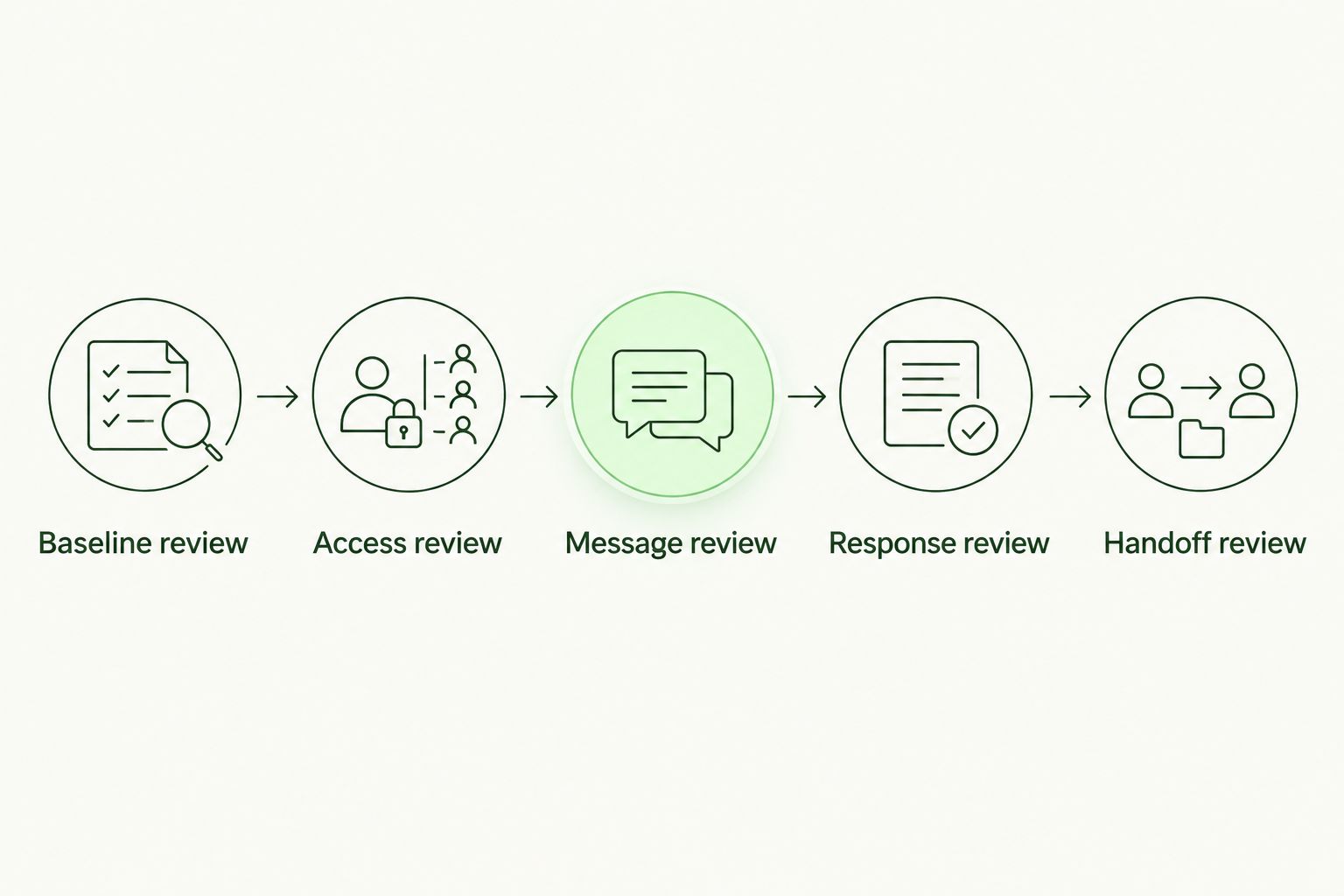
A detection demonstration is incomplete without response and handoff.
An MSP should also rehearse the workflow across 2 client tenants in a controlled evaluation. Check that administrators can distinguish clients, apply the intended permissions, and retrieve the right organization’s records. This is an acceptance requirement, not a claim about any vendor’s capabilities.
Use the same decision record when evaluating anti-phishing software before switching vendors. Record the reason to change before planning the migration.
Match the rollout to the client’s exposure
Separate mailbox access from service access
Review the permissions requested by each proposed service. Record who can grant access, who can revoke it, and what happens when the client relationship ends. An MSP offboarding process must address vendor access as well as the departing client’s administrator accounts.
For legal clients, evaluating email security tools for law firms also requires explicit decisions about access to confidential correspondence, investigation records, and delegated administration. Apply those questions to the proposed deployment rather than treating a sector-specific label as proof of suitability.
Give every report an owner
Name 1 incident owner for each client’s reported-email queue. That person coordinates review and escalation; the arrangement does not require that person to perform every technical action.
Write down what employees should report, where the report goes, and who responds. Then test the handoff with an ordinary support request. A reporting button without an owned queue is an incomplete service design.
Keep payment controls outside the inbox
Email protection should not become permission to approve payment changes by email alone. Require staff to verify sensitive changes through a previously established contact route, not contact details supplied in the request.
Apply the same principle to payroll changes, credential resets, and requests for confidential records. The message’s apparent sender is evidence to inspect, not sufficient authorization to act.
Which option should you choose?
For an undecided Google Workspace buyer in 2026, start with Gmail’s native configuration and a written gap assessment. Add Check Point Harmony Email & Collaboration when the specialist inspection and remediation workflow meets that gap. Shortlist Abnormal Security when behavioral detection is the central requirement.
For MSP-delivered training, choose the training layer separately. Keep mailbox protection, employee education, and incident ownership as distinct items in the service agreement. Each needs a responsible owner and a clear acceptance condition.
Do not buy two overlapping email-security services because both produce convincing demonstrations. Select the workflow your team can administer, explain, and support across the client environments you actually manage.
FAQ
What’s the best anti-phishing email software for Google Workspace?
Gmail’s native protections are the best starting point for establishing your existing baseline. Evaluate Check Point Harmony Email & Collaboration for additional email protection and Abnormal Security when behavioral detection is the main requirement.
Is Gmail’s built-in phishing protection enough for a business?
Gmail’s built-in protection is a baseline, not a universal answer to every business requirement. Review your Workspace edition, active configuration, incident workflow, and documented gaps before deciding whether to add another service.
Is security awareness training the same as email filtering?
No. Email filtering evaluates messages, while security awareness training teaches employees how to handle suspicious requests. Select and assess the two controls separately.
Can an MSP use one security design for every Google Workspace client?
An MSP can standardize an evaluation process, but each client still needs a configuration and responsibility review. Check Workspace editions, permissions, reporting routes, and escalation ownership before applying the design.
What should I ask an email-security vendor to demonstrate?
Ask the vendor to demonstrate detection, investigation, message removal, restoration, and incident closure in the proposed Google Workspace setup. Include a legitimate message that was incorrectly flagged so you can assess recovery as well as blocking.
Should I replace Gmail protection when I add another vendor?
Do not disable native protections merely because you add another vendor. Establish the supported configuration with the vendor and document which service owns each policy, quarantine action, and exception.
How should I compare the total cost of email-security options?
Compare the complete service workload, not licensing alone. Include onboarding, policy maintenance, false-positive handling, client reporting, and offboarding when you assess the proposed arrangement.
One last thing
Make restoration part of the buying decision. Ask the administrator who will support the client—not only the vendor’s presenter—to recover a legitimate message during the evaluation. If that person cannot explain the steps and permissions, the operational handoff is unfinished.