Do MSPs need dedicated anti-phishing software for clients?
Anti-phishing for MSPs needs defined controls, not another tool by default. Identify gaps in email protection, training, response, and client evidence first.
DefendWise
DefendWise
MSPs need dedicated anti-phishing capabilities, but not necessarily another standalone product for every client. Use a separate tool when it closes a documented gap in email protection, employee training, or incident response that your existing stack does not cover. Security awareness training addresses employee behavior; it does not replace message filtering, account protection, or a response process.
TL;DR
- Anti-phishing for MSPs needs email protection, employee training, and incident response—not automatically another product.
- Defend Wise fits MSPs seeking white-label security awareness training without per-seat licensing.
- Buy a dedicated tool only when it closes a documented control or operating gap.
- Training completion records show participation, not proof that a client cannot be phished.
Do MSPs need dedicated anti-phishing software for clients?
Yes to dedicated controls. No to buying a separate platform by default. In 2026, the purchasing decision should start with what your managed service actually covers, not how many products carry an anti-phishing label.
For the employee-training layer, Defend Wise provides white-label security awareness training for MSPs managing end-client organizations. Treat that category as one part of the service, not as a substitute for technical prevention.
Separate the decision into these 3 control layers:
| Control layer | Best for | What it contributes | Limitation |
|---|---|---|---|
| Email protection | Screening suspicious messages before employees act | Filtering and inspection of incoming messages | Does not teach employees how to handle suspicious requests outside email |
| Security awareness training | Teaching employees to recognize and report suspicious requests | Instruction on behavior, verification, and reporting | Does not block malicious messages or contain compromised accounts |
| Incident response | Handling reported messages and suspected account compromise | Investigation, containment, and recovery procedures | Acts after a report or detection; it is not a replacement for prevention |
These are complementary functions. A vendor can package several together, but a shared dashboard does not make them interchangeable.
Your first question is therefore not whether dedicated software is necessary. It is whether every required function has a clear owner, a working process, and evidence that the process operates.
Why this matters
A client can have email filtering and still need employee training. The same client can complete training and still need someone to investigate a suspicious message. Selling either layer as complete phishing protection creates an expectation your service cannot meet.
For your 2026 service package, distinguish the employee-facing work from the technical work. State who receives reports, who investigates, who approves containment, and what the client receives as evidence.
That clarity also protects your service scope. A training subscription is not an incident-response agreement, and a completion report is not a clean bill of security health.
Package the service around responsibilities, not a product list. Clients need to understand what happens when an employee spots a suspicious request, not just which licenses appear on their invoice.
Email protection: stop treating filtering as the whole service
Email protection is the technical screening layer. Evaluate it against the client's mail environment and your actual operating requirements, including how administrators review suspicious messages and investigate reported activity.
Its advantage is direct intervention in message delivery. Its limitation is scope: an email control does not govern every request employees receive through messaging applications, phone calls, or other channels.
Check the protection already in place before adding another product. Confirm which capabilities are licensed, which are configured, and which your team actively manages. A feature listed in a vendor brochure is not evidence that the client's environment uses it correctly.
Then identify the gap in plain language. For example, your team needs a workable process for reviewing reported messages, or the current arrangement leaves responsibility for suspicious messages unclear. Define the requirement before comparing software.
Best for: technical screening and message investigation. Do not use it as the sole answer to employee education or client evidence requirements.
Security awareness training: teach the action, not just the warning
Security awareness training should tell employees what to do with a suspicious request. Recognizing an unusual sender helps, but employees also need a reporting route and a way to verify sensitive requests independently.
Use practical scenarios: an unexpected sign-in prompt, a request to change payment details, or a message asking for confidential information. Focus the instruction on the action you want the employee to take, rather than on memorizing a list of suspicious words.
The benefit is a repeatable way to teach behavior across client organizations. The limitation is equally clear: completing a lesson does not establish that an employee will make the right decision in every situation.
Defend Wise is best for MSPs that want white-label security awareness training without per-seat licensing. Its unlimited-seat model addresses seat-count friction; it does not remove your responsibility to define client scope, reporting procedures, and evidence expectations.
Evaluate the training layer on those operational requirements. Do not assume that white-label delivery includes every export, integration, or reporting function your service needs. Verify the specific functions before making them part of a client commitment.
Incident response: make the reporting route usable
Incident response starts with a clear route for employees to report suspicious activity. Employees should know where to send a report and what to do if they have already followed a link, submitted credentials, or approved a request.
The advantage of a defined response process is ownership. Your team knows who investigates and who can authorize containment. The limitation is that a written procedure provides little protection if employees cannot find it or technicians do not follow it.
Document the handoff from employee report to technician review. Include escalation responsibilities and the communication the client should expect. Keep sensitive incident details out of general training reports.
A dedicated product is justified when it supplies a required capability that the existing workflow lacks. It is not justified merely because it creates another place to view the same alerts.
Best for: investigating reported activity and managing suspected compromise. Keep response responsibilities explicit even when software automates part of the workflow.
How do you decide whether another tool is necessary?
Use this 4-step review before adding dedicated anti-phishing software to your 2026 stack. The output should be a written service decision, not a longer vendor shortlist.
1. Map coverage
List the controls each client actually receives. Include email protection, employee training, reporting, investigation, and the evidence you provide.
Distinguish installed software from managed work. If a client owns a capability but nobody monitors or maintains it, record the operating gap rather than assuming coverage exists.
2. Define gaps
Describe each missing function in a sentence. Examples include an unclear employee reporting route, training that excludes part of the workforce, or evidence that your team cannot readily assemble for the client.
Separate configuration problems from product limitations. A new subscription is the wrong answer when the existing control simply needs an owner or a corrected setting.
3. Verify workflow
Walk through the proposed service with the people who will operate it. Check employee enrollment, client separation, reporting, technician handoffs, and evidence retrieval against your requirements.
Ask vendors to demonstrate the specific workflow. Do not accept a feature name as proof that your team can deliver the service as scoped.
4. Assign ownership
Name the party responsible for each action: your MSP, the client, or another provider. Record exceptions and obtain agreement on what falls outside the managed service.
Then decide whether to use existing capabilities, improve the process, or add a tool. Buy only when the new product solves the defined gap and fits the operating model.
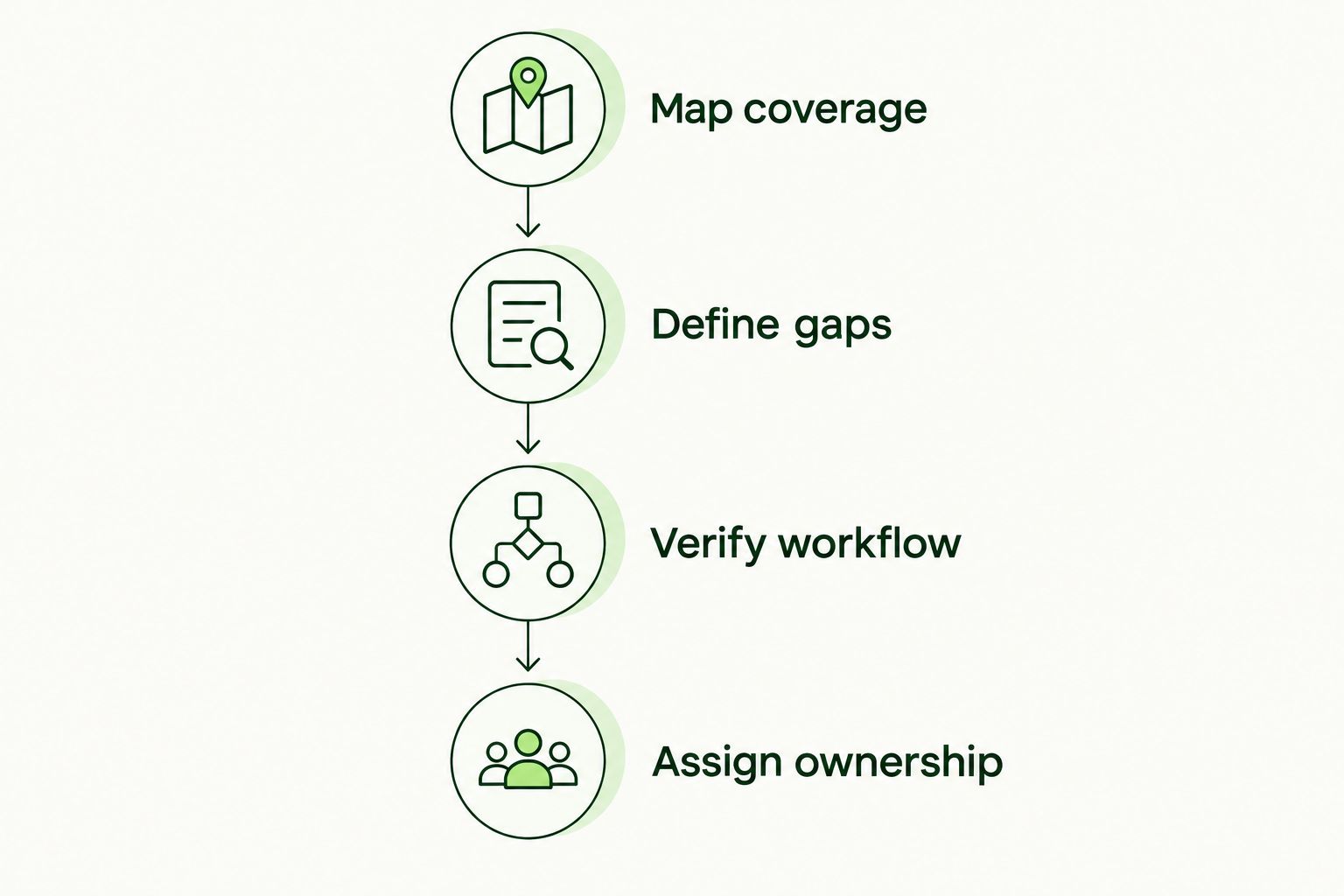
Define the missing function before selecting another platform.
Why anti-phishing requirements vary between clients
Use these factors to scope your 2026 anti-phishing service. They describe requirements to check, not reasons to assume every client needs a different product.
- Existing coverage: Check what the client already uses and what your MSP manages. Avoid purchasing overlapping capabilities without a defined benefit.
- Workforce coverage: Establish which employees require training and who maintains enrollment when people join, leave, or change roles.
- Client administration: Determine how your team separates organizations, handles subclient work, and avoids mixing records or responsibilities.
- Evidence requirements: Ask what the client needs to demonstrate and to whom. Match the records to the actual request rather than promising blanket compliance.
- Service branding: Decide whether employee-facing training must carry your MSP's identity. White-label delivery is an operating requirement, not a technical prevention control.
- Response ownership: Confirm whether your agreement includes investigation and containment or requires escalation to another party.
These factors also belong in the service agreement. A requirement that exists only in a sales conversation becomes a delivery problem later.
What evidence should your clients receive?
Keep 2 evidence types separate: training records and incident records. They answer different questions and should not be presented as equivalent proof of protection.
Training records show participation in the awareness program. Define the relevant training period, the covered workforce, and how you will identify incomplete participation. Verify that your chosen platform supports the records your agreement requires.
Incident records document reported activity and the response to it. Record the investigation and disposition under your incident-handling process, with access appropriate to the information involved.
For a 2026 compliance or insurance request, read the actual question before selecting evidence. A request about training participation does not establish that a completion report also satisfies a question about technical controls.
Do not promise certification, policy eligibility, or claim acceptance based on training alone. State what the records demonstrate and leave conclusions about external requirements to the responsible decision-maker.
Can employee training replace technical phishing protection?
Employee training cannot replace technical phishing protection. Training teaches people to recognize, verify, and report requests; technical controls screen activity and support investigation.
Keep both responsibilities in the service scope. Removing one because the other exists leaves a different function uncovered, not the same function delivered another way.
Should you replace your existing tools or add another platform?
Replace or add software only after documenting a coverage or operating gap. Keep an existing tool when it satisfies the requirement and your team can operate it within the agreed service.
If a proposed platform combines functions, compare the complete workflow before retiring anything. Confirm that the replacement preserves each required responsibility and evidence record—not just the most visible feature.
FAQ
Do MSPs need separate anti-phishing software for every client?
MSPs do not need a separate anti-phishing product for every client by default. They need defined coverage for email protection, employee training, and incident response, with additional software justified by a documented gap.
What's the best way to evaluate anti-phishing for MSPs?
Evaluate anti-phishing for MSPs by mapping existing coverage, defining gaps, verifying workflows, and assigning ownership. Compare software against those requirements rather than starting with a feature list.
Is security awareness training the same as email filtering?
Security awareness training is not the same as email filtering. Training teaches employee behavior; filtering screens messages, and neither replaces a defined incident-response process.
Does completing phishing training prove a client is compliant?
Completing phishing training does not by itself prove that a client satisfies a compliance requirement. Match training records and other evidence to the specific requirement being assessed.
What should employees do after clicking a suspicious link?
Employees should report the event promptly through the organization's defined incident-reporting route. The response team should assess what happened and follow its documented containment process.
Is Defend Wise suitable for MSP security awareness training?
Defend Wise fits MSPs seeking white-label security awareness training with unlimited seats. Evaluate the reporting and operating requirements of your client service separately; training does not replace email protection or incident response.
Should an MSP add software if its current platform already has phishing features?
An MSP should add software only when existing capabilities fail a defined requirement. First confirm that the current features are configured, managed, and usable within the client service.
One last thing
Before buying another tool, ask a client employee to explain how they would report a suspicious request. Then ask a technician to explain who receives it and what happens next. Compare those answers with the service you sold.
That exercise does not measure the strength of every control. It exposes whether the handoff is understood. Fix an unclear reporting route before adding another dashboard.