How to connect SuperOps to auto-sync client rosters into training
To connect SuperOps to sync client rosters, training needs verified support. Map clients, test enrollment, and prevent unsafe roster changes before rollout.
DefendWise
DefendWise
Instead of manually copying SuperOps client rosters into training, build a supported workflow that matches each person to the correct client, applies approved changes, and flags exceptions. Start with connection verification—not live enrollment—because a roster-sync plan is not proof of a native SuperOps integration.
TL;DR
- To connect SuperOps to sync client rosters, training needs verified connection support and explicit client mapping.
- Defend Wise security awareness training fits MSPs seeking flat-fee, white-label delivery.
- Pilot roster additions before automating updates or offboarding.
- Keep failed reads separate from confirmed employee departures.
Why this matters
A roster connection controls who receives training and which client owns the record. Getting authentication right is only the start. An incorrect client mapping sends a valid employee to the wrong organization; an unsafe removal rule treats a failed source read as an offboarding instruction.
Defend Wise security awareness training is best for MSPs that want flat-fee, white-label delivery. That commercial model removes seat-count friction, but it does not replace identity checks or client approval. Review Defend Wise for the platform offering; verify the connection method separately before authorizing roster changes.
For your 2026 rollout, define success as a reconciled client roster, not a successful connection message. This guide gives you the configuration sequence and acceptance checks without assuming undocumented buttons, endpoints, or connector capabilities.
Before you start
- Access and ownership: Arrange authorized SuperOps access, training-platform administration, and a named client contact who approves roster membership. Identify who owns connection credentials and failed-sync alerts.
- A verified connection path: Confirm current vendor documentation supports the source records, destination actions, authentication method, and client boundaries you need. Verify Defend Wise support for that exact route before configuring it; a third-party listing alone is not sufficient.
- The non-obvious gotcha: A client contact list is not automatically an employee training roster. Establish eligibility rules for shared mailboxes, external contacts, inactive people, and employees serving multiple organizations before importing anything.
Stop at this gate if the documented connection cannot read the required people or safely target the destination client. Do not substitute a similarly named integration or assume that reporting access includes permission to create learners.
Source access and roster scope
The first configuration unit establishes which records the workflow is allowed to read. Keep the initial scope small enough to inspect every proposed change.
Establish the supported connection
- Check the current SuperOps documentation for the available access method and record types. Record the documented authentication requirements in your implementation notes.
- Check the training destination’s documentation for supported roster operations. Confirm whether the route supports additions, updates, and inactive-status handling separately.
- Select the documented connection method that supports both ends. If no supported automatic route exists, keep the process manual rather than presenting an import as auto-sync.
- Authorize only the access the documented workflow requires. Keep credentials in your approved secret-management system, not in shared roster files or service tickets.
Expected result: You have an authorized route with a written list of supported operations. Nothing has been enrolled merely to prove the connection works.
Define the eligible population
- Choose 1 pilot client as a recommended starting scope. Obtain approval for the source roster before connecting additional clients.
- Define what makes a person eligible for training. Use approved business rules rather than assuming that every contact qualifies.
- Identify the source attributes needed for identity, client membership, delivery address, and eligibility. Use the documented field names in your actual configuration.
- Review a source sample with the client contact. Resolve ambiguous identities before letting the workflow write records.
Expected result: Your pilot produces a reviewable list of eligible people and documented exclusions. A successful source read does not yet authorize training invitations.
Client mapping and identity rules
A multi-client workflow needs two separate decisions: which organization receives the record, and which person the record represents. Make both decisions explicit.
Build the mapping rules
- Map each approved source client identifier to its intended destination organization. Do not rely on display names alone; names are editable and are not a safe substitute for verified identifiers.
- Choose a documented, stable person identifier where the connection supports one. Treat the email address as a delivery attribute rather than assuming it never changes.
- Define what happens when the source lacks a required identifier or address. Route that record to review instead of creating a partial learner.
- Document the cross-client rule. A record without an approved client mapping must stop before any destination write.
- Record the mapping owner and approval date in your 2026 implementation record. Recheck the mapping whenever a client organization changes.
Expected result: Every proposed learner resolves to an approved client and a recognizable person. Unmatched records produce exceptions, not guessed destinations.
Define change behavior
Separate identity changes from eligibility changes. An updated surname is not a new employee, and an employee’s absence from an incomplete source response is not proof that employment ended.
Use these labels in your implementation worksheet—not as assumed product interface labels:
- Source roster: The approved population read from SuperOps.
- Client mapping: The relationship between source and destination organizations.
- Identity match: The rule linking a source person to an existing learner.
- Approved changes: The additions or updates permitted by your policy.
- Reconciliation: The check that confirms the destination matches the approved population.
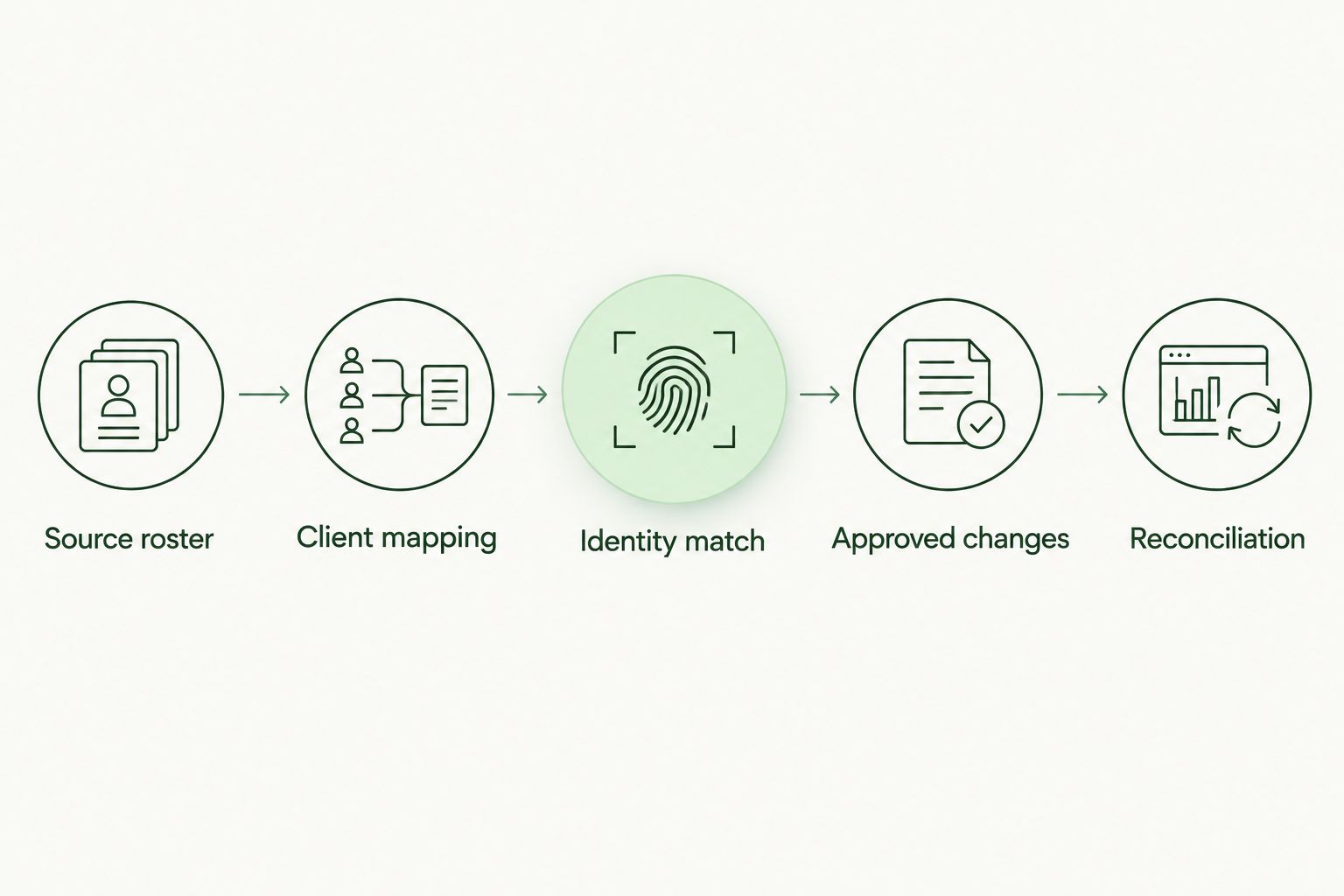
Approve the client and identity match before writing a learner record.
Expected result: Your change policy distinguishes a new learner, an existing learner update, and an unresolved record. The workflow does not make those decisions from a name match alone.
Pilot validation and production controls
A connection test checks access. A roster pilot checks behavior. You need both before expanding the workflow.
Test the proposed changes
- Prepare 5 test records as a recommended acceptance set: an eligible new learner, an existing learner, an excluded contact, a changed email address, and a person associated with another client. Use authorized test identities rather than sending invitations to uninvolved employees.
- Compare the source records with the proposed destination changes. If the supported route has no preview function, use an isolated test scope and keep live enrollment disabled until reviewed.
- Confirm that the existing learner matches the intended record. Check that a changed email address does not silently create a duplicate identity.
- Verify that the excluded contact stays out and that the other-client record cannot enter the pilot organization.
- Repeat an unchanged input. The acceptance criterion is no additional learner creation and no unnecessary repeat action.
Expected result: Each test record has an explainable outcome. Do not expand a pilot that creates duplicates, crosses client boundaries, or loses exclusions.
Release the approved workflow
- Obtain client approval for the pilot roster and the permitted change types. Store the approval with the implementation record.
- Enable only the actions that passed testing and are supported by the documented route. Keep removal actions separate from initial additions.
- Choose a supported execution schedule or documented change trigger. Set an internal roster-freshness expectation that the connection can actually meet.
- Assign 1 daily reconciliation during the initial rollout as a recommended operating check. Compare eligible source people, destination learners, and unresolved exceptions.
- Send failures to a named service owner. Preserve the source-read status, affected client, attempted action, and outcome in your operational record.
Expected result: The production workflow has an owner, an approved scope, and a way to detect drift. In 2026, an unattended sync still needs an attended exception queue.
Sync roster updates after initial enrollment
Initial enrollment and ongoing lifecycle management are adjacent workflows, not interchangeable ones. Start with additions; introduce updates and offboarding only after verifying their behavior.
| Workflow | Best for | Benefit | Limitation | Release condition |
|---|---|---|---|---|
| Additions-only sync | MSPs validating initial enrollment | Limits the first rollout to approved new learners | Does not resolve departures or existing-record changes | Correct client mapping and duplicate prevention pass |
| Lifecycle sync | MSPs with approved identity and offboarding rules | Keeps supported learner attributes and eligibility aligned | Incorrect status interpretation can affect active learners | Updates and inactive-status actions pass separate tests |
Apply approved lifecycle changes
- Establish which source system owns employment status. If SuperOps receives that information from elsewhere, document the dependency rather than treating contact visibility as an employment decision.
- Define the supported response to a confirmed departure. Check the destination’s documented handling of learner access and historical training records before enabling the action.
- Treat an unreadable, empty, or partial source response as a sync failure until validated. Do not automatically translate it into mass offboarding.
- Test reinstatement separately. Confirm how the supported route handles a returning person and whether the intended identity remains linked.
- Reconcile after each approved lifecycle test. Keep a record of the decision and its destination outcome.
Expected result: Confirmed lifecycle changes receive the approved action, while ambiguous source conditions stop for review. Your 2026 offboarding procedure protects both current enrollment and historical evidence.
Troubleshooting
The source connects, but eligible people are missing
Check record scope, access permissions, eligibility rules, and whether the source response is complete. Compare a missing person with a known included person and identify the exact rule or read boundary responsible. Do not broaden access across every client just to make the count increase.
A learner appears twice
Pause additions for the affected scope. Compare the stored source identifier, destination identifier, and email-change handling before correcting the duplicate through the destination’s documented process. Re-run the unchanged-input test before restarting writes.
A person appears under the wrong client
Stop writes for the affected mapping immediately. Verify the source client identifier against the destination organization, correct the mapping, and review every action made through that relationship. Do not fix only the visible learner while leaving the underlying rule unchanged.
A failed read produces an empty roster
Keep the last approved state while investigating authentication, authorization, filtering, and response completeness. Resume lifecycle actions only after a successful, validated read. An empty result is a condition to investigate, not an offboarding instruction.
Roster records update, but training does not start
Separate roster synchronization from training assignment. Check whether the documented connection performs enrollment, whether an approved assignment rule exists, and whether invitations are intentionally held. A learner record alone is not evidence of assigned or completed training.
Customize your workflow
Expand scope after the roster is reliable, not before. Add clients individually, approve each mapping, and keep separate exception ownership where clients have different eligibility rules.
For Defend Wise security awareness training, keep the workflow focused on the stated service: flat-fee, white-label training for MSPs. Verify each desired automation independently; the service description does not establish a particular connector or lifecycle action.
Use the MSP integration comparison guide to structure the next evaluation. Ask what each connection reads, what it writes, how it separates clients, and what happens when a run fails.
For your 2026 operating procedure, distinguish roster freshness from completion evidence. The roster tells you who belongs in training; assignment and completion records tell you what happened afterward.
FAQ
How do I connect SuperOps to sync client rosters into training?
Verify a documented connection method, approve client and identity mappings, then pilot supported roster actions before enabling production writes. Do not assume a native connector exists or that roster creation also assigns training.
Does Defend Wise have a native SuperOps connector?
Treat native SuperOps support as unverified until current vendor documentation confirms it. Verify the exact supported records and actions before authorizing access or planning automatic enrollment.
Should every SuperOps contact receive security awareness training?
No. Apply client-approved eligibility rules before enrollment, including decisions about external contacts, shared addresses, and inactive people.
Can roster synchronization automatically remove departed employees?
Enable automatic offboarding only when the documented route supports the required action and an approved source confirms departure. A missing record or failed read is not sufficient evidence.
How often should I check a new roster sync?
Use one daily reconciliation during the initial rollout as a recommended operating check. Adjust the ongoing review schedule to your approved roster-freshness requirement and the connection's supported behavior.
Will changing an employee's email address create a duplicate learner?
Your acceptance test must confirm that an email change updates the intended identity instead of creating another learner. Use a supported stable identifier where available and review unmatched changes.
Does a synchronized roster prove that employees completed training?
No. Roster synchronization establishes membership; assignment and completion records establish training activity. Keep those evidence checks separate.
One last thing
Test failure handling before adding another client. An integration that stops safely is more useful than one that applies uncertain changes quickly. With client approval, test a controlled source-access failure and confirm that it creates an exception without offboarding learners.
Keep that result beside the successful enrollment test. Together, they show whether your workflow can operate safely—not merely connect.