How long to onboard a new MSP client into training?
How long to onboard MSP client security awareness training? Use readiness checks, not a fixed day count, to approve users, test access, and launch.
DefendWise
DefendWise
Onboarding a new MSP client into security awareness training takes as long as it takes to approve the user roster, configure delivery, verify access, and launch the agreed assignments. For your 2026 rollout, separate technical setup from client approval and learner participation: a configured account is not a completed onboarding.
TL;DR
- How long to onboard MSP client security awareness training? Measure readiness milestones rather than promising an unsupported day count.
- Separate account setup, launch readiness, and learner completion when setting client expectations.
- Defend Wise offers MSPs white-label security awareness training with flat-fee billing and unlimited seats.
- Approve the roster, test learner access, and verify reporting before declaring the client launched.
Why this matters
Your client needs a launch commitment with a clear definition of done. Your service team needs to know which tasks it owns, which decisions belong to the client, and what stops the launch.
That distinction matters when you package Defend Wise security awareness training into a managed service. Flat-fee, unlimited-seat billing removes per-seat charges from the commercial model; it does not replace roster approval, client communication, or delivery checks.
Commit to a launch milestone, not an undefined onboarding duration. If the client means every employee has finished training while your team means the account is configured, both sides will report different completion dates.
How long to onboard a new MSP client into training?
Estimate onboarding from the work required to reach launch readiness, including any client approvals that block the next step. Do not treat the time spent configuring the platform as the full onboarding timeline.
Use these 3 milestones to define the scope of your 2026 onboarding plan. Each milestone answers a different question, so report them separately rather than merging them into a single status.
| Milestone | What it means | Evidence to record | What it does not prove |
|---|---|---|---|
| Account setup | The client environment and initial settings are prepared | Configuration checklist and named administrator | Employees can receive or access training |
| Launch readiness | The roster, delivery, access, assignments, and client communication have been checked | Approved roster and documented delivery test | Employees have completed their assignments |
| Learner completion | Assigned employees have finished the required activities | Completion records for the assigned population | The client's entire compliance obligation is satisfied |
An account can be technically ready while the client is still reviewing the employee list. A campaign can be launched while employees are still working through their assignments. Neither situation is a contradiction; the milestones describe different outcomes.
When you quote an onboarding date, name the milestone it covers. Use language such as: launch readiness depends on an approved roster, confirmed delivery, and client sign-off. That gives the client a useful commitment without suggesting that employee completion happens automatically.
Build the estimate from dependencies
Start with tasks that can begin immediately, then identify work that depends on another person or system. Configuration and drafting the launch message can proceed together; sending assignments must wait until the intended recipients are confirmed.
For each task, record an owner, a prerequisite, and the evidence needed to close it. Ask each owner to confirm the expected completion date rather than substituting a generic industry estimate.
Your launch forecast follows the chain of blocking tasks. Adding unrelated tasks together overstates the timeline, while ignoring approval dependencies understates it.
Account setup: define the client boundary
Account setup should establish who the training service covers and who can administer it. Begin with the client organization, the responsible contacts, and the intended employee population—not the first training email.
Assign 1 client owner to approve business decisions. Other stakeholders can contribute, but a named approver prevents unresolved questions from circulating between HR, IT, and management.
Record these decisions before you move to delivery:
- Client boundary: Which organization and employee population belong in this rollout?
- Administrative access: Who needs permission to manage the service or inspect records?
- Roster authority: Which source determines whether a person should receive training?
- Assignment scope: What activities should the initial rollout include?
- Escalation contact: Who resolves access problems and overdue client decisions?
If the platform supports separate client environments, confirm that the intended client boundary matches the configuration. Do not assume that creating an environment automatically establishes appropriate administrator permissions.
For your 2026 onboarding record, retain the approved decisions alongside the configuration checklist. A later administrator should be able to understand the setup without reconstructing it from email threads.
Launch readiness: prove delivery before rollout
Launch readiness means the intended employees can receive and access the intended training. Treat that as a verification exercise, not a visual inspection of the administrator dashboard.
Use this sequence to keep the handoff clear:
- Approve roster. Ask the client owner to confirm who belongs in the rollout, including exclusions that need an explicit decision.
- Check settings. Review the sender identity, assignment settings, permissions, and branding available in the selected platform.
- Test delivery. Send 1 test assignment to an approved test recipient before releasing the broader assignment.
- Verify access. Confirm that the recipient can follow the invitation and reach the intended learning activity.
- Approve launch. Give the client owner the launch message, assignment scope, and escalation route for sign-off.
Record the outcome of the test, not just the fact that someone initiated it. An administrator seeing a sent status does not establish that the recipient found the message or successfully accessed training.
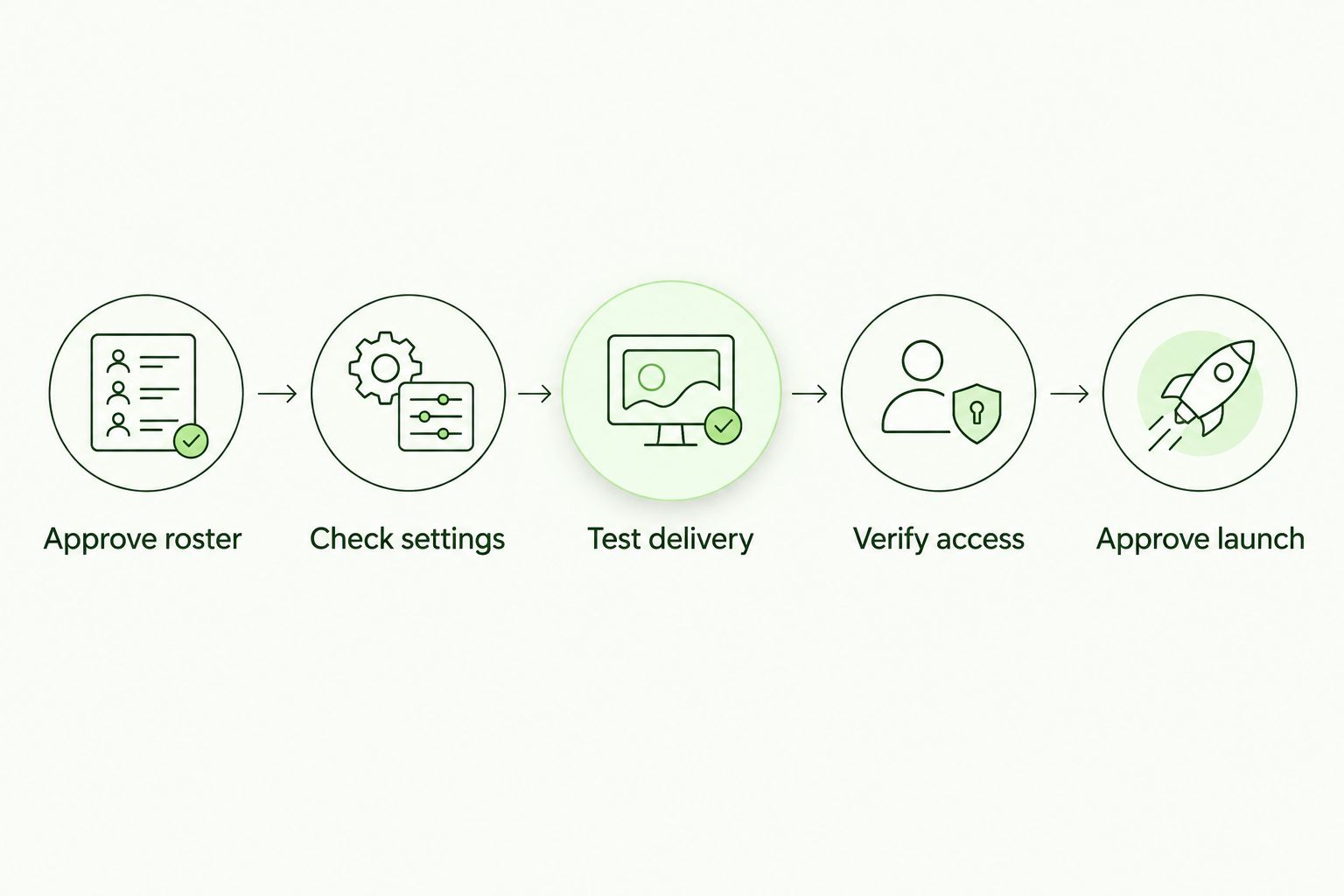
Approve the rollout only after delivery and learner access have been checked.
Keep tests within the agreed scope. If simulated phishing is part of the service, confirm its authorization and communication requirements separately rather than treating a training invitation test as approval for every campaign type.
A successful administrator login is not a successful learner launch. The acceptance test should follow the path the employee will actually use.
Learner completion: manage it after launch
Learner completion belongs on the service calendar, but it should not silently extend the technical onboarding commitment. Employees need an assigned activity and a communicated deadline before completion status has a useful meaning.
Agree on the follow-up process before launch. Identify who receives exception reports, who contacts employees with access problems, and who decides what happens when an assignment remains incomplete.
Keep access failures separate from overdue learning. An employee who cannot open the assignment needs technical help; an employee who can access it but has not finished needs the agreed participation follow-up.
For your first 2026 reporting cycle, make the report understandable without a live explanation. Include the client, assignment, reporting period, intended population, and relevant status definitions. Use the reporting capabilities available in the chosen platform, and document any context that must be supplied separately.
A completion record is evidence of the recorded learning activity. It is not, by itself, proof that every employee understands every threat or that the organization meets every requirement in a compliance framework.
Why MSP training onboarding time varies
The main timing drivers are unresolved inputs, approval dependencies, and the checks required for the agreed rollout. Use the following factors to explain the estimate to the client, rather than blaming a vague setup process.
- Roster quality. Unclear ownership, duplicate entries, and disputed exclusions require decisions before you can approve recipients. Establish the authoritative employee list first.
- Access requirements. The selected login method needs to work for the intended learners. Confirm any required identity-system coordination before assigning a launch date.
- Email delivery checks. Invitation delivery needs a recipient-side test. Any necessary mail-system changes need an owner and approval before rollout.
- Client sign-off. Branding, sender identity, assignment scope, and employee messaging need a clear approval path. A finished configuration cannot resolve an unanswered business decision.
- Training scope. A basic assignment and a rollout with differentiated employee groups require different configuration decisions. Define the initial scope instead of adding requirements during launch.
- Evidence requirements. Client reporting expectations determine what you must verify before handoff. Agree on the required records before promising that the service is ready for an assessment.
Do not convert these factors into automatic delays. Check which ones apply to the client, then document only the dependencies that affect that rollout.
How do you shorten onboarding without skipping checks?
Standardize the decisions and tests; do not skip them. A reusable intake form should capture the client owner, roster authority, assignment scope, delivery contacts, and reporting audience before configuration begins.
Keep your default process separate from client exceptions. Reusing a launch-message template is sensible; copying another client's recipient list, permissions, or reporting destinations is not.
Use a short handoff checklist with explicit acceptance criteria. Each task should end with something another person can inspect: an approved roster, a successful access test, or a signed-off launch message.
For 2026 service packaging, distinguish platform economics from service effort. Defend Wise offers flat-fee, unlimited-seat security awareness training, which removes per-seat billing from the platform model. Your team still needs to account for intake, exceptions, approvals, and ongoing client administration.
Defend Wise security awareness training is best for MSPs seeking white-label delivery without per-seat billing. That fit does not establish a universal onboarding speed; validate the required workflow before committing to the client's launch date.
When should an MSP call training onboarding complete?
Call launch onboarding complete when the agreed population is approved, delivery and access checks pass, assignments are ready or released as agreed, and the client knows who owns follow-up. Record learner completion as a separate milestone unless the contract explicitly includes it in onboarding.
Close the handoff with a client-facing status note. State what has launched, what remains outstanding, and who owns the next action; avoid a blanket completed label when exceptions remain open.
A useful handoff also explains where evidence will come from. The client should know which records the service supplies and which business decisions or approvals remain the client's responsibility.
FAQ
How long does it take to onboard an MSP client into security awareness training?
Estimate onboarding from the tasks and approvals needed to reach launch readiness, not from account creation alone. Confirm the roster, delivery, learner access, assignment scope, and client sign-off before committing to the launch date.
Can I launch training as soon as I create the client account?
Account creation alone does not establish launch readiness. Approve the recipients and verify that a learner can receive and access the intended assignment before the broader rollout.
What should I ask the client for before onboarding starts?
Request an approved roster source, a named client owner, the intended training scope, and the contacts responsible for access and email delivery. Agree on the reporting audience and required evidence before launch.
Does unlimited-seat pricing make onboarding automatic?
Unlimited-seat pricing changes the billing model, not the launch acceptance criteria. Defend Wise offers flat-fee, unlimited-seat training, but roster approval, learner access, and client communication still need explicit ownership.
Should employee training completion be part of the onboarding deadline?
Track employee completion separately from launch readiness unless your agreement explicitly combines them. State which milestone the deadline covers so an unfinished assignment is not confused with an unfinished technical setup.
What should I do when a training invitation does not arrive?
Pause the affected rollout and check the recipient details, sending configuration, and recipient-side mail handling. Repeat the delivery and access test after the responsible administrator resolves the issue.
Does a completion report prove that the client is compliant?
A completion report documents the learning activity recorded for the assigned population; it does not establish every compliance requirement. Match the evidence to the client's applicable requirements and assessment scope.
One last thing
The onboarding clock needs a start condition as well as a finish condition. If your service commitment starts when the agreement is signed but roster approval arrives later, your timeline includes a dependency your technical team does not control.
Write both conditions into the handoff: what the client must supply before launch work can proceed, and what evidence proves your work is complete. That is a more useful promise than a fast-sounding duration with no agreed definition.