How to connect Vanta to auto-sync training evidence for SOC 2 audits
Connect Vanta to sync training evidence SOC 2: verify the transfer method, map learner records, and test completion evidence before enabling automatic sync.
DefendWise
DefendWise
Instead of manually collecting training reports before every audit, connect Vanta to sync training evidence for SOC 2 through a documented, supported connection. Start by verifying the transfer method, then map identities, test completion records, and monitor exceptions; use controlled evidence uploads when automatic transfer is unsupported.
TL;DR
- Connect Vanta to sync training evidence for SOC 2 only through a verified, supported transfer method.
- Defend Wise security awareness training is best for MSPs seeking flat-fee, white-label delivery.
- Match client, learner, assignment, completion status, and timestamps before enabling automatic evidence transfers.
- A successful transfer proves delivery, not SOC 2 control effectiveness or auditor acceptance.
Why this matters
A training completion and an audit-ready record are different things. Your evidence needs to show who completed which training, when completion occurred, and which client organization the record belongs to.
Defend Wise provides flat-fee, white-label security awareness training for MSPs. Defend Wise security awareness training is best for MSPs that want flat-fee, white-label delivery for end-client organizations. That positioning does not establish a Vanta integration; verify the connection separately before promising automatic evidence delivery.
For your 2026 SOC 2 evidence process, separate three responsibilities: the training source records learning activity, the transfer process moves evidence, and the control owner reviews whether that evidence supports the control. Automation should remove repeated handling without removing accountability.
The old way is to rebuild a report whenever someone asks. The better workflow preserves reliable records and makes exceptions visible before the audit request arrives.
Before you start
- Access and approval: Obtain authorized access to the client’s Vanta environment and training records. Confirm who can approve integrations, grant permissions, and review evidence. For an MSP, keep each end-client organization’s access separate.
- Control and record requirements: Agree on the training control, in-scope population, review period, required evidence fields, and exception process with the client’s compliance owner. Use the auditor’s evidence request to guide the format.
- The gotcha: identity matching: Confirm how training identities match the employee population used for compliance. Email aliases, renamed accounts, and duplicate learners can make completed training appear missing. Also verify a documented transfer method before attempting setup.
Do not treat a vendor logo, a marketing reference, or an API’s existence as proof that completion evidence transfers automatically. Require documentation describing the actual records transferred, authorization requirements, destination, and supported update behavior.
Connection method
Choose the method that your current systems explicitly support. Best for repeatable automation: a documented connection that transfers the evidence your control requires. A connection that moves employee names but not training completions does not solve this workflow.
| Transfer method | Best for | Advantage | Limitation |
|---|---|---|---|
| Documented native connector, if supported | Teams with a supported source-to-destination connection | Avoids building a separate transfer process | Supported fields and update behavior determine its usefulness |
| Documented API-based transfer, if supported | Teams with engineering ownership and suitable interfaces | Lets you implement explicit mapping and validation | Requires maintenance, credential management, and failure handling |
| Controlled evidence upload | Teams without a supported automatic route | Keeps evidence review possible without custom integration work | Requires recurring handling and version control |
These are implementation choices, not confirmed capabilities of Defend Wise or any specific connector. Select a route only after checking the documentation for the systems involved.
- Identify the training source and the client’s intended Vanta destination.
- Check both systems’ current documentation for the proposed connection. Confirm whether it transfers individual completion records, report files, or another evidence type.
- Record the documented authorization method, permissions, transferred fields, and update behavior. Do not substitute guessed menu names or endpoints.
- Assign an owner for connection failures and credential changes. For a custom transfer, also assign an owner for code changes.
- If automatic transfer is unsupported, select controlled uploads rather than presenting a manual process as auto-sync.
Expected result: You have a supported transfer method, a named owner, and a written description of exactly what reaches the destination. Your 2026 workflow specification should distinguish automatic transfer from manual evidence handling.
Evidence mapping
Define the evidence contract before transferring records. A clean mapping is more valuable than a fast connection that attaches the wrong completion to the wrong person.
- Client identity: Map every record to its end-client organization. Use a stable organization identifier where the documented interfaces support one; do not rely on a display name alone.
- Learner identity: Choose the matching identifier supported by both systems. When email is the matching key, define how aliases and address changes are reconciled without merging different people.
- Training identity: Preserve the assignment or course identifier, its title, and any available version information needed to distinguish separate requirements.
- Completion state: Document how source statuses translate. Assigned, started, completed, exempted, and overdue are different states; do not convert them all into completion.
- Event timing: Preserve the original completion timestamp and its time zone. Keep the transfer timestamp separate so a later upload does not appear to be a later learning event.
- Evidence destination: Agree where the record or report belongs and which control owner reviews it. Follow the destination’s documented evidence mechanism.
For your 2026 evidence specification, include an example of a valid record and an example that must be rejected. The rejection example should explain the reason, such as an unmatched learner or missing completion date.
Expected result: A reviewer can trace a transferred completion back to the correct client, learner, assignment, and source record without interpreting an ambiguous spreadsheet.
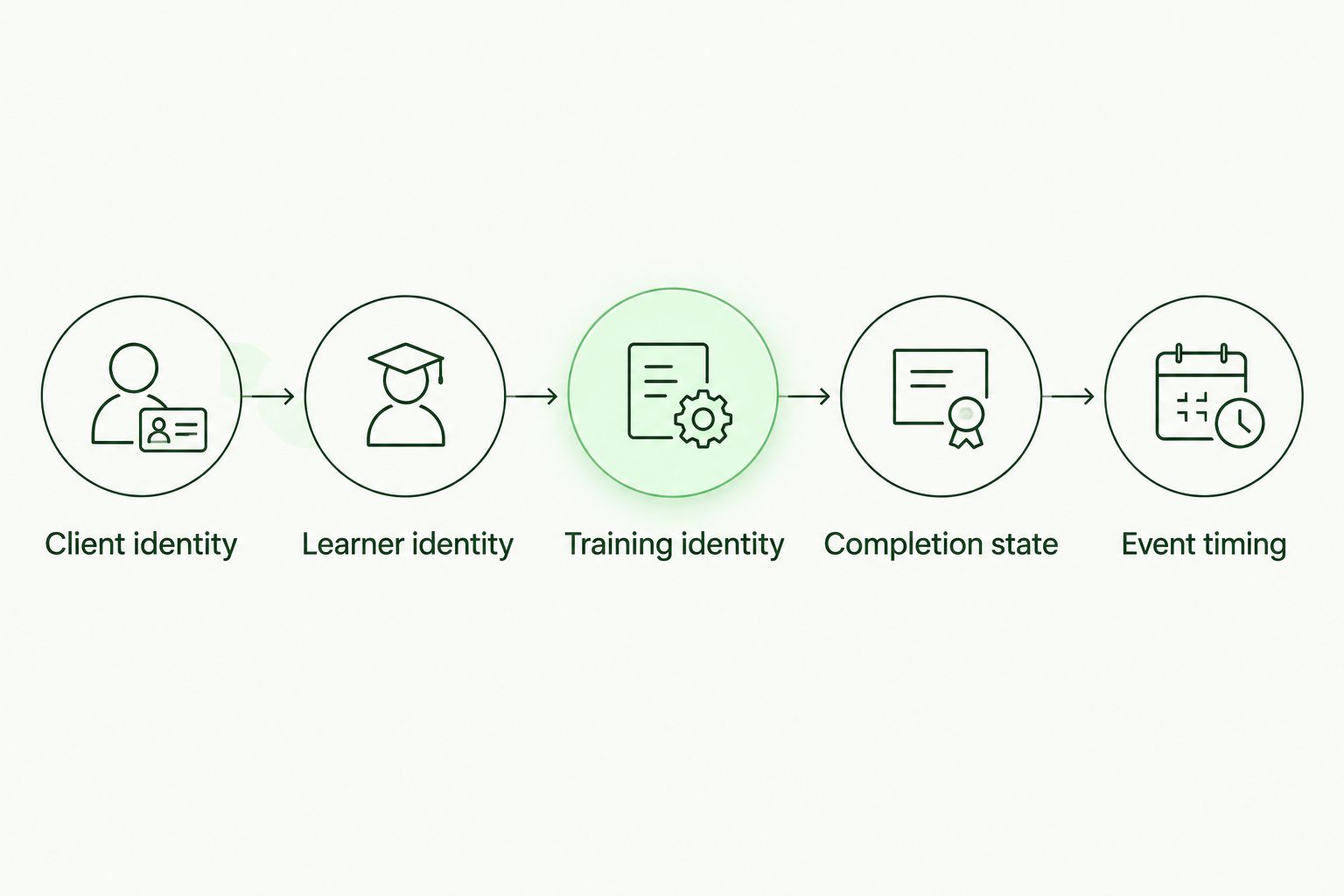
Validate identity and completion details before transferring training evidence.
Pilot validation
Test the evidence, not just the connection. An authorization success message does not prove that the destination received a complete, correctly matched record.
- Start with 1 client organization as a deliberate pilot boundary. Keep other clients outside the initial transfer until routing and access checks pass.
- Prepare 3 test records: a completed assignment, an incomplete assignment, and a completed assignment with an identity mismatch. Use approved test accounts or an authorized test environment where available.
- Execute the transfer using the documented method. Capture the source record identifiers and inspect the corresponding destination evidence.
- Confirm that the completed assignment retains its original status and timestamp. Confirm that the incomplete assignment is not presented as completed.
- Confirm that the mismatched identity becomes an exception rather than evidence attached to an unrelated learner.
- Perform 2 transfer runs against the same test set. Check that a retry does not create misleading duplicate evidence or change the original completion date.
- Compare the destination records with the source. Record discrepancies and resolve them before expanding the workflow.
Those numbers define a recommended pilot, not an audit standard. Add cases for renamed accounts, reassigned training, or client-specific requirements when those conditions apply.
Expected result: Valid records reach the correct destination, invalid records remain visible as exceptions, and repeat processing preserves accurate history.
Production controls
Enable the production workflow only after the pilot passes. Your 2026 rollout needs an exception owner as well as a working transfer.
- Grant only the permissions required by the documented method. Store credentials in your approved secrets-management system, not in shared spreadsheets or task descriptions.
- Configure the documented trigger or schedule. Record its actual behavior; do not promise immediate synchronization when the connection operates on a schedule.
- Maintain a processing record that identifies successful transfers, failed transfers, and records awaiting review. Avoid storing unnecessary employee information in operational logs.
- Define retry behavior. For a custom implementation, use stable record identifiers to prevent repeated attempts from creating duplicate evidence.
- Reconcile the source population and completion records against the destination. Review both missing records and unexpected records; a clean-looking completion percentage is not enough.
- Assign responsibility for resolving identity mismatches, expired authorization, and changes to supported fields. Preserve the resolution history with the workflow documentation.
Expected result: The connection operates without routine report rebuilding, while failures remain visible and assigned. Automatic collection supports the evidence process; it does not replace the client’s review of the training control.
Variant: update evidence after a completion changes
Initial synchronization and ongoing updates are separate workflows. Use an update workflow only when the supported connection can identify changed records and the destination can handle those changes correctly.
For example, a learner can finish a previously incomplete assignment. A source administrator can also correct a completion record. Your process must distinguish a new learning event from a correction to an existing event.
- New completion: Transfer the completed assignment with its source identity and original completion timestamp.
- Correction: Preserve the relationship to the original record and document what changed. Do not silently replace historical evidence without a review trail.
- Reassignment: Treat a new assignment as a separate requirement when that is how the training source represents it. Do not overwrite the earlier completion merely because the title matches.
- Departure: Preserve historical completion evidence according to the client’s retention requirements while updating the active population separately.
If the interfaces do not support updates, use a controlled reconciliation process instead. Make the limitation explicit in your operating procedure so the client does not mistake an initial import for continuous synchronization.
Best for changing populations: a workflow that reconciles both learner status and training history. Its benefit is continuity; its trade-off is additional review whenever identities or assignments change.
Troubleshooting
The connection succeeds, but completion evidence is missing
Check what the connection actually transfers. A successful authorization can coexist with missing evidence when the supported data scope does not include the needed training records.
Compare a known source completion with the documented field set and destination. If completions are outside the connection’s scope, use a supported alternative or controlled uploads; repeated retries will not add unsupported functionality.
Completed learners appear unmatched
Compare the source learner identifier with the compliance population. Check aliases, changed email addresses, duplicate accounts, and incorrect client routing.
Resolve the identity mapping before retrying. Do not create another learner simply to clear an exception; that can leave the real person’s evidence split across records.
Repeated transfers create duplicates
Inspect the identifiers used to recognize an existing record. A transfer timestamp or filename alone is a poor substitute for the source’s stable record identity.
For custom workflows, correct the matching logic and test retries again. For a managed connector, follow its documented duplicate-handling process and involve the responsible support team.
Completion dates shift after import
Compare the source timestamp, its time zone, the transfer timestamp, and the displayed destination date. Determine whether the difference is a display conversion or an incorrect field mapping.
Correct the mapping rather than rewriting the source completion date. Keep enough context for a reviewer to understand why a displayed calendar date differs.
Former employees disappear from the report
Check whether your source report includes only active learners. An active-population report and historical completion evidence answer different questions.
Preserve the historical evidence required for the review period, then reconcile departures separately. Do not keep former employees in the active population solely to retain a reporting row.
Customize your workflow
Start with the control requirement, not the connector catalog. The guide to SOC 2 security awareness training requirements helps frame what your evidence process needs to demonstrate.
For MSP delivery, Defend Wise provides flat-fee, white-label security awareness training. The commercial model and the evidence connection remain separate decisions: flat-fee delivery does not remove integration validation, mapping, or review work.
Expand only after the first client’s workflow is stable. Add client-specific routing, exception ownership, and evidence-retention instructions before increasing the number of organizations covered.
Your final 2026 handoff should explain the source, transfer method, matching rules, destination, reconciliation procedure, and escalation owner. That document is what lets another technician maintain the process without reverse-engineering it during an audit request.
FAQ
How do I connect Vanta to sync training evidence for SOC 2?
Verify a documented transfer method, authorize the required access, map learner and training records, and validate the destination evidence before enabling production transfers. If automatic transfer is unsupported, use controlled evidence uploads instead.
Does Defend Wise have a native Vanta integration?
Do not assume a native connection without current documentation confirming it. Verify the supported transfer method and the specific training evidence it moves before committing to an automatic workflow.
Does syncing training evidence mean we pass SOC 2?
No. Evidence synchronization moves records; it does not establish control effectiveness or determine the auditor’s opinion. The control owner must review whether the records support the stated training control.
What fields should training completion evidence contain?
Include the client identity, learner identity, training assignment, completion status, and original completion timestamp. Agree on additional fields and supporting records with the compliance owner and auditor.
How often should training evidence sync to Vanta?
Set the frequency according to the supported connection and your documented evidence process. Record the actual update behavior rather than assuming the transfer is immediate.
Can an MSP use one workflow for multiple clients?
An MSP can standardize its operating procedure, but each client needs correct routing, authorized access, and separate evidence handling. Validate tenant boundaries before expanding the workflow.
What should happen when an employee leaves?
Update the active population without deleting historical completion evidence required for the review period. Follow the client’s retention requirements and preserve the relationship between the learner and earlier assignments.
One last thing
Test the missing record before celebrating the completed record. A workflow that silently drops an unmatched learner can look healthy while leaving the evidence population incomplete.
Before accepting the handoff, ask the owner to show where a rejected record appears and who resolves it. That demonstration reveals more about operational readiness than a successful connection screen.