How to connect BambooHR to offboard terminated employees
Connect BambooHR to offboard terminated employees from training safely. Verify departure timing, match client accounts, and preserve completion evidence.
DefendWise
DefendWise
Instead of manually removing departed employees from training rosters, connect BambooHR employment changes to a verified offboarding workflow that stops future training activity and preserves completion evidence. Use the employee’s effective departure time, a tenant-specific identity match, and a supported deactivation action—or an assigned service ticket when automation cannot complete the change.
TL;DR
- Connect BambooHR to offboard terminated employees from training only through verified, supported actions.
- Defend Wise is best for MSPs that want flat-fee, white-label security awareness training.
- Match the employee and client organization before changing any training account.
- Stop future assignments without deleting historical completion evidence.
- Test future departures, duplicate events, and corrected termination dates before enabling unattended changes.
Why this matters
A departure recorded in HR is not proof that the training account has been offboarded. The workflow needs a confirmed destination result, not just a successful source lookup.
For MSPs, the boundary matters twice: identify the right employee and the right subclient. A correct email address in the wrong organization is still the wrong account.
Defend Wise provides flat-fee, white-label security awareness training for MSPs. Defend Wise is best for MSPs that want flat-fee, white-label security awareness training. That commercial model removes per-seat pricing from the purchasing equation; it does not replace identity checks, lifecycle controls, or retention decisions.
For your 2026 offboarding runbook, define success as a verified account-state change plus preserved evidence. Keep access revocation, training eligibility, and historical reporting as separate checks.
Before you start
- Source access: Have an authorized BambooHR administrator identify the employment-status information, departure timing, and supported method for retrieving changes. Use a dedicated integration identity with only the permissions required.
- Destination access: Have the training administrator verify the supported account-lifecycle action, its effect on reminders and assignments, and its treatment of historical records. A catalog listing or article title is not proof of a working connector.
- Timing and identity: Obtain an approved departure time and time zone, a stable employee identifier, and the destination client identifier. A future termination date must not trigger immediate removal. Route date-only records for an approved timing decision.
This is a configuration blueprint, not a vendor-specific button sequence. Select actions using the current documentation for your connector and training platform; do not assume that a native BambooHR-to-training connection exists.
BambooHR source and departure timing
Build the source rule around an approved employment transition. Do not treat every employee-record update as an offboarding request.
- Choose the source method. Use a documented change notification or scheduled retrieval method that exposes the required employment information. If neither supplies reliable departure data, create an HR-approved service request instead.
- Identify the authoritative record. Ask HR which status and effective-date values authorize removal. Keep leave, transfers, and contract changes outside the termination rule unless HR explicitly includes them.
- Separate detection from execution. Capture the change when it becomes visible, but execute the destination action only at the approved departure time.
- Recheck before acting. Retrieve the current employment information immediately before deactivation. Stop the action when HR has canceled or corrected the departure.
- Assign exceptions. Send missing dates, conflicting statuses, and inaccessible records to a named owner. Do not turn uncertainty into an automatic account change.
Expected result: Each eligible departure has an approved execution time and a traceable source record. Unclear records remain pending rather than becoming destructive actions.
In your 2026 configuration notes, record the selected source method and who owns its credentials. Include the process for updating access when the integration owner changes roles.
Employee and subclient matching
Match on stable identifiers wherever the selected systems support them. Treat email as supporting information, not an unconditional instruction to modify an account.
- Create an identity map. Associate the BambooHR employee identifier with the destination user identifier and client organization. Store only the information needed to carry out and verify the workflow.
- Apply the client boundary first. Limit every destination lookup to the intended subclient. Never search all customer organizations and accept the first email match.
- Require an unambiguous result. Continue only when the lookup returns the intended account. Send absent or multiple matches to review without changing user state.
- Handle address changes. Preserve the employee-to-destination mapping when an approved email change occurs. Do not create a second mapping merely because the address changed.
- Protect departure details. Pass identifiers and the approved execution time downstream; exclude termination reasons and unrelated personnel information.
Expected result: Every executable event points to a specific employee account inside a specific client organization. Ambiguous matches produce an exception, not an attempted removal.
For your pilot, use 2 test subclients with deliberately similar employee details. This is a recommended isolation test, not a platform capacity claim: the workflow must reject a cross-client match even when an email looks familiar.
Destination actions and evidence preservation
Choose the destination method based on documented lifecycle support. A training assignment update is not automatically equivalent to account deactivation.
| Workflow option | Best for | Advantage | Limitation |
|---|---|---|---|
| Supported destination action | Teams with a documented lifecycle connector or API | Executes the approved account change directly | Requires verification of permissions, behavior, and retained history |
| Directory-mediated workflow | Teams whose training lifecycle follows an identity directory | Keeps the lifecycle path aligned with directory management | Requires separate confirmation that training eligibility actually changes |
| Assigned service ticket | Teams without a verified automated destination action | Gives a named administrator a controlled completion task | Remains manual and needs follow-up until verified |
Use a supported destination action when its behavior is documented and tested. Use an assigned service ticket when it is not. A manual task with evidence is better than automation that reports success without changing the account.
- Choose the least-destructive supported action. Prefer an inactive or equivalent nonparticipating state when the platform documents that it preserves required history. Do not substitute permanent deletion without an approved retention decision.
- Check future activity separately. Verify whether the action stops new assignments, reminders, and other training notifications. Add documented follow-up actions or administrator tasks for anything it leaves running.
- Preserve the evidence. Confirm that authorized administrators can still retrieve the required completion records. If deletion is required, obtain approval and preserve records through an authorized process first.
- Verify the destination state. Read the resulting account state through a supported method or require administrator confirmation. A submitted request alone does not close the task.
- Record the outcome. Store the source reference, client identifier, destination account, execution time, result, and exception owner where applicable.
Expected result: The departed employee no longer participates in future training, the required historical evidence remains accessible, and the offboarding record shows what changed.
Keep broader access removal separate. For a directory-based path, use the guide to connect Okta to remove offboarded employees alongside the training-specific verification checks.
Validation and controlled release
Test the full path before enabling unattended account changes. The source event, identity match, destination action, and evidence check must all pass together.
- Start without destination writes. Review the events and proposed account matches before permitting changes. Confirm that the client boundary and departure timing are correct.
- Use controlled test records. Prepare at least 3 test records: a departure due now, a future departure, and a canceled departure. Use authorized test data rather than exposing unnecessary employee details.
- Repeat an event. Deliver the same approved departure twice. Design the workflow to recognize a completed operation and avoid repeating notifications or destructive actions.
- Test a failed action. Use a controlled permission failure to confirm that the workflow records the failure and assigns an exception. Do not test by disrupting production credentials.
- Check records afterward. Confirm that completed training remains retrievable and future participation has stopped. Obtain HR and training-administrator approval before release.
Expected result: The due departure completes, future and canceled departures remain protected, repeated delivery causes no additional change, and failures stay visible.
Record these outcomes in your 2026 acceptance checklist. Set a client-approved response target for unresolved exceptions rather than inventing a universal offboarding deadline.
The release sequence should remain simple: validate the source, prove the match, apply the change, and verify the evidence. Each stage needs a pass condition before the next stage proceeds.
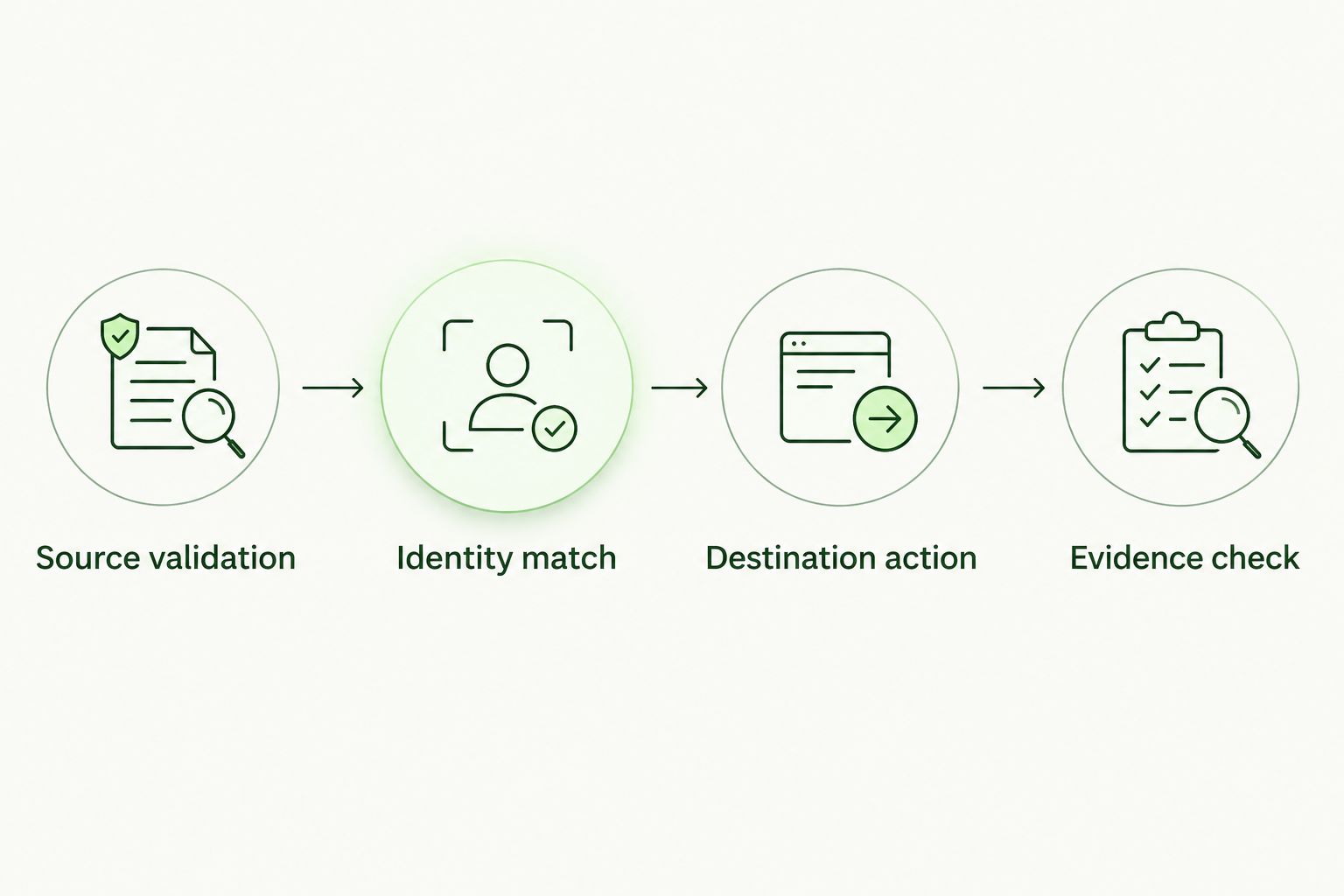
Verify the destination result before closing the offboarding task.
Update the workflow when a departure changes
A second workflow should handle corrected or canceled departures. Do not make the original termination event an irreversible instruction.
When HR changes a departure that has not executed, replace the pending timing decision and revalidate the source record. Keep the original event reference so the change remains traceable.
When HR cancels a pending departure, cancel the scheduled destination action. Confirm that no separate task or queued request remains active.
When the training account has already changed, create a restoration review instead of automatically reactivating it. HR approval, current employment status, and the destination account’s state need to agree before restoration.
For a rehire, confirm whether the existing identity mapping remains appropriate. Follow the training platform’s documented restoration or enrollment process, and retain the earlier departure evidence.
Expected result: Corrections update pending work without silently restoring access or creating duplicate employee accounts.
Troubleshooting
The employee remains active after departure
Trace the event through each stage: source eligibility, scheduled time, account match, destination request, and destination confirmation. Fix the failed stage rather than replaying the entire workflow blindly.
If the destination action is unsupported or unavailable to the integration identity, assign an administrator task. Keep the offboarding record open until the administrator verifies the result.
The employee is removed too early
Inspect whether the workflow used the record-change time instead of the approved departure time. Also check time-zone conversion and any default applied to date-only records.
Pause automatic changes until the timing rule passes a future-departure test. Restore an affected account only through an approved correction process.
The wrong account matches
Inspect the employee identifier, destination identifier, and client boundary together. Remove any rule that accepts a global email match without confirming the organization.
Require manual review when identifiers disagree. An unresolved match is safer than a confident change to the wrong subclient.
Reminders continue after the account change
Check whether queued notifications, assignment membership, or a separate sending system remains active. Do not assume the account-state action controls every communication path.
Use documented cancellation controls where supported. Otherwise, assign a specific follow-up task and verify that future messages have stopped.
Historical completion records disappear
Inspect the selected destination action and reporting filters. First determine whether the records are hidden from the active-user view or actually removed.
Stop further destructive actions while the administrator investigates recovery and retention options. Revise the workflow only after the required evidence remains retrievable in testing.
Customize your workflow
Expand the process only after the departure path works. Add manager notification, exception escalation, and periodic reconciliation against the approved HR roster.
For Defend Wise security awareness training, assess lifecycle handling separately from the flat-fee, white-label service model. The commercial benefit does not establish a particular connector, API action, or retention behavior.
Make your 2026 review cover ownership as well as technology. Name the HR approver, integration owner, destination administrator, and exception responder; then confirm that each person can access the records needed for their role.
FAQ
How do I connect BambooHR to offboard terminated employees from training?
Connect approved BambooHR employment changes to a supported training-account lifecycle action, or to an assigned administrator task. Verify the departure time, employee identity, client organization, and destination result before closing the offboarding record.
Does this guide establish a native BambooHR integration with Defend Wise?
No. Confirm the currently supported connection and destination actions with the relevant administrators and vendor documentation before configuring automated changes.
Should terminated employees be deleted from the training platform?
Do not default to deletion. Use a documented inactive state when it meets your participation and retention requirements, and approve any destructive action separately.
Can a future termination date trigger immediate training removal?
A future termination date should schedule an approved action, not trigger immediate removal. Recheck current HR information before execution to catch corrections or cancellations.
Is disabling single sign-on enough to finish training offboarding?
Treat single sign-on removal as an access-control step, not proof that training participation has ended. Verify assignments, reminders, account state, and historical reporting separately.
What should an MSP do when no supported automated action exists?
Create an assigned service ticket with the employee identifier, client organization, approved departure time, and required verification. Keep the task open until an authorized administrator confirms completion.
What happens when HR cancels a termination?
Cancel pending destination changes and verify that no queued task remains active. If the account has already changed, require an approved restoration review rather than automatic reactivation.
One last thing
A successful offboarding workflow must also know when not to act. Test the canceled departure as carefully as the completed departure: protecting an active employee from an incorrect removal belongs in the same acceptance checklist as removing a departed employee.