How to connect N-able N-central to trigger training for new endpoints
Connect N-able N-central to trigger security training safely: verify employee identity, prevent duplicate assignments, and confirm supported enrollment methods.
DefendWise
DefendWise
Instead of manually checking new endpoints for training needs, connect N-able N-central to trigger security training through a workflow that verifies the client and employee before requesting enrollment. Use endpoint discovery as the starting signal—not as proof that a new person needs training—and confirm the supported connection methods before enabling automatic assignments.
TL;DR
- Connect N-able N-central to trigger security training only after matching an endpoint to an active employee and client.
- N-able N-central device discovery is a starting signal, not an employee roster.
- Defend Wise fits MSPs seeking flat-fee, white-label security awareness training; verify integration support separately.
- Start with approval-based enrollment, then automate only supported actions with duplicate protection.
Why this matters
A new workstation does not necessarily mean a new employee. Replacement laptops, shared devices, and reassigned machines all break a workflow that treats every new endpoint as a new learner.
Train the person. Use the device as a signal. Your workflow needs to answer three questions before it requests an assignment: which client owns the endpoint, which active employee uses it, and whether that employee already has the required training.
Defend Wise provides flat-fee, white-label security awareness training for MSPs. That commercial model addresses seat-count friction; it does not establish that a native N-able N-central connector or automated enrollment action exists.
For your 2026 rollout, treat this as an implementation blueprint, not a verified click-by-click connector walkthrough. Confirm the available interfaces and enrollment actions in your actual accounts before building around them. The configuration names below describe records you create in your workflow, not vendor interface labels.
Before you start
- Access and documentation: Obtain authorized N-able N-central access, documentation for your deployed version, and a supported way to retrieve device inventory or discovery changes. Confirm authentication requirements and account scope before selecting an automation tool.
- Identity and enrollment access: Prepare an authoritative employee roster, a client-to-training-organization mapping, and a confirmed enrollment method. For Defend Wise security awareness training, verify the supported provisioning process directly before designing an automated write action.
- The gotcha: A device record is not a learner record. Decide how to handle shared computers, servers, replacement endpoints, missing owners, and inactive employees before any assignment leaves the workflow.
Assign an owner to the integration credentials and an owner to enrollment exceptions. Those responsibilities are different: restoring a connection does not resolve an ambiguous employee match.
Do not use a workstation's current login alone as enrollment approval. Confirm the person against the client's employee source and training policy.
Endpoint intake configuration
Establish the discovery source
- Inspect the supported inventory access methods for your N-able N-central installation. Select a documented method that exposes the device and its customer context; do not assume a particular webhook or connector exists.
- If a suitable discovery event is documented, use that event as the intake signal. Otherwise, compare supported inventory snapshots to identify records not previously processed.
- Restrict the pilot to one client organization. Include only the endpoint categories covered by that client's training onboarding policy.
- Save a baseline before enabling enrollment requests. Treat existing inventory as existing inventory, not as a batch of newly hired employees.
- Record the source customer identifier, source device identifier, observation timestamp, and processing status in your integration's intake record. These are your workflow fields, not claimed N-central API field names.
Expected result: Each candidate endpoint produces an intake record with enough context to identify its source client. No learner receives training at this stage.
Keep discovery separate from assignment
For the 2026 pilot, use a proposed 24-hour reconciliation interval if daily onboarding checks satisfy your service commitment. That interval is a starting configuration recommendation, not a N-central refresh rate or vendor service promise.
Store the last successful reconciliation boundary. After an interrupted run, resume from a recoverable point and rely on duplicate checks rather than assuming every returned record is new.
An intake record should remain traceable after processing. If a client asks why someone received training, you need the originating device observation and the subsequent identity decision—not just a successful automation status.
Client and employee mapping
Build the identity gate
- Create a mapping between the source customer identifier and the destination training organization. Require an exact, approved mapping; never fall back to a default client when a match fails.
- Resolve the endpoint's assigned person using your approved asset and employee records. Prefer a maintained ownership record over a hostname or inferred naming convention.
- Verify that the person is active and belongs to the mapped client. Confirm the destination learner identifier through the supported training provisioning process.
- Check whether the employee already has the required onboarding assignment or a recognized completion under your client's policy.
- Send unresolved records to an exception queue. Include a reason such as missing owner, inactive employee, shared device, or unmapped client.
Expected result: Every enrollment candidate contains a verified client, an active employee, and a documented reason for assignment. Uncertain records stop before enrollment.
A work email address can help match records, but it is not a universal identity key. Employees change addresses, contractors use different domains, and the same person can have more than one account. Keep the authoritative employee identifier alongside the address wherever your supported systems permit it.
Define the exclusions
Write exclusion rules in plain language before implementing them. Exclude devices without an individual training recipient, and route disputed ownership to review rather than inventing an owner.
Your approved flow should have these named stages: Endpoint intake, Client mapping, Employee match, Enrollment gate, and Evidence log. Each stage has a separate job; a successful intake does not bypass the enrollment gate.
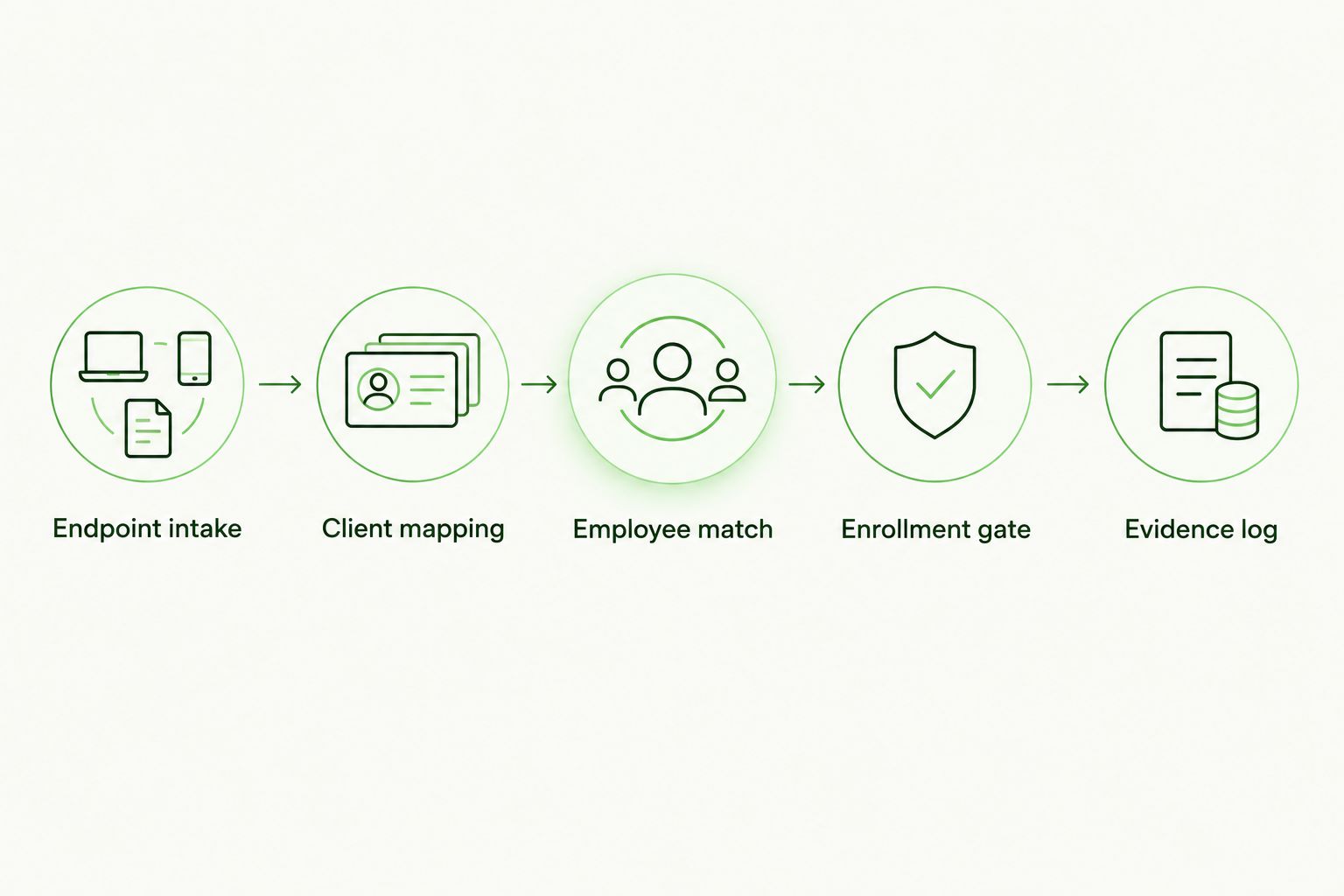
Resolve client and employee identity before requesting a training assignment.
Enrollment action configuration
Choose the supported execution path
Use the least automated path that you can verify end to end. The choice is between approval-based execution and a supported automated action—not between an assumed connector and a guessed API request.
| Execution path | Best for | Advantage | Trade-off |
|---|---|---|---|
| Approval-based enrollment | Initial pilots and unresolved provisioning support | A technician checks the client, learner, and assignment before execution | Each request still needs human action |
| Supported automated enrollment | Validated mappings and documented enrollment interfaces | Removes the routine approval step for qualified records | Requires confirmed write support, duplicate controls, and recovery handling |
- Confirm the destination's supported method for creating or locating learners and assigning training. Inspect required identifiers, permissions, error responses, and any documented limits.
- Start with an approval request containing the source client, matched employee, training requirement, and existing-assignment check. Keep credentials and unnecessary personal data out of the request.
- Have the technician perform enrollment using the supported provisioning process. Record the resulting learner and assignment references where available.
- Replace the approval action with an automated action only after the interface, permissions, and recovery behavior are verified.
- Mark the workflow successful only after confirming the intended assignment exists in the intended organization. A submitted request is not the same as a confirmed assignment.
Expected result: A qualifying endpoint observation leads to a verified learner assignment, either through approval or through a documented automated interface.
Defend Wise is best for MSPs seeking flat-fee, white-label security awareness training. That fit does not remove the implementation dependency: confirm the enrollment interface before promising an automatic N-central-to-training connection.
Prevent repeat assignments
Build the assignment identity around the client, employee, and training requirement. Do not build it solely around the endpoint; the same employee can receive a replacement device without needing another onboarding assignment.
Keep a record of requested, confirmed, failed, and review-required outcomes in your integration. Before retrying an uncertain request, check the destination for the intended assignment. Otherwise, a response timeout becomes a duplicate-enrollment problem.
Validation and evidence configuration
Test the decisions, not just the connection
- Run a dry pass that produces proposed actions without enrolling anyone. Inspect the mappings and exclusion decisions.
- Test 3 cases: a new employee with a new endpoint, an existing employee with a replacement endpoint, and a shared endpoint without an individual owner.
- Replay 1 previously processed intake record. Confirm that it does not create another assignment for the same training requirement.
- Test an unmapped client and an interrupted enrollment request. Confirm that neither produces an unverified success status.
- Check the destination organization and learner record manually before expanding beyond the pilot client.
Expected result: The new employee reaches the enrollment path, the replacement device does not duplicate training, and ambiguous or failed records remain visible for review.
For the 2026 acceptance record, document the configuration version, test outcomes, approving technician, and unresolved limitations. These are implementation records, not proof that an employee completed training.
Keep completion evidence separate from assignment evidence. A device discovery timestamp proves when the workflow observed an endpoint; it does not prove attendance, understanding, or completion.
Trigger training when endpoint ownership changes
A second useful workflow starts when an existing endpoint is reassigned to another employee. It reuses the same identity gate but compares ownership rather than first discovery.
Use a supported change source if available. Otherwise, compare approved ownership snapshots and send changed records through client mapping, active-employee verification, and the existing-assignment check.
Best for: MSPs that regularly reassign equipment. The advantage is coverage for employees who receive existing hardware; the trade-off is dependence on accurate ownership records.
Do not reset a previous employee's completion history because a device changes hands. Treat the new owner as a separate identity decision, and keep offboarding separate from endpoint reassignment.
In your 2026 operating procedure, distinguish ownership changes from transient logins. A technician signing in to repair a laptop should not become its training recipient.
Troubleshooting
The connection works, but no candidates appear
Check the selected customer scope, endpoint exclusions, baseline, and reconciliation boundary. Confirm that a genuinely new test record appears in the source data returned through your supported access method.
If the source record exists but the intake does not, inspect the retrieval and comparison stage before changing enrollment rules.
A replacement laptop creates another assignment
Inspect the duplicate key. Replace device-only matching with a client, employee, and training-requirement check, then inspect existing assignments before retrying.
Preserve the replacement endpoint as supporting context. It should not become a second learner identity.
The employee lands in the wrong client
Pause automated enrollment immediately. Inspect the source-to-destination organization mapping and remove any default organization fallback.
Correct the affected destination records through the platform's supported process. Resume only after testing the repaired mapping against both affected client organizations.
Enrollment fails after the request is sent
Check the destination before resubmitting. Confirm whether the learner or assignment was created despite the failed response, then retry only the missing action.
Use the interface's documented authentication and retry guidance. Do not solve a permission failure by granting broad administrative access without review.
Shared endpoints produce unresolved owners
Keep those records in the exception queue and enroll staff from the authoritative roster instead. Shared hardware cannot supply a reliable one-device-to-one-person mapping.
Customize your workflow
Expand the workflow only after the pilot handles duplicate records, ownership changes, and failed requests correctly. Add clients through explicit mappings, not through a rule that automatically accepts every newly discovered customer.
For your 2026 service plan, measure unresolved mappings, confirmed assignments, and failed actions separately. A low exception count means little if the workflow silently excludes employees who have no newly discovered device.
Use the guide to security awareness training ranked by MSP integrations to frame your next evaluation around supported actions rather than connector names alone.
Defend Wise security awareness training addresses the flat-fee, white-label service model. Your workflow still needs to own identity quality, exception handling, and confirmation of any supported enrollment action.
FAQ
How do I connect N-able N-central to trigger security training?
Use a supported N-central inventory or change source, match each qualifying endpoint to a client and active employee, then request enrollment through a verified provisioning method. Start with technician approval until the complete workflow is validated.
Does Defend Wise have a native N-able N-central integration?
This guide does not establish a native N-able N-central integration for Defend Wise. Verify current connector availability and supported enrollment actions directly before promising automated provisioning.
Can every new endpoint automatically enroll an employee?
No. Replacement devices, shared computers, and endpoints without verified owners must pass identity and existing-assignment checks before enrollment.
What should I do if automated enrollment is not supported?
Create an approval request containing the verified client, employee, and training requirement. A technician can then complete enrollment through the supported process and record the result.
How do I prevent duplicate security training assignments?
Check assignments using the client, employee, and training requirement rather than the device alone. Before retrying a failed response, confirm whether the intended assignment already exists.
Should removing an endpoint also remove the employee from training?
No. Endpoint removal does not establish employee termination. Use the authoritative employee lifecycle process to decide whether training access should change.
Does an enrollment log prove that security training was completed?
No. An enrollment log records an assignment action, not completion. Obtain completion evidence from the training system through its supported reporting process.
One last thing
An employee can need training without ever receiving a new endpoint. Contractors, shared-device staff, and employees using existing hardware all expose the limit of device-driven onboarding. Reconcile the employee roster against training coverage as a separate control; use N-central discovery to supplement that control, not replace it.