Vishing attacks: an MSP guide to voice phishing, verification, and client reporting
Vishing attacks use voice calls and AI audio to pressure users. MSPs need verification, reporting, and evidence workflows.
DefendWise
DefendWise
TL;DR
Vishing attacks are voice-based social engineering attacks. The caller may pretend to be a bank, executive, vendor, employee, client, helpdesk user, government office, or family member. New AI voice tools make the old trick more convincing, but the defence is still practical: do not trust the voice, the urgency, or the caller ID.
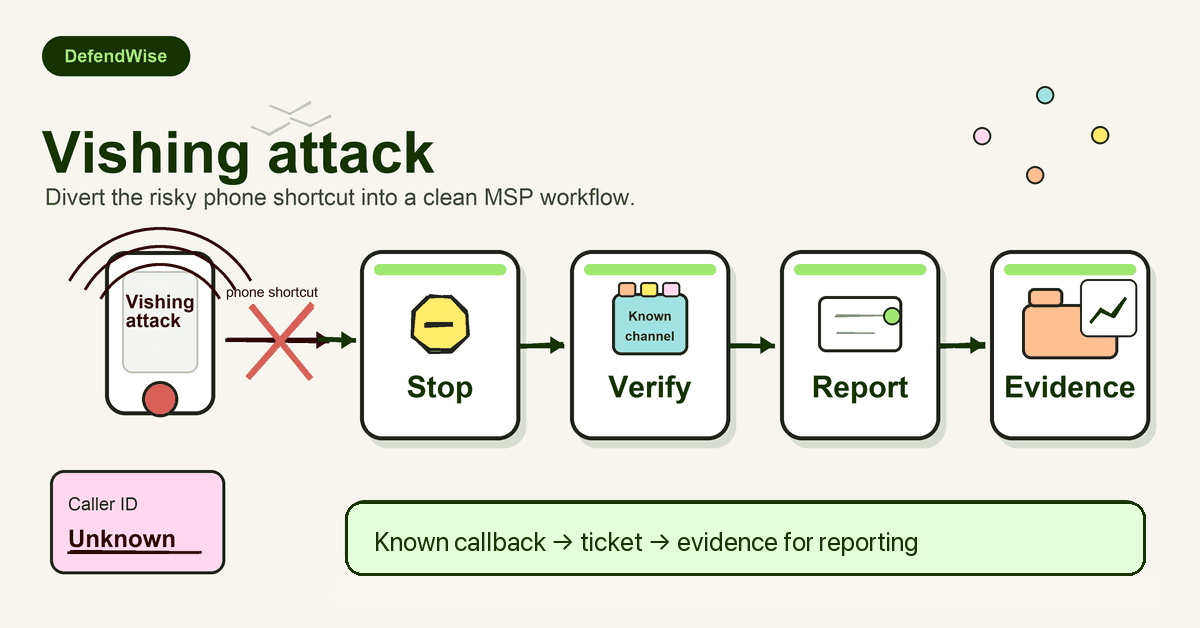
For MSPs, vishing training should not stop at “be careful on the phone.” Clients need a simple workflow for risky voice requests: stop the action, verify through a known channel, report the attempt, check related accounts, and keep evidence. That turns vishing from a one-off awareness topic into an MSP-owned operating process.
What are vishing attacks?
Vishing attacks are phishing attacks carried out through voice communication. CISA defines vishing as a social engineering technique that uses voice communication, often with VoIP and caller ID spoofing, to trick people into revealing sensitive information: https://www.cisa.gov/news-events/news/avoiding-social-engineering-and-phishing-attacks.
The “voice” part can take a few forms:
- a live phone call,
- a voicemail,
- a voice memo,
- a robocall,
- a call that follows a text message,
- an AI-generated voice message that sounds like a real person.
The target may be asked to share a password, approve a payment, move a conversation to another app, reset MFA, reveal a one-time code, update payroll details, or provide customer information.
The FBI's 2025 alert on senior official impersonation describes vishing as malicious targeting through voice memos, including AI-generated voices. The FBI also warns that these campaigns may try to move victims to a secondary messaging platform, deliver malicious links, or steal account credentials: https://www.fbi.gov/investigate/cyber/alerts/2025/senior-us-officials-impersonated-in-malicious-messaging-campaign.
That matters for MSPs because voice requests often land outside the systems MSPs watch most closely. A client may have email filtering, MFA, endpoint controls, and a ticketing process, but a persuasive call can still pressure a receptionist, finance user, owner, or technician into making a risky decision.
Why vishing matters for MSP clients
Most client security programs still over-index on email. That is understandable. Email phishing remains common, and it is easy to train with screenshots and reporting buttons.
Vishing is harder to contain because it happens in the moment. The user is speaking to someone. The caller sounds confident. They can answer questions. They can apply pressure. They can react to hesitation.
FTC data shows why voice and impersonation fraud deserve attention. In 2024, US consumers reported more than $12.5 billion in fraud losses, with imposter scams causing $2.95 billion in reported losses. The FTC also said phone calls were the second most commonly reported contact method after email: https://www.ftc.gov/news-events/news/press-releases/2025/03/new-ftc-data-show-big-jump-reported-losses-fraud-125-billion-2024.
That is consumer fraud data, not a direct MSP-client loss estimate. Treat it as a signal, not as proof that every MSP client has the same exposure. The useful point is simpler: impersonation plus phone pressure is a known, expensive pattern.
Verizon's 2026 DBIR public summary also points to the shift toward mobile social engineering, including fake texts and voice calls, and says mobile-based attacks have a higher success rate than traditional email phishing: https://www.verizon.com/about/news/breach-industry-wide-dbir-finds. Again, MSPs should not turn that into a scare line. Use it to broaden training beyond the inbox.
How vishing attacks usually work
Most vishing attacks follow a business pattern, not a technical one.
| Vishing pattern | What the caller wants | Common pressure tactic | Safe client response |
|---|---|---|---|
| Bank or payment impersonation | Transfer, card details, login code, account confirmation | “Your account is at risk right now.” | Hang up and call the known bank number from the card, portal, or statement. |
| Executive impersonation | Wire transfer, gift cards, payroll change, sensitive file | “I am in a meeting. Handle this quickly.” | Verify through an approved internal channel before acting. |
| Vendor or supplier call | New bank details, invoice change, urgent payment | “The old account is closed. Pay this one today.” | Use the vendor contact already in the accounting system. |
| Helpdesk impersonation | Password reset, MFA reset, device enrolment, temporary access | “I lost my phone and need access for a client call.” | Follow identity-verification steps and record the ticket trail. |
| Government or law enforcement impersonation | Payment, personal data, secrecy, fear response | “You must not tell anyone, or you will be in trouble.” | End the call and use official public contact details to verify. |
| Client or employee emergency | Money transfer, payroll exception, sensitive details | “I am stuck, injured, locked out, or travelling.” | Contact the person through a known channel or another trusted contact. |
| Text-to-call scam | Call a fake support number or move to another platform | “Your account is locked. Call this number now.” | Do not use the number in the message. Go to the known site or app. |
The surface changes. The workflow stays the same.
The caller creates urgency, borrows trust, and asks the user to leave the normal path. The safe move is to put the request back into the normal path.
Why AI voice cloning changes the training message
Old phone scams often relied on generic scripts. Newer attacks can sound more personal.
The FTC warns that scammers can use AI-enabled voice cloning to make requests for money or information more believable. Its advice is blunt: if a call sounds like a boss or family member, call that person back using a phone number you know is theirs and verify the story: https://consumer.ftc.gov/consumer-alerts/2024/04/fighting-back-against-harmful-voice-cloning.
The FTC has also warned about family emergency schemes where scammers use a short audio clip from online content to clone someone's voice, then pressure the victim to send money quickly: https://consumer.ftc.gov/consumer-alerts/2023/03/scammers-use-ai-enhance-their-family-emergency-schemes.
For MSP client training, the message should be practical:
A familiar voice is not proof.
That does not mean every client needs a deepfake-detection lesson. Most users will not reliably identify synthetic audio by sound. The stronger lesson is procedural:
- do not approve money, payroll, access, or sensitive data changes during an unexpected call,
- call back through a known number,
- use a pre-agreed verification path,
- report the attempt even if no money moved.
AI can make the voice more believable. It does not make a bad process safe.
The vishing red flags MSPs should teach
Do not make the training depend on spotting a fake accent, strange audio, or poor grammar. Those clues can help, but they are not reliable enough.
Teach the decision points.
Urgency without the normal workflow
The caller asks for something risky right now. They say the account will close, payroll will fail, a client will be angry, an executive is waiting, or a deal will collapse.
The right response is not to debate the caller. The user should stop and verify through the approved process.
Authority pressure
The caller claims to be a CEO, owner, government official, bank fraud team, vendor manager, insurer, lawyer, MSP technician, or Microsoft support.
Authority is not verification. If the action changes money, access, payroll, data, or security settings, it needs the same check as any other risky request.
Caller ID confidence
CISA notes that vishing can use VoIP and caller ID spoofing. A familiar number can still be misleading: https://www.cisa.gov/news-events/news/avoiding-social-engineering-and-phishing-attacks.
Train users not to say, “But the number looked right.” The safe test is the callback path, not the caller ID.
Request to move channels
The FBI's 2025 PSA describes malicious actors trying to move targets to a separate messaging platform, sometimes by sending a malicious link: https://www.ic3.gov/PSA/2025/PSA250515.
If a caller asks a user to leave the normal business channel and continue on encrypted chat, personal SMS, a new app, or a one-off link, that is a reportable sign.
Request for MFA, passwords, or one-time codes
A legitimate helpdesk process should not need a user to read out passwords or one-time codes over the phone. If the caller asks for a code, they may be trying to complete a login or account recovery step in real time.
CISA's joint phishing guidance warns that weak MFA methods can still be bypassed, including through fake login pages or attacks that capture 6-digit codes: https://www.cisa.gov/sites/default/files/2025-03/Phishing%20Guidance%20-%20Stopping%20the%20Attack%20Cycle%20at%20Phase%20One%20508.pdf.
Secrecy
“Do not tell anyone.” “Keep this off email.” “Handle it personally.” “The usual approver is unavailable.”
Secrecy isolates the user from the very people who could catch the scam.
Step-by-step: a vishing response workflow for MSP clients
1. Stop the requested action
The user should pause the payment, reset, account change, payroll update, file release, or support action. Do not keep negotiating with the caller.
If the request involves money, access, payroll, client data, legal threats, government claims, or credential checks, the call is no longer just a conversation. It is a security event.
2. Do not use caller-provided contact details
Do not call back the number shown on caller ID. Do not use the number in the voicemail, SMS, or email. Do not click the link the caller sends.
Use a number or channel the business already trusts:
- the employee directory,
- the vendor master record,
- the bank card or portal,
- the client contact record,
- the official agency website,
- the existing ticketing or chat system.
3. Verify the person and the business action
The goal is not only to confirm identity. It is to confirm that the requested action is legitimate.
For example:
- Did the CFO really request the wire?
- Did the vendor really change bank details?
- Did the employee really lose their MFA device?
- Did the bank really flag suspicious activity?
- Did the client really ask for emergency access?
If the business action is unusual, use a stronger approval path.
4. Report the attempt
Users should know exactly where to report suspected vishing. That may be a helpdesk ticket, phishing-report mailbox, Teams channel, hotline, or MSP support portal.
The report should capture:
- time and date,
- calling number shown,
- claimed identity,
- requested action,
- any callback number or link provided,
- whether money, access, data, or credentials were involved,
- whether the user shared anything.
5. Check related systems
The MSP or client IT team should decide whether the call was isolated or part of a wider attempt.
Depending on the request, check:
- account login history,
- MFA changes,
- password resets,
- mailbox rules,
- finance approvals,
- vendor details,
- payroll updates,
- helpdesk tickets,
- other calls or texts to similar staff.
6. Escalate if money, credentials, or access changed
If a user shared a code, approved a reset, changed payment details, or sent money, treat it as an incident.
Use the client's incident response process. If fraud occurred, official reporting paths may include the FBI's IC3 at https://www.ic3.gov/ and the FTC's ReportFraud.gov at https://reportfraud.ftc.gov/.
7. Turn the pattern into training
Do not shame the user. Extract the pattern.
Was the hook urgency, authority, caller ID, AI voice, fake support, payroll pressure, or a helpdesk reset? Update the next client training module, QBR note, or manager reminder around that exact decision point.
How MSP helpdesks should handle vishing risk
Helpdesk vishing deserves its own rulebook. Attackers do not always need to fool finance. Sometimes they only need to fool the person who can reset MFA.
Cisco Duo's helpdesk attack guidance frames the core problem well: remotely verifying a caller's identity quickly is hard. Attackers often use urgency, authority, confusion, and context about a real employee to push a password or MFA reset: https://duo.com/blog/defending-against-help-desk-attacks.
For MSPs, helpdesk identity checks should be written down and trained. A technician should not have to invent a verification process while an angry “executive” is on the line.
A practical MSP helpdesk standard should define:
- which reset requests are high risk,
- which identity checks are allowed,
- when callback is required,
- who can approve exceptions,
- how failed verification is logged,
- how to handle “lost phone” or “travelling executive” pressure,
- what to do if the client pushes the technician to skip the process.
The rule should protect the technician as well as the client. If the MSP wants strong verification, leadership must back the person who slows down a risky request.
What good vishing training looks like
Good vishing training is not a one-slide warning about scam calls. It gives people a short decision habit.
For MSP clients, the habit can be:
- What is the caller asking me to change?
- Would we normally approve that by phone?
- Which known channel should I use to verify it?
- Where do I report it?
- What evidence do we keep?
That is also where security awareness connects to compliance and client reporting. CIS Controls mapping lists workforce training for social engineering attacks, including phone scams and impersonation calls: https://csf.tools/reference/critical-security-controls/version-7-1/csc-17/csc-17-6.
NIST's small-business phishing guidance also warns users to take a second or third look at messages requesting action such as a transfer, login, file download, or sensitive information submission, especially as AI makes phishing more convincing: https://www.nist.gov/itl/smallbusinesscyber/guidance-topic/phishing.
For MSPs, the reporting layer is as important as the module. If a client asks, “What did we do about vishing?” the MSP should be able to show:
- who was trained,
- which roles received extra scenarios,
- what reporting path was communicated,
- what verification policy was reinforced,
- what incidents or reports were followed up,
- what changed after the last real or simulated event.
Mistakes to avoid
Treating vishing as only a user problem
Users need training, but process gaps create the opening. If a client lets anyone approve payments, reset MFA, change payroll, or share sensitive files from an unexpected call, training has to fight the business process.
Fix the process.
Trusting caller ID
Caller ID is not an identity control. It is a clue, and sometimes a misleading one. Train users to verify high-risk requests through known numbers and approved systems.
Over-relying on “voice sounds wrong” clues
AI-generated audio may sound strange, but it may also sound good enough. Users should not need to be synthetic-audio experts. They need a rule: risky request, trusted verification.
Forgetting non-finance roles
Finance is not the only target. Reception, helpdesk, HR, office managers, executives, client service, sales, and administrators all make decisions attackers can abuse.
Leaving reports in someone's inbox
A reported vishing attempt should not disappear into email. MSPs need a ticket, case note, or evidence record that can support follow-up, client reporting, and training updates.
For adjacent client workflows, see our guides to social engineering scams, AI voice scams, credential phishing, what to do if you open a phishing email, and measuring security awareness effectiveness.
How a flat-rate MSP SAT platform helps
Vishing awareness works best when every relevant user is included. That is hard when the MSP has to justify every extra learner as a new per-seat cost.
DefendWise gives MSPs a flat-fee, white-label, multi-tenant way to deliver security awareness training and client-facing reporting across client organisations. For vishing, the fit is operational: train broadly, keep the service under the MSP's brand, and report back without rebuilding evidence by hand for every tenant.
If vishing is now part of your client risk conversation, do not leave it as a one-off warning. Build it into onboarding, role-based refreshers, helpdesk procedures, and QBR reporting. Start a free 7-day trial and see how a flat-rate MSP SAT model fits your service package.
Frequently asked questions
What are vishing attacks?
Vishing attacks are voice-based social engineering attacks. A caller, voicemail, or voice message impersonates a trusted person or organisation to trick the target into sharing sensitive information, transferring money, changing access, or taking another risky action.
How are vishing attacks different from phishing?
Phishing usually refers to email-based attacks. Smishing uses SMS or MMS. Vishing uses voice communication, including phone calls, voicemails, robocalls, voice memos, and AI-generated voice messages. The medium changes, but the goal is often credential theft, fraud, account takeover, or data access.
Can AI make vishing attacks harder to detect?
Yes. The FBI and FTC have warned that criminals can use AI-generated voices and voice cloning to impersonate trusted people. The safer habit is not to decide whether the voice is real. Verify the request through a known, trusted channel.
Should staff trust caller ID during a suspected vishing attack?
No. CISA notes that vishing can use VoIP and caller ID spoofing. Users should not rely on the incoming number as proof. For risky requests, they should hang up and use a known contact method.
What should an employee do during a suspicious phone call?
Pause the requested action, avoid sharing codes or sensitive information, end the call if needed, and verify through a known number or approved business channel. Then report the attempt through the client's security or helpdesk process.
What should MSPs include in vishing training?
MSPs should include caller ID spoofing, AI voice cloning, bank and vendor impersonation, executive pressure, helpdesk reset scams, payroll-change requests, reporting steps, and second-channel verification. The training should teach the workflow, not just a list of scary call examples.
Is security awareness training enough to stop vishing attacks?
No. Training helps users recognise and report risky requests, but it should sit alongside identity controls, helpdesk procedures, payment verification, MFA policy, incident response, and client reporting.
How often should clients refresh vishing awareness?
Refresh it during onboarding, annual security awareness, finance and helpdesk role training, and after relevant incidents or new scam patterns. For high-risk roles, short scenario refreshers are more useful than a long once-a-year module.
Sources
- CISA, Avoiding Social Engineering and Phishing Attacks: https://www.cisa.gov/news-events/news/avoiding-social-engineering-and-phishing-attacks
- CISA/NSA/FBI/MS-ISAC, Phishing Guidance: Stopping the Attack Cycle at Phase One: https://www.cisa.gov/sites/default/files/2025-03/Phishing%20Guidance%20-%20Stopping%20the%20Attack%20Cycle%20at%20Phase%20One%20508.pdf
- CISA, guide announcement on preventing phishing intrusions: https://www.cisa.gov/news-events/news/cisa-nsa-fbi-ms-isac-publish-guide-preventing-phishing-intrusions
- NIST, Phishing: https://www.nist.gov/itl/smallbusinesscyber/guidance-topic/phishing
- FBI, Senior U.S. Officials Impersonated in Malicious Messaging Campaign: https://www.fbi.gov/investigate/cyber/alerts/2025/senior-us-officials-impersonated-in-malicious-messaging-campaign
- FBI IC3, Senior US Officials Impersonated in Malicious Messaging Campaign: https://www.ic3.gov/PSA/2025/PSA250515
- FTC, Fighting back against harmful voice cloning: https://consumer.ftc.gov/consumer-alerts/2024/04/fighting-back-against-harmful-voice-cloning
- FTC, Scammers use AI to enhance their family emergency schemes: https://consumer.ftc.gov/consumer-alerts/2023/03/scammers-use-ai-enhance-their-family-emergency-schemes
- FTC, New data show reported fraud losses reached $12.5 billion in 2024: https://www.ftc.gov/news-events/news/press-releases/2025/03/new-ftc-data-show-big-jump-reported-losses-fraud-125-billion-2024
- Cisco Duo, Defending Against Help Desk Attacks: https://duo.com/blog/defending-against-help-desk-attacks
- CSF Tools, Train Workforce on Identifying Social Engineering Attacks: https://csf.tools/reference/critical-security-controls/version-7-1/csc-17/csc-17-6
- Verizon, 2026 DBIR public summary: https://www.verizon.com/about/news/breach-industry-wide-dbir-finds
- Proofpoint, What Is Vishing?: https://www.proofpoint.com/us/threat-reference/vishing