SAT for small MSP clients: a practical service model
SAT for small MSP clients works when the baseline is simple, the owner is clear, and reporting leads to a real next action.
DefendWise
DefendWise
TL;DR
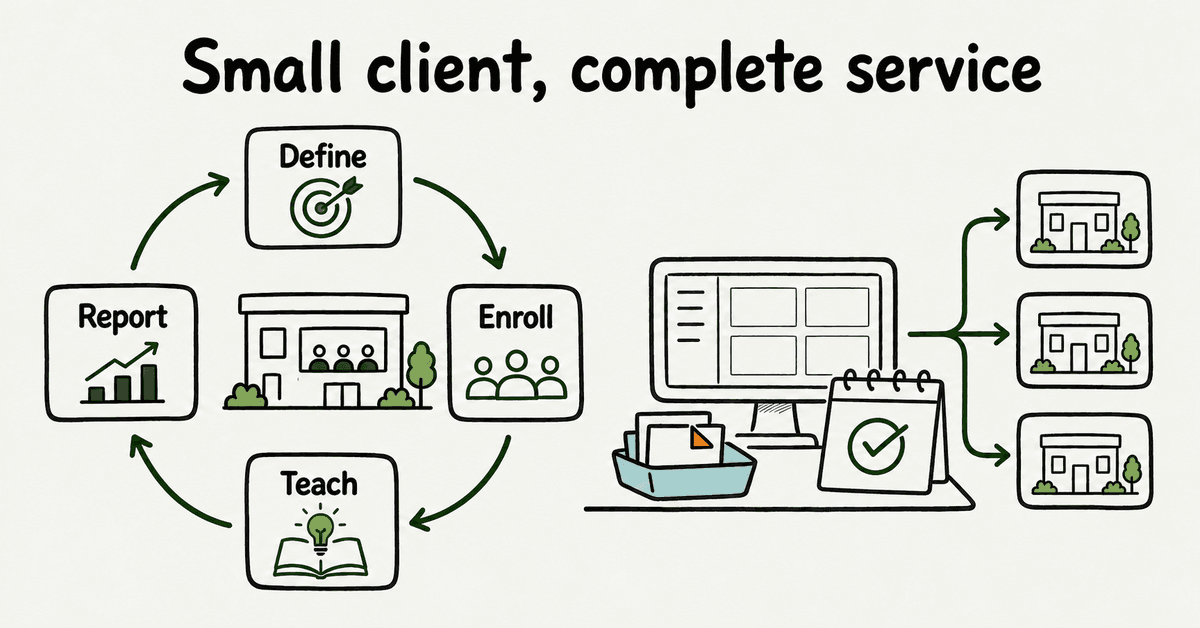
SAT for small MSP clients should be a managed service with a small, repeatable baseline, not a cut-down enterprise program. Give every client a named owner, a defined learner population, a clear reporting path, lifecycle handling, and a monthly evidence review. Standardize what repeats across clients, keep exceptions visible, and connect training to the controls and response process the client already uses.
Small clients need a complete service, not a smaller pile of content
A 12-person accounting firm does not need the same operating model as a 2,000-person enterprise. It still needs people to recognize suspicious activity, verify unusual requests, protect credentials and data, and know where to report a concern.
That distinction matters for an MSP. The wrong approach is to take an enterprise training program, remove a few modules, and call the result small-business friendly. The better approach is to define the smallest complete service that can be operated consistently across the client base.
The NIST Cybersecurity Framework 2.0 Small Business Quick-Start Guide is written for organizations with modest or no cybersecurity plans. It treats small-business security as risk management, not a long list of enterprise controls. CISA's small-business guidance also separates responsibilities among leadership, a security program manager, and IT. Training sits inside that wider program.
For an MSP, the useful question is not, "How many courses can we assign?" It is, "What service can we deliver to every suitable client without losing ownership, evidence, or margin?"
What SAT for small MSP clients should include
A defensible baseline has 8 parts:
- A named business owner at the client.
- A named MSP service owner.
- A current list of people in scope.
- Short learning tied to likely work situations.
- A reporting path employees can actually use.
- Joiner, mover, and leaver handling.
- An exception and follow-up process.
- A monthly client-facing review.
NIST SP 800-50 Rev. 1 describes cybersecurity and privacy learning as a lifecycle that can be adapted for large or small organizations. It covers needs, roles, learning methods, metrics, evaluation, and regular improvement. That is a better model for an MSP service than a once-a-year content drop.
CIS Control 14 calls for an established and maintained security awareness program. The word "maintained" matters. A program has owners, recurring work, and a way to change when the client changes.
Define the service boundary before enrollment
Small-client work becomes expensive when the boundary is vague. The MSP ends up answering case-by-case questions about who belongs in the program, which content applies, who can see individual results, how reminders work, and what the monthly report means.
Write a one-page service definition before enrolling anyone. It should state:
- the business purpose;
- the client owner and MSP owner;
- who is included and excluded;
- how people enter and leave the program;
- the baseline learning and reinforcement cadence;
- how suspicious activity is reported;
- what the MSP monitors;
- which exceptions create a ticket;
- what appears in the client report;
- what the service does not claim to prove.
Do not promise that training prevents incidents. Do not imply that a completion record proves compliance. Do not let "managed" mean the MSP owns every cultural and business decision.
CISA says leadership should establish a culture of security and support the people operating the program. The MSP can run the service. Client leadership still sets workplace expectations and decides how managers respond to persistent non-participation.
Use a minimum viable baseline
Small clients often have limited time, little internal security capacity, and no appetite for a complex curriculum. That does not justify vague training. It calls for a tighter baseline.
Start with the actions most employees need to perform:
- recognize and report suspicious email, text, call, or collaboration messages;
- verify unusual payment, credential, and data requests using a known route;
- use the client's approved password and authentication practices;
- handle sensitive client, employee, and business information correctly;
- update devices and software through the approved process;
- escalate a suspected mistake quickly instead of hiding it.
The U.S. Small Business Administration lists phishing, safe browsing, suspicious downloads, authentication, and protection of vendor and customer information as useful employee-training topics. The FTC's small-business cybersecurity hub connects employee training to phishing, ransomware, email impersonation, remote access, and other routine business risks.
The baseline should match the client's environment. A bookkeeper who changes supplier bank details needs stronger payment-verification practice. A help-desk user with administrative access needs role-specific training. A field worker who relies on text messages needs mobile and smishing examples.
Avoid assigning every topic to everyone. Relevance is easier to defend than volume.
Make the reporting path part of the lesson
Training that ends at "do not click" leaves the service desk blind. Every learner should know what to report, where to report it, what information to include, and what to do after a mistake.
CISA's phishing guidance for small and medium businesses recommends teaching employees to recognize and report phishing, verifying unusual messages through a known contact method, and reinforcing the message between formal training sessions.
For each client, document:
- the report button, mailbox, phone number, ticket route, or other approved channel;
- what counts as urgent;
- what to do after entering credentials or opening a suspicious file;
- who receives the report;
- how the MSP acknowledges it;
- how lessons are fed back into future learning.
Then test the route. Send a benign test report. Confirm it reaches the right queue, includes the right context, and produces a response the employee can understand.
A client with 15 employees may not need a complex triage platform. It does need a reporting route that works on Monday morning.
Keep client and MSP ownership separate
Small clients may expect the MSP to "handle security." That phrase hides several different jobs.
| Work item | Client owner | MSP owner | Evidence to retain |
|---|---|---|---|
| Business expectations | Approves policy and employee expectations | Advises on service design | Approved policy or service note |
| Learner scope | Confirms employees, contractors, and exceptions | Reconciles the active audience | Scope record and exception list |
| Learning baseline | Confirms business relevance | Configures and maintains the baseline | Assignment record and change note |
| Reporting route | Tells staff what route to use | Operates or integrates the route | Test report and response record |
| Follow-up | Managers handle workplace action | Tracks overdue work and service exceptions | Open action, owner, and due date |
| Monthly review | Reviews results and decides next actions | Produces scoped evidence and recommendations | Delivered report and meeting notes |
| Incident response | Owns business and legal decisions | Follows the contracted response role | Incident plan and escalation contacts |
This split protects both sides. The MSP avoids pretending it can own client culture. The client avoids assuming that buying training transfers all responsibility to a vendor.
The FTC discussion guide for talking cybersecurity with employees recommends making cybersecurity part of routine staff conversations, creating policies, and discussing how guidance applies to the business. Those are leadership activities, even when an MSP supplies the platform and material.
Build enrollment and removal into the service
A small client can still have frequent staff changes. One missing leaver or missed starter can undermine the report and create avoidable access problems.
Define the source of truth before launch. It may be Microsoft 365, a payroll or HR export, a PSA record, or a named client contact. The MSP should know:
- how a new person is detected;
- which client and role they belong to;
- when the baseline is assigned;
- what happens when an email address or role changes;
- how a leaver is removed from active work;
- which historical evidence remains available;
- how failed changes become visible.
For a client with 8 people, a controlled monthly reconciliation may be enough. For a client with 80 and frequent changes, directory sync may be the safer path. The requirement is not a specific connector. It is a lifecycle the MSP can explain and test.
DefendWise supports Microsoft 365 integration and automated onboarding. An MSP should still test its own scope rules, exception handling, and reconciliation process during the trial.
Use simulations for a named purpose
Phishing simulations are useful when they test a behavior or process the client has agreed to improve. They are weak when the only goal is to generate a click-rate chart.
A simulation can test whether employees:
- notice a relevant warning sign;
- use the approved report route;
- verify an unusual request;
- know what to do after a mistake;
- receive timely coaching;
- create useful information for the service desk.
The CISA anti-phishing training support overview describes employee awareness, simulated attacks, and results analysis used to inform training changes. The important link is analysis to modification. A result should change the program or confirm that the process works.
Before running a simulation, define the audience, purpose, data access, safe handling, response route, coaching, and client communication. Do not use humiliation as a teaching method. Do not create lures that interfere with payroll, healthcare, or other sensitive workflows without an explicit reason and approval.
For very small clients, one poorly handled simulation can damage trust. Start with the reporting process and baseline expectations before increasing difficulty.
Report decisions, not decorative charts
A small client report should take minutes to understand. It should not force the owner to interpret a dashboard built for a security operations team.
Use a monthly report with these fields:
| Report field | Question it answers | Next action if weak |
|---|---|---|
| In-scope people | Who should have participated? | Fix the source or scope |
| New starters and leavers | Did lifecycle changes work? | Reconcile the directory or list |
| Assignments and completions | Was expected work delivered and completed? | Follow up or adjust timing |
| Delivery failures | Who did not receive the message? | Correct the address or route |
| Reporting-path activity | Did employees use the agreed channel? | Retest and reinforce the route |
| Exercise results | What behavior or process was tested? | Coach, change the scenario, or fix the workflow |
| Open exceptions | What remains unresolved? | Name an owner and date |
| Next month's focus | What changes now? | Approve one specific improvement |
Keep denominators visible. "90% complete" means little if the report does not state 90% of whom, for which assignment, and over what period.
Keep claim boundaries visible too. Completion evidence shows what the platform recorded. It does not prove that every employee will act correctly, that the client meets every obligation, or that an incident will not occur.
Standardize the baseline and meter the exceptions
Small-client SAT is commercially sensible when repeatable work stays repeatable.
Defend a standard service pattern across clients:
- one baseline scope model;
- one enrollment process;
- one reporting route template;
- one reminder policy;
- one monthly report shape;
- one exception workflow;
- one offboarding checklist.
Then record every deviation. A client may need a different language, timing rule, role-specific module, reporting recipient, or contractual evidence pack. That can be valid. It should not become invisible labor.
Track the recurring minutes created by each exception. If a special report takes 45 minutes every month, the commercial model should know it. If a client refuses directory sync, the manual reconciliation belongs in the service record.
This is where pricing and operations meet. Per-seat pricing can make small clients awkward to include. A flat platform price can remove seat-count friction, but it does not remove labor. The MSP still protects margin by standardizing the service and automating work that does not need human judgment.
DefendWise uses flat $399/month pricing for unlimited users and client organizations. It also supports multi-tenant management and white-label delivery. Those claims describe the platform. The MSP still decides what is included in its own client package and how exceptions are priced.
A 30-day small-client launch
Use a short launch that proves the service path before rolling it across the fleet.
Days 1 to 5: define
Choose one representative client. Name the client owner and MSP owner. Confirm the learner scope, source of truth, reporting route, baseline topics, reminder approach, monthly report audience, and exclusions.
Write the service definition. Ask the client owner to approve it.
Days 6 to 10: configure
Create the client, apply branding, load or sync users, assign the baseline, configure reminders, and set the reporting recipient. Add one exception on purpose so the team can see how it is recorded.
Test a starter and a leaver with non-production identities.
Days 11 to 15: test the learner path
Walk through the invitation, login, learning, support route, and report-a-message path. Check mobile use if the workforce relies on phones. Confirm replies and errors reach an owned route.
Do not test only the administrator view.
Days 16 to 23: launch and monitor
Launch the agreed baseline. Monitor delivery failures, access questions, scope mistakes, and reporting-route activity. Fix process defects before adding more content.
Give the client owner a short status note with exceptions and owners.
Days 24 to 30: report and decide
Produce the first report. Review the denominator, lifecycle changes, completions, exceptions, and open actions. Choose one improvement for the next month.
Then decide whether the service is ready for the next client, needs a process fix, or creates too much manual work in its current form.
For a broader rollout sequence, use the 90-day MSP client security training plan. The 30-day launch here is deliberately narrower: it proves the minimum service for one small client.
What good looks like after 90 days
A healthy small-client service is boring in the right places.
New starters appear without a chase. Leavers leave active scope. Employees know where to report suspicious activity. Delivery failures become visible. Monthly reports use the same shape. Client-specific changes are recorded. The client owner can name the next action without reading 12 charts.
The MSP should also know the real workload. Count manual reconciliations, support tickets, report edits, exception follow-ups, and client meetings. If the work keeps growing, fix the service design before rolling it to more clients.
Mistakes to avoid
Treating small as simple
A small headcount does not remove ownership, privacy, lifecycle, or response questions. It makes a clear service boundary more important because there are fewer people available to absorb confusion.
Starting with a large library
More modules do not fix an unclear reporting route or stale learner list. Start with the actions the client needs, then add material based on risk and evidence.
Reporting only completion
Completion is one record. Include scope, delivery exceptions, lifecycle changes, reporting behavior, open actions, owners, and dates.
Hiding bespoke work
Every recurring exception consumes margin. Record it and decide whether it belongs in the standard package, an add-on, or a client responsibility.
Letting the MSP own client culture
The MSP can operate the service and advise the client. Leadership must set expectations and support follow-up inside the business.
Where DefendWise fits
DefendWise is built for MSPs that want to deliver security awareness training across multiple client organizations. Its current public offer includes flat $399/month pricing, unlimited users and client organizations, white-label multi-tenant delivery, Microsoft 365 sync, automated onboarding and reporting, and AI-native training content.
Use the free 7-day trial to test one small-client workflow. Define the baseline, add a test audience, process a starter and leaver, test the reporting route, generate a client report, and record every manual step.
The outcome should be a service decision, not a feature impression.
Frequently asked questions
What should SAT for a small MSP client include?
Start with named client and MSP owners, a defined learner population, short baseline learning, a clear reporting path, joiner and leaver handling, reminders, exceptions, and a monthly review. Add role-specific learning only where the client's work makes it useful.
How often should a small business receive training?
Use a recurring program rather than one annual event. Set the cadence based on the client's risks, obligations, workforce changes, and available time. Reinforce the reporting path between formal activities.
Does every small client need phishing simulations?
No single format is mandatory for every client. A simulation can test a named behavior or process, but it needs an agreed purpose, safe handling, and follow-up. It should not be treated as proof that the client is secure.
Who owns the program?
Client leadership owns business expectations and workplace action. A named client coordinator handles local participation. The MSP operates the platform, lifecycle, exceptions, and reporting defined in the service.
What should the monthly report include?
Include the in-scope population, assignments, completions, overdue work, starters and leavers, delivery failures, reporting-path activity, exercises where applicable, open actions, owners, and dates. Keep compliance and incident-prevention claims separate.
How can an MSP protect margin on small clients?
Standardize the baseline, automate repeatable work, limit bespoke changes, meter recurring exceptions, and price the actual service workload. Platform pricing is only one part of delivery cost.
Can DefendWise support small-client delivery?
Yes. DefendWise is built for MSPs with flat $399/month pricing, unlimited users and client organizations, white-label multi-tenant delivery, Microsoft 365 sync, automated onboarding and reporting, and a free 7-day trial.
Sources
- NIST SP 800-50 Rev. 1: Building a Cybersecurity and Privacy Learning Program
- NIST SP 1300: Cybersecurity Framework 2.0 Small Business Quick-Start Guide
- NIST Small Business Cybersecurity Corner: Training
- NIST Small Business Cybersecurity Corner: Employee Awareness
- CIS Control 14: Security Awareness and Skills Training
- CISA: Cyber Guidance for Small Businesses
- CISA: Teach Employees to Avoid Phishing
- CISA: Anti-Phishing Training Program Support
- FTC: Cybersecurity for Small Business
- FTC: Talking Cybersecurity With Your Employees
- U.S. Small Business Administration: Strengthen Your Cybersecurity