MSP client security training: a practical 90-day rollout plan
MSP client security training works better with clear owners, role-based content, reporting paths, and a repeatable 90-day rollout plan.
DefendWise
DefendWise
TL;DR
MSP client security training needs an operating system, not a folder of annual videos. Give every client a named owner, a defined audience, a simple reporting path, and a cadence that continues after launch. A practical 90-day rollout moves from scope and baseline to reinforcement and review, with evidence the MSP can use in service conversations. Keep technical controls, incident response, and workforce training connected, but never claim that training alone prevents breaches or creates compliance.
What is MSP client security training?
MSP client security training is a managed program that helps employees at client organizations recognize, avoid, and report common security threats. The MSP coordinates the program across multiple clients, but each client still needs business ownership, workforce participation, and an agreed route for reporting suspicious activity.
That distinction matters. Sending a course link is an activity. Running a program means deciding who is in scope, what they need to do differently, how new starters are handled, where reports go, what gets reviewed, and what happens when participation stalls.
NIST SP 800-50 Rev. 1 describes a lifecycle approach to cybersecurity and privacy learning. It is written for federal agencies and organizations, not specifically MSPs, but the operating idea transfers well: identify needs, design the program, deliver learning, evaluate results, and update the program as risks change.
For an MSP, the extra challenge is repetition at scale. The same service has to work for a 15-person professional firm, a 200-person manufacturer, and a client with seasonal workers or several locations. The goal is a standard operating model with controlled exceptions, not a custom project for every account.
Why this matters for MSPs
Training sits inside the service relationship
Client employees need to know more than how to spot a suspicious message. They need to know the action expected by their employer: which button to use, which mailbox or service desk to contact, what not to do, and what information to provide.
CISA's small-business cyber guidance separates responsibilities across leadership, a security program manager, and IT. That is a useful reminder for MSP delivery. The MSP can operate parts of the program, but leadership sponsorship and internal follow-up cannot be silently outsourced.
Once-a-year delivery is a weak operating model
CISA's guidance on teaching employees to avoid phishing says once-a-year training is not enough and recommends regular reinforcement plus a clear reporting route. Threats, tools, and employee roles change between annual completion dates.
A sustainable program uses several moments: onboarding, scheduled refreshers, short reminders, incident-driven updates, and role-specific learning. The cadence should be documented so the MSP and client know what will happen next.
Evidence improves the client conversation
A completion export is useful, but it is not the whole story. NIST's current learning-program guidance includes metrics and evaluation methods so programs can be updated as needs evolve. An MSP can turn that into a modest client review pack: who was included, who completed assigned learning, whether employees know the reporting path, what support themes appeared, and which actions are next.
This is evidence of program operation. It is not proof that an incident was prevented. Keeping that boundary clear makes the report more credible.
The operating model to agree before launch
Use a one-page service definition before enrolling anyone. It prevents the most common confusion later.
| Decision | What to record | Why it matters |
|---|---|---|
| Client business owner | Named person and backup | Someone inside the client can approve the audience and chase participation |
| MSP service owner | Named role or queue | The client knows who coordinates delivery and reporting |
| Audience | Included workers, exclusions, and special groups | Enrollment data matches the agreed scope |
| Start triggers | New hire, new client, annual reset, role change | Training does not depend on an ad hoc reminder |
| Core behaviors | Recognize, verify, report, and escalate | Learning connects to actions employees can take |
| Reporting path | Button, mailbox, phone number, or service desk route | Suspicious activity reaches the right team quickly |
| Cadence | Baseline, reinforcement, refresh, and review dates | The program continues after the first course |
| Evidence | Fields, format, recipient, and retention expectation | Reports are useful and handled consistently |
| Escalation | Overdue threshold and responsible owner | Non-completion does not sit unnoticed |
| Review | Monthly during launch, then agreed frequency | The program can be adjusted using real operating feedback |
Keep the core service consistent across clients. Add exceptions only where the client's risk, workforce, contract, or regulatory context genuinely requires them.
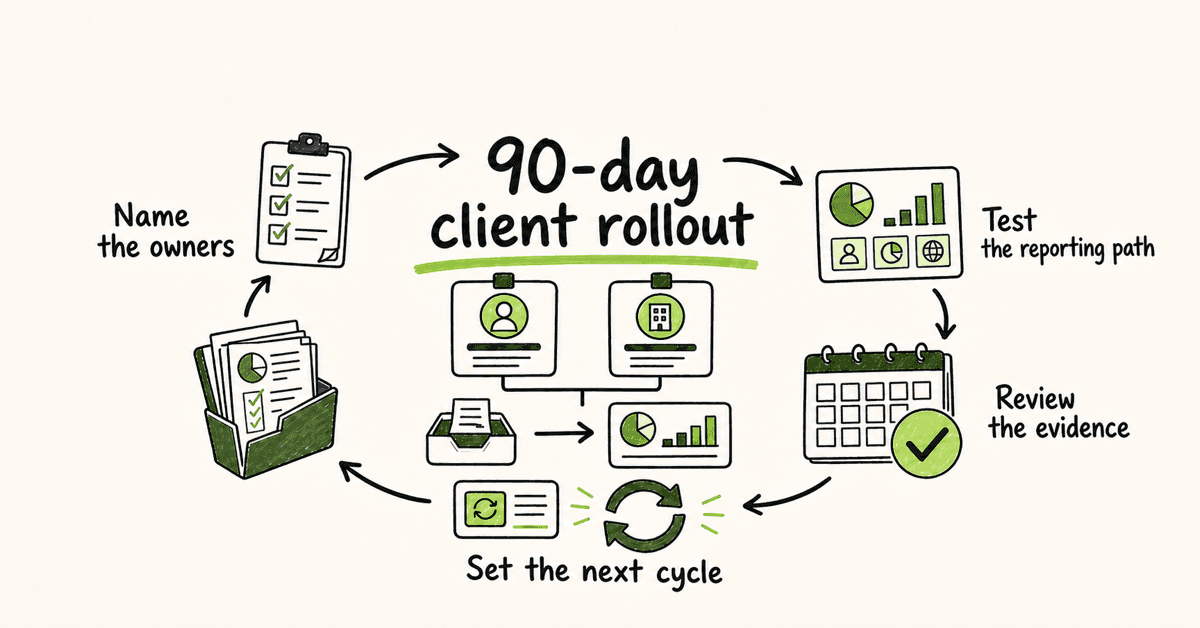
A practical 90-day rollout plan
Days 1–15: define scope and ownership
Start with the client, not the course library. Confirm the business owner, MSP owner, workforce source, reporting path, and the behaviors the program should reinforce.
Ask practical questions:
- Which employees, contractors, and locations are in scope?
- How are new starters and leavers passed to the MSP?
- Which roles handle payments, payroll, sensitive records, privileged access, or executive communications?
- Where should an employee report a suspicious email, call, sign-in prompt, or payment request?
- Who follows up when assigned learning is overdue?
- Which contractual or compliance requirements need qualified review?
Do not copy an old client setup and assume the answers are the same. A working reporting mailbox for one client may be wrong for another. A finance team may need payment-verification scenarios that are irrelevant to most of the workforce.
Create a short baseline register with client name, owner, audience count, data source, reporting route, planned launch date, and review date. The register becomes the MSP's control sheet across accounts.
Days 16–30: prepare the audience and baseline
Clean enrollment data before launch. Remove departed users, resolve duplicate identities, and confirm how shared mailboxes or non-human accounts are treated. Do not count a directory object as a learner without checking that a person should receive training.
Explain the program before the first assignment lands. A short note from client leadership should cover why the program exists, what employees will receive, where messages come from, how much time is expected, and how to report anything suspicious. White-label delivery can help keep the experience under the MSP or client's brand, but clarity matters more than decoration.
The baseline should be short enough to finish and specific enough to be useful. Cover the client's reporting path, account protection, suspicious requests, data handling, and any role-specific risks already agreed. CISA's Secure Our World resources provide plain-language material on phishing, strong passwords, multifactor authentication, and software updates.
Do not overclaim the baseline. It gives the program a starting point. It does not certify that every employee will respond correctly under pressure.
Days 31–45: launch and remove friction
Launch to a controlled group first when the client is large or the data is messy. A pilot can expose blocked email, confusing sender names, inaccessible content, incorrect user records, or an unclear support route before the full audience is involved.
Track delivery failures separately from learner non-completion. They have different fixes. A bounced message needs data correction; an overdue assignment needs manager follow-up; a user who cannot access the material needs support.
Give client managers one concise view of the launch:
- people assigned;
- assignments delivered;
- delivery exceptions;
- completions and overdue assignments;
- support issues;
- next follow-up date.
Avoid daily dashboards that no one reads. Set a predictable review rhythm and notify the client owner when an agreed threshold is crossed.
Days 46–60: reinforce the actions that matter
Reinforcement should focus on behavior, not trivia. Employees should know how to pause, verify, and report when something feels wrong.
CISA's phishing guidance recommends using a known contact method rather than replying to a suspicious message or trusting the contact details inside it. That becomes a useful client-specific exercise: show a payment-change request, then ask which approved channel the employee should use to verify it.
Connect learning to technical controls. Training should explain why MFA prompts must be treated carefully, while the IT team still configures and enforces MFA. CISA's MFA guidance explains why a second authenticator adds protection beyond a password. Training supports that control; it does not replace it.
Use role-based reinforcement where it earns its place. Finance staff can practice payment verification. Service-desk staff can practice identity checks and escalation. Executives can practice handling urgent requests that appear to come from trusted contacts. General employees still need a shared baseline and a simple reporting route.
Days 61–75: test the reporting path
A reporting process should be tested before an urgent message arrives. Run a tabletop discussion or a controlled internal exercise with the client's approval. The aim is to verify the handoff, not to embarrass employees.
Check whether:
- employees can find the reporting route;
- reports reach a monitored destination;
- the MSP or client team acknowledges the report;
- the report contains enough context to investigate;
- urgent cases follow the incident process;
- lessons are fed back into future training.
CISA offers tabletop exercise packages that organizations can adapt. Keep the scenario proportional to the client's size and maturity.
Do not turn every reported message into a training score. Reporting is a behavior you want to encourage. If employees think they will be punished for raising a false alarm, they may stay quiet when a real problem appears.
Days 76–90: review evidence and set the ongoing cadence
The day-90 review should answer five questions:
- Did the agreed audience receive the program?
- Were delivery and identity exceptions resolved?
- Can employees find and use the reporting path?
- Which roles or topics need more support?
- What will happen over the next quarter?
Use a short client-facing pack. Include scope, completions, overdue items, exceptions, support themes, reporting-path test results, agreed actions, owners, and dates. If the client has a governance or compliance requirement, label the evidence carefully and have any specific mapping reviewed.
The NIST Cybersecurity Framework 2.0 places awareness and training in the Protect function. It also frames cybersecurity as a wider risk-management system. That is the right perspective for the review: workforce learning is one control area among governance, technical safeguards, detection, response, and recovery.
What good looks like after day 90
A mature MSP delivery process is visible in routine operations:
- Every active client has a named business owner and MSP service owner.
- Workforce data has a defined source and update process.
- New starters receive the right baseline without waiting for an annual campaign.
- Employees know how to report suspicious activity.
- High-risk roles receive relevant reinforcement.
- Overdue work has an owner and an agreed escalation route.
- Client reviews show evidence, exceptions, actions, and dates.
- Incidents and near misses can change the next learning cycle.
CIS Control 14 describes the goal as establishing and maintaining a program that influences workforce behavior and builds skills to reduce enterprise risk. The words "establish and maintain" matter. Launch is the beginning of the service, not the finish line.
Metrics that help without pretending to prove too much
Choose indicators that lead to action.
Coverage indicators
Track enrolled people against the agreed audience, not against an unverified directory total. Record delivery exceptions and stale identities separately.
Participation indicators
Completion and overdue counts tell the client whether assigned work happened. They do not show, by themselves, that behavior changed.
Reporting-readiness indicators
Record whether the reporting path was communicated, tested, and acknowledged. Track recurring confusion, such as employees using an unmonitored mailbox or not knowing how to report a phone-based request.
Program-operation indicators
Track time to launch, unresolved enrollment exceptions, new-starter handling, client review completion, and actions carried over. These tell the MSP whether the service itself is being operated consistently.
Learning indicators
Use short knowledge checks, role-based exercises, support themes, and incident lessons to decide what to reinforce. Avoid publishing a single composite "risk score" unless its method and limits are clear.
The FTC's Cybersecurity for Small Business library is also useful when clients need plain-language supporting material. It covers common attacks and basic safeguards without turning awareness into a product pitch.
Mistakes to avoid
Selling the course instead of defining the service
Clients need to know what the MSP will operate, what the client must own, what evidence will be provided, and what happens when people do not participate. A catalog does not answer those questions.
Using the same content for every role
A shared baseline is useful. Treating payroll, privileged administrators, reception staff, and general employees as if they face identical decisions is not.
Leaving the reporting route vague
"Contact IT" is not a process. Give employees a named route and tell them what to do if the suspected message appears to come from the usual contact.
Mixing delivery failures with employee behavior
A blocked email, stale account, inaccessible module, and ignored assignment need different owners. One overdue number hides the work required.
Treating completion as breach prevention
Completion shows that an assignment was completed. It does not prove an incident will not happen. Keep claims tied to the evidence you actually have.
Making compliance promises
Training may support a wider compliance program, but requirements vary. Verify any specific framework, control, contract, insurance, or regulatory statement before presenting a report as audit evidence.
Ending the program at launch
No review, no reinforcement, and no new-starter process means the service decays as soon as the client changes. Put the next 90 days on the calendar before closing the first review.
How a flat-rate MSP SAT platform helps
A platform built for multi-client delivery can reduce the commercial and administrative friction around operating the same service across many accounts. DefendWise provides flat $399/month pricing, unlimited users and client organizations, multi-tenant management, white-label delivery, and automated onboarding and reporting.
Those product capabilities support the operating model. The MSP still has to define ownership, audience, reporting routes, escalation, and review. If that model is ready, start a free 7-day trial.
Frequently asked questions
What is MSP client security training?
MSP client security training is a managed program that helps employees at client organizations recognize, avoid, and report common security threats. The MSP coordinates delivery across clients, while each client keeps clear business ownership and internal responsibilities.
How long should an MSP security training rollout take?
A focused first rollout can fit into 90 days: define the service and audience, launch a baseline, reinforce important behaviors, test the reporting path, and hold a client review. Day 90 should establish the next cycle, not end the program.
How often should client employees receive training?
There is no single cadence that fits every client. Use onboarding training, regular short reinforcement, threat-triggered updates, and periodic refreshers based on client risks, workforce changes, and reviewed requirements. CISA explicitly advises against relying only on once-a-year phishing training.
Who owns the program at the client?
Name one client-side business owner and one MSP service owner, with backups where practical. The client owner supports participation and business decisions; the MSP owner coordinates delivery, exceptions, reporting, and agreed escalation.
What should an MSP include in a client report?
Include the agreed audience, enrollment coverage, delivery exceptions, completions, overdue items, reporting-path readiness, support themes, actions, owners, and dates. Separate operational evidence from any claim about risk reduction or incident prevention.
Does security awareness training make a client compliant?
No. Training can support a wider security or compliance program, but it does not make an organization compliant by itself. Specific requirements and control mappings need qualified review against the client's actual obligations.
How should MSPs handle new starters and leavers?
Define the source of workforce changes, the frequency of updates, the baseline assigned to new starters, and the process for removing departed workers. Review exceptions so stale accounts and missed enrollments do not accumulate.
Can DefendWise support MSP client security training?
Yes. DefendWise is built for MSPs with flat $399/month pricing, unlimited users and client organizations, white-label delivery, multi-tenant management, and automated onboarding and reporting. The current primary CTA is to start a free 7-day trial.
Sources
- NIST SP 800-50 Rev. 1: Building a Cybersecurity and Privacy Learning Program
- NIST Cybersecurity Framework 2.0
- CIS Critical Security Control 14: Security Awareness and Skills Training
- CISA: Teach Employees to Avoid Phishing
- CISA: Cyber Guidance for Small Businesses
- CISA: Secure Our World
- CISA: Recognize and Report Phishing
- CISA: More than a Password
- CISA Tabletop Exercise Packages
- FTC: Cybersecurity for Small Business