Creating recurring security reporting decks for clients: an MSP workflow
Creating recurring security reporting decks for clients helps MSPs turn security work into clear decisions, evidence, and next-quarter action.
DefendWise
DefendWise
TL;DR
Creating recurring security reporting decks for clients is not a design job. It is an MSP operating workflow.
A useful deck explains what changed, what risk remains, what evidence exists, and what the client needs to decide next. It should pull from the PSA, RMM, backup, endpoint, identity, security awareness, and evidence records without turning the meeting into a data dump.
The best deck is repeatable: same slide order, same metric definitions, same evidence trail, and a short client-facing story each month or quarter. If a senior person has to rebuild the deck from screenshots every time, the reporting motion is still too manual.
What recurring security reporting decks are for
A recurring security reporting deck is a client-facing pack that turns security work into a clear business conversation.
For MSPs, that usually means a monthly security review, quarterly business review, cyber insurance prep call, board-readiness update, or vCISO check-in.
The deck should answer 4 questions quickly:
- What changed since the last report?
- What risk needs attention?
- What evidence can we show if someone asks?
- What decision or action does the client own next?
That is different from a raw report.
A raw report says “patch compliance is X,” “training completion is Y,” and “tickets closed were Z.” A security reporting deck explains whether those numbers matter. It tells the client where they are safer, where they are still exposed, and what the MSP recommends next.
This is why generic monthly IT reports often miss the mark. They prove activity. They do not always prove judgement.
Axcient’s QBR guidance argues MSP reviews should move from “here are your metrics” to “here is what these metrics mean for your business,” which is the right bar for a recurring client deck Axcient QBR handbook. ConnectWise makes a similar recurring-business-review point: the recurring review should cover progress, known concerns, new concerns, and budgeting surprises before they become a problem ConnectWise recurring business review.
For security, the deck has a sharper job. It should make risk visible enough for the client to act.
Why this matters for MSPs
Security work is easy to under-value when the client only sees tickets.
The MSP may have cleaned up identities, reviewed risky settings, chased overdue training, checked backup failures, handled endpoint alerts, and prepared evidence for a renewal. If those actions stay scattered across tools, the client sees noise. Worse, they may see nothing.
A recurring security deck turns that invisible work into a rhythm.
The rhythm matters because client security is not a single project. CISA’s Cybersecurity Performance Goals 2.0 describe voluntary practices with high-impact security actions for organizations of all sizes, while noting that the goals are a baseline, not a complete security program CISA CPG 2.0. That is useful framing for an MSP deck. The deck should show baseline movement and open gaps without pretending one report covers every risk.
NIST CSF 2.0 is also useful here because it is designed to help organizations better understand and improve their management of cybersecurity risk NIST Cybersecurity Framework. A client reporting deck should do the same thing in plain language. It should not force the client to read a framework. It should translate current work into outcomes, decisions, and evidence.
For MSP owners, the deck has a second job: protect margin.
If every review requires manual screenshots, spreadsheet cleanup, slide formatting, and last-minute account-manager rewrites, the reporting promise becomes a hidden cost. The client gets a polished deck. The MSP burns senior time preparing it.
Recurring decks only scale when the deck is fed by a repeatable workflow.
The deck should not be a tool export
Most MSPs already have the raw material:
- PSA tickets and tasks;
- RMM alerts, patching, and device health;
- backup job status;
- endpoint or email security signals;
- identity and MFA status;
- security awareness training records;
- phishing reports or simulation results, where used;
- client risk register items;
- evidence exports for insurance, audit, or board requests.
The mistake is copying all of that into slides.
A tool export belongs in the backup evidence. The deck belongs in the client conversation.
Use this split:
| Layer | Purpose | Example |
|---|---|---|
| Source record | The system that holds the evidence | SAT completion export, PSA ticket, RMM patch report |
| Reporting deck | The client story | “Training coverage improved, but Finance has 6 overdue users.” |
| Decision log | The next action | “Client owner to approve manager follow-up by Friday.” |
| Evidence pack | The proof behind the deck | Completion roster, date range, scope, exceptions, source link |
That split prevents the deck from becoming a dumping ground.
It also helps with trust. A client can see the summary, ask for proof, and receive the evidence without forcing every slide to carry every row.
A practical slide order for recurring security reporting decks
Use a stable slide order. Change the story, not the structure.
1. Executive summary
This slide should be written last and read first.
Keep it to 4 or 5 bullets:
- what improved;
- what worsened;
- what stayed blocked;
- what evidence is ready;
- what decision is needed.
Bad summary: “Security services were delivered successfully this quarter.”
Better summary: “Training coverage is healthy, but 8 new starters missed onboarding training because the directory group was not updated. Backup evidence is ready for the renewal pack. Finance still needs payment-change verification training before the next BEC review.”
The second version gives the client something to do.
2. Client risk snapshot
Show the current risk themes in plain language.
Do not start with 11 charts. Start with the 3 to 5 risks that matter this period.
Examples:
- identity hygiene;
- endpoint exposure;
- backup recovery confidence;
- awareness coverage;
- phishing or social engineering response;
- audit or insurance evidence gaps;
- recurring user-lifecycle failures.
Tie each risk to an owner and next step. If nobody owns it, the deck is only theatre.
3. Security awareness and human-risk block
Security awareness belongs in the deck when it is part of the MSP service package.
Do not show only “course completed.” Show the operating picture.
A useful awareness block includes:
| Metric | Why it matters | Deck wording |
|---|---|---|
| Users in scope | Defines the denominator | “126 active users expected to complete baseline training.” |
| Assigned users | Shows campaign reach | “126 assigned the current module.” |
| Completed users | Shows progress | “114 complete by report date.” |
| Overdue users | Creates follow-up action | “12 overdue; 7 are in Finance.” |
| Sensitive-role coverage | Shows whether riskier roles are covered | “Finance and executives need BEC refresher.” |
| Evidence status | Shows audit or insurance readiness | “Completion export filed; manager exception list open.” |
| Reporting behaviour | Shows response habit, where available | “Employees know where to report suspicious messages.” |
CIS Control 14 gives a useful anchor: establish and maintain a security awareness program to influence workforce behaviour and reduce cybersecurity risk CIS Control 14. The CIS assessment specification also points to concrete records such as workforce members and most recent training completion dates CIS Control 14 assessment spec.
That is the right level for a deck. Show scope, completion, currency, and follow-up. Do not overclaim.
CISA’s small-business phishing guidance adds another practical point: staff should know how to recognize and report suspicious messages, and once-a-year training is not enough for threats that change CISA phishing training guidance. For MSP reporting, that means the deck should show whether reporting paths and refreshers are alive, not only whether a module was assigned.
4. Control and framework mapping
Clients often ask, “Does this help with ISO 27001, NIST, CIS, cyber insurance, or our policy?”
Answer carefully.
A deck can show that evidence supports a control conversation. It should not claim that the client is compliant because training happened.
Use a simple mapping table:
| Client concern | Evidence shown | Safe wording |
|---|---|---|
| NIST CSF awareness and training | Current assignment and completion records | “Supports awareness and training evidence under the Protect function.” |
| CIS Control 14 | Program scope, completion, review dates | “Shows program coverage and current training records.” |
| Cyber insurance renewal | Completion export and overdue exceptions | “Provides awareness evidence for insurer questions where requested.” |
| ISO 27001 awareness | Scope, role coverage, policy acknowledgement if available | “Supports awareness evidence; does not prove ISO 27001 certification.” |
If the client is covered by the FTC Safeguards Rule, the reporting pack may need to show a broader information security program, not only training. The FTC says the Rule is intended to ensure covered entities maintain safeguards to protect customer information and points businesses back to the Rule text for obligations FTC Safeguards Rule guide. That is a good reminder: the deck can organize evidence, but it should not pretend to be legal advice.
5. Open exceptions
This is the slide clients usually need most.
List the exceptions that require action:
- overdue training by role or department;
- new starters not enrolled;
- leavers still appearing in reports;
- failed sync or stale group membership;
- missing manager approval;
- policy acknowledgement not captured;
- evidence export not filed;
- risk accepted but not documented.
Give each exception an owner, due date, and next step.
Avoid a shame list of names unless the client explicitly needs learner-level follow-up. Most executive decks should stay at role, department, or manager level. Put learner detail in the evidence pack or manager follow-up report.
6. What changed since last deck
Recurring reporting only works if the client can see movement.
Show:
- trend direction;
- resolved risks;
- new risks;
- still-open items;
- decisions made last time;
- decisions still waiting.
This is where the deck earns trust. If the same exception appears for 3 periods, say so. If a risk has not moved because the client has not approved an action, say that too.
The point is not to make the MSP look perfect. It is to keep the record honest.
7. Next-period plan
End with the work ahead.
A useful close has 3 parts:
- MSP actions;
- client actions;
- evidence to be ready by the next report.
Example:
| Owner | Action | Due | Evidence next deck should show |
|---|---|---|---|
| MSP | Fix Microsoft 365 group scope for training sync | 14 days | New-starter enrollment shows current users only |
| Client manager | Follow up with overdue Finance users | 7 days | Overdue count reduced or exception accepted |
| MSP vCISO | Add BEC refresher to finance training path | Next cycle | Role-specific module assigned and completed |
This turns the deck into a working document, not a quarterly ceremony.
How to build the recurring workflow
A strong deck comes from a simple operating loop.
Step 1: Define the deck owner
Someone owns the reporting story.
That can be the account manager, vCISO, service manager, or designated client success owner. But it cannot be “whoever has time.”
The owner decides what matters this period and checks that the evidence matches the story.
Step 2: Lock the metric dictionary
Define every recurring metric once.
For awareness reporting, define:
- in-scope users;
- assigned users;
- completed users;
- overdue users;
- current training;
- sensitive-role coverage;
- evidence-ready status;
- exception status.
For each metric, state the source system, date range, denominator, and owner.
This prevents the classic deck problem: this month’s chart does not match last month’s chart because someone exported a different filter.
Step 3: Keep source links, not screenshots
Screenshots are fragile. Source links and exports are better.
Where possible, keep a link from the slide back to the source record or evidence file:
- PSA ticket;
- RMM report;
- SAT export;
- backup report;
- identity report;
- risk register;
- signed exception.
This makes the deck reviewable. It also helps Woz, Grant, or Dan verify claims later without guessing where the number came from.
Step 4: Separate executive deck from evidence appendix
The main deck should be short.
A good default is:
- 1 executive slide;
- 1 risk snapshot;
- 1 awareness/human-risk block;
- 1 control or evidence slide;
- 1 open-exceptions slide;
- 1 next-period plan.
The appendix can hold detail. That is where the completion export, learner list, control mapping, raw tickets, and long evidence notes belong.
Step 5: Use exception-based automation
Do not automate every normal event into the deck.
Automate exceptions:
- training overdue past the agreed threshold;
- high-risk role missing current training;
- report export failed;
- user sync failed;
- client tenant has no current evidence pack;
- phishing report path not tested this period;
- manager follow-up missing.
This matches the PSA/RMM reporting rule: send work items to systems of action and keep raw evidence in the source system. For a deeper integration workflow, see tips for integrating SAT data into PSA and RMM reports and how to use Zapier to automate training ticket creation.
Security awareness deck example
Here is a simple awareness section an MSP could reuse.
Slide title: Human-risk and awareness coverage
What changed
- Current training assigned to all in-scope users.
- Completion improved from the prior report.
- Overdue users are concentrated in 1 department.
- Evidence export is ready for the renewal pack.
What needs attention
- Finance needs a role-specific BEC refresher.
- 2 new starters did not receive training because group membership was stale.
- Manager follow-up is still open.
Decision needed
- Approve Finance refresher and manager escalation path.
Evidence behind the slide
- Current user scope export.
- Completion export.
- Overdue-user exception list.
- Manager follow-up ticket.
- Prior-period comparison.
That is enough for a client conversation. It is also enough to defend the report if someone asks where the number came from.
Where DefendWise fits
DefendWise fits the security awareness layer of the recurring reporting deck.
The public claim register supports these claims: DefendWise is built for MSPs, uses a $399/month flat fee, supports unlimited users and unlimited client organisations, provides white-label delivery, multi-tenant control, AI-generated training content, Microsoft 365 sync, Zapier integration, automated onboarding, compliance mapping at a high level, and branded reporting.
For recurring decks, that matters because the reporting workflow should not become harder every time a client adds users.
A flat-fee, multi-tenant awareness layer helps MSPs keep coverage broad without turning every new user into a pricing debate. White-label reporting helps the deck feel like the MSP’s client service, not a vendor export. Microsoft 365 sync and automation paths help keep user scope closer to reality. Branded reports and evidence exports give the MSP material to place into QBRs, insurance packs, and audit prep.
Keep the claim narrow. DefendWise does not make the whole client compliant. It helps MSPs run and report the awareness layer with less recurring admin drag.
For related workflows, see:
- Reporting templates for MSP quarterly business reviews
- Measure security awareness effectiveness
- Building auditor-ready reports for clients
- Cyber insurance evidence
- Automating client provisioning for MSPs
The Monday version
If you want this working next week, do not start with slide design.
Start here:
- Pick 1 client.
- Choose a 6-slide deck structure.
- Define 8 recurring metrics.
- Link each metric to a source record.
- Create 1 open-exceptions slide.
- Write the executive summary last.
- Save the evidence appendix separately.
- Reuse the same structure next month.
That is the difference between a nice deck and a reporting system.
A nice deck helps once. A recurring deck makes client security work visible without rebuilding the story from scratch every time.
Header image brief for Picasso
Asset type: Doodle/Image2 TL;DR infographic header for a DefendWise SEO blog post.
Article: “Creating recurring security reporting decks for clients: an MSP workflow”
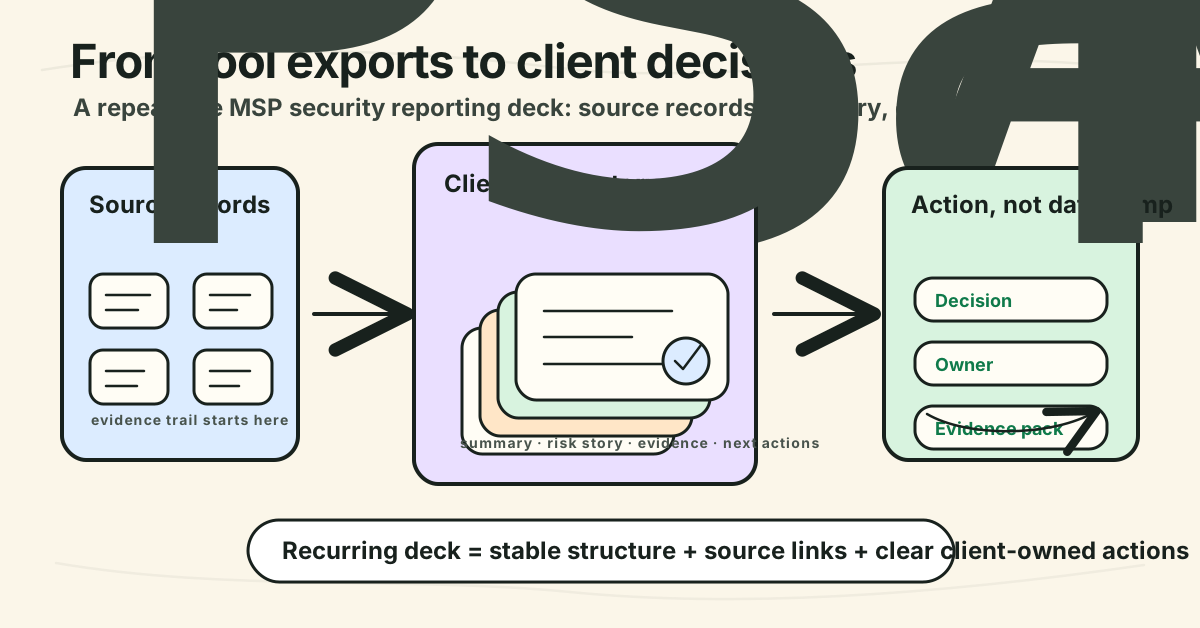
Core visual idea: A hand-drawn MSP reporting conveyor: source systems on the left, a clean client deck in the middle, and decisions/evidence on the right.
TL;DR to visualize: Recurring security reporting decks should turn scattered MSP security data into a short client decision pack: what changed, what risk remains, what evidence exists, and what the client must do next.
Suggested layout: 3-column horizontal flow.
- Left column: small doodle icons for PSA, RMM, backup, identity, SAT, and evidence exports. Label: “Source records”.
- Middle column: 6-slide mini deck stack with labels: “summary”, “risk”, “awareness”, “evidence”, “exceptions”, “next actions”. Label: “Client-ready story”.
- Right column: 3 output cards: “decision”, “owner”, “evidence pack”. Label: “Action, not data dump”.
Text to include in image:
- Main headline: “From tool exports to client decisions”
- Small labels only: “source records”, “risk story”, “evidence”, “next actions”
Avoid: fake dashboards with invented stats, specific client names, compliance badges, lock/shield theatre, tiny unreadable table text, real vendor logos, “100% secure” or compliance-guarantee language.
Crop needs: 1200×628 blog/OG asset and 1200×627 social-safe crop. Keep the headline and key flow inside the central safe area.
Style: Doodle style — clean hand-drawn startup explainer, warm off-white background, bold black sans-serif hierarchy, imperfect sketch arrows/connectors, soft pastel accents, lots of whitespace, simple high-contrast labels, no photorealism, no 3D, no glossy gradients, no clutter.
Source notes
External sources checked:
- CISA: Cybersecurity Performance Goals 2.0
- CISA: Teach employees to avoid phishing
- CIS: Control 14: Security Awareness and Skills Training
- CIS: Control 14 assessment specification
- NIST: Cybersecurity Framework
- NIST CSRC: NIST publishes SP 800-50 Revision 1
- FTC: Safeguards Rule: What Your Business Needs to Know
- Axcient: The Four Rs of MSP QBR Success
- ConnectWise: Automate a critical piece of your recurring business review
- Guardz: QBR checklist for MSPs
Product-claim safety notes:
- Used only claim-register-safe DefendWise claims: MSP-built, $399/month flat fee, unlimited users, unlimited client organisations, white-label delivery, multi-tenant control, AI-generated training content, Microsoft 365 sync, Zapier integration, automated onboarding, high-level compliance mapping, and branded reporting.
- Did not claim DefendWise guarantees compliance, cyber insurance approval, risk reduction percentages, exact admin-hour savings, customer satisfaction, or broad PSA/RMM connector support.
- Kept
featured_imageandsocial_imageblank for the Picasso/Woz image process.