White-label phishing training for MSPs: a practical guide
White-label phishing training works when MSP branding, client approvals, safe simulations, and reporting follow one repeatable service model.
DefendWise
DefendWise
TL;DR
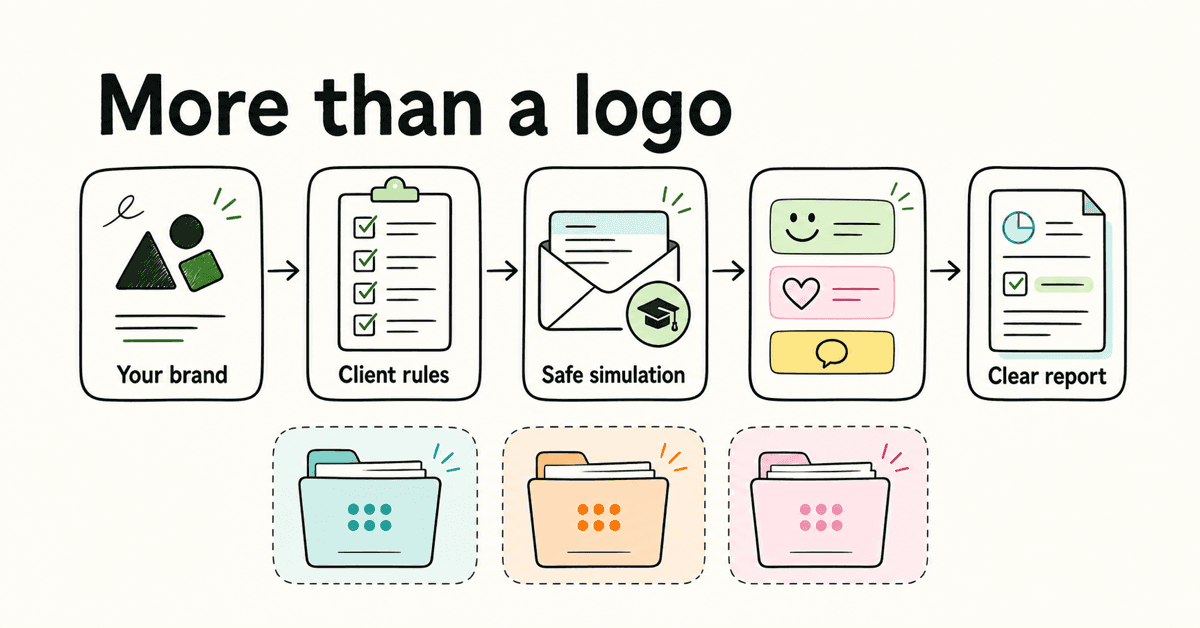
White label phishing training is not a logo switch. It is a managed service in which the MSP owns the client-facing experience, the client approves the exercise rules, users get a safe learning path, and every campaign ends in a useful report. Standardize the brand layer, tenant boundary, approval path, simulation method, and evidence pack before scaling across clients. Keep the MSP brand visible where it builds trust, but do not turn a simulated phishing message into a disguised MSP marketing email.
White label should describe the service, not just the screen
An MSP can change a logo in 5 minutes and still deliver a fragmented phishing service.
The portal may carry the MSP's colors while reminders come from an unfamiliar domain. The client report may look polished while the help desk has no idea a simulation is running. A landing page may carry the client's logo without clear authorization for how that logo is being used.
That is not a white-label operating model. It is a set of branded surfaces with gaps between them.
For an MSP, white label phishing training should mean the service feels coherent from the client's point of view:
- the proposal and service name belong to the MSP;
- the client knows what has been approved;
- learner support follows a known route;
- training and feedback pages are recognizable;
- reports look like part of the managed service;
- each client's records remain separate;
- the MSP can repeat the model without rebuilding it every month.
The DefendWise white-label feature page describes the public product position as an MSP-branded portal, emails, reports, and client-facing materials. That is the useful commercial layer. The simulation itself needs a separate safety and governance layer.
What white label phishing training includes
A complete service has 5 layers. If any layer is vague, the MSP inherits manual work or trust risk later.
| Layer | What the MSP standardizes | What remains client-specific | Evidence to retain |
|---|---|---|---|
| Service brand | Service name, portal theme, report format, support route | Approved logo, colors, domain, and client contacts | Brand approval and current configuration |
| Tenant boundary | Baseline settings, roles, report fields, change process | Users, groups, exclusions, managers, and local owners | Scope record and access list |
| Simulation governance | Safe scenario categories, approval template, launch checklist | Allowed themes, timing, target groups, and escalation rules | Client authorization and launch record |
| Learner experience | Feedback pattern, reporting instruction, follow-up learning | Local reporting route, language, role context, and accommodations | Landing-page copy and learning assignment |
| Client evidence | Standard summary, exceptions, next-action format | Client decisions, owners, due dates, and local context | Dated report and action log |
Current vendor pages tend to group white labeling with multi-client management, training, reporting, and partner delivery. PhishingBox's solution-provider page, for example, presents white labeling as one part of a wider service-provider workflow. Its claims are vendor-published, not independent proof, but the page shows the buying category MSPs are comparing.
The same pattern appears in the CanIPhish MSP buyer's guide, which groups branding with tenant management, onboarding, automation, reporting, directory sync, and follow-up training. Use it as market structure, not as a neutral product verdict.
The practical conclusion is simple: a logo without tenant control and repeatable operations is decoration.
Keep the brand layer separate from the lure
A common mistake is to assume that every part of a white-label service should display the MSP's logo.
That does not work for phishing simulations.
A simulated phishing email is meant to test or teach a defined scenario. It may imitate a routine business process, a delivery notice, a shared document, an account message, or another approved situation. Adding the MSP logo to every lure can make the exercise less realistic, confuse the lesson, or train users to distrust legitimate MSP messages.
The MSP brand is most useful on:
- the learner portal;
- pre-approved service notices;
- support and reporting instructions;
- the education or feedback page after an interaction;
- client summaries and QBR material;
- recurring training communications that are not part of the simulated lure.
The lure should follow the scenario, client authorization, and applicable legal rules.
Microsoft's documentation for Attack Simulation Training payloads distinguishes built-in and tenant-created payloads and warns that trademark and logo use carries legal considerations. It also says customers are responsible for deciding what use is appropriate in their environment. That is a useful boundary for any MSP, regardless of platform.
Do not assume a client's approval to run simulations is also permission to imitate every supplier, government agency, bank, or software brand. Record what has been approved. Keep sensitive or cruel themes out of the baseline. Escalate unusual scenarios for client and legal review.
White label should make the service more trustworthy. It should not blur accountability.
Define the service before choosing a template
Start with one paragraph that describes the managed service.
The MSP operates an approved recurring phishing-awareness service for the client. The service includes current learner scope, controlled simulations, immediate education, a known reporting route, follow-up learning where needed, and a client summary with actions and owners.
Then define what the service does not promise:
- it does not guarantee that users will identify every real attack;
- it does not prove the client is compliant;
- it does not replace email security, MFA, incident response, or other controls;
- it does not authorize unapproved impersonation or sensitive lures;
- it does not make individual employees the sole explanation for security risk.
NIST SP 800-50 Rev. 1 describes a lifecycle approach to cybersecurity and privacy learning that can be adapted for large and small organizations. It includes roles, objectives, methods, metrics, evaluation, and regular updates. CIS Control 14 calls for an established and maintained awareness program, training on social engineering, and the ability to recognize and report incidents.
A phishing exercise can support that program. It is not the whole program.
Build one client approval record
Client approval should not live in a meeting note that nobody can find 3 months later.
Use a short approval record for every new client and every material change to the baseline. Include:
- Purpose. What behavior or process is the exercise meant to test or teach?
- Audience. Which users, groups, roles, and exclusions are in scope?
- Scenario boundaries. Which themes are allowed, restricted, or prohibited?
- Timing. What launch window is acceptable, and which business periods must be avoided?
- Data handling. What interactions are recorded? What is never collected?
- Reporting route. How should a learner report the message, and where does that report go?
- Escalation. What happens if the help desk, executive team, or an external party raises a concern?
- Follow-up. What education follows an interaction, and who owns repeat issues?
- Client reporting. What will the named client owner receive?
- Authorization. Who approved the exercise and on what date?
PhishingBox's partner FAQ says a client must authorize simulated phishing tests. That is vendor guidance, but it reflects the safer operational rule: no client approval, no campaign.
For white-label delivery, add the approved brand surfaces to the same record. The client should know what will carry the MSP brand, what will carry the client brand, and what will appear as part of the simulation scenario.
Make reporting behavior the positive outcome
Click rate is easy to explain. It is also easy to misuse.
The NIST Phish Scale User Guide says click and reporting rates provide only a single point of insight. Some simulated phishing messages are harder to detect than others, and the context of the target audience changes how results should be interpreted. NISTIR 8420A also documents the difficulty awareness programs face when measuring impact and the need to look beyond completion toward behavior-based measures.
That matters across an MSP client base. Comparing a basic shipping lure at one client with a highly aligned invoice scenario at another does not produce a fair leaderboard.
A useful client report should include:
- the purpose and scenario category;
- the people and groups in scope;
- delivered, bounced, and excluded counts;
- user interactions relevant to the exercise;
- suspicious-message reports;
- scenario difficulty or relevant context;
- follow-up learning assigned and completed;
- delivery, identity, or reporting-route exceptions;
- one recommended client action, with an owner and date.
Reporting rate is worth making visible because it describes a useful behavior. CISA tells small and medium businesses to teach employees to recognize and report phishing and to give them a known reporting route in its phishing-training guidance.
The FTC gives similar practical advice. Its small-business phishing guidance tells staff to pause, verify a request through a known route, and raise suspicious messages with colleagues or the supposed sender.
A good simulation makes that behavior easier to practice. A bad simulation produces a list of names and no better reporting path.
Use difficulty and relevance, not shock value
A scenario should be relevant enough to teach, but not cruel enough to break trust.
The NIST Phish Scale evaluates both cues in an email and how well its premise aligns with the target audience. Its cue list includes sender details, URLs, domain spoofing, branding, requests for sensitive information, urgency, threatening language, and messages that mimic a work process or trusted authority.
Instead of asking, "Which lure will catch the most people?" ask:
- Which work process is relevant to this client?
- What should a user notice or verify?
- What reporting behavior do we want to reinforce?
- How difficult is the message likely to be for this audience?
- What lesson appears immediately afterward?
Avoid baseline scenarios built around layoffs, medical scares, bonuses, personal tragedy, or panic. Avoid using high-profile staff as bait without explicit approval. Do not make a first campaign so difficult that it creates resentment and no clear learning value.
Even KnowBe4, a competitor in this category, argues that phishing simulations should be educational rather than punitive. The useful point is not a vendor comparison. It is a service principle: teach people what to do next.
Design for many clients, not one perfect pilot
The first client can tolerate manual work. The 30th client exposes it.
A multi-client service needs a baseline that can be inherited, plus a controlled way to handle exceptions. DefendWise describes its multi-tenant model as managing client organizations from one console. Whatever platform an MSP evaluates, the operating questions remain the same:
| Question | Pass condition | Warning sign |
|---|---|---|
| Can each client be separated cleanly? | Users, permissions, campaigns, and reports stay inside the correct tenant. | Shared exports or labels create cross-client confusion. |
| Can the MSP inherit a baseline? | New clients receive approved defaults for branding, roles, reports, and cadence. | Every client starts from a blank page. |
| Can the client override safely? | Exceptions are limited, documented, and reviewable. | One-off settings spread through email and tickets. |
| Can user scope stay current? | Joiners and leavers are reconciled through a defined process. | Old accounts remain in campaigns, or new staff are missed. |
| Can activity be scheduled? | Recurring work runs within client-approved windows. | A technician must remember every launch manually. |
| Can the MSP see failures? | Delivery, sync, report, and assignment exceptions are visible. | Automation fails quietly. |
| Can reports be reused? | The format is standard, with client-specific interpretation and actions. | Every account manager builds a new deck. |
| Can access be limited? | MSP staff and client admins see only what their role requires. | Broad admin access becomes the default. |
The DefendWise automation page describes automated onboarding and reporting. Whatever platform an MSP chooses, verify the workflow in a pilot and keep the client-facing promise tied to what the service can actually deliver.
Run a 30-day white-label pilot
A pilot should test the service model, not only whether an email arrives.
Week 1: lock the boundaries
Choose one cooperative client. Name the client owner and MSP owner. Approve the audience, scenario categories, excluded periods, learner reporting route, brand surfaces, data handling, and report format.
Create a support note for the service desk. Make sure the team knows how to recognize a simulation-related ticket without disclosing more than necessary.
Week 2: test delivery and the learner path
Use a small internal or client-approved test group before the full audience. Check sender configuration, links, landing pages, browser warnings, mobile rendering, accessibility, reporting-button behavior, and the education page.
Microsoft's simulation workflow documentation is product-specific, but its sequence is useful as a technical checklist: choose the technique and payload, define targets and exclusions, assign training, select landing pages and notifications, configure launch details, and review the full simulation.
Do not weaken real email protection broadly to make a simulation pass. Use the supported simulation-delivery controls for the client's environment, document the change, and verify the rollback.
Week 3: run one controlled exercise
Launch inside the approved window. Monitor delivery and support queues. Confirm reported messages reach the right destination and that the learner feedback page explains the lesson without shame.
Keep the first scenario moderate. The goal is to prove the workflow and collect clean evidence, not to win a contest against the client.
Week 4: deliver the report and change one thing
Review the results with the named client owner. Explain the scenario and its difficulty before showing rates. Separate delivery failures from user behavior. Highlight reporting behavior. Confirm follow-up learning and open exceptions.
End with one owned action. It might be fixing the report button, improving a verification process, updating the audience, or changing the next scenario.
Then decide whether the service is ready to become a baseline for other clients.
Mistakes to avoid
Branding everything
A branded learner portal and client report build trust. An MSP logo inside every simulated lure can distort the scenario and damage trust in legitimate MSP communication.
Treating client logos as reusable assets
A client logo on the portal does not automatically authorize its use in every payload, landing page, or scenario. Record the allowed surfaces.
Comparing clients by raw click rate
Different scenarios have different detection difficulty and relevance. Compare a client to its own context and program goals before comparing it with another client.
Hiding manual work behind the word automated
If a technician still edits groups, launches campaigns, exports results, and builds reports client by client, the service is not automated in the way that protects margin.
Sending results without a next action
A dashboard screenshot does not tell a client what to decide. Every report should identify the most useful next action, owner, and date.
Shaming users
Punitive language can discourage reporting and create a political problem for the client. The exercise should make the safer action clearer.
Claiming compliance or breach prevention
Training records can support evidence. They do not prove compliance or promise that an incident will not happen.
What good looks like
A mature white-label phishing service is recognizable without being noisy.
The client sees the MSP as the service owner. Learners know where to get help and report suspicious messages. Simulations follow approved boundaries. The MSP can see exceptions across tenants. Reports use one structure and end with client-specific actions.
The brand is consistent where consistency builds trust. The scenario remains honest about what it is testing. The evidence is useful without pretending to prove more than it does.
That is the difference between white-label software and a white-label managed service.
DefendWise is built for MSPs with a white-label portal, emails, reports, and client-facing materials, plus multi-tenant delivery, automated onboarding and reporting, Microsoft 365 sync, unlimited users and client organizations, and flat $399/month pricing. You can start a free 7-day trial to inspect how the branded MSP experience fits your service model before rolling it across clients.
Frequently asked questions
What is white-label phishing training?
White-label phishing training lets an MSP deliver the client-facing training service under its own brand. It may include a branded portal, emails, learning pages, reports, and client materials. Simulated phishing messages still follow the approved scenario and legal boundaries for each client.
Should a simulated phishing email carry the MSP's logo?
Usually, the simulation should look like the approved scenario rather than an MSP marketing email. Use the MSP brand for the service wrapper, learner support, education, and reporting. Any third-party logo or trademark in a simulation needs client authorization and appropriate legal review.
What should an MSP white-label before launch?
Decide how the portal, learner notifications, training pages, support route, reports, and client-facing materials will appear. Also define the approved sender domains, URLs, payload categories, landing pages, and escalation process.
How can an MSP manage phishing training across many clients?
Use a multi-tenant operating model with separate client scope, inherited baseline settings, controlled overrides, current user lists, scheduled activity, per-client approvals, and repeatable reports. Keep exceptions visible.
Which phishing simulation metrics should MSPs report?
Report audience, delivery, clicks or interactions, suspicious-message reports, scenario difficulty, follow-up learning, exceptions, and the next client action. Click rate alone lacks context because some messages are harder to detect than others.
Can white-label phishing training prove compliance?
No. Dated training and simulation records can support awareness evidence and client reviews. They do not prove compliance, prevent breaches, or replace wider controls and professional advice.
How does DefendWise support white-label MSP delivery?
DefendWise is built for MSPs with flat $399/month pricing, unlimited users and client organizations, white-label multi-tenant delivery, Microsoft 365 sync, automated onboarding and reporting, and a free 7-day trial.
Sources
- NIST SP 800-50 Rev. 1
- NIST Phish Scale User Guide
- NIST Small Business Cybersecurity Corner: Phishing
- NISTIR 8420A
- CISA: Teach Employees to Avoid Phishing
- CIS Control 14
- FTC: Cybersecurity for Small Business, Phishing
- Microsoft: Payloads in Attack Simulation Training
- Microsoft: Simulate a Phishing Attack
- PhishingBox: Solution Provider Program
- CanIPhish: MSP Buyer's Guide
- KnowBe4: Phishing Simulations Should Be Educational, Not Punitive