What does CISA guidance say about fake login phishing?
CISA phishing fake login page credential theft guidance: verify requests, report suspicious messages, and use phishing-resistant MFA to protect work accounts.
DefendWise
DefendWise
CISA guidance treats fake login phishing as a credential-theft threat: avoid signing in through suspicious messages, verify requests through a trusted route, and report the message. CISA also recommends phishing-resistant multifactor authentication because a convincing fake login page can capture passwords and some conventional MFA responses. For your 2026 security program, combine employee reporting with stronger authentication; training alone does not protect an account after credentials have been stolen.
TL;DR
- CISA phishing fake login page credential theft guidance: verify independently, report suspicious messages, and use phishing-resistant MFA.
- CISA recommends FIDO/WebAuthn authentication to resist phishing; passwords and one-time codes do not provide equivalent protection.
- Defend Wise serves MSPs needing white-label security awareness training; training does not replace account-level security controls.
- After entering credentials into a suspicious page, report the incident immediately and open the real service independently.
What does CISA guidance say about fake login phishing?
Do not use a suspicious message as your route to a login page. CISA's Secure Our World: Recognize and Report Phishing guidance tells people to recognize suspicious requests, avoid interacting with them, and report phishing. Its Implementing Phishing-Resistant MFA guidance addresses the authentication layer: use methods designed to resist impersonation of legitimate services.
Apply those recommendations through these steps:
- Stop the interaction. Do not enter a password, supply a verification code, approve an unexpected authentication request, or download an attachment from the suspicious message.
- Open the service independently. Use a trusted bookmark, your organization's approved application launcher, or an address you already know. Do not rely on the message's link to establish authenticity.
- Verify the request. If the message claims your employer, customer, or supplier needs action, contact that organization using contact details you already trust.
- Report the message. Use your organization's phishing-reporting process. If you already entered information, state that explicitly so the security team can treat it as an account incident.
These are complementary controls, not competing options. Independent access avoids the attacker's route; reporting gives defenders something to investigate; phishing-resistant authentication protects the sign-in process.
For MSPs building those actions into a client service, Defend Wise provides white-label security awareness training. The training layer supports employee education; it does not replace identity protection or incident response.
Why this matters
A fake login page asks the employee to do something familiar: sign in. The attacker copies the appearance of a service and supplies a reason to act, such as reviewing a shared document or resolving an account problem. The employee's task looks routine. The destination is the problem.
That distinction changes what you should teach. A lesson built around spelling mistakes and strange logos misses the central decision: whether the employee reached the login page through a trusted route.
For a 2026 training plan, make that decision explicit. Teach employees to leave the message, open the real service independently, and check whether the requested task actually exists there. A polished page is not evidence that the request is legitimate.
How does a fake login page steal credentials?
A basic credential-harvesting page collects the username and password entered into its form. The attacker can then attempt to use those credentials at the real service. The page does not need to deliver malware to create an account-security incident.
More sophisticated phishing uses an adversary-in-the-middle approach. An attacker-controlled service relays parts of the interaction with the legitimate service and can capture authentication information or session material. This is why entering a one-time code into a phishing page is not a safe workaround.
Keep these distinctions clear:
| Attack approach | What happens | What your response must address |
|---|---|---|
| Credential harvesting | A counterfeit form collects information entered by the user | Exposed credentials and possible unauthorized access |
| Adversary-in-the-middle phishing | An attacker intermediates the authentication interaction | Credentials, authentication responses, and potentially active sessions |
The practical consequence is simple: a completed MFA prompt does not prove the page was legitimate. The authentication method and the origin of the request both matter.
Do not ask employees to diagnose the attack type before reporting. Their job is to describe what they did. Your security team determines whether the incident involves an exposed password, an unauthorized session, or another form of compromise.
Which authentication methods resist fake login phishing?
CISA identifies FIDO/WebAuthn as a phishing-resistant authentication approach. It binds authentication to the legitimate service rather than asking the user to type a reusable secret or transferable code into whichever page appears on screen.
The important comparison is resistance to an impersonated login page, not whether a method carries the MFA label.
| Authentication approach | Best for | Advantage | Limitation |
|---|---|---|---|
| Password-only authentication | Identifying accounts that need stronger protection | Familiar sign-in process | A fake page can collect the password |
| One-time-code MFA | Adding protection when phishing-resistant authentication is not yet deployed | Adds a factor beyond the password | A user can disclose the code to a phishing page |
| Push-based MFA | Organizations using an existing push-based deployment | Adds an approval step | Unexpected or deceptive approval requests remain a concern |
| FIDO/WebAuthn authentication | Organizations prioritizing resistance to fake login phishing | Binds authentication to the legitimate service | Enrollment, recovery, and application support still need management |
Prefer phishing-resistant authentication wherever your applications support it. Do not remove existing MFA while planning the transition; strengthen the deployment instead.
For your 2026 identity review, examine actual sign-in and recovery paths. A stronger primary method does not eliminate the need to secure fallback methods, administrator access, and account recovery. Review what users can actually choose, not just what your policy recommends.
Why protection against fake login phishing varies
A training completion record does not describe an organization's entire phishing defense. Protection depends on the choices available to employees and the controls applied to their accounts.
- Authentication method. A password, a transferable verification code, and FIDO/WebAuthn do not resist impersonated login pages in the same way.
- Entry route. A login reached through an unsolicited message deserves different treatment from an independently opened, trusted service.
- Recovery paths. Account recovery and fallback authentication need review alongside the main sign-in method.
- Reporting clarity. Employees need to know how to report both a suspicious message and information they have already submitted.
- Response scope. An exposed password and a potentially stolen session require account-level investigation, not just deletion of the message.
- Training content. Lessons should cover credible-looking requests and the verification action, not only obvious visual defects.
Use these factors to scope the service you provide. Separate employee education, identity configuration, and incident response responsibilities. A white-label training service does not automatically include every control in that chain.
What should employees check before entering a password?
Teach 2 verification checks: the route to the service and the request inside the service. Those checks give employees an action they can repeat without becoming security analysts.
Trusted route
Ask how the employee reached the page. A link in an unexpected email, text message, or collaboration message is not a trusted route simply because the sender appears familiar.
Open the application independently instead. If there is no established way to reach the service, use your organization's support process before signing in. Do not resolve uncertainty by returning to the suspicious link.
Real request
Check whether the real application contains the document, notification, or account task described in the message. If the message claims to come from a known person, confirm through a separate, trusted channel when necessary.
A browser padlock is not an identity check. HTTPS protects the connection to the displayed website; it does not establish that the website belongs to the organization the page imitates. Logos and familiar layouts do not establish ownership either.
Keep the lesson short: leave the message, open the service, verify the task. That is more useful than asking employees to remember every possible appearance of a phishing page.
What should you do after entering credentials on a fake page?
Use 3 incident paths based on the employee's interaction: no information entered, credentials entered, or authentication completed. These are triage categories for your response process, not a substitute for investigation.
| Incident path | Immediate employee action | Security-team focus |
|---|---|---|
| No information entered | Stop interacting and report the message | Examine the message and identify other recipients |
| Credentials entered | Report the exposure and use the trusted account-recovery process | Reset affected credentials and investigate account access |
| Authentication completed | Report the login and any code or approval supplied | Investigate unauthorized access and invalidate affected sessions where supported |
Do not send the employee back to the suspicious page to change a password. Use the real service or your established support process. If the exposed password was reused, address the other affected accounts as well.
A password reset is not the entire response when an attacker has obtained a valid session. Your identity team should review active sessions, authentication activity, and relevant account changes. Follow the affected service's incident-response procedures.
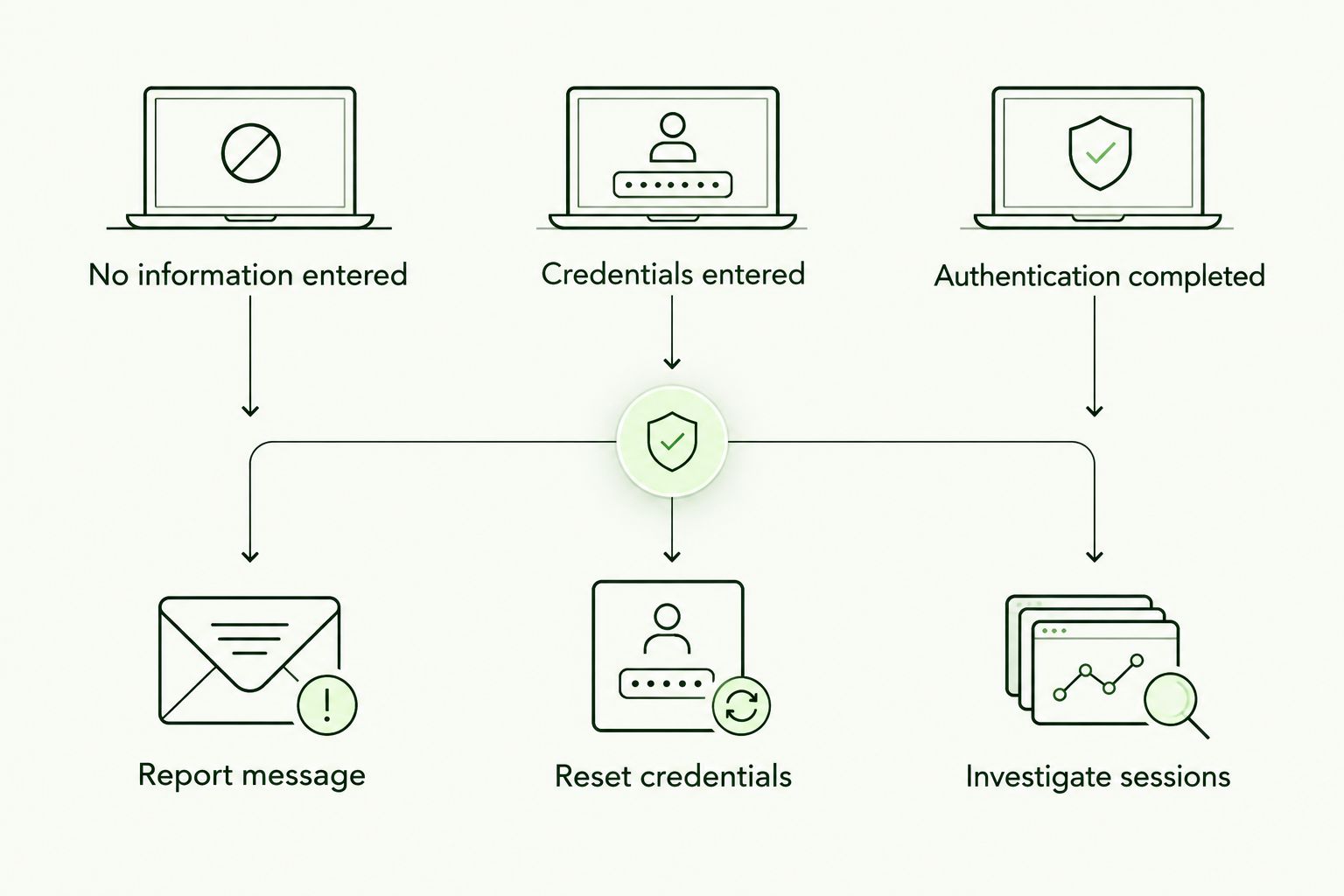
The response depends on what the employee submitted, not just what the message looked like.
Make the reporting experience direct and blame-free. Ask what happened, record the answer, and start containment. Do not make the employee wait for a training assignment before the security team handles the account.
What should an MSP record as compliance evidence?
Record 4 evidence fields for each relevant report: the message, the interaction, the affected account, and the response. Together, they describe what happened and what your team did about it.
- Message: Preserve the suspicious communication through your approved reporting process, including relevant sender and delivery information.
- Interaction: Record whether the employee opened the link, entered credentials, supplied a code, or approved authentication.
- Affected account: Identify the service and account involved without asking the employee to put passwords or verification codes into the incident ticket.
- Response: Record containment actions, investigation findings, and any required follow-up.
Keep training evidence separate from incident evidence. Completion shows participation in a lesson. It does not prove that an account was protected, that every employee recognized a phishing attempt, or that an incident was contained.
For 2026 client reporting, describe the control accurately. Report training activity as training activity, authentication deployment as authentication deployment, and incident response as incident response. Do not combine them into an unsupported claim that the client is phishing-proof or compliant with every requirement.
Is white-label training enough to stop credential theft?
White-label training is not enough by itself. It teaches people what to do; it does not independently enforce phishing-resistant authentication or invalidate an attacker-controlled session.
Defend Wise security awareness training is best for MSPs that want a white-label training platform without per-seat billing. Its flat-fee, unlimited-seat model addresses seat-count friction, while the MSP still needs to define the identity controls and response responsibilities surrounding training.
The advantage is a training service designed for MSP delivery. The boundary is equally important: do not sell training completion as proof that fake login phishing cannot succeed. Build the client offering around education, authentication, and response as distinct responsibilities.
FAQ
What does CISA recommend for fake login phishing in 2026?
CISA recommends recognizing and reporting phishing, avoiding suspicious interactions, and adopting phishing-resistant MFA. Apply those principles by opening services independently rather than signing in through unexpected messages.
Can a fake login page steal my MFA code?
A fake login page can collect a verification code that you type into it. Some phishing attacks relay authentication interactions, which is why CISA recommends phishing-resistant methods such as FIDO/WebAuthn.
Does the padlock mean a login page is safe?
The padlock does not prove a login page belongs to the organization it imitates. HTTPS protects the connection to that website; verify the destination through a trusted route before entering credentials.
What should I do if I entered my work password on a fake page?
Report the exposure immediately and use your organization's trusted account-recovery process. The security team should address the exposed password and investigate account access, including sessions when relevant.
Is a security key better than a text-message code for phishing?
A FIDO/WebAuthn security key provides phishing resistance that a text-message verification code does not. Application support, enrollment, and recovery still need management.
Should I delete a phishing email before reporting it?
Report the phishing email through your organization's approved process before deleting it. Preserve the information your security team needs without forwarding the message casually to colleagues.
Can Defend Wise replace phishing-resistant MFA?
Defend Wise cannot replace phishing-resistant MFA with security awareness training. Training addresses employee decisions; authentication controls protect the sign-in process, and incident response handles suspected compromise.
One last thing
The most convincing fake login page can look ordinary. Stop making appearance the deciding test.
For your next 2026 employee lesson, give the learner a credible-looking request and ask for the next action, not a list of suspicious design details. The correct action is to open the service independently and verify the task. Then make sure the reporting instructions explain what to do if the learner has already entered a password or approved authentication.
That is the useful boundary between awareness and protection: employees verify and report; your identity and response controls handle the account.