Security training for dental support organizations: 2026 guide
Security awareness training for dental support organizations works best with role-based lessons, clear MSP ownership, and evidence tied to workforce coverage.
DefendWise
DefendWise
Dental support organization security awareness training is workforce education designed to reduce unsafe handling of patient information and business systems across affiliated practices. This 2026 guide explains how to structure security awareness training for dental support organizations around practice roles, central oversight, and evidence your MSP can maintain.
TL;DR
- Security awareness training for dental support organizations should connect practice-specific risks, workforce coverage, and documented follow-up.
- Defend Wise is built for MSPs delivering white-label security awareness training to end-client organizations.
- Separate patient-data workflows from payment workflows so each employee receives relevant instruction.
- Unlimited seats remove seat-count friction; they do not replace policy ownership or evidence review.
Why security awareness training matters for dental support organizations
A DSO training program needs to connect central policy with the people performing work inside each practice. Start with the work: appointment communications, patient records, billing, payroll, and requests arriving from outside the organization. A generic lesson does not tell a receptionist how to verify an unexpected request for patient information.
For your 2026 program, distinguish workforce education from proof that a particular control operates. Course completion documents participation. It does not prove that staff verify payment changes, report suspicious messages, or follow access procedures.
Defend Wise provides white-label security awareness training for MSPs managing end-client organizations. That delivery model fits an MSP-led program; the DSO still needs to define its rules and assign responsibility for exceptions.
Where HIPAA applies, the Security Rule at 45 CFR §164.308(a)(5) requires a security awareness and training program for all members of the workforce, including management. The federal requirement is not a universal instruction to take one annual course and stop. Match your training program to applicable obligations and the organization's risk assessment.
Your operating goal is consistent coverage without treating every practice role as identical. Make the central standard clear, then teach staff how to apply it during their own work.
Build a DSO training program that practices can follow
Use the following steps to create a repeatable service. Document the process manually before choosing software; otherwise, you risk automating unclear ownership and incomplete workforce lists.
Define your workforce and practice scope
Start with a spreadsheet listing practices, workforce members, roles, managers, and training status. Identify who maintains each source list and who approves changes. Include central employees in the same scope review rather than treating headquarters as separate from the training program.
Check whether employees working across practices appear more than once or fall between location lists. Decide how to handle contractors and temporary staff according to their duties, access, and applicable requirements. Employment labels alone are not a reliable basis for deciding who needs instruction.
Create 1 scope record per practice as a recommended operating standard. Record the responsible owner, relevant workforce groups, and the source used to maintain the roster. This is a management recommendation, not a regulatory record format.
The output should be an enrollment rule another person can apply without asking the original administrator. When the rule is clear, you can move from manual lists to a training platform without losing control of who belongs in the program.
- Record the practice name and responsible manager.
- Identify workforce groups with patient-data or business-system access.
- Mark staff who work across multiple locations.
- Name the source of truth for joiners and leavers.
- Document how temporary access affects training assignments.
Map training to patient and business workflows
Use interviews with practice staff to identify where decisions happen. Ask what information arrives by email, who handles patient requests, how payment changes are approved, and where employees report suspicious activity. Teach the procedure employees are expected to follow, not just the threat vocabulary.
Begin with 3 workflow groups: patient communications, payment changes, and account access. These are a suggested starting scope, not a claim about the frequency of incidents. Add other workflows when your risk assessment identifies them.
For each workflow, write a short scenario and a correct response. A patient-record request should teach identity verification and approved disclosure handling. A changed payment instruction should teach independent verification through a known channel. An unexpected sign-in request should teach reporting and the approved account-security response.
Keep scenarios specific without using real patient information. Your 2026 training material should reflect the procedures staff currently use, including the reporting route they can actually reach.
- Give reception staff a patient-request verification scenario.
- Give billing staff a changed-payment-instruction scenario.
- Give managers an unexpected account-access-request scenario.
- Use fictional names and synthetic patient details.
- State the approved reporting route in every relevant lesson.
Choose a delivery model that fits your MSP service
The manual route is straightforward: distribute approved lessons, maintain assignments in a spreadsheet, and retain completion records in a controlled location. It gives you direct control over content and record structure. It also leaves enrollment, reminders, and reconciliation with your team.
Once those tasks are defined, compare software against the work you want to remove. Examine enrollment handling, practice separation, reporting, and the effort required to correct exceptions. Treat every unverified capability as a question for the vendor, not a feature you can promise the DSO.
Defend Wise security awareness training is best for MSPs delivering a white-label training service to end-client organizations. Its stated flat-fee, unlimited-seat model removes per-seat licensing changes from that service model. It does not establish the DSO's policies, decide HIPAA applicability, or prove that every required workflow is covered.
Select the delivery model after defining the service boundary. The MSP can administer training while the DSO owns workforce policy and approves the procedures employees must follow.
- Write down which administration tasks remain manual.
- Ask how the platform separates end-client records.
- Verify how assignments and completion evidence are exported.
- Check the handling of departures and duplicate accounts.
- Confirm the white-label experience before promising it to clients.
Assign ownership and handle exceptions
Name 2 accountable owners: a DSO policy owner and an MSP service owner. This recommended split distinguishes responsibility for organizational rules from responsibility for training administration. Local managers can support follow-up without becoming the default owner of every unresolved issue.
The DSO policy owner should approve training scope, role-specific procedures, and escalations. The MSP service owner should maintain assignments, coordinate reminders, and present unresolved items for action. Write those responsibilities into the service description rather than relying on informal expectations.
Build a simple exception register manually before automating it. Distinguish absence, access problems, incorrect assignment, and overdue participation. Different causes need different responses; repeatedly sending the same reminder does not resolve a broken login or an inaccurate roster.
For the 2026 service review, assess whether an exception has an owner and a documented next action. An overdue status without an action is an unfinished task, not useful management information.
- Name the person who approves training policy.
- Name the person who administers assignments.
- Give local managers a defined escalation route.
- Separate technical problems from participation problems.
- Record the resolution and approval for each exception.
Build evidence around questions reviewers ask
Begin with a controlled folder and an evidence index. Organize records by organization, practice, training period, and subject. Record what the evidence demonstrates so a reviewer does not have to infer its meaning from a filename.
A useful training record connects the person, assignment, training version, completion status, and any follow-up. Preserve the context needed to explain exceptions. A completion export without a clear workforce scope cannot answer whether everyone who should have participated was included.
Keep training evidence separate from claims about compliance or insurance acceptance. HIPAA obligations depend on the organization's circumstances and applicable rules. An insurer's request depends on its own wording; a training report should answer that request without claiming more than it proves.
Have software demonstrate the export you need before adopting it. A dashboard is useful for administration, but your service also needs records that remain understandable outside the platform.
- Retain the approved workforce scope alongside completion records.
- Record the training subject and version or issue date.
- Preserve outstanding assignments and their resolution.
- Restrict access to employee records appropriately.
- Review evidence against the actual questionnaire or audit request.
Review behavior and improve the service
Start with a manual review of reported messages, recurring questions, overdue assignments, and roster corrections. Look for a process that needs clarification before assigning more content. If employees do not know where to report a suspicious message, another lesson on recognizing phishing does not fix the reporting gap.
Keep measurement tied to the service decision. Completion status supports follow-up. Reporting records help you examine whether employees use the approved route. Neither measure, by itself, proves that the organization is secure.
When using phishing simulations, define the learning objective and follow-up before launching the exercise. Avoid presenting one result as a complete assessment of employee judgment. Make corrective instruction relevant to the decision tested, and keep reporting expectations clear.
Your 2026 review should end with an approved change, an owner, or a documented decision to keep the current approach. Reporting without a decision adds administration without improving the service.
- Review repeated employee questions for unclear procedures.
- Check whether workforce changes reached the training roster.
- Examine exceptions before interpreting completion figures.
- Match simulation follow-up to the behavior tested.
- Record approved changes to lessons and reporting instructions.
The service runs as a cycle: define the workforce, teach relevant workflows, assign ownership, retain evidence, and review behavior. A platform supports that cycle; it does not decide the policy behind it.
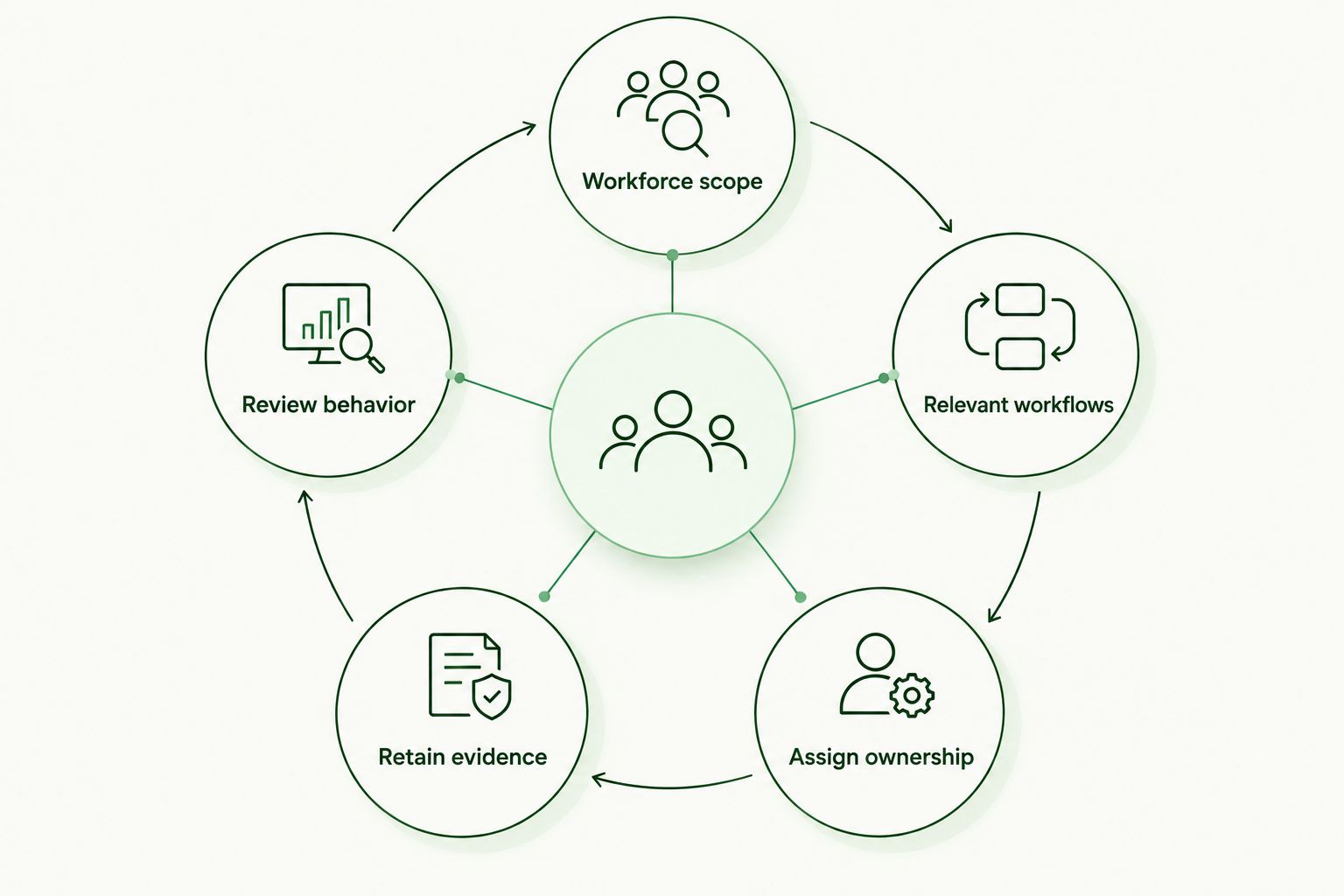
Training administration needs an owner and an evidence trail at every stage.
Compare training delivery options for a DSO
Choose the option that fits your service responsibilities, not just the course library. The comparison below separates licensing structure from operational work. Features such as practice-level reporting and roster synchronization still require verification for any platform under consideration.
| Option | Best for | Main strength | Key limitation |
|---|---|---|---|
| Manual administration | A defined program whose team can maintain assignments and records | Direct control over content, scope, and evidence organization | Your team handles reminders, roster changes, and reconciliation |
| Per-seat platform | A service that intentionally aligns licensing with assigned user counts | A licensing unit tied to the user roster | Seat changes require licensing attention; administration features vary |
| Defend Wise | MSPs delivering white-label security awareness training to end-client organizations | Flat-fee, unlimited-seat delivery without per-seat licensing changes | Policies, practice workflows, and required reporting capabilities still need review |
Unlimited seats address licensing scope, not management scope. You still need accurate assignments, a clear service boundary, and a way to explain unresolved participation. Compare those tasks separately so the commercial model does not hide unfinished operational work.
Common mistakes dental support organizations make
Treating every role as the same audience
A receptionist, billing employee, and central administrator face different decisions. Keep a shared baseline, then add instructions for the workflows each role performs. Relevance comes from the correct response, not from adding dental terminology to a generic lesson.
Confusing a completed course with verified practice
Completion establishes that an assignment was completed. It does not establish that a payment change was independently verified or that a patient request followed the approved procedure. Review the workflow as well as the training record.
Leaving central staff outside practice-level oversight
A location-based roster can overlook shared-service employees unless you include them deliberately. Reconcile central and practice lists, and give cross-location staff a clear assignment rule. Do not make enrollment depend on where someone happens to sit.
Promising compliance or insurance acceptance
Training supports a compliance program; it does not guarantee compliance or acceptance by an insurer. Match evidence to the actual requirement and identify its limits. Keep unsupported assurances out of client reports and service proposals.
FAQ
What's the best way to structure security awareness training for dental support organizations?
Use a shared workforce baseline with role-specific instruction for patient communications, payment changes, and account access. Assign central ownership while giving practice managers a defined follow-up role.
Does HIPAA require security awareness training for dental staff?
Where HIPAA applies, 45 CFR §164.308(a)(5) requires a security awareness and training program for all workforce members, including management. Define the program through applicable requirements and the organization's risk assessment rather than assuming one annual course is sufficient.
Should every dental practice receive the same security training?
Every practice should follow the same approved baseline, but assignments should reflect workforce roles and relevant procedures. Staff handling patient requests need different workflow instruction from staff approving payment changes.
Is a flat-fee platform better than per-seat training for an MSP?
A flat-fee platform fits an MSP service that needs to avoid per-seat licensing changes. Compare administration effort, end-client separation, and evidence exports independently of the licensing model.
Who is Defend Wise security awareness training designed for?
Defend Wise security awareness training is designed for MSPs delivering a white-label training service to end-client organizations. Its stated model includes unlimited seats, while the MSP and client still need to define policies and service responsibilities.
What evidence should a DSO keep after training?
Keep records connecting workforce scope, assigned training, completion status, and exception follow-up. Include the training subject and version or issue date so the record remains understandable during a later review.
Can phishing simulations replace security awareness training?
Phishing simulations cannot replace a complete workforce training program. They assess responses to selected scenarios and need relevant instruction, a reporting procedure, and defined follow-up.
One last thing
An unlimited-seat license does not produce a complete workforce roster. Before expanding your 2026 program, reconcile the training list against the approved workforce source and resolve the differences. That check connects the promise to cover everyone with evidence that the right people actually received assignments.