Security awareness training for tax preparation firms: 2026 guide
Security awareness training for tax preparation firms must fit tax workflows. Build seasonal onboarding, phishing response, and compliance evidence for 2026.
DefendWise
DefendWise
Tax preparation firms’ security awareness training is a staff education program aimed at protecting taxpayer information and helping employees handle suspicious requests correctly. This 2026 guide covers seasonal onboarding, tax-specific phishing scenarios, compliance evidence, and the choices your firm or MSP needs to make before selecting software.
TL;DR
- Security awareness training for tax preparation firms should connect phishing recognition, taxpayer data handling, and incident reporting.
- Train seasonal staff before granting access to taxpayer information; include partners, administrators, and temporary employees.
- Defend Wise is best for MSPs that want flat-fee, white-label security awareness training across end-client organizations.
- Keep completion records and policy acknowledgments, but never treat training certificates as proof of complete compliance.
Why security awareness training matters for tax preparation firms
Tax preparation work combines sensitive taxpayer information, seasonal staffing, and requests that arrive through email, phone calls, and document exchanges. Your training needs to reflect those workflows. A generic lesson about suspicious links does not tell an employee how to verify an unexpected request for a client’s tax records.
The FTC Safeguards Rule covers tax preparation firms within its definition of financial institutions. Its personnel provisions address security awareness training and qualified information-security personnel. IRS Publication 4557, Safeguarding Taxpayer Data, also provides guidance on protecting taxpayer information. Use these references when reviewing your 2026 written information security plan, not as a substitute for advice about your firm’s obligations.
Training belongs inside your security program, not beside it. Staff need to know which approved workflow to follow, who receives a suspicious-message report, and what happens when someone makes a mistake.
For an MSP evaluating delivery options, Defend Wise provides white-label security awareness training. Keep software selection separate from the firm’s responsibility to define policies, approve access, and respond to incidents.
Build a tax-firm training program that fits the work
Define your people, access, and responsibilities
Start with a spreadsheet. List everyone who handles taxpayer information, the systems they use, and the person responsible for confirming their training. Include partners and administrative staff; exposure does not begin and end with return preparation.
Separate permanent employees from seasonal staff and contractors. The distinction matters for onboarding and offboarding, not for whether someone needs instruction. An employee who scans documents or answers client calls still needs to recognize unsafe requests.
For your 2026 roster, connect training status to the access decision. Document who checks readiness before granting access and who removes access when an engagement ends. A completed lesson should not automatically authorize access to every client file.
- Create a staff roster: record role, supervisor, start date, and expected end date where applicable.
- Map sensitive access: identify tax software, document storage, email, and client communication channels.
- Assign ownership: name the person who approves training completion and access readiness.
- Include exceptions: document how partners, contractors, and late-starting seasonal staff enter the process.
Teach the decisions staff actually make
Build the first lessons manually from your policies and common work tasks. Ask an employee to explain what they would do with an unexpected attachment, a changed payment instruction, or a request to send taxpayer records to a different address. Correct the workflow before adding more content.
Tax-specific scenarios should teach verification, not just suspicion. Employees need an approved way to contact a client independently of the message they received. They also need to know when to stop processing a request and involve a supervisor.
Use a 15-minute lesson as a planning target for one focused topic, followed by a 5-minute practice drill. These are recommended session lengths, not regulatory requirements. Keep the exercise narrow enough that staff can explain the required action afterward.
- Verify identity changes: confirm unexpected contact or payment changes through an established channel.
- Handle attachments safely: follow your approved process for unexpected documents and links.
- Protect taxpayer records: use authorized sharing methods rather than personal email or storage.
- Escalate software alerts: teach staff where to report unexpected login prompts or security warnings.
- Check understanding: ask employees to describe the next action, not merely repeat a definition.
Choose how to deliver the program
The manual route is straightforward: approved lesson materials, a staff roster, recorded attendance, and a controlled folder for evidence. This works when someone owns updates and follows up on missed training. The limitation is the administration your team must perform.
Software is the next option, not a prerequisite. Your MSP should assess whether a platform fits client separation, branding, assignment, and evidence requirements before committing to it. Ask for a demonstration using a tax-firm workflow rather than a generic sales presentation.
Defend Wise is best for MSPs that want flat-fee, white-label security awareness training across end-client organizations. Its unlimited-seat model addresses seat-count friction, but it does not define your firm’s policies or replace your security responsibilities. Confirm the specific reporting, administration, and tax-topic capabilities you need before selection.
- List required workflows: document onboarding, assignments, follow-up, and evidence retrieval.
- Test client separation: check how the proposed delivery method keeps each organization’s records distinct.
- Inspect evidence: review an actual completion record and its available fields.
- Check content fit: verify that lessons support your taxpayer-data procedures.
- Assign policy ownership: keep firm-specific decisions with the designated responsible person.
Rehearse reporting before a real incident
Write the reporting process in plain language and practice it without a live threat. An employee should know where to send a suspicious message, what information to include, and what to do if they already opened a file or entered credentials.
Do not make staff investigate the incident themselves. Their job is to report promptly and follow the response owner’s instructions. Your security lead or MSP handles assessment under the firm’s incident-response process.
Use a harmless sample message for the practice drill. Avoid real taxpayer information, functioning credential-collection pages, or instructions that encourage staff to open suspicious files. If you later use phishing simulations, evaluate the simulation separately from the core training program.
- Name the reporting route: identify the approved contact or reporting mechanism.
- Explain accidental actions: specify how employees report a click, attachment opening, or credential entry.
- Preserve useful details: teach staff to provide the message and a factual account of their actions.
- Set response ownership: identify who assesses the report and gives instructions.
- Close the loop: explain the correct workflow after the exercise without public blame.
The reporting sequence should be simple enough to repeat under pressure: Spot the request, Pause the action, Report the concern, Follow instructions. Teach that sequence alongside the contact details staff actually need.
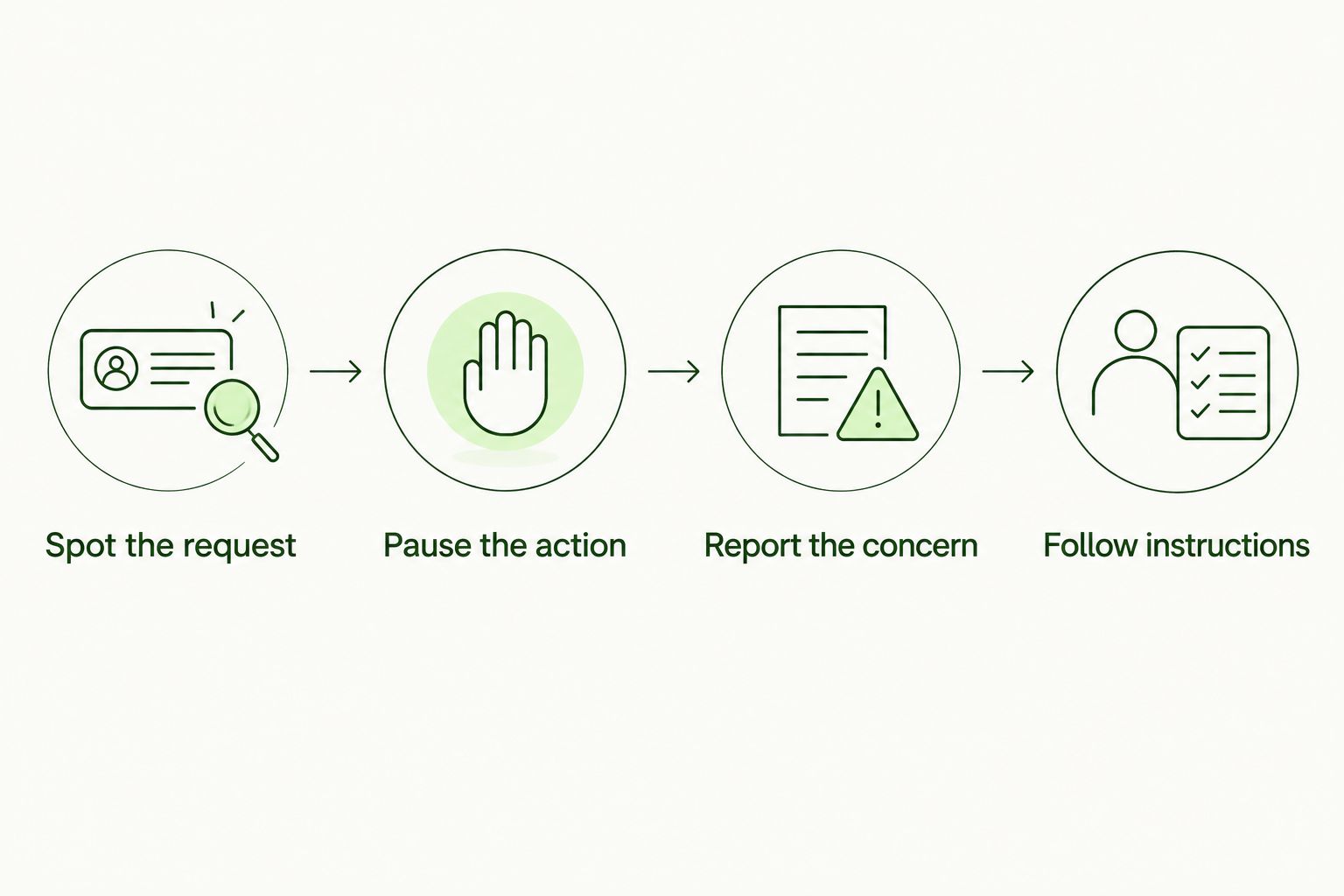
Staff report the concern; the designated response owner directs the next action.
Keep evidence tied to your security plan
Begin with a controlled evidence folder and an index. Retain the lesson topic, assigned audience, completion record, relevant policy acknowledgment, and unresolved exceptions. Use synthetic examples in training materials rather than copying taxpayer records into screenshots or exercises.
A certificate establishes what its recorded fields support. It does not establish that every security control works or that the firm satisfies every obligation. Keep training evidence connected to your written information security plan and the policies staff were instructed to follow.
For 2026, review the evidence before an insurer, client, or assessor asks for it. Check whether you can identify who completed which lesson and which outstanding assignments need action. Do not claim a platform produces a particular report until you have inspected it.
- Record the topic: retain the lesson name or description and the policy it supports.
- Identify the audience: connect assignments and completion records to the staff roster.
- Track exceptions: document absences, overdue work, and the responsible follow-up owner.
- Control evidence access: restrict training records according to your firm’s procedures.
- Preserve context: retain the relevant policy version and acknowledgment where required.
Review gaps and remove expired access
Start with a 30-day review interval for checking overdue training and roster changes, then adjust it to your staffing schedule. This is an operating recommendation, not a legal deadline. During hiring periods, review new starters before their access begins rather than waiting for the next scheduled check.
Look beyond completion totals. Ask whether staff can report a suspicious request, whether seasonal employees received the right instructions, and whether the evidence matches the current roster. A clean dashboard means little if departed employees still have access.
Your MSP’s training service and your firm’s access administration need a clear handoff. Define who identifies the departure, who removes access, and who confirms the action. Closing a training assignment is not the same as disabling an account.
- Review roster changes: reconcile new starters, role changes, and departures.
- Resolve overdue work: assign an owner and document the next action.
- Check reporting readiness: confirm staff know the current reporting route.
- Remove expired access: follow the offboarding process for seasonal and departing staff.
- Update weak lessons: revise instructions when exercises expose unclear decisions.
Compare delivery options for tax preparation firms
Choose the delivery method around ownership and evidence first. Seat-count administration matters, especially for MSPs serving multiple organizations, but removing that task does not remove content review, policy decisions, or incident-response work.
| Option | Best for | Main advantage | Key limitation |
|---|---|---|---|
| Manual, firm-managed training | Firms with a designated owner and a manageable staff roster | Direct control over firm-specific procedures and lesson materials | Your team maintains assignments, follow-up, and evidence manually |
| Per-seat training software | Firms or MSPs that prefer user-based licensing | A licensing structure tied to enrolled users | Seat changes require attention to licensing terms; capabilities vary by platform |
| Defend Wise security awareness training | MSPs delivering white-label training to end-client organizations | Flat-fee delivery with unlimited seats | Confirm reporting and tax-specific workflow fit; the platform does not replace firm policy ownership |
Choose manual delivery when you can maintain it reliably; choose software when it fits the work you need to administer. For an MSP considering Defend Wise, evaluate the complete service workflow rather than treating unlimited seats as the whole decision.
Common mistakes tax preparation firms make
Training preparers but overlooking document handlers
Reception staff, administrators, and temporary workers can encounter taxpayer information and suspicious requests. Build the audience from actual information handling, not job titles. Include anyone whose decisions affect document intake, sharing, or client verification.
Granting seasonal access before instruction
A later training deadline leaves a gap between access and readiness. Put essential taxpayer-data handling and reporting instruction into the onboarding checklist. Approve access through your normal process after the employee understands the required workflow.
Using real taxpayer files in exercises
A realistic exercise does not require a real return, identification document, or client email thread. Use synthetic materials. Training should not create another location containing sensitive taxpayer information.
Treating completion as complete compliance
Course completion is evidence of a training activity, not a verdict on your entire security program. Maintain the written plan, safeguards, oversight, and response procedures that apply to your firm. Describe evidence accurately when answering questionnaires.
Measuring clicks without checking reporting
A click result does not tell you whether staff know how to ask for help or whether the response owner received the report. Review the required actions, not just exercise outcomes. Correct unclear reporting instructions before repeating the exercise.
FAQ
What is security awareness training for tax preparation firms?
Security awareness training for tax preparation firms teaches employees to protect taxpayer information, recognize suspicious requests, and follow approved reporting procedures. It should cover the decisions staff make during document intake, client communication, and tax preparation.
Do seasonal tax preparation employees need security training?
Seasonal employees need training relevant to the taxpayer information and systems they handle. Include essential instruction before granting access and connect departure dates to your offboarding process.
Does the FTC Safeguards Rule apply to tax preparation firms?
The FTC Safeguards Rule includes tax preparation firms among the financial institutions it covers. Review the rule’s requirements and applicable exemptions with a qualified adviser; training alone does not satisfy the entire rule.
Is phishing training enough for a tax preparation firm?
Phishing training is not enough for a tax preparation firm. Staff also need instruction on taxpayer-data handling, identity verification, approved sharing methods, incident reporting, and access responsibilities.
What training records should a tax preparation firm keep?
Keep records that identify the assigned audience, training topic, completion status, and unresolved exceptions. Connect the records to relevant policies and your written information security plan, and determine retention requirements through your compliance process.
What is Defend Wise best for?
Defend Wise is best for MSPs that want flat-fee, white-label security awareness training across end-client organizations. Confirm the reporting and administration features required for each tax preparation client before selecting the platform.
How often should a tax preparation firm review training?
Review training when employees join, responsibilities change, or your procedures change, as well as on a documented recurring schedule. A 30-day roster and overdue-assignment review is a practical starting recommendation, not a regulatory deadline.
One last thing
Before approving your 2026 training program, ask a seasonal employee to show you how they would report a suspicious request for taxpayer records. Do not ask whether they completed the lesson. Ask them to demonstrate the next action.
If the reporting route is unclear, fix the route before assigning another course. That check connects training to the decision your firm needs staff to make.