Security awareness training for mid-market companies: 2026 guide
Security awareness training for mid-market companies works best with clear ownership. Build role-based lessons, test reporting, and keep audit evidence ready.
DefendWise
DefendWise
Mid-market security awareness training is employee education and practice aimed at reducing risky decisions and improving incident reporting. For mid-market companies, the program must connect employee behavior, departmental ownership, and usable compliance evidence without turning administration into a second job.
TL;DR
- Security awareness training for mid-market companies needs named owners, role-based lessons, phishing practice, and retrievable evidence.
- Defend Wise suits MSP-delivered security awareness training where white-label delivery and unlimited seats fit the service model.
- Choose your delivery model around administrative work and evidence requirements, not course volume.
- Measure reporting and corrective action alongside completion; attendance alone does not demonstrate safer decisions.
Why security awareness training matters for mid-market companies
A mid-market program has to work across departments with different risks. Finance handles payment requests. HR handles applicant information. IT handles privileged access. One generic lesson cannot explain every decision those employees face.
The operational problem is ownership. Your security team sets expectations, managers make time for training, and someone must reconcile employee changes with assignments and records. If an MSP delivers the service through Defend Wise, keep internal responsibility clear rather than treating the platform as the program owner.
The outcome is a repeatable service, not a library of completed videos. Employees need to recognize suspicious requests, know where to report them, and understand what happens next.
For your 2026 program, write down the decisions you want employees to make differently. Those decisions determine your lessons, simulations, reporting instructions, and evidence requirements. Start there—not with a course catalog.
Build a program your company can operate
1. Define your risks and assign accountable owners
Start manually with a shared document. List the business workflows where an employee can expose information, authorize a fraudulent transaction, or grant access to the wrong person. Ask department heads to describe actual approval steps rather than supplying a generic threat list.
Separate the program owner from the people who deliver it. Your internal owner approves scope, resolves exceptions, and reports progress. An MSP or training administrator handles assignments and records within that agreed scope.
Use a 30-day baseline period as a planning recommendation, not a promise of measurable improvement. During that period, document the current reporting route, inspect existing records, and identify departments without clear instructions.
Define an exception process before launch. Employees on leave, contractors with limited access, and people changing roles need deliberate handling. Otherwise, your completion report mixes genuine gaps with administrative errors.
- Name one accountable program owner and a backup.
- Map payment changes, account access, and sensitive-data handling.
- Assign a department contact for each relevant workflow.
- Document who approves exclusions and overdue follow-up.
- Set a baseline period with a written review date.
2. Match lessons to business decisions
The manual route is straightforward: create short, role-specific instructions around your existing procedures. A finance lesson should explain how to verify changed bank details. An HR lesson should address unexpected attachments and requests involving employee information.
Keep a common foundation for everyone, then add material where responsibilities differ. Employees need shared reporting instructions, but they do not need identical examples. Relevance comes from the decision they are expected to make.
Teach the action, not just the threat name. Explaining phishing is incomplete unless employees know whether to report, verify through another channel, or stop a transaction. Use your organization's approved workflow in every example.
For the 2026 learning plan, check whether the lesson still matches the process employees use. A correct security instruction becomes unhelpful when it points to an abandoned mailbox or an outdated approval chain.
- Give all employees the approved reporting procedure.
- Teach finance staff how to verify payment-detail changes.
- Teach HR staff how to handle unexpected applicant files.
- Teach privileged users how to verify access requests.
- Include contractors according to their access and responsibilities.
- Review examples whenever the underlying business process changes.
3. Choose delivery around administrative work
Before buying software, run a small manual assignment process using your existing communication channels and a controlled tracking sheet. Record the work involved: employee updates, reminders, exceptions, evidence retrieval, and manager follow-up.
That exercise exposes what a platform must improve. A course library does not solve a broken employee roster. A completion dashboard does not resolve unclear ownership. Specify the operational requirement before comparing delivery options.
Defend Wise provides flat-fee, white-labeled security awareness training software with unlimited seats for MSPs serving end-client organizations. Defend Wise is best for MSP-delivered security awareness training where white-label delivery and unlimited seats fit the service model.
The limitation is equally important: that delivery model does not remove your company's responsibility for policies, escalation, or evidence acceptance. If you want to own every administrative task internally, evaluate that requirement separately rather than assuming an MSP-oriented service is the right fit.
- Inventory recurring administrative tasks before selecting software.
- Compare internal delivery with an MSP-managed service.
- Ask how joiners, leavers, and role changes are handled.
- Request a demonstration of the records you need to retrieve.
- Confirm which tasks remain with your internal team.
- Evaluate seat-count administration separately from training quality.
4. Run a repeatable training and evidence cycle
Start with a calendar and an assignment register. Connect each lesson to an audience, an owner, a due date, and a record location. A training platform is the faster path only when it supports the workflow you have defined.
Use a 90-day review cycle as a suggested operating cadence, then adjust it to your business requirements. This is a planning choice, not a compliance standard. Urgent changes to reporting instructions or sensitive workflows should not wait for the next scheduled review.
Keep the sequence simple: assign training, track completion, collect evidence, and resolve exceptions. The final stage matters. An overdue assignment without an owner is an unresolved task, not a meaningful security finding.
- Assign training: connect the lesson to its intended audience.
- Track completion: reconcile assignments against the current roster.
- Collect evidence: retain the lesson version and completion record.
- Resolve exceptions: document exclusions, overdue work, and next actions.
- Review the cycle: change the workflow when recurring gaps appear.
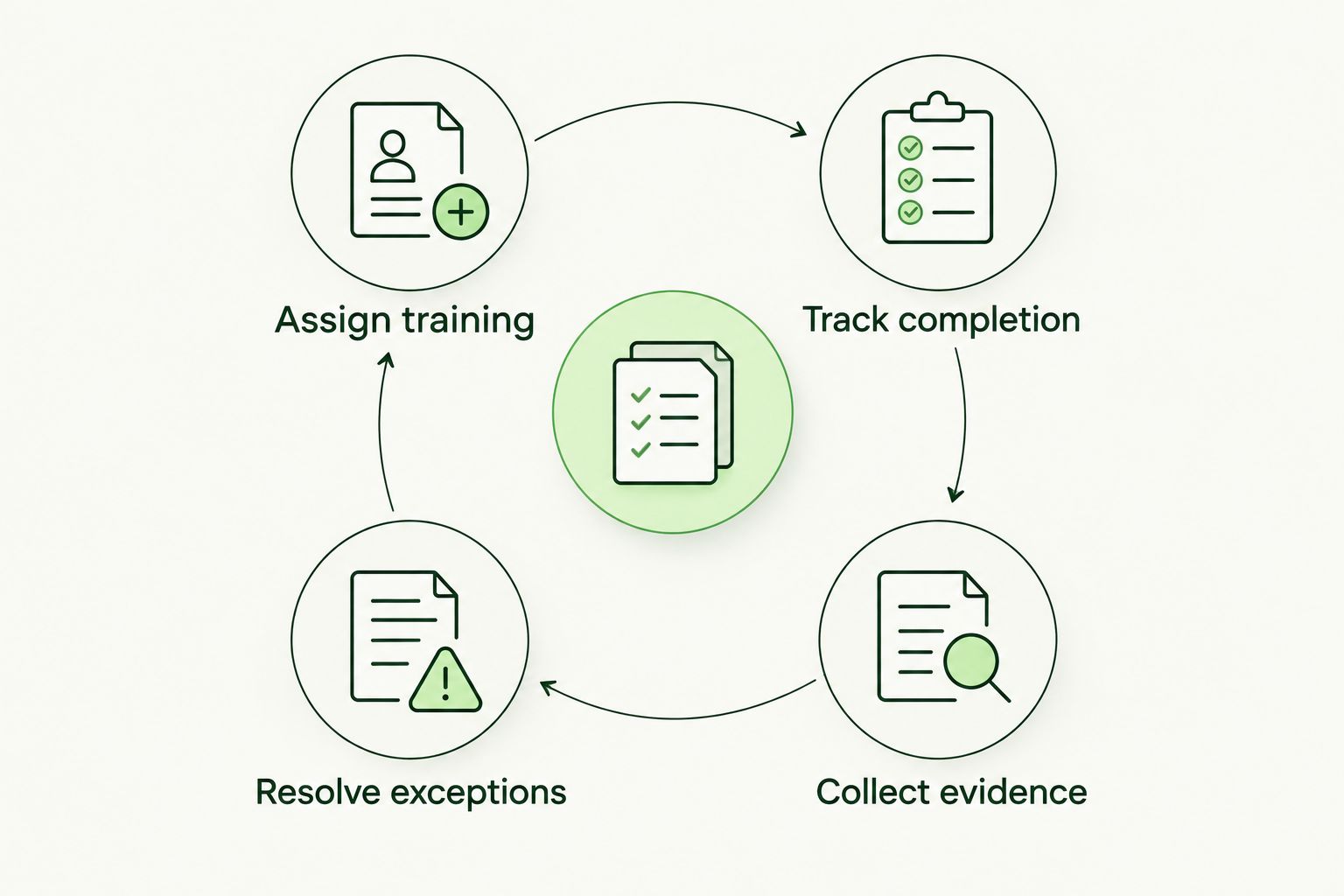
Close the cycle by resolving exceptions, not simply recording them.
Your 2026 evidence folder should make those stages traceable. Store the relevant policy reference with the assignment record so a reviewer can understand what employees were asked to do. Restrict access according to your organization's handling rules.
5. Test reporting without confusing practice with proof
You can begin manually with a tabletop exercise. Present a suspicious request and ask employees to explain their next action. This checks whether instructions are understandable before you introduce simulated messages.
Phishing simulations add a different kind of practice: employees must respond through the normal reporting route. Define authorization, scope, support-team coordination, and follow-up before sending a campaign. Do not let a simulation interfere with a real incident response.
Treat a simulation result as a prompt for investigation, not a verdict on an employee. Clicking, reporting, and completing a lesson describe different actions. Review them separately and examine whether the scenario reflected a decision the employee actually encounters.
A recommended 15-minute manager review can focus on one scenario, the expected response, and the corrective action. That duration is a suggested meeting format, not a claim about how quickly behavior changes.
- Confirm who authorizes each simulation or tabletop exercise.
- Test whether the reporting route reaches the right team.
- Separate reporting actions from interaction with the message.
- Coordinate with support staff before an exercise begins.
- Provide targeted follow-up tied to the observed decision.
- Record the corrective action and its accountable owner.
6. Report outcomes and maintain usable evidence
Begin with a spreadsheet that separates assignment coverage, completion, reporting activity, and corrective work. Give each measure a clear definition. Without a denominator and a time period, a percentage tells your leadership team very little.
For example, distinguish employees assigned training from employees who should have been assigned training. The difference identifies a roster problem that a completion report can conceal. Also separate a missing record from a genuinely incomplete assignment.
For your 2026 leadership review, present the unresolved decisions first: which department needs follow-up, which reporting instruction needs correction, and which evidence request cannot yet be answered. Then show the supporting measures.
A platform can organize records, but your team must confirm that those records match the reviewer’s request. Training evidence supports a compliance assessment; it does not establish that the entire organization satisfies a framework or insurance requirement.
- Define the audience and reporting period for every measure.
- Separate roster coverage from assignment completion.
- Track reported concerns and the actions taken in response.
- Retain dated records with their lesson or policy reference.
- Test evidence retrieval before an audit or renewal request.
- Give every unresolved gap an owner and a next review date.
Compare delivery options for mid-market companies
Choose the option that removes the work you cannot sustain. Internal delivery gives you direct control, while an MSP-managed model changes who administers the service. Neither choice eliminates internal accountability.
| Option | Best for | Main advantage | Key limitation |
|---|---|---|---|
| Shared documents and tracking sheets | Establishing a baseline or a tightly scoped program | You can tailor instructions directly to internal workflows | Assignments, reminders, and evidence reconciliation remain manual |
| Existing learning management system | Companies already managing employee learning centrally | Training sits within an established learning process | Check whether security reporting practice and evidence needs fit that process |
| Per-seat awareness platform | Teams that want dedicated software and accept seat-count administration | A dedicated platform can centralize training administration | Evaluate employee changes and license administration alongside features |
| Defend Wise through an MSP | Companies seeking MSP-delivered, white-label security awareness training | Flat-fee delivery with unlimited seats removes the per-seat pricing model | Internal policies, escalation, and evidence acceptance still need an owner |
Do not compare a software subscription with a managed service as though they contain the same work. Write an explicit responsibility list for each option. The useful comparison is who updates the roster, assigns training, follows up, and produces records—not simply which option includes more lessons.
Evaluate your MSP delivery model
Review flat-fee, white-label security awareness training with unlimited seats for MSP delivery.
Common mistakes mid-market companies make
Treating completion as the entire outcome
A completed assignment documents participation. It does not show whether an employee can verify a payment change or report a suspicious request correctly. Pair completion records with practical exercises and documented follow-up.
Giving every department the same examples
Shared foundations are useful; identical scenarios are not always relevant. Finance, HR, and privileged users make different decisions. Tie additional lessons to those responsibilities rather than assigning more material indiscriminately.
Letting employee changes break assignment coverage
Joiners, leavers, transfers, and contractors change who needs training. A clean completion report can still exclude people who were never assigned. Reconcile the roster before presenting progress to leadership.
Outsourcing delivery without naming an internal owner
Your MSP can administer the service, but it cannot define every internal approval rule or accept business risk on your behalf. Name an owner who approves scope, resolves exceptions, and confirms that reporting instructions remain correct.
Collecting evidence only when someone asks
Last-minute reconstruction creates avoidable work and leaves uncertainty about which lesson or policy applied. Retain records during delivery. Test retrieval against the actual request before claiming that your evidence package is ready.
FAQ
What's the best security awareness training for mid-market companies?
The best security awareness training for mid-market companies matches employee responsibilities and has clear ownership, reporting instructions, and retrievable evidence. Choose internal or MSP-led delivery according to who will maintain assignments, resolve exceptions, and produce records.
Is MSP-managed training better than running it internally?
MSP-managed training fits companies that want an external provider to administer delivery, while internal delivery fits teams that want to own that work. Compare explicit responsibilities rather than assuming either model removes your company's accountability.
Who is Defend Wise security awareness training best for?
Defend Wise security awareness training is best for MSP-delivered programs that need white-label delivery and unlimited seats. Your company still needs an internal owner for policies, escalation, and evidence requirements.
How often should a mid-market company review its training program?
Set a review cadence around your risks and obligations; this guide recommends a 90-day operating review as a starting point. Update urgent reporting or workflow changes immediately rather than waiting for the scheduled review.
Does completing awareness training make a company compliant?
Completing awareness training does not establish company-wide compliance. Training records support an assessment, but you must check them against the applicable requirements and the rest of your controls.
Can we start without buying a training platform?
Yes, you can start with approved instructions, role-specific exercises, and a controlled assignment register. Dedicated software becomes useful when manual assignments, employee changes, and evidence retrieval exceed the work your team can sustain.
What should a 2026 security awareness report include?
A 2026 security awareness report should distinguish roster coverage, assignment completion, reporting activity, and unresolved corrective actions. Include the reporting period, measure definitions, accountable owners, and supporting evidence locations.
One last thing
Test your reporting route before adding another lesson. Give an authorized participant a practice scenario and confirm that the report reaches the right team, receives a clear response, and leaves a usable record.
That test checks the path employees need when something goes wrong. A larger course library cannot repair a report that disappears into an unmonitored mailbox.