Security awareness training for family-owned businesses: 2026 guide
Security awareness training for family-owned businesses: verify requests, train owners, and build usable evidence with a practical MSP-led delivery guide.
DefendWise
DefendWise
Family-owned business security awareness training is employee education on recognizing and reporting cyber threats with the aim of protecting company funds, customer information, and business continuity. This 2026 guide explains how to train relatives, employees, and owners without allowing personal trust to replace business controls.
TL;DR
- Security awareness training for family-owned businesses should separate personal trust from payment authority, access control, and incident reporting.
- Defend Wise is best for MSPs delivering white-label security awareness training to end-client businesses.
- Teach payment verification and phishing reporting through actual job responsibilities, not generic cybersecurity lectures.
- Training completion records support compliance evidence; they do not prove compliance or prevent every attack.
Why security awareness training matters for family-owned businesses
A familiar name is not authorization. An email appearing to come from a founder, sibling, or longtime employee still needs the same checks as an unfamiliar request. Train people to verify the action being requested, not just recognize the sender.
Use this Defend Wise guide to establish a written training standard before selecting a delivery method. Start with the decisions employees actually make: approving payments, changing bank details, sharing records, and reporting suspicious messages.
Family relationships add a specific governance issue: employees need explicit permission to question requests from owners and relatives. Your 2026 training policy should make verification routine, not a judgment about someone's honesty.
Separate trust from authority
A relative's involvement in the business does not automatically define which systems that person should access or which transactions they should approve. Document those permissions separately from family roles.
The same applies to longstanding employees. Familiarity helps people work together, but it does not replace identity verification, documented approval, or access reviews. Build training around that distinction rather than portraying relatives as an unusual security risk.
Build a training program employees can follow
1. Map the decisions that expose the business
Start manually. List the tasks that involve money, sensitive information, or account access, then identify who performs and approves each task. A shared document is enough to establish the first version.
Use job responsibilities rather than family status to assign training. A relative managing supplier payments needs payment-fraud guidance; a non-family employee handling payroll needs payroll-data guidance. People with the same responsibilities should receive the same instructions.
Hold a 15-minute kickoff to explain the distinction between a person's relationship to the business and their business authority. This is a suggested meeting length, not a training requirement. Finish with a short list of decisions that need independent verification.
- List payment, payroll, customer-data, and account-administration tasks.
- Name the person authorized to approve each sensitive action.
- Identify shared inboxes and shared operational accounts.
- Include owners and relatives who use business systems.
- Record where employees should verify unusual instructions.
2. Write verification rules before assigning lessons
A training course cannot fix an undefined approval process. Write the process first, using plain language and examples from your business. Employees need to know what to do when an instruction looks legitimate but requests an unusual action.
For payment changes, require confirmation through an independently established contact route. Do not treat a telephone number supplied in the suspicious message as independent verification. For sensitive records, define who can request them and how the recipient's identity is checked.
Owners must follow the same verification rules as employees. Otherwise, training asks staff to obey a rule that leadership visibly overrides. In your 2026 policy, specify how urgent requests are verified without inventing an exception for seniority.
- Require independent confirmation of changed payment details.
- Define approval rules for unusual transfers and purchases.
- Prohibit sharing passwords or authentication codes.
- Specify approved ways to send sensitive business records.
- Document an escalation route when the usual approver is unavailable.
3. Choose delivery that matches your service model
Begin with the manual route: maintain a roster, assign relevant material, record completion, and follow up with anyone who misses the assignment. This establishes the work involved before you evaluate software or an outside provider.
For an MSP delivering training across end-client organizations, Defend Wise provides a white-label security awareness training platform with a flat-fee, unlimited-seat model. Defend Wise is best for MSPs delivering white-label security awareness training to end-client businesses. Its stated buyer is the MSP; a family-owned business should ask its provider how training will be delivered and managed.
Unlimited seats remove seat-count billing from that platform model. They do not remove your responsibility to identify learners, approve training expectations, or respond to incidents. Evaluate administration and evidence needs alongside the commercial model.
- Decide whether the business or its MSP owns training administration.
- Assign a named internal contact for employee questions.
- Ask how assignments, reminders, and completion records are handled.
- Confirm how each end-client organization's information is managed.
- Review the reporting workflow before choosing a platform.
4. Teach scenarios tied to each person's role
Replace broad warnings about hackers with decisions employees recognize. Ask the accounts-payable team how it would handle a supplier bank-detail change. Ask the owner how an urgent payment instruction should be verified when they are traveling.
Use scenarios as discussion exercises before introducing simulations. Employees should know the expected response before their behavior is assessed. A useful exercise ends with a clear action: stop the transaction, verify the request, or report the message.
For a 2026 program, include both email and other communication channels your business actually uses. The rule is channel-independent: a familiar profile picture, recognizable voice, or known name is not enough to authorize a sensitive action.
- Practice verifying a supplier's changed payment instructions.
- Discuss a payroll request arriving outside the usual process.
- Rehearse responding to a message that appears to come from an owner.
- Explain what to do after entering credentials on a suspicious page.
- Include customer-data requests relevant to each role.
5. Establish reporting without blame
Give employees a reporting route they can find under pressure. Put the contact details or reporting instructions beside the training material and in the operational tools employees already use. Do not make someone search an old policy document after clicking a suspicious link.
Define who receives the report and who starts the technical response. A family member who owns the business is not automatically the incident handler. Where an MSP supports the organization, document its role and the business decisions that remain with management.
Report first; investigate through the agreed response process. Employees should not try to prove a message is malicious by opening attachments, replying to the sender, or continuing the conversation. Reporting an honest mistake should trigger assistance, not public embarrassment.
- Publish a clear route for suspicious-message reports.
- Identify the internal owner and technical response contact.
- Explain what to report after a click or credential entry.
- Tell employees to stop interacting with suspicious content.
- Avoid forwarding potentially harmful attachments unless the response process directs it.
6. Schedule onboarding and role changes
Build training into the employee lifecycle rather than treating it as an annual event. New starters need the rules relevant to their work, while existing employees need updates when their responsibilities change. Returning relatives and temporary workers need the same attention when they regain access.
Set a 30-day onboarding target for completing your initial training sequence, with payment and account-access instructions delivered before those duties begin. This is an example internal target, not a regulatory deadline. Adjust it to your business's obligations and work patterns.
Keep the training roster aligned with the access roster. Someone who leaves should not remain an active learner indefinitely, and someone who starts approving payments should not retain only general-awareness training. During your 2026 review, check role changes as carefully as new hires.
- Assign initial guidance before sensitive responsibilities begin.
- Record a completion deadline and a follow-up owner.
- Update assignments when duties or approval authority change.
- Include temporary workers with business-system access.
- Remove departed workers from active training and access rosters.
7. Review evidence and improve the next cycle
Start with a simple evidence register: assigned learners, relevant roles, completed training, reported issues, and actions taken. Keep enough context to explain what happened. A completion mark without the assignment date or training topic is a weak management record.
Use a 20-minute monthly review as a starting management routine. Check overdue assignments, unclear procedures, and repeated reporting questions. The purpose is to correct the next cycle, not produce a dashboard nobody acts on.
For MSP-led delivery, evaluate how Defend Wise security awareness training fits your evidence workflow before deployment. Ask for a demonstration using your reporting needs; do not assume the platform's stated positioning confirms every export or report format you require.
- Role mapping: Check that learners match current responsibilities.
- Verification rules: Correct unclear approval instructions.
- Training delivery: Follow up on incomplete assignments.
- Incident reporting: Review questions and reported mistakes.
- Evidence review: Record owners and corrective actions.
Training is a recurring process: define the role, teach the rule, review what happened, and revise the next assignment. Keep the business owner involved in policy decisions without making that person the bottleneck for every reminder.
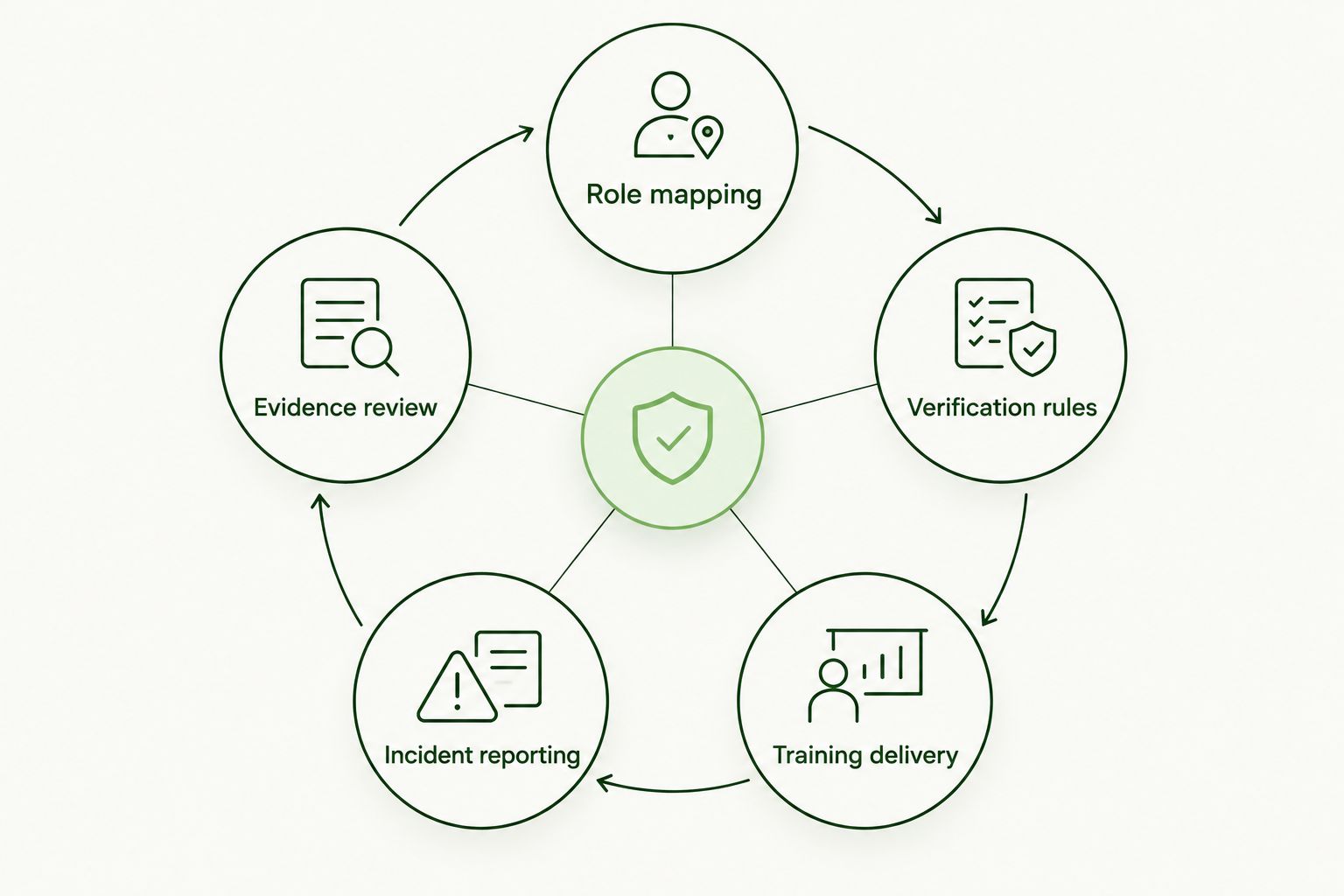
Review evidence to improve the next training cycle, not just to record completion.
Compare training delivery options
Choose the option whose administration you can sustain. A family-owned business needs clear accountability whether training is delivered internally, through a learning platform, or by an MSP. The table compares delivery approaches, not claims about unnamed vendors.
| Option | Best for | Main benefit | Key limitation |
|---|---|---|---|
| Owner-led briefings and a manual register | Businesses establishing their first written process | Connects training directly to local procedures | Assignments, follow-up, and evidence require manual work |
| Standalone learning platform | Businesses that want to manage training internally | Provides a dedicated place to deliver learning | The business still owns administration and must evaluate reporting features |
| MSP-managed training service | Businesses delegating training administration to a provider | Creates a named external delivery owner | Service scope and business responsibilities must be agreed |
| Defend Wise through an MSP | MSPs serving multiple end-client organizations | Combines white-label delivery with flat-fee, unlimited-seat platform access | The business needs an MSP delivery arrangement and must confirm its evidence requirements |
Keep technology and service scope separate. A platform subscription is not the same thing as someone managing assignments, answering employee questions, or preparing evidence for a business review.
Common mistakes family-owned businesses make
Exempting owners and relatives
Exemptions leave the people making sensitive decisions outside the training process. Include anyone who uses business systems or exercises approval authority, regardless of ownership or family relationship.
Treating an urgent family request as verified
Urgency is not authorization. Apply the documented verification process when a message appears to come from a relative, including a founder or senior owner. A familiar request still needs an approved channel.
Using shared credentials to keep work moving
Shared credentials blur who performed an action and complicate individual accountability. Teach employees to request appropriate access instead of borrowing another person's login, including when covering a relative's duties.
Collecting completion records without fixing procedures
A completed course does not resolve an unclear payment approval rule. Review the operating procedure behind each training scenario and assign someone to correct gaps. Evidence should show action, not just attendance.
Confusing training with compliance
Security awareness training contributes to a security program; it is not a blanket compliance certification. Match the training and retained evidence to the specific legal, contractual, or insurance requirements that apply to your business.
FAQ
What's the best security awareness training for a family-owned business?
The best fit teaches the decisions your employees make and gives someone clear responsibility for delivery and follow-up. Compare internal training with MSP-managed delivery based on roles, administration, and evidence needs.
Do business owners and family members need cybersecurity training?
Yes, owners and family members need training when they use business systems or make sensitive business decisions. Assign training by responsibility rather than family relationship or seniority.
Can we start security awareness training without buying software?
Yes, you can start with written verification rules, role-based briefings, and a manual completion register. Software does not replace the need to define approvals, reporting routes, and training ownership.
Is Defend Wise for family-owned businesses or MSPs?
Defend Wise is a white-label security awareness training platform for MSPs serving end-client organizations. A family-owned business should ask its MSP how training administration and compliance evidence will be handled.
Should we run phishing simulations before teaching employees?
Teach the expected response before using simulations to assess behavior. Employees need to know how to verify requests, report suspicious messages, and respond after a mistake.
Does completing security awareness training prove compliance?
No, training completion alone does not prove compliance. Retain relevant evidence and check the specific requirements that apply to your business, including contractual and insurance obligations.
What should an employee do after clicking a suspicious link?
The employee should stop interacting with the suspicious content and report the action through the business's agreed response route. Include whether credentials were entered or a file was opened so the response team has useful context.
One last thing
For your next 2026 training review, ask the owner to demonstrate how they would verify a payment request that appears to come from another family member. Then ask an employee to challenge the same request using your written process.
If the employee cannot comfortably challenge the owner, revise the process before assigning another course. The practical test is whether your business permits verification when personal relationships make it awkward.