Phishing simulation pricing for MSPs: how to compare per-seat, tiered, and flat-fee models
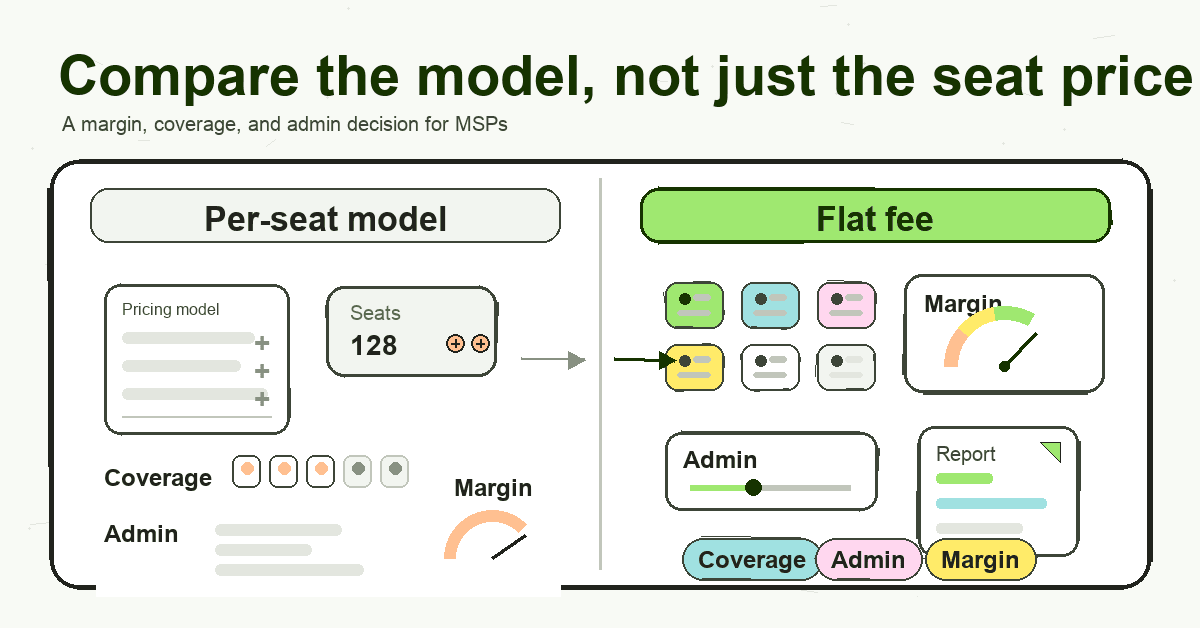
Phishing simulation pricing for MSPs should be judged by margin, coverage, admin load, and client packaging, not seat price alone.
DefendWise
DefendWise
TL;DR
Phishing simulation pricing is not a simple software line item for an MSP. It affects margin, client coverage, packaging, seat-count admin, and how confidently you can include training across your base.
Most phishing simulation and security awareness training tools use some mix of per-user pricing, plan tiers, quote-based contracts, or MSP/reseller pricing. Those models can work, but they need to be judged through an MSP lens: what happens when a client adds 40 users, a seasonal team rolls on, or you want to include training in every managed services package?
For MSPs, the cleanest comparison is not “which tool has the lowest seat price?” It is “which pricing model lets us cover every client user, under our brand, without turning each new seat into a margin event?”
Phishing simulation pricing is really a coverage decision
A single business buying phishing simulation software usually starts with one question: how many employees do we have?
An MSP has a harder question: how many client employees should we include, across how many client organisations, without damaging margin or creating a new admin loop?
That difference matters.
Phishing simulation is meant to help people recognise suspicious messages, report them, and build better habits over time. CISA tells small and medium-sized businesses to train employees to recognise and report phishing attempts, and NIST’s Phish Scale gives practitioners a way to rate the difficulty of simulated phishing emails so results have more context than a raw click rate.
That is the security reason to run the program.
The MSP reason is more commercial. If training is priced per user, every extra employee at every client becomes a cost calculation. The MSP has to decide whether to:
- include training in the managed services package;
- resell it as a separate line item;
- offer it only to larger or higher-risk clients;
- eat the cost for smaller clients;
- or leave some users uncovered because the economics are awkward.
That is why phishing simulation pricing for MSPs should be compared as a coverage model, not just a license model.
Common phishing simulation pricing models
Most public pricing pages and buyer guides fall into 5 broad pricing models. A vendor may use more than one, especially if it sells to both direct businesses and MSP partners.
| Pricing model | How it usually works | Why MSPs look at it | Where it can create friction |
|---|---|---|---|
| Per-user / per-seat | The buyer pays for each learner, mailbox, or licensed employee. | Easy to understand and easy to map to one client’s headcount. | MSP margin changes as users are added. Seat counts need upkeep across many clients. |
| Tiered plans | Features are grouped into plan levels, often with seat ranges or minimums. | Lets buyers pick a package by feature depth. | The MSP may need different tiers for different clients, which complicates packaging. |
| Quote-based enterprise | Pricing is set after sales discovery, usually based on users, features, term, and support. | Can fit complex environments and larger clients. | Slower buying motion. Harder to build a repeatable MSP bundle without a known cost base. |
| MSP / reseller / sub-account | The MSP buys through a partner model, reseller account, pooled usage, subclient seats, or client accounts. | Better fit for multi-client delivery than a single-company plan. | Still may depend on seat mix, client account type, usage bands, or separate client configuration. |
| Flat-fee MSP model | One fixed monthly fee covers the MSP’s users and client organisations within the platform terms. | Predictable cost base. Easier to include training across the client base. | MSP must confirm the flat fee includes the features, white-label, and automation needed for delivery. |
None of these models is automatically wrong. The wrong model is the one that makes you ration training, hide the cost, or rebuild your packaging for every client.
Why per-seat pricing creates MSP friction
Per-seat pricing is familiar because it mirrors how many SaaS products are sold. It can be fair enough when one company buys software for one workforce.
For an MSP, it introduces 4 practical problems.
1. Margin changes when client headcount changes
If a client adds 25 users, the MSP may gain managed services revenue, but the phishing simulation vendor bill may also rise. If that training cost is bundled into an MSA, the MSP either absorbs the extra vendor line item or reopens the client conversation.
That is not always a disaster. It is, however, a pricing dependency the MSP has to track.
A useful test: if a client’s headcount grows 20% tomorrow, does your cost change immediately, at renewal, or not at all?
2. Coverage becomes a budget choice
Good training programs should cover the users who can receive, click, report, forward, or act on suspicious messages. For MSP clients, that often means full-time employees, part-time staff, contractors, shared mailboxes, executives, and seasonal workers.
Per-seat pricing can make that a budget debate.
The MSP starts asking which groups “need” training instead of asking how to make full coverage easier to deliver. That is a business-model problem, not a security practice problem.
3. Client-by-client admin grows quietly
Seat-based tools need accurate user lists. MSPs also need client-level reporting, onboarding, reminders, and evidence for QBRs or audit support.
When that work has to be repeated for each client, pricing is only half the cost. The rest is operational drag: checking seat counts, reconciling billed users, exporting reports, updating client contacts, and explaining why one user group is included while another is not.
A low seat price can still be expensive if it creates recurring delivery work.
4. Packaging gets harder
MSPs sell repeatable service packages. They need pricing and delivery rules that can be explained quickly by sales, delivered consistently by operations, and defended by account managers.
Per-seat phishing simulation pricing often pushes the MSP toward add-ons:
- “Security awareness training is available for $X per user.”
- “Only users in this department are included.”
- “We can add it at renewal.”
- “We need to true-up the user count.”
That may fit some clients. But if the MSP wants training to be part of the standard managed services story, per-seat pricing can work against that packaging.
What MSPs should check before choosing a phishing simulation tool
The buying checklist should go beyond the price page.
Pricing and contract terms
Start with the obvious questions.
- Is pricing per user, per mailbox, per client, per campaign, usage-based, or flat?
- Are there minimums?
- Is the contract monthly, annual, or multi-year?
- Does the price change with features, support, reporting, or content access?
- Are phishing simulations, training modules, reporting, and client management included in the same plan?
If the vendor is quote-based, ask for a scenario-based quote that matches how your MSP sells: number of clients, average users per client, expected growth, and whether every user is included.
Client and subclient handling
An MSP needs more than a single company dashboard.
Check whether the platform supports:
- multiple client organisations under one MSP account;
- separate client reporting;
- client admin access where needed;
- MSP-level templates or settings;
- client-level overrides;
- roll-up reporting across the client base.
If each client has to be treated as a separate account with separate billing, setup, and reports, the platform may be workable but not truly MSP-friendly.
White-label support
If security awareness training is part of your managed services offer, the client experience should support your brand.
Look for white-label support across the surfaces clients actually see:
- portal;
- emails;
- reports;
- certificates;
- client-facing materials;
- sender identity and domains, where supported.
Co-branding may be fine for some MSPs. Others want the vendor to disappear so the MSP stays the security authority in the client relationship.
Onboarding and reporting workload
A pricing model that looks cheap on paper can still fail if setup and reporting consume too much time.
Ask:
- How are users enrolled?
- Does Microsoft 365 or directory sync fit your client base?
- Can you apply templates across clients?
- How are reminders handled?
- Can reports be generated automatically?
- Can client-facing evidence be sent or exported without manual work each month?
The goal is not “no admin ever.” The goal is a delivery model your team can run across many clients without turning SAT into a side business of spreadsheets and exports.
Trial path
A demo-only sales process can be reasonable for complex enterprise tools. MSP owners also need a fast way to test packaging, setup, reporting, and client experience.
Before committing, check whether you can trial the platform with a realistic MSP workflow:
- create an MSP account;
- add a sample client;
- inspect white-label surfaces;
- enroll a small user group;
- run or schedule a simulation;
- review client-ready reporting;
- confirm what happens as users and clients scale.
A trial should answer the business question, not just the feature question.
Where flat-fee security awareness training changes the economics
Flat-fee pricing changes the starting point.
Instead of asking “Which clients can justify the per-user cost?”, the MSP can ask “How do we include training across our client base in a way that protects margin and is simple to deliver?”
DefendWise is built for MSPs around that model:
- $399/month flat;
- unlimited users;
- unlimited client organisations/subclients;
- white-label portal, emails, reports, and client-facing materials;
- multi-tenant management from one MSP dashboard;
- AI-generated training content;
- automated onboarding and reporting.
That does not mean every MSP should ignore every other pricing model. It means flat-fee pricing gives MSP owners a cleaner cost base when the goal is broad client coverage.
The strongest use case is packaging. If you are comparing phishing simulation and training as one MSP offer, review MSP security awareness training pricing alongside the simulation feature checklist.
If your managed services offer already includes security basics, phishing simulation and awareness training can become part of the standard bundle instead of a fragile add-on. Sales can explain it simply. Operations can deliver it from one dashboard. Account managers can show evidence without rebuilding reports every month.
The flat-fee page has a useful way to think about it: compare a fixed monthly platform cost against an illustrative per-seat scenario, then caveat the math because actual vendor prices vary by plan, term, volume, region, and partner program.
Use that same discipline here. The point is not to claim a universal savings number. The point is to understand when your vendor cost rises with coverage and when it does not.
Example MSP scenario, with caveats
Say an MSP supports 25 clients with an average of 40 trainable users each. That is 1,000 users.
If a vendor quote is $2 per user per month, the monthly vendor line item would be:
1,000 users × $2 = $2,000/month
If 3 clients add a combined 120 users, the monthly line item becomes:
1,120 users × $2 = $2,240/month
That is not a competitor claim. It is simple scenario math. Actual vendor prices vary by plan, term, volume, region, support level, features, and partner program.
The useful question is what the MSP does with that change:
- absorb it and reduce margin;
- pass it through and create a client conversation;
- exclude some users;
- or choose a model where the vendor bill does not rise with each learner.
For MSP owners, that is the heart of phishing simulation pricing.
How to compare pricing models without getting trapped by the headline number
Use this short framework when reviewing vendors.
1. Price the service the way you sell it
Do not ask only for a price for one client.
Model your actual MSP base:
- current number of clients;
- average and high-end user counts;
- expected new clients this year;
- seasonal or contractor-heavy clients;
- whether you want all users included;
- whether training is bundled, resold, or optional.
A quote that works for one client may not work across a book of business.
2. Separate software cost from delivery cost
The vendor bill is visible. Admin time is easier to miss.
When comparing tools, note what your team must still do manually:
- create tenants;
- import or sync users;
- chase completions;
- explain client reports;
- export evidence;
- maintain branding;
- manage exceptions;
- reconcile billing.
A slightly higher platform cost can be reasonable if it removes recurring work. A lower software price can be expensive if your team has to carry the process.
3. Check whether the model encourages full coverage
A pricing model sends a signal.
If every new learner creates a vendor charge, MSPs naturally think twice before adding edge-case users. If every new client needs a separate quote or plan, the service is harder to standardise. If every report needs manual cleanup, QBR evidence becomes a chore.
Choose the model that supports the behaviour you want: training every relevant user, across every client, without making the service hard to sell or deliver.
4. Test the client experience
MSP security services are judged partly by what the client sees.
Before choosing a tool, look at:
- the learner portal;
- training emails;
- reminder emails;
- phishing simulation landing pages;
- completion certificates;
- client reports;
- admin permissions.
If those surfaces carry someone else’s brand or feel generic, decide whether that weakens your managed services offer.
5. Keep proof claims modest
Phishing simulation and training can support better awareness, reporting, and client conversations. They should not be sold as a breach-prevention guarantee.
Use careful language with clients:
- “helps train users to spot and report suspicious messages”;
- “supports awareness and evidence for client reviews”;
- “gives us a repeatable way to run training and reporting”;
- “helps make coverage easier across your organisation.”
Avoid claims that promise no breaches, assured compliance, or fixed risk reduction.
Frequently asked questions
How much does phishing simulation cost?
Phishing simulation pricing varies by vendor, user count, plan tier, contract term, support level, and whether the buyer is a direct business or an MSP managing multiple clients.
For MSPs, the better question is total delivery cost: the platform bill, client coverage, admin time, reporting work, and whether the model lets you include all relevant users without renegotiating every seat change.
What pricing models do phishing simulation tools use?
Common models include per-user or per-seat pricing, tiered plans, quote-based enterprise plans, MSP/reseller or client sub-account models, and flat-fee MSP models.
Some vendors combine models. For example, a tool might offer public per-seat plans for direct businesses and a separate partner model for MSPs.
Is per-seat pricing a problem for MSPs?
It can be. Per-seat pricing is easy to understand for one company, but MSPs manage many clients with changing user counts.
If every extra learner increases the vendor bill, the MSP has to manage margin, true-ups, client conversations, and coverage decisions more carefully.
What should MSPs compare besides price?
Compare the operating model.
Look at client/subclient handling, white-label support, multi-tenant management, onboarding, reporting, trial path, contract terms, and how easily your team can include training across every client.
Does DefendWise charge per user?
No. DefendWise is $399/month flat for unlimited users and unlimited client organisations/subclients.
It is built for MSPs with white-label client-facing materials, multi-tenant management from one MSP dashboard, AI-generated training content, and automated onboarding and reporting.
Why does white-label matter in phishing simulation pricing?
White-label matters because the MSP is selling the service relationship.
If the portal, emails, certificates, and reports carry your brand, training can feel like part of your managed service. If the vendor brand is visible everywhere, the client may see it as a resold third-party tool.
Should MSPs use a free or bundled phishing simulation tool?
A free or bundled tool can be useful, especially for a single organisation or a narrow test.
MSPs should still check whether it supports multi-client delivery, white-label reporting, client-level evidence, repeatable onboarding, and the packaging model they want to sell. A tool can be free and still create delivery friction.
CTA
If you are comparing phishing simulation pricing as an MSP, do the math across your actual client base, not a single sample account.
Then test the delivery model.
DefendWise gives MSPs a $399/month flat-fee way to run security awareness training across unlimited users and unlimited client organisations/subclients, with white-label delivery, multi-tenant management, and automated onboarding and reporting.
Secondary: See how the flat-fee model works