Phishing simulation API to SIEM-ready telemetry: 2026 workflow
Phishing simulation API SIEM integration: connect DefendWise to Splunk, Sentinel, or Elastic for 2026-ready compliance evidence without per-seat cost.
DefendWise
DefendWise
Manually exporting phishing simulation results into a spreadsheet for every client audit burns hours every month that MSPs don't get paid for. Connect the DefendWise API to your SIEM once, and every phish-click, report, and training completion event lands in your security stack automatically, tagged by subclient, no copy-paste required.
TL;DR
- Phishing simulation API SIEM integration pushes click, report, and training completion events from DefendWise into Splunk, Sentinel, or Elastic automatically.
- DefendWise runs on one flat fee of $399/month with unlimited seats, so adding SIEM ingestion doesn't add per-seat licensing cost.
- Map subclient ID and event type to your SIEM schema before the first sync, not after the first client audit.
- Webhook delivery beats scheduled polling for this workflow because events land close to real time instead of on a batch delay.
- Best for MSPs centralizing multi-tenant security awareness training evidence inside one SIEM instead of per-client spreadsheets.
Why this matters
Per-seat pricing breaks the moment an MSP tries to centralize evidence across subclients — more seats, more line items, more reconciliation work at renewal. Flat-fee security awareness training removes that friction on the billing side, but the audit trail still needs to live somewhere a SOC analyst or auditor can query it.
In 2026, cyber insurance underwriters and compliance frameworks increasingly ask for continuous evidence, not a once-a-year PDF. Piping phishing simulation results and training completions straight into your SIEM turns that evidence into a queryable log instead of an email attachment somebody has to dig up in March.
DefendWise's phishing simulation API to SIEM workflow is best for MSPs who need unlimited-seat security awareness training evidence inside their existing security stack without per-seat licensing creep.
Before you start
- Admin access to DefendWise with API and webhook permissions enabled on the account — a standard analyst login won't expose the integrations panel.
- A SIEM endpoint ready to receive events — an HTTP Event Collector (HEC) token if you run Splunk, a Data Collection Endpoint if you run Microsoft Sentinel, or a webhook input if you run Elastic.
- Decide push vs. pull before you build anything. Webhook delivery (push) lands events near real time; scheduled API pulls (pull) are simpler to firewall but introduce a reporting delay. Switching models later means re-mapping every field, not just flipping a toggle.
- The gotcha: if you don't map the subclient or organization ID field before the first sync, every client's phishing results land in one undifferentiated stream in your SIEM. Untangling that after the fact means a full re-pull and manual relabeling — map it before day one, not after the first mixed report.
Set up your DefendWise API connection
- In the DefendWise admin console, open Settings and locate API & Integrations.
- Click Generate API Key and scope it to read access for simulation results and training completion events — write access isn't needed for telemetry export.
- Copy the key and the account's Webhook Secret into a password manager, not a shared doc. This secret verifies that incoming payloads actually came from DefendWise.
- If you're running a multi-tenant setup, confirm each subclient carries a unique organization ID in the account hierarchy before continuing.
Expected result: the Integrations panel shows an active API key and a webhook secret, ready to attach to an endpoint.
Configure SIEM ingestion
- In Splunk, create an HTTP Event Collector token under Settings > Data Inputs and copy the HEC URL and token.
- In Microsoft Sentinel, create a Data Collection Endpoint and matching Data Collection Rule, then copy the ingestion URL.
- In Elastic, configure a webhook input under Fleet and generate the listener URL.
- Back in DefendWise, paste the SIEM's endpoint URL into the Webhook Destination field and select the event types to forward: phishing clicks, phishing reports, and training completions.
- Fire a test event from DefendWise's integrations panel and confirm it lands in your SIEM's raw log view within the same session.
Expected result: a test phishing-simulation event appears in your SIEM's index or workspace, carrying the DefendWise source tag.
Map fields for compliance evidence
- In your SIEM's field mapping or parsing rules, map the incoming payload's organization/subclient ID to a dedicated field — don't let it fall into a generic "message" blob.
- Map event type (clicked, reported, completed) to a categorical field your alerting rules can filter on.
- Map the event's own UTC timestamp field, not the SIEM's ingestion time — these drift apart under network delay.
- Map campaign ID so a single phishing simulation run can be queried as one unit across every user it targeted.
Expected result: a saved search or dashboard panel that filters phishing simulation and security awareness training events by client, by event type, and by date range — the exact slice an auditor or underwriter asks for.
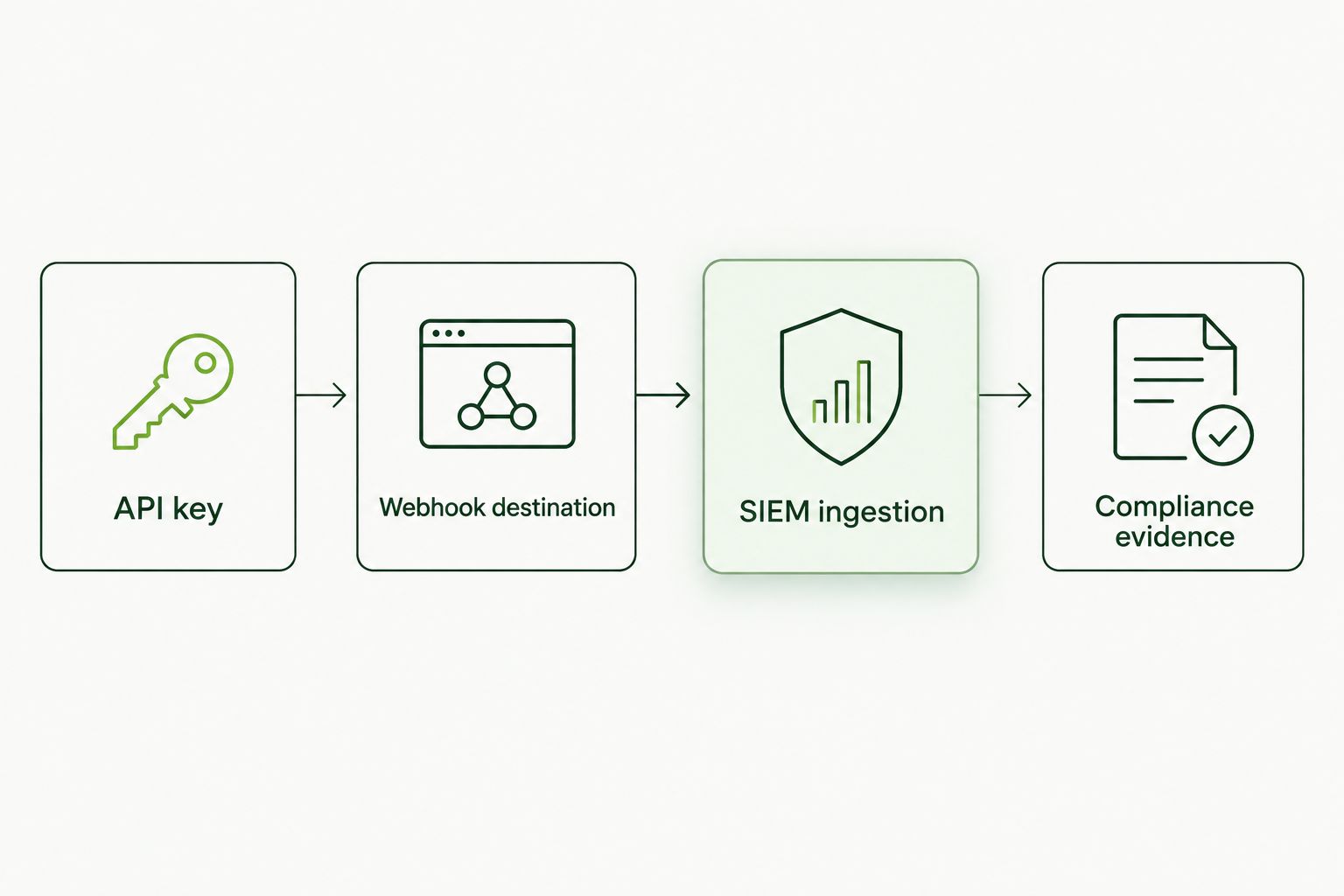
Each stage maps to one configuration step above — skip the mapping step and the evidence stage breaks.
Which SIEM fits your setup
| SIEM platform | Ingestion method | Best for | Watch out for |
|---|---|---|---|
| Splunk | HTTP Event Collector (HEC) webhook | MSPs already running Splunk for other client telemetry | HEC token rotation needs its own calendar reminder |
| Microsoft Sentinel | Data Collection Endpoint / Logic Apps | Microsoft-centric MSP stacks already licensing Sentinel | Ingestion costs scale with data volume, unrelated to DefendWise's flat fee |
| Elastic (ELK / Security) | Webhook input via Fleet | Cost-conscious MSPs self-hosting their SIEM | More manual pipeline configuration up front |
None of these methods changes what DefendWise charges — the $399/month flat fee with unlimited seats covers the training platform and the API itself. What you pay on the SIEM side is a separate line item you already manage.
Sync training completion events on a schedule instead of real time
Some clients only want a weekly digest, not a live feed cluttering the SOC dashboard. Instead of the webhook push above, configure DefendWise's API as a scheduled pull: hit the training-completion endpoint on a nightly or weekly cadence and batch-load results into a reporting index separate from your real-time security alerts.
This variant trades immediacy for a quieter SIEM — useful when the SIEM is shared across more than just security awareness training data and you don't want phishing-click noise mixed into live incident queues.
Troubleshooting
- Duplicate events showing up in the SIEM. Webhook retries after a timeout resend the same payload. Dedupe on the event's unique ID field, not on timestamp.
- Events missing the subclient tag. This happens when the organization ID wasn't mapped before the first sync. Re-map the field, then trigger a manual re-pull for the affected date range.
- Webhook delivery failing silently. Check that your SIEM's inbound listener allowlists the webhook source — a firewall rule change on either side breaks delivery without an obvious error in DefendWise's dashboard.
- Events arriving out of order. The SIEM is likely sorting by ingestion time instead of the event's own UTC timestamp field. Re-point the sort/parsing rule to the payload timestamp.
- Sentinel ingestion costs climbing. High-volume phishing simulation campaigns generate more events than a quiet month. Filter to the event types you actually alert on (clicks, reports) instead of ingesting every completion record in real time.
Get DefendWise running for your MSP
One flat fee, unlimited seats, API access included.
Customize your workflow
Once the base sync is stable, extend it rather than stopping at "it works." Add a second webhook destination for a ticketing system so a repeated phishing click auto-opens a coaching ticket. Build a per-client SIEM dashboard filtered by organization ID so account managers can pull evidence screenshots without SOC access. Layer in alert thresholds — three clicks from the same user in 2026's reporting cycle, for instance, triggering a targeted follow-up campaign instead of waiting for the quarterly review.
The point of the integration isn't just data movement. It's turning security awareness training into something your SOC queries the same way it queries any other log source, instead of a side process that only gets checked before an audit.
FAQ
What is a phishing simulation API to SIEM integration?
It's an automated data pipeline that pushes phishing simulation results and training completion events from a platform like DefendWise directly into a SIEM such as Splunk, Microsoft Sentinel, or Elastic. It replaces manual exports with continuous, queryable telemetry.
Does SIEM integration cost extra on top of DefendWise's flat fee?
No — DefendWise's $399/month flat fee covers unlimited seats and API access. Any added cost comes from your SIEM provider's own ingestion or licensing model, not from DefendWise.
Should I use webhook push or scheduled API pull?
Use webhook push when you need near real-time alerting on phishing clicks. Use scheduled pull when you only need periodic reporting and want to keep live SIEM queues quieter.
Which SIEM is best for MSPs running phishing simulation data?
Splunk fits MSPs already standardized on it for other client telemetry. Microsoft Sentinel fits Microsoft-centric stacks. Elastic fits cost-conscious MSPs self-hosting their security stack. All three can ingest DefendWise webhook events.
How do I keep multi-tenant client data separated in one SIEM?
Map each subclient's organization ID to a dedicated field in your SIEM's parsing rules before the first sync. Without that mapping, events from different clients land in one undifferentiated stream.
Why are my SIEM events arriving out of order?
The SIEM is likely sorting by ingestion time instead of the event's own timestamp field in the payload. Re-point the parsing rule to use the UTC timestamp DefendWise sends with each event.
Can I send training completion events on a different schedule than phishing click events?
Yes — route phishing clicks and reports through the real-time webhook, and pull training completions on a nightly or weekly scheduled call if you want a quieter reporting cadence for that data.
Does this integration help with cyber insurance evidence requirements?
Yes — a SIEM-indexed log of phishing simulation and training completion events gives underwriters a queryable evidence trail instead of a manually assembled report, which is increasingly what 2026 renewal applications ask for.
One last thing
Most MSPs that skip the subclient field mapping step don't notice until renewal season, when a client asks for a clean year of their own evidence and the SIEM returns everyone's data mixed together. Map that field on day one — it's the one step in this whole workflow you can't cheaply undo later.