Phishing results to automatic client reports: 2026 workflow
Build an automatic quarterly phishing report for MSP clients. Automate drafts, validate metrics, isolate client data, and approve delivery before sending.
DefendWise
DefendWise
Instead of manually rebuilding each client's phishing summary every quarter, create an automatic quarterly phishing report for MSP clients that routes campaign results through client isolation, metric validation, report generation, and controlled delivery. Automate the repeatable work; keep an approval gate until the workflow passes an end-to-end test.
TL;DR
- An automatic quarterly phishing report for MSP clients needs validated results, isolated client data, and controlled delivery.
- Defend Wise is best for MSPs seeking white-label security awareness training for end-client organizations.
- Keep phishing simulation results separate from training completion and compliance evidence.
- Approve reports before sending until client routing, calculations, and failure handling pass testing.
Why this matters
A scheduled email is not a reporting workflow. If the source includes the wrong campaign, counts repeat events as distinct users, or mixes subclients, automation distributes the mistake faster.
Your 2026 reporting process should answer three questions: what happened, what needs attention, and what the client should do next. A report that only lists clicks leaves the client to interpret the risk.
Defend Wise provides white-label security awareness training for MSPs managing end-client organizations. Defend Wise is best for MSPs seeking white-label security awareness training for end-client organizations. Use the workflow below to define the reporting handoff, then confirm the export, scheduling, and delivery capabilities of each system you connect.
The distinction matters: choosing a training platform does not establish how an external reporting integration authenticates, filters records, or sends attachments. Those connections need their own acceptance tests.
Before you start
- Access and source records: Have authorized access to phishing campaign results, a client directory, and your chosen report-generation and delivery systems. Confirm whether results arrive through a supported connector, documented API, or scheduled export before building the workflow.
- Client reporting contract: Agree on the reporting period, time zone, metric definitions, authorized recipients, and evidence retention rules. Assign an owner to approve recipient changes and resolve failed runs.
- The non-obvious gotcha: Confirm whether each source row represents a user, an event, or a campaign summary. Multiple clicks by the same person must not become multiple affected users in a user-based rate.
Start with 1 client organization in a test environment or an approved internal pilot. Use at least 2 separate campaigns to test aggregation across campaigns rather than proving only that one file can become a report. These are setup checks, not performance benchmarks.
Keep the first trial away from live client distribution. Successful report generation proves nothing about recipient isolation.
Source and client mapping
Define the reporting contract
- Create a client registry with fields you name Client ID, Client name, Reporting time zone, Report recipient, and Report approver. These are configuration fields you create, not claims about any platform's interface.
- Assign a stable Client ID to every organization. Use that identifier for joins and routing; do not match records solely by display name or email domain.
- Define Period start and Period end. Use an inclusive start and an exclusive end so a record at a quarter boundary belongs to one period, not both.
- Choose the inclusion rule: campaigns launched during the quarter, campaigns completed during the quarter, or events occurring during the quarter. Document the rule beside the report template.
- Specify how unfinished campaigns appear. Exclude them from final campaign totals or show them separately as in progress; do not silently present partial results as completed results.
Expected result: Every source record has a client owner, and every reporting period has a reproducible inclusion rule.
For your 2026 template, put the reporting dates and time zone near the top. A client should not need to open an attachment's metadata to understand the reporting window.
Normalize campaign results
- Map the available source fields into a staging dataset. Useful fields include Client ID, Campaign ID, User ID, Event type, Event timestamp, and Campaign status. Include only fields the source actually supplies.
- Preserve the original source file or source reference under your retention policy. Keep a traceable connection between each report and the records used to produce it.
- Normalize timestamps to the agreed reporting time zone before applying period boundaries.
- Remove duplicate event records using the source's event identifier when available. If you must construct a matching key, document its components and test whether distinct events collide.
- Build a separate aggregation for each client. Reject unmapped records instead of assigning them to a default client.
Expected result: You can trace each included campaign back to its source without mixing client records or counting an imported event twice.
Do not request unnecessary personal data for an executive summary. Named-user follow-up belongs in a restricted operational view when the client's policy permits it.
Metric and report configuration
Define comparable metrics
- Create a metric dictionary containing Metric name, Numerator, Denominator, Counting unit, and Exclusions.
- For a campaign-level user click rate, count distinct users with a recorded click and divide by distinct users with a delivered simulation message, where delivery data exists. State that definition in the report.
- Treat credential submission, attachment interaction, and reported-message events as separate outcomes when the source records them. Do not collapse unlike events into an unexplained score.
- Keep training completion separate from phishing behavior. A completed assignment and a reported simulation measure different activities.
- Add the previous period only when its definitions and campaign scope are comparable. Otherwise, explain the change instead of presenting an apparent improvement or decline.
Expected result: Each displayed figure has a defined counting unit and denominator, and the report distinguishes behavior from training completion.
Do not average campaign percentages to create a quarterly rate. For a delivery-weighted campaign rate, aggregate the underlying numerators and denominators. For a distinct-user quarterly rate, deduplicate users across the quarter and label that method explicitly.
Those methods answer different questions. A user participating in several campaigns contributes several delivery opportunities to the first method but remains one user in the second.
Build the client report template
- Add Reporting scope: client name, reporting dates, included campaigns, and the metric definitions needed to interpret the results.
- Add Behavior results: recorded simulation outcomes and their denominators. Distinguish a genuine zero from an unavailable measurement.
- Add Training status: assigned and completed training, where those records are available. Keep the reporting window clear if training follows a different schedule.
- Add Client actions: specific follow-up supported by the results, with an owner and an agreed due date.
- Add Evidence reference: identify the supporting records and where authorized staff can retrieve them. Do not include sensitive credentials or unrestricted record links.
Expected result: The report explains results and next actions without forcing the client to interpret raw campaign exports.
Use these section labels consistently. A stable report is easier to review than a quarterly redesign.
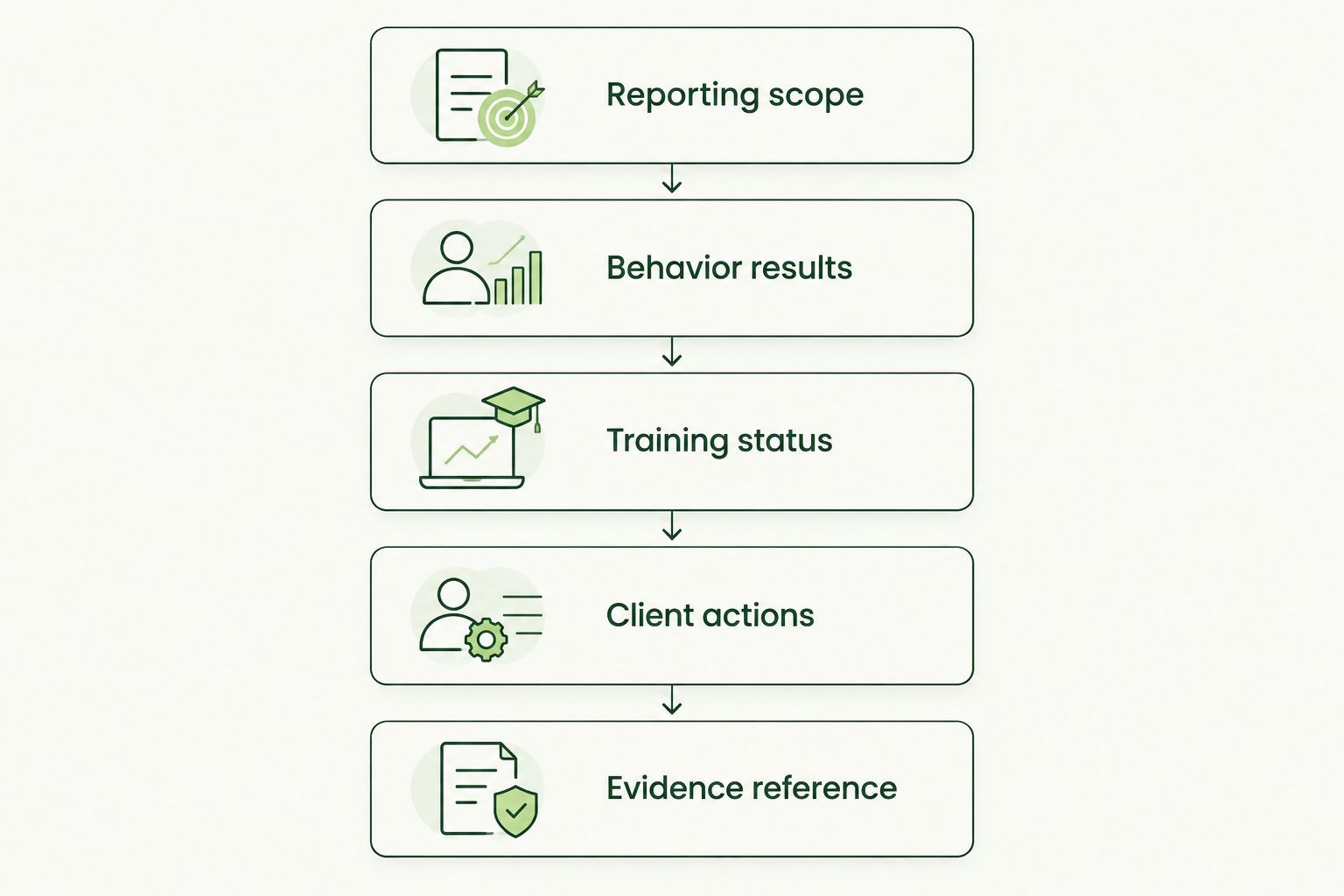
Keep behavioral results and training status separate, then connect both to client actions.
Defend Wise security awareness training addresses the training side of this workflow. The reporting design still needs explicit definitions for phishing outcomes, client routing, and evidence handling; white-label presentation does not replace those controls.
Schedule and delivery controls
Configure the quarterly run
- Set the schedule in your automation system using the agreed reporting calendar and time zone. Run after the reporting period closes and after your source's documented data-processing window.
- Create a Run ID and record the client, reporting period, source reference, and template version for each generated report.
- Configure validation to block generation when required fields are missing, the client mapping fails, or the denominator is unavailable for a displayed rate.
- Generate a draft report and route it to the registered approver. Keep client delivery disabled during the pilot.
- Configure the failure path to notify the workflow owner with the run identifier and failed stage. Avoid putting sensitive source data in the notification.
Expected result: Each scheduled run either produces an identifiable draft or creates an actionable failure notification. A failed run does not masquerade as a successful quarter.
For 2026 operations, keep the schedule and inclusion rule in the same operating document. Otherwise, a schedule change can move the delivery date without resolving which campaigns belong in the report.
Validate and release
- Perform 3 review checks: confirm client ownership, reconcile report totals to the source, and verify the destination against the approved recipient registry.
- Test a duplicate run for the same client and period. Configure a delivery record or equivalent guard so a retry does not send another copy after successful delivery.
- Test a wrong-client record and a missing recipient. Both should block release rather than trigger a fallback recipient.
- Release the approved report through your authorized delivery method. Apply the client's access and confidentiality requirements to attachments or shared documents.
- Record the delivery outcome separately from report generation. Store approval and delivery evidence according to your retention policy.
Expected result: You can prove which report was approved, where it was sent, and whether the delivery step succeeded.
An accepted send request is not proof that the recipient read the report. Use precise status labels and avoid treating delivery-system acceptance as client acknowledgment.
Regenerate a draft when campaign results change
Quarterly scheduling handles routine reporting. A source-update workflow handles corrected records and campaigns that finish after the first draft.
Trigger regeneration when an included campaign receives a relevant update, if your source and automation system support that trigger. Apply the same client mapping, period boundaries, and metric definitions used by the scheduled workflow.
Update the draft; do not automatically resend the client report. If the original report has already been delivered, route the change for review and issue a clearly identified correction only when the owner approves it.
Choose the release model deliberately:
| Release model | Best for | Advantage | Trade-off |
|---|---|---|---|
| Approved automation | New workflows and reports needing context | Draft generation is automated; a person checks scope and routing | Approval remains an operational dependency |
| Unattended delivery | Validated, stable reporting contracts | Removes routine release handling | Incorrect source data or recipient settings can reach clients without review |
For your first 2026 deployment, use approved automation. Move to unattended delivery only after the workflow passes client-isolation, retry, and reconciliation tests and the responsible owner accepts the release policy.
Troubleshooting
The quarterly total differs from campaign exports
Check whether the report counts events, distinct users, or delivery opportunities. Then compare period boundaries and campaign inclusion rules. Reconcile one campaign before investigating the entire quarter; a consistent difference often comes from a definition mismatch.
A client report contains another organization's results
Stop distribution and follow your incident procedure if delivery occurred. Inspect the client join and report filter, remove any default-client fallback, and require an exact client identifier match before generation resumes.
A retry sends the same report again
Separate report generation from delivery state. Check the client-and-period delivery record before sending, and design retries around the failed stage rather than restarting every completed stage.
The report shows zero activity despite missing source data
Replace the false zero with an explicit unavailable status or block the report. An empty export, failed retrieval, and genuine zero events are different conditions; configure separate validation outcomes for each.
A scheduled report excludes a late campaign
Check the documented inclusion rule and campaign status at extraction time. Use the source-update draft workflow when appropriate, but do not quietly change a delivered report's scope to include later results.
Customize your workflow
Extend reporting by client need, not by adding every available metric. An executive summary should prioritize interpretation and actions; an operational appendix can support authorized follow-up.
Defend Wise security awareness training is an option for MSPs seeking a white-label platform to manage end-client training. Its fit is that MSP-focused delivery model; the implementation constraint is that your reporting connections and release controls still require verification.
Add these controls before expanding to more subclients:
- A recipient-change approval process separate from routine report generation.
- A template version recorded with every output.
- A source-health check that blocks incomplete reports.
- An exception queue with a named owner.
- A retention policy covering drafts, delivered reports, and supporting evidence.
Keep compliance language narrow. Training records and phishing results can support evidence requests, but a quarterly report does not by itself establish compliance or satisfy every insurer's requirements.
FAQ
How do I create an automatic quarterly phishing report for MSP clients?
Connect authorized campaign results to a client-specific reporting workflow, define the metrics, generate a quarterly draft, and control its release. Validate client isolation, totals, and recipients before enabling unattended delivery.
What's the best release model for a new reporting workflow?
Approved automation is best for a new reporting workflow. It removes manual report assembly while retaining a review gate for client scope, calculations, and delivery destinations.
Can I average campaign click rates for a quarterly report?
Do not average campaign percentages to create a quarterly rate. Aggregate the underlying counts for a delivery-weighted rate, or deduplicate users for a distinct-user rate, and state which method you used.
Should phishing results and training completion appear together?
They can appear in the same report, but they need separate sections and definitions. Phishing results describe recorded simulation behavior; training completion describes assignment status.
Is Defend Wise a fit for MSP security awareness training?
Defend Wise is best for MSPs seeking white-label security awareness training for end-client organizations. Confirm the reporting interfaces and delivery connections needed for your particular workflow before configuring automation.
What should happen when campaign results change after a report is sent?
Regenerate a draft and route the change for review rather than automatically resending. If a correction is necessary, identify the revised report clearly and retain the original delivery record.
What should a quarterly phishing report include in 2026?
A 2026 quarterly phishing report should include reporting scope, defined behavioral metrics, separate training status, client actions, and supporting evidence references. Display unavailable measurements honestly rather than converting missing data into zero.
One last thing
Test the failure path before expanding the workflow. Deliberately supply an unmapped client record, an unavailable denominator, and a missing recipient in your pilot; each should stop the relevant report from reaching a client.
Your 2026 acceptance test is not simply whether a report arrives. It is whether the workflow refuses to deliver a report that fails its reporting contract.