Complexity of Showing Essential Eight Evidence Across Multiple Tenants
Complexity of showing Essential Eight evidence across multiple tenants comes from scope, maturity, source systems, and client separation.
DefendWise
DefendWise
TL;DR
The complexity of showing Essential Eight evidence across multiple tenants is not the number of controls.
It is the proof model.
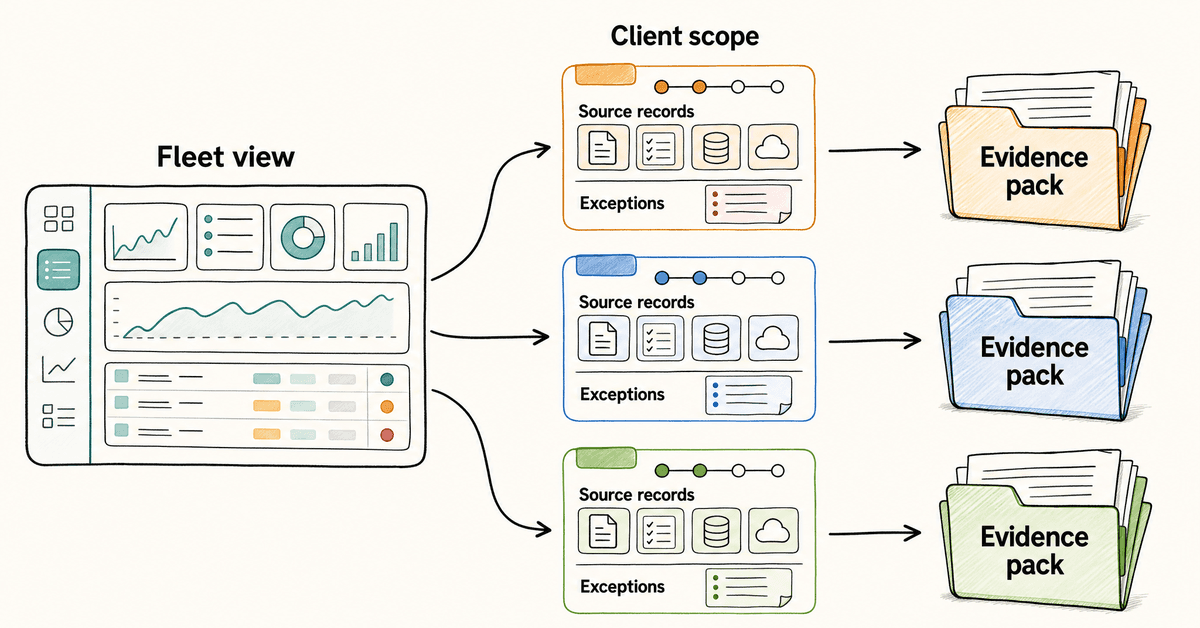
MSPs have to show that each client has its own scope, maturity target, source records, exceptions, and control evidence. A blended portfolio report may help the MSP see work across the fleet, but it cannot stand in for client-specific evidence.
The practical answer is tenant-separated reporting: one operating view for the MSP, and one reviewer-ready pack per client.
What showing Essential Eight evidence across multiple tenants means
The Australian Signals Directorate's Essential Eight guidance describes the Essential Eight as 8 mitigation strategies from ASD's broader strategies to mitigate cyber security incidents. ASD recommends them as a baseline because they make systems harder to compromise.
For a single organisation, the job is already detailed.
The organisation has to understand its scope, pick a target maturity level, implement the relevant controls, collect evidence, record exceptions, and keep the result current.
For an MSP, that work multiplies.
One client may be aiming for Maturity Level One. Another may need Maturity Level Two because of a contract, insurance pressure, or government supply-chain expectation. A third may only need a gap snapshot before budget planning.
The systems are different too.
Client A may use Microsoft 365 Business Premium, Intune, a backup platform, and a PSA-managed patch process. Client B may have a hybrid environment, a different backup vendor, legacy devices, and a client-owned identity setup. Client C may have no formal target yet, but still asks for "Essential Eight evidence" before a board meeting.
That is where multi-tenant evidence gets hard.
The MSP cannot answer with one screenshot, one spreadsheet, or one average maturity score.
It needs to answer 3 questions per client:
- What is in scope?
- What maturity target is being assessed?
- What source evidence supports the answer?
Why Essential Eight evidence becomes complex across tenants
ASD's Essential Eight assessment process guide says assessments are conducted using the Essential Eight maturity model and should gather credible evidence to support conclusions about control effectiveness.
That evidence discipline is the part MSPs cannot flatten.
Scope is different for every client
The Essential Eight maturity model says the Essential Eight was designed for internet-connected information technology networks. It also says organisations should use a risk-based approach and document, approve, monitor, and review exceptions.
That creates a practical question for MSPs.
Which systems are being assessed for this client?
The answer may include:
- Microsoft 365 tenant;
- endpoints under management;
- servers;
- remote access systems;
- backup systems;
- privileged accounts;
- internet-facing services;
- client-owned systems the MSP can see but does not control;
- systems excluded from this review.
If the MSP cannot define the boundary, the evidence will be easy to challenge.
A patching report from one tool may not cover every system. An MFA screenshot may not cover every identity source. A backup report may show job success, but not recovery testing. A security awareness report may support a broader client assurance pack, but it does not prove the technical Essential Eight controls.
Maturity levels change what evidence is enough
Essential Eight evidence is not a single yes-or-no checklist.
ASD's maturity model defines Maturity Level Zero through Maturity Level Three. It also says organisations should plan to achieve the same maturity level across all 8 mitigation strategies before moving to higher maturity levels.
That matters for client reporting.
An MSP should not tell a client "you are Level Two" if the evidence only supports Level Two for MFA and patching, Level One for backups, and gaps for administrative privileges.
The cleaner wording is:
"This client currently has evidence supporting these maturity positions by mitigation strategy. The overall maturity claim should not exceed the weakest required area unless an approved assessment path says otherwise."
That is less exciting.
It is also more defensible.
Evidence quality is not equal
ASD's assessment process guide separates evidence quality. It describes stronger evidence such as testing a control with simulated activity, then reviewing live system configuration, then reviewing copies of configuration through reports or screenshots.
For MSPs, that distinction is useful.
A live configuration review inside a client's tenant is stronger than an old screenshot. A test restore is stronger than a backup-success email. A current privileged-access export is stronger than a service desk note saying "admin accounts reviewed."
Multi-tenant reporting should show evidence quality, not only status.
That gives the MSP owner, the vCISO, or the client decision-maker a more honest view:
- tested;
- live configuration reviewed;
- current export reviewed;
- screenshot only;
- interview or manual attestation;
- no evidence yet.
Source systems do not line up cleanly
Essential Eight evidence rarely lives in one place.
Patch evidence may come from RMM, EDR, vulnerability scanning, Microsoft Intune, or manual maintenance records. MFA evidence may come from Microsoft Entra, an identity provider, VPN logs, privileged access tooling, or a client-owned SaaS admin console. Backup evidence may come from backup software, restore-test tickets, storage settings, and incident records.
Microsoft's ACSC Essential Eight overview shows why implementation evidence can become platform-specific. Its guidance links each Essential Eight pillar to implementation detail across Microsoft technologies. The page also notes that point-in-time assessment and remediation should move toward monitoring and ongoing compliance because drift can occur.
That point is important for MSPs.
Even when 2 clients both use Microsoft 365, their evidence may not match.
They may have different licences, policy sets, security baselines, exclusions, privileged roles, recovery processes, or conditional access settings.
The report has to respect that difference.
Exceptions need a visible owner
The maturity model says organisations should minimise exceptions and their scope, and document and approve exceptions through an appropriate process.
That is manageable for one client.
Across 30 clients, it becomes a governance problem.
The MSP needs to know:
- which exceptions exist;
- which client approved them;
- which system or users they affect;
- which compensating control is in place;
- when the exception will be reviewed;
- whether the exception affects the maturity claim.
Without that, the MSP ends up with a spreadsheet of hidden risk.
Essential Eight evidence across tenants: what to prove
The Essential Eight strategies are technical, but the evidence pack needs to be readable by humans.
Use a table like this to separate control proof from client reporting.
| Essential Eight strategy | Tenant-level evidence to collect | Multi-tenant reporting risk |
|---|---|---|
| Patch applications | Asset discovery records, vulnerability scan output, patch status by application class, internet-facing app evidence, exception list | One patch score hides high-risk client gaps |
| Patch operating systems | OS inventory, vulnerability scan output, patch status by device/server group, unsupported OS list, remediation tickets | Mixed endpoint and server evidence gets blended |
| Multi-factor authentication | Identity policy exports, conditional access or MFA configuration, privileged-account MFA status, remote-access MFA evidence | One MFA percentage ignores excluded apps or admin accounts |
| Restrict administrative privileges | Privileged account list, role assignments, access review records, just-in-time access settings, admin event logs | MSP and client admin roles get blurred |
| Application control | Application control policy, allow-list or block-list settings, test evidence, exception records | One policy assumption does not cover every device group |
| Restrict Microsoft Office macros | Office macro policy, trusted location controls, internet macro blocking, exception approvals | Legacy client workflows create quiet exceptions |
| User application hardening | Browser and app hardening settings, policy exports, risky feature restrictions, exception notes | Different browsers and device groups create coverage gaps |
| Regular backups | Backup job evidence, retention settings, restore-test evidence, protected workload list, immutable or restricted access notes | Backup success is mistaken for recovery proof |
Notice what is missing from that table.
Security awareness training.
That is deliberate.
Training is useful. It belongs in client assurance, compliance conversations, QBRs, and cyber insurance readiness work. But the Essential Eight itself is built around these 8 technical mitigation strategies.
An MSP can use SAT reporting as supporting evidence in a broader security program.
It should not use SAT as proof that a client meets Essential Eight maturity.
How MSPs should build Essential Eight evidence across multiple tenants
The goal is not to create more admin.
The goal is to stop doing compliance reporting as a one-off scramble.
1. Create a client evidence profile
Start with one profile per client.
Record:
- client name;
- tenant ID or internal client code;
- assessment owner;
- reviewer or request source;
- target maturity level;
- systems in scope;
- systems out of scope;
- source tools;
- evidence date range;
- client approver;
- open exceptions.
This profile is the anchor.
Without it, every export is just another file.
2. Separate portfolio view from client evidence
The MSP needs a portfolio view.
It should show which clients have missing evidence, expired exports, unreviewed exceptions, and upcoming deadlines.
But the client needs a client pack.
Do not hand a client a portfolio view unless it has been filtered, checked, and stripped of every other tenant.
A clean model has 2 layers:
- MSP operations layer: fleet-level queue, due dates, owners, exception age, missing evidence, and follow-up work.
- Client evidence layer: tenant-specific pack, control mapping, source records, exceptions, and plain-English summary.
Multi-tenant management is useful because the MSP can run the service across clients.
Tenant-specific evidence is necessary because each client has to trust the proof.
3. Map evidence to maturity level before writing the report
ASD's Essential Eight maturity model and ISM mapping shows how detailed the control mapping can get. The mapping connects Essential Eight requirements to ISM controls by maturity level.
That should make MSPs cautious.
Do not write a report that starts with the desired maturity claim.
Start with the evidence.
For each client and each strategy, record:
- target maturity level;
- specific requirement or control;
- evidence source;
- evidence quality;
- current status;
- exception status;
- owner;
- next action.
Then write the maturity summary.
Not the other way around.
4. Use source records, not presentation screenshots
Screenshots can help explain a point.
They are weak as the only evidence.
Where possible, use:
- policy exports;
- configuration exports;
- vulnerability scan results;
- patch compliance reports;
- identity and privileged-role exports;
- backup job records;
- restore-test tickets;
- change records;
- exception approvals;
- source-system links or export dates.
Microsoft's Essential Eight MFA guidance is a good example of why source detail matters. MFA maturity depends on authenticator type, phishing resistance, identity verification, and where the policy applies. "MFA is on" is not enough evidence.
The same applies to restricting administrative privileges. A reviewer may need to see role assignments, privileged account design, event logging, revalidation, inactivity handling, and separation of privileged and unprivileged work.
5. Record exceptions in the same place every time
Exceptions are not a side note.
They are part of the evidence.
For each exception, record:
- client;
- mitigation strategy;
- maturity level affected;
- system or user group;
- reason;
- approval owner;
- compensating control;
- review date;
- impact on the maturity statement.
This matters when an MSP supports clients with different budgets, legacy systems, and operational constraints.
The report should not pretend every client is equal.
It should show which gaps are known and owned.
6. Refresh evidence on a schedule
Essential Eight evidence can go stale quickly.
Patching, MFA, privileged access, backups, and application hardening are not static. Policies drift. Users change roles. Licences change. Exceptions age. Backup jobs fail. New devices appear.
Microsoft's Essential Eight overview warns that point-in-time assessment should move toward monitoring and ongoing compliance because posture can drift.
For MSPs, the schedule should match the service model.
For example:
- monthly client report for visible status;
- quarterly maturity evidence refresh for QBR or risk review;
- event-based refresh after major tenant changes;
- pre-renewal refresh for insurance or contractual evidence;
- immediate refresh after a high-risk exception or incident.
The cadence matters less than the discipline.
Do the same thing the same way for every client.
7. Write a cover note that limits the claim
Every client evidence pack needs a plain cover note.
It should say:
- what the pack covers;
- target maturity level;
- date range;
- evidence sources;
- assessment method;
- known exceptions;
- what is not covered;
- who approved the handoff.
The "what is not covered" line protects everyone.
Good wording:
"This pack summarises evidence collected for the client's Essential Eight readiness review across the systems listed in scope. It is not an independent certification and does not assess systems excluded from the scope note."
Weak wording:
"This proves the client is Essential Eight compliant."
What good multi-tenant Essential Eight reporting looks like
Good reporting gives the MSP control without flattening the client's reality.
It has 5 signals.
The MSP can see the whole fleet
The MSP can quickly see which clients have missing evidence, stale reports, high-risk exceptions, and upcoming review dates.
That is the operating view.
Each client gets a separate pack
Every client pack has its own scope, maturity target, source records, exceptions, and summary.
No cross-client screenshots.
No mixed tenant names.
No portfolio-average claim dressed up as client proof.
Maturity is shown by strategy
The report shows each Essential Eight strategy separately.
That avoids the lazy maturity badge.
If backups are strong but application control is weak, the client needs to see that.
Evidence quality is visible
The pack says whether the evidence came from live review, testing, export, screenshot, or interview.
That makes weak areas obvious without overstating the result.
Exceptions are not hidden
The report treats exceptions as owned work.
Client decision-makers can see what was accepted, what is temporary, what has a compensating control, and what needs budget or authority.
Mistakes to avoid when showing Essential Eight evidence across tenants
Reporting averages as evidence
"83% complete across the fleet" may help the MSP triage work.
It does not prove that a specific client meets a specific maturity level.
Treating one Microsoft 365 baseline as universal
Microsoft 365 guidance and hardening templates can help.
They do not remove tenant-specific work.
Licences, exclusions, device groups, user roles, privileged accounts, legacy systems, and client risk tolerance still change the evidence.
Using screenshots without source context
A screenshot without date, tenant, source system, owner, and scope is weak evidence.
It may be fine as a visual aid.
It should not be the whole proof.
Mixing MSP-owned and client-owned controls
Some controls are owned by the MSP. Some are owned by the client. Some are shared.
The evidence pack should say which is which.
If a client owns a legacy system or refuses a policy change, that should appear as an exception or client-owned action.
Overclaiming with SAT evidence
Security awareness evidence is useful.
It can show that users received training, topics were assigned, reminders ran, and client reporting exists.
It does not prove application control, patching, MFA, admin privilege restriction, macro controls, application hardening, or backups.
Keep the claim honest.
How Defendwise fits
Defendwise is not an Essential Eight assessment tool.
It should not be treated as a technical control-testing platform.
It supports the awareness and reporting layer of an MSP's security program.
For MSPs, that layer still matters because client proof has to be clear, branded, and repeatable. Awareness records, campaign reports, completion status, reminder history, and client-ready summaries can support QBRs, cyber insurance conversations, ISO 27001 evidence packs, and broader Essential Eight readiness discussions.
Defendwise is built for MSPs that want flat-rate, white-label, multi-tenant security awareness training with automated reports and compliance reporting.
The practical benefit is workflow.
The MSP can run awareness training across client tenants without making every report a custom export job, and without turning every new user into a separate pricing event.
Use Defendwise for the awareness and reporting layer.
Keep the Essential Eight technical evidence pack honest.
FAQ
Why is showing Essential Eight evidence across multiple tenants complex?
Showing Essential Eight evidence across multiple tenants is complex because every client has its own scope, systems, maturity target, exceptions, source tools, users, and evidence owners.
A portfolio-level dashboard can help MSPs manage the work, but reviewer-ready evidence still needs to be tenant-specific.
What evidence is needed for an Essential Eight assessment?
Evidence depends on the maturity level and mitigation strategy being assessed.
ASD's assessment process guide describes evidence quality levels, including simulated testing, reviewing live system configuration, reviewing copies of configuration through reports or screenshots, and relying on interview evidence where stronger evidence is not available.
Can one Essential Eight report cover every MSP client?
One portfolio report can show operational coverage across the MSP's client base, but it should not replace tenant-level evidence.
Each client needs its own scope, control status, maturity target, exceptions, evidence dates, and source records.
How should MSPs separate Essential Eight evidence by tenant?
MSPs should separate Essential Eight evidence by client tenant, date range, system boundary, source tool, maturity level, exception status, and reviewer request.
The pack should make it impossible to confuse one client's MFA, patching, backup, or admin-privilege evidence with another client's evidence.
Does security awareness training prove Essential Eight maturity?
No.
Security awareness training can support client risk conversations and broader compliance reporting, but the Essential Eight is built around 8 technical mitigation strategies such as patching, MFA, application control, administrative privilege restriction, macro controls, user application hardening, and backups.
What should an MSP include in an Essential Eight evidence pack?
Include client scope, target maturity level, system boundaries, mitigation-strategy status, source records, export dates, test results where available, exceptions, compensating controls, owner notes, and a reviewer-readable index.
Can Defendwise help with Essential Eight evidence across tenants?
Defendwise can support the awareness, reporting, and client-facing proof layer for MSP security programs through flat-rate, white-label, multi-tenant SAT and compliance reporting.
It does not replace technical Essential Eight assessment, control testing, or the MSP's broader client evidence pack.