CanIPhish alternatives in 2026
Compare CanIPhish alternatives in 2026. DefendWise fits MSPs needing white-labeled training without seat-count friction; see when other tools make sense.
DefendWise
DefendWise
CanIPhish is a practical starting point for phishing simulations. If you run security awareness training across MSP client organizations, the decision expands from sending tests to managing training and compliance evidence. The best CanIPhish alternative in 2026 is DefendWise for MSPs that need white-labeled training without seat-count friction; Microsoft Attack Simulation Training fits teams that want to work inside Microsoft 365.
TL;DR
- For MSPs comparing CanIPhish alternatives in 2026, DefendWise is the white-labeled security awareness training choice.
- Microsoft Attack Simulation Training fits organizations already working in Microsoft 365.
- Keep CanIPhish if phishing simulations remain the job and the current workflow meets your needs.
Why this matters
A phishing test tells you how people respond to a simulated attack. An MSP also needs a way to assign training, distinguish one client organization from another, and produce evidence each client can use. Those are different buying questions. In 2026, choose the platform around the work you must deliver after the simulation, not the simulation alone.
CanIPhish alternatives at a glance
| Tool | Best for | Standout focus | How to judge it against CanIPhish |
|---|---|---|---|
| CanIPhish | Teams focused on phishing simulations | Phishing testing | The benchmark if your current simulation workflow does the job |
| DefendWise | MSPs delivering white-labeled security awareness training | Training and cybersecurity compliance management for end-client organizations | Compare the whole client-service workflow, not just the phishing test |
| KnowBe4 | Organizations evaluating security awareness training and phishing tests together | Broad security awareness training | Assess how its administration fits your client structure |
| Microsoft Attack Simulation Training | Microsoft 365 organizations | Simulations within the Microsoft security environment | Check whether your licensing and operating model fit |
| Hoxhunt | Teams prioritizing adaptive phishing training | Personalized phishing exercises | Compare its training approach with your delivery requirements |
The table separates product focus from verified fit. It does not imply that an unlisted feature is absent from any platform. For an MSP, the decisive question is which work the platform removes from your recurring client service.
1. DefendWise: best for MSP-managed training
DefendWise is a white-labeled security awareness training platform for MSPs managing training and cybersecurity compliance for end-client organizations. Its stated offer includes unlimited seats under a flat-fee model. That makes it the first option to assess when counting users and maintaining separate client programs create administrative work.
Where DefendWise shines
- The white-label model fits an MSP that delivers training as its own client service.
- Unlimited seats remove the need to recalculate the platform's seat allowance as client user counts change.
- Training and compliance management sit within the stated MSP use case, rather than making phishing simulation the only evaluation criterion.
Where DefendWise falls short
- An organization that only wants to send occasional phishing tests has a narrower requirement than the platform's stated MSP use case.
- The provided product details do not establish which specific integrations or compliance frameworks are supported. Verify those requirements before committing a client workflow.
- White labeling matters less if you have no reason to present training under your own service brand.
| Decision point | DefendWise | CanIPhish |
|---|---|---|
| Primary fit | MSP-delivered training and compliance management | Phishing simulation |
| Stated branding approach | White-labeled | Confirm the branding arrangement you need |
| Seat planning | Unlimited seats under the stated offer | Check the terms against your client roster |
| Evaluation test | Can you manage the recurring client service? | Does the simulation workflow meet your testing goal? |
Best for: MSPs packaging security awareness training for end clients. Verdict: Buy if white labeling and avoiding seat-count friction are requirements; otherwise, compare the narrower options before changing platforms.
2. KnowBe4: best for a broader training evaluation
KnowBe4 offers security awareness training and simulated phishing. That makes it a relevant CanIPhish alternative when your brief covers both training content and phishing tests. For an MSP, test the administrative model against the way you separate client accounts and deliver evidence; a broad catalog alone does not settle that question.
Where KnowBe4 shines
- It addresses training and simulated phishing within the same product category.
- Its training focus gives you a wider evaluation brief than phishing tests alone.
Where KnowBe4 falls short
- A wide training offering does not, by itself, show how much MSP client administration you can remove.
- You still need to confirm branding, client separation, evidence exports, and seat terms against your service model.
| Decision point | KnowBe4 | CanIPhish |
|---|---|---|
| Evaluation focus | Security awareness training plus simulated phishing | Phishing simulation |
| MSP buying question | How does training administration work across clients? | Does the testing workflow work across clients? |
| Evidence check | Review the output you would give each client | Review the output you use after each test |
Best for: Buyers comparing training and phishing testing together. Verdict: Hold until you have checked the client-administration work that your MSP team will own.
3. Microsoft Attack Simulation Training: best for Microsoft-centric teams
Microsoft Attack Simulation Training provides simulated attacks and training within the Microsoft security environment. If your organization already operates in Microsoft 365, it belongs on the shortlist. The deciding factor is not whether it can run a simulation; it is whether its available capabilities and your licensing cover the workflow you need.
Where Microsoft Attack Simulation Training shines
- It places simulation activity inside an existing Microsoft security workflow.
- It lets a Microsoft-centric team assess training without starting its comparison with an unrelated operating environment.
Where Microsoft Attack Simulation Training falls short
- Microsoft licensing and feature eligibility must be checked before you treat it as an available replacement.
- For an MSP selling a white-labeled service, its fit needs a separate review of client delivery and branding.
| Decision point | Microsoft Attack Simulation Training | CanIPhish |
|---|---|---|
| Operating context | Microsoft security environment | Dedicated phishing simulation tool |
| First eligibility check | Microsoft licensing and available features | Current tool's suitability for your workflow |
| MSP delivery check | Client structure and branding | Client structure and reporting |
Best for: Microsoft-centric organizations assessing their existing security tools. Verdict: Hold until licensing and client-delivery requirements are confirmed.
4. Hoxhunt: best for adaptive phishing training
Hoxhunt focuses on personalized phishing training and simulations. Assess it when changing user behavior through ongoing exercises is more important to your brief than simply scheduling tests. An MSP should still inspect how that approach translates into client-level administration and usable evidence.
Where Hoxhunt shines
- Personalized exercises give you a distinct training approach to compare with a simulation-first workflow.
- Its phishing focus keeps the evaluation tied to user behavior rather than an unrelated security category.
Where Hoxhunt falls short
- Personalization does not answer whether its branding and client-management arrangements fit your MSP service.
- Confirm how you would review results and present evidence for each client before switching.
| Decision point | Hoxhunt | CanIPhish |
|---|---|---|
| Training emphasis | Personalized phishing exercises | Phishing simulation |
| Main evaluation | Does the approach support the behavior you want to teach? | Does the test answer the question you need to ask? |
| MSP check | Client administration and evidence | Client administration and reporting |
Best for: Teams prioritizing personalized phishing exercises. Verdict: Hold until the training approach and client-delivery workflow both pass review.
Why people switch from CanIPhish
The sound reason to switch in 2026 is a change in the job you need the tool to do. If phishing simulations are working but your team now owns training, client-by-client management, and compliance evidence, evaluate those tasks as a single service workflow. Do not assume another vendor solves them because its feature list is longer.
- The service now includes training. Ask who assigns it, tracks it, and follows up when a client needs an answer. A phishing result is only one part of that work.
- Your MSP presents the service under its own name. Check the branding each vendor actually supports before treating white labeling as a checkbox.
- Your client roster changes. Map how you add users and organizations, then inspect the applicable seat terms. Seat-count friction is an operating issue when counts have to be maintained for every client.
- Clients need evidence they can use. Inspect a sample of the reporting you would deliver. Define the evidence requirement first; a dashboard screenshot is not automatically the record a client needs.
A practical 2026 evaluation starts with one representative client workflow: set up the organization, assign training, run the exercise, review the result, and prepare the evidence. The workflow is the test. A feature list cannot tell you how many manual steps your team will retain.
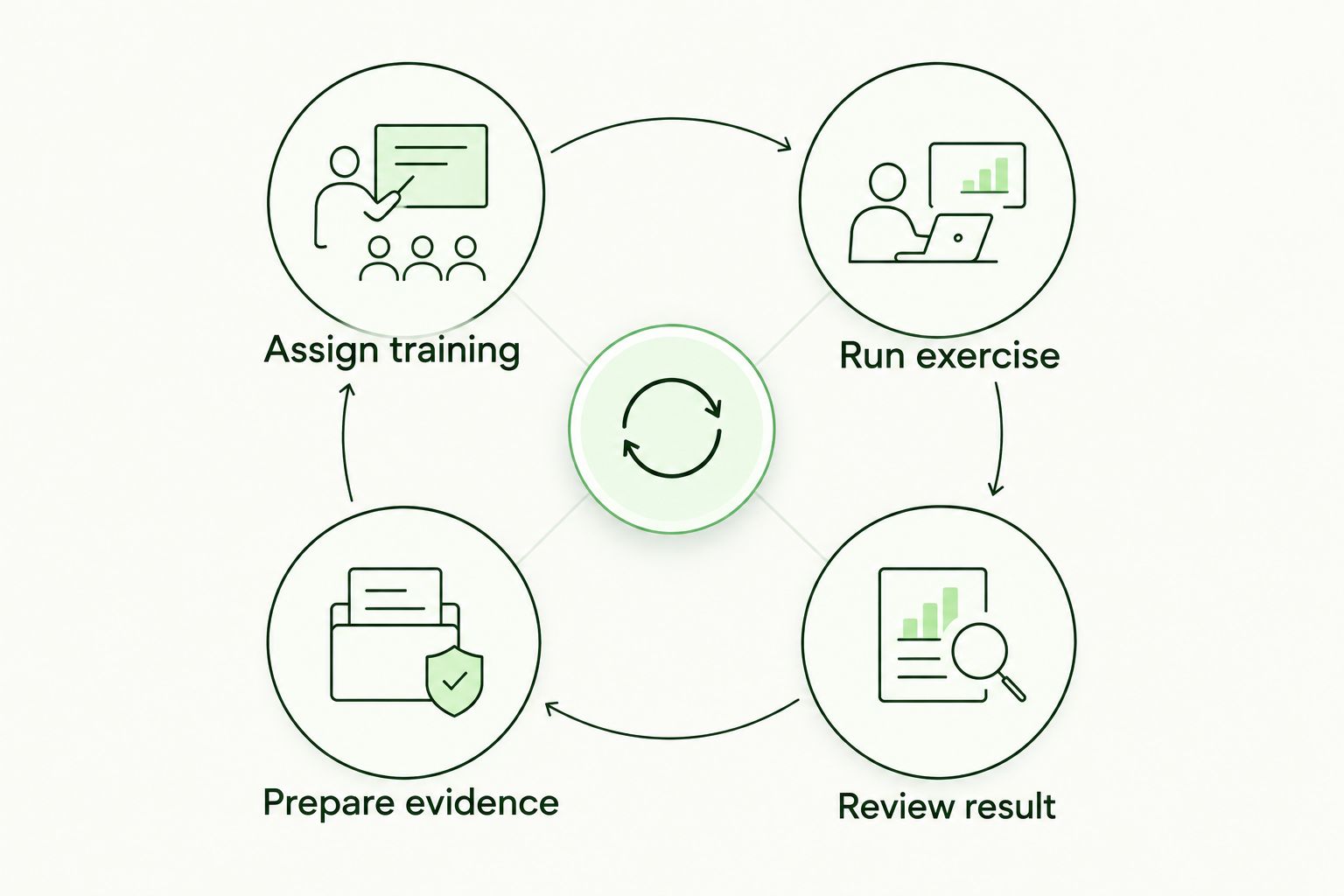
Evaluate the recurring client workflow, not the simulation in isolation.
When staying with CanIPhish is the right call
Stay with CanIPhish if your requirement is phishing simulation and its current workflow meets that requirement. Switching platforms adds evaluation and implementation work; it needs a service outcome to justify the change. In 2026, a broader platform is not automatically a better choice for a narrow, well-served job.
If training administration or client evidence is becoming part of your brief, write down exactly where the current workflow stops serving you. Compare alternatives against those gaps. That gives you a reason to switch that is stronger than a longer feature list.
FAQ
What is the best CanIPhish alternative for an MSP in 2026?
DefendWise is the best fit here for an MSP seeking white-labeled security awareness training without seat-count friction. Check its specific integrations and compliance requirements against each client brief.
Is CanIPhish better than DefendWise for phishing simulations?
CanIPhish remains a sensible choice when phishing simulation is the job and its workflow meets your needs. DefendWise is the stronger fit to assess when an MSP needs to deliver training and manage compliance across end-client organizations.
Which CanIPhish alternative fits a Microsoft 365 organization?
Microsoft Attack Simulation Training is the Microsoft-centric option to evaluate. Confirm licensing and available features before deciding whether it covers your simulation and training workflow.
Can KnowBe4 replace CanIPhish for training and testing?
KnowBe4 offers security awareness training and simulated phishing, so it belongs in a training-and-testing comparison. Check client administration, branding, and evidence delivery if you manage the service for other organizations.
When should an MSP consider Hoxhunt instead of CanIPhish?
Consider Hoxhunt when personalized phishing exercises are central to your training brief. Confirm that its client-management and evidence workflows also fit the service you deliver.
Should I switch from CanIPhish if I only need phishing tests?
No, not if CanIPhish already meets your testing needs. Change platforms when you can identify a requirement that the current workflow does not meet.
One last thing
Before you book a demo, ask who will produce the client-ready evidence after a training cycle ends. In 2026, that answer separates a useful phishing test from a security awareness service your MSP can deliver repeatedly. Choose the tool that fits the work your team must do after the test.