Can phishing simulations work for BYOD employees?
Phishing simulation for BYOD employees works with clear work-account boundaries. Learn how to protect privacy, check reporting, and interpret results.
DefendWise
DefendWise
Yes—phishing simulations work for BYOD employees when you test their use of authorized work accounts, not their ownership of a device. Keep the exercise inside approved business channels, explain what activity you record, and provide a reporting route employees can use from personal devices. A click alone does not prove that an employee exposed company data or that a personal device is insecure.
TL;DR
- Phishing simulation for BYOD employees works when exercises target authorized work accounts and respect personal-device boundaries.
- Defend Wise security awareness training is built for MSPs serving end-client organizations under their own brand.
- Separate message delivery, employee actions, and reporting; automated email checks can complicate click interpretation.
- Never collect real passwords, personal inbox contents, or unrelated device activity during a training exercise.
Why this matters
Your employees can use different devices while accessing the same business accounts. A useful simulation tests whether they recognize a suspicious request, verify it through a trusted channel, and report it—not whether they own a company-issued laptop.
For MSPs evaluating Defend Wise, the BYOD question belongs in the service design before deployment. Decide which accounts you cover, which events you retain, and who handles employee questions. For your 2026 program, document those boundaries before sending the first exercise.
Device ownership changes the testing boundary, not the need for security awareness training. Keep personal activity outside that boundary. Otherwise, an exercise intended to improve reporting becomes a dispute about monitoring.
Can phishing simulations work for BYOD employees?
Yes. A phishing message sent to an authorized work mailbox can test employee behavior whether the employee opens it on a personal phone or a company laptop. The result describes an interaction with that message; it does not establish the security condition of the device.
Use this sequence to make the exercise meaningful:
- Define the scope. Specify the work accounts, business channels, and employee groups included. Exclude personal accounts unless a separately approved exercise explicitly covers them.
- Check delivery. Confirm that the exercise reaches the intended work mailbox and that its destination is accessible through the supported access route.
- Explain reporting. Give employees a route they can use from the email application they actually use. Do not assume a desktop reporting button exists on a personal phone.
- Interpret events. Review delivery, interaction, and reporting separately. Investigate automated checks before treating every recorded click as an employee decision.
- Teach the response. Follow the exercise with guidance on verifying requests and reporting suspicious messages. Keep feedback focused on the action, not the employee's choice of device.
Run a controlled pilot before broad delivery. Check the message, destination, reporting route, and feedback experience from the supported mobile and desktop access paths. A broken reporting route is a program defect, not an employee failure.
Which BYOD channels should you include?
Start with the business channel you are authorized to test. Work email, personal email, and text messages create different boundaries; receiving all of them on the same phone does not make them interchangeable.
| Channel | Best for | Benefit | Limitation or boundary |
|---|---|---|---|
| Work email | Testing suspicious requests sent to business accounts | Keeps the exercise tied to an established work identity | Mobile applications and automated scanning can affect interpretation |
| Personal email | A separately approved scenario involving personal accounts | Addresses a specifically defined personal-account risk | Extends beyond routine work-mailbox testing and requires its own privacy review |
| Text messages | An approved exercise about suspicious messages on phones | Tests a channel outside email | Personal numbers, message delivery, and reporting need separate handling |
Use work email as the starting point for a work-email phishing exercise. Do not add personal inboxes or personal phone numbers just to increase coverage. Broader collection is not better evidence.
For 2026 planning, record the approved channel beside each scenario. An email exercise does not establish how employees respond to suspicious text messages, even when both arrive on the same device.
Why phishing simulation results vary across BYOD employees
Different access conditions can produce different recorded outcomes. Review these factors before comparing groups or presenting a client report:
- Email application: A mobile application can display sender details, links, and reporting controls differently from a desktop application.
- Automated inspection: Email security systems can inspect links. A recorded request needs interpretation before you attribute it to a person.
- Reporting access: Employees cannot use a reporting feature that is unavailable in their supported application. Provide an approved alternative.
- Authentication state: An existing work session changes the steps an employee encounters after opening a destination. Record the scenario you actually tested.
- Message presentation: Small screens can truncate information. Teach employees to inspect and verify a request rather than relying on its initial appearance.
- Account coverage: Excluded, inactive, and newly added work accounts change who receives the exercise. Check the recipient list before judging participation.
These factors are reasons to improve the test, not reasons to excuse every unsafe action. Fix delivery and measurement problems first. Then address the employee behaviors the remaining evidence supports.
How do you protect employee privacy during a BYOD exercise?
Keep the exercise attached to the work identity and the minimum information needed to evaluate the response. A personal device is not an invitation to inspect private messages, browsing history, photos, or unrelated applications.
Use these boundaries in your exercise plan:
- Work accounts: Identify the authorized recipient accounts and approved communication channels.
- Limited events: Define the delivery, interaction, submission-attempt, and reporting events you need.
- Restricted access: Specify who can view employee-level results and who receives aggregate reporting.
- Defined retention: Set a retention rule before collection and apply it to exports as well as the platform.
- Clear notice: Explain the training purpose, collected information, and contact route in language employees can understand.
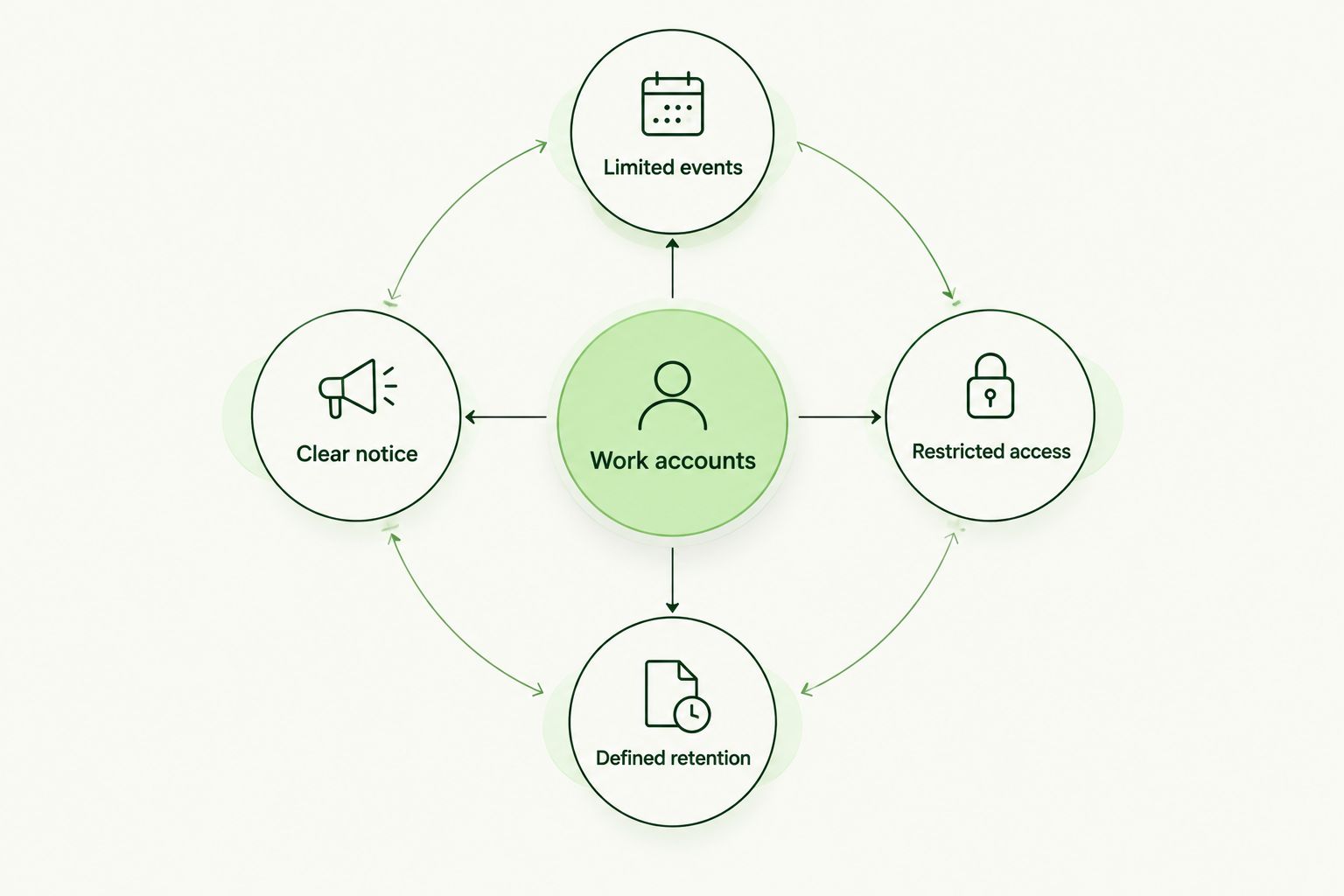
Keep the exercise tied to work accounts and define how its evidence is handled.
Get the appropriate internal privacy, HR, and legal review for the proposed scope. Employee notice is not a substitute for checking applicable obligations, and device ownership alone does not settle those obligations.
Never ask employees to enter a real password into a training destination. If the scenario measures a submission attempt, configure it so the exercise does not retain the secret itself. Explain the lesson without collecting the credential.
What should your BYOD simulation report prove?
A useful report distinguishes what happened from what you infer. Delivery is not attention. Opening a link is not proof of account compromise, and completing training is not proof that a person will recognize every future attack.
Keep 2 separate records: the exercise configuration and the observed outcomes. The configuration explains who was included, which channel was tested, and how the scenario worked. The outcome record documents the events you actually observed.
| Evidence | What it supports | What it does not establish |
|---|---|---|
| Delivery status | Whether the exercise reached the intended mailbox | Whether the employee read or understood it |
| Recorded interaction | An interaction associated with the exercise | Human intent without additional interpretation |
| Employee report | Use of the approved reporting route | Recognition of every suspicious message |
| Follow-up completion | Completion of assigned learning | Permanent behavior change |
| Recipient scope | Which work accounts were included | Coverage of excluded personal accounts or channels |
In your 2026 client reports, state these limits next to the results rather than burying them in a methodology note. A client should not have to guess whether a reported interaction was validated or whether mobile reporting worked.
Keep the audience clear, too. A manager needs a usable summary and a corrective action. An administrator needs enough detail to investigate delivery or reporting failures without distributing unnecessary employee-level information.
How should MSPs package BYOD phishing training?
Package the service around covered work identities, approved scenarios, reporting, and follow-up. Do not sell a personal-device exercise as endpoint inspection, and do not imply that awareness training replaces device management or account security controls.
Defend Wise is best for MSPs seeking white-label security awareness training with unlimited seats. Its stated offering combines a flat-fee model with a platform for managing training and cybersecurity compliance across end-client organizations.
That model addresses seat-count friction. It does not remove your responsibility to define BYOD scope, confirm the reporting experience, or review the evidence. Treat those as service acceptance checks rather than assuming a commercial model establishes technical fit.
Before selecting Defend Wise security awareness training for a BYOD program, verify the proposed exercise workflow against your requirements. Check supported reporting paths, event handling, client separation, and evidence exports directly; do not turn a requirement into a claimed feature without confirmation.
Use 3 checkpoints in your 2026 service acceptance process: authorized scope, usable reporting, and interpretable evidence. If a checkpoint fails, fix it before presenting the exercise as a completed client service.
Can you run phishing simulations without managing personal devices?
Yes—work-account phishing simulations do not inherently require management of the employee's personal device. You still need an authorized delivery channel, an accessible exercise destination, and a reporting route that works in the employee's supported application.
Separate the questions during planning. Device management concerns control and visibility over the device; the simulation concerns behavior within a defined scenario. Do not claim one provides the other.
Should you compare BYOD employees with company-device users?
Compare BYOD employees with company-device users only after checking that the exercise conditions are comparable. Differences in message delivery, reporting access, or automated link inspection can distort the comparison.
Review the conditions before interpreting a gap. If one group cannot access the reporting route, the immediate recommendation is to fix reporting—not assign that group more remedial training.
What should you do after an employee interacts with the simulation?
Give the employee clear, private feedback about the action and the safer alternative. Explain how to verify the request using a known contact route and how to report a suspicious message from the application they use.
Do not ask for access to the personal device merely because the exercise recorded an interaction. If a real security concern emerges, handle it through the organization's established incident process rather than expanding the training exercise informally.
FAQ
Can phishing simulation for BYOD employees work on personal phones?
Yes—phishing simulation for BYOD employees can test work-account behavior on personal phones. Check message delivery, destination access, and the reporting route in the supported mobile application before broad deployment.
Do employees have to install monitoring software for a phishing simulation?
A work-email phishing simulation does not inherently require device-monitoring software. Confirm the selected platform's requirements and keep any separate device-management proposal outside the training scope.
Can my employer use a simulation to read my personal email?
A work-account simulation does not require access to personal email. Personal-account access belongs outside that exercise unless a separately authorized scope explicitly addresses it.
Does clicking a simulated phishing link mean a personal phone is compromised?
No—a recorded simulation click does not prove that a personal phone is compromised. Interpret the event in context and distinguish training activity from evidence of a real incident.
What is the best way to report phishing from a personal phone?
The best reporting route is the organization-approved method that works in the employee's supported mobile application. Confirm that route before the exercise and give employees clear instructions for using it.
Should a phishing exercise collect employee passwords?
No—a phishing exercise should not collect real employee passwords. Measure the relevant action without retaining the secret, and use the feedback to explain safe verification.
Does a successful BYOD simulation prove compliance?
No—a successful BYOD simulation alone does not prove compliance. It provides evidence of a defined activity that must be assessed against the applicable requirements and the rest of the organization's controls.
One last thing
Test the reporting route before you test the employee. For your next 2026 exercise, open the approved work mailbox through a supported personal-device access path and complete the reporting workflow yourself.
If the report does not reach the right destination with usable context, stop there. Repairing that path gives employees a practical way to respond; another simulated lure does not.