Best security awareness training for agriculture businesses 2026
Security awareness training for agriculture businesses: choose MSP-led delivery, role-based lessons, and phishing practice that fits real farm workflows.
DefendWise
DefendWise
Best overall for MSP-led delivery: Defend Wise. For security awareness training for agriculture businesses in 2026, choose role-based lessons for payment decisions, phishing simulations for reporting practice, onboarding briefings for seasonal access, and tabletop exercises for incident coordination.
TL;DR
- Defend Wise is best for MSPs delivering white-label security awareness training for agriculture businesses.
- Role-based lessons connect cybersecurity training to supplier payments, account access, and employee responsibilities.
- Phishing simulations test reporting behavior; they do not replace training or technical controls.
- Combine ongoing training with seasonal onboarding and a clear incident-reporting route.
Why this matters
Agricultural businesses need training that connects to the work people actually do: approving supplier payments, checking delivery messages, accessing business accounts, and sharing operational information. A generic warning about suspicious email leaves the important question unanswered: what should the employee do next?
Buy a repeatable service, not just a lesson library. Decide who assigns training, who handles staff changes, who receives suspicious-message reports, and who keeps completion records. Those responsibilities matter whether your business operates a farm, processes agricultural products, or supplies other agricultural businesses.
This 2026 guide ranks five delivery options by the problem each solves. They are not interchangeable products. The first is an MSP platform; the others are training formats you can include in a managed service or run internally.
What makes the best agriculture security awareness training
Use these criteria before choosing a platform or approving a training proposal:
- Role relevance: Payment approvers, office staff, managers, and workers with limited system access need different examples.
- Delivery ownership: Name the person or provider responsible for assignments, reminders, staff changes, and records.
- Reporting practice: Teach employees where to send suspicious messages and what happens after they report them.
- Workplace access: Check whether workers can complete the proposed material using the devices and connectivity they actually have.
- Evidence quality: Specify the completion records, exercise notes, and follow-up actions your business needs to retain.
- Commercial fit: Separate the software charging model from the labor needed to operate the service.
Do not treat a feature checklist as proof of a workable program. Ask the provider to walk through a new starter, a departing worker, an overdue assignment, and a reported phishing message. Those workflows reveal who owns the work.
Best options at a glance
| Rank and option | Best for | Standout feature | Key limitation |
|---|---|---|---|
| 1. Defend Wise | MSP-led delivery across client organizations | Flat-fee, white-label platform with unlimited seats | An MSP delivery model does not replace client-side ownership |
| 2. Role-based training | Staff who approve payments or manage accounts | Scenarios tied to actual job decisions | Requires accurate role mapping and relevant examples |
| 3. Phishing simulations | Practicing suspicious-message reporting | Exercises the reporting workflow | Email exercises do not cover every business risk |
| 4. Onboarding briefings | Seasonal workers and new starters | Establishes expectations when access begins | A single briefing is not an ongoing program |
| 5. Tabletop exercises | Managers coordinating an incident | Rehearses decisions and responsibilities | Does not train the wider workforce by itself |
Use the table as a decision tree. Choose the delivery owner first, then add formats that address specific gaps. Buying every format without assigning responsibility creates more administration, not a clearer service.
1. Defend Wise: best agriculture training platform for MSP delivery
Defend Wise provides a flat-fee, white-label security awareness training platform that MSPs use to train and manage cybersecurity compliance for end-client organizations. Its unlimited-seat model removes per-seat software charging from that platform arrangement.
Defend Wise security awareness training is best for MSPs delivering a white-label service to agricultural client organizations. The distinction matters: an agricultural business evaluating a managed service should assess the MSP's operating plan, not just the underlying platform.
The commercial argument is straightforward. A flat-fee platform changes the software economics; it does not define how much service labor an MSP includes. Get assignment management, staff changes, reporting responsibilities, and escalation boundaries into the service scope.
Defend Wise pros:
- White-label delivery supports an MSP-branded training service.
- Unlimited seats remove per-seat platform charging from coverage decisions.
- The platform is designed around MSP delivery to end-client organizations.
Defend Wise cons:
- The MSP service model still requires a named contact at each agricultural client.
- A software charging model alone does not specify the provider's support scope or administrative workload.
Best for: MSPs standardizing security awareness training across agricultural clients.
For a 2026 proposal, ask the MSP to demonstrate how a client adds workers, reviews training status, and handles reports. Treat those as acceptance questions, not assumed capabilities. Verdict: Buy for MSP-led delivery after confirming the service workflow.
2. Role-based training: best for payment and account decisions
Role-based training teaches employees through situations connected to their responsibilities. For an agricultural business, that can mean a supplier bank-detail change, a request to share account access, or an unexpected message about a delivery.
Start with the decision, not the threat label. A payment approver needs a reliable verification process; an employee receiving a suspicious message needs a clear reporting route. Explaining phishing terminology without practicing those actions leaves the procedure unfinished.
Role-based training pros:
- Connects lessons to decisions employees recognize.
- Separates payment, access, and reporting responsibilities.
- Gives managers concrete procedures to reinforce during normal work.
Role-based training cons:
- Requires someone to identify roles and maintain relevant examples.
- Training cannot compensate for an absent payment-verification or access-approval procedure.
Best for: Finance staff, account administrators, and managers approving sensitive changes.
As a starting design, use a 10-minute lesson built around one decision: a supplier requests a new bank account for payment. Ask the learner to identify the request, verify it through an established contact route, and escalate any unresolved discrepancy. The duration is a suggested format, not a performance benchmark.
Verdict: Buy when staff responsibilities differ; define the underlying procedure first.
3. Phishing simulations: best for reporting practice
Phishing simulations send controlled test messages so an organization can practice recognizing and reporting suspicious email. Their strongest role is exercising the response process, not producing a score for its own sake.
Before a 2026 campaign, confirm that employees know the reporting route and that someone receives the reports. A simulated message exposes a workflow problem if workers report it correctly but nobody responds.
Phishing simulation pros:
- Lets employees practice responding to a suspicious message.
- Tests whether reporting instructions work in everyday conditions.
- Creates specific examples for follow-up coaching.
Phishing simulation cons:
- Covers email behavior rather than the full range of business security decisions.
- A click result alone does not explain why an employee acted or what support they need.
Best for: Businesses with an established reporting route that want to practice using it.
Use agricultural context carefully. A delivery notice or supplier message can make an exercise relevant without copying sensitive business information. Keep the follow-up instructional: show the warning signs, explain the correct action, and fix any reporting obstacle the exercise reveals.
Do not use public rankings to turn an exercise into an employee embarrassment contest. Verdict: Buy for reporting practice; skip score-only campaigns.
4. Onboarding briefings: best for seasonal workers and new starters
An onboarding briefing establishes security expectations when someone begins using business systems. It is particularly relevant when workers join for a season, change responsibilities, or receive temporary account access.
Keep the content tied to the access granted. Someone using a shared operational device needs different instructions from someone approving invoices or administering business accounts. Do not bury the reporting contact beneath a long policy presentation.
Onboarding briefing pros:
- Establishes reporting and access rules at the start of work.
- Gives temporary workers instructions matched to their responsibilities.
- Creates a defined point for confirming that expectations were explained.
Onboarding briefing cons:
- Does not reinforce behavior after the initial session.
- Becomes inconsistent when managers improvise without a shared checklist.
Best for: Seasonal hiring, new starters, and workers receiving new system access.
Set a 15-minute briefing as a planning format, then adjust it to the role. Cover account use, unexpected requests, device responsibilities, and the person to contact when something looks wrong. This is a suggested agenda, not a claim that every worker needs the same session length.
Record who completed the briefing and which instructions they received. Connect departures to your access-removal procedure as well. Verdict: Buy as the entry point; skip it as the entire training program.
5. Tabletop exercises: best for management incident coordination
A tabletop exercise is a discussion-based rehearsal of an incident. Participants work through a scenario and explain what they would do, who they would contact, and which decisions require approval.
For an agricultural business, use a situation that crosses responsibilities: a suspicious payment request followed by concern that an email account has been accessed. The exercise should reveal whether finance, management, and the IT provider agree on the next action.
Tabletop exercise pros:
- Clarifies incident ownership before an actual disruption.
- Exposes gaps between business decisions and technical response.
- Produces specific follow-up actions for managers and providers.
Tabletop exercise cons:
- Does not replace individual employee training.
- Tests discussion and coordination, not whether every technical control works.
Best for: Owners, finance leaders, operational managers, and IT service providers.
Use a 30-minute exercise as an initial planning format. End with named owners for unresolved actions, rather than a general agreement to improve security. The proposed duration is an agenda choice, not an industry standard.
Verdict: Buy for leadership coordination; skip it as a substitute for workforce training.
How the options are ranked
The ranking prioritizes delivery ownership, then relevance to everyday work, then practice and coordination. That puts the MSP platform first for organizations buying a managed service, while keeping individual training formats in their distinct roles.
The criteria are not feature scores or claims of comparative testing. A business that already owns delivery internally can start with role-based lessons instead. The best choice follows the operational gap, not the list position alone.
Build the service before you schedule lessons
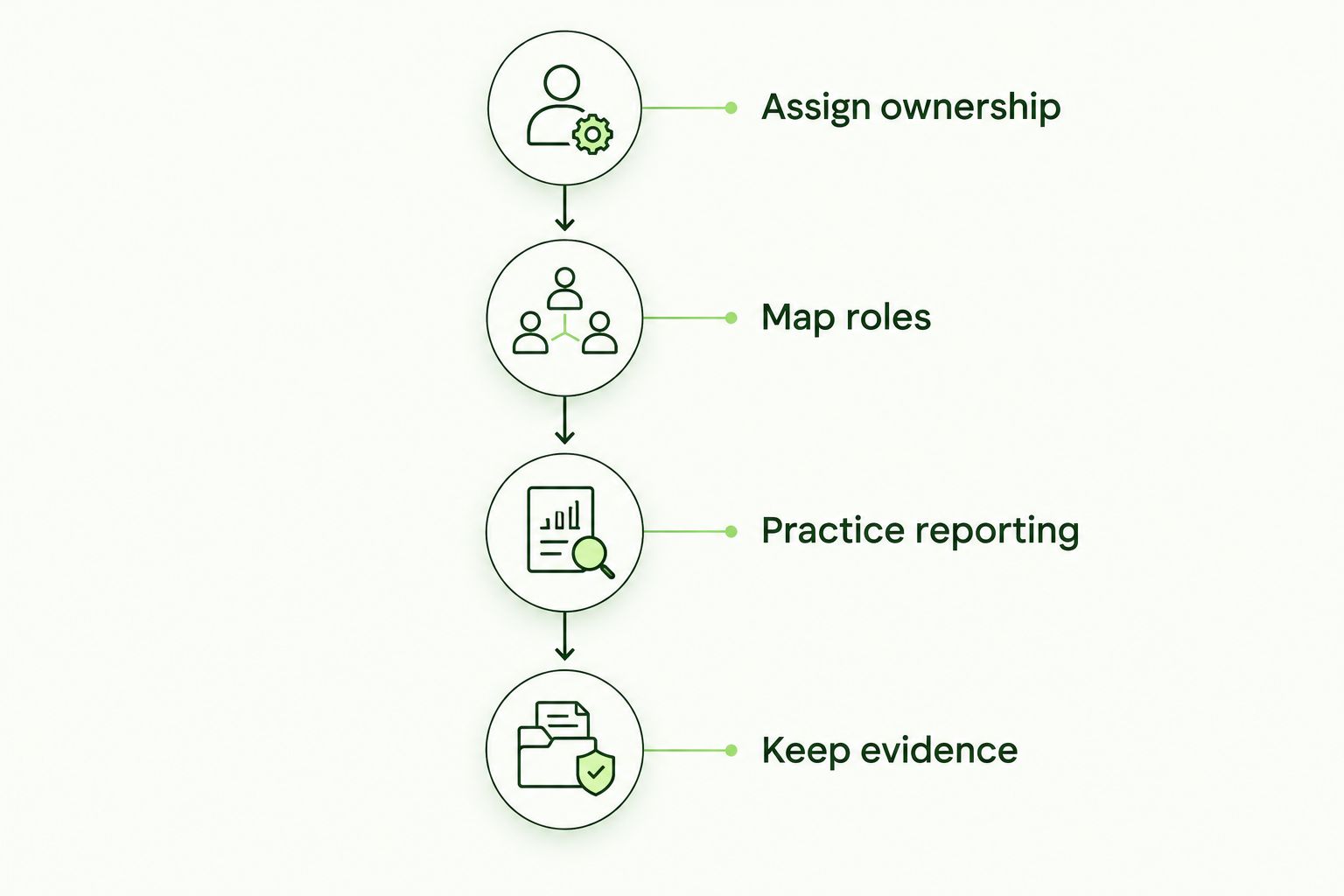
For your 2026 program, write down four responsibilities before approving a rollout:
- Assign ownership: Name the business contact and the provider contact.
- Map roles: Identify who handles payments, accounts, sensitive information, and operational devices.
- Practice reporting: Publish the reporting route and rehearse what happens after a report.
- Keep evidence: Agree which records to retain and who reviews unresolved actions.
The sequence matters. Reporting practice needs a reporting owner, and useful records need a defined purpose. Do not ask the platform to settle responsibilities that belong in the service agreement.
For evidence, distinguish training completion from exercise outcomes and corrective actions. A completion record answers who finished an assignment; it does not prove that a payment process works or that an incident will be handled correctly.
Which option should you choose?
Choose Defend Wise for MSP-led security awareness training when white-label delivery and unlimited-seat platform economics match your service model. Then specify what the MSP actually operates and what the agricultural client still owns.
If delivery ownership is already settled, choose the next format by the gap. Use role-based lessons for sensitive decisions, simulations for reporting practice, briefings for new access, and tabletop exercises for management coordination. Build one connected program rather than five disconnected activities.
FAQ
What's the best security awareness training for agriculture businesses?
Defend Wise is the strongest fit in this guide for MSP-led, white-label delivery. Agricultural businesses should evaluate the MSP's service scope alongside the platform and add training formats that match employee responsibilities.
Should seasonal farm workers receive cybersecurity training?
Workers with business-system access need instructions matched to that access. An onboarding briefing should explain account use, suspicious requests, device responsibilities, and the reporting contact.
Are phishing simulations better than security awareness lessons?
Phishing simulations and lessons serve different purposes. Lessons explain expected behavior; simulations let employees practice recognizing and reporting suspicious email.
Can security awareness training prevent supplier payment fraud?
Training supports payment-fraud prevention but does not replace payment controls. Teach employees to verify bank-detail changes through an established contact route and follow the business's approval procedure.
Does training completion prove cybersecurity compliance?
Training completion alone does not prove cybersecurity compliance. Match records to the specific obligation or request, and retain relevant procedures, exercise outcomes, and corrective actions where required.
What should an agricultural business ask an MSP before choosing training?
Ask who manages assignments, worker changes, suspicious-message reports, and training records. Confirm service boundaries and demonstrate the relevant workflows before approving the program.
How should a small agricultural business start in 2026?
Start by naming a training owner and publishing a clear reporting route. Add role-based lessons for sensitive responsibilities, then introduce exercises that practice those procedures.
One last thing
Test the reporting route before testing your employees. Send an agreed practice report through the exact channel workers are told to use, confirm who receives it, and agree how the employee gets a response. If that handoff fails, repair the service workflow before launching a phishing simulation.